light LEXUS LX470 2007 Workshop Manual
[x] Cancel search | Manufacturer: LEXUS, Model Year: 2007, Model line: LX470, Model: LEXUS LX470 2007Pages: 426, PDF Size: 10.95 MB
Page 137 of 426

119
2-3. Operating the lights and windshield wipers
2
When driving
Headlight cleaner switch (if equipped)
■The headlight cleaner can be operated when
When the ignition key is in the “ON” po sition and the headlight switch is turned
ON.
NOTICE
■When the washer fluid tank is empty
Do not use this function when the washer fluid tank is empty. This may cause the
washer cleaner motor to overheat.
Washer fluid can be sprayed on the headlights.
Press the switch to clean the
headlights.
Page 138 of 426
120
2-4. Using other driving systems
Cruise control
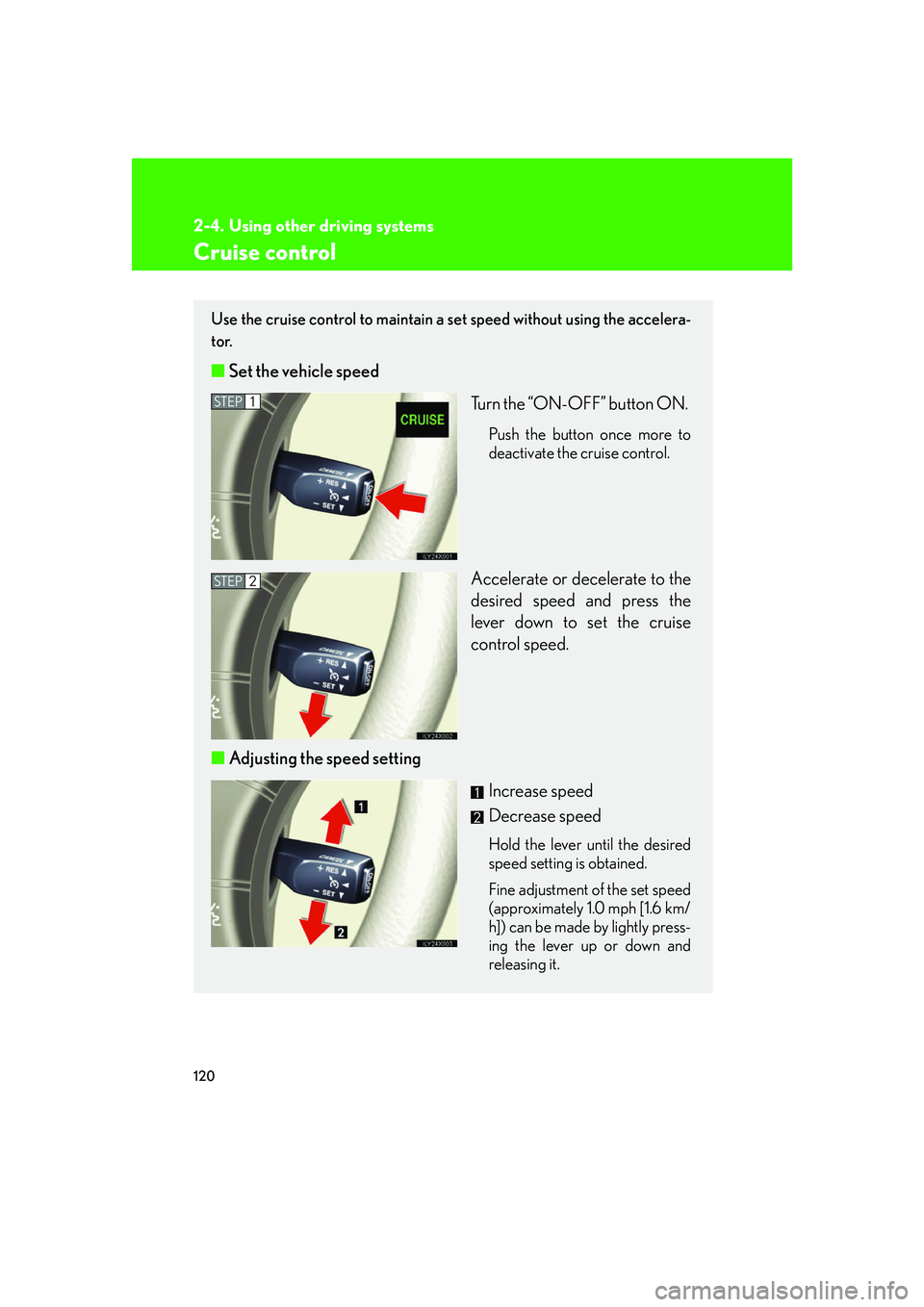
Use the cruise control to maintain a set speed without using the accelera-
tor.
■ Set the vehicle speed
Turn the “ON-OFF” button ON.
Push the button once more to
deactivate the cruise control.
Accelerate or decelerate to the
desired speed and press the
lever down to set the cruise
control speed.
■ Adjusting the speed setting
Increase speed
Decrease speed
Hold the lever until the desired
speed setting is obtained.
Fine adjustment of the set speed
(approximately 1.0 mph [1.6 km/
h]) can be made by lightly press-
ing the lever up or down and
releasing it.
STEP1
STEP2
Page 139 of 426
121
2-4. Using other driving systems
2
When driving
■Cruise control can be set when
●The shift lever is in the “D” or “4”.
●Vehicle speed is between approximately 25 mph (40 km/h) and 125 mph
(200 km/h).
■Accelerating
The vehicle can be accelerated normally. After acceleration, the set speed
resumes.
■Automatic cruise control cancelation
The set speed is automatically canceled in any of the following situations.
●Actual vehicle speed falls more than 10 mph (16 km/h) below the preset vehicle
speed
●Actual vehicle speed is below 25 mph (40 km/h)
●VSC is activated
■If the cruise control indicator light flashes
Turn the “ON-OFF” button off once, and then reactivate the system.
If the cruise control speed cannot be set or if the cruise control cancels immediately
after being activated, there may be a malfun ction in the cruise control system. Have
the vehicle inspected by your Lexus dealer.
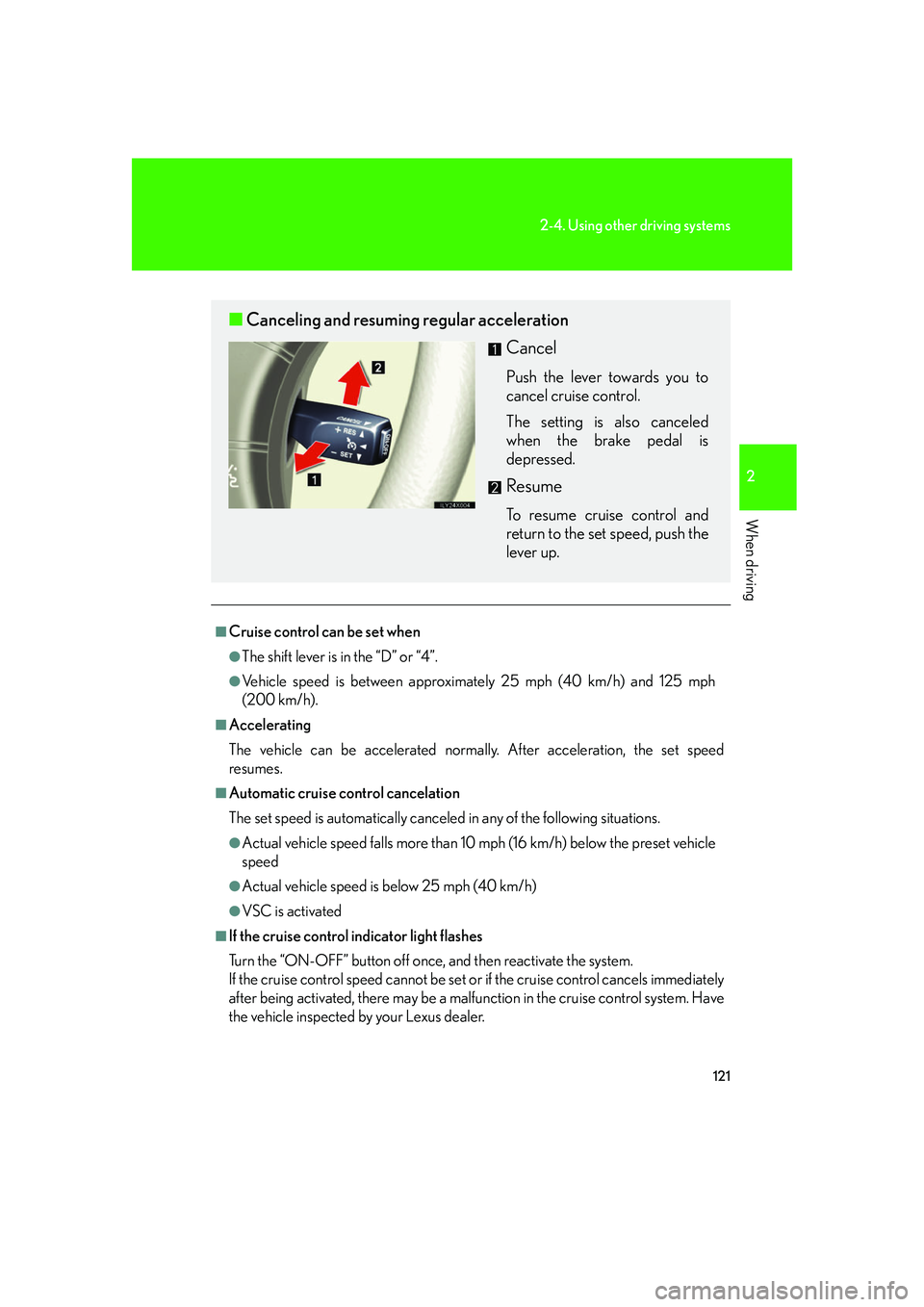
■ Canceling and resuming regular acceleration
Cancel
Push the lever towards you to
cancel cruise control.
The setting is also canceled
when the brake pedal is
depressed.
Resume
To resume cruise control and
return to the set speed, push the
lever up.
Page 142 of 426

124
2-4. Using other driving systems
■Rear view monitor system camera
■Smear effect
In the following cases, it may be difficult to
see the images on the screen, even when the
system is functioning correctly.
• In the dark (e.g. at night).
• If the temperature near the lens isextremely high or low.
• If water droplets get on the camera, or when humidity is high (e.g. when it rains).
• If foreign matter (e.g. snow or mud) get
on the camera lens.
• If the sun or headlights are shining directly
into the camera lens.
If a bright light (e.g., sunlight reflected off the
vehicle body) is picked up by the camera, a
smear effect* peculiar to the camera may
occur.
*: Smear effect—A phenomenon that occurs when a bright light (e.g., sunlight reflected
off the vehicle body) is picked up by the
camera; when transmitted by the camera,
the light source appears to have a vertical
streak above and below it.
Page 143 of 426

125
2-4. Using other driving systems
2
When driving
CAUTION
■Observe these precautions to avoid an accident that could result in death or seri-
ous injuries.
●Never depend solely on the monitor system when reversing.
●Always check visually and with the mirrors to confirm your intended path is clear.
●Depicted distances between objects and flat surfaces differ from actual dis-
tances.
●Do not use the system if the back door is open.
■Conditions which may affect the rear view monitor system
●If the back of the vehicle is hit, the camera's position and mounting angle may
change. Contact your Lexus dealer.
●Rapid temperature changes, such as when hot water is poured on the vehicle in
cold weather, may cause the system to function abnormally.
●If the camera lens is dirty, it cannot transmit a clear image. Rinse with water and
wipe with a soft cloth. If extremely dirty, wash with a mild cleanser and rinse.
●The displayed image may be darker and mo ving images may be slightly distorted
when the system is cold.
Page 144 of 426

126
2-4. Using other driving systems
Lexus night view system (if equipped)
The Lexus night view system assists the driver by displaying a monochrome
image of the view in front of the vehicle while driving at night.
Near-infrared rays are irradi-
ated forward and an image con-
verted from its irradiated light is
shown on the head-up display.
The image is shown ranging
from the tip of the low beam to
the high beam.
Near-infrared floodlight
Near-infrared camera
Head-up display
Automatic light control
sensor
■ Turning on the system and adjustin g the brightness of the display
ON/OFF
“MAIN” indicator light comes
on when the system is on.
Darker
Brighter
If the display is too bright, you
cannot see surroundings
through the windshield clearly.
Page 145 of 426

127
2-4. Using other driving systems
2
When driving
■The Lexus night view system can be operated when
●The ignition key is in the “ON” position.
●It is dark outside.
●The headlights are on.
When all the above conditions are met, the head-up display shutter opens automat-
ically and the image sent from the head -up display is shown on the windshield.
■“BEAM” indicator
●When the vehicle starts moving with th e system on, the near-infrared floodlight
is irradiated and the “BEAM” indicator light comes on.
■Conditions unfavorable to correct operation
In the following conditions, the image may not be clear or the view of the road
ahead may not be shown at all.
●Driving on hills with many up and down slopes.
●Driving on road with curves.
●In severe weather conditions such as rain, fog or snow.
●Strong near-infrared light emission, such as the light coming from a vehicle run-
ning in the opposite lane, enters the near-infrared camera.
●An object or clothing of a pedestrian is made of a certain kind of material (ex.
leather).
●The windshield or the lens of the near-infrared floodlight is dirty. (Always keep
the windshield and the lens clean.)
●Double vision of image reduces clarity in some situation.
●The top of the windshield fogs up.
Page 146 of 426

128
2-4. Using other driving systems
CAUTION
■While driving
●This system should be used as a supplemental aid to help you see objects. Never
depend on this system only. Be sure to view objects with your own eyes.
●This system is designed to help you see objects better when driving in a flat area
with few curves in darkness. Use of this function in an area with many curves or
slopes or in a well-lit area could cause an accident.
■Conditions which may affect the Lexus night view system
●If the front bumper is deformed in a collision, etc., the performance of the near-
infrared floodlight will be affected. Have it repaired or replaced by your Lexus
dealer.
●If you notice the inner lens of the near-infrared camera is dirty, have it inspected
by your Lexus dealer.
●If the top of the windshield fogs up, the lens of the near-infrared camera will also
fog up, resulting in deterioration of the system performance. Defog the wind-
shield by pushing the windshield air flow button on the air conditioning.
●If the outside temperature is low, the head-up display may darken or it may take
time to display the image with the system on.
●The automatic light control sensor may not function properly if an object is placed
on the sensor, or anything that blocks the sensor is affixed to the windshield.
■To a v o i d i n j u r y
The near-infrared floodlight irradiates stro ng energy nut visible to the eyes. Do not
stare at the floodlight at close range for a long time.
Page 148 of 426

130
2-4. Using other driving systems
AHC (Active Height Control Suspension)
AHC adjusts the vehicle height in accordance with driving conditions.
There are 3 selectable modes, “HI” (high), “N” (normal), and “LO” (low).
■Height control switch
“▲ ” (Up) switch
“ ▼ ” (Down) switch
“OFF” switch
Push while the vehicle is
stopped. The “OFF” indicator
light will come on, and the vehi-
cle height will be fixed in the
current mode. Push the switch
again to turn the system back
on.
■ AHC indicator lights
Height control mode indica-
tors
Height control “OFF” indica-
tor
Page 150 of 426

132
2-4. Using other driving systems
AHC indicator lightsIf you change the vehicle height mode, the indicator lights change as fol-
lows: • The current mode indicator light w ill turn off, and the selected mode
indicator light will begin flashing.
• Once the change in vehicle height is complete, the selected mode indicator light will change fr om flashing to continuously lit.
If you press the height control switch while AHC is off, the current mode
indicator light will turn on and the selected mode indicator light will begin
flashing while the system starts up.
Once the system has star ted, the current mode indi cator light will turn off.
■Operating conditions
●The engine must be running.
●All side doors and the back door must be closed.
■Automatic change in vehicle height when in the high mode
●If the vehicle speed exceeds 19 mph (30 km/h) with the four-wheel drive con-
trol lever in the “H” position, normal mode is automatically selected.
●If the vehicle speed exceeds 30 mph (50 km/h) with the four-wheel drive con-
trol lever in the “L” position, the vehicle height is lowered to 1.0 in. (25 mm)
higher than the normal mode height. If the vehicle speed drops to 12 mph (20
km/h) or less, high mode is automatically resumed.