phone LEXUS LX570 2014 Owners Manual
[x] Cancel search | Manufacturer: LEXUS, Model Year: 2014, Model line: LX570, Model: LEXUS LX570 2014Pages: 956, PDF Size: 16.4 MB
Page 675 of 956

6753-5. Using the hands-free system (for cellular phone)
3
Interior features
LX570_OM_OM60L21U_(U) ■
Editing the “Device Name”
If you change a device name, the name registered in your cellular phone is not
changed. ■
About “Device Address”
The address peculiar to the system. It cannot be changed. If you have registered two
Bluetooth ®
phones with the same device name and you cannot distinguish one
from the other, refer to this address. ■
“My Phone Number”:
The phone number of the Bluetooth ®
phone is displayed on the screen. Depending
on the type of phone, the phone number may not be displayed. ■
“Profiles”:
The compatibility profile of the Bluetooth ®
device is displayed on the screen.■
“Connect Portable Player from”:
There are 2 portable player connection settings available; “Vehicle” and “Portable
Player”. ■
When you delete a Bluetooth ®
phone
The phonebook data will be deleted at the same time.
Page 676 of 956

6763-5. Using the hands-free sy stem (for cellular phone)
LX570_OM_OM60L21U_(U) Selecting a Bluetooth ®
phone
If multiple Bluetooth ®
phones are registered, follow the procedure below
to select the Bluetooth ®
phone to be used. You can only use one phone
at a time.
Display the “Bluetooth
* ” screen. (
P. 6 6 9 )
Touch “Connect Phone” on the “Bluetooth
* ” screen.
Choose the phone to be con-
nected. The Bluetooth ®
mark is displayed
when you connect the phone.
If a completion message is dis-
played, connection is complete.
*: Bluetooth is a registered trademark of Bluetooth SIG, Inc.STEP 1
STEP 2
STEP 3
■
When another Bluetooth ®
device is connected during registering or selecting a
phone ●
When another Bluetooth ®
device is connected, a confirmation message will be
displayed. If you want to disconnect it, touch “Yes”. ●
The currently connected Bluetooth ®
phone’s screen button will have a Blue-
tooth ®
mark displayed on it. If the currently connected Bluetooth ®
phone’s
screen button is touched, the Bluetooth ®
phone can be disconnected. Touch
“Yes” to disconnect.■
Connecting the phone while Bluetooth ®
audio is playing
Bluetooth ®
audio will stop temporarily.
Page 677 of 956

6773-5. Using the hands-free system (for cellular phone)
3
Interior features
LX570_OM_OM60L21U_(U) Selecting a portable player
If multiple portable players are reg istered, follow the procedure below to
select the portable player phone to be used. You can only use one porta-
ble player at a time.
Display the “Bluetooth
* ” screen. (
P. 6 6 9 )
Touch “Connect Portable Player” on the “Bluetooth
* ” screen.
Choose the portab le player to be
used. The Bluetooth ®
mark is displayed
when you connect the portable
player.
If a completion message is dis-
played, connection is complete.
*: Bluetooth is a registered trademark of Bluetooth SIG, Inc. STEP 1
STEP 2
STEP 3
■
When another Bluetooth ®
device is connected during registering or selecting a
portable player ●
When another Bluetooth ®
device is connected, a confirmation message will be
displayed. If you want to disconnect it, touch “Yes”. ●
The currently connected portable player’s screen button will have a Bluetooth ®
mark displayed on it. If the currently co nnected portable player’s screen button
is touched, the portable player can be disconnected. Touch “Yes” to disconnect.
Page 678 of 956
6783-5. Using the hands-free sy stem (for cellular phone)
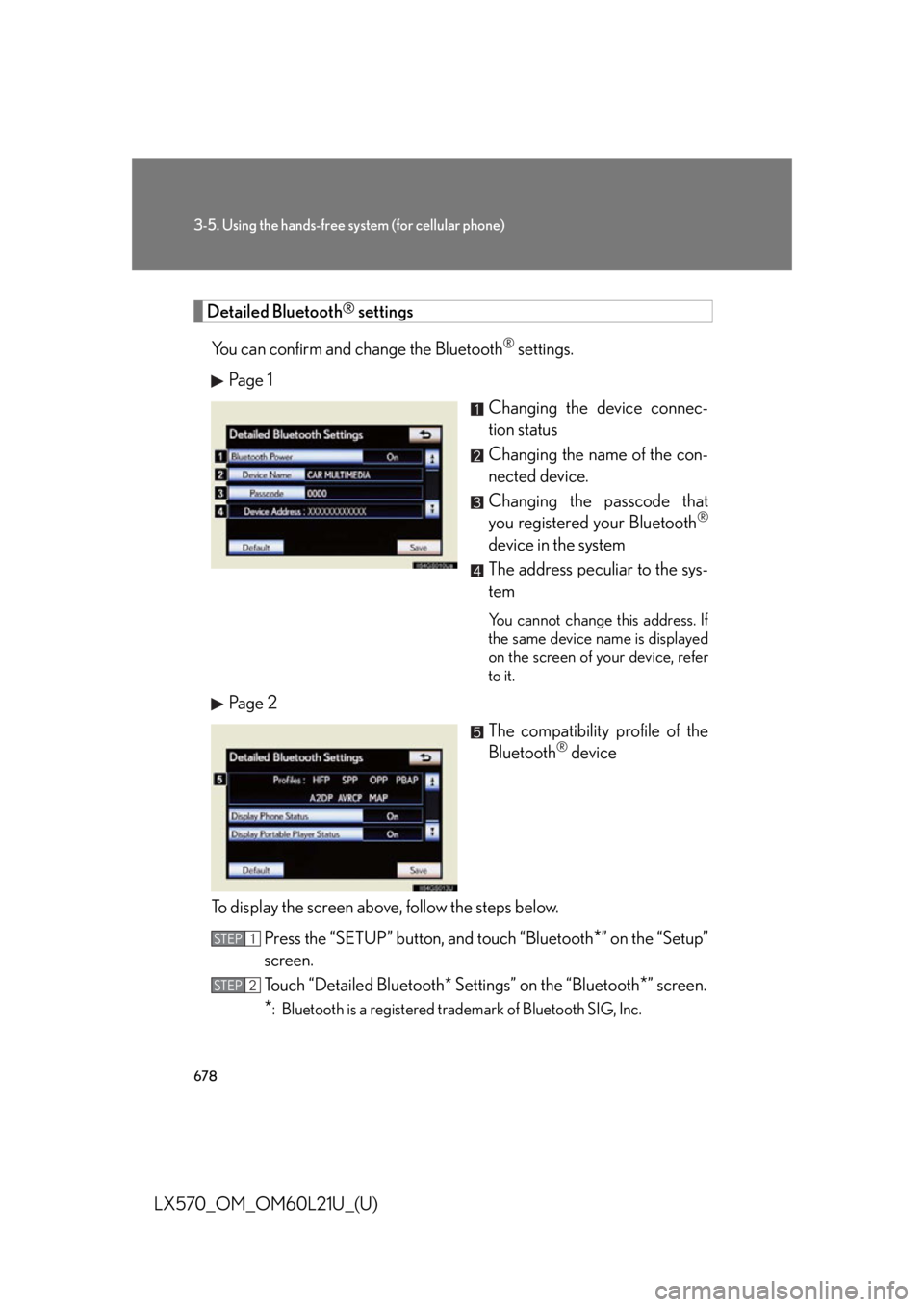
LX570_OM_OM60L21U_(U) Detailed Bluetooth ®
settings
You can confirm and change the Bluetooth ®
settings.
Pa g e 1
Changing the device connec-
tion status
Changing the name of the con-
nected device.
Changing the passcode that
you registered your Bluetooth ®
device in the system
The address peculiar to the sys-
tem You cannot change this address. If
the same device name is displayed
on the screen of your device, refer
to it.
Pa g e 2
The compatibility profile of the
Bluetooth ®
device
To display the screen above, follow the steps below.
Press the “SETUP” button, and touch “Bluetooth
* ” on the “Setup”
screen.
Touch “Detailed Bluetooth* Settings” on the “Bluetooth
* ” screen.
* : Bluetooth is a registered trademark of Bluetooth SIG, Inc.STEP 1
STEP 2
Page 679 of 956

6793-5. Using the hands-free system (for cellular phone)
3
Interior features
LX570_OM_OM60L21U_(U) ■ Changing Bluetooth
* power
The Bluetooth
* device is automatically co nnected when you turn the
“ENGINE START STOP” switch to ACCESSORY or IGNITION ON
mode. You can change between “On” or “Off”.
Display the “Detailed Bluetooth
* Settings” screen. (
P. 6 7 8 )
Touch “Bluetooth
* Power” on the “Detailed Bluetooth
* Settings”
screen.
Touch “On” or “Off”, and then
touch “Save”.
* : Bluetooth is a registered tr ademark of Bluetooth SIG, Inc.
■ Editing the device name
Display the “Detailed Bluetooth
* Settings” screen. (
P. 6 7 8 )
Touch “Device Name” on the “Detailed Bluetooth
* Settings”
screen.
Input the device name, and touch “OK”.
Touch “Save” on the “Detailed Bluetooth
* Settings” screen.
* : Bluetooth is a registered tr ademark of Bluetooth SIG, Inc.STEP 1
STEP 2
STEP 3
STEP 1
STEP 2
STEP 3
STEP 4
Page 680 of 956

6803-5. Using the hands-free sy stem (for cellular phone)
LX570_OM_OM60L21U_(U) ■ Editing the passcode
Display the “Detailed Bluetooth
* Settings” screen. (
P. 6 7 8 )
Touch “Passcode” on the “Detailed Bluetooth
* Settings” screen.
Input a passcode, and touch “OK”.
Touch “Save” on the “Detailed Bluetooth
* Settings” screen.
* : Bluetooth is a registered trademark of Bluetooth SIG, Inc.
■ Bluetooth ®
device connection status display settings
When “Bluetooth
* Power” is “On” and the “ENGINE START STOP”
switch is in ACCESSORY or IGNITION ON mode, the Bluetooth ®
phone and portable player’s conne ction status can be displayed.
(
P. 6 7 9 )
Display the “Detailed Bluetooth
* Settings” screen. (
P. 6 7 8 )
Touch “Display Phone Status” or “Display Portable Player Status”
on the “Detailed Bluetooth
* Settings” screen.
Touch “On”, and then touch
“Save”.
* : Bluetooth is a registered trademark of Bluetooth SIG, Inc.STEP 1
STEP 2
STEP 3
STEP 4
STEP 1
STEP 2
STEP 3
Page 681 of 956

6813-5. Using the hands-free system (for cellular phone)
3
Interior features
LX570_OM_OM60L21U_(U) ■
While driving
You cannot change the state of “Bluetooth
* Power” from “On” to “Off” while driv-
ing, but it can be changed from “Off” to “On”. ■
To return to the default Bluetooth ®
settings
Touch “Default”, and then touch “Yes”.
If the state of “Bluetooth
* Power” is changed from “Off” to “On”, Bluetooth ®
con-
nection will begin.
*: Bluetooth is a registered trademark of Bluetooth SIG, Inc.
Page 682 of 956

6823-5. Using the hands-free sy stem (for cellular phone)
LX570_OM_OM60L21U_(U)
Page 683 of 956

6833-5. Using the hands-free system (for cellular phone)
3
Interior features
LX570_OM_OM60L21U_(U)
Page 724 of 956

7223-8. Other interior features
LX570_OM_OM60L21U_(U) Safety Connect
: If equippedSafety Connect is a subscription-based telematics service that uses Global
Positioning System (GPS) data and emb edded cellular technology to pro-
vide safety and security features to subscribers. Safety Connect is sup-
ported by Lexus’ designated response center, which operates 24 hours per
day, 7 days per week.
Safety Connect service is available by subscription on select, telematics
hardware-equipped vehicles.
By using the Safety Connect service, you are agreeing to be bound by the
Telematics Subscription Service Agreement and its Terms and Conditions,
as in effect and amended from time to time, a current copy of which is avail-
able at Lexus.com. All use of the Safety Connect service is subject to such
then-applicable Terms and Conditions.
■ System components
Microphone
LED light indicators
“SOS” button