phone LEXUS LX570 2014 Workshop Manual
[x] Cancel search | Manufacturer: LEXUS, Model Year: 2014, Model line: LX570, Model: LEXUS LX570 2014Pages: 956, PDF Size: 16.4 MB
Page 635 of 956
6353-5. Using the hands-free system (for cellular phone)
3
Interior features
LX570_OM_OM60L21U_(U) ■
When calling by phone number ●
Say the phone number one digit at a time. For example, if the phone number is
2345678, say “two three four five six seven eight”. ●
The system can recognize the following types of phone numbers:
• 3 digit numbers (911, 411, 611)
• 7 digit numbers (Local phone numbers)
• 10 digit numbers (Area code + Local phone number)
• 11 digit phone numbers (1 + Area code + Local phone number) ●
As the system cannot recognize additional numbers, say the complete number
without stopping. ●
When the system recognizes multiple phone numbers, a phone number candi-
date list will be displayed on the screen . If the desired phone number is not dis-
played on the top of the screen, say the number of the desired phone number
from the candidate list (number 1 and nu mber 2) to select a phone number from
the candidate list■
International calls
To dial a phone number that is not a 3, 7, 10 or 11 digit number, for example an inter-
national number, use “International Call”.
Press or on the steering wheel to display the “Shortcut
Menu” screen and saying “Mai n menu” or touch “Main Menu”.
Say “Use a phone”.
Say “International call”.
Up to 24 digits can be recognized when using the international call function. The
number can also be divided into multiple groups and recognized.
You may not be able to make international calls, depending on the cellular phone in
use. STEP 1
STEP 2
STEP 3
Page 636 of 956
6363-5. Using the hands-free sy stem (for cellular phone)
LX570_OM_OM60L21U_(U) ■
Calling by using the latest call history item
Press on the steering wheel to display the “Phone” screen.
Press on the steering wheel to display the “Call History” screen.
Press on the steering wheel to select the most recent number in the
history.
Touch or press on the steering wheel. ■
To cancel voice recognition ●
Press and hold or on the steering wheel. ●
Touch “Cancel”. ■
When using voice recognition
Use correct commands and speak clearly, otherwise the system may not correctly
recognize the command. Wind or other noises may also cause the system not to
recognize the desired command. STEP 1
STEP 2
STEP 3
STEP 4
Page 637 of 956
6373-5. Using the hands-free system (for cellular phone)
3
Interior features
LX570_OM_OM60L21U_(U) Receiving a call
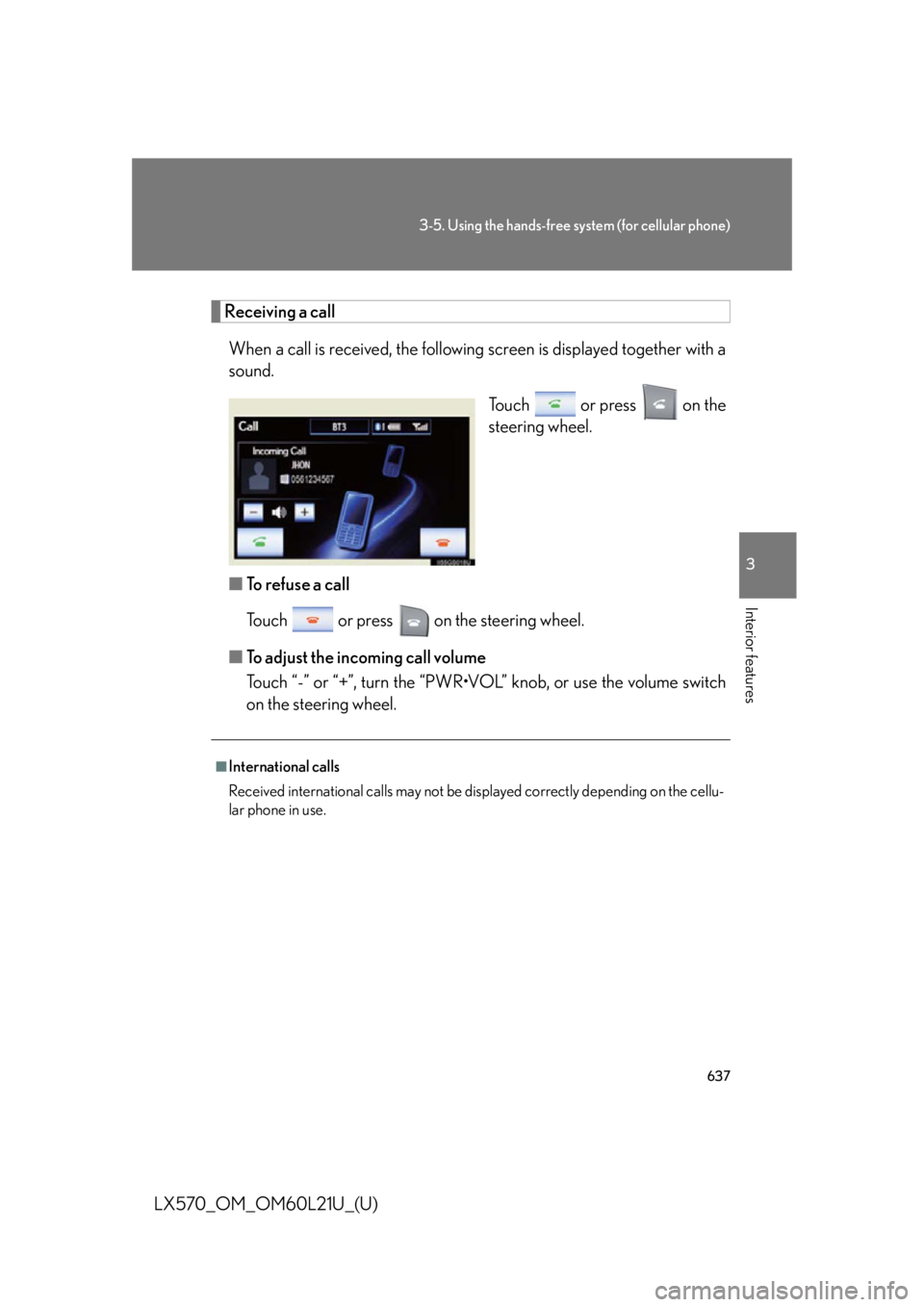
When a call is received, the following screen is displaye d together with a
sound.
Touch or press on the
steering wheel.
■ To refuse a call
Touch or press on the steering wheel.
■ To adjust the incoming call volume
Touch “-” or “+”, turn the “PWR•VOL” knob, or use the volume switch
on the steering wheel. ■
International calls
Received international calls may not be di splayed correctly depending on the cellu-
lar phone in use.
Page 638 of 956
6383-5. Using the hands-free sy stem (for cellular phone)
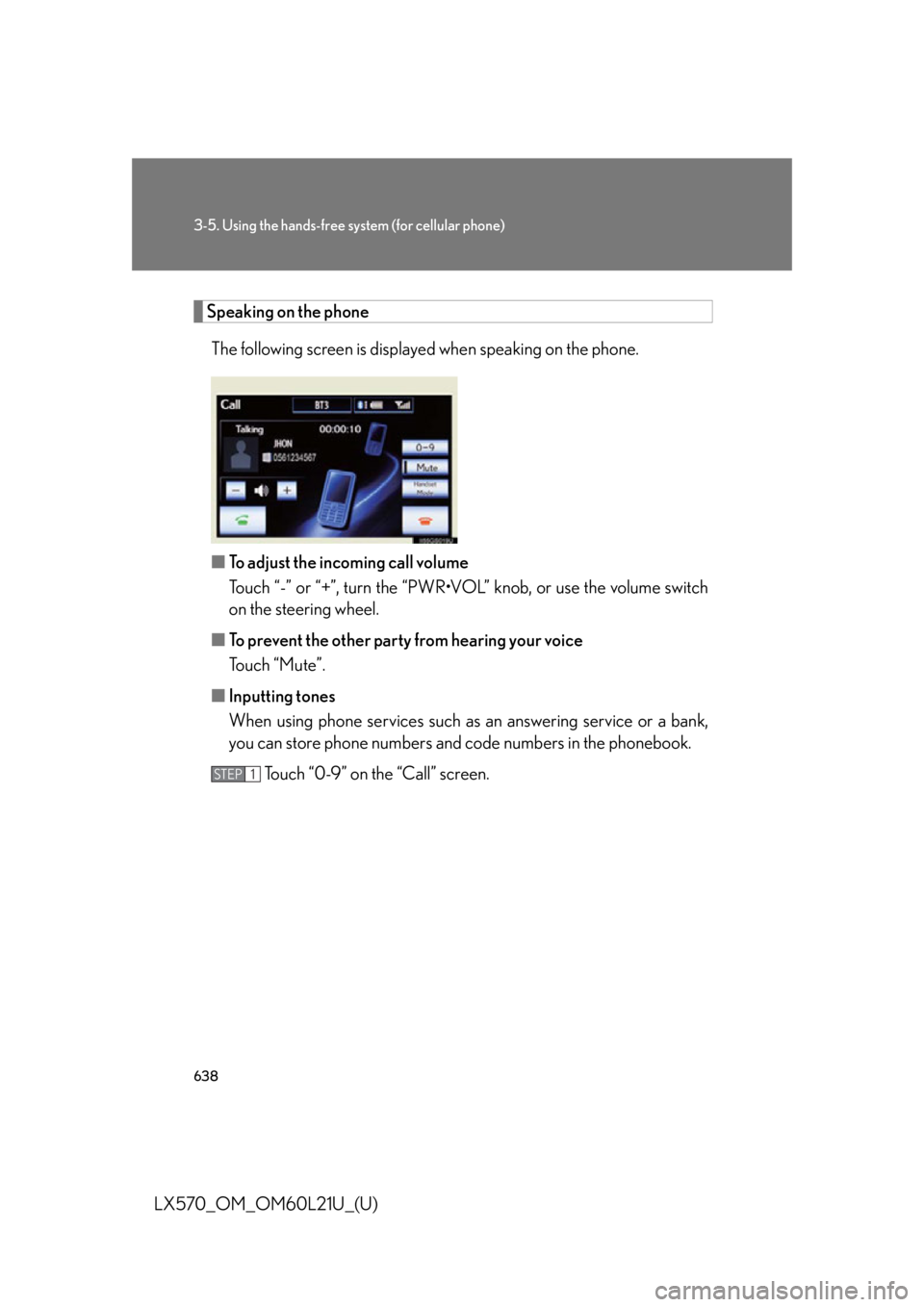
LX570_OM_OM60L21U_(U) Speaking on the phone
The following screen is displayed when speaking on the phone.
■ To adjust the incoming call volume
Touch “-” or “+”, turn the “PWR•V OL” knob, or use the volume switch
on the steering wheel.
■ To prevent the other party from hearing your voice
Touch “Mute”.
■ Inputting tones
When using phone services such as an answering service or a bank,
you can store phone numbers and code numbers in the phonebook.
Touch “0-9” on the “Call” screen. STEP 1
Page 639 of 956
6393-5. Using the hands-free system (for cellular phone)
3
Interior features
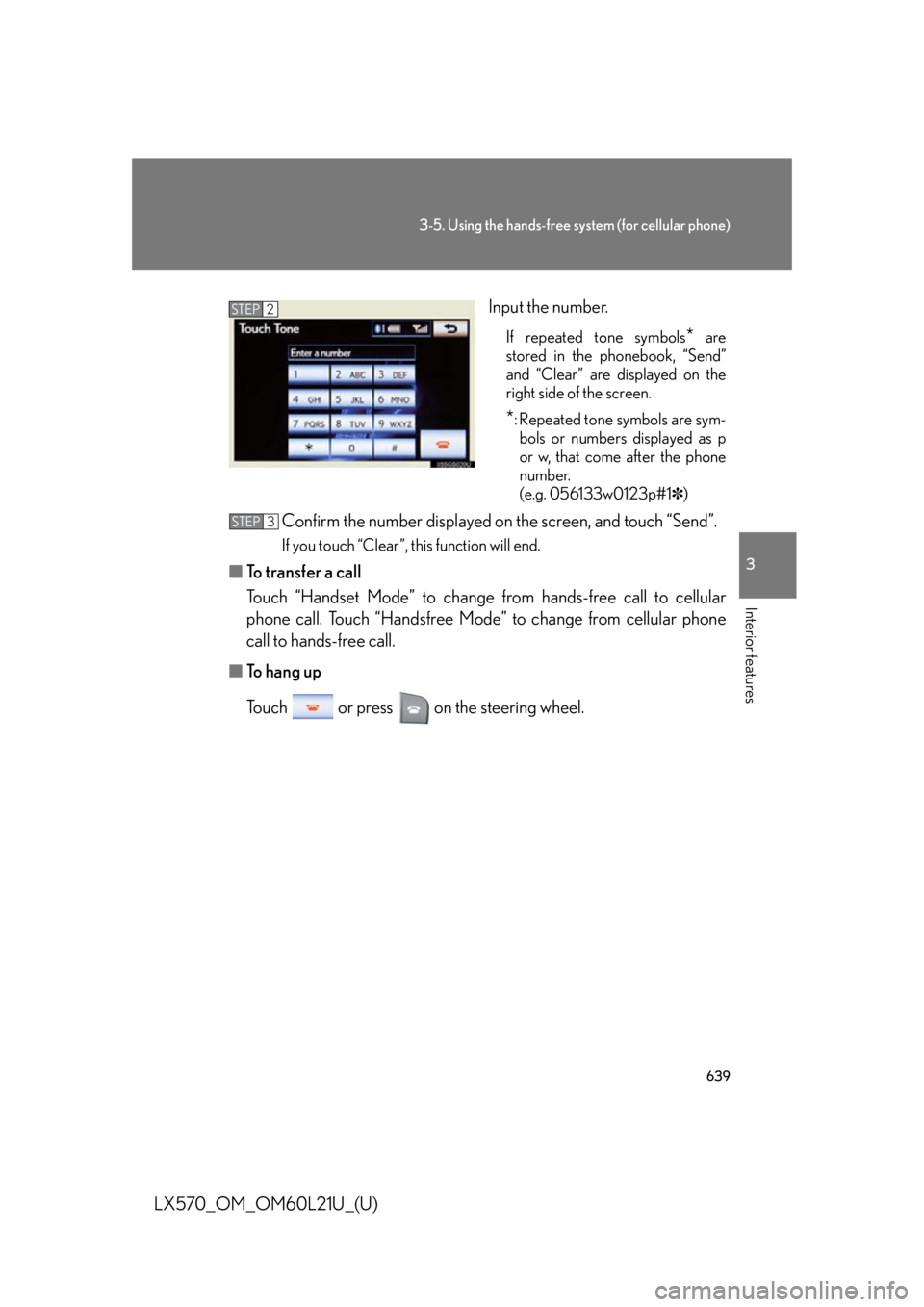
LX570_OM_OM60L21U_(U) Input the number. If repeated tone symbols
* are
stored in the phonebook, “Send”
and “Clear” are displayed on the
right side of the screen.
* : Repeated tone symbols are sym-
bols or numbers displayed as p
or w, that come after the phone
number.
(e.g. 056133w0123p#1 ✽ )
Confirm the number displayed on the screen, and touch “Send”. If you touch “Clear”, this function will end.
■ To transfer a call
Touch “Handset Mode” to change from hands-free call to cellular
phone call. Touch “Handsfree Mode” to change from cellular phone
call to hands-free call.
■ To hang up
Touch or press on the steering wheel. STEP 2
STEP 3
Page 640 of 956

6403-5. Using the hands-free sy stem (for cellular phone)
LX570_OM_OM60L21U_(U) ■ Call waiting
When a connected call is interrupted by the third party, the incoming
call message will be displayed.
● To talk with the other party: Touch or press on the
steering wheel.
● To refuse the call: Touch or press on the steering wheel.
Everytime you touch or press on the steering wheel after
a call is interrupted, you will be switched to the other party.
If your cellular phone is not accepted in HFP Ver. 1.5, this function can-
not be used. ■
Incoming call ●
The ring tone that has been set in th e “Phone Sound Settings” screen sounds
when there is an incoming call. ( P. 645)●
Depending on the type of Bluetooth ®
phone, both the system and Bluetooth ®
phone may sound simultaneously when there is an incoming call.■
Transferring calls ●
It is not possible to transfer from hand s-free to a cellular phone while driving.●
If you transfer from a cellular phone to hands-free, the hands-free screen will be
displayed, and you can operate the system using the screen. ●
Transfer method and operation may vary according to the cellular phone used. ●
For operation of the cellular phone in use, see the phone’s manual.■
Repeated tone symbols
When the “p” pause tone is used, after waiting 2 seconds the tone data up until the
next pause tone will be automatically sent. When the “w” pause tone is used, the
tone data up until the next pause tone will be automatically sent after user opera-
tion.
Page 641 of 956
6413-5. Using the hands-free system (for cellular phone)
3
Interior features
LX570_OM_OM60L21U_(U) Using a Bluetooth ®
phone message
Received messages can be forwarded from the connected Bluetooth ®
phone, enabling checking and replying (Quick reply).
■ Checking a message
Display the “Phone” screen. ( P. 621)
Touch “Messages” on the “Phone” screen. Depending on the type of Bluetooth ®
phone being connected, it
may be necessary to perform additional steps on the phone.
When “Message Transfer” is set to “Off”, a confirmation screen will
be displayed. Touch “Yes”.
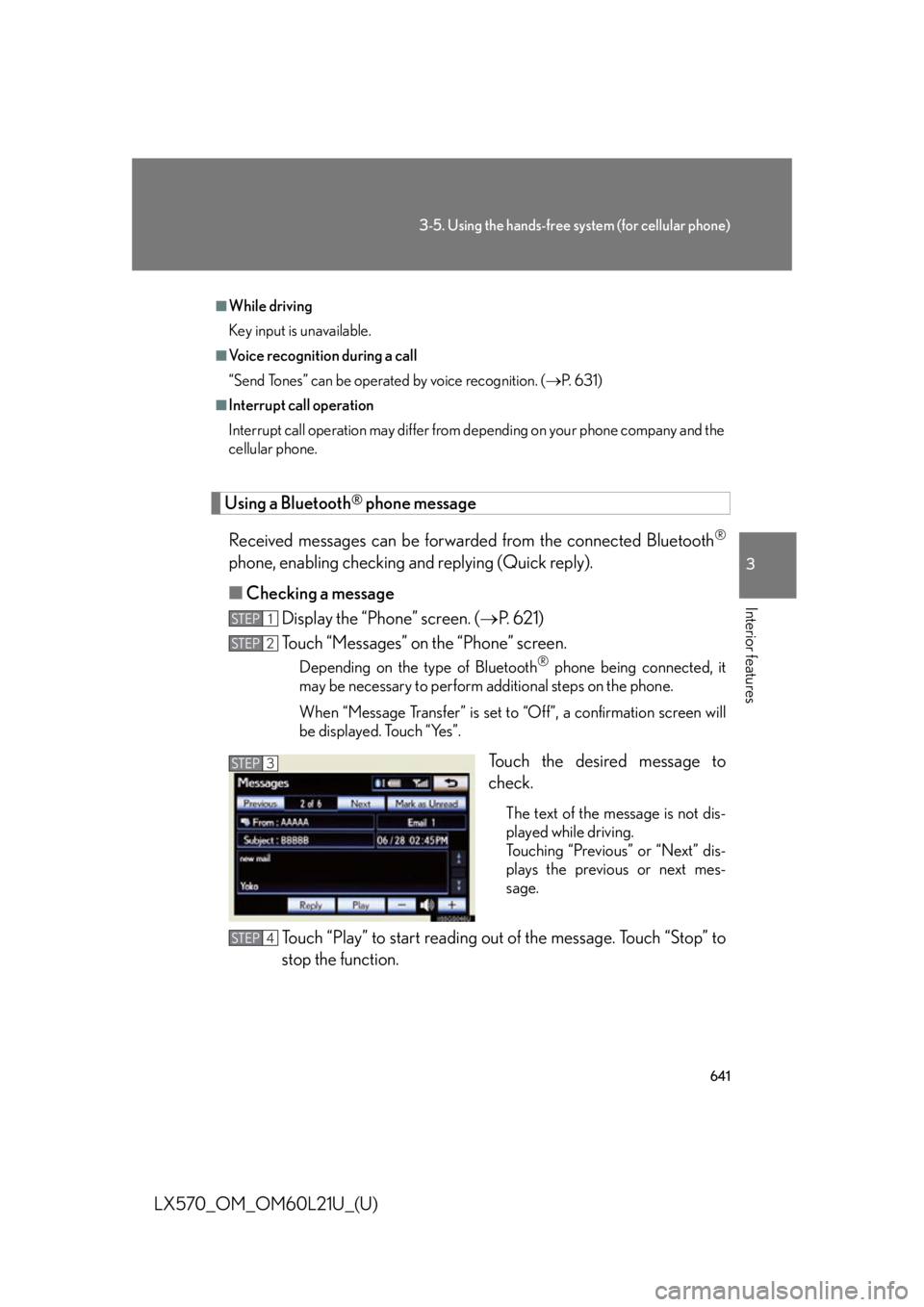
Touch the desired message to
check. The text of the message is not dis-
played while driving.
Touching “Previous” or “Next” dis-
plays the previous or next mes-
sage.
Touch “Play” to start reading out of the message. Touch “Stop” to
stop the function. ■
While driving
Key input is unavailable. ■
Voice recognition during a call
“Send Tones” can be operated by voice recognition. ( P. 6 3 1 )■
Interrupt call operation
Interrupt call operation may differ from depending on your phone company and the
cellular phone.
STEP 1
STEP 2
STEP 3
STEP 4
Page 642 of 956
6423-5. Using the hands-free sy stem (for cellular phone)
LX570_OM_OM60L21U_(U) ■ To adjust the message reading out volume
Touch “-” or “+”, turn the “PWR•V OL” knob, or use the volume switch
on the steering wheel.
■ Replying a message (Quick reply)
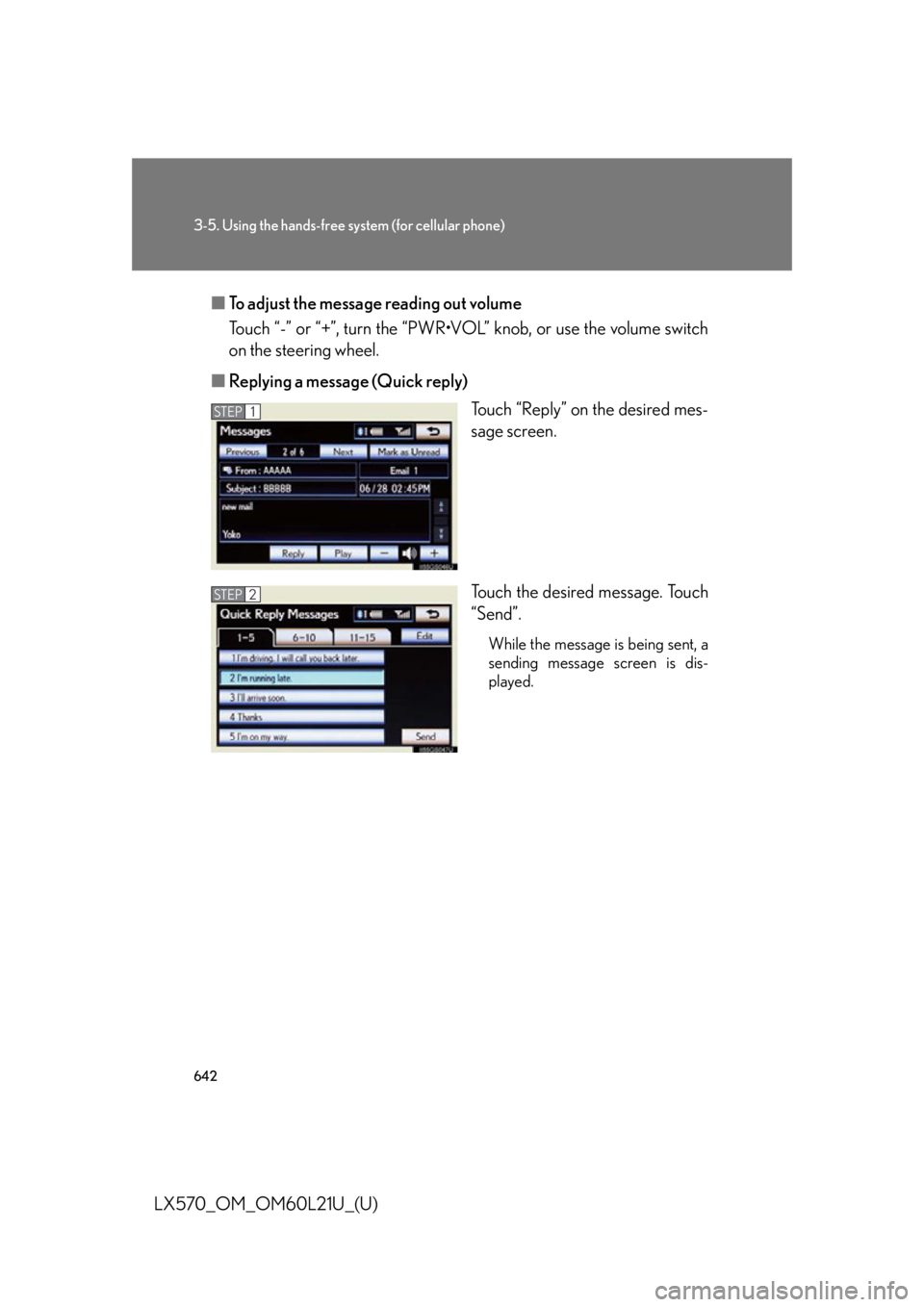
Touch “Reply” on the desired mes-
sage screen.
Touch the desired message. Touch
“Send”. While the message is being sent, a
sending message screen is dis-
played.STEP 1
STEP 2
Page 643 of 956

6433-5. Using the hands-free system (for cellular phone)
3
Interior features
LX570_OM_OM60L21U_(U) ■
To check the message ●
Messages are displayed in the appropriate connected Bluetooth ®
phone’s reg-
istered mail address folder. Touch the tab of the desired folder to be displayed. ●
Only received messages on the connected Bluetooth ®
phone can be dis-
played. ●
When the received message is an e-mail and “Update Message Read Status on
Phone” is set to “On”, “Mark as Unread” or “Mark as Read” can be selected.
Touch “Mark as Unread” to mark mails that have been read on the Bluetooth ®
phone as unread. Conversely, touch “Mark as Read” to mark mails that have not
been read on the Bluetooth ®
phone as read. ( P. 6 6 2 )■
Calling using SMS/MMS message
You can call using the SMS (Short Me ssage Service)/MMS (Multimedia Messag-
ing Service) message sender’s phone number. ( P. 6 3 3 )■
If the message delivery failed
If message delivery has failed, a notification will be displayed on the screen.
Touch “Retry” to attempt to send the me ssage again or touch “Cancel” to cancel.■
Editing a quick reply message
You can edit the “Quick Reply Messages”. ( P. 6 6 4 )■
New message notification
If “New Message Pop-up” and “New Message Voice Notification” are set to “On”, a
notification appears on the screen and a voice notification will be heard when a new
message arrives, touch “Read” to check the message, also to check the message
later, touch “Ignore”. When “Automatic Message Readout” is set to “On”, the mes-
sage will be automatically read out. ( P. 6 6 2 )
Page 644 of 956
6443-5. Using the hands-free system (for cellular phone)
LX570_OM_OM60L21U_(U) Setting the hands-free system (for cellular phone)
Phone sound settings
■ Setting the volume
Display the “Phone Settings” screen.
Touch “Phone Sound Settings” on the “Phone Settings” screen.
Choose the volume setting switch. “Call Volume”: changes the
speaker volume
“Ring Tone Volume”: changes the
ring tone
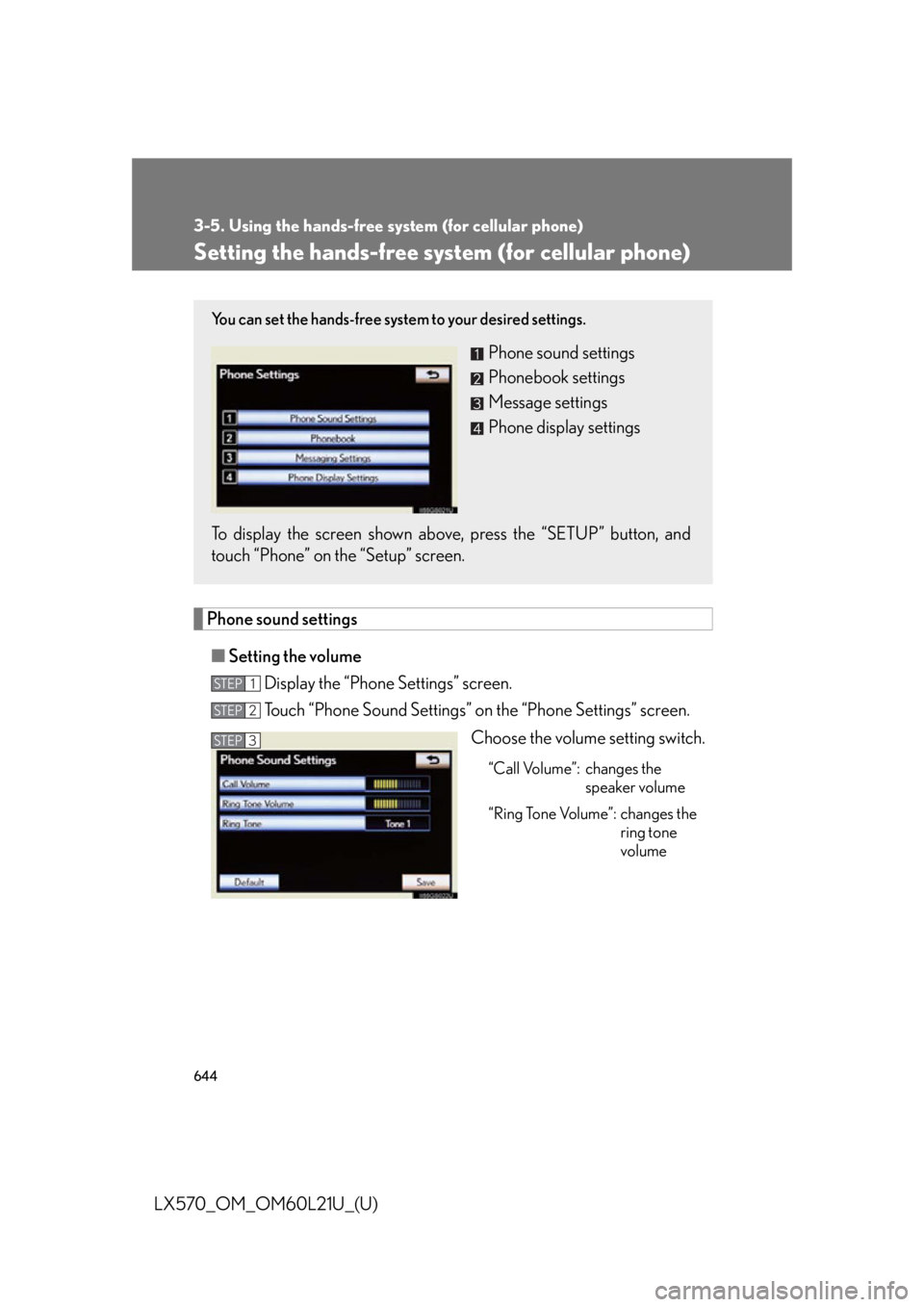
volumeYou can set the hands-free system to your desired settings.
Phone sound settings
Phonebook settings
Message settings
Phone display settings
To display the screen shown abov e, press the “SETUP” button, and
touch “Phone” on the “Setup” screen. STEP 1
STEP 2
STEP 3