LEXUS LX570 2014 Owners Manual
LX570 2014
LEXUS
LEXUS
https://www.carmanualsonline.info/img/36/58937/w960_58937-0.png
LEXUS LX570 2014 Owners Manual
Page 609 of 956
6093-4. Using the rear se at entertainment system
3
Interior features
LX570_OM_OM60L21U_(U) Setting LCD AI
Automatically determines th e tone of the video image and sets the con-
trast to an optimum level, displaying a sharp image.
Press the “SETTING” button on the controller.
Select “LCD AI”. “LCD AI” indicator is highlighted.
Setting the display mode
Press the “SETTING” button on the controller.
Select “Screen Size” tab on the screen.
Select “Normal”, “Wide1” or
“Wide2”.STEP 1
STEP 2
STEP 1
STEP 2
STEP 3
Page 610 of 956
6103-4. Using the rear seat entertainment system
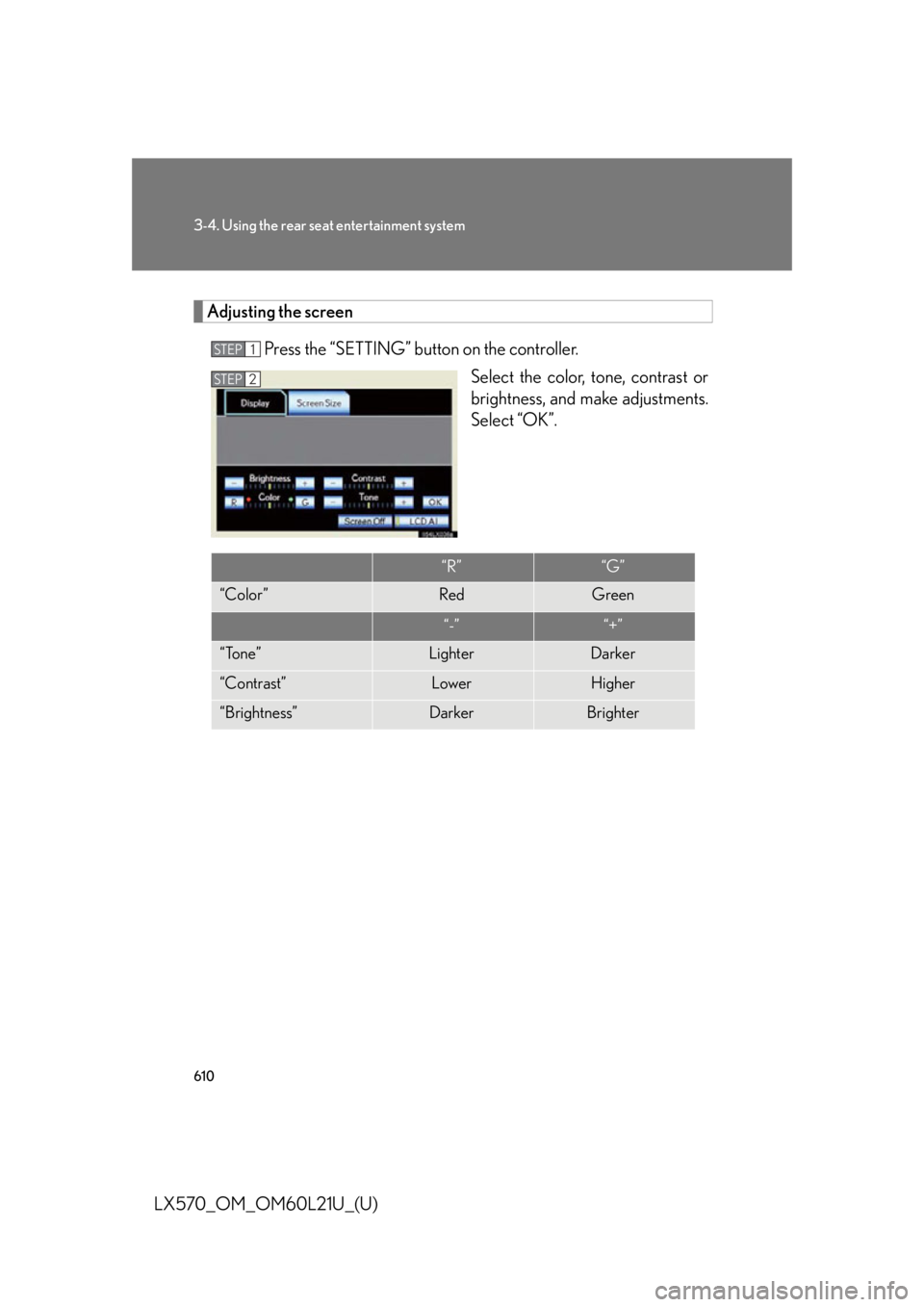
LX570_OM_OM60L21U_(U) Adjusting the screen
Press the “SETTING” button on the controller.
Select the color, tone, contrast or
brightness, and make adjustments.
Select “OK”.STEP 1
STEP 2
“R” “G”
“Color ” Red Green
“-” “+”
“Tone” Lighter Darker
“Contrast” Lower Higher
“Brightness” Darker Brighter
Page 612 of 956
612
LX570_OM_OM60L21U_(U) 3-5. Using the hands-free system (for cellular phone)
Hands-free system (for cellular phone) The hands-free system is a function th at allows you to use your cellular
phone without touching it.
This system supports Bluetooth ®
cellular phones. Bluetooth ®
is a wireless
data system that allows a cellular phon e to wirelessly connect to the hands-
free system and outgoing/incoming calls.
The illustrations of the hands-free system screens shown here may slightly
vary depending on the type of the system.
■ Telephone switch
Off hook switch
• Sending
• Receiving
• “Phone” screen display
On hook switch
• End call
• Refuse call
Page 684 of 956
682
LX570_OM_OM60L21U_(U) 3-6. Using the interior lights
Interior lights list
Rear interior light ( P. 683)
Rear personal lights ( P. 6 8 4 )
Inside door handle light
Shift lever light (when the “E NGINE START STOP” switch is in
ACCESSORY or IGNITION ON mode)
Front interior lights ( P. 683)
Front personal lights ( P. 6 8 4 )
Footwell lights
Scuff lights (if equipped)
“ENGINE START STOP” switch light
Door courtesy light
Luggage compartment light ( P. 685)
Outer foot lights
Running board lights
Page 685 of 956
6833-6. Using the interior lights
3
Interior features
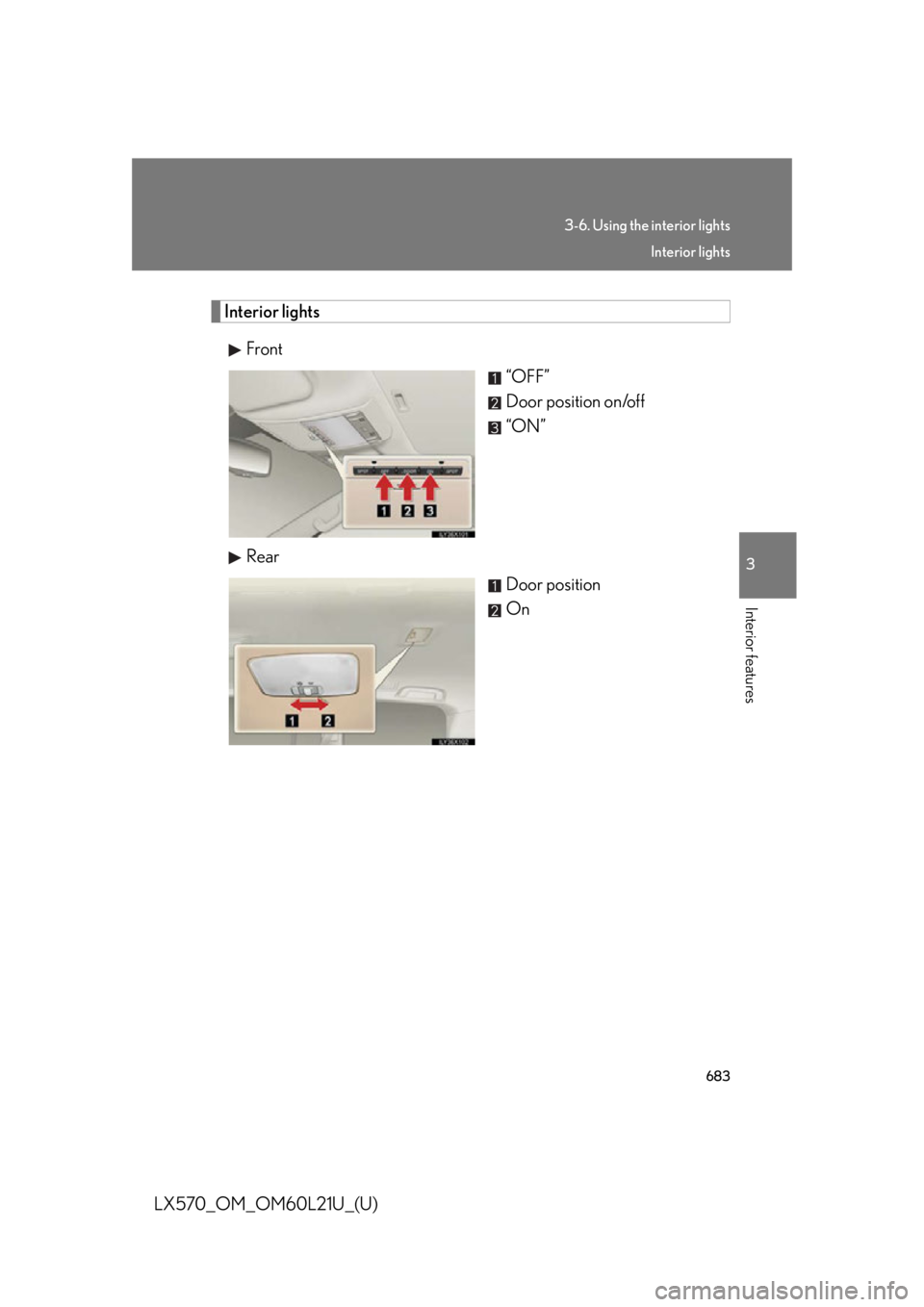
LX570_OM_OM60L21U_(U) Interior lights
Front
“OFF”
Door position on/off
“ON”
Rear
Door position
On Interior lights
Page 686 of 956
6843-6. Using the interior lights
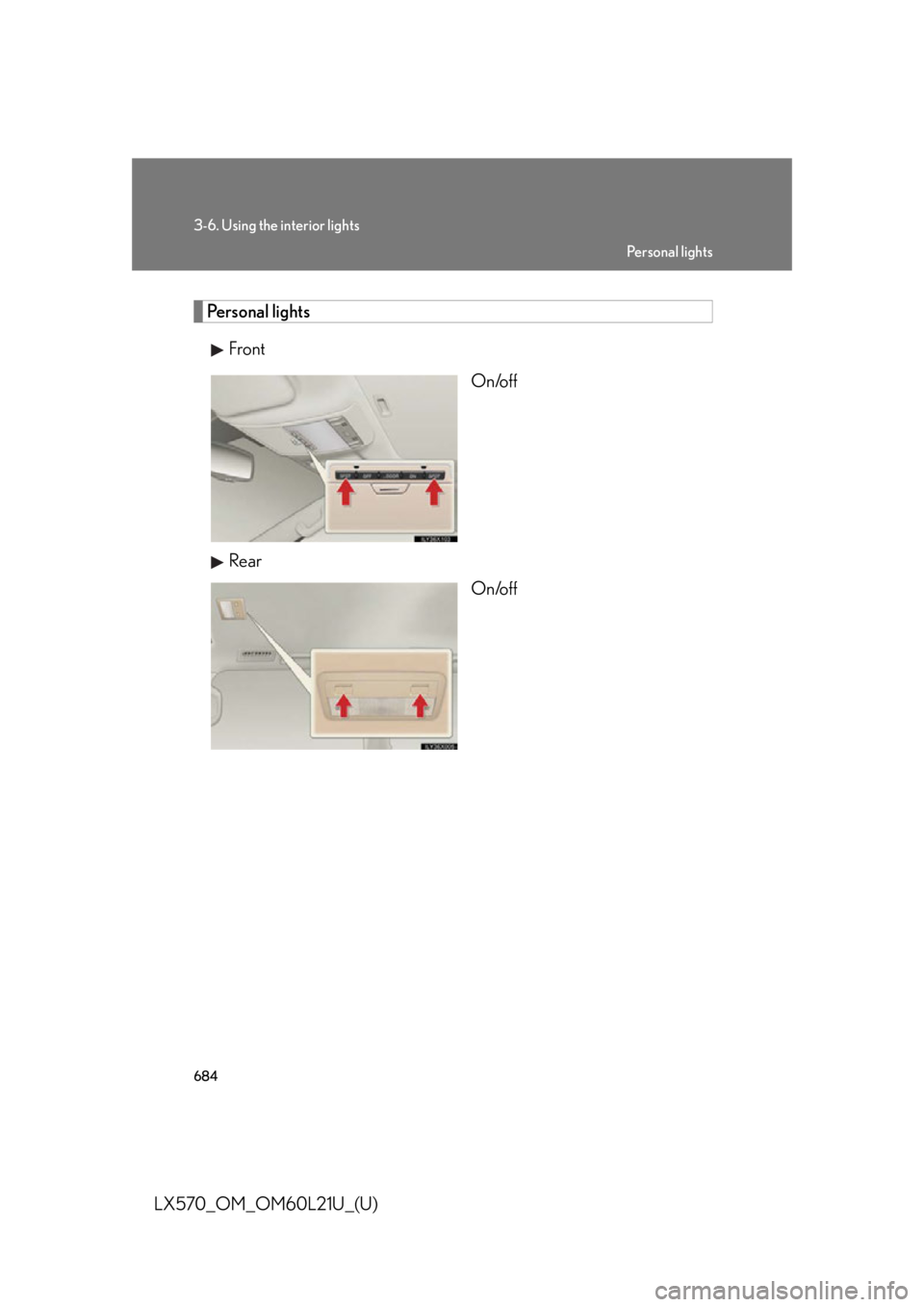
LX570_OM_OM60L21U_(U) Personal lights
Front
On/off
Rear
On/off Pe r s o n a l l i g h t s
Page 687 of 956
6853-6. Using the interior lights
3
Interior features
LX570_OM_OM60L21U_(U) Luggage compartment light
Off
Door position■
Illuminated entry system
The lights automatically turn on/off according to “ENGINE START STOP” switch
mode, the presence of the electronic key, whether the doors are locked/unlocked,
and whether the doors are open/closed. ■
To prevent battery discharge
If the interior lights remain on when the “ENGINE START STOP” switch is turned
off, the lights will go off automatically after 20 minutes. ■
Customization
Settings (e.g. Time period before the inte rior lights turn off.) can be changed.
(Customizable features P. 9 0 6 ) Luggage compartment light
Page 688 of 956
686
LX570_OM_OM60L21U_(U) 3-7. Using the storage features
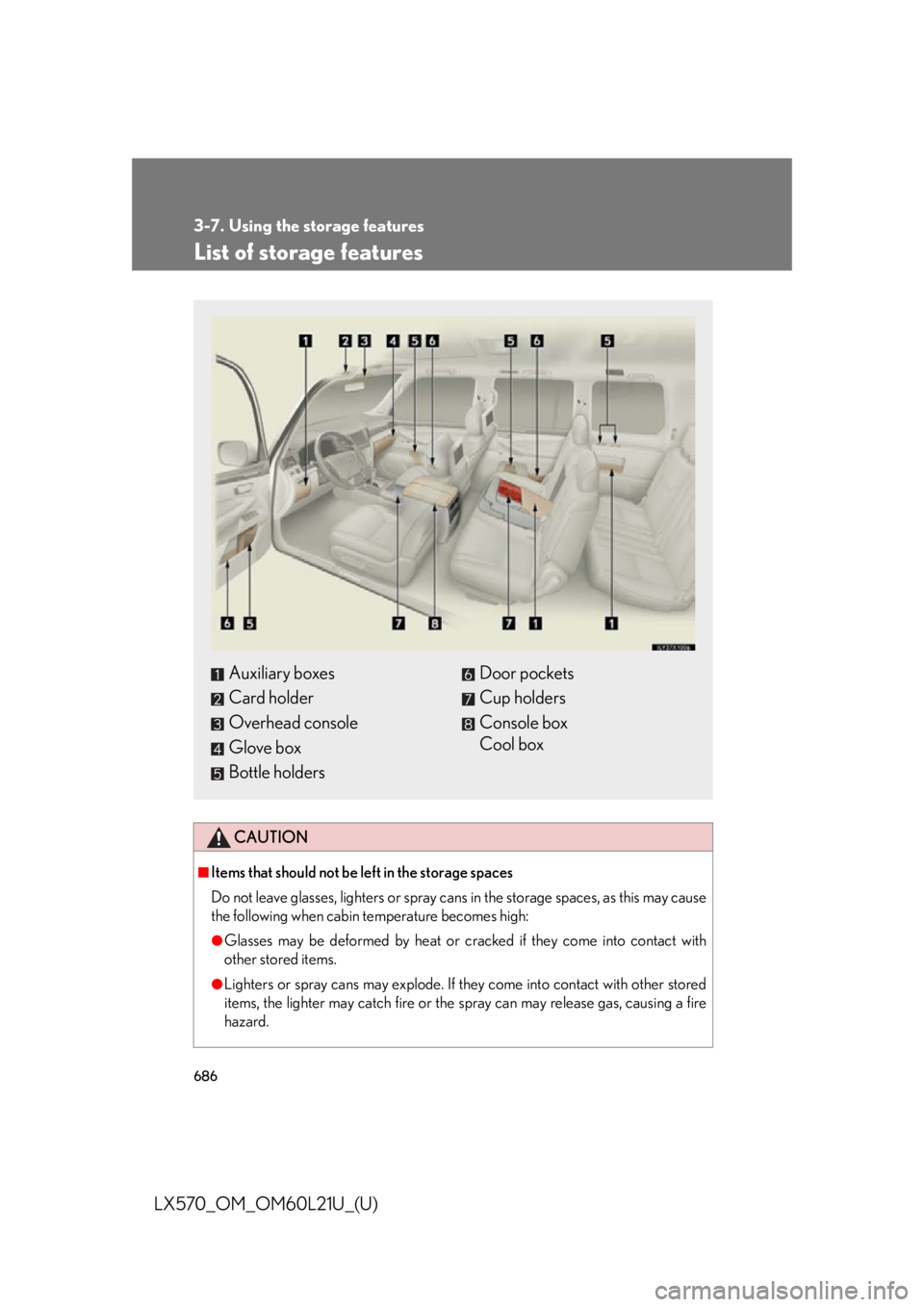
List of storage features
CAUTION■
Items that should not be left in the storage spaces
Do not leave glasses, lighters or spray cans in the storage spaces, as this may cause
the following when cabin temperature becomes high: ●
Glasses may be deformed by heat or cracked if they come into contact with
other stored items. ●
Lighters or spray cans may explode. If they come into contact with other stored
items, the lighter may catch fire or the spray can may release gas, causing a fire
hazard.Auxiliary boxes
Card holder
Overhead console
Glove box
Bottle holders Door pockets
Cup holders
Console box
Cool box
Page 689 of 956
6873-7. Using the storage features
3
Interior features
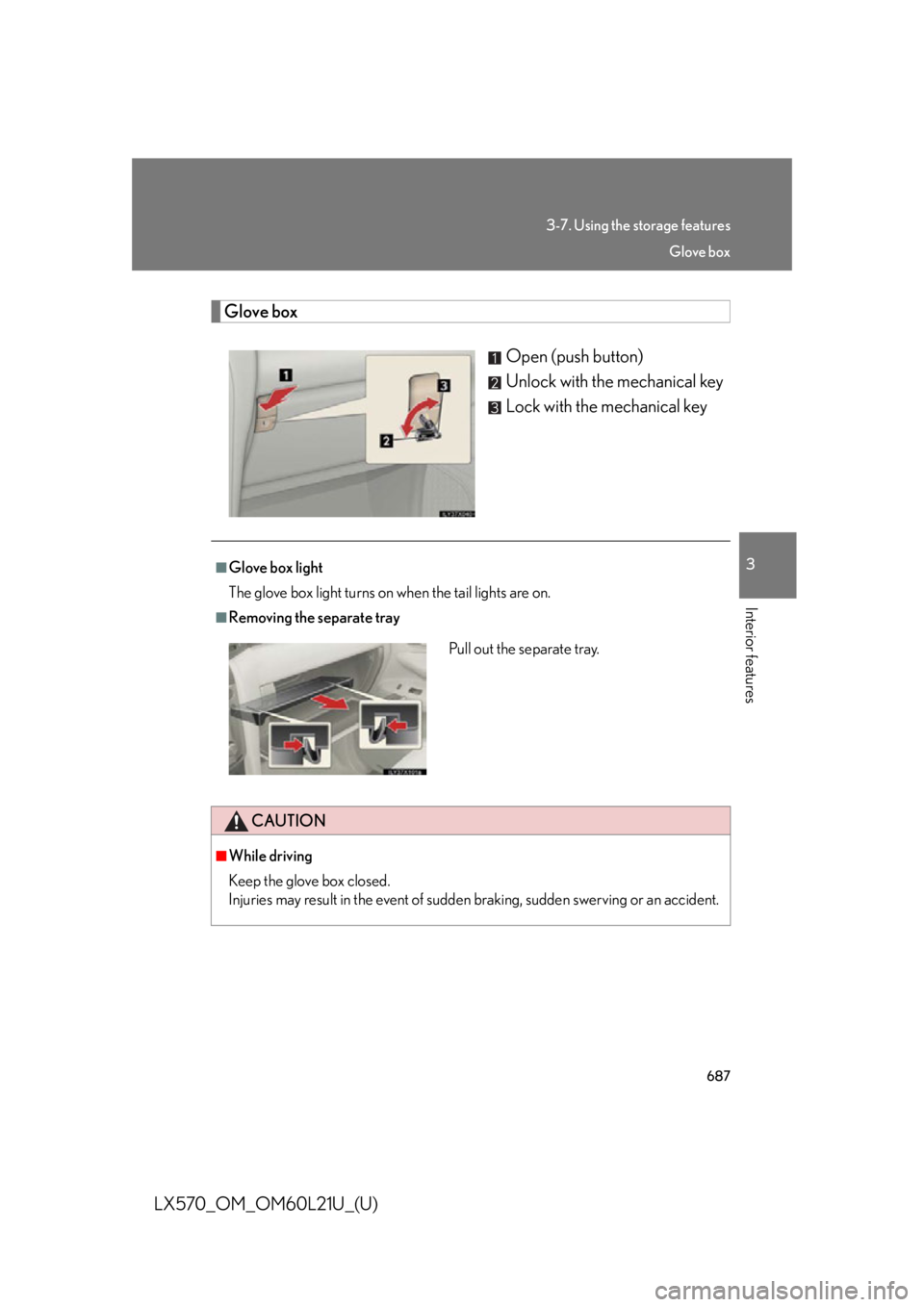
LX570_OM_OM60L21U_(U) Glove box
Open (push button)
Unlock with the mechanical key
Lock with the mechanical key■
Glove box light
The glove box light turns on when the tail lights are on. ■
Removing the separate tray
CAUTION■
While driving
Keep the glove box closed.
Injuries may result in the event of sudden braking, sudden swerving or an accident.Pull out the separate tray. Glove box
Page 697 of 956
6953
Interior features
LX570_OM_OM60L21U_(U) 3-8. Other interior features
Cool box
: If equipped■
While the cool box is on
The front air conditioning system cannot be turned off. ■
When the outside temperature is 32°F (0°C) or below
The cool box may not operate.While the engine is running , the cool box, which is cooled by the air condi-
tioning, can be used.
Lift the lid while pulling up the
lower lever to release the lock.
On/off When on, the indicator light
comes on.
If the front air conditioning sys-
tem is not in use, the front air
conditioning system is automati-
cally turned on when the cool
box is turned on.STEP 1
STEP 2