lock LEXUS LX570 2014 Owners Manual
[x] Cancel search | Manufacturer: LEXUS, Model Year: 2014, Model line: LX570, Model: LEXUS LX570 2014Pages: 956, PDF Size: 16.4 MB
Page 873 of 956

5
When trouble arises
8715-2. Steps to take in an emergency
LX570_OM_OM60L21U_(U) ■
Starting the engine when the battery is discharged
The engine cannot be started by push-starting. ■
Avoiding a discharged battery ●
Turn off the headlights and the audio system while the engine is off. ●
Turn off any unnecessary electrical compon ents when the vehicle is running at a
low speed for an extended period, such as in heavy traffic, etc.■
Charging the battery
The electricity stored in the battery will discharge gradually even when the vehicle
is not in use, due to natural discharge and the draining effects of certain electrical
appliances. If the vehicle is left for a long time, the battery may discharge, and the
engine may be unable to start. (The battery recharges automatically during driving.) ■
When the battery is removed or discharged ●
The power back door must be initialized. ( P. 6 0 )●
Make sure the key is not inside the vehicle when recharging or replacing the
battery. The key may be locked in the vehicle if the alarm is activated. ( P. 1 2 0 )Start the engine of the second vehicle. Increase the engine
speed slightly and maintain at that level for approximately 5
minutes to recharge the battery of your vehicle.
Open and close any of the do ors with the “ENGINE START
STOP” switch off.
Maintain the engine speed of th e second vehicle and turn the
“ENGINE START STOP” switch to IGNITION ON mode,
then start the vehicle’s engine.
Once the vehicle’s engine ha s started, remove the jumper
cables in the exact reverse ord er in which they were con-
nected.
Once the engine starts, have the vehicle checked at your Lexus dealer,
as soon as possible. STEP 3
STEP 4
STEP 5
STEP 6
Page 885 of 956

8816-1. Specifications
6
Vehicle specifications
LX570_OM_OM60L21U_(U) Vehicle identification
■ Vehicle identification number
The vehicle identification number (V IN) is the legal identifier for your
vehicle. This is the primary identi fication number for your Lexus. It is
used in registering the ownership of your vehicle.
This number is stamped on the top
left of the instrument panel.
This number is also on the Certifi-
cation Label.
■ Engine number
The engine number is stamped on
the engine block as shown.
Page 891 of 956

8876-1. Specifications
6
Vehicle specifications
LX570_OM_OM60L21U_(U) Automatic transmission
The fluid capacity is the quantity of refere nce. If replacement is necessary, contact
your Lexus dealer.
Tr a n s f e r
* : Your Lexus vehicle is filled with “Toyota Genuine Transfer Gear oil LF” at the fac-
tory. Use Lexus approved “Toyota Genuine Transfer Gear oil LF” or an equiva-
lent of matching quality to satisfy the above specification. Please contact your
Lexus dealer for further details.Fluid capacity With air-cooled
type ATF
cooler 12.6 qt. (11.9 L, 10.5 Imp.qt.)
Without
air-cooled type
AT F c o o l e r 12.3 qt. (11.6 L, 10.2 Imp.qt.)
Fluid type Toyota Genuine ATF WS
NOTICE■
Automatic transmission fluid type
Using transmission fluid other than “Toyota Genuine ATF WS” may cause deterio-
ration in shift quality, locking up of your transmission accompanied by vibration, and
ultimately damage the transmission of your vehicle.
Oil capacity 1.53 qt. (1.45 L, 1.28 Imp.qt.)
Oil type
* Toyota Genuine Transfer Gear oil LF or
equivalent
Recommended oil viscosity SAE 75W
Page 911 of 956
9076-2. Customization
6
Vehicle specifications
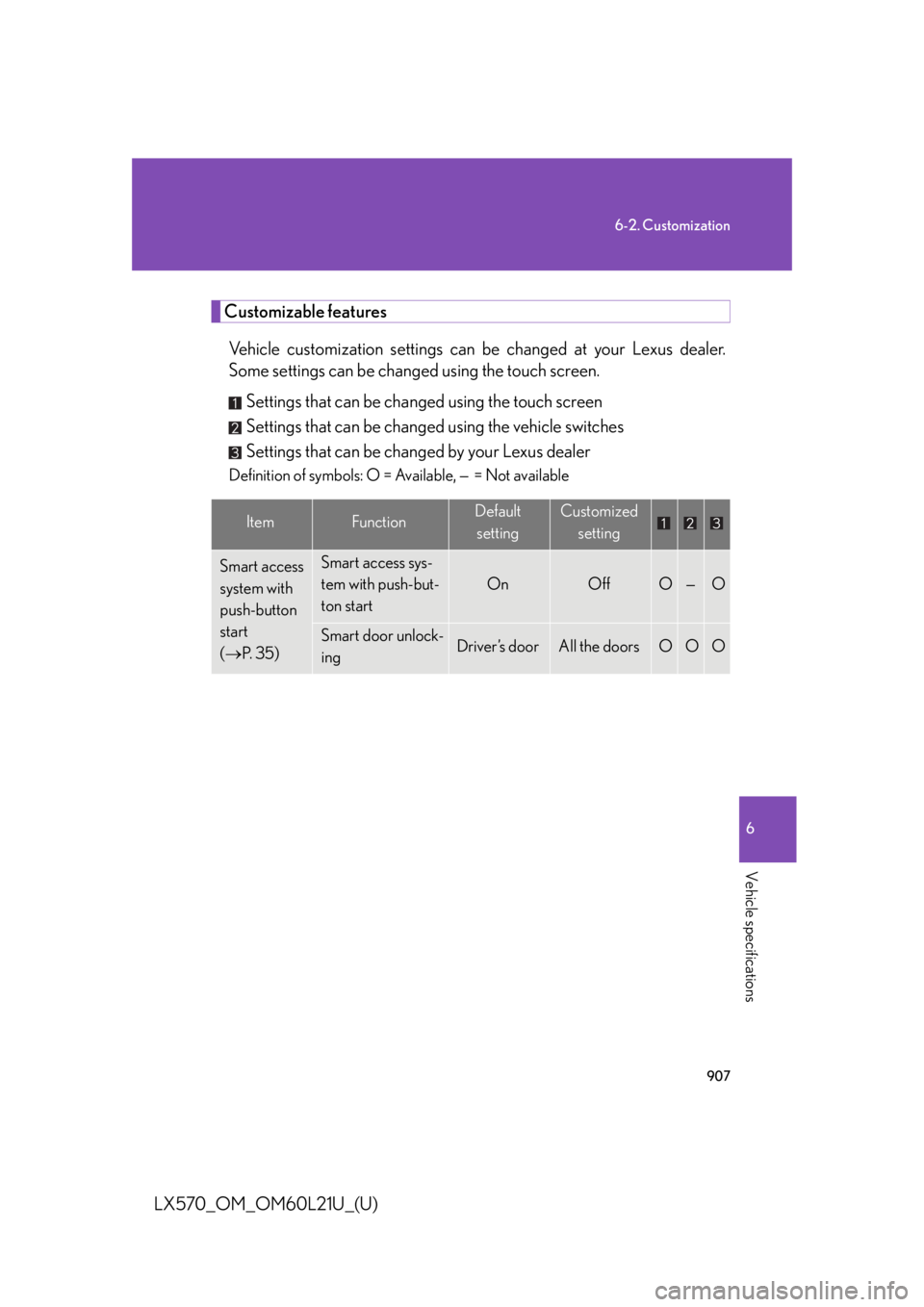
LX570_OM_OM60L21U_(U) Customizable features
Vehicle customization settings can be changed at your Lexus dealer.
Some settings can be changed using the touch screen.
Settings that can be changed using the touch screen
Settings that can be changed using the vehicle switches
Settings that can be changed by your Lexus dealer Definition of symbols: O = Available, — = Not available
Item Function Default
setting Customized
setting
Smart access
system with
push-button
start
( P. 3 5 ) Smart access sys-
tem with push-but-
ton start On Off O — O
Smart door unlock-
ing Driver’s door All the doors O O O
Page 912 of 956

9086-2. Customization
LX570_OM_OM60L21U_(U) Wireless
remote
control
( P. 4 8 ) Wireless remote
control On Off — — O
Open door warn-
ing function (when
locking the vehicle) On Off — — O
Unlocking opera-
tion Driver’s door
unlocked in
one step, all
doors
unlocked in
two steps All doors
unlocked in
one step O — O
Adjust the volume
of confirmation
buzzer sounds
when the vehicle is
locked or unlocked 7 Off
O — O
1 to 6
Power back door
operation Push and hold One short
push — — O
Push twice — — O
Off — — O
Smart access
system with
push-button
start
( P. 3 5 )
and wireless
remote
control
( P. 4 8 ) Operation signal
(Emergency flash-
ers) On Off O — O
Ti m e e l a p s e d
before automatic
door lock function
is activated if door
is not opened after
being unlocked 60 seconds Off
O — O30 seconds
120 secondsItem Function Default
setting Customized
setting
Page 913 of 956
9096-2. Customization
6
Vehicle specifications
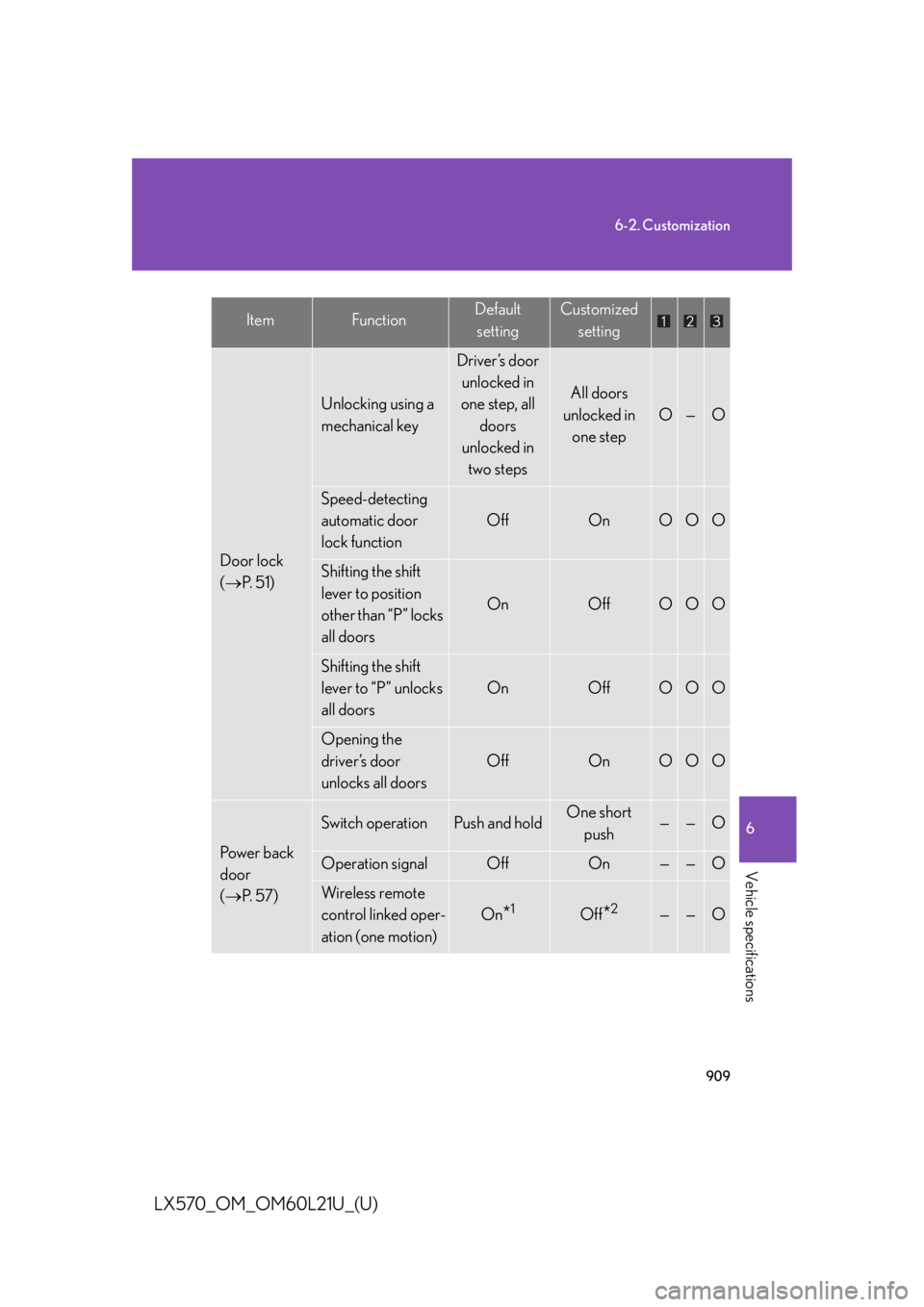
LX570_OM_OM60L21U_(U) Door lock
( P. 5 1 ) Unlocking using a
mechanical key Driver’s door
unlocked in
one step, all
doors
unlocked in
two steps All doors
unlocked in
one step O — O
Speed-detecting
automatic door
lock function Off On O O O
Shifting the shift
lever to position
other than “P” locks
all doors On Off O O O
Shifting the shift
lever to “P” unlocks
all doors On Off O O O
Opening the
driver’s door
unlocks all doors Off On O O O
Power back
door
( P. 5 7 ) Switch operation Push and hold One short
push — — O
Operation signal Off On — — O
Wireless remote
control linked oper-
ation (one motion) On
* 1
Off
* 2
— — OItem Function Default
setting Customized
setting
Page 916 of 956

9126-2. Customization
LX570_OM_OM60L21U_(U) Illumination
( P. 6 8 2 ) Time period before
the interior lights
turn off 15 seconds Off
O — O7. 5 s e c o n d s
30 seconds
Time period before
the exterior lights
turn off 15 seconds Off
O — O7. 5 s e c o n d s
30 seconds
Operation after the
“ENGINE START
STOP” switch is
turned off On Off — — O
Operation when
the doors are
unlocked On Off — — O
Operation when
you approach the
vehicle with the
electronic key on
your person (when
the interior light
switch is door posi-
tion) On Off — — O
Shift lever light On Off — — O
Footwell lights On Off — — OItem Function Default
setting Customized
setting
Page 918 of 956
9146-2. Customization
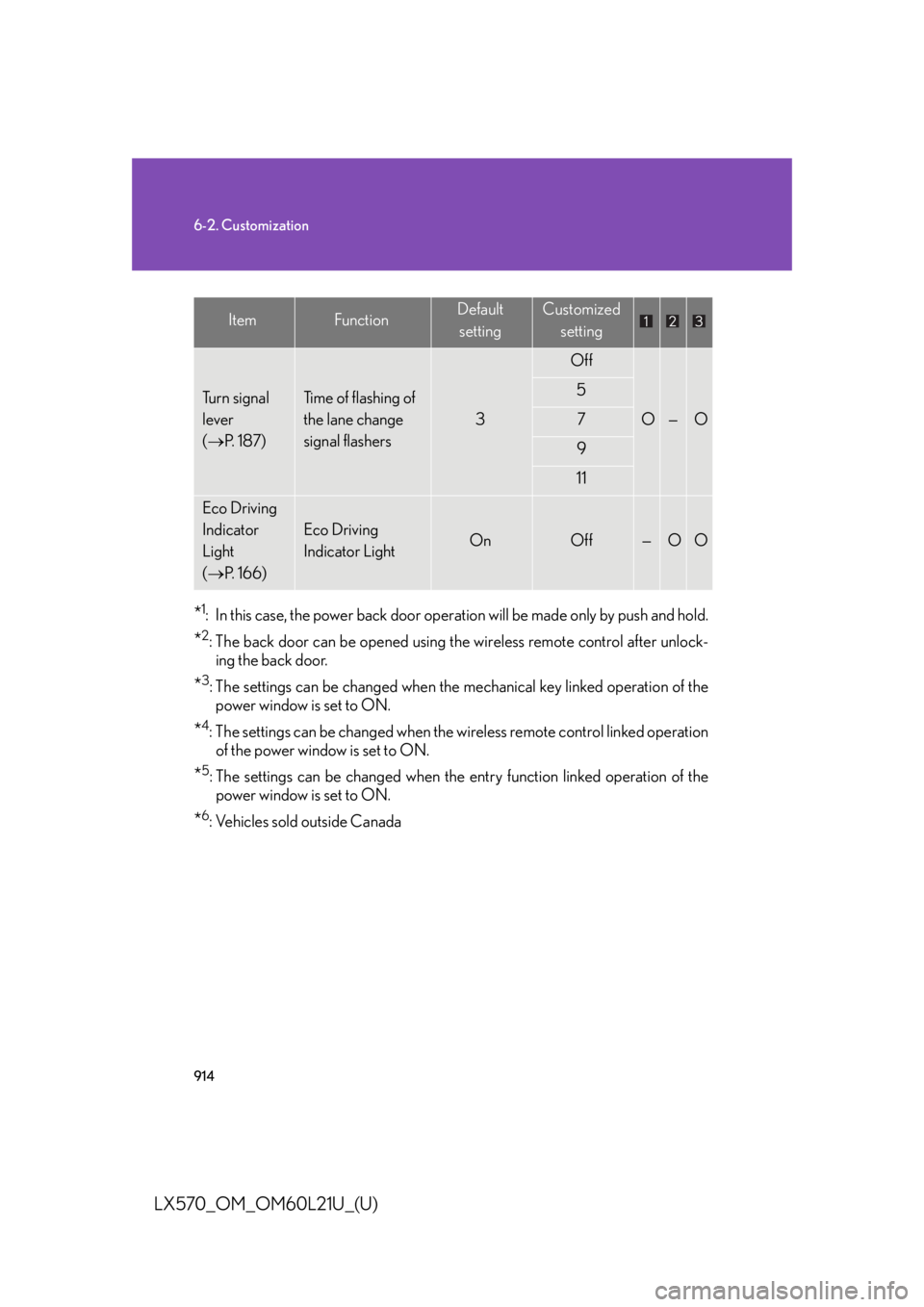
LX570_OM_OM60L21U_(U) * 1
: In this case, the power back door operat ion will be made only by push and hold.
* 2
: The back door can be opened using th e wireless remote control after unlock-
ing the back door.
* 3
: The settings can be changed when the mechanical key linked operation of the
power window is set to ON.
* 4
: The settings can be changed when the wireless remote control linked operation
of the power window is set to ON.
* 5
: The settings can be changed when the entry function linked operation of the
power window is set to ON.
* 6
: Vehicles sold outside CanadaTu r n s i g n a l
lever
( P. 1 8 7 ) Time of flashing of
the lane change
signal flashers 3 Off
O — O5
7
9
11
Eco Driving
Indicator
Light
( P. 1 6 6 ) Eco Driving
Indicator Light On Off — O OItem Function Default
setting Customized
setting
Page 919 of 956

9156-2. Customization
6
Vehicle specifications
LX570_OM_OM60L21U_(U) ■
Vehicle customization ●
If the smart access system with push-b utton start is turned “OFF”, unlock door
cannot be selected. ●
If the doors are not opened after unlo cking and are then automatically re-
locked, a signal will be given if “Operation signal (Emergency flashers)” or
“Operation signal (Buzzer)” are set to ON.■
When setting using the vehicle switches
When using the vehicle switches to set an item that can also be set using the touch
screen, the item displayed on the touch screen will not change immediately.
If the “ENGINE START STOP” switch is firs t turned to OFF, the screen display will
change once the “ENGINE START STOP” switch is turned to IGNITION ON
mode again. ■
When customizing using the touch screen
Stop the vehicle in a safe place, apply th e parking brake, and shift the shift lever to
“P”. Also, to prevent battery discharge, leave the engine running while customizing
the features.
Page 938 of 956
934
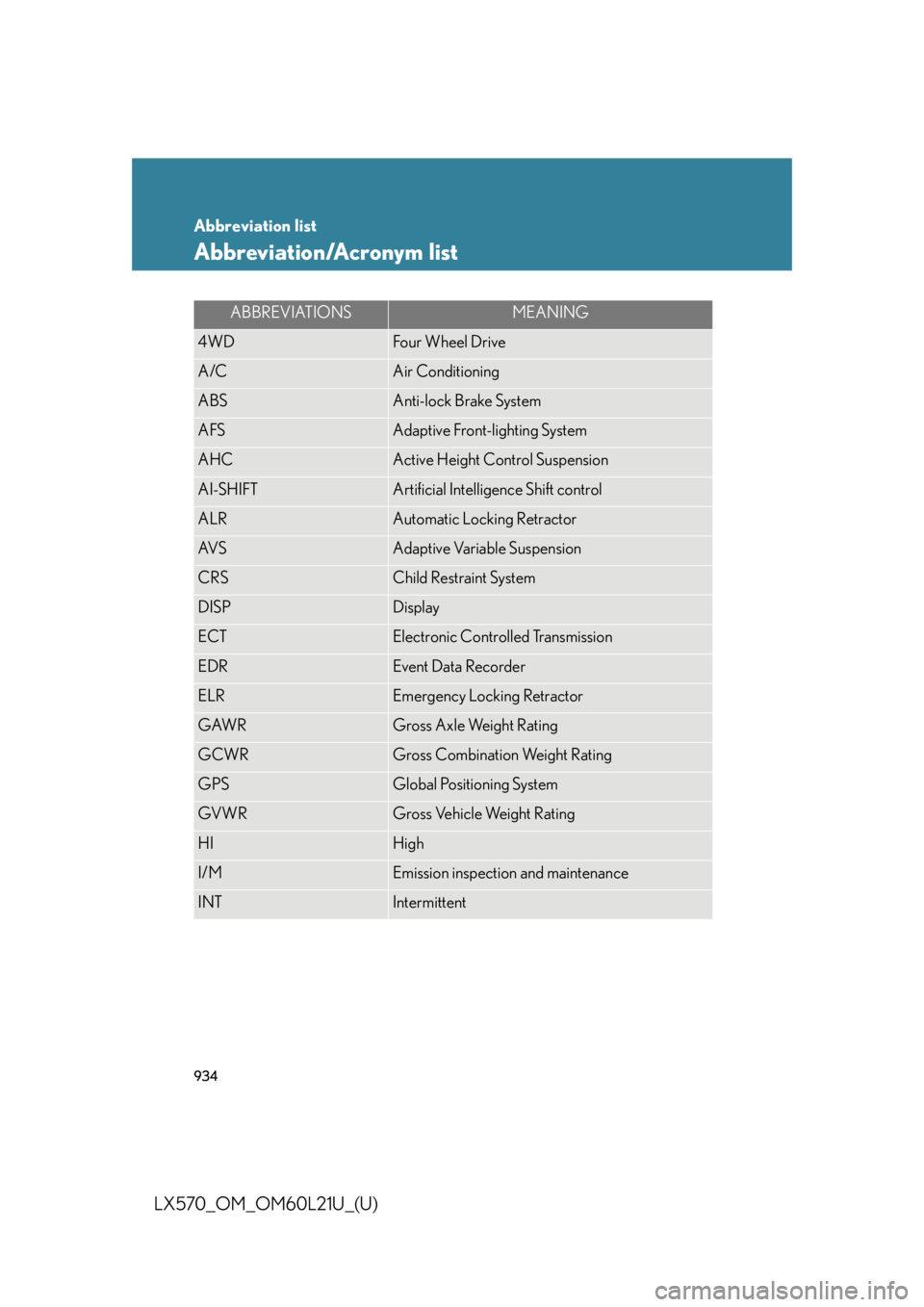
LX570_OM_OM60L21U_(U) Abbreviation list
Abbreviation/Acronym list ABBREVIATIONS MEANING
4WD Four Wheel Drive
A/C Air Conditioning
ABS Anti-lock Brake System
AFS Adaptive Front-lighting System
AHC Active Height Control Suspension
AI-SHIFT Artificial Intelligence Shift control
ALR Automatic Locking Retractor
AV S Adaptive Variable Suspension
CRS Child Restraint System
DISP Display
ECT Electronic Controlled Transmission
EDR Event Data Recorder
ELR Emergency Locking Retractor
GAWR Gross Axle Weight Rating
GCWR Gross Combination Weight Rating
GPS Global Positioning System
GVWR Gross Vehicle Weight Rating
HI High
I/M Emission inspection and maintenance
INT Intermittent