lock LEXUS LX570 2014 Owners Manual
[x] Cancel search | Manufacturer: LEXUS, Model Year: 2014, Model line: LX570, Model: LEXUS LX570 2014Pages: 956, PDF Size: 16.4 MB
Page 562 of 956

5623-3. Using the audio system
LX570_OM_OM60L21U_(U) Selecting, fast forwarding or rewinding a track
■ Selecting one track at a time
Turn the “TUNE•SCROLL” knob or press “ ” or “ ” on the
“PRST•TRACK” button to select the desired track.
■ Selecting a track from the list
Touch the track name on the screen to display the following track
list screen.
Touch the desired track number. ,
: Touch to move the list up or
down by 5 track groups.
“PRST•TRACK” button: Press “ ”
or “ ” on the “PRST•TRACK” but-
ton to scroll through the track list
one by one.
“TUNE•SCROLL” knob: Turn the
knob clockwise or counterclock-
wise to quickly scroll up or down
the track list.
, : If appears to the right of
an item name, the com-
plete name is too long for
the screen. Touch to
scroll to the end of the
name. Touch to move to
the beginning of the name.
■ Fast forwarding or rewinding a track
To fast forward or rewind, press and hold “ ” or “ ” on the
“PRST•TRACK” button. STEP 1
STEP 2
Page 577 of 956

5773-4. Using the rear se at entertainment system
3
Interior features
LX570_OM_OM60L21U_(U) Headphone jacks
To listen to the rear audio, open the
cover and use headphones.
To use the headphones
Connect them to the jack.
To adjust the volume
Turn the knob clockwise to
increase the volume. Turn the
knob counterclockwise to
decrease the volume.
Changing the source
Press the “SOURCE”, button to
display the audio source selection
screen.
Turning on the audio source
selection screen
Selecting an icon
Inputting the selected icon
Select an audio source.STEP 1
STEP 2
Page 579 of 956

5793-4. Using the rear se at entertainment system
3
Interior features
LX570_OM_OM60L21U_(U) Touch the “Rear” tab on the
screen.
Touch the desired butto n. The selected butto n indicator is high-
lighted. “POWER”: Turns the rear screen on or off.
“Rear System Lock”: Locks the system so passengers in the rear seats
cannot operate the rear entertainment system.
“Speaker Output”: Enables the front speakers to output the front audio
system’s audio source.STEP 2
■
The rear seat entertainment system can be used when
The “ENGINE START STOP” switch is in ACCESSORY or IGNITION ON mode. ■
When appears on the screen
It indicates that the selected icon cannot be used at this time. STEP 3
Page 603 of 956
6033-4. Using the rear se at entertainment system
3
Interior features
LX570_OM_OM60L21U_(U) ■ Parental lock
Select “Parental Lock”.
Enter the 4-digit personal code on the “Enter Key Code” screen.If you enter wrong numbers, select to delete the numbers.
Select a parental level (1 - 8). ( P. 5 2 8 )
■ Setting sound dynamic range
The difference between the lowest volume and the highest volume can
be adjusted.
Select “Sound Dynamic Range”.
Select “MAX”, “STD” or “MIN”.
■ Entering a language code
If you select “Other” on the “A udio Language” screen, “Subtitle
Language” screen or “DVD Language” screen, you can select a
language by entering the 4-digit la nguage code if that language is
available.
Enter the 4-digit language code. ( P. 522)If you enter wrong numbers, select to delete the numbers.
Select “OK”. STEP 1
STEP 2
STEP 3
STEP 1
STEP 2
STEP 1
STEP 2
Page 687 of 956

6853-6. Using the interior lights
3
Interior features
LX570_OM_OM60L21U_(U) Luggage compartment light
Off
Door position■
Illuminated entry system
The lights automatically turn on/off according to “ENGINE START STOP” switch
mode, the presence of the electronic key, whether the doors are locked/unlocked,
and whether the doors are open/closed. ■
To prevent battery discharge
If the interior lights remain on when the “ENGINE START STOP” switch is turned
off, the lights will go off automatically after 20 minutes. ■
Customization
Settings (e.g. Time period before the inte rior lights turn off.) can be changed.
(Customizable features P. 9 0 6 ) Luggage compartment light
Page 689 of 956
6873-7. Using the storage features
3
Interior features
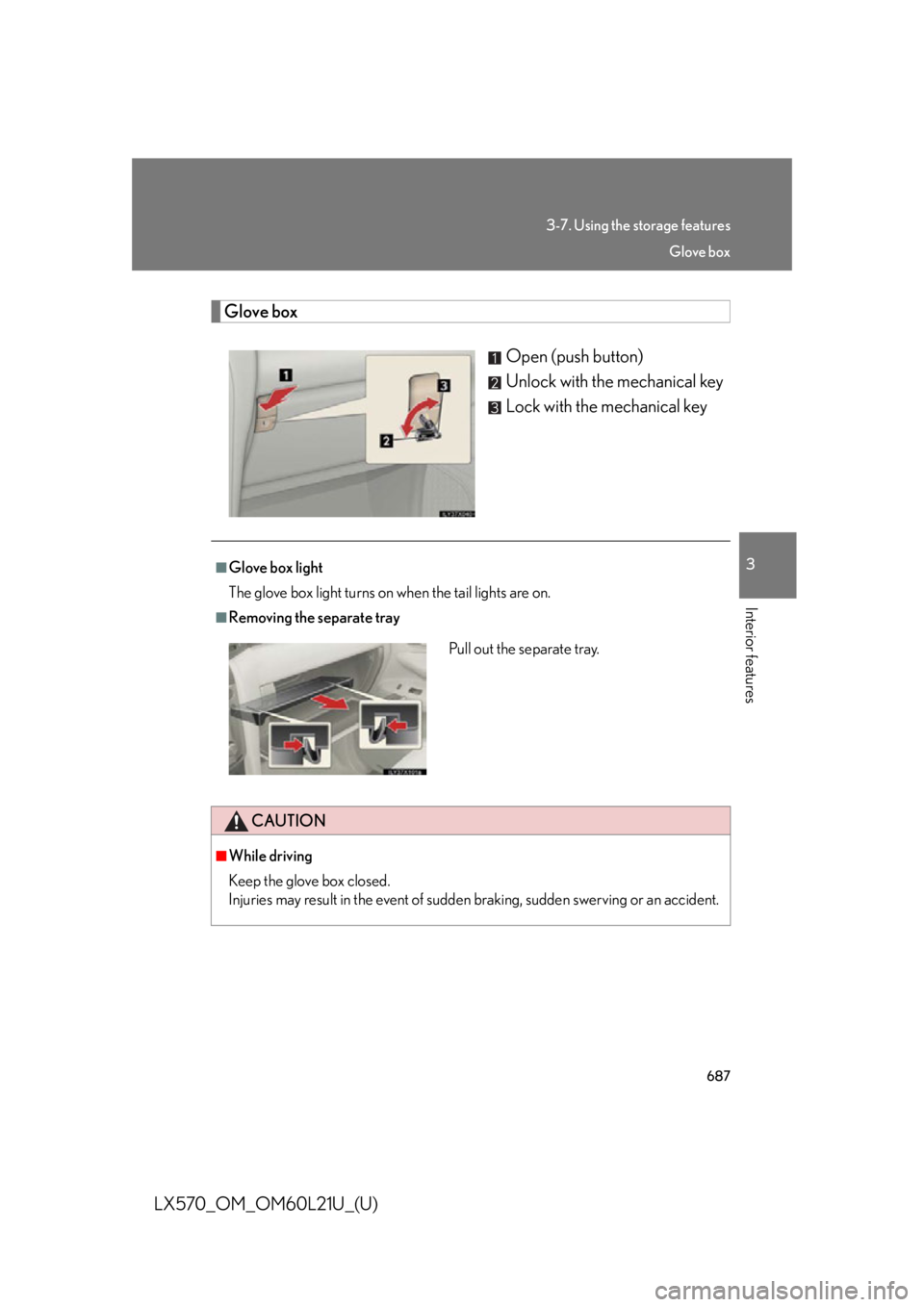
LX570_OM_OM60L21U_(U) Glove box
Open (push button)
Unlock with the mechanical key
Lock with the mechanical key■
Glove box light
The glove box light turns on when the tail lights are on. ■
Removing the separate tray
CAUTION■
While driving
Keep the glove box closed.
Injuries may result in the event of sudden braking, sudden swerving or an accident.Pull out the separate tray. Glove box
Page 690 of 956
6883-7. Using the storage features
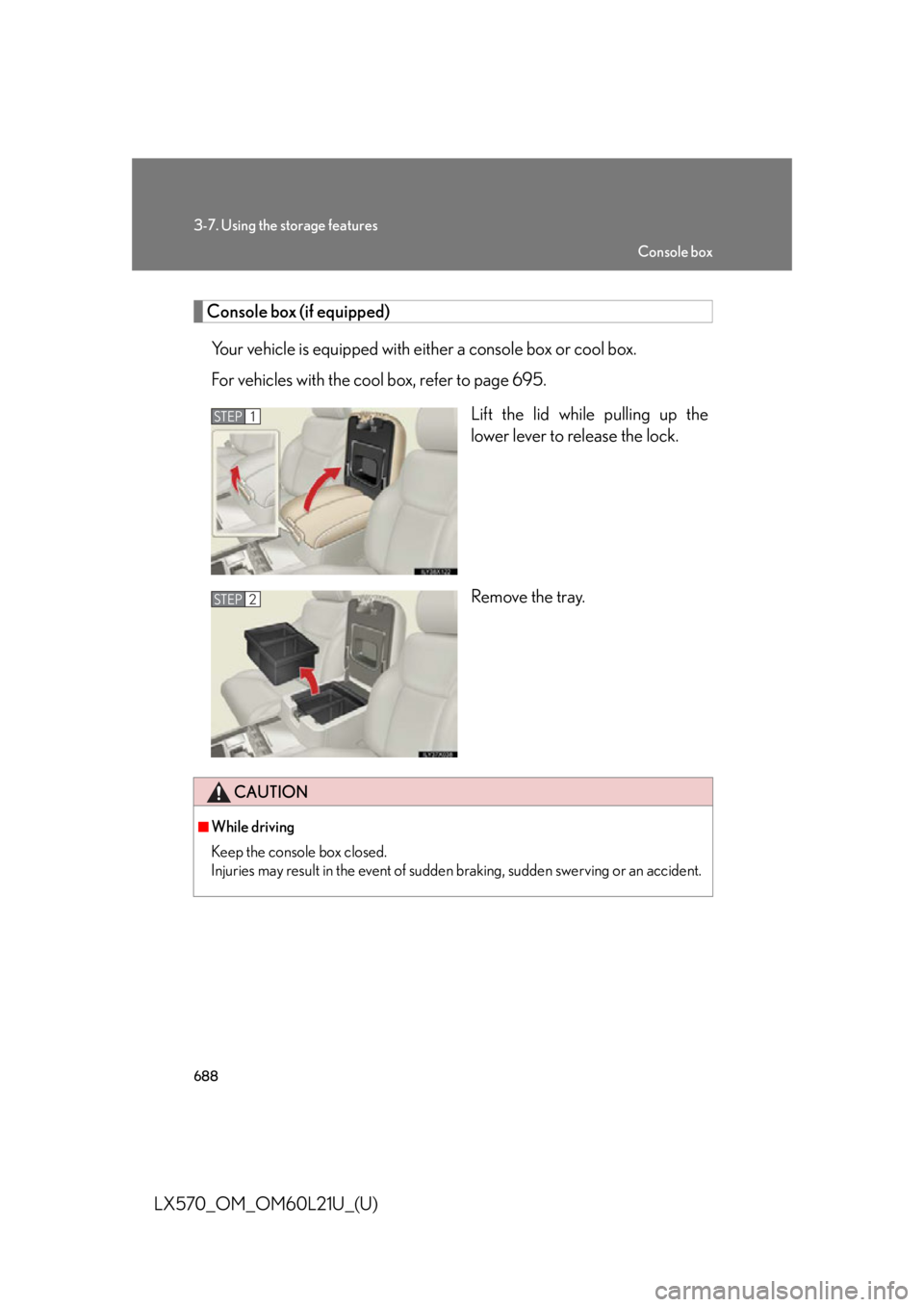
LX570_OM_OM60L21U_(U) Console box (if equipped)
Your vehicle is equipped with either a console box or cool box.
For vehicles with the cool box, refer to page 695.
Lift the lid while pulling up the
lower lever to release the lock.
Remove the tray.STEP 1
STEP 2
CAUTION■
While driving
Keep the console box closed.
Injuries may result in the event of sudden braking, sudden swerving or an accident. Console box
Page 696 of 956
6943-7. Using the storage features
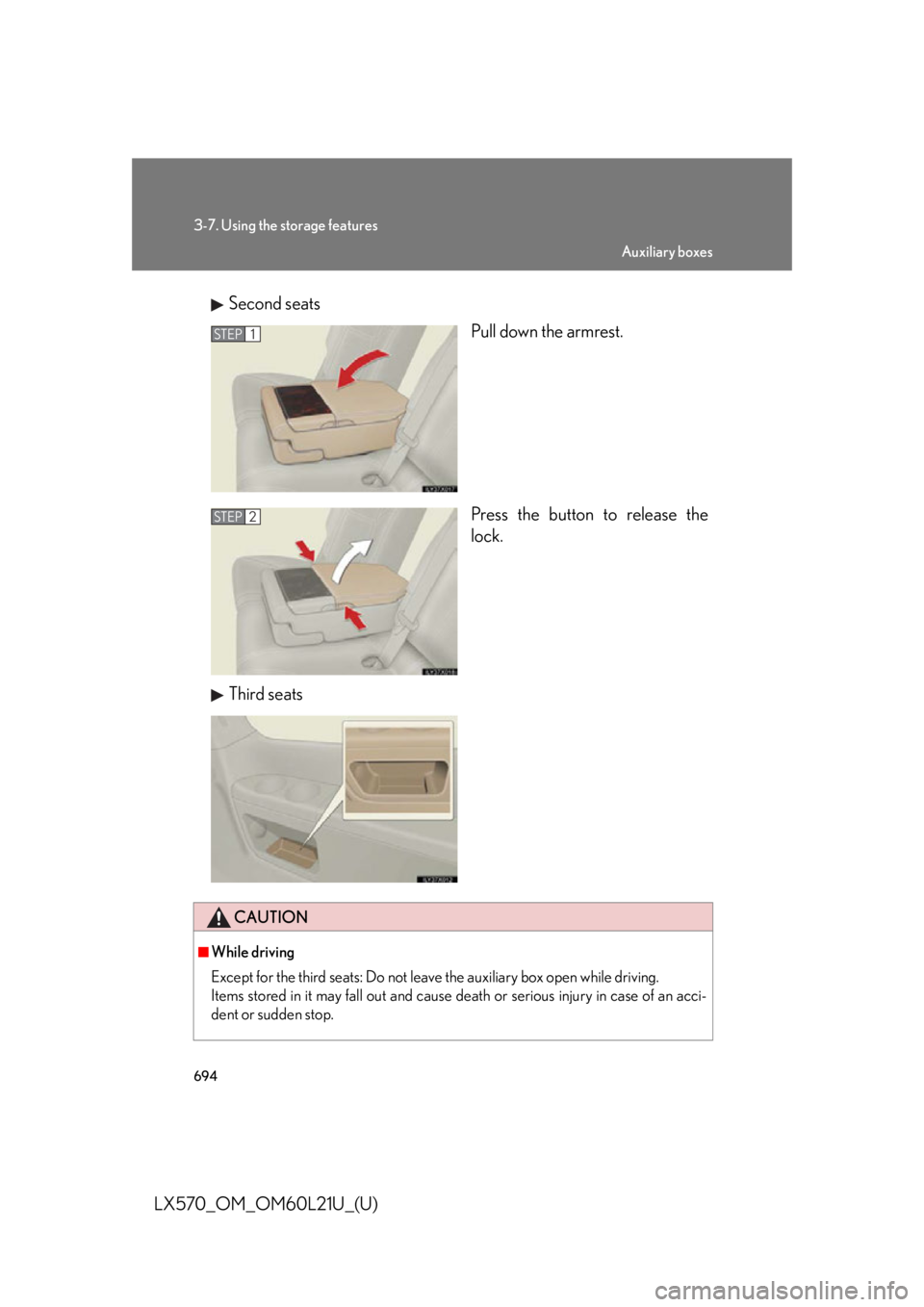
LX570_OM_OM60L21U_(U) Second seats
Pull down the armrest.
Press the button to release the
lock.
Third seats STEP 1
STEP 2
CAUTION■
While driving
Except for the third seats: Do not leave the auxiliary box open while driving.
Items stored in it may fall out and cause de ath or serious injury in case of an acci-
dent or sudden stop. Auxiliary boxes
Page 697 of 956

6953
Interior features
LX570_OM_OM60L21U_(U) 3-8. Other interior features
Cool box
: If equipped■
While the cool box is on
The front air conditioning system cannot be turned off. ■
When the outside temperature is 32°F (0°C) or below
The cool box may not operate.While the engine is running , the cool box, which is cooled by the air condi-
tioning, can be used.
Lift the lid while pulling up the
lower lever to release the lock.
On/off When on, the indicator light
comes on.
If the front air conditioning sys-
tem is not in use, the front air
conditioning system is automati-
cally turned on when the cool
box is turned on.STEP 1
STEP 2
Page 707 of 956
7053-8. Other interior features
3
Interior features
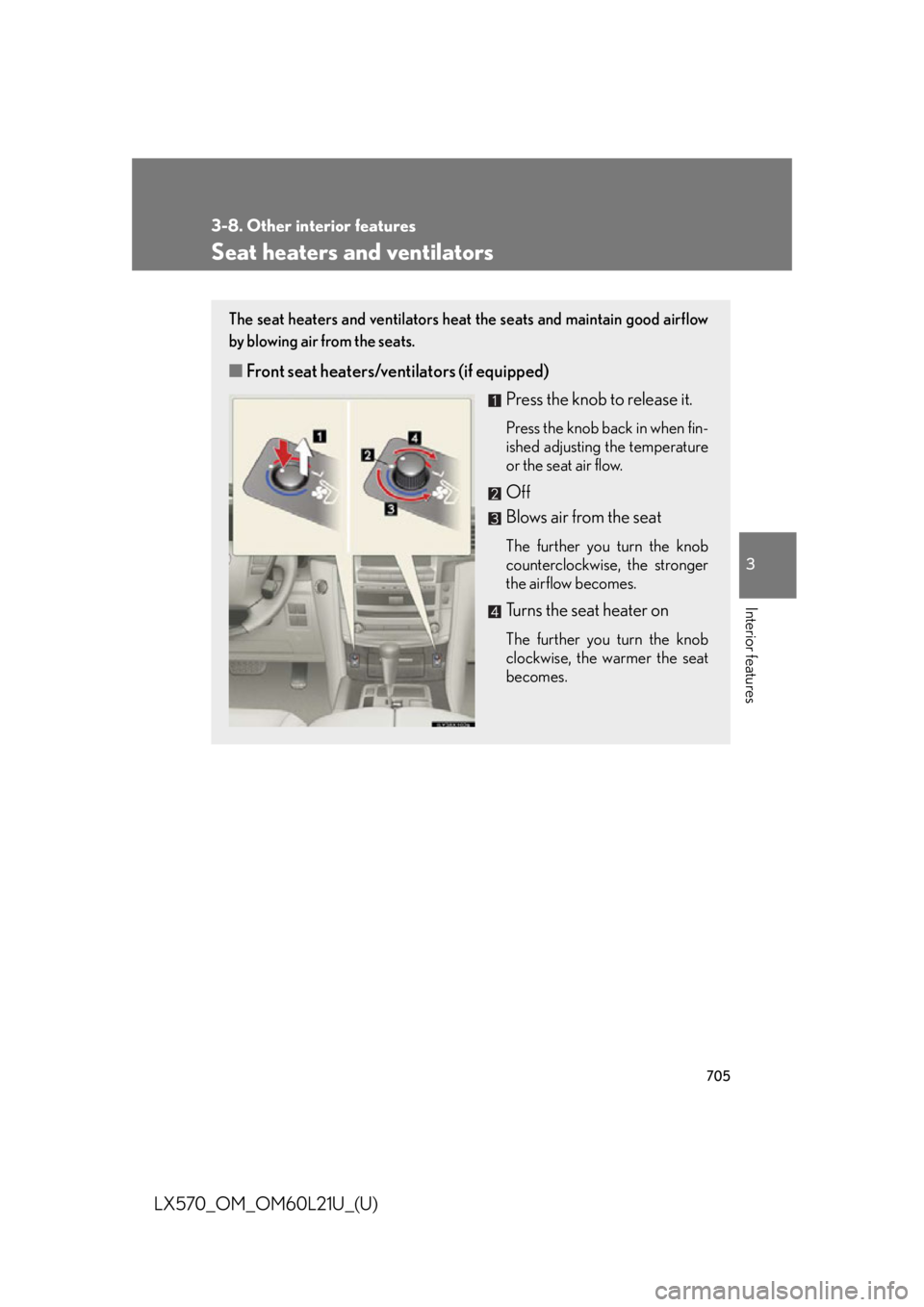
LX570_OM_OM60L21U_(U) Seat heaters and ventilators The seat heaters and ventilators heat the seats and maintain good airflow
by blowing air from the seats.
■ Front seat heaters/ventilators (if equipped)
Press the knob to release it. Press the knob back in when fin-
ished adjusting the temperature
or the seat air flow.
Off
Blows air from the seat The further you turn the knob
counterclockwise, the stronger
the airflow becomes.
Turns the seat heater on The further you turn the knob
clockwise, the warmer the seat
becomes.