ad blue LEXUS LX570 2014 User Guide
[x] Cancel search | Manufacturer: LEXUS, Model Year: 2014, Model line: LX570, Model: LEXUS LX570 2014Pages: 956, PDF Size: 16.4 MB
Page 310 of 956
3102-4. Using other driving systems
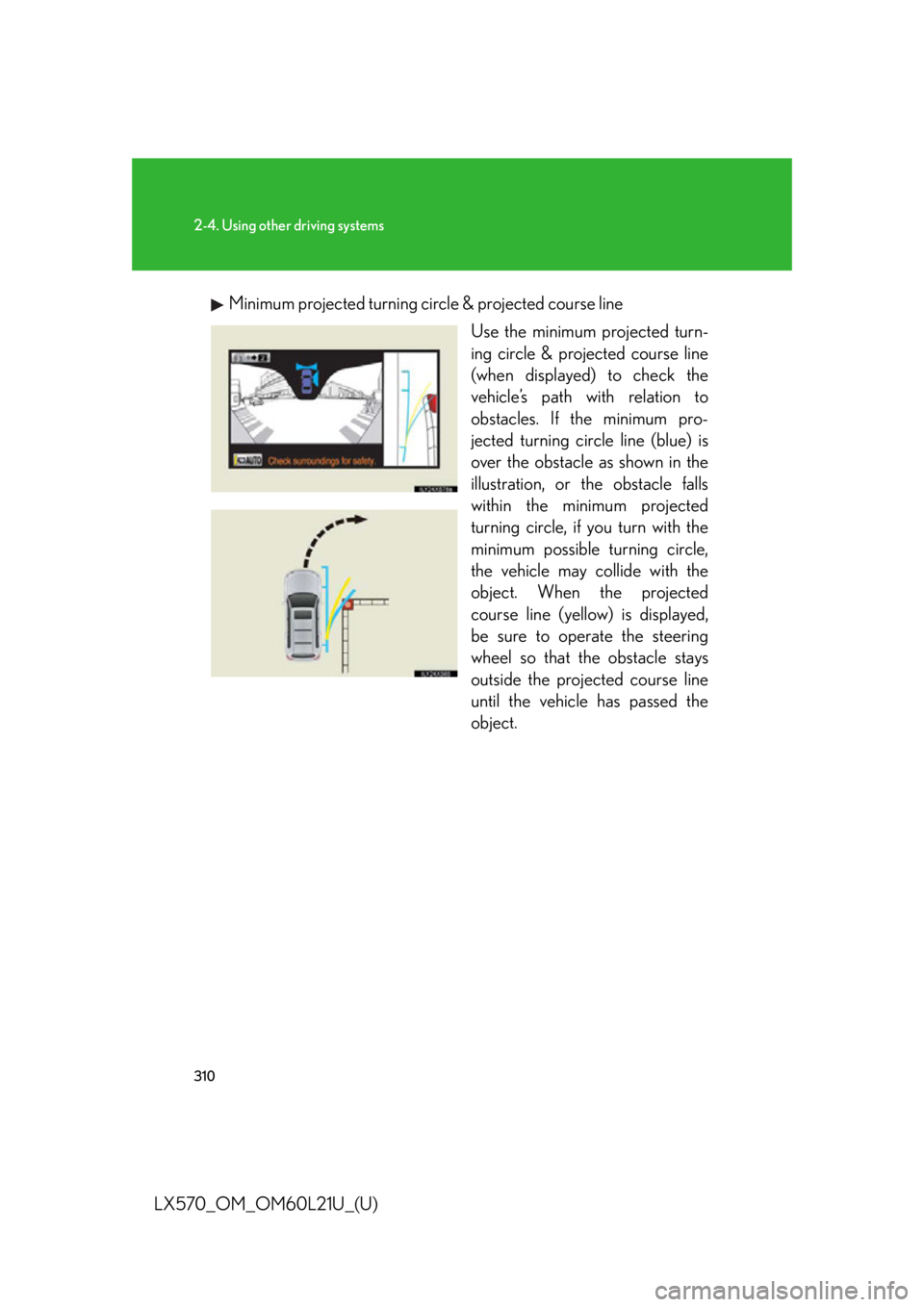
LX570_OM_OM60L21U_(U) Minimum projected turning circ le & projected course line
Use the minimum projected turn-
ing circle & projected course line
(when displayed) to check the
vehicle’s path with relation to
obstacles. If the minimum pro-
jected turning circle line (blue) is
over the obstacle as shown in the
illustration, or the obstacle falls
within the minimum projected
turning circle, if you turn with the
minimum possible turning circle,
the vehicle may collide with the
object. When the projected
course line (yellow) is displayed,
be sure to operate the steering
wheel so that the obstacle stays
outside the projec ted course line
until the vehicle has passed the
object.
Page 400 of 956

400
LX570_OM_OM60L21U_(U) 3-1. Using the touch screen
Touch screen ........................... 402
Set up screen ........................... 410
Information screen................. 427
Voice command system ....... 429
3-2. Using the air conditioning
system and defogger
Front air conditioning
system..................................... 440
Rear air conditioning
system..................................... 452
Rear window and outside
rear view mirror
defoggers .............................. 456
Windshield wiper de-icer..... 457 3-3. Using the audio system
Audio system type.................. 458
Using the radio....................... 483
Using the CD/
DVD player .......................... 503
Playing an audio CD and
MP3/WMA discs .............. 505
Playing DVD video .................. 511
CD/DVD player and DVD
video disc information........ 525
Listening to Bluetooth ®
audio........................................ 537
Listening to a USB
memory ................................. 548
Listening to an iPod............... 558
Optimal use of the audio/
video system......................... 568
Using the AUX port .............. 570
Using the steering wheel
audio switches ...................... 572
3-4. Using the rear seat
entertainment system
Rear seat entertainment
system features .................... 575
Using the radio....................... 583
Using the radio (internet
radio broadcast) ................. 585
Playing an audio CD/
CD text .................................. 586
Page 401 of 956

Interior features
3
401
LX570_OM_OM60L21U_(U) Playing WMA/
MP3 discs .............................. 587
Playing a Bluetooth ®
audio....................................... 589
Playing a USB memory ........ 592
Playing iPod ............................. 594
Playing DVD video ................ 596
DVD player and DVD
video disc information ....... 605
Using the video mode ........... 607
3-5. Using the hands-free system
(for cellular phone)
Hands-free system
(for cellular phone) .............. 612
Using a Bluetooth ®
phone ....................................... 621
Setting the hands-free
system (for cellular
phone)..................................... 644
Setting the Bluetooth ®
........ 669
3-6. Using the interior lights
Interior lights list ..................... 682
• Interior lights ........................... 683
• Personal lights ........................ 684
• Luggage compartment
light.............................................. 685 3-7. Using the storage features
List of storage features......... 686
• Glove box ................................. 687
• Console box............................ 688
• Overhead console ................ 689
• Cup holders ............................. 690
• Bottle holders .......................... 692
• Card holder.............................. 693
• Auxiliary boxes ....................... 693
3-8. Other interior features
Cool box ................................... 695
Sun visors .................................. 697
Vanity mirrors ......................... 698
Ashtrays.................................... 699
Cigarette lighter .................... 700
Power outlets ........................... 701
Heated steering wheel ........ 703
Seat heaters and
ventilators ............................. 705
Armrest .................................... 708
Assist grips ............................... 709
Floor mats ................................. 710
Luggage compartment
features ................................... 712
Garage door opener ............. 714
Safety Connect ...................... 722
Page 411 of 956

4113-1. Using the touch screen
3
Interior features
LX570_OM_OM60L21U_(U) * : Bluetooth is a registered tr ademark of Bluetooth SIG, Inc.Switch Pa g e
“Display” P. 4 0 3 /
Navigation System Owner’s Manual
“General” P. 4 1 2 /
Navigation System Owner’s Manual
“Voice” P. 4 2 3 /
Navigation System Owner’s Manual
“Navigation” Navigation System Owner’s Manual
“Vehicle” P. 4 2 4 /
Navigation System Owner’s Manual
“Phone” P. 4 2 5
“Bluetooth
* ” P. 4 2 5
“A u d i o ” P. 4 2 6
“Other ” Navigation System Owner’s Manual
Page 422 of 956

4223-1. Using the touch screen
LX570_OM_OM60L21U_(U) ■ Delete personal data
This function is not available while driving.
Touch “Delete Personal Data” on the “General Settings” screen.
Touch “Delete”. Check carefully beforehand, as
data cannot be retrieved once
deleted.
To u c h “ Ye s ” .The following personal data can be deleted or returned to their default set-
tings:
• Maintenance conditions
• Maintenance information off setting
• Address book
•Areas to avoid
•Previous points
• Route guidance
• Route trace
• Phonebook data
• Call history data
• Speed dial data
•Bluetooth ®
phone data
• Phone sound settings
• Phone display settings
• Message settings
• Audio setting
•Bluetooth ®
audio setting
• Startup image data
• Screen off image data STEP 1
STEP 2
STEP 3
Page 425 of 956

4253-1. Using the touch screen
3
Interior features
LX570_OM_OM60L21U_(U) Phone settings
Touch “Phone” on the “Setup” screen.
Phone sound settings Detailed information: P. 6 4 4
Phonebook settings Detailed information: P. 6 4 6
Message settings Detailed information: P. 6 6 2
Phone display settings Detailed information: P. 6 6 6
Bluetooth ®
Settings
Touch “Bluetooth
* ” on the “Setup” screen.
Registered devices Detailed information: P. 6 7 0
Selecting a Bluetooth ®
phoneDetailed information: P. 6 76
Selecting portable player Detailed information: P. 6 7 7
Detailed Bluetooth ®
settingsDetailed information: P. 6 7 8
* : Bluetooth is a registered trade-
mark of Bluetooth SIG, Inc.
Page 436 of 956

4363-1. Using the touch screen
LX570_OM_OM60L21U_(U) ■ Select audio mode
When expanded voice commands are turned “On”. ( P. 433)
* : Bluetooth is a registered tr ademark of Bluetooth SIG, Inc.Command
Action Shortcut
Menu
“Radio” Sets the audio mode to radio. O
“A M ” Selects the AM band. O
“FM” Selects the FM band. O
“Satellite radio” Selects the satellite radio mode. O
“Disc” Selects the disc audio mode. O
“Auxiliary” Selects the auxiliary audio mode. O
“Bluetooth
* audio” Selects the Bluetooth ®
audio mode. O
“iPod” Selects the iPod audio mode. O
“USB audio” Selects the USB audio mode. O
“Audio on” Turns the audio system on. O
“Audio off” Turns the audio system off. O
Page 459 of 956

4593-3. Using the audio system
3
Interior features
LX570_OM_OM60L21U_(U) Ti t l e Pa g e
Using the radio P. 4 8 3
Using the CD/DVD player P. 5 0 3
Playing an audio CD and MP3/WMA discs P. 5 0 5
Playing DVD video P. 5 1 1
CD/DVD player and DVD video disc information P. 5 2 5
Listening to Bluetooth ®
audio P. 5 3 7
Listening to a USB memory P. 5 4 8
Listening to an iPod P. 5 5 8
Optimal use of the audio/video system P. 5 6 8
Using the AUX port P. 5 7 0
Using the steering wheel audio switches P. 5 7 2
Page 486 of 956
4863-3. Using the audio system
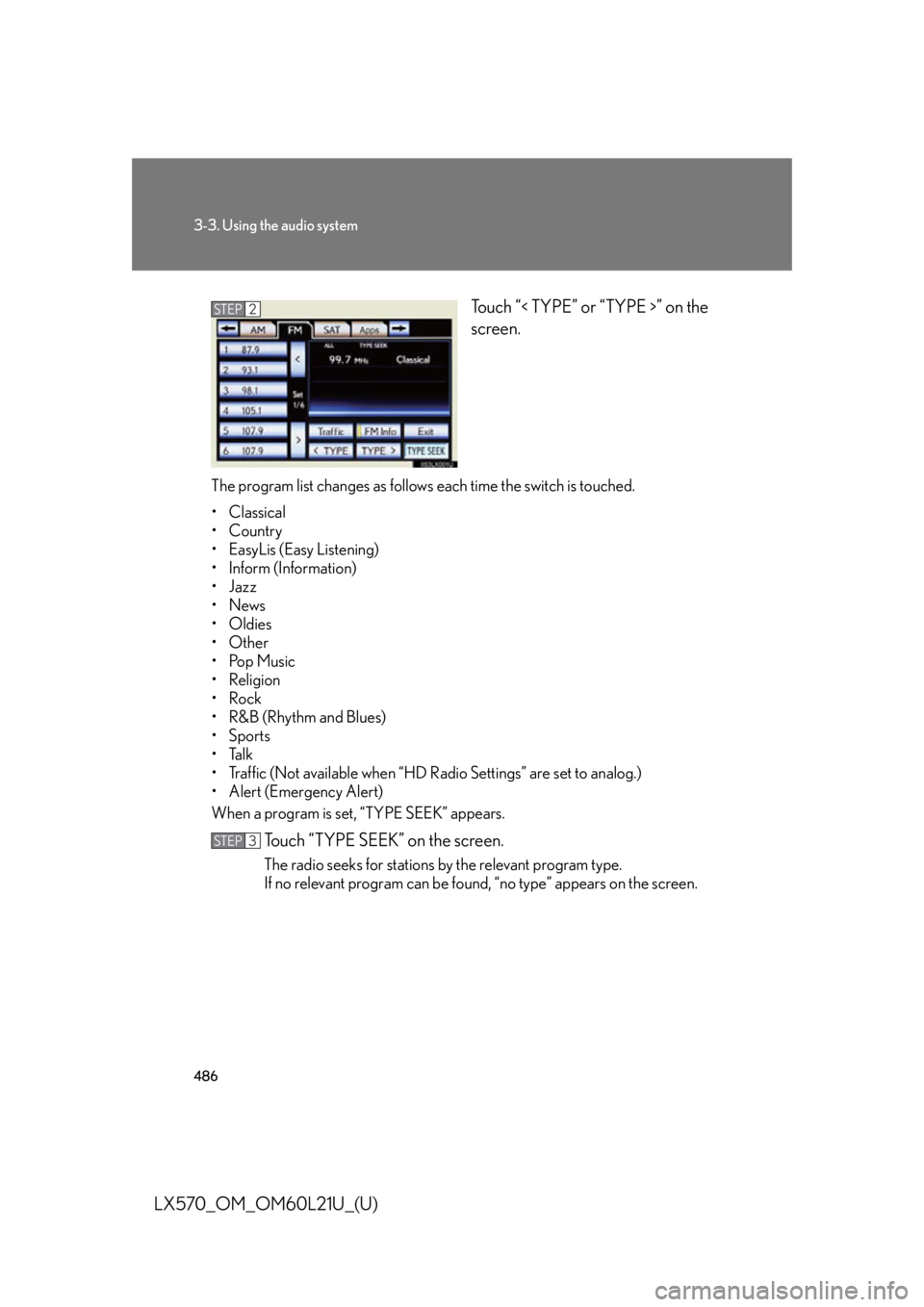
LX570_OM_OM60L21U_(U) Touch “< TYPE” or “TYPE >” on the
screen.
The program list changes as follows each time the switch is touched.
• Classical
•Country
• EasyLis (Easy Listening)
• Inform (Information)
•Jazz
•News
• Oldies
•Other
•Pop Music
• Religion
•Rock
•R&B (Rhythm and Blues)
•Sports
•Talk
• Traffic (Not available when “HD Radio Settings” are set to analog.)
• Alert (Emergency Alert)
When a program is set, “TYPE SEEK” appears.
Touch “TYPE SEEK” on the screen. The radio seeks for stations by the relevant program type.
If no relevant program can be foun d, “no type” appears on the screen.STEP 2
STEP 3
Page 496 of 956
4963-3. Using the audio system
LX570_OM_OM60L21U_(U) Internet radio broadcast (vehicles with the navigation system)
One of Apps’ features is the ability to listen to internet radio. In order to
use this service, an Apps compat ible phone and the navigation system
need to be set. For details, ref er to the “Navigation System Owner’s
Manual”.
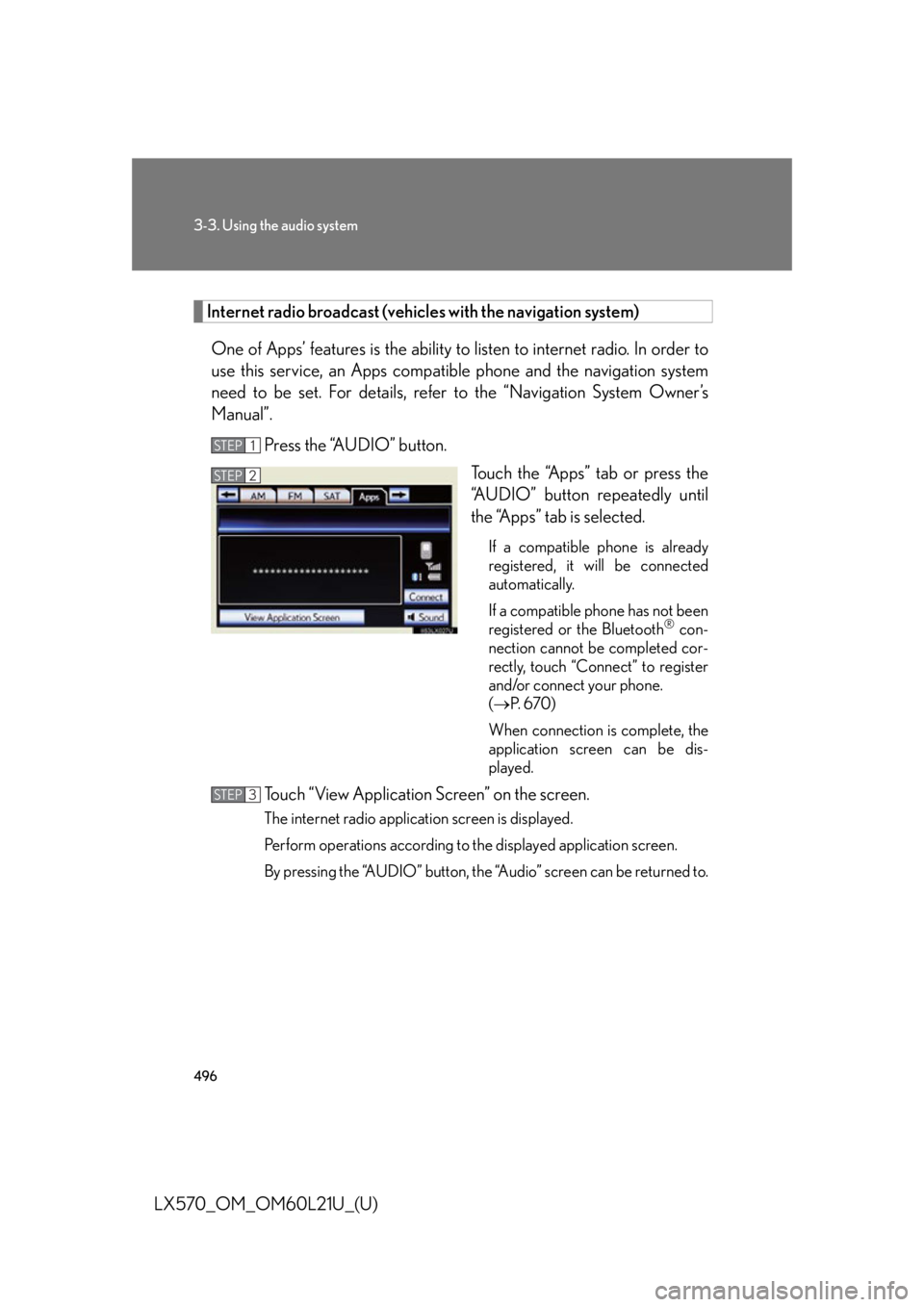
Press the “AUDIO” button.
Touch the “Apps” tab or press the
“AUDIO” button repeatedly until
the “Apps” tab is selected. If a compatible phone is already
registered, it will be connected
automatically.
If a compatible phone has not been
registered or the Bluetooth ®
con-
nection cannot be completed cor-
rectly, touch “Connect” to register
and/or connect your phone.
( P. 6 7 0 )
When connection is complete, the
application screen can be dis-
played.
Touch “View Application Screen” on the screen. The internet radio application screen is displayed.
Perform operations according to the displayed application screen.
By pressing the “AUDIO” button, the “Audio” screen can be returned to.STEP 1
STEP 2
STEP 3