ECO mode LEXUS LX570 2014 Owner's Manual
[x] Cancel search | Manufacturer: LEXUS, Model Year: 2014, Model line: LX570, Model: LEXUS LX570 2014Pages: 956, PDF Size: 16.4 MB
Page 186 of 956

1862-1. Driving procedures
LX570_OM_OM60L21U_(U) ■
When driving with the cruise control or radar cruise control activated
Even when performing the following acti ons with the intent of enabling engine
braking, engine braking will not activate because cruise control or radar cruise
control will not be canceled. ●
While driving in “D” position (vehicles wi th paddle shift switches) or “S” mode,
downshifting to “5” or “4”. ( P. 2 3 0 , 2 3 4 )●
When switching the driving mode to power mode while driving in “D” position.
( P. 181)■
Second start mode automatic deactivation
Second start mode is automatically deactivated if the engine is turned off after driv-
ing in second start mode. ■
If the shift lever cannot be shifted from “P”
P. 8 6 5■
If the “S” indicator does not come on ev en after shifting the shift lever to “S”
This may indicate a malfunction in the automatic transmission system. Have the
vehicle inspected by your Lexus dealer immediately.
(In this situation, the vehicle will operate as if the shift lever is in “D”.) ■
AI-SHIFT
The AI-SHIFT automatically shifts the gear to the suitable position according to the
driver performance and driving conditions.
The AI-SHIFT automatically operates when the shift lever is in the “D” position.
(Shifting the shift lever to the “S” position cancels the function.)
Page 195 of 956
1952-2. Instrument cluster
2
When driving
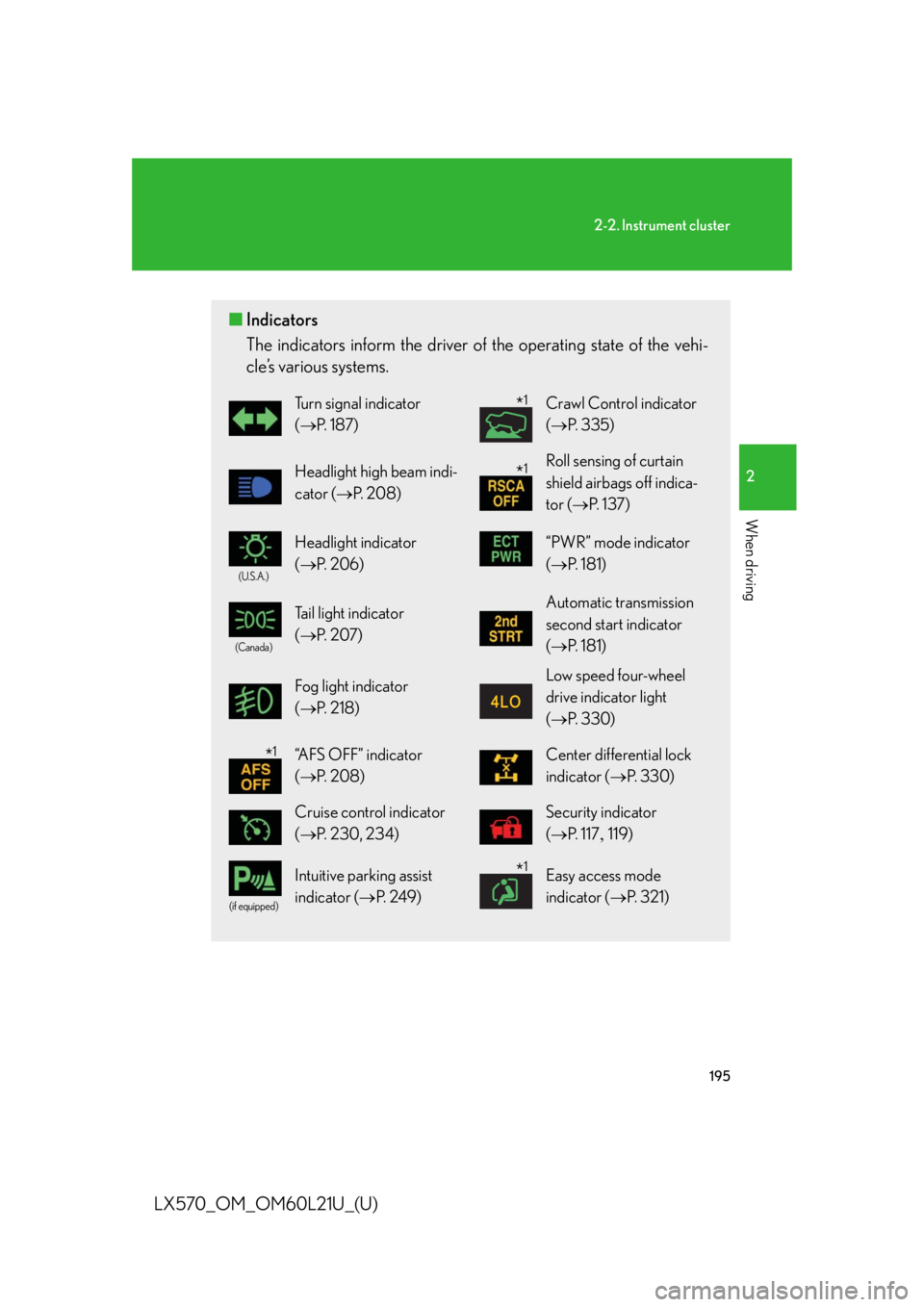
LX570_OM_OM60L21U_(U) ■ Indicators
The indicators inform the driver of th e operating state of the vehi-
cle’s various systems. Turn signal indicator
( P. 1 8 7 ) Crawl Control indicator
( P. 335)
Headlight high beam indi-
cator ( P. 2 0 8 ) Roll sensing of curtain
shield airbags off indica-
tor ( P. 1 3 7 )(U.S.A.)
Headlight indicator
( P. 2 0 6 ) “PWR” mode indicator
( P. 181)(Canada)
Tail light indicator
( P. 2 0 7 ) Automatic transmission
second start indicator
( P. 181)
Fog light indicator
( P. 2 1 8 ) Low speed four-wheel
drive indicator light
( P. 3 3 0 )
“AFS OFF” indicator
( P. 2 0 8 ) Center differential lock
indicator ( P. 3 3 0 )
Cruise control indicator
( P. 230, 234) Security indicator
( P. 117 119)(if equipped)
Intuitive parking assist
indicator ( P. 2 4 9 ) Easy access mode
indicator ( P. 3 2 1 )* 1
* 1
* 1
* 1
Page 196 of 956
1962-2. Instrument cluster
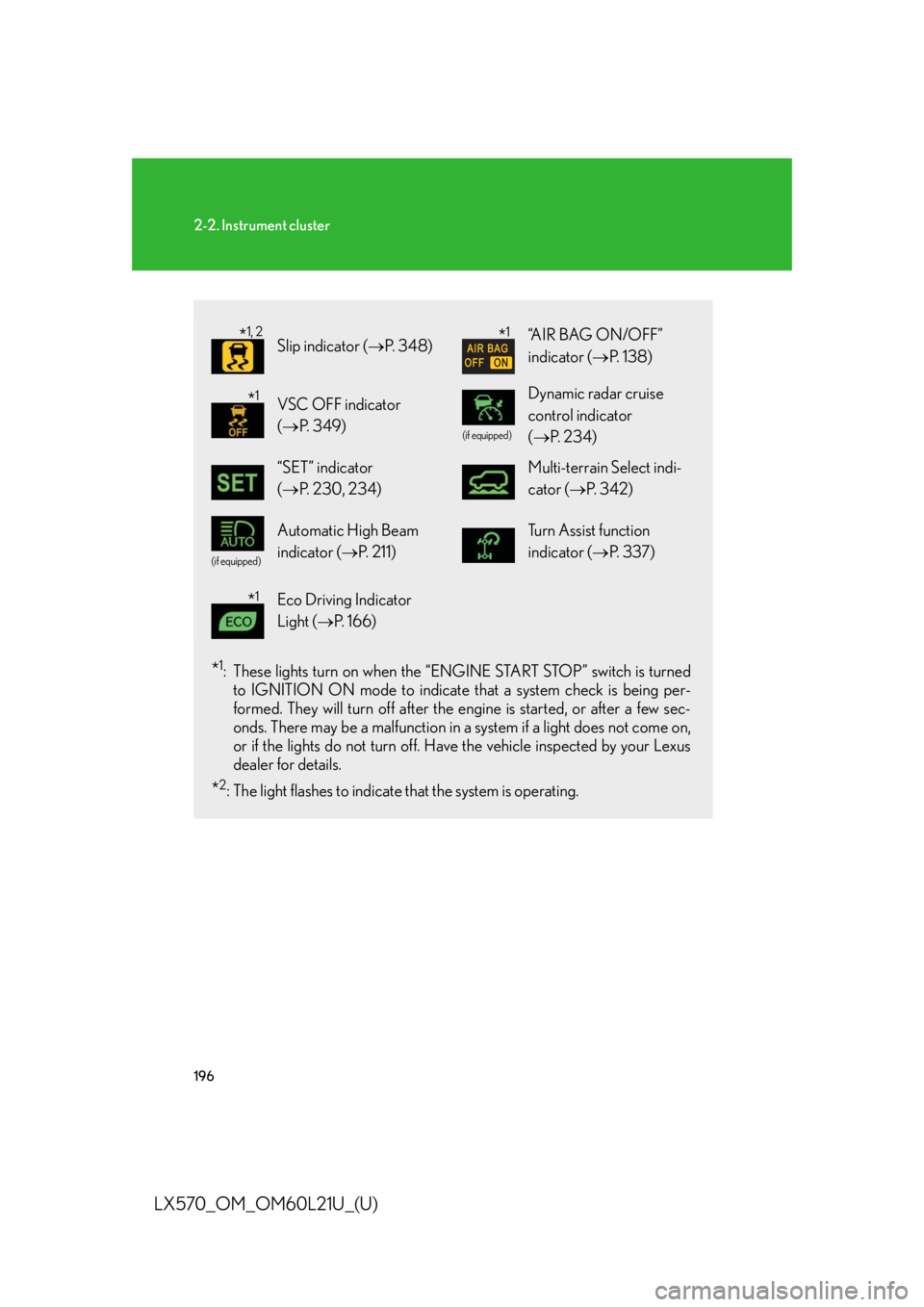
LX570_OM_OM60L21U_(U) * 1
: These lights turn on when the “E NGINE START STOP” switch is turned
to IGNITION ON mode to indicate that a system check is being per-
formed. They will turn off after the en gine is started, or after a few sec-
onds. There may be a malfunction in a system if a light does not come on,
or if the lights do not turn off. Have the vehicle inspected by your Lexus
dealer for details.
* 2
: The light flashes to indicate that the system is operating. Slip indicator ( P. 3 4 8 ) “AIR BAG ON/OFF”
indicator ( P. 1 3 8 )
VSC OFF indicator
( P. 3 4 9 ) (if equipped)
Dynamic radar cruise
control indicator
( P. 2 3 4 )
“SET” indicator
( P. 230, 234) Multi-terrain Select indi-
cator ( P. 3 4 2 )(if equipped)
Automatic High Beam
indicator ( P. 211) Tu r n A s s i s t f u n c t i o n
indicator ( P. 3 3 7 )
Eco Driving Indicator
Light ( P. 1 6 6 )* 1, 2
* 1
* 1
* 1
Page 209 of 956

2092-3. Operating the lights and wipers
2
When driving
LX570_OM_OM60L21U_(U) ■
Daytime running light system ●
To make your vehicle more visible to other drivers, the parking lights turn on
automatically (at an increased intensity) whenever the engine is started and the
parking brake is released. Daytime running lights are not designed for use at
night. ●
Compared to turning on th e headlights, the daytime running light system offers
greater durability and consumes less electricity, so it can help improve fuel
economy.■
Headlight control sensor
■
Automatic light off system ●
When the headlights are on: The headlights and tail lights turn off 30 seconds
after a door is opened and closed if the “ENGINE START STOP” switch has
been switched to AC CESSORY or OFF mode.●
When only the tail lights are on: The tail lights turn off automatically if the
“ENGINE START STOP” switch is switched to ACCESSORY or OFF mode
and driver’s door is opened.
To turn the lights on again, turn the “ENGINE START STOP” switch to IGNITION
ON mode, or turn the light switch off once and then back to the
or
position. The sensor may not function properly if an
object is placed on the sensor, or anything
that blocks the sensor is affixed to the wind-
shield.
Doing so interferes with the sensor detecting
the level of ambient light and may cause the
automatic headlight system to malfunction.
Page 224 of 956

2242-3. Operating the lights and wipers
LX570_OM_OM60L21U_(U) ■
Effects of vehicle speed on wiper operation
With the settings other than “AUTO” also, the time until drip prevention wiper
sweep occurs is changed depending on vehicle speed.
Ty p e A
With selected, wiper operation will be switched from low speed to intermit-
tent wiper operation only when the vehicle is stationary. (However, when the sensor
sensitivity is adjusted to the highest level, the mode cannot be switched.)
Ty p e B
With selected, wiper operation will be switched from low speed to intermit-
tent wiper operation only when the vehicle is stationary. (However, when the sensor
sensitivity is adjusted to the highest level, the mode cannot be switched.) ■
If no windshield washer fluid sprays
Check that the washer nozzles are not blocked if there is washer fluid in the wind-
shield washer fluid reservoir.
CAUTION■
Caution regarding the use of windshield wipers in “AUTO” mode
The windshield wipers may operate unexpect edly if the sensor is touched or the
windshield is subject to vibration in “AUTO” mode. Take care that your fingers etc.
anything else does not become caught in the windshield wipers. ■
Caution regarding the use of washer fluid
When it is cold, do not use the washer fluid until the windshield becomes warm. The
fluid may freeze on the windshield and cause low visibility. This may lead to an acci-
dent, resulting in death or serious injury.
Page 228 of 956
2282-3. Operating the lights and wipers
LX570_OM_OM60L21U_(U) ■
The rear window wiper and washer can be operated when
The “ENGINE START STOP” switch is in IGNITION ON mode. ■
Dripping prevention wiper sweep
After washing and wiping operation several times, the wipers operate one more
time after a short delay to prevent dripping. ■
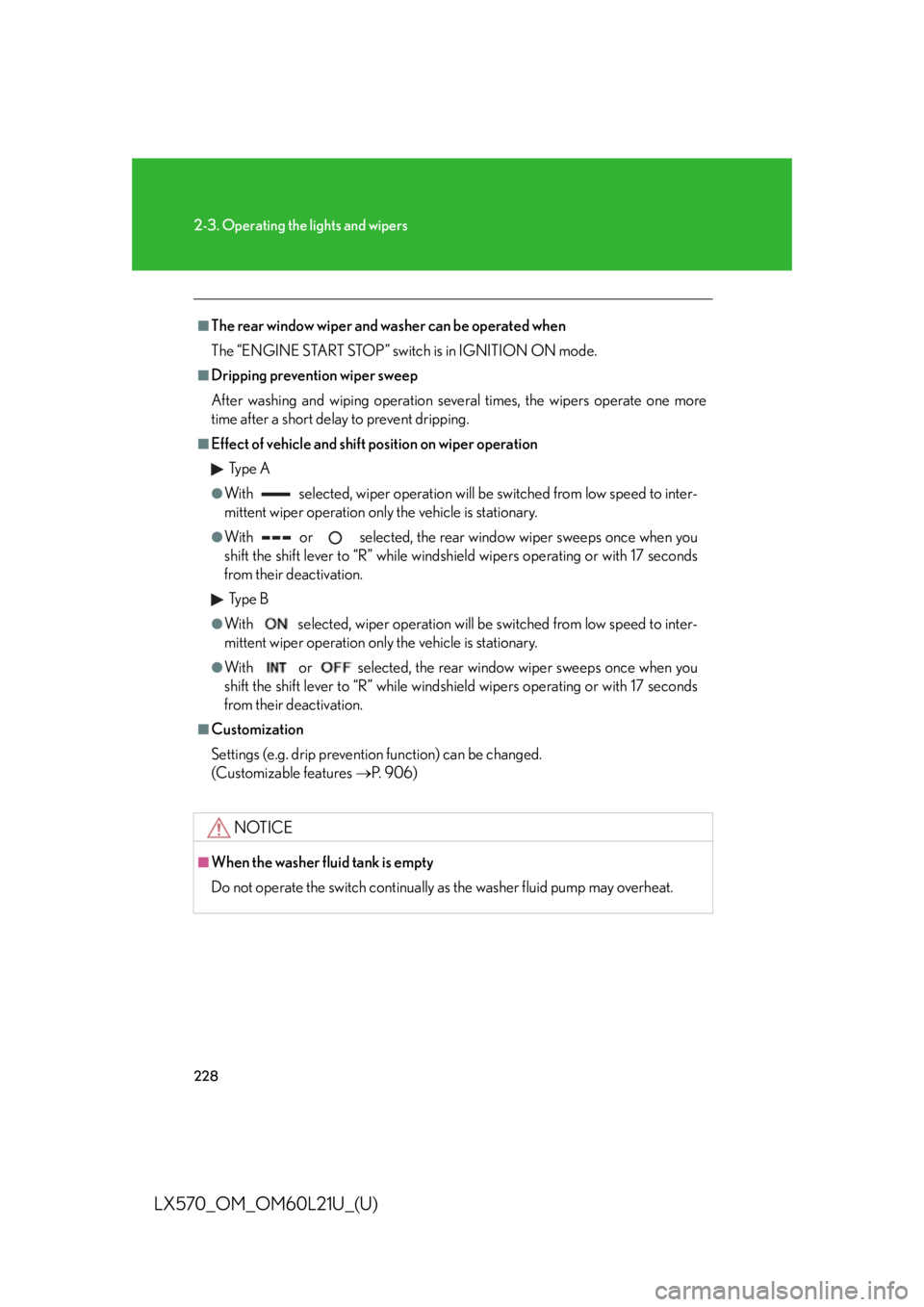
Effect of vehicle and shift position on wiper operation
Ty p e A ●
With selected, wiper operation will be switched from low speed to inter-
mittent wiper operation only the vehicle is stationary. ●
With or selected, the rear window wiper sweeps once when you
shift the shift lever to “R” while windshield wipers operating or with 17 seconds
from their deactivation.
Ty p e B ●
With selected, wiper operation will be switched from low speed to inter-
mittent wiper operation only the vehicle is stationary. ●
With or selected, the rear window wiper sweeps once when you
shift the shift lever to “R” while windshield wipers operating or with 17 seconds
from their deactivation.■
Customization
Settings (e.g. drip prevention function) can be changed.
(Customizable features P. 9 0 6 )
NOTICE■
When the washer fluid tank is empty
Do not operate the switch continually as the washer fluid pump may overheat.
Page 235 of 956
2352-4. Using other driving systems
2
When driving
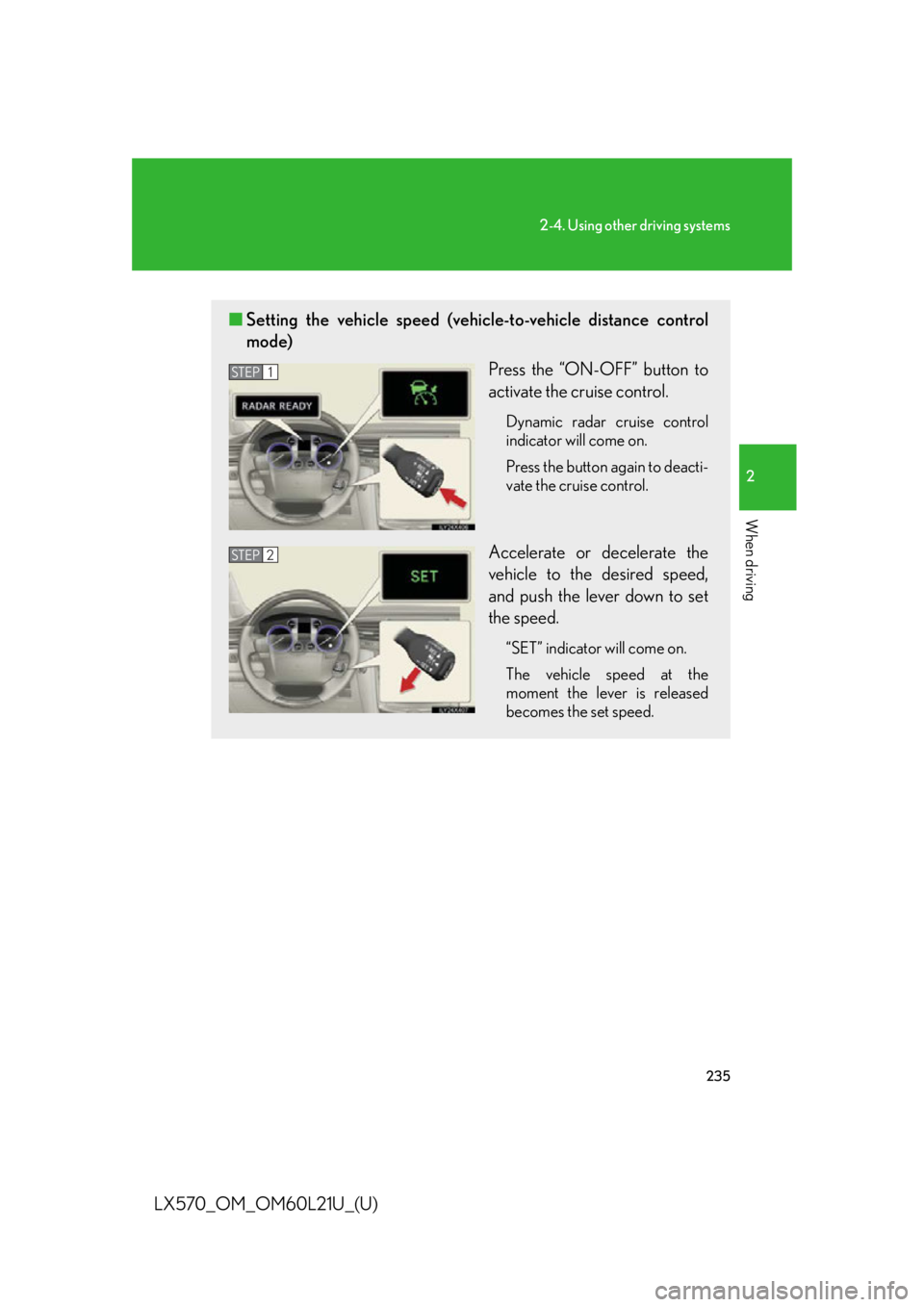
LX570_OM_OM60L21U_(U) ■ Setting the vehicle speed (vehicle-to-vehicle distance control
mode)
Press the “ON-OFF” button to
activate the cruise control. Dynamic radar cruise control
indicator will come on.
Press the button again to deacti-
vate the cruise control.
Accelerate or decelerate the
vehicle to the desired speed,
and push the lever down to set
the speed. “SET” indicator will come on.
The vehicle speed at the
moment the lever is released
becomes the set speed.STEP 1
STEP 2
Page 236 of 956

2362-4. Using other driving systems
LX570_OM_OM60L21U_(U) ■ Adjusting the set speed
To change the set speed, operate the lever until the desired set
speed is displayed.
Increases the speed
Decreases the speed Fine adjustment: Momentarily
move the lever in the desired
direction.
Large adjustment: Hold the
lever in the desired direction.
In the vehicle-to-vehicle distance control mode, the set speed will be
increased or decr eased as follows:
• When the set speed is shown in “MPH”
Fine adjustment: By approximately 5 mph (8 km/h) each time the lever
is operated
Large adjustment: By approximately 5 mph (8 km/h) for each 0.75
seconds the lever is held
• When the set speed is shown in “km/h”
Fine adjustment: By approximately 3.1 mph (5 km/h) each time the
lever is operated
Large adjustment: By approximately 3.1 mph (5 km/h) for each 0.75
seconds the lever is held
In the constant speed control mode (
P. 241), the set speed will be
increased or decr eased as follows:
Fine adjustment: By approximately 1 mph (1.6 km/h) each time the lever is
operated
Large adjustment: The set speed can be increased or decreased contin-
ually until the lever is released
Page 241 of 956

2412-4. Using other driving systems
2
When driving
LX570_OM_OM60L21U_(U) Selecting conventional constant speed control mode
Constant speed control mode differs from vehicle-to-vehicle distance
control mode. When constant speed control mode is selected, your vehi-
cle will maintain a set speed regardless of whether or not there are other
vehicles in the lane ahead.
Press the “ON-OFF” button to activate the cruise control. Press the button again to deactivate the cruise control.
Switch to constant speed control mode. (Push the lever forward and
hold for approximately one second.) Cruise control indicator will come on.
When in constant speed control mode, to return to vehicle-to-vehicle dis-
tance control mode, push the lever forward again and hold for approximately
1 second.
After the desired speed has been set, it is not possible to return to vehicle-to-
vehicle distance control mode.
If the “ENGINE START STOP” switch is turned off and then turned to
IGNITION ON mode again, the vehicle will automatically return to vehicle-
to-vehicle distance control mode.
Adjusting the speed setting:
P. 2 3 6
Canceling and resuming the speed setting:
P. 2 3 8
Page 242 of 956

2422-4. Using other driving systems
LX570_OM_OM60L21U_(U) ■
Dynamic radar cruise control can be set when ●
The shift lever is in “D” or range “4” or higher of “S” has been selected. ●
Range “4” or higher has been selected by using the paddle shift. (vehicles with
paddle shift switches) ●
Vehicle speed is above approximately 30 mph (50 km/h).■
Accelerating after setting the vehicle speed
The vehicle can accelerate normally. After acceleration, the set speed resumes.
However, during vehicle-to-vehicle distance control mode, the vehicle speed may
decrease below the set speed in order to maintain the distance to the vehicle
ahead. ■
Automatic cancelation of vehicle-to-vehicle distance control
Vehicle-to-vehicle distance control driving is automatically canceled in the follow-
ing situations: ●
Actual vehicle speed falls below approximately 25 mph (40 km/h). ●
VSC is activated. ●
The sensor cannot operate correctly because it is covered in some way. ●
The windshield wipers are operating at hi gh speed (when the wiper switch is set
to the “AUTO” mode or high speed wiper operation position). ●
When second start mode is set. ●
The switching operation continues for 5 seconds or more after the center dif-
ferential lock switch has been operated.
If vehicle-to-vehicle distance control driving is automatically canceled for any other
reason, there may be a malfunction in the system. Contact your Lexus dealer.