camera LEXUS LX570 2014 Owner's Manual
[x] Cancel search | Manufacturer: LEXUS, Model Year: 2014, Model line: LX570, Model: LEXUS LX570 2014Pages: 956, PDF Size: 16.4 MB
Page 314 of 956

3142-4. Using other driving systems
LX570_OM_OM60L21U_(U) Side camera
The area covered by the camera is limited. Objects which are close to either corner
of the bumper or under the bumper cannot be seen on the screen.
The area displayed on the screen may vary according to vehicle orientation or road
conditions. ■
Wide view front & side monitor cameras
In the following cases, it may be difficult to see the images on the screen, even when
the system is functioning correctly.
• In the dark (e.g. at night).
• If the temperature near the lens is extremely high or low.
• If water droplets get on the camera, or when humidity is high (e.g. when it rains).
• If foreign matter (e.g. snow or mud) get on the camera lens.
• If the sun or headlights are shining directly into the camera lens.
• If the camera lens is damaged by flying stones. Camera’s field of view
Objects visible to the camera
Right side of vehicle
Side camera
Front camera
Page 315 of 956
3152-4. Using other driving systems
2
When driving
LX570_OM_OM60L21U_(U) ■
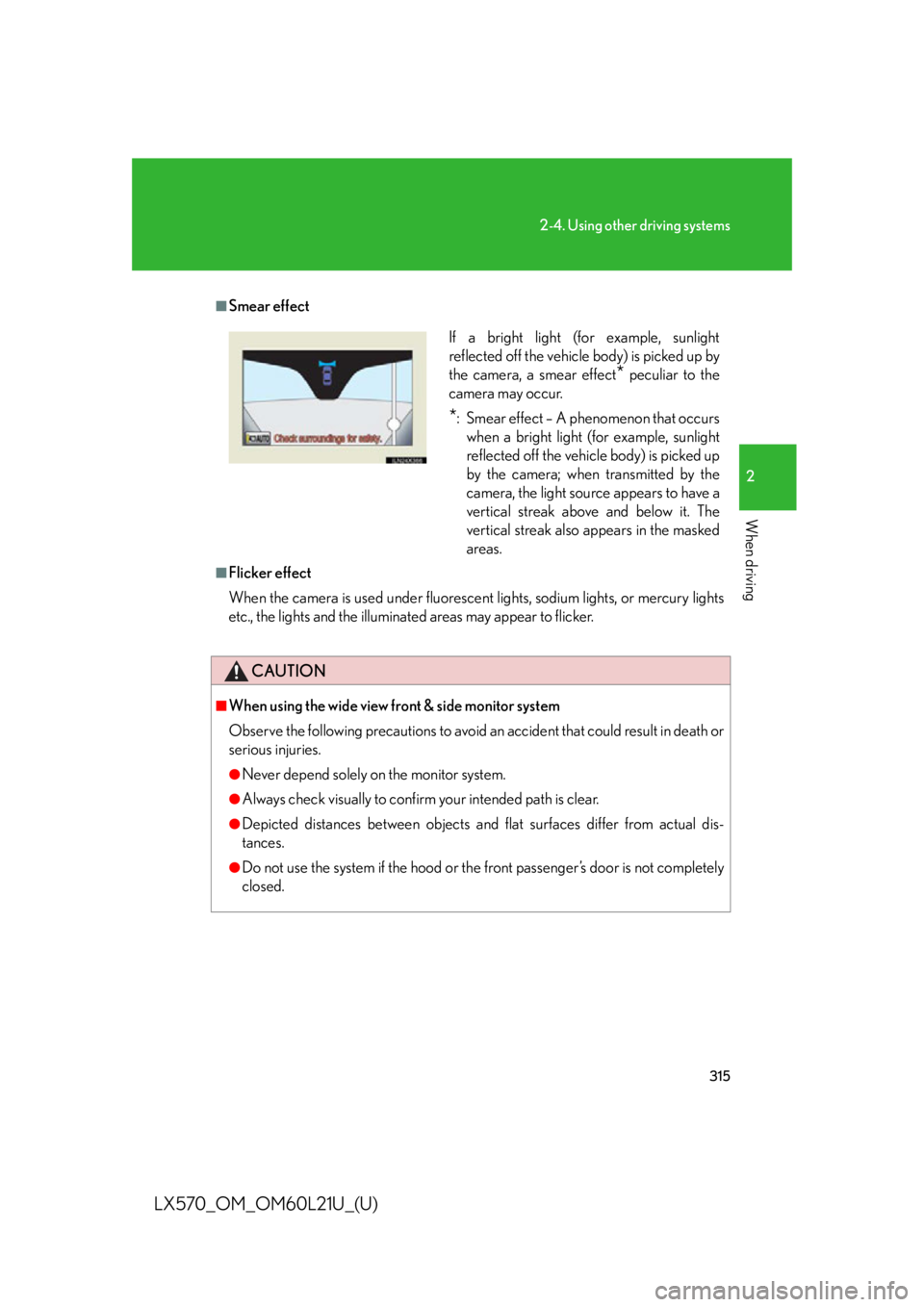
Smear effect
■
Flicker effect
When the camera is used un der fluorescent lights, sodium lights, or mercury lights
etc., the lights and the illuminated areas may appear to flicker.
CAUTION■
When using the wide view front & side monitor system
Observe the following precautions to avoid an accident that could result in death or
serious injuries. ●
Never depend solely on the monitor system. ●
Always check visually to confirm your intended path is clear. ●
Depicted distances between objects and flat surfaces differ from actual dis-
tances. ●
Do not use the system if the hood or th e front passenger’s door is not completely
closed. If a bright light (for example, sunlight
reflected off the vehicle body) is picked up by
the camera, a smear effect
* peculiar to the
camera may occur.
* : Smear effect – A phenomenon that occurs
when a bright light (for example, sunlight
reflected off the vehicle body) is picked up
by the camera; when transmitted by the
camera, the light source appears to have a
vertical streak above and below it. The
vertical streak also appears in the masked
areas.
Page 316 of 956

3162-4. Using other driving systems
LX570_OM_OM60L21U_(U) CAUTION■
Conditions which may affect the wide view front & side monitor system ●
If the front of the vehicle or the passenger side outside rear view mirror is hit, the
camera’s position and mounting angle ma y change. Contact your Lexus dealer.●
Rapid temperature changes, such as when hot water is poured on the vehicle in
cold weather, may cause the system to function abnormally. ●
If the camera lens is dirty, it cannot transmit a clear image. Rinse with water and
wipe with a soft cloth. If extremely dirty, wash with a mild cleanser and rinse. ●
The displayed image may be darker and mo ving images may be slightly distorted
when the system is cold. ●
Situations unsuitable for wide view front & side monitor
• On icy or slick road surfaces, or in snow.
• When using tire chains or emergency tires.
• On roads that are not flat or straight, such as curves or slopes. ●
If the tires are changed, the position of the guide lines displayed on the screen
may be incorrect. When changing the tires, consult your Lexus dealer. ●
Depending on the circumstances of the vehicle (number of passengers, amount
of luggage, etc.), the position of the guide lines displayed on the screen may
change. Be sure to check visually behind and all around the vehicle before pro-
ceeding. ●
When washing the vehicle, do not apply intensive bursts of water to the camera
or camera area. Doing so may result in the camera malfunctioning.
Page 404 of 956
4043-1. Using the touch screen
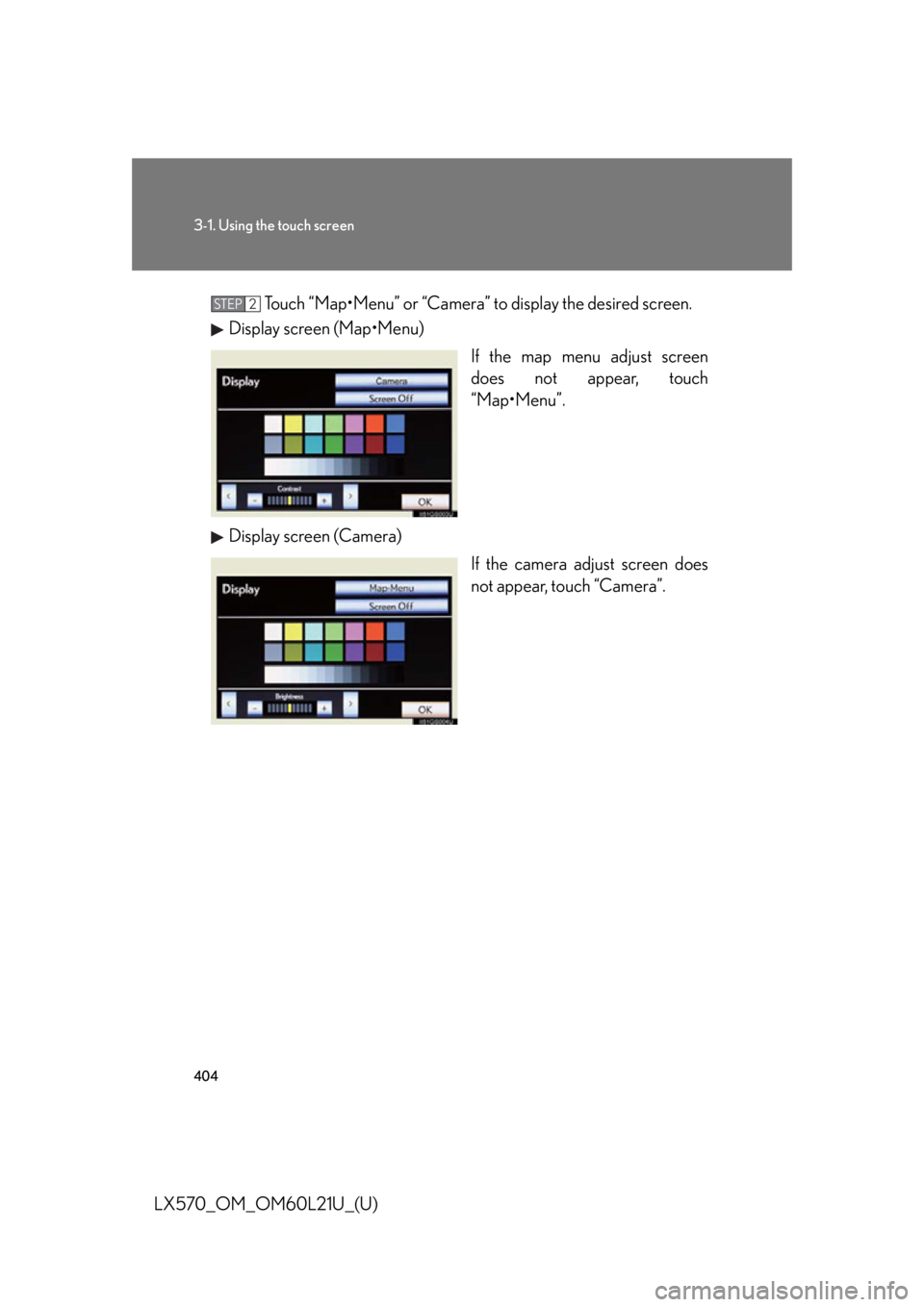
LX570_OM_OM60L21U_(U) Touch “Map•Menu” or “Camera” to display the desired screen.
Display screen (Map•Menu)
If the map menu adjust screen
does not appear, touch
“Map•Menu”.
Display screen (Camera)
If the camera adjust screen does
not appear, touch “Camera”.STEP 2
Page 580 of 956
5803-4. Using the rear seat entertainment system
LX570_OM_OM60L21U_(U) ■
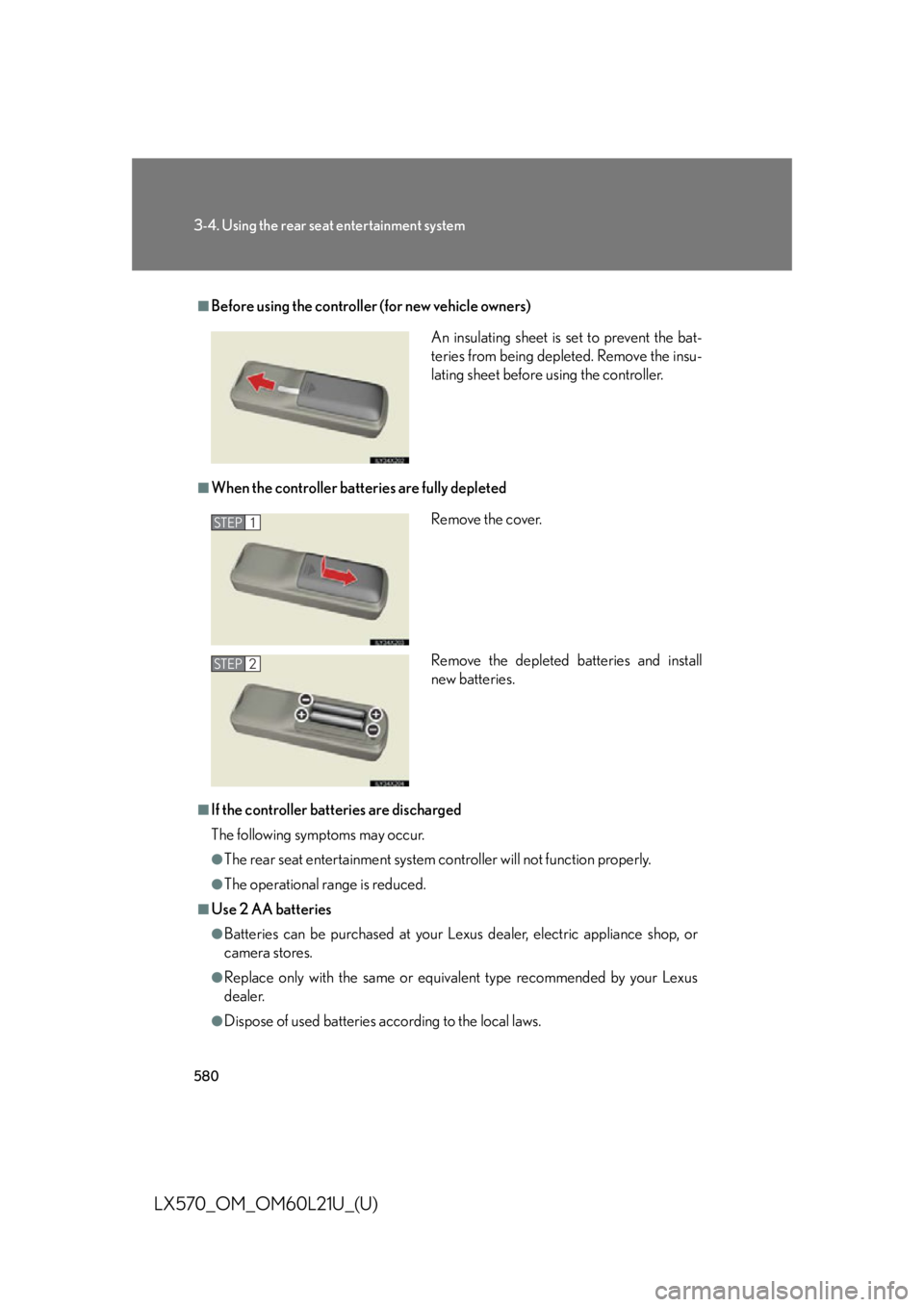
Before using the controller (for new vehicle owners)
■
When the controller batteries are fully depleted
■
If the controller batteries are discharged
The following symptoms may occur. ●
The rear seat entertainment system controller will not function properly. ●
The operational range is reduced.■
Use 2 AA batteries ●
Batteries can be purchased at your Lexus dealer, electric appliance shop, or
camera stores. ●
Replace only with the same or equivalent type recommended by your Lexus
dealer. ●
Dispose of used batteries according to the local laws. An insulating sheet is set to prevent the bat-
teries from being depleted. Remove the insu-
lating sheet before using the controller.
Remove the cover.
Remove the depleted batteries and install
new batteries.STEP 1
STEP 2
Page 783 of 956

7814-3. Do-it-yourself maintenance
4
Maintenance and care
LX570_OM_OM60L21U_(U) ■
If the electronic key battery is discharged
The following symptoms may occur. ●
The smart access system with push-button start and wireless remote control will
not function properly. ●
The operational range is reduced.■
Use a CR1632 lithium battery ●
Batteries can be purchased at your Lexus dealer, jewelers, or camera stores.●
Replace only with the same or equivalent type recommended by your Lexus
dealer. ●
Dispose of used batteries according to the local laws.■
When the card key battery needs to be replaced
The battery for the card key is available only at Lexus dealer. Your Lexus dealer can
replace the battery for you.
CAUTION■
Removed battery and other parts
These parts are small and if swallowed by a child, they can cause choking. Keep
away from children. Failure to do so could result in death or serious injury.
NOTICE■
For normal operation after replacing the battery
Observe the following precautions to prevent accidents. ●
Always work with dry hands.
Moisture may cause the battery to rust. ●
Do not touch or move any other comp onents inside the electronic key.●
Do not bend the battery terminals.
Page 795 of 956

7934-3. Do-it-yourself maintenance
4
Maintenance and care
LX570_OM_OM60L21U_(U) 4 PA N E L 10 A Ashtray, brake controller, cigarette
lighter, cool box, center differential
lock, driving mode switches, multi-
information display, air conditioning
system, glove box light, audio system,
emergency flashers, headlight cleaner
switch, driving position memory
switches, outside rear view mirror
switches, overhead module, roll sens-
ing of curtain shield airbags off switch,
rear heater panel, shift lever switch,
power back door main switch, camera
switch, VSC OFF switch, steering
switch, console switch, instrument
panel light control
5 ECU-IG No.2 10 A Air conditioning system, rear heater
panel, overhead module, ABS, VSC,
steering sensor, yaw rate & G sensor,
main body ECU, stoplights, moon
roof, anti-glare inside rear view mirror
6 WINCH 5 A No circuit
7 A/C IG 10 A Cool box, condenser fan, cooler com-
pressor, rear window and outside rear
view mirror defoggers, smog sensor
8 TA I L 15 A Tail lights, license plate lights, front fog
lights, parking lights, side marker
lightsFuse Ampere Circuit