remote control LEXUS LX570 2014 Owner's Manual
[x] Cancel search | Manufacturer: LEXUS, Model Year: 2014, Model line: LX570, Model: LEXUS LX570 2014Pages: 956, PDF Size: 16.4 MB
Page 119 of 956

11911-6. Theft deterrent system
Before driving
LX570_OM_OM60L21U_(U) Alarm The system sounds the alarm and flashes lights when forcible entry is
detected.
■ Triggering of the alarm
The alarm is triggered in the follow ing situations when the alarm is
set:
● A locked door is unlocked or opened in any way other than by
using the entry function, the wire less remote control or using the
mechanical key. (The doors wi ll lock again automatically.)
● The hood is opened.
■ Setting the alarm system
Close the doors and hood, and
lock all doors.
The system will be set automati-
cally after 30 seconds. The indicator light changes from
being on to flashing when the
system is set.
■ Deactivating or stopping the alarm
Do one of the following to deactivate or stop the alarm.
● Unlock the doors.
● Turn the “ENGINE START STOP” switch to ACCESSORY or
IGNITION ON mode, or start the engine. (The alarm will be
deactivated or stopped after a few seconds.)
Page 121 of 956
1211-6. Theft deterrent system
1
Before driving
LX570_OM_OM60L21U_(U) ■
When the battery is disconnected
Be sure to cancel the alarm system.
If the battery is disconnected before can celing the alarm, the system may be trig-
gered when the battery is reconnected. ■
Alarm-operated door lock ●
When the alarm is operating, the door s are locked automatically to prevent
intruders. ●
Do not leave the key inside the vehicle when the alarm is operating, and make
sure the key is not inside the vehicle when recharging or replacing the battery.■
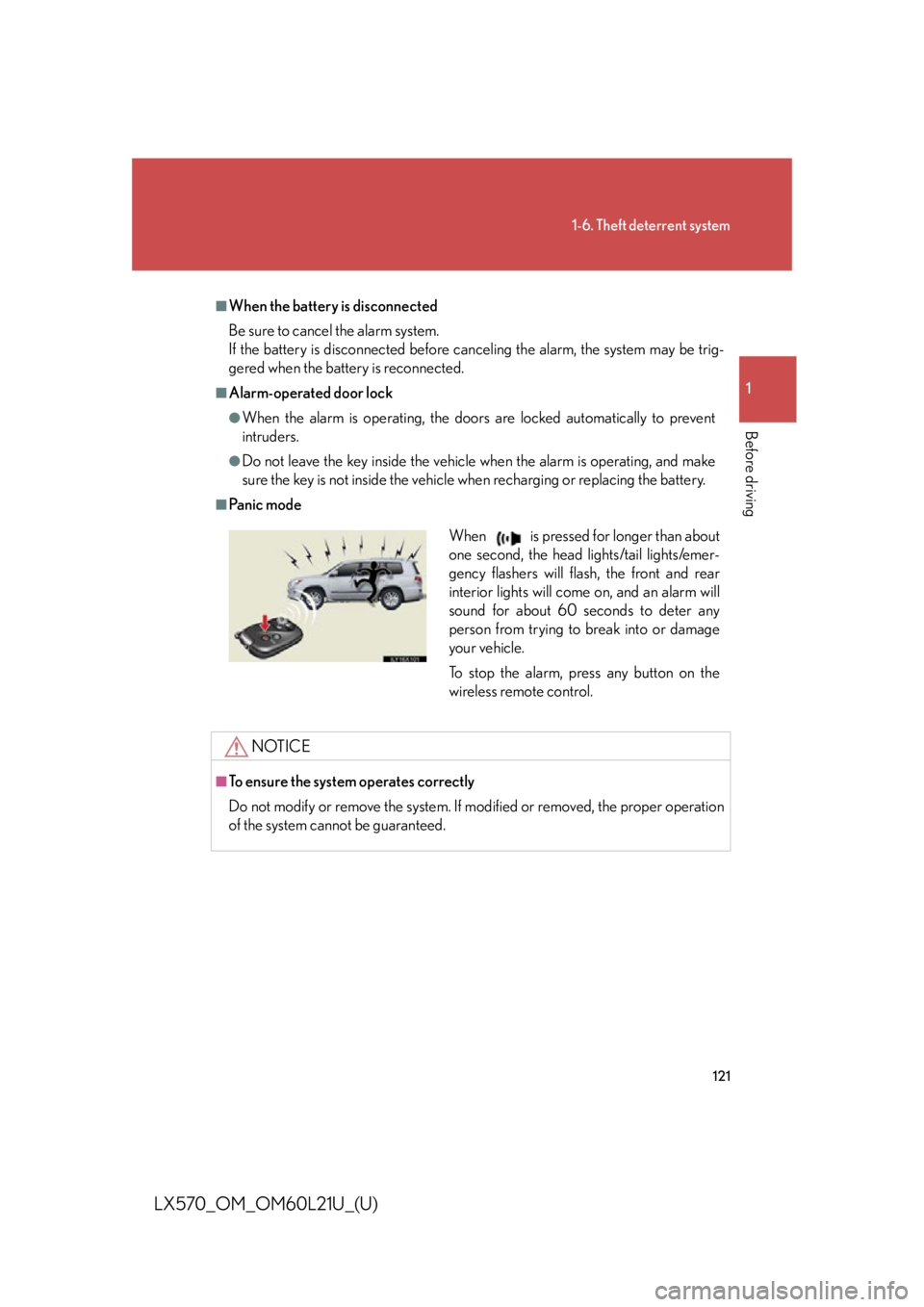
Pa n i c m o d e
NOTICE■
To ensure the system operates correctly
Do not modify or remove the system. If mo dified or removed, the proper operation
of the system cannot be guaranteed. When is pressed for longer than about
one second, the head lights/tail lights/emer-
gency flashers will flash, the front and rear
interior lights will come on, and an alarm will
sound for about 60 seconds to deter any
person from trying to break into or damage
your vehicle.
To stop the alarm, press any button on the
wireless remote control.
Page 546 of 956

5463-3. Using the audio system
LX570_OM_OM60L21U_(U) ■
About Bluetooth ®
■
Compatible models
Portable players must correspond to the following specifications: ●
Bluetooth ®
specification
Ve r. 1 .1 o r h i g h e r
(Recommended: Ver. 2.1+EDR or higher) ●
Profile
• A2DP (Advanced Audio Distribution Profile) Ver. 1.0 or higher
(Recommended: Ver. 1.2 or higher)
• AVRCP (Audio/Video Remote Control Profile) Ver. 1.0 or higher
(Recommended: Ver. 1.4 or higher)
However, please note that some function s may be limited depending on the type of
portable player. Also, the different screen is displayed depend ing on which portable
player is connecting.
Please go to the website at http://www.lexus.com/MobileLink to find approved
portable players for this system. ■
Certification
P. 6 1 8 Bluetooth is a registered trademark of Blue-
tooth SIG, Inc.
Page 582 of 956

5823-4. Using the rear seat entertainment system
LX570_OM_OM60L21U_(U) NOTICE■
Cleaning the display
Wipe the display with a dry soft cloth.
If the screen is wiped with a rough cloth, the surface of the screen may be
scratched. ■
To prevent damage to the controller ●
Keep the remote control away from direct sunlight, high temperature and high
humidity. ●
Do not drop or knock the controller against hard objects. ●
Do not sit on or place heavy objects on the controller.■
DVD player
Never try to disassemble or oil any part of the DVD player. Do not insert anything
other than a disc into the slot. ■
For normal operation after replacing the battery
Observe the following precautions to prevent accidents. ●
Always work with dry hands.
Moisture may cause the battery to rust. ●
Do not touch or move any other components inside the controller. ●
Do not bend either of the battery terminals.
Page 717 of 956
7153-8. Other interior features
3
Interior features
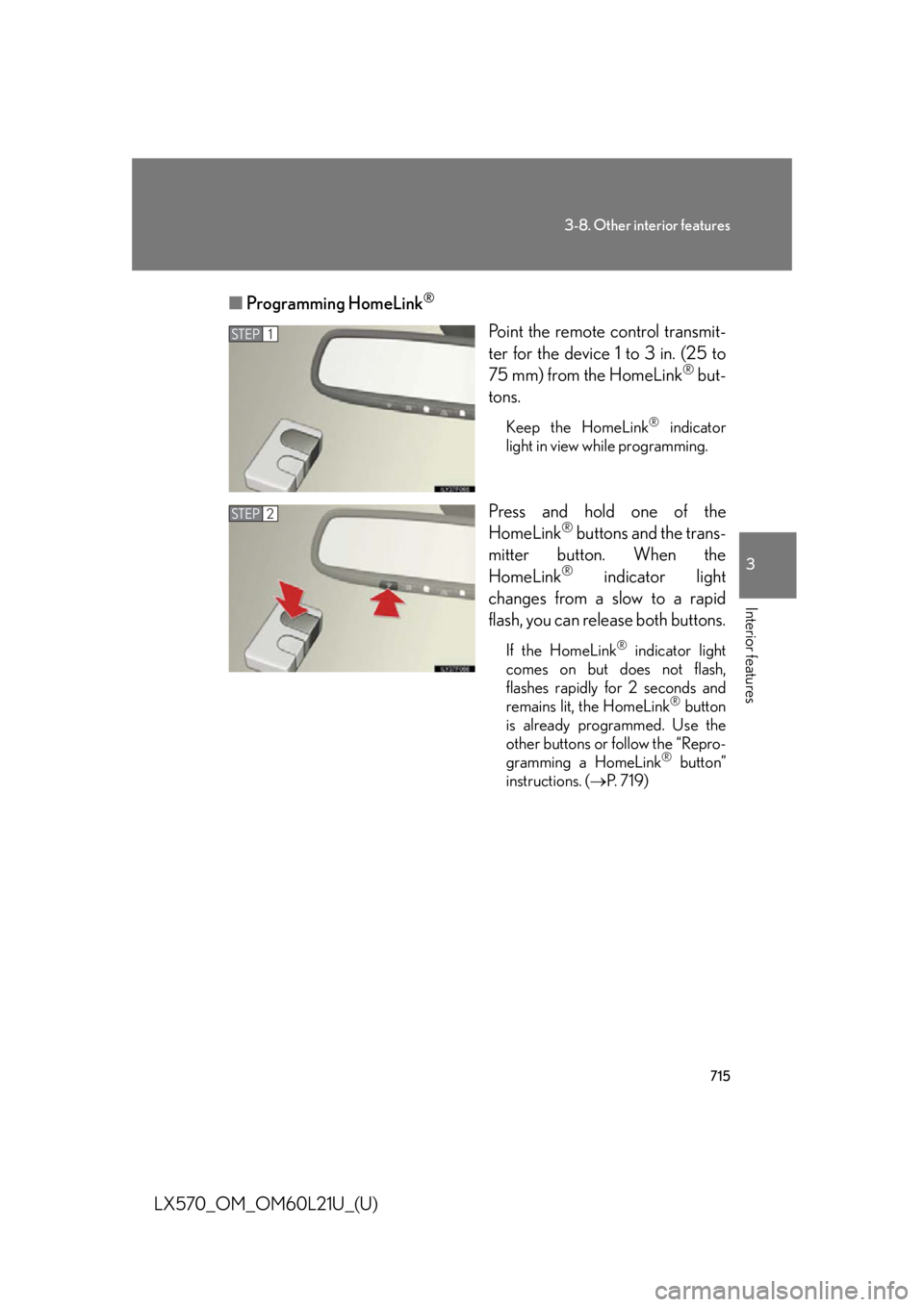
LX570_OM_OM60L21U_(U) ■ Programming HomeLink ®
Point the remote control transmit-
ter for the device 1 to 3 in. (25 to
75 mm) from the HomeLink ®
but-
tons. Keep the HomeLink ®
indicator
light in view while programming.
Press and hold one of the
HomeLink ®
buttons and the trans-
mitter button. When the
HomeLink ®
indicator light
changes from a slow to a rapid
flash, you can release both buttons. If the HomeLink ®
indicator light
comes on but does not flash,
flashes rapidly for 2 seconds and
remains lit, the HomeLink ®
button
is already programmed. Use the
other buttons or follow the “Repro-
gramming a HomeLink ®
button”
instructions. ( P. 7 1 9 )STEP 1
STEP 2
Page 718 of 956
7163-8. Other interior features
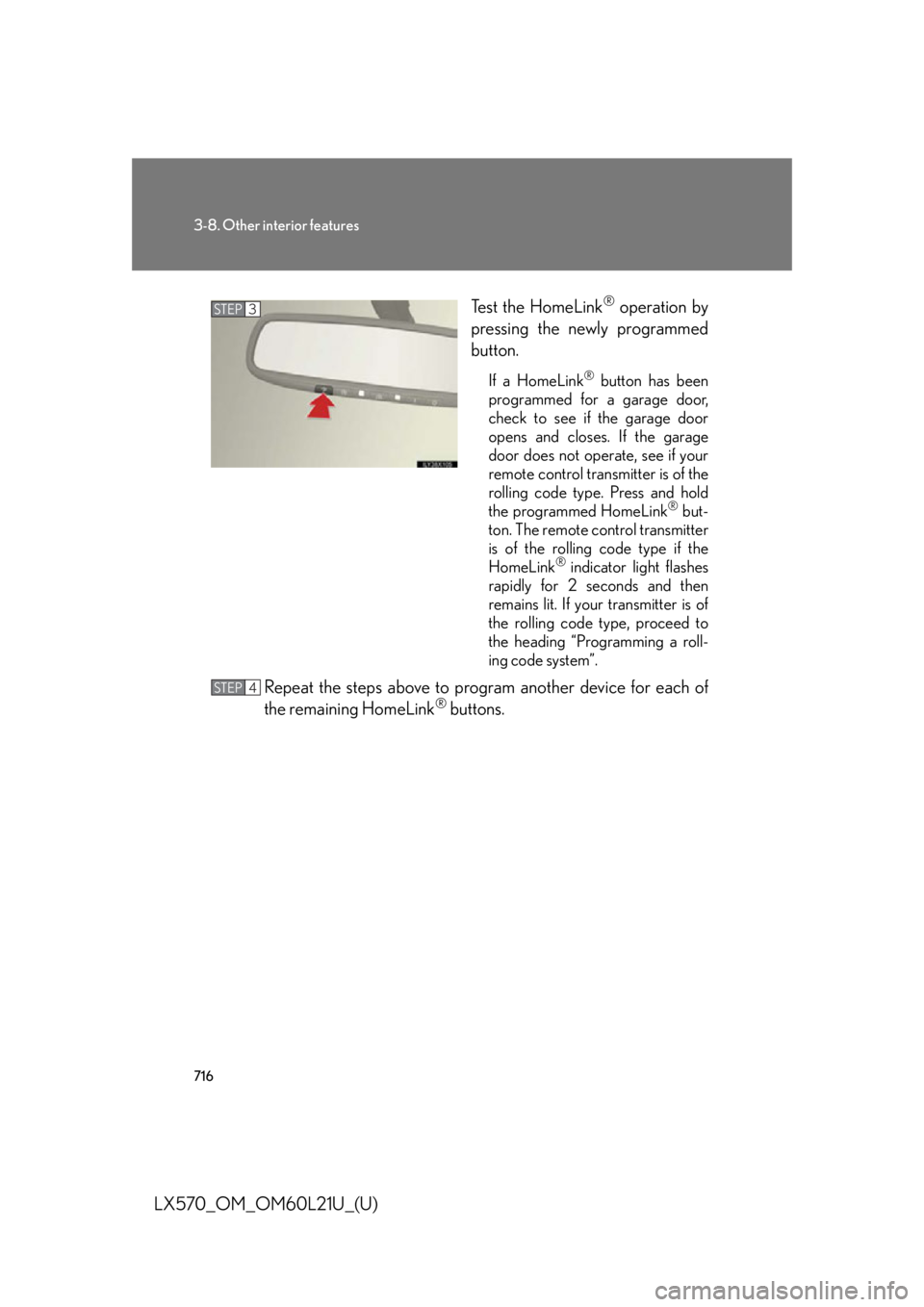
LX570_OM_OM60L21U_(U) Test the HomeLink ®
operation by
pressing the newly programmed
button. If a HomeLink ®
button has been
programmed for a garage door,
check to see if the garage door
opens and closes. If the garage
door does not operate, see if your
remote control transmitter is of the
rolling code type. Press and hold
the programmed HomeLink ®
but-
ton. The remote control transmitter
is of the rolling code type if the
HomeLink ®
indicator light flashes
rapidly for 2 seconds and then
remains lit. If your transmitter is of
the rolling code type, proceed to
the heading “Programming a roll-
ing code system”.
Repeat the steps above to program another device for each of
the remaining HomeLink ®
buttons.STEP 3
STEP 4
Page 720 of 956

7183-8. Other interior features
LX570_OM_OM60L21U_(U) ■ Programming an entry gate (for U .S.A. owners)/Programming all
devices in the Canadian market
Place your transmitter 1 to 3 in. (25 to 75 mm) away from the sur-
face of the HomeLink ®
.Keep the HomeLink ®
indicator light in view while programming.
Press and hold the selected HomeLink ®
button.
Repeatedly press and release (cyc le) the device’s remote control
button for two seconds each until step 4 is completed.
When the indicator light on the HomeLink ®
compatible trans-
ceiver starts to flash rapidly, release the buttons.
Test the operation of the HomeLink ®
by pressing the newly pro-
grammed button. Check to see if the gate/device operates cor-
rectly.
Repeat the steps above to program another device for each of
the remaining HomeLink ®
buttons.
■ Programming other devices
To program other devices such as home security systems, home door
locks or lighting, contact your au thorized Lexus dealer for assistance.
■ Reprogramming a button
The individual HomeLink ®
buttons cannot be erased but can be
reprogrammed. To reprogram a button, follow the “Reprogramming a
HomeLink ®
button” instructions.STEP 1
STEP 2
STEP 3
STEP 4
STEP 5
STEP 6
Page 722 of 956

7203-8. Other interior features
LX570_OM_OM60L21U_(U) ■
Before programming ●
Install a new battery in the remote control transmitter. ●
The battery side of the remote control transmitter must be pointed away from
the HomeLink ®
button.■
Certification for the garage door opener
For vehicles sold in the U.S.A.
FCC ID:NZLOBIHL4
FCC ID:NZLWZLHL4
NOTE:
This device complies with Part 15 of the FCC Rules. Operation is subject to the fol-
lowing two conditions: (1) this device may not cause harmful interference, and (2)
this device must accept any interference received, including interference that may
cause undesired operation.
FCC WARNING:
Changes or modifications not expressly approved by the party responsible for
compliance could void the user’s authority to operate the equipment.
For vehicles sold in Canada
NOTE:
Operation is subject to the following two conditions: (1) this device may not cause
interference, and (2) this device must a ccept any interference, including interfer-
ence that may cause undesired operation of the device. ■
When support is necessary
Visit on the web at www.homelink.com or call 1-800-355-3515.
Page 723 of 956
7213-8. Other interior features
3
Interior features
LX570_OM_OM60L21U_(U) CAUTION■
When programming a garage door or other remote control devices
The garage door on other devices may oper ate, so ensure people and objects are
out of danger to prevent potential harm. ■
Conforming to federal safety standards
Do not use the HomeLink ®
compatible transceiver with any garage door opener
or device that lacks safety stop and reverse features as required by federal safety
standards.
This includes any garage door that cannot detect an interfering object. A door or
device without these featur es increases the risk of death or serious injury.
Page 783 of 956

7814-3. Do-it-yourself maintenance
4
Maintenance and care
LX570_OM_OM60L21U_(U) ■
If the electronic key battery is discharged
The following symptoms may occur. ●
The smart access system with push-button start and wireless remote control will
not function properly. ●
The operational range is reduced.■
Use a CR1632 lithium battery ●
Batteries can be purchased at your Lexus dealer, jewelers, or camera stores.●
Replace only with the same or equivalent type recommended by your Lexus
dealer. ●
Dispose of used batteries according to the local laws.■
When the card key battery needs to be replaced
The battery for the card key is available only at Lexus dealer. Your Lexus dealer can
replace the battery for you.
CAUTION■
Removed battery and other parts
These parts are small and if swallowed by a child, they can cause choking. Keep
away from children. Failure to do so could result in death or serious injury.
NOTICE■
For normal operation after replacing the battery
Observe the following precautions to prevent accidents. ●
Always work with dry hands.
Moisture may cause the battery to rust. ●
Do not touch or move any other comp onents inside the electronic key.●
Do not bend the battery terminals.