LED LEXUS LX570 2014 Owner's Guide
[x] Cancel search | Manufacturer: LEXUS, Model Year: 2014, Model line: LX570, Model: LEXUS LX570 2014Pages: 956, PDF Size: 16.4 MB
Page 225 of 956
2252-3. Operating the lights and wipers
2
When driving
LX570_OM_OM60L21U_(U) NOTICE■
When the windshield is dry
Do not use the wipers, as they may damage the windshield. ■
When there is no washer fluid spray from the nozzle
Damage to the washer fluid pump may be caused if the lever is pulled toward you
and held continually. ■
When a nozzle becomes blocked
Do not try to clear it with a pin or other object. The nozzle will be damaged.
Page 231 of 956
2312-4. Using other driving systems
2
When driving
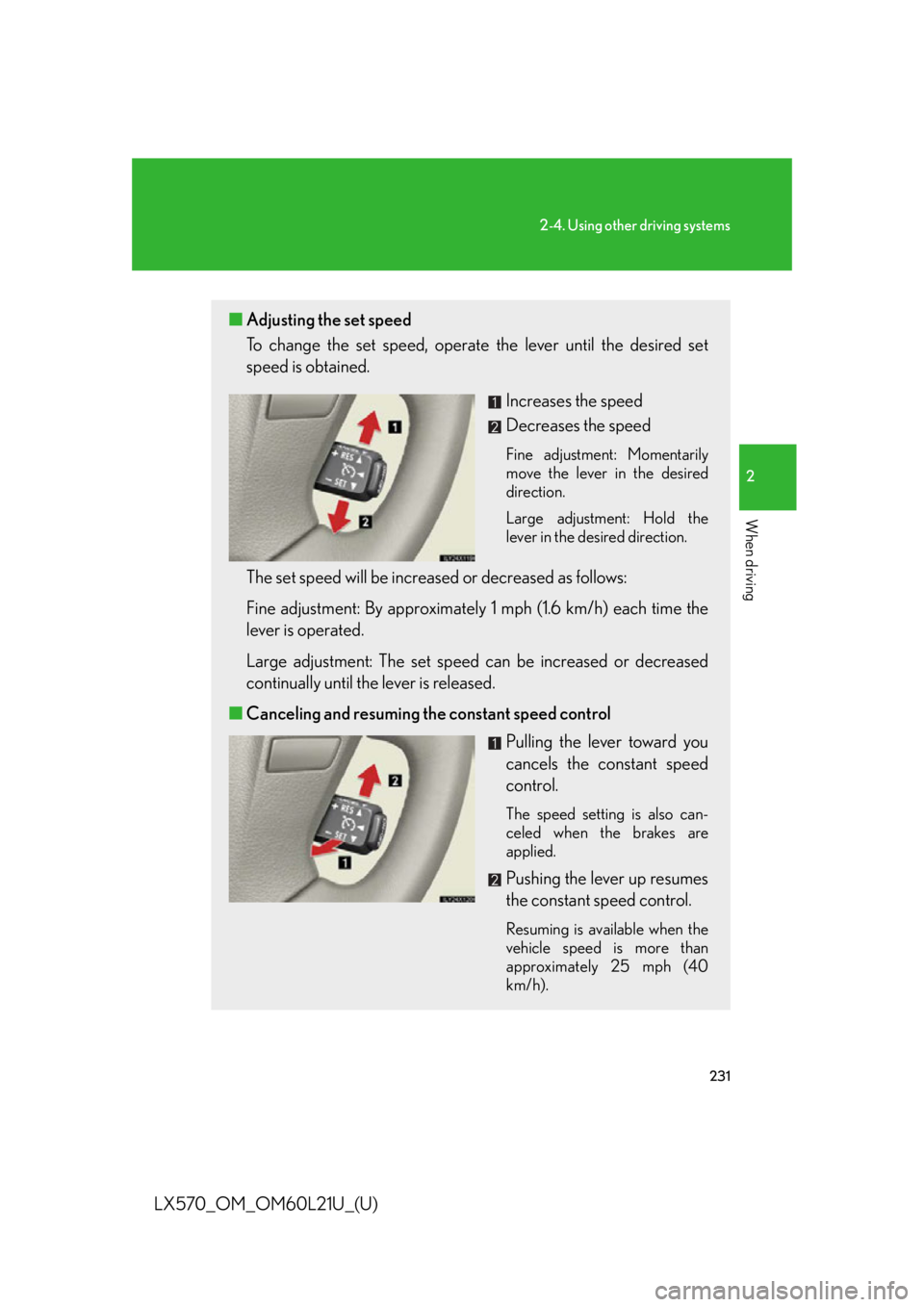
LX570_OM_OM60L21U_(U) ■ Adjusting the set speed
To change the set speed, operate the lever until the desired set
speed is obtained.
Increases the speed
Decreases the speed Fine adjustment: Momentarily
move the lever in the desired
direction.
Large adjustment: Hold the
lever in the desired direction.
The set speed will be increased or decreased as follows:
Fine adjustment: By approximatel y 1 mph (1.6 km/h) each time the
lever is operated.
Large adjustment: The set speed can be increased or decreased
continually until the lever is released.
■ Canceling and resuming the constant speed control
Pulling the lever toward you
cancels the constant speed
control. The speed setting is also can-
celed when the brakes are
applied.
Pushing the lever up resumes
the constant speed control. Resuming is available when the
vehicle speed is more than
approximately 25 mph (40
km/h).
Page 238 of 956
2382-4. Using other driving systems
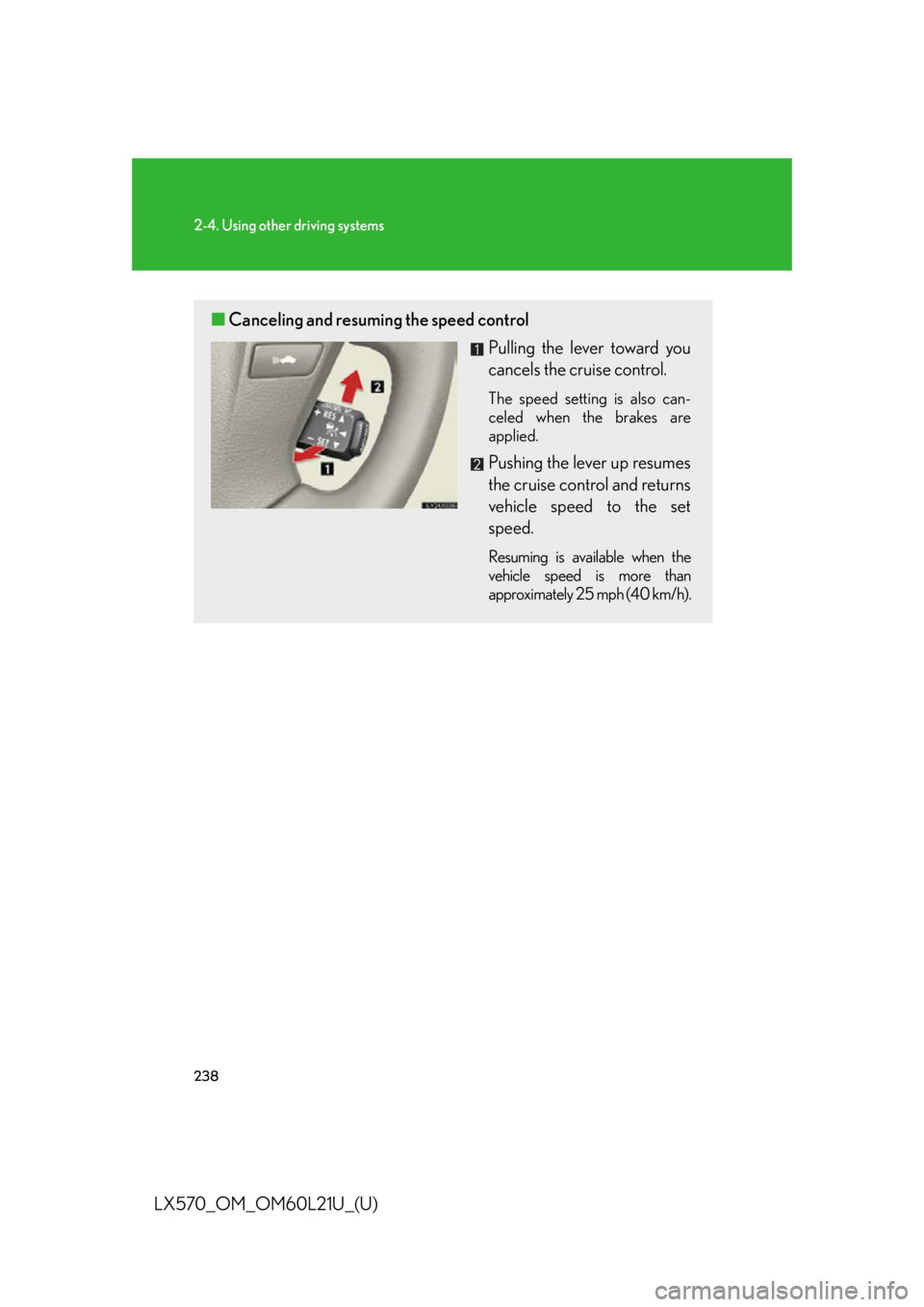
LX570_OM_OM60L21U_(U) ■ Canceling and resuming the speed control
Pulling the lever toward you
cancels the cruise control. The speed setting is also can-
celed when the brakes are
applied.
Pushing the lever up resumes
the cruise control and returns
vehicle speed to the set
speed. Resuming is available when the
vehicle speed is more than
approximately 25 mph (40 km/h).
Page 242 of 956

2422-4. Using other driving systems
LX570_OM_OM60L21U_(U) ■
Dynamic radar cruise control can be set when ●
The shift lever is in “D” or range “4” or higher of “S” has been selected. ●
Range “4” or higher has been selected by using the paddle shift. (vehicles with
paddle shift switches) ●
Vehicle speed is above approximately 30 mph (50 km/h).■
Accelerating after setting the vehicle speed
The vehicle can accelerate normally. After acceleration, the set speed resumes.
However, during vehicle-to-vehicle distance control mode, the vehicle speed may
decrease below the set speed in order to maintain the distance to the vehicle
ahead. ■
Automatic cancelation of vehicle-to-vehicle distance control
Vehicle-to-vehicle distance control driving is automatically canceled in the follow-
ing situations: ●
Actual vehicle speed falls below approximately 25 mph (40 km/h). ●
VSC is activated. ●
The sensor cannot operate correctly because it is covered in some way. ●
The windshield wipers are operating at hi gh speed (when the wiper switch is set
to the “AUTO” mode or high speed wiper operation position). ●
When second start mode is set. ●
The switching operation continues for 5 seconds or more after the center dif-
ferential lock switch has been operated.
If vehicle-to-vehicle distance control driving is automatically canceled for any other
reason, there may be a malfunction in the system. Contact your Lexus dealer.
Page 243 of 956

2432-4. Using other driving systems
2
When driving
LX570_OM_OM60L21U_(U) ■
Automatic cancelation of constant speed control
The cruise control will stop maintaining the vehicle speed in the following situations: ●
Actual vehicle speed is more than approximately 10 mph (16 km/h) below the
set vehicle speed.
At this time, the memorized set speed is not retained. ●
Actual vehicle speed falls below approximately 25 mph (40 km/h). ●
VSC is activated. ●
The switching operation continues for 5 seconds or more after the center dif-
ferential lock switch has been operated.■
Radar sensor and grille cover
Always keep the sensor and grille cover clean to ensure that the vehicle-to-vehicle
distance control operates properly. (Some obstructions, such as snow, ice and plas-
tic objects, cannot be detected by the obstruction sensor.)
Dynamic radar cruise control is canceled if an obstruction is detected.
■
Warning messages and buzzers for dynamic radar cruise control
Warning messages and buzzers are used to indicate a system malfunction or to
inform the driver of the need for caution while driving. ( P. 8 3 2 )Grille cover
Radar sensor
Page 244 of 956

2442-4. Using other driving systems
LX570_OM_OM60L21U_(U) ■
Certification
For vehicles sold in U.S.A.
FCC ID: HYQDNMWR005
This device complies with part 15 of the FCC Rules. Operation is subject to the fol-
lowing two conditions: (1) This device may not cause harmful interference, and (2)
this device must accept any interference received, including interference that may
cause undesired operation.
FCC WARNING
Changes or modifications not expressly approved by the party responsible for
compliance could void the user’s authority to operate the equipment.
Radiofrequency radiation exposure Information:
This equipment complies with FCC radiatio n exposure limits set forth for an uncon-
trolled environment.
This equipment should be installed and op erated with minimum distance of 20 cm
between the radiator (antenna) and your body.
This transmitter must not be co-located or operating in conjunction with any other
antenna or transmitter.
For vehicles sold in Canada
This device complies with Industry Canada licence-exempt RSS standards.
Operation is subject to the following two conditions: (1) this device may not cause
interference, and (2) this device must a ccept any interference, including interfer-
ence that may cause undesired operation of the device.
Page 257 of 956

2572-4. Using other driving systems
2
When driving
LX570_OM_OM60L21U_(U) ■
Sensor detection information ●
The sensor’s detection areas are limited to the areas around the vehicle’s front
corner and rear bumpers. ●
Certain vehicle conditions and the su rrounding environment may affect the
ability of the sensor to correctly detect obstacles. Particular instances where this
may occur are listed below.
• There is dirt, snow or ice on the sensor. (Wiping the sensors will resolve this
problem.)
• The sensor is frozen. (Thawing the area will resolve this problem.)
In especially cold weather, if a sensor is frozen the screen may show an abnor-
mal display, or obstacles may not be detected.
• The sensor is covered in any way.
• The vehicle is leaning considerably to one side.
• On an extremely bumpy road, on an incline, on gravel, or on grass
• The vicinity of the vehicle is noisy due to vehicle horns, motorcycle engines,
air brakes of large vehicles, or other loud noises producing ultrasonic waves.
• There is another vehicle equipped with parking assist sensor s in the vicinity.
• The sensor is coated with a sheet of spray or heavy rain.
• The vehicle is equipped with a fender pole or wireless antenna.
• Towing eyelets are installed.
• The bumper or sensor receives a strong impact.
• The vehicle is approaching a tall or curved curb.
• In harsh sunlight or intense cold weather
•The area directly under th e bumpers is not detected.
• If obstacles draw too close to the sensor.
• A non-genuine Lexus suspension (low ered suspension etc.) is installed.
• People may not be detected if they are wearing certain types of clothing.
In addition to the examples above, there are instances in which, because of their
shape, signs and other object s may be judged by the sensor to be closer than they
are.
Page 258 of 956

2582-4. Using other driving systems
LX570_OM_OM60L21U_(U) ●
The shape of the obstacle may prevent th e sensor from detecting it. Pay particu-
lar attention to the following obstacles:
• Wires, fences, ropes, etc.
• Cotton, snow and other materi als that absorb sound waves
• Sharply-angled objects
•Low obstacles
• Tall obstacles with upper sections projec ting outwards in the direction of your
vehicle●
The following situations may occur during use.
• Depending on the shape of the obstacle and other factors, the detection dis-
tance may shorten, or dete ction may be impossible.
• Obstacles may not be detected if they are too close to the sensor
• There will be a short delay between obstacle detection and display. Even at
slow speeds, there is a possibility that the obstacle will come within the sen-
sor’s detection areas before the display is shown and the warning beep
sounds.
• Thin posts or objects lower than the sensor may not be detected for collision
when approached, even if they have been detected once.
• It might be difficult to hear beeps due to the volume of audio system or air
flow noise of air conditioning system.■
If a message is displayed on the multi-information display
P. 8 3 2■
Certification (Canada only)
This ISM device complies with Canadian ICES-001.
Page 260 of 956
2602-4. Using other driving systems
LX570_OM_OM60L21U_(U) Rear view monitor system
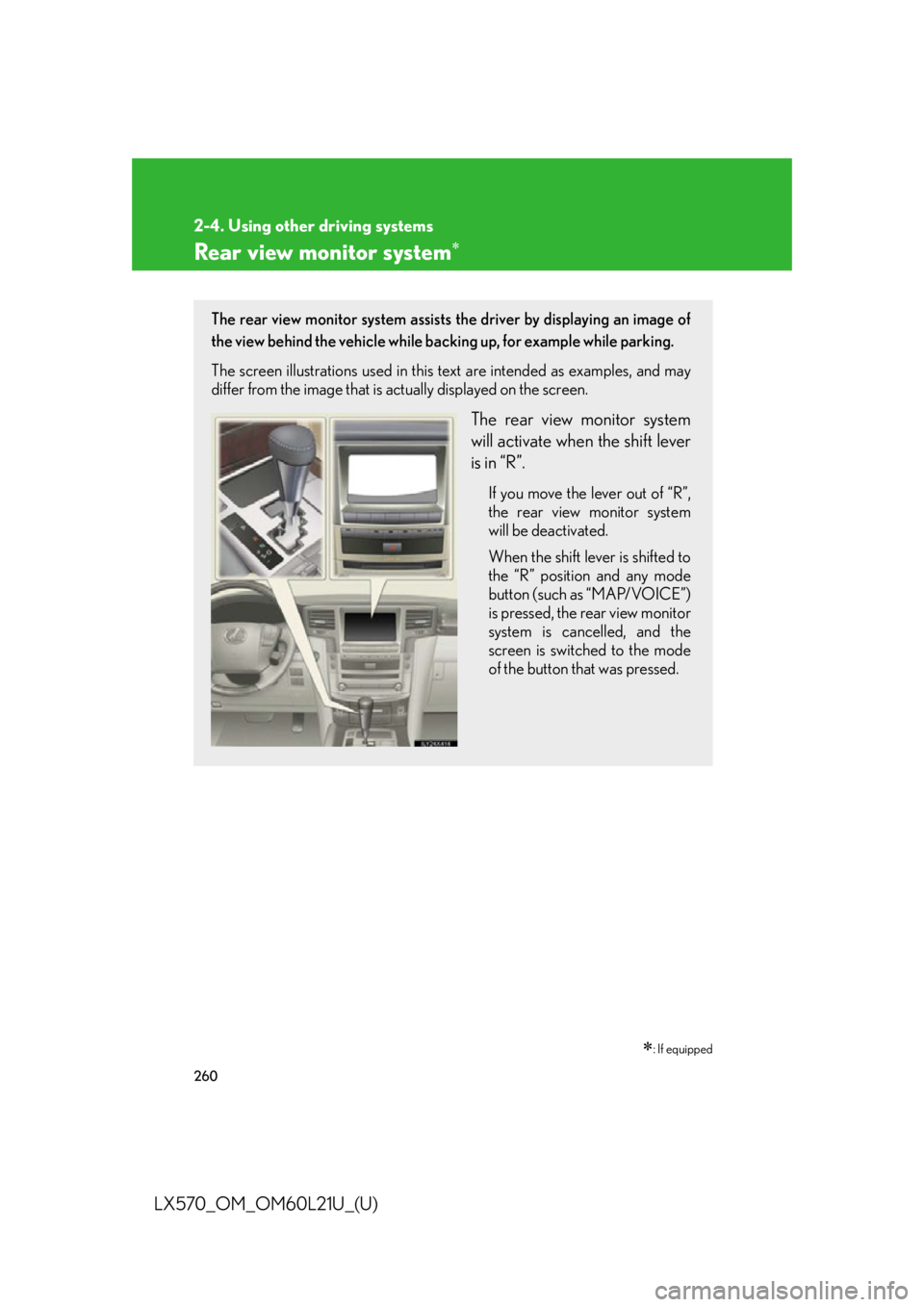
: If equippedThe rear view monitor system assists the driver by displaying an image of
the view behind the vehicle while ba cking up, for example while parking.
The screen illustrations used in this te xt are intended as examples, and may
differ from the image that is actually displayed on the screen.
The rear view monitor system
will activate when the shift lever
is in “R”. If you move the lever out of “R”,
the rear view monitor system
will be deactivated.
When the shift lever is shifted to
the “R” position and any mode
button (such as “MAP/VOICE”)
is pressed, the rear view monitor
system is cancelled, and the
screen is switched to the mode
of the button that was pressed.
Page 268 of 956
2682-4. Using other driving systems
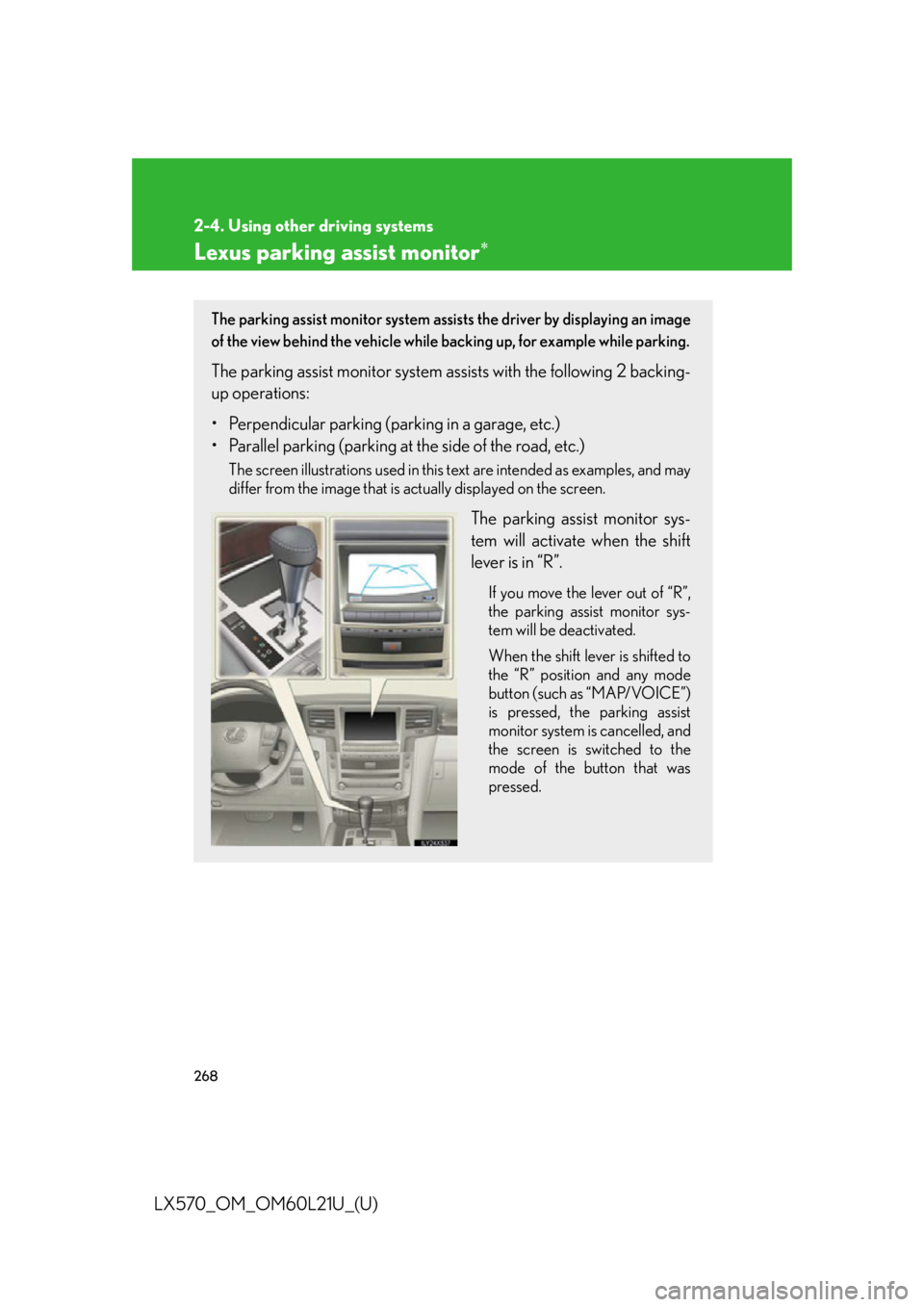
LX570_OM_OM60L21U_(U) Lexus parking assist monitor
The parking assist monitor system assists the driver by displaying an image
of the view behind the vehicle while backing up, for example while parking.
The parking assist monito r system assists with the following 2 backing-
up operations:
• Perpendicular parking (parking in a garage, etc.)
• Parallel parking (parking at the side of the road, etc.) The screen illustrations used in this text are intended as examples, and may
differ from the image that is actually displayed on the screen.
The parking assist monitor sys-
tem will activate when the shift
lever is in “R”. If you move the lever out of “R”,
the parking assist monitor sys-
tem will be deactivated.
When the shift lever is shifted to
the “R” position and any mode
button (such as “MAP/VOICE”)
is pressed, the parking assist
monitor system is cancelled, and
the screen is switched to the
mode of the button that was
pressed.