LED LEXUS LX570 2014 Repair Manual
[x] Cancel search | Manufacturer: LEXUS, Model Year: 2014, Model line: LX570, Model: LEXUS LX570 2014Pages: 956, PDF Size: 16.4 MB
Page 424 of 956

4243-1. Using the touch screen
LX570_OM_OM60L21U_(U) ■ Voice volume
The voice guidance volume can be adjusted or switched off.
Touch “Voice” on the “Setup” screen.
Select the desired level by touch-
ing the appropriate number. If voice guidance is not needed,
touch “Off” to disable the feature.
Touch “Save”.
Vehicle settings
Touch “Vehicle” on the “Setup” screen.
Maintenance information set-
tings Refer to “Navigation System
Owner’s Manual”.
Vehicle customization Detailed information: P. 9 0 6
Setting up intuitive parking
assist Detailed information: P. 2 4 9STEP 1
STEP 2
STEP 3
Page 425 of 956

4253-1. Using the touch screen
3
Interior features
LX570_OM_OM60L21U_(U) Phone settings
Touch “Phone” on the “Setup” screen.
Phone sound settings Detailed information: P. 6 4 4
Phonebook settings Detailed information: P. 6 4 6
Message settings Detailed information: P. 6 6 2
Phone display settings Detailed information: P. 6 6 6
Bluetooth ®
Settings
Touch “Bluetooth
* ” on the “Setup” screen.
Registered devices Detailed information: P. 6 7 0
Selecting a Bluetooth ®
phoneDetailed information: P. 6 76
Selecting portable player Detailed information: P. 6 7 7
Detailed Bluetooth ®
settingsDetailed information: P. 6 7 8
* : Bluetooth is a registered trade-
mark of Bluetooth SIG, Inc.
Page 426 of 956
4263-1. Using the touch screen
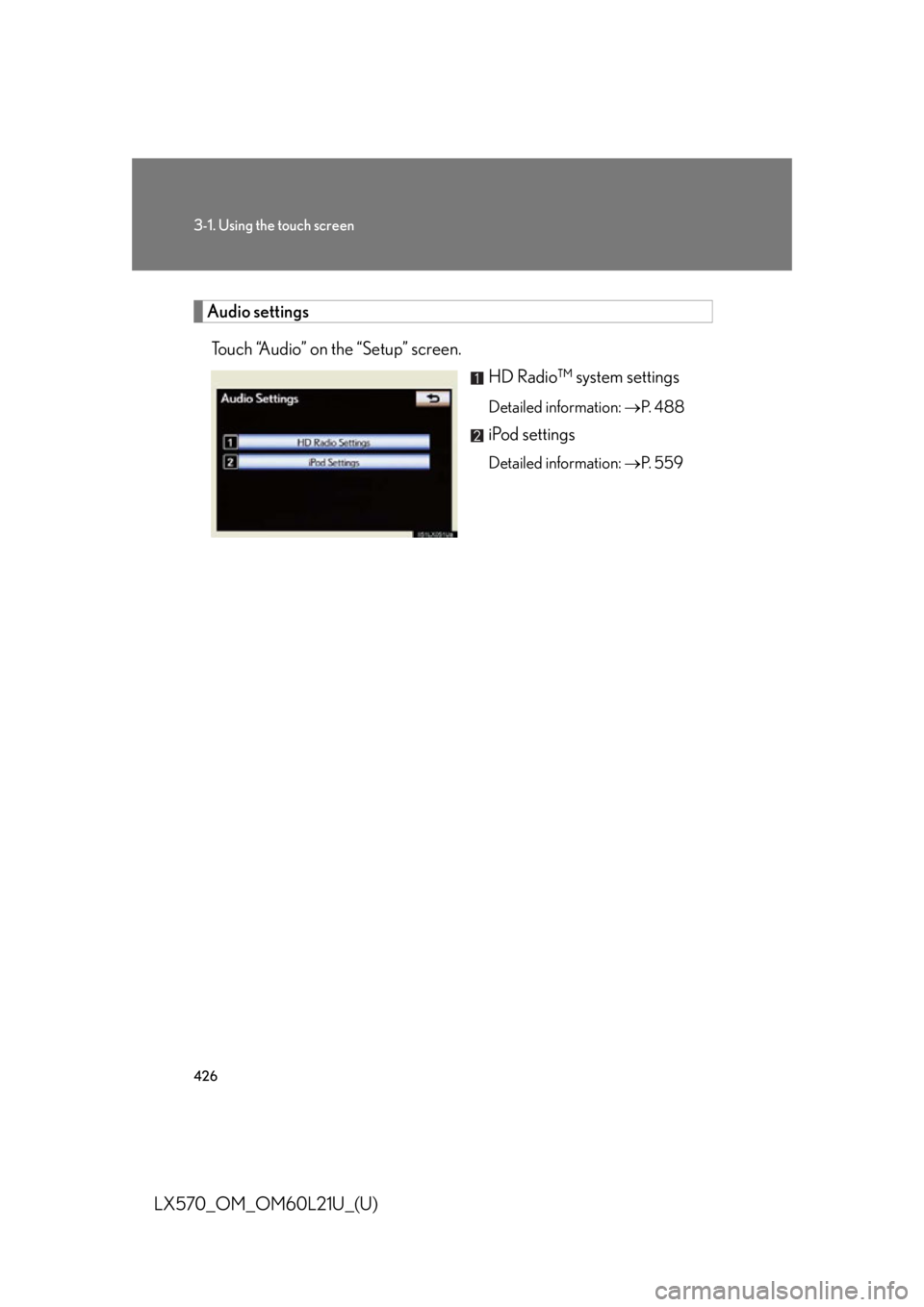
LX570_OM_OM60L21U_(U) Audio settings
Touch “Audio” on the “Setup” screen.
HD Radio™ system settings Detailed information: P. 4 8 8
iPod settings Detailed information: P. 5 5 9
Page 433 of 956

4333-1. Using the touch screen
3
Interior features
LX570_OM_OM60L21U_(U) Expanded voice commands
Touching “On” next to “Expanded Voice Commands” on the “Voice
Settings” screen enables voice co mmand operation of the audio/video
and air conditioning system. ( P. 423)
For more information on operatio ns that can be controlled using
expanded voice commands, re fer to “Command list”. ( P. 433)
■ Voice command example (turn the audio system)
Press or .
Say “Audio on”.
Command list
Recognizable voice commands and their actions are shown below.
● For devices that are not installed in the vehicle, the related commands
will not be displayed in the “Shortcut Menu” screen. Also, according to
conditions, other commands may no t be displayed in the “Shortcut
Menu” screen.
● Voice recognition language can be changed. ( P. 415)
● Commands that have a “O” in the Sho rtcut Menu column can be rec-
ognized from the “Shortcut Menu” screen.
Commands that have a “—” in the Sh ortcut Menu column can only be
recognized from the screen that they are displayed in. STEP 1
STEP 2
Page 437 of 956

4373-1. Using the touch screen
3
Interior features
LX570_OM_OM60L21U_(U) ■ Air conditioning system command
When expanded voice commands are turned “On”. ( P. 433)Command
Action Shortcut
Menu
“Automatic climate
control” Turns air conditioni ng system on and
off. O
“Warmer” Turns temperature up. O
“Cooler ” Turns temperature down. O■
Voice command system ●
Commands that are not displayed in the “Shortcut Menu” screen can be oper-
ated from the “Main Menu” screen. ●
If the system does not respond or the confirmation screen does not disappear,
press
or
and try again.●
Voice guidance can be canceled by setting voice prompts to off. Use this setting
when it is desirable to say a co mmand immediately after pressing
or
and hearing a beep.■
If a voice command cannot be recognized ●
If a voice command cannot be recognized within 6 seconds, voice guidance will
say “Pardon?” (“Command not recognized.” will be displayed on the screen)
and voice command reception will restart. ●
If a voice command cannot be recognized 2 consecutive times, the voice com-
mand guidance system will say “Paused. To restart voice recognition, push the
talk switch. To cancel voice recognition, push and hold the talk switch.”. Then
voice recognition will be suspended.■
When touching “Voice Prompts” ●
The voice recognition prompt can be set to on or off. This setting can also be
changed on the “Voice Settings” screen. ( P. 4 2 3 )●
Voice recognition will be temporarily suspended. Press
or
again.
Page 464 of 956

4643-3. Using the audio system
LX570_OM_OM60L21U_(U) Copyright © 1991, 1993 The Regents of the University of California. All rights
reserved.
Copyright © 1991, 1993 The Regents of the University of California. All rights
reserved.
This code is derived from software cont ributed to Berkeley by Berkeley Software
Design, Inc.
Copyright © 1992, 1993 The Regents of the University of California. All rights
reserved.
Copyright © 1992, 1993 The Regents of the University of California. All rights
reserved.
This code is derived from software cont ributed to Berkeley by Ralph Campbell.
Copyright © 1992, 1993 The Regents of the University of California. All rights
reserved.
© UNIX System Laboratories, Inc. All or some portions of this file are derived from
material licensed to the University of California by American Telephone and Tele-
graph Co. or Unix System Laboratories, In c. and are reproduced herein with the
permission of UNIX Sy stem Laboratories, Inc.
Copyright © 1992, 1993 The Regents of the University of California. All rights
reserved.
This software was developed by the Computer Systems Engineering group at
Lawrence Berkeley Laboratory under DARPA contract BG 91-66 and contributed
to Berkeley. All advertising materials ment ioning features or use of this software
must display the following acknowledgement: This product includes software
developed by the University of Califo rnia, Lawrence Berkeley Laboratory.
Copyright © 1992, 1993 The Regents of th e University of California. All rights
reserved.
This code is derived from software contributed to Berkeley by Ralph Campbell.
This file is derived from the MIPS RISC Architecture book by Gerry Kane.
Copyright © 1993 The Regents of the Univer sity of California. All rights reserved.
Copyright © 1994 The Regents of the University of California. All rights reserved.
Page 465 of 956

4653-3. Using the audio system
3
Interior features
LX570_OM_OM60L21U_(U) This code is derived from software cont ributed to Berkeley by Andrew Hume of
AT &T B e l l L a b o r a t o r i e s .
Redistribution and use in sour ce and binary forms, with or without modification, are
permitted provided that the following conditions are met:
1. Redistributions of source code must reta in the above copyright notice, this list of
conditions and the following disclaimer.
2. Redistributions in binary form must reproduce the above copyright notice, this
list of conditions and the following disc laimer in the documentation and/or other
materials provided with the distribution.
3. All advertising materials mentioning features or use of this software must display
the following acknowledgement: This product includes software developed by
the University of California, Berkeley and its contributors.
4. Neither the name of the University nor the names of its contributors may be
used to endorse or promote products deri ved from this software without specific
prior written permission.
THIS SOFTWARE IS PROVIDED BY THE REGENTS AND CONTRIBUTORS
“AS IS” AND ANY EXPRESS OR IMPLIED WARRANTIES, INCLUDING, BUT
NOT LIMITED TO, THE IMPLIED WARRANTIES OF MERCHANTABILITY
AND FITNESS FOR A PARTICULAR PURPOSE ARE DISCLAIMED. IN NO
EVENT SHALL THE REGENTS OR CONTRIBUTORS BE LIABLE FOR ANY
DIRECT, INDIRECT, INCIDENTAL, SPECIAL, EXEMPLARY, OR CONSE-
QUENTIAL DAMAGES (INCLUDING, BUT NOT LIMITED TO, PROCURE-
MENT OF SUBSTITUTE GOODS OR SERVICES; LOSS OF USE, DATA, OR
PROFITS; OR BUSINESS INTERRUP TION) HOWEVER CAUSED AND ON
ANY THEORY OF LIABILITY, WHETHER IN CONTRACT, STRICT LIABILITY,
OR TORT (INCLUDING NEGLIGENCE OR OTHERWISE) ARISING IN ANY
WAY OUT OF THE USE OF THIS SOFTWARE, EVEN IF ADVISED OF THE
POSSIBILITY OF SUCH DAMAGE.
Copyright © 1982, 1986 Regents of the University of California. All rights
reserved.
Copyright © 1983, 1990, 1993 The Regents of the University of California. All
rights reserved.
Page 466 of 956

4663-3. Using the audio system
LX570_OM_OM60L21U_(U) Redistribution and use in sour ce and binary forms, with or without modification, are
permitted provided that the following conditions are met:
1. Redistributions of source code must reta in the above copyright notice, this list of
conditions and the following disclaimer.
2. Redistributions in binary form must reproduce the above copyright notice, this
list of conditions and the following disc laimer in the documentation and/or other
materials provided wi th the distribution.
3. All advertising materials mentioning features or use of this software must display
the following acknowledgement: This product includes software developed by
the University of California, Berkeley and its contributors.
4. Neither the name of the University no r the names of its contributors may be
used to endorse or promote products deri ved from this software without specific
prior written permission.
THIS SOFTWARE IS PROVIDED BY THE REGENTS AND CONTRIBUTORS
“AS IS” AND ANY EXPRESS OR IMPL IED WARRANTIES, INCLUDING, BUT
NOT LIMITED TO, THE IMPLIED WARRANTIES OF MERCHANTABILITY
AND FITNESS FOR A PARTICULAR PURPOSE ARE DISCLAIMED. IN NO
EVENT SHALL THE REGENTS OR CONTRIBUTORS BE LIABLE FOR ANY
DIRECT, INDIRECT, INCIDENTAL, SPECIAL, EXEMPLARY, OR CONSE-
QUENTIAL DAMAGES (INCLUDING, BUT NOT LIMITED TO, PROCURE-
MENT OF SUBSTITUTE GOODS OR SE RVICES; LOSS OF USE, DATA, OR
PROFITS; OR BUSINESS INTERRUPTION) HOWEVER CAUSED AND ON
ANY THEORY OF LIABILITY, WHETHER IN CONTRACT, STRICT LIABILITY,
OR TORT (INCLUDING NEGLIGENCE OR OTHERWISE) ARISING IN ANY
WAY OUT OF THE USE OF THIS SOFTWARE, EVEN IF ADVISED OF THE
POSSIBILITY OF SUCH DAMAGE.
Portions Copyright © 1993 by Digital Equipment Corporation.
Pe r m i s s i o n t o u s e , c o p y, m o d i fy, and distribute this software for any purpose with or
without fee is hereby granted, provided that the above copyright notice and this
permission notice appear in all copies, an d that the name of Digital Equipment Cor-
poration not be used in adve rtising or publicity pertaining to distribution of the doc-
ument or software without specific, written prior permission.
Page 469 of 956

4693-3. Using the audio system
3
Interior features
LX570_OM_OM60L21U_(U) Copyright © 1999, 2000 The NetBSD Foun dation, Inc. All rights reserved.
This code is derived from software contributed to The NetBSD Foundation by
Julian Coleman.
Copyright © 2000 The NetBSD Founda tion, Inc. All rights reserved.
This code is derived from software contributed to The NetBSD Foundation by
Dieter Baron and Thomas Klausner.
Copyright © 2000, 2001 The NetBSD Fo undation, Inc. All rights reserved.
This code is derived from software contributed to The NetBSD Foundation by Jun-
ichiro itojun Hagino and by Klaus Klein.
Copyright © 2001 The NetBSD Founda tion, Inc. All rights reserved.
This code is derived from software contributed to The NetBSD Foundation by
Klaus Klein.
Redistribution and use in sour ce and binary forms, with or without modification, are
permitted provided that the following conditions are met:
1. Redistributions of source code must reta in the above copyright notice, this list of
conditions and the following disclaimer.
2. Redistributions in binary form must reproduce the above copyright notice, this
list of conditions and the following disc laimer in the documentation and/or other
materials provided with the distribution.
3. All advertising materials mentioning features or use of this software must display
the following acknowledgement: This product includes software developed by
the NetBSD Foundation, Inc. and its contributors.
4. Neither the name of The NetBSD Foundation nor the names of its contributors
may be used to endorse or promote products derived from this software without
specific prior written permission.
Page 470 of 956

4703-3. Using the audio system
LX570_OM_OM60L21U_(U) THIS SOFTWARE IS PROVIDED BY THE NETBSD FOUNDATION, INC. AND
CONTRIBUTORS “AS IS” AND ANY EXPRESS OR IMPLIED WARRANTIES,
INCLUDING, BUT NOT LIMITED TO, THE IMPLIED WARRANTIES OF MER-
CHANTABILITY AND FITNESS FOR A PARTICULAR PURPOSE ARE DIS-
CLAIMED. IN NO EVENT SHALL THE FOUNDATION OR CONTRIBUTORS
BE LIABLE FOR ANY DIRECT, INDIRECT, INCIDENTAL, SPECIAL, EXEM-
PLARY, OR CONSEQUENTIAL DAMAGES (INCLUDING, BUT NOT LIM-
ITED TO, PROCUREMENT OF SUBSTITUTE GOODS OR SERVICES; LOSS
OF USE, DATA, OR PROFITS; OR BUSINESS INTERRUPTION) HOWEVER
CAUSED AND ON ANY THEORY OF LIABILITY, WHETHER IN CON-
TRACT, STRICT LIABILITY, OR TORT (INCLUDING NEGLIGENCE OR OTH-
ERWISE) ARISING IN ANY WAY OUT OF THE USE OF THIS SOFTWARE,
EVEN IF ADVISED OF THE POSSIBILITY OF SUCH DAMAGE.
This product includes software developed by Christos Zoulas.
Copyright © 1997 Christos Zoulas. All rights reserved.
Redistribution and use in sour ce and binary forms, with or without modification, are
permitted provided that the following conditions are met:
1. Redistributions of source code must reta in the above copyright notice, this list of
conditions and the following disclaimer.
2. Redistributions in binary form must reproduce the above copyright notice, this
list of conditions and the following disc laimer in the documentation and/or other
materials provided wi th the distribution.
3. All advertising materials mentioning features or use of this software must display
the following acknowledgement: This product includes software developed by
Christos Zoulas.
4. The name of the author may not be used to endorse or promote products
derived from this software without specific prior written permission.