brake LEXUS LX570 2014 Owner's Guide
[x] Cancel search | Manufacturer: LEXUS, Model Year: 2014, Model line: LX570, Model: LEXUS LX570 2014Pages: 956, PDF Size: 16.4 MB
Page 259 of 956

2592-4. Using other driving systems
2
When driving
LX570_OM_OM60L21U_(U) CAUTION■
When using the intuitive parking assist
Observe the following precautions.
Failing to do so may result in the vehicle being unable to be driven safely and possi-
bly cause an accident. ●
Do not use the sensor at speeds in excess of 6 mph (10 km/h). ●
The sensors’ detection areas and reaction times are limited. When moving for-
ward or reversing, check the areas surrounding the vehicle (especially the sides
of the vehicle) for safety, and drive slowly, using the brake to control the vehicle’s
speed. ●
Do not install accessories within the sensors’ detection areas.
NOTICE■
When using intuitive parking assist
In the following situations, the system may not function correctly due to a sensor
malfunction etc. Have the vehicle checked by your Lexus dealer. ●
A beep does not sound when you turn the main switch on. ●
The intuitive parking assist operation disp lay flashes, and a beep sounds when no
obstacles are detected. ●
If the area around a sensor collides wi th something, or is subjected to strong
impact. ●
If the bumper collides with something. ●
If the display shows continuously without a beep. ●
If a display error occurs, first check the sensor.
If the error occurs even if there is no ice, snow or mud on the sensor, it is likely that
the sensor is malfunctioning.■
Notes when washing the vehicle
Do not apply intensive bursts of water or steam to the sensor area.
Doing so may result in the sensor malfunctioning.
Page 266 of 956

2662-4. Using other driving systems
LX570_OM_OM60L21U_(U) CAUTION■
When using the rear view monitor system
The rear view monitor system is a supplemental device intended to assist the driver
when backing up. When backing up, be sure to check visually behind and all around
the vehicle before proceeding.
Observe the following precautions to avoid an accident that could result in death or
serious injuries. ●
Never depend on the rear view monitor system entirely when backing up. The
image and the position of the guide lines displayed on the screen may differ from
the actual state.
Use caution, just as you would when backing up any vehicle. ●
When parking, be sure to check that the parking space will accommodate your
vehicle before maneuvering into it. ●
Be sure to back up slowly, depressing the brake pedal to control vehicle speed.●
In low temperatures, the screen may darken or the image may become faint. The
image could distort when the vehicle is moving, or you may become unable to
see the image on the screen. Be sure to check direct visually and with the mirrors
all around the vehicle before proceeding. ●
The camera uses a special lens. The di stances between obje cts and pedestrians
that appear in the image displayed on the screen will differ from the actual dis-
tances. ( P. 2 9 0 )
Page 297 of 956

2972-4. Using other driving systems
2
When driving
LX570_OM_OM60L21U_(U) CAUTION■
When using the Lexus parking assist monitor system
The parking assist monitor system is a supp lemental device intended to assist the
driver when backing up. When backing up, be sure to check visually behind and all
around the vehicle before proceeding.
Observe the following precautions to avoid an accident that could result in death or
serious injuries. ●
Never depend on the parking assist monitor entirely when backing up. The image
and the position of the guide lines displayed on the screen may differ from the
actual state.
Use caution, just as you would when backing up any vehicle. ●
Be sure to back up slowly, depressing the brake pedal to control vehicle speed.●
If you seem likely to hit nearby vehicles, obstacles, people or mount the shoulder,
depress the brake pedal to stop the vehicle, then disable the assist system by
touch
on the screen to cancel the system.●
The instructions given are only guidelines.
When and how much to turn the steering wheel will vary according to traffic con-
ditions, road surface conditions, vehicle co ndition, etc. when parking. It is neces-
sary to be fully aware of this before using the parking assist system. ●
When parking, be sure to check that the parking space will accommodate your
vehicle before maneuvering into it. ●
Do not use the Lexus parking assist monitor system in the following cases:
• On icy or slick road surfaces, or in snow
• When using tire chains
• When the back door is not closed completely
• On roads that are not flat or straight, such as curves or slopes. ●
In low temperatures, the screen may darken or the image may become faint. The
image could distort when the vehicle is moving, or you may become unable to
see the image on the screen. Be sure to check direct visually and with the mirrors
all around the vehicle before proceeding.
Page 325 of 956

3252-4. Using other driving systems
2
When driving
LX570_OM_OM60L21U_(U) ■
In the following cases the 4-Wheel AHC will not operate ●
The brake pedal has been depressed for a few seconds or longer while the vehi-
cle is stopped. ●
Vehicle height control has not been frequently used. ●
The suspension fluid temperature is lower than -22°F (-30°C). ●
There is ice on the suspension. ●
Driving on bumpy roads which may cause the suspension to fully elongate. ●
If the steering wheel is abruptly turned more than 3/4 of a revolution with the
center differential lock system activated.■
Cold weather operation
It may take longer for the vehicle height to change if the suspension fluid tempera-
ture drops below 5°F (-15°C).
The 4-Wheel AHC does not operate when the suspension fluid temperature drops
below -22°F (-30°C). ●
In this case, even if the height select switch is pressed, the vehicle height will not
change. Once the vehicle has been driven for a short time and the suspension
fluid has been warmed to within normal operating limits, the 4-Wheel AHC will
begin operating and the vehicle height wi ll automatically change to the selected
mode. ●
When the suspension fluid is around -22°F (-30°C), the vehicle height may not
be able to be raised, even if the 4-Wheel AHC is operating. In this case, pull the
height select switch to “ ” then push to “ ” after driving for a short time longer
to select the desired vehicle height.■
Parking and stopping tips ●
If you immediately stop the engine after off-road driving, the vehicle height may
gradually lower. When parking, make su re there is nothing under the vehicle
that may come in contact with the underbody. The vehicle will return to the set
height when the engine is started. ●
The vehicle height may change as the temperature changes when the engine is
stopped. The vehicle will return to the set height when the engine is started.
Page 332 of 956

3322-4. Using other driving systems
LX570_OM_OM60L21U_(U) ■
Advice for driving on slippery roads ●
If you shift the four-wheel drive control sw itch to “L4” and the shift lever to the
“2” range of “S” or “D” (vehicles with paddle shift switches) while driving in
steep off-road areas, the output of the brake can be controlled effectively by the
Active TRAC, which assists the driver to control the driving power of 4 wheels. ●
Use the “1” range of “S” or “D” (vehicles with paddle shift switches) of the shift
lever for maximum power and traction when your wheels get stuck or when
driving down a steep incline.■
The center differential lock indicator light
The indicator light blinks while locking/unlocking the center differential. ■
The center differential lock/unlock switch can be operated when ●
The “ENGINE START STOP” switch is in IGNITION ON mode. ●
The vehicle speed is less than 60 mph (100 km/h).■
Locking/unlocking the center differential ●
When the four-wheel drive control switch is in L4 with the center differential
locked, VSC is automatically turned off. (The center differential lock and VSC
OFF indicator lights come on.) ●
If the operation is not completed, the center differential lock indicator blinks. If
the indicator light does not turn off when unlocking the center differential, drive
straight ahead while accelerating or decelerating, or drive in reverse. ●
If the center differential lock/unlock is not completed within 5 seconds while the
cruise control system is on, ca ncel the cruise control system.
Page 333 of 956

3332-4. Using other driving systems
2
When driving
LX570_OM_OM60L21U_(U) ■
If the low speed four-wheel drive indicator light or the center differential lock
indicator light blinks ●
If the low speed four-wheel drive indicator light continues to blink when using
the four-wheel drive control switch, stop the vehicle completely, move the shift
lever to “N” and operate the switch again. ●
If the shift lever is moved before the low speed four-wheel drive indicator turns
on/off, the transfer mode may not be shifted completely. The transfer mode dis-
engages both the front and rear driveshafts from the powertrain and allows the
vehicle to move regardless of the shift po sition. (At this time, the indicator blinks
and the buzzer sounds.)
Therefore, the vehicle is free to roll even if the automatic transmission is in “P”.
You or someone else could be seriously injured. You must complete the shifting of
the transfer mode.
To complete the shifting, stop the vehicle completely, return the shift lever to “N”,
and confirm that the shift was completed (the indicator turns on/off). ●
If the engine coolant temperature is too low, the four-wheel drive control system
may not be able to shift. When the engine is warmer operate the switch again.
If the low speed four-wheel drive indicator light or the center differential lock indi-
cator light continues to blink even after attempting the above, there may be a mal-
function in the engine, the brake system or the four-wheel drive system. In this case,
you may not be able to shif t between “H4” and “L4”, and the center differential lock
may not be operable. Have the vehicle inspected by your Lexus dealer immediately.
Page 339 of 956

3392-4. Using other driving systems
2
When driving
LX570_OM_OM60L21U_(U) ■
The Crawl Control and Turn Assist function can be operated when
Crawl Control ●
The engine is running. ●
The shift lever is in any gear other than “P” or “N”. ●
The four-wheel drive control switch is in “L4”. ●
The driver’s door is closed.
Tu r n A s s i s t f u n c t i o n ●
Crawl Control is operating. ●
The center differential is not locked. ●
The accelerator and brake are not being operated. ●
The shift lever is in any gear other than “P”, “R” or “N”.●
The steering wheel is turned very far.■
Automatic system cancelation
Crawl Control
In the following situations, the buzzer will sound intermittently and Crawl Control
will be canceled automatically. In this event, the Crawl Control indicator will flash
and then go off, the Turn Assist indicator will go off (if the Turn Assist function is in
use), and a message stating that Crawl Co ntrol has been turned off will be dis-
played on the multi-information display for several seconds. ●
When the shift lever is moved to “P” or “N”. ●
When the four-wheel drive control switch is in “H4”. ●
When the driver’s door is opened.
Tu r n A s s i s t f u n c t i o n
When the center differential is locked, th e buzzer will sound intermittently and the
Turn Assist function will be canceled automatically. In this event, the Turn Assist indi-
cator will go off, and a message stating that the Turn Assist function has been turned
off will be displayed on the multi-information display for several seconds.
Page 340 of 956

3402-4. Using other driving systems
LX570_OM_OM60L21U_(U) ■
Function limitations
Crawl Control ●
In the following situations, brake control can be used to drive downhill at a con-
stant speed. However, engine control is not available when driving uphill at a
constant speed.
• When switched to second start mode. ●
In the following situation, engine control and brake control will stop temporarily.
In this event, the Crawl Control indicator will flash.
• When the vehicle speed exceeds approximately 15 mph (25 km/h).
Tu r n A s s i s t f u n c t i o n
In the following situations, the Turn Assist fu nction will stop temporarily. In this event,
the Turn Assist indicator will flash. ●
When the vehicle speed exceeds approximately 6 mph (10 km/h).●
When the shift lever is moved to “R”.■
When the Crawl Control system is operated continuously ●
If Crawl Control is used continuously for a long time, the buzzer will sound, a
malfunction notification will be displaye d on the multi-information display, the
Crawl Control indicator will go off, and Crawl Control will be temporarily inop-
erable as a result of the brake system over heating. In this event, stop the vehicle
immediately in a safe place, and allow the brake system to cool down sufficiently
until the “TRAC OFF” on the multi-inform ation display goes off. (In the mean-
time, normal driving is possible.) ●
If Crawl Control is used continuously for a long time, the buzzer will sound, the
system will be temporarily canceled, and a malfunction notification will be dis-
played on the multi-information display as a result of the automatic transmission
system overheating. Stop the vehicle in a safe place until the display goes off.
Page 342 of 956
3422-4. Using other driving systems
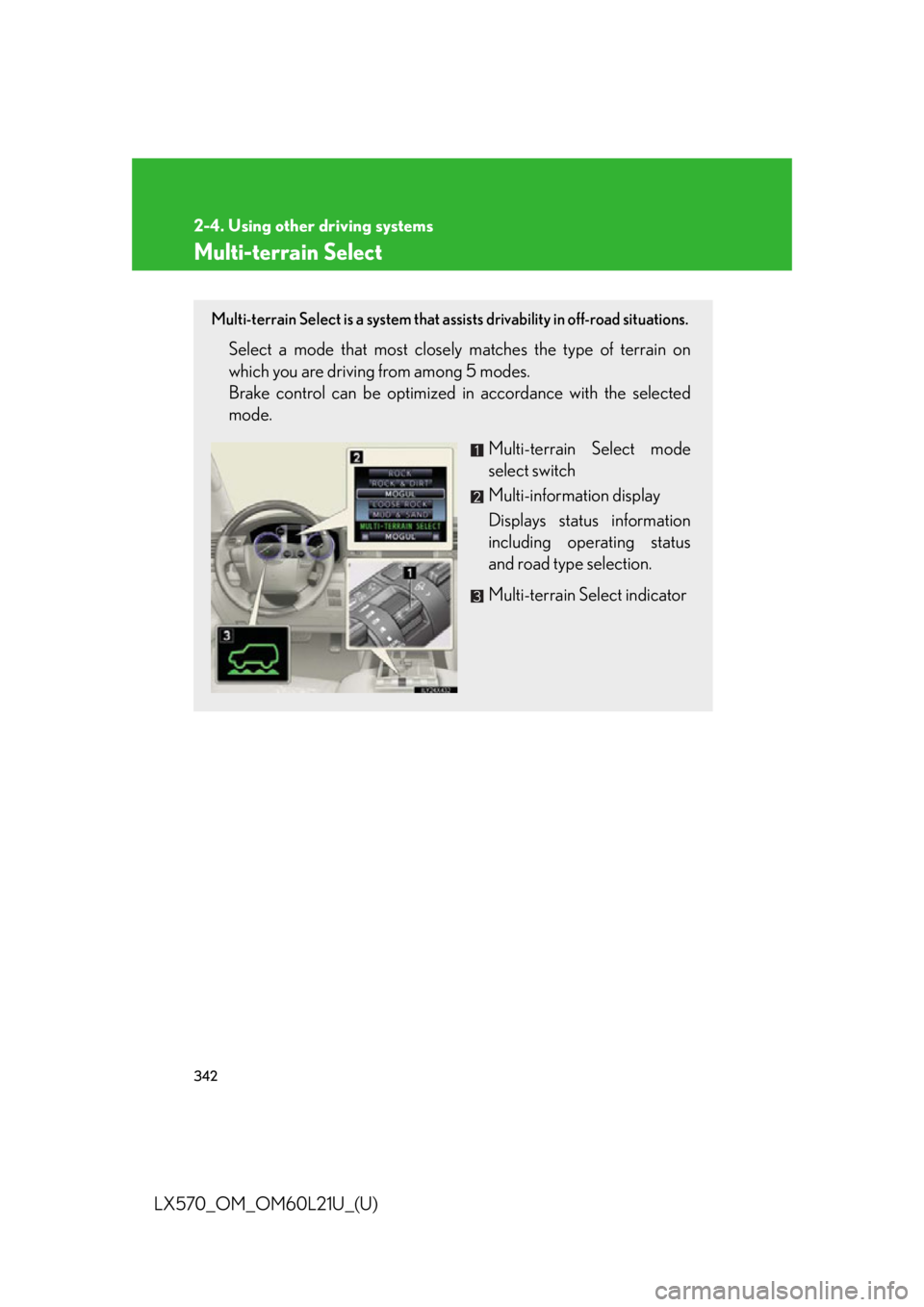
LX570_OM_OM60L21U_(U) Multi-terrain Select Multi-terrain Select is a system that as sists drivability in off-road situations.
Select a mode that most closel y matches the type of terrain on
which you are driving from among 5 modes.
Brake control can be optimized in accordance with the selected
mode.
Multi-terrain Select mode
select switch
Multi-information display
Displays status information
including operating status
and road type selection.
Multi-terrain Select indicator
Page 346 of 956
3462-4. Using other driving systems
LX570_OM_OM60L21U_(U) ■
When the vehicle is stuck
Switching the transfer and differential
For the operation of the following functions, refer to the following pages. ●
Four-wheel drive system ( P. 3 3 0 )●
Center differential lock ( P. 3 3 0 )■
When the brake system operates continuously
The brake system may overheat. In this case, a buzzer will sound, the “TRAC OFF”
will be displayed on the multi-information display, and Multi-terrain Select will be
temporarily inoperable. In this event, stop the vehicle immediately in a safe place,
and allow the brake system to cool down sufficiently. (There is no problem with con-
tinuing normal driving.)
After a short time, the message on the multi-information display will go off, and you
will be able to use Multi-terrain Select. ■
When there is a malfunction in the system
The slip indicator light will come on. Have the vehicle inspected by your Lexus
dealer immediately.
CAUTION■
When using the Multi-terrain Select
Observe the following precautions to avoid an accident that could result in death or
serious injuries: ●
There is a chance that the selected mode may not be the most appropriate in
terms of road conditions such as pitch, slipperiness, undulation, etc. ( P. 3 4 3 )●
Multi-terrain Select is not intended to expand the limits of the vehicle. Check the
road conditions thoroughly beforehand, and drive safely and carefully.
NOTICE■
Precaution for use
The Multi-terrain Select is intended for use during off-road driving. Do not use the
system at any other time.