phone LEXUS LX570 2014 Service Manual
[x] Cancel search | Manufacturer: LEXUS, Model Year: 2014, Model line: LX570, Model: LEXUS LX570 2014Pages: 956, PDF Size: 16.4 MB
Page 625 of 956

6253-5. Using the hands-free system (for cellular phone)
3
Interior features
LX570_OM_OM60L21U_(U) ■
Reconnecting to the Bluetooth ®
phone
If the system cannot connect due to poor signal strength wi th the “ENGINE START
STOP” switch in ACCESSORY or IGNITION ON mode, the system will automat-
ically attempt to reconnect.
If the phone is turned off, the system will not attempt to reconn ect. In this case, it
must be connected manually, or the phone must be re-selected or re-entered. ■
Connecting the phone while Bluetooth ®
audio is playing●
Bluetooth ®
audio will stop temporarily.●
It may take time to connect.■
Connecting the phone while another Bluetooth ®
device is connected
When another Bluetooth ®
device is currently connected, a confirmation message
will be displayed. To di sconnect the Bluetooth ®
device, touch “Yes”.■
Connecting the phone while 5 Bluetooth ®
devices have already been registered
When 5 Bluetooth ®
devices have already been registered, a registered device
needs to be deleted. Touch “Yes” to delete one or more.
Touch the device to be deleted, then touch “Remove”, and “Yes”. ■
If the Bluetooth ®
phone has a Bluetooth ®
audio function
When the Bluetooth ®
phone to be registered has a Bluetooth ®
audio function, this
audio function will be registered automa tically at the same time and confirmation
message may be displayed. If this screen is displayed, touch “Yes” to connect the
audio function or touch “No” to cancel the connection.
Page 626 of 956

6263-5. Using the hands-free sy stem (for cellular phone)
LX570_OM_OM60L21U_(U) Making a call
Once the Bluetooth ®
phone is registered, you can make a call using the
following procedure:
■ Dialing
Display the “Phone” screen. ( P. 621)
Input the phone number. To delete the inputted phone num-
ber, touch .
Touch or press on the steering wheel. Depending on the type of Bluetooth ®
phone being connected, it may
be necessary to perform additional steps on the phone.STEP 1
STEP 2
STEP 3
Page 627 of 956

6273-5. Using the hands-free system (for cellular phone)
3
Interior features
LX570_OM_OM60L21U_(U) ■ Dialing from the phonebook
You can dial a number from the phonebook data imported from your
cellular phone. The system has one phonebook for each phone. Up to
1000 entries may be stored in each phonebook. ( P. 646)
Display the “Phone” screen. ( P. 621)
Touch “Contacts” on the “Phone” screen.
Choose the desired data to call
from the list.
Choose the number and then
touch or press on the
steering wheel.STEP 1
STEP 2
STEP 3
STEP 4
Page 628 of 956

6283-5. Using the hands-free sy stem (for cellular phone)
LX570_OM_OM60L21U_(U) ■ When the phonebook is empty
If your cellular phone is neith er PBAP nor OPP compatible, the
phonebook cannot be transferred.
Display the “Phone” screen. ( P. 621)
Touch “Contacts” on the “Phone” screen.
PBAP compatible models
Touch “Yes”.
PBAP incompatible but OPP compatible models
Touch “Transfer”.STEP 1
STEP 2
STEP 3
STEP 3
Page 629 of 956

6293-5. Using the hands-free system (for cellular phone)
3
Interior features
LX570_OM_OM60L21U_(U) Transfer the phonebook data to
the system using the Bluetooth ®
phone. This screen appears while transfer-
ring. To cancel this function, touch
“Cancel”.
Depending on the type of
Bluetooth ®
phone:
• It may be necessary to perform
additional steps on the phone
when transferring phonebook
data.
• The registered image on the
phonebook may not appear
when phonebook data is trans-
ferred.
Depending on the type of cellular
phone, OBEX authentication may
be required when transferring
phonebook data. Enter “1234” into
the Bluetooth ®
phone.
When the data transfer from a
PBAP incompatible but OPP
compatible model is complete,
“Done” will appear on the screen.
Touch “Done”.STEP 4
STEP 5
Page 630 of 956

6303-5. Using the hands-free sy stem (for cellular phone)
LX570_OM_OM60L21U_(U) ■ Calling using speed dial
You can make a call using numbers registered from the phonebook.
( P. 646)
Display the “Phone” screen. ( P. 621)
Touch “Speed Dials” on the “Phone” screen.
Touch the desired tab and choose
the desired number to make a call.
■ Dialing from history
You can call using the call history which has the 4 functions below.
“All”: all the numbers below which were memorized
“Missed”: calls which you missed
“Incoming”: calls which you received
“Outgoing”: numbers which you called
You can call using the 25 most rece ntly called numbers shown by “All”
tab while driving.
Display the “Phone” screen. ( P. 621)
Touch “Call History” on the “Phone” screen. STEP 1
STEP 2
STEP 3
STEP 1
STEP 2
Page 631 of 956
6313-5. Using the hands-free system (for cellular phone)
3
Interior features
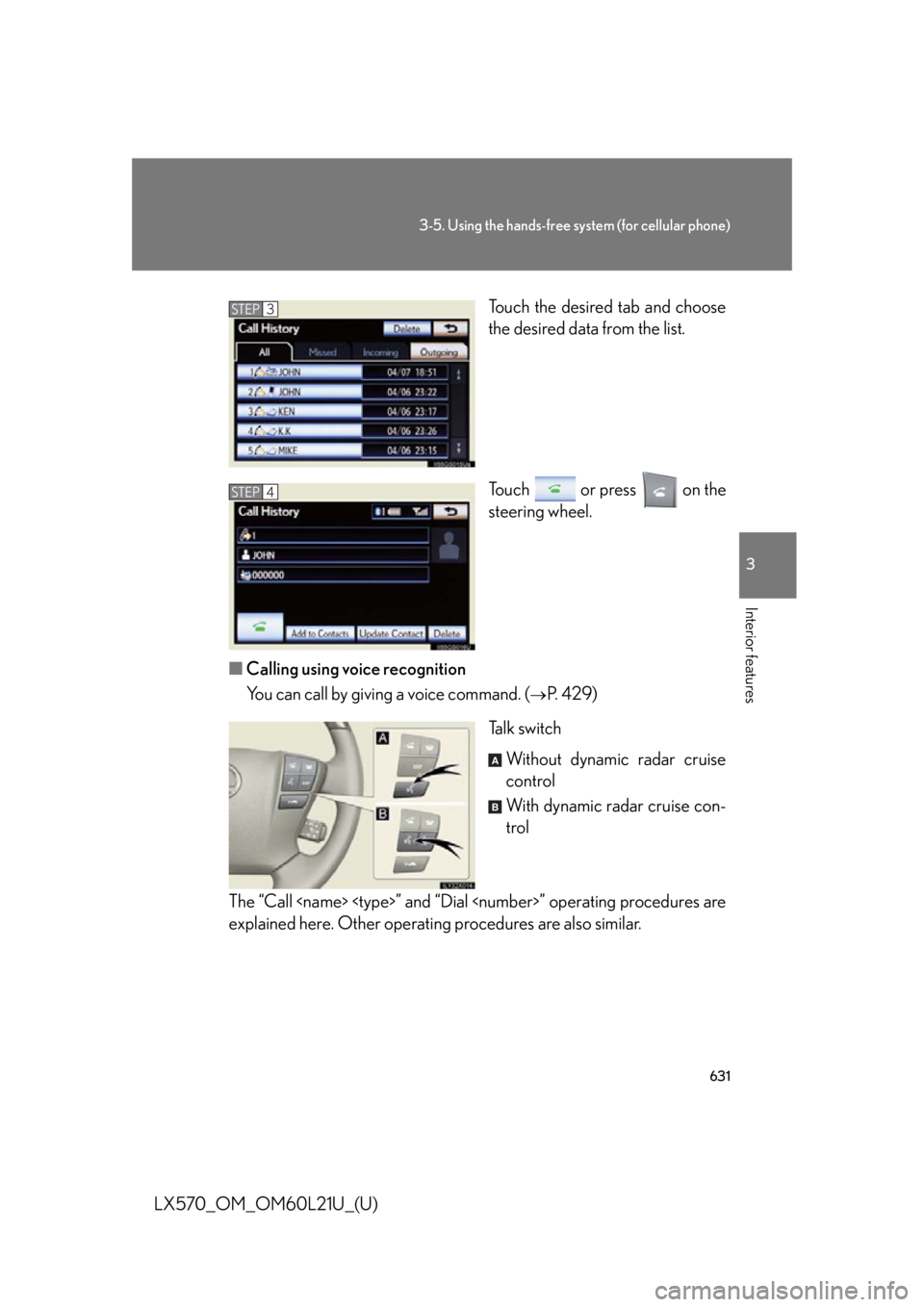
LX570_OM_OM60L21U_(U) Touch the desired tab and choose
the desired data from the list.
Touch or press on the
steering wheel.
■ Calling using voice recognition
You can call by giving a voice command. (
P. 4 2 9 )
Ta l k s w i t c h
Without dynamic radar cruise
control
With dynamic radar cruise con-
trol
The “Call
explained here. Other operating procedures are also similar. STEP 3
STEP 4
A
B
Page 632 of 956
6323-5. Using the hands-free sy stem (for cellular phone)
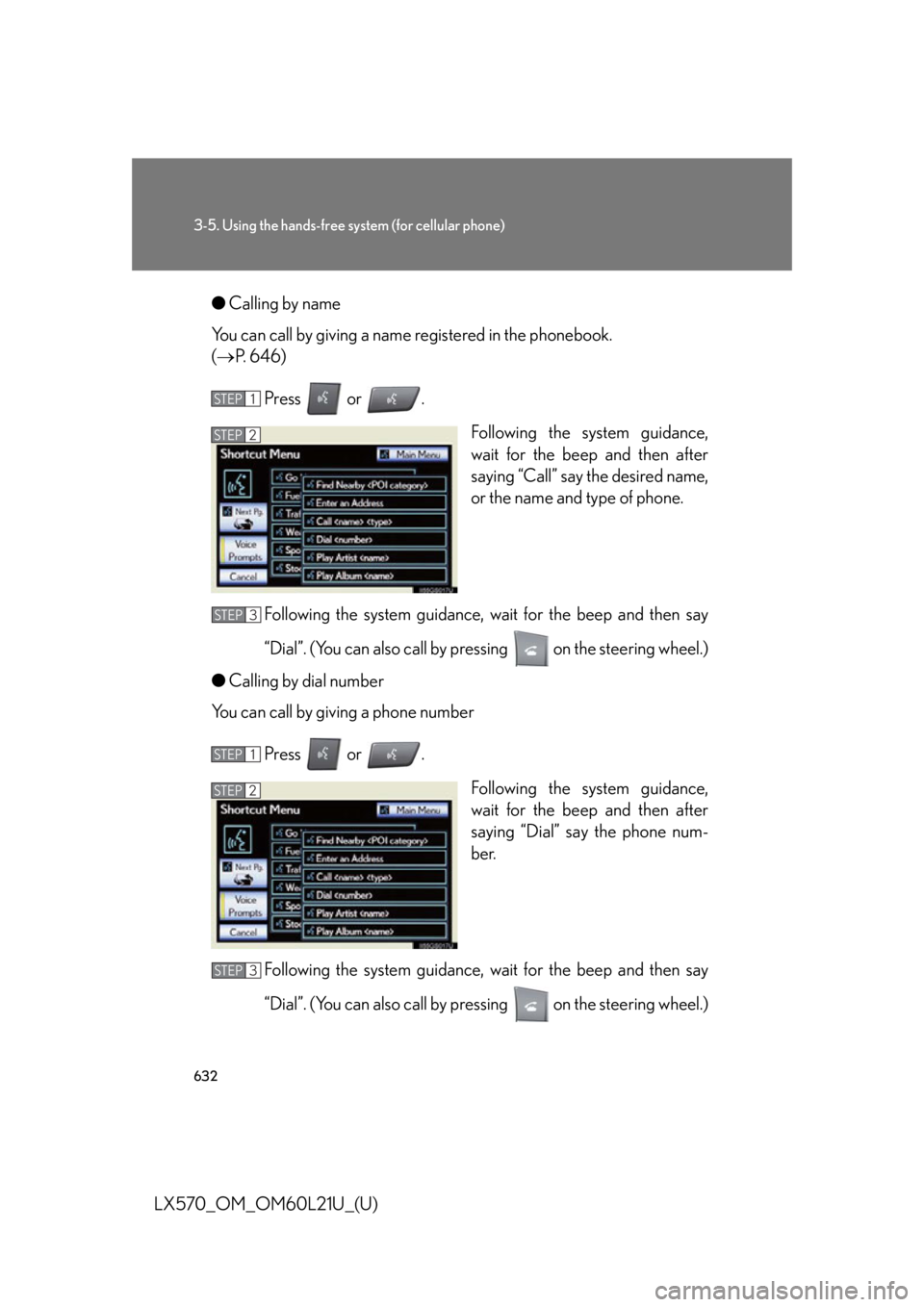
LX570_OM_OM60L21U_(U) ● Calling by name
You can call by giving a name re gistered in the phonebook.
( P. 646)
Press or .
Following the system guidance,
wait for the beep and then after
saying “Call” say the desired name,
or the name and type of phone.
Following the system guidance, wait for the beep and then say
“Dial”. (You can also call by pressing on the steering wheel.)
● Calling by dial number
You can call by giving a phone number
Press or .
Following the system guidance,
wait for the beep and then after
saying “Dial” sa y the phone num-
ber.
Following the system guidance, wait for the beep and then say
“Dial”. (You can also call by pressing on the steering wheel.) STEP 1
STEP 2
STEP 3
STEP 1
STEP 2
STEP 3
Page 633 of 956
6333-5. Using the hands-free system (for cellular phone)
3
Interior features
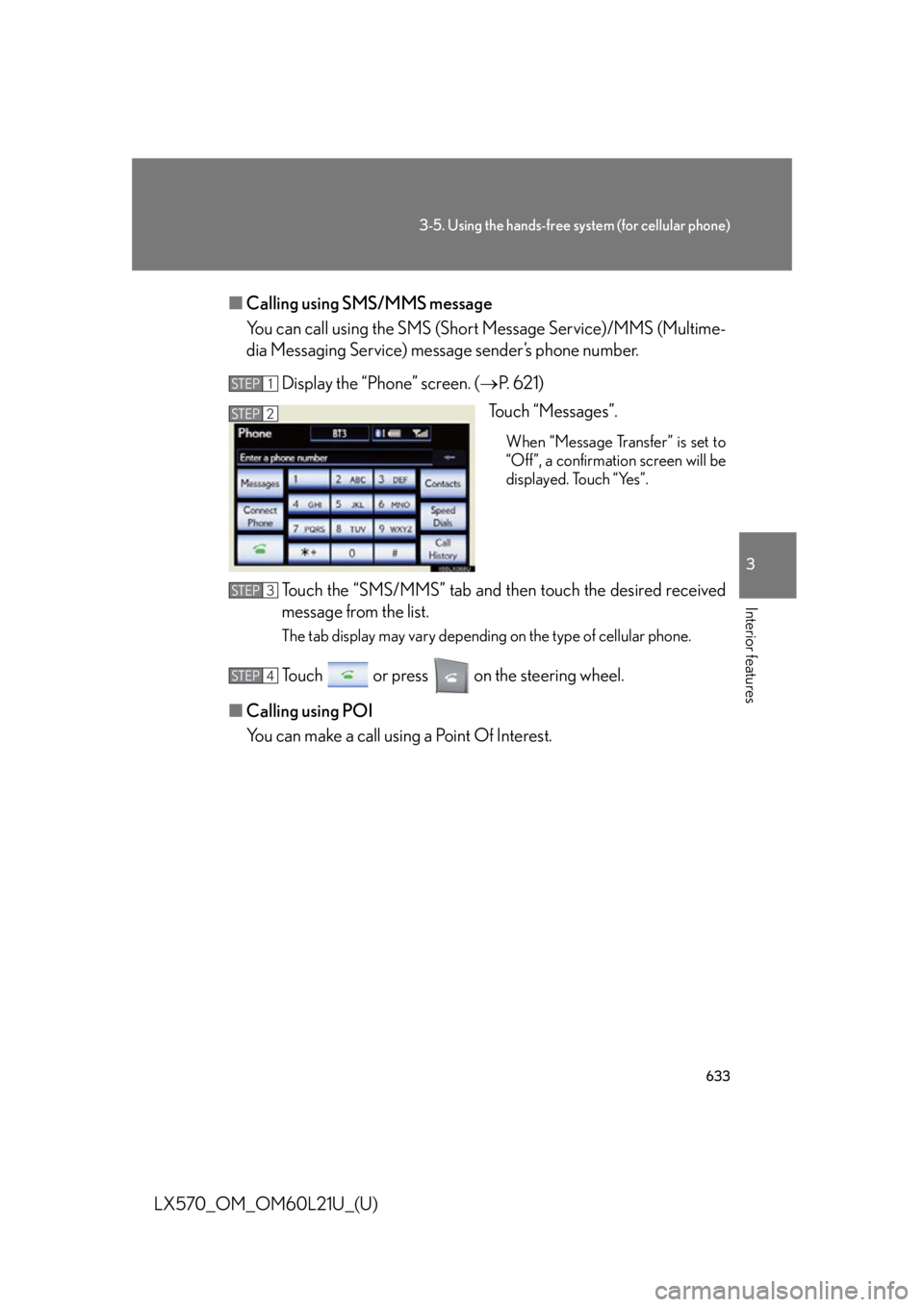
LX570_OM_OM60L21U_(U) ■ Calling using SMS/MMS message
You can call using the SMS (Short Message Service)/MMS (Multime-
dia Messaging Service) message sender’s phone number.
Display the “Phone” screen. ( P. 621)
Touch “Messages”. When “Message Transfer” is set to
“Off”, a confirmation screen will be
displayed. Touch “Yes”.
Touch the “SMS/MMS” tab and th en touch the desired received
message from the list. The tab display may vary dependin g on the type of cellular phone.
Touch or press on the steering wheel.
■ Calling using POI
You can make a call using a Point Of Interest. STEP 1
STEP 2
STEP 3
STEP 4
Page 634 of 956
6343-5. Using the hands-free sy stem (for cellular phone)
LX570_OM_OM60L21U_(U) ■
Call history list ●
If you make a call to or receive a call from a number registered in the phone
book, the name is displayed in the call history. ●
If you make multiple calls to the same number, only the last call made is dis-
played in the call history. ●
Number-withheld calls are also memorized in the system.■
When driving
The functions “Dialing”, “Dialing from th e phonebook”, and “Dialing from history”
(except for call using the 25 most recently called numbers shown by “All” tab) are
unavailable. ■
When calling by registered name in the phonebook ●
When “Call
phonebook’s voice command recognition cannot be used. Check the Blue-
tooth ®
connection and if the contacts have been transferred to the system.●
Short or abbreviated names in the phonebook may not be recognized. Change
names in the phonebook to full names. ●
Sometimes a voice recognition result confirmation screen will be displayed.
After confirming the result, say “Yes” or “No”. ●
When the system recogniz es multiple names from the phonebook, a name can-
didate list will be displayed on the screen . If the desired name is not displayed on
the top of the screen, say the number of the name from the candidate list (num-
ber 1 and number 2) to select a name from the candidate list.●
When a contact has multiple phone numb ers registered in the phonebook, a
candidate list will be disp layed. If the desired phone number is not displayed on
the top of the screen, say the number of the desired phone number from the
candidate list (number 1 and number 2) to select a phone number from the can-
didate list.