steering wheel LEXUS LX570 2015 Owners Manual
[x] Cancel search | Manufacturer: LEXUS, Model Year: 2015, Model line: LX570, Model: LEXUS LX570 2015Pages: 960, PDF Size: 11.33 MB
Page 402 of 960
402
LX570_OM_OM60L96U_(U) 3-1. Using the touch screen
Touch screen .......................... 404
Set up screen ........................... 412
Information screen................ 429
Voice command system ....... 431
Mobile Assistant .................... 442
3-2. Using the air conditioning
system and defogger
Front air conditioning
system .................................... 444
Rear air conditioning
system .................................... 456
Rear window and outside
rear view mirror
defoggers .............................. 460
Windshield wiper de-icer ..... 461 3-3. Using the audio system
Audio system type.................. 462
Using the radio........................ 487
Using the CD/
DVD player ........................... 507
Playing an audio CD and
MP3/WMA discs .............. 509
Playing DVD video ................. 515
CD/DVD player and DVD
video disc information........ 529
Listening to Bluetooth ®
audio......................................... 541
Listening to a
USB memory ....................... 552
Listening to an iPod ............... 562
Optimal use of the audio/
video system ......................... 572
Using the AUX port .............. 574
Using the steering wheel
audio switches ...................... 576
3-4. Using the rear seat
entertainment system
Rear seat entertainment
system features .................... 579
Using the radio........................ 587
Using the radio (internet
radio broadcast) ................. 589
Playing an audio CD/
CD text .................................. 590Interior features
3
Page 403 of 960
Interior features
3
403
LX570_OM_OM60L96U_(U) Playing WMA/
MP3 discs ............................... 591
Playing a Bluetooth ®
audio........................................ 593
Playing a USB memory......... 596
Playing iPod ............................ 598
Playing DVD video ............... 600
DVD player and DVD
video disc information ....... 609
Using the video mode ............. 611
3-5. Using the hands-free system
(for cellular phone)
Hands-free system
(for cellular phone) .............. 616
Using a Bluetooth ®
phone ...................................... 625
Setting the hands-free
system (for cellular
phone)..................................... 648
Setting the Bluetooth ®
........ 673
3-6. Using the interior lights
Interior lights list ..................... 686
• Interior lights ............................ 687
• Personal lights ........................ 688
• Luggage compartment
light.............................................. 689 3-7. Using the storage features
List of storage features ........ 690
• Glove box .................................. 691
• Console box............................. 692
• Overhead console ................ 693
• Cup holders ............................. 694
• Bottle holders .......................... 696
• Card holder.............................. 697
• Auxiliary boxes ....................... 697
3-8. Other interior features
Cool box ................................... 699
Sun visors .................................. 701
Vanity mirrors ......................... 702
Ashtrays.................................... 703
Cigarette lighter.................... 704
Power outlets .......................... 705
Heated steering wheel ........ 707
Seat heaters and
ventilators ............................. 709
Armrest ..................................... 712
Assist grips ................................ 713
Floor mats ................................. 714
Luggage compartment
features .................................... 716
Garage door opener ............. 718
Safety Connect ...................... 726
Page 430 of 960
4303-1. Using the touch screen
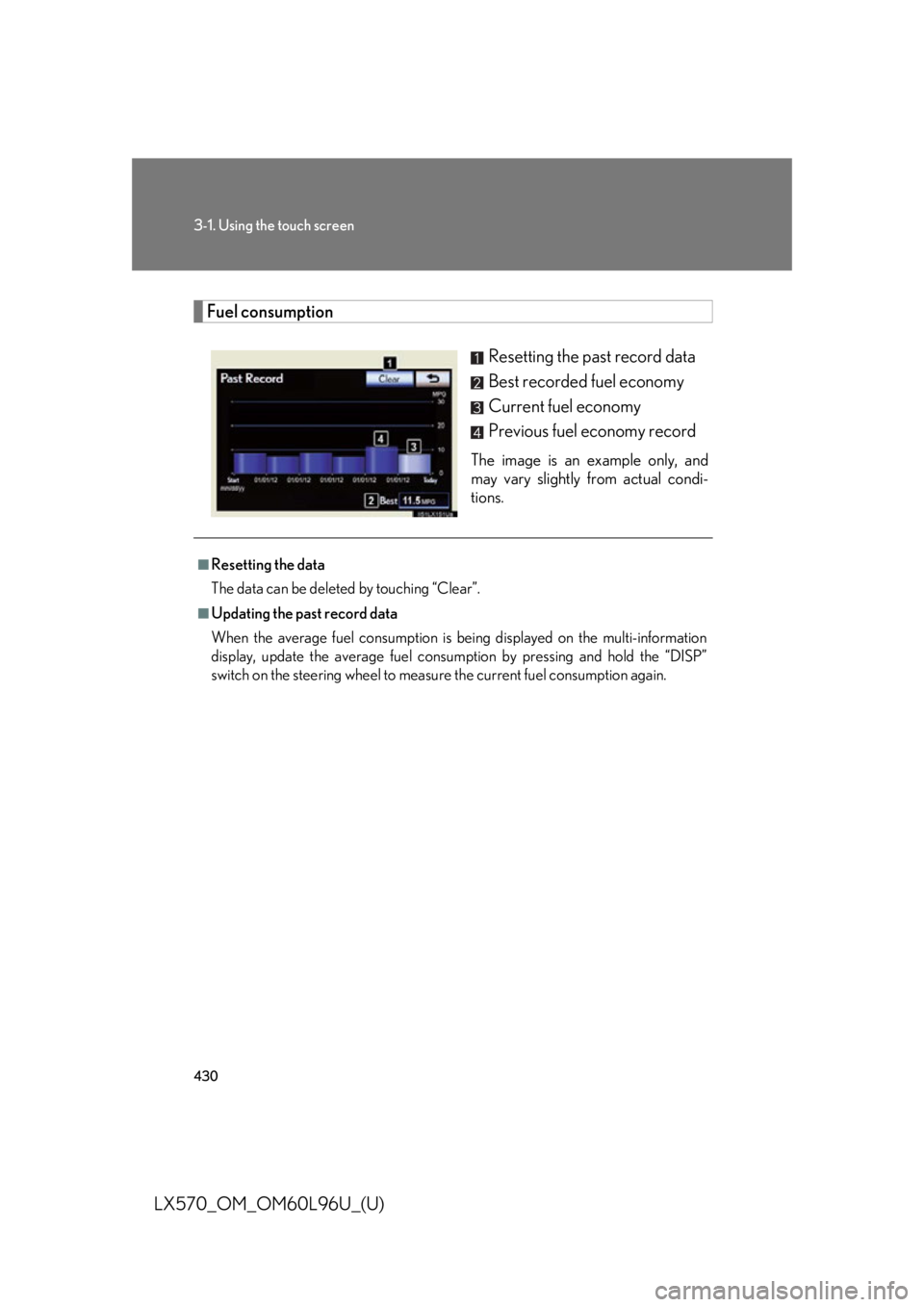
LX570_OM_OM60L96U_(U) Fuel consumption
Resetting the past record data
Best recorded fuel economy
Current fuel economy
Previous fuel economy record The image is an example only, and
may vary slightly from actual condi-
tions.■
Resetting the data
The data can be deleted by touching “Clear”. ■
Updating the past record data
When the average fuel consumption is being displayed on the multi-information
display, update the average fuel consum ption by pressing and hold the “DISP”
switch on the steering wheel to measure the current fuel consumption again.
Page 442 of 960

4423-1. Using the touch screen
LX570_OM_OM60L96U_(U) Mobile Assistant
Press and hold the off hook switch
until you hear the beeps that indi-
cate the system is listening.
The Mobile Assistant can be used
only when the neighboring screen
is displayed. To cancel the Mobile Assistant,
touch “Cancel”, or press and hold
the off hook switch.
To restart the Mobile Assistant for
additional commands, press the off
hook switch. Mobile Assistant can
only be restarted after the system
responds to a voice command.
After some phone and music com-
mands, the Mobile Assistant fea-
ture will automatically end to
complete the requested action.The Mobile Assistant feature on this sy stem allows the activation of Apple’s
Siri ®
Eyes Free mode via the steering wheel switches. To operate the
Mobile Assistant, a compatible cellul ar phone must be registered and con-
nected to this system via Bluetooth ®
. ( P. 625)
For details of the navigation syst em, refer to the “Navigation System
Owner’s Manual”. STEP 1
STEP 2
Page 443 of 960
4433-1. Using the touch screen
3
Interior features
LX570_OM_OM60L96U_(U) ■
Adjusting the volume
The volume of the Mobile Assistant can be adjusted using the “PWR/VOL” knob
or steering wheel volume switches. The Mobile Assistant and phone call volumes
are synchronized. ■
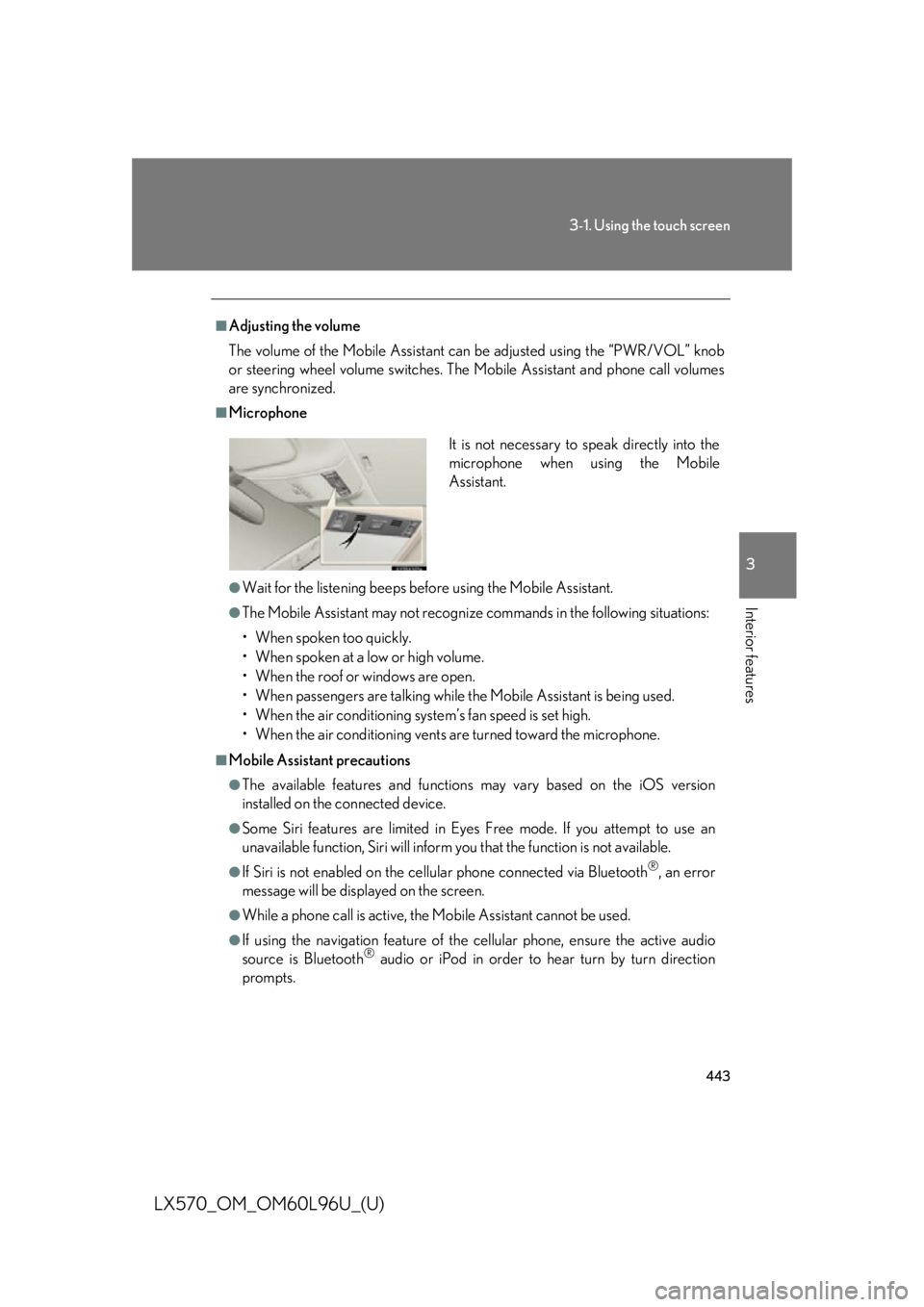
Microphone
●
Wait for the listening beeps befo re using the Mobile Assistant.●
The Mobile Assistant may not recognize commands in the following situations:
• When spoken too quickly.
• When spoken at a low or high volume.
• When the roof or windows are open.
• When passengers ar e talking while the Mobile Assistant is being used.
• When the air conditioning syst em’s fan speed is set high.
• When the air conditioning vents ar e turned toward the microphone.■
Mobile Assistant precautions ●
The available features and functions may vary based on the iOS version
installed on the connected device.●
Some Siri features are limited in Eyes Free mode. If you attempt to use an
unavailable function, Siri will inform you that the function is not available. ●
If Siri is not enabled on the cellular phone connected via Bluetooth ®
, an error
message will be displayed on the screen. ●
While a phone call is active, the Mobile Assistant cannot be used. ●
If using the navigation feature of the cellular phone, ensure the active audio
source is Bluetooth ®
audio or iPod in order to hear turn by turn direction
prompts. It is not necessary to speak directly into the
microphone when using the Mobile
Assistant.
Page 463 of 960

4633-3. Using the audio system
3
Interior features
LX570_OM_OM60L96U_(U) Title Page
Using the radio P. 487
Using the CD/DVD player P. 507
Playing an audio CD and MP3/WMA discs P. 509
Playing DVD video P. 515
CD/DVD player and DVD video disc information P. 529
Listening to Bluetooth ®
audio P. 541
Listening to a USB memory P. 552
Listening to an iPod P. 562
Optimal use of the audio/video system P. 572
Using the AUX port P. 574
Using the steering wheel audio switches P. 576
Page 576 of 960
5763-3. Using the audio system
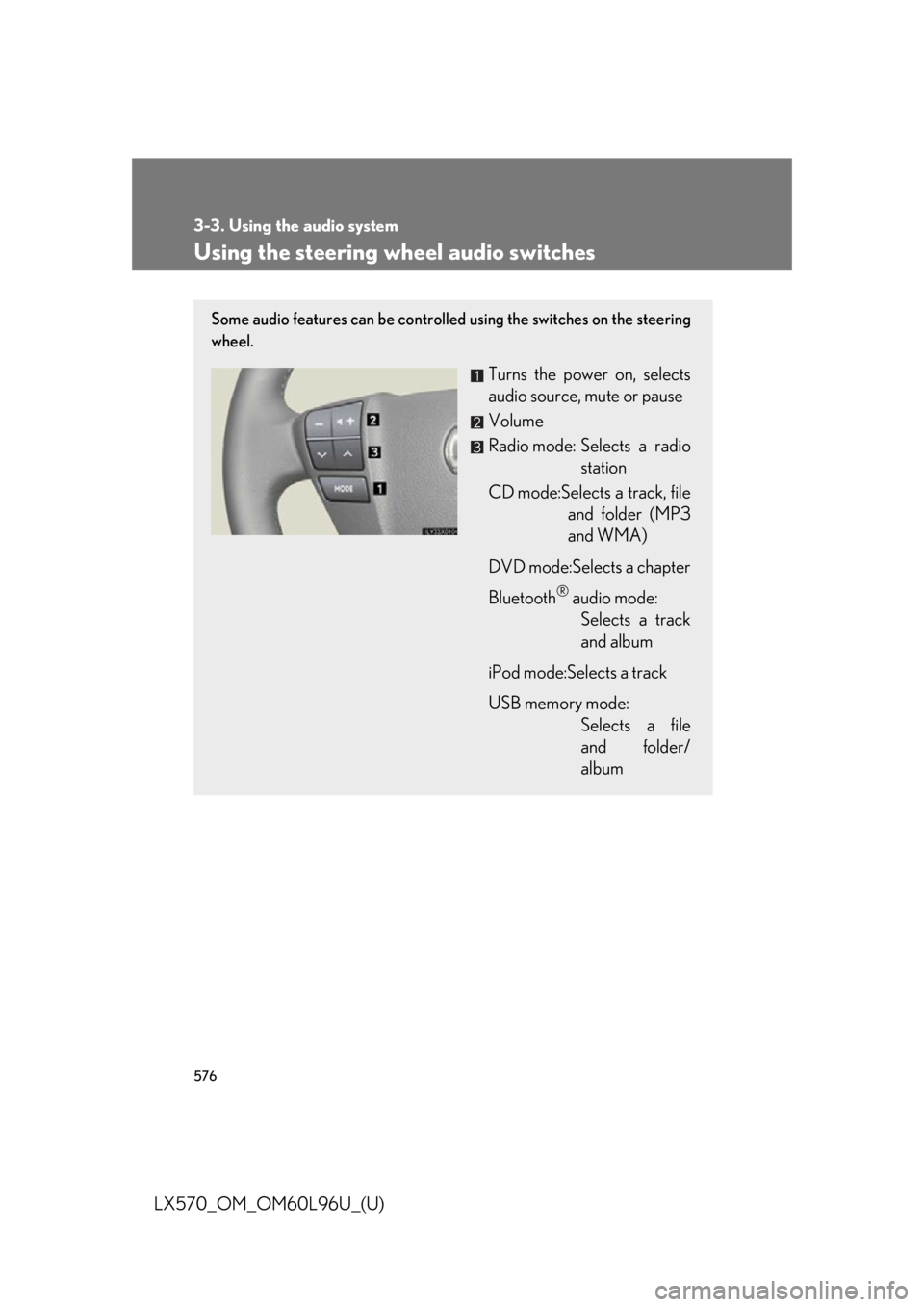
LX570_OM_OM60L96U_(U) Using the steering wheel audio switches Some audio features can be controlled using the switches on the steering
wheel.
Turns the power on, selects
audio source, mute or pause
Volume
Radio mode: Selects a radio
station
CD mode:Selects a track, file
and folder (MP3
and WMA)
DVD mode:Selects a chapter
Bluetooth ®
audio mode:
Selects a track
and album
iPod mode:Selects a track
USB memory mode:
Selects a file
and folder/
album
Page 578 of 960
5783-3. Using the audio system
LX570_OM_OM60L96U_(U) Selecting a track/file or chapter
Press the “MODE” switch to se lect the CD/DVD, Bluetooth ®
audio, iPod or USB memory mode.
Press the “ ” or “ ” switch to select.To return to the beginning of the curr ent track, file or chapter, press the
“
” switch once quickly.
Selecting an album
Press the “MODE” switch to select Bluetooth ®
audio or USB
memory mode.
Press and hold the “ ” or “ ” switch until a beep is heard to select.
Selecting a folder
Press the “MODE” switch to se lect the CD (only when MP3/
WMA disc is in use) or USB memory mode.
Press and hold the “ ” or “ ” switch until a beep is heard to select.CAUTION■
To reduce the risk of an accident
Exercise care when operating the audio switches on the steering wheel. STEP 1
STEP 2
STEP 1
STEP 2
STEP 1
STEP 2
Page 630 of 960
6303-5. Using the hands-free sy stem (for cellular phone)
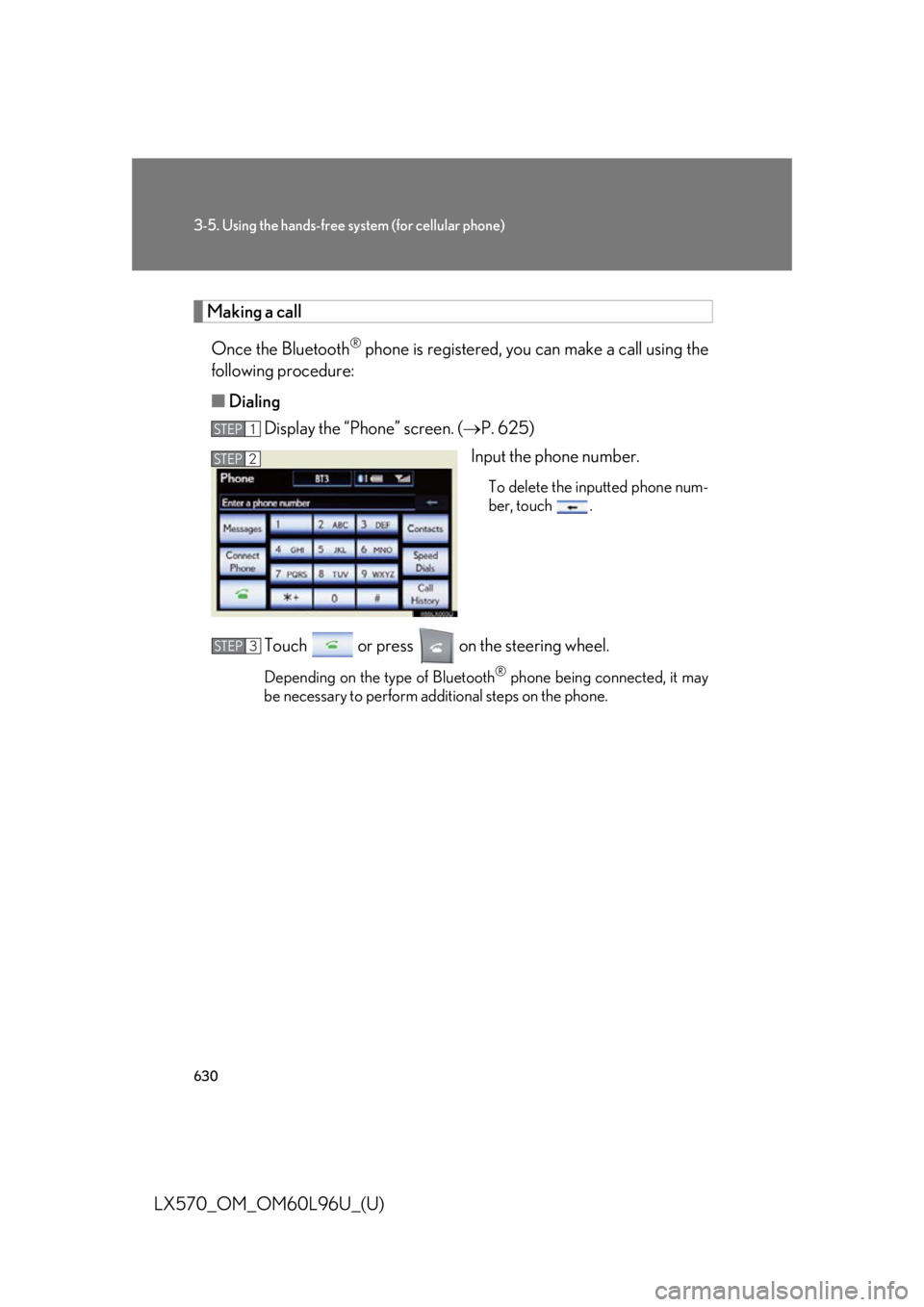
LX570_OM_OM60L96U_(U) Making a call
Once the Bluetooth ®
phone is registered, you can make a call using the
following procedure:
■ Dialing
Display the “Phone” screen. ( P. 625)
Input the phone number. To delete the inputted phone num-
ber, touch .
Touch or press on the steering wheel. Depending on the type of Bluetooth ®
phone being connected, it may
be necessary to perform additional steps on the phone.STEP 1
STEP 2
STEP 3
Page 631 of 960
6313-5. Using the hands-free system (for cellular phone)
3
Interior features
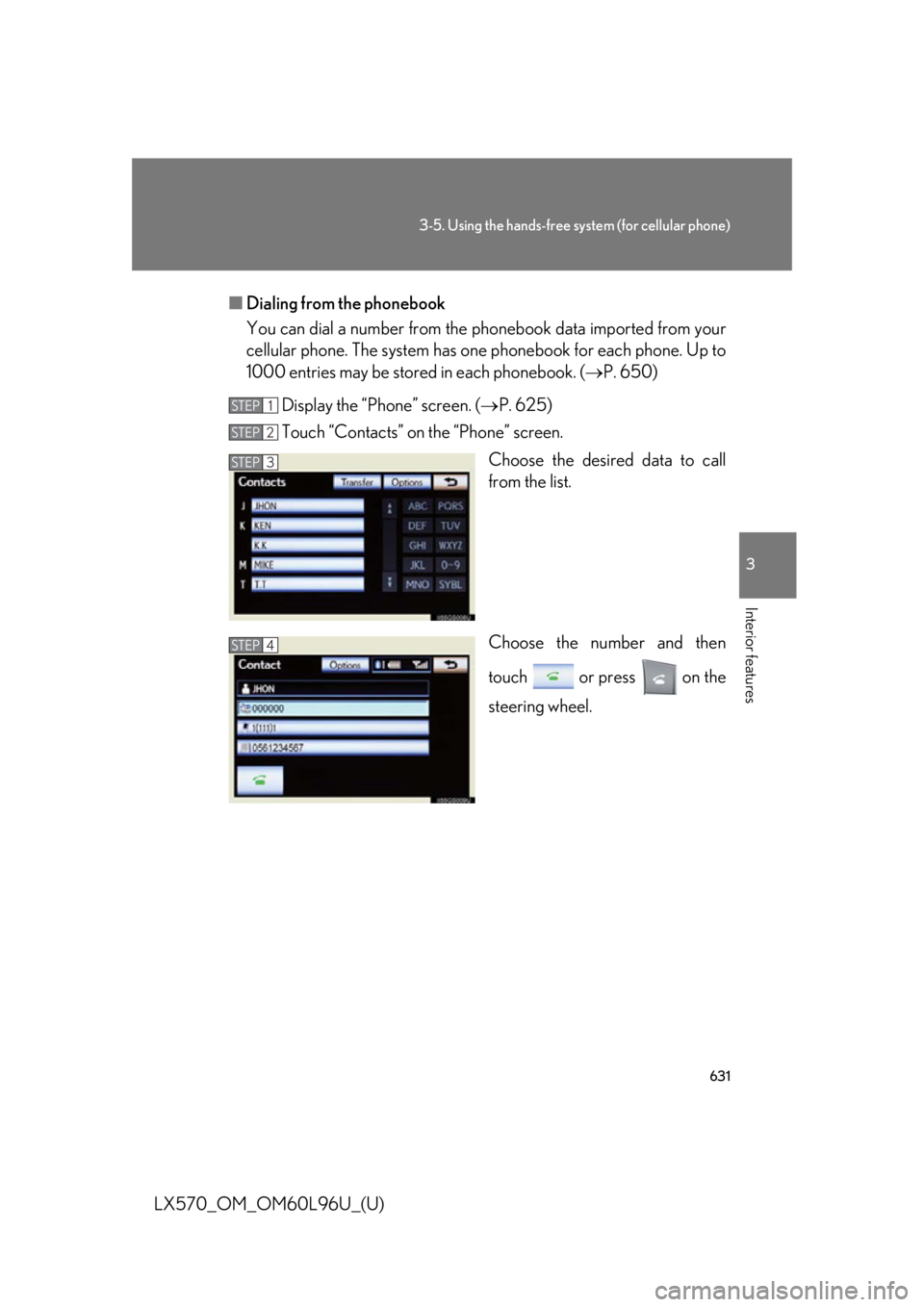
LX570_OM_OM60L96U_(U) ■ Dialing from the phonebook
You can dial a number from the pho nebook data im ported from your
cellular phone. The system has on e phonebook for each phone. Up to
1000 entries may be stored in each phonebook. ( P. 650)
Display the “Phone” screen. ( P. 625)
Touch “Contacts” on the “Phone” screen.
Choose the desired data to call
from the list.
Choose the number and then
touch or press on the
steering wheel.STEP 1
STEP 2
STEP 3
STEP 4