tow LEXUS LX570 2015 Owner's Manual
[x] Cancel search | Manufacturer: LEXUS, Model Year: 2015, Model line: LX570, Model: LEXUS LX570 2015Pages: 960, PDF Size: 11.33 MB
Page 227 of 960

2272-3. Operating the lights and wipers
2
When driving
LX570_OM_OM60L96U_(U) NOTICE■
When the windshield is dry
Do not use the wipers, as they may damage the windshield.■
When there is no washer fluid spray from the nozzle
Damage to the washer fluid pump may be caused if the lever is pulled toward you
and held continually. ■
When a nozzle becomes blocked
Do not try to clear it with a pin or other object. The nozzle will be damaged.
Page 233 of 960
2332-4. Using other driving systems
2
When driving
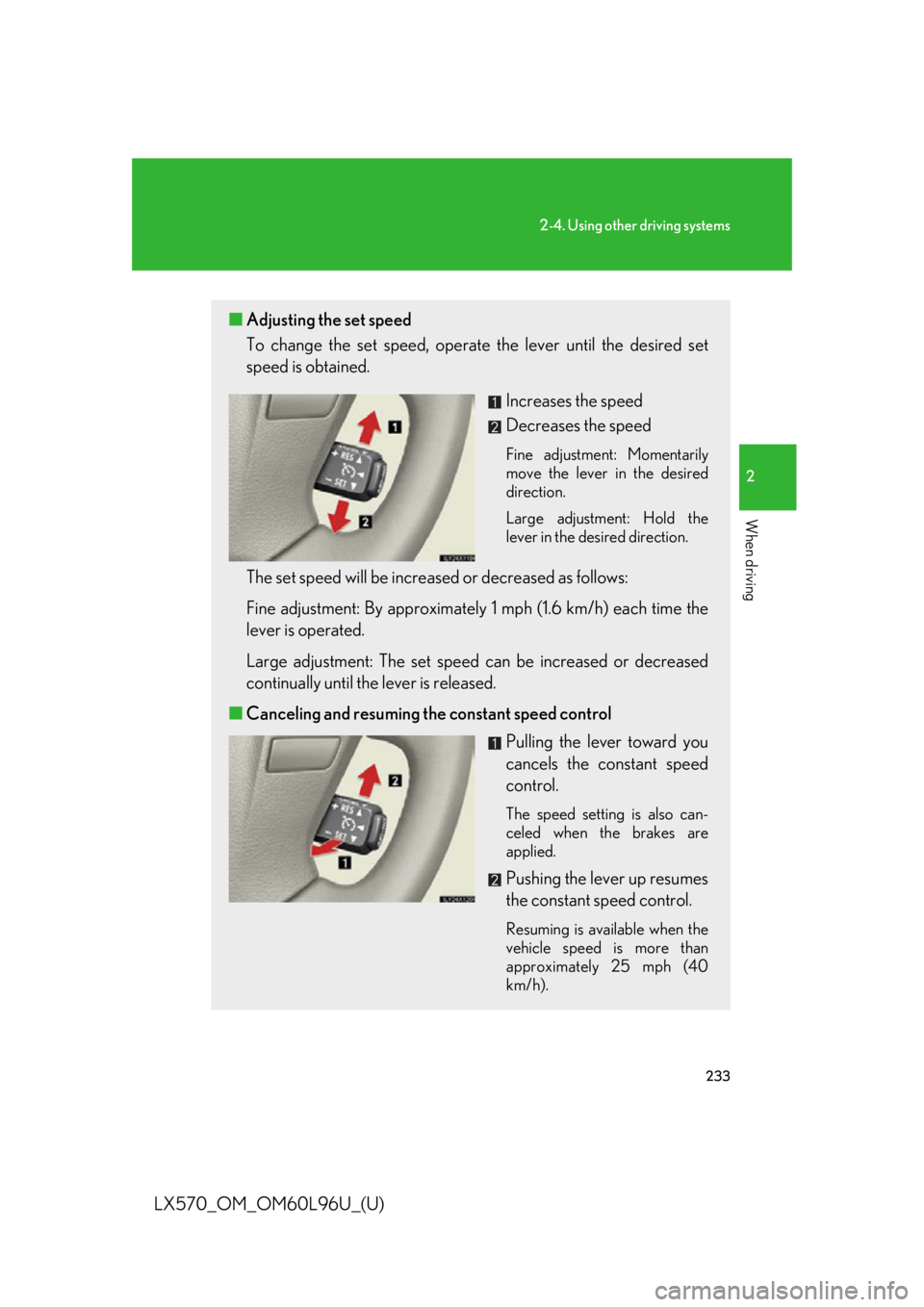
LX570_OM_OM60L96U_(U) ■ Adjusting the set speed
To change the set speed, operate the lever until the desired set
speed is obtained.
Increases the speed
Decreases the speed Fine adjustment: Momentarily
move the lever in the desired
direction.
Large adjustment: Hold the
lever in the desired direction.
The set speed will be increased or decreased as follows:
Fine adjustment: By approximatel y 1 mph (1.6 km/h) each time the
lever is operated.
Large adjustment: The set speed can be increased or decreased
continually until the lever is released.
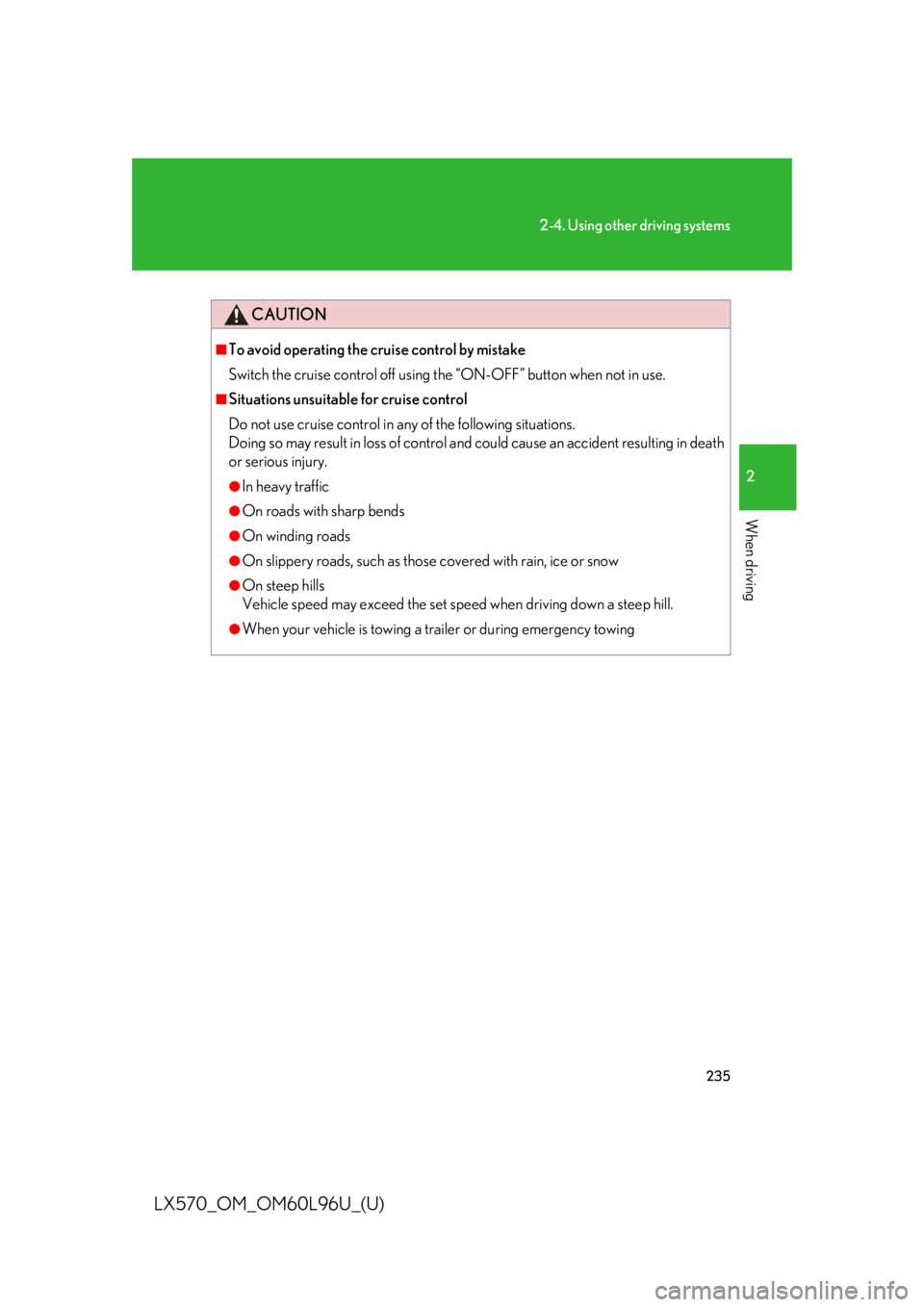
■ Canceling and resuming the constant speed control
Pulling the lever toward you
cancels the constant speed
control. The speed setting is also can-
celed when the brakes are
applied.
Pushing the lever up resumes
the constant speed control. Resuming is available when the
vehicle speed is more than
approximately 25 mph (40
km/h).
Page 235 of 960
2352-4. Using other driving systems
2
When driving
LX570_OM_OM60L96U_(U) CAUTION■
To avoid operating the cruise control by mistake
Switch the cruise contro l off using the “ON-OFF” button when not in use.■
Situations unsuitable for cruise control
Do not use cruise control in any of the following situations.
Doing so may result in loss of control and could cause an accident resulting in death
or serious injury. ●
In heavy traffic ●
On roads with sharp bends ●
On winding roads ●
On slippery roads, such as thos e covered with rain, ice or snow●
On steep hills
Vehicle speed may exceed the set speed when driving down a steep hill.●
When your vehicle is towing a trailer or during emergency towing
Page 240 of 960
2402-4. Using other driving systems
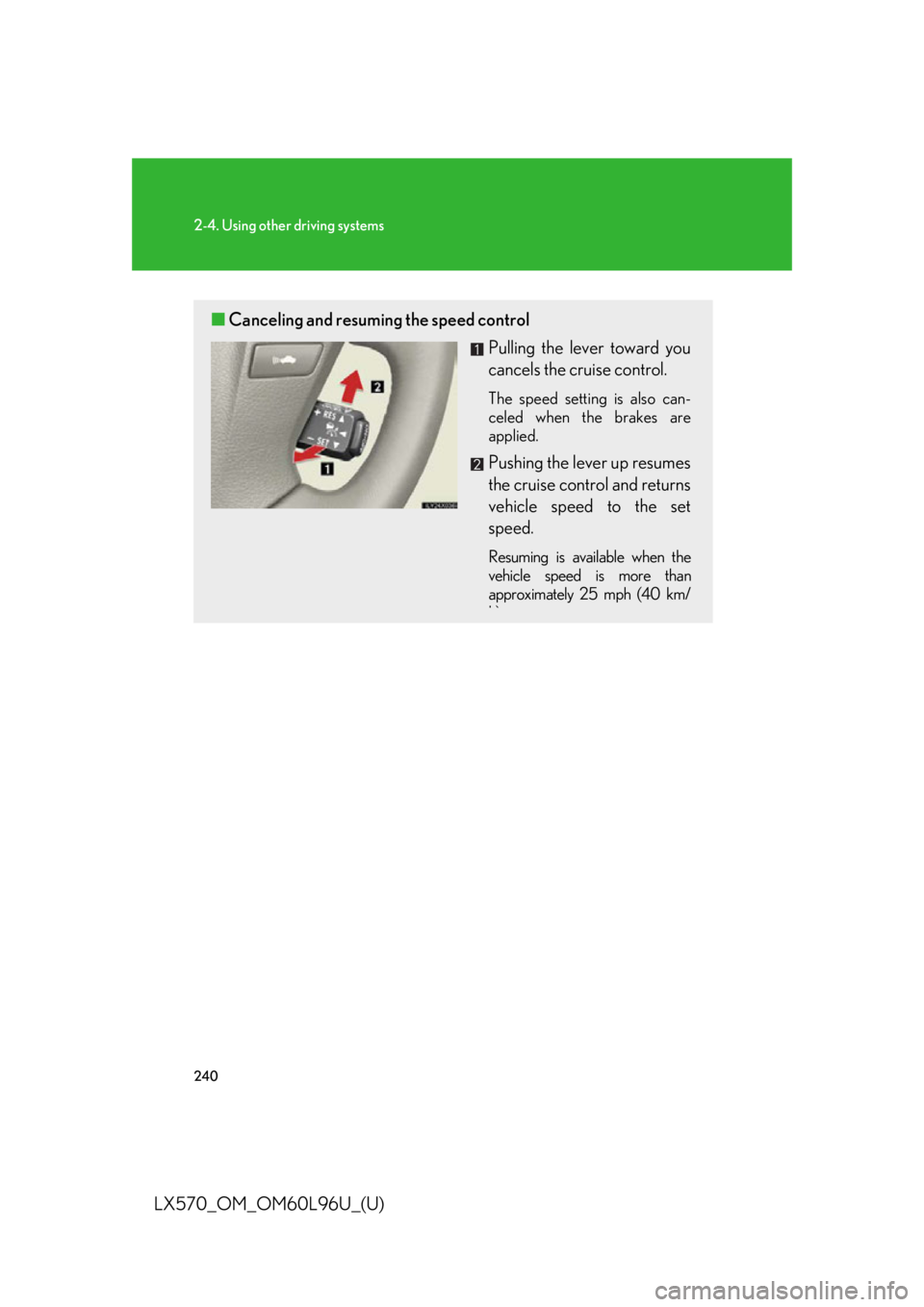
LX570_OM_OM60L96U_(U) ■ Canceling and resuming the speed control
Pulling the lever toward you
cancels the cruise control. The speed setting is also can-
celed when the brakes are
applied.
Pushing the lever up resumes
the cruise control and returns
vehicle speed to the set
speed. Resuming is available when the
vehicle speed is more than
approximately 25 mph (40 km/
h)
Page 248 of 960

2482-4. Using other driving systems
LX570_OM_OM60L96U_(U) CAUTION■
Situations unsuitable for dy namic radar cruise control
Do not use dynamic radar cruise contro l in any of the following situations.
Doing so may result in inappropriate sp eed control and could cause an accident
resulting in death or serious injury. ●
In heavy traffic ●
On roads with sharp bends ●
On winding roads ●
On slippery roads, such as thos e covered with rain, ice or snow●
On steep downhills, or where there are sudden changes between sharp up and
down gradients
Vehicle speed may exceed the set speed when driving down a steep hill.●
At entrances to expressways ●
When weather conditions are bad enough that they may prevent the sensors
from functioning correctly (fog, sn ow, sandstorm, heavy rain etc.)●
When an approach warning buzzer is heard often ●
When your vehicle is towing a trailer or during emergency towing
Page 259 of 960

2592-4. Using other driving systems
2
When driving
LX570_OM_OM60L96U_(U) ■
Sensor detection information ●
The sensor’s detection areas are limited to the areas around the vehicle’s front
corner and rear bumpers. ●
Certain vehicle conditions and the surrounding environment may affect the
ability of the sensor to correctly detect obstacles. Particular instances where
this may occur are listed below.
• There is dirt, snow or ice on the sens or. (Wiping the sensors will resolve this
problem.)
• The sensor is frozen. (Thawing the area will resolve this problem.)
In especially cold weather, if a sensor is frozen the screen may show an
abnormal display, or obstacles may not be detected.
• The sensor is covered in any way.
• The vehicle is leaning considerably to one side.
• On an extremely bumpy road, on an incline, on gravel, or on grass
• The vicinity of the vehicle is noisy due to vehicle horns, motorcycle engines,
air brakes of large vehicles, or other loud noises producing ultrasonic waves.
• There is another vehicle equipped with parking assist sensor s in the vicinity.
• The sensor is coated with a sheet of spray or heavy rain.
• The vehicle is equipped with a fender pole or wireless antenna.
• Towing hook is installed.
• The bumper or sensor receives a strong impact.
• The vehicle is approaching a tall or curved curb.
• In harsh sunlight or intense cold weather
• The area directly under the bumpers is not detected.
• If obstacles draw too close to the sensor.
• A non-genuine Lexus suspension (low ered suspension etc.) is installed.
• People may not be detected if they are wearing certain types of clothing.
In addition to the examples above, there are instances in which, because of their
shape, signs and other objects may be ju dged by the sensor to be closer than
they are.
Page 329 of 960

3292-4. Using other driving systems
2
When driving
LX570_OM_OM60L96U_(U) CAUTION■
When switching the vehicle height mode
Before lowering the vehicle height, check that there are no people under or around
the vehicle, and check for obstacles.
If you do not do this, body parts may be caught in the vehicle, possibly leading to an
accident. ■
Using the high mode
The high mode should only be used wh en driving on rough roads, for example
when driving off-road. Beca use the vehicle’s center of gravity will become higher
when in the mode, the vehicle may become unstable when turning abruptly, result-
ing in an accident. ■
When jacking up the vehicle or installing tire chains
Turn off the height control and stop the engine, otherwise the vehicle height may
change due to the automatic leveling func tion and you may catch part of your body
in the vehicle, resulting in an accident. ■
When crossing rivers
Select the high mode and turn off the height control. Drive at 18 mph (30 km/h) or
lower. Otherwise the vehicle height may change due to the automatic leveling
function, resulting in an accident. ■
If your vehicle must be towed
Put the vehicle height in the normal mode and turn off the height control, otherwise
the vehicle height may change due to th e automatic leveling function and you may
catch part of your body in the ve hicle, resulting in an accident.■
If your vehicle becomes stuck in a ditch
Turn off the height control, otherwise the vehicle height may change due to the
automatic leveling function, resulting in an accident.■
When loading cargo on the roof luggage carrier
Do not switch to high mode. Sudden steeri ng could cause the vehicle to lose stabil-
ity due to the vehicle’s higher center of gravity, possibly leading to an accident.
Page 330 of 960

3302-4. Using other driving systems
LX570_OM_OM60L96U_(U) NOTICE■
When parking in areas with limited overhead height
After leaving the vehicle or unloading the luggage, the vehicle height may be
slightly higher than normal. Take care when overhead height is limited. ■
To avoid damage to the vehicle ●
Normal mode will be switched to automatically even if the vehicle is started off in
low mode. Take care when overhead height is limited. ●
Do not select the low mode when driving on bumpy roads, as the underbody of
the vehicle may contact the road surface. ●
When traveling on bumpy roads or throug h water, or when towing, turn off easy
access mode.■
Avoid rapid changes to the vehicle height
As the pump may overheat. Leave at a few seconds between selections when
changing the vehicle height mode.
Page 356 of 960

3562-4. Using other driving systems
LX570_OM_OM60L96U_(U) CAUTION■
Trailer Sway Control precaution
The Trailer Sway Control system is not able to reduce trailer sway in all situations.
Depending on many factors such as the cond itions of the vehicle, trailer, road sur-
face, and driving environment, the Trailer Sway Control system may not be effec-
tive. Refer to your trailer ow ner’s manual for information on how to tow your trailer
properly. ■
If trailer sway occurs
Observe the following precautions.
Failing to do so may cause death or serious injury.●
Firmly grip the steering wh eel. Steer straight ahead.
Do not try to control trailer swaying by turning the steering wheel. ●
Begin releasing the accelerator pedal immediately but very gradually to reduce
speed.
Do not increase speed. Do not apply vehicle brakes.
If you make no extreme correction with the steering or brakes, your vehicle and
trailer should stabilize. ( P. 397)
Page 368 of 960
3682-5. Driving information
LX570_OM_OM60L96U_(U) Cargo and luggage Take notice of the following informat ion about storage precautions, cargo
capacity and load.
● Stow cargo and luggage in th e luggage compartment whenever
possible.
● Be sure all items are secured in place.
● Be careful to keep the vehicle le vel. Placing the weight as far for-
ward as possible helps maintain vehicle balance.
● For better fuel economy, do not carry unnecessary weight.
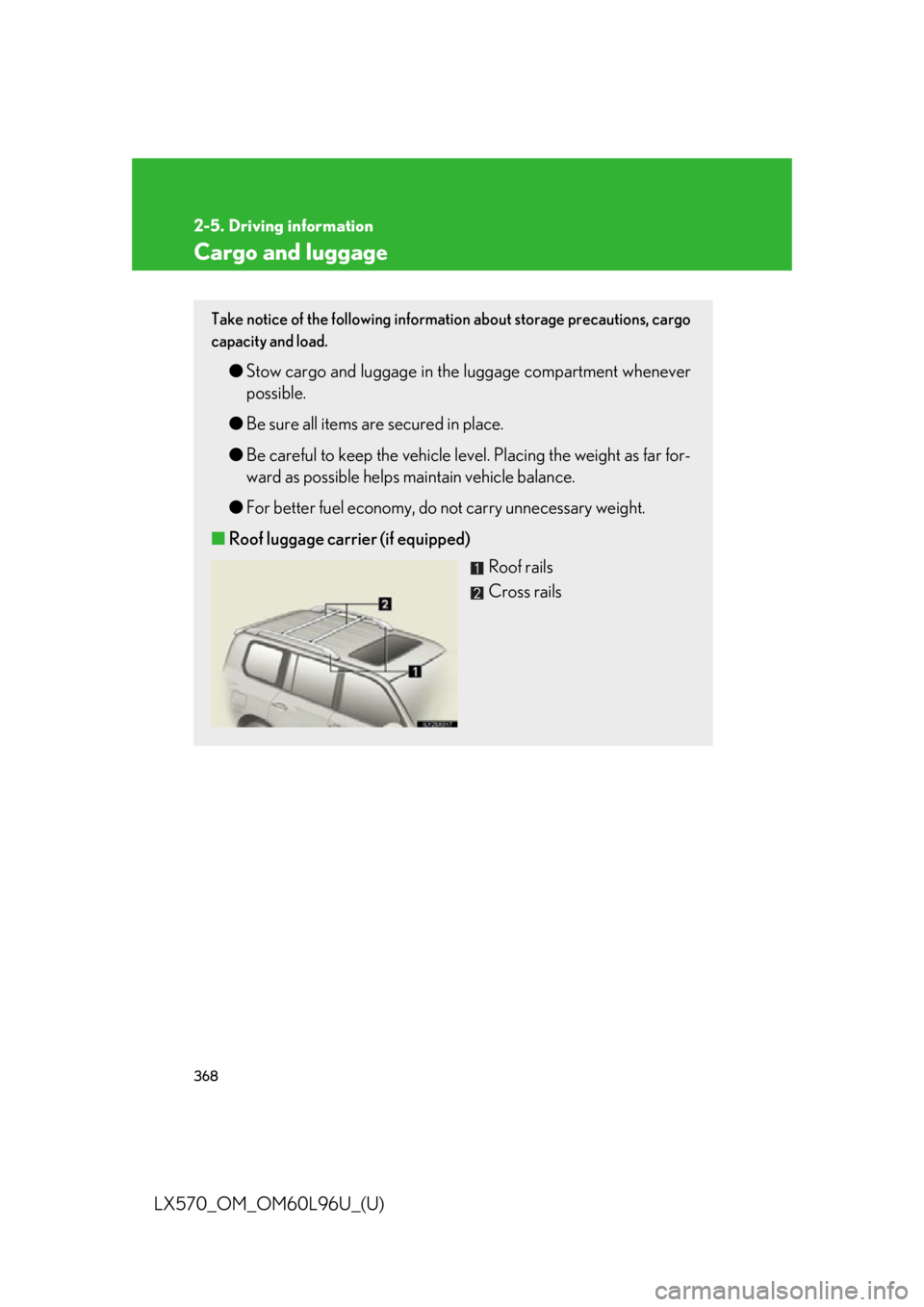
■ Roof luggage carrier (if equipped)
Roof rails
Cross rails