seats LEXUS LX570 2015 Service Manual
[x] Cancel search | Manufacturer: LEXUS, Model Year: 2015, Model line: LX570, Model: LEXUS LX570 2015Pages: 960, PDF Size: 11.33 MB
Page 597 of 960
5973-4. Using the rear se at entertainment system
3
Interior features
LX570_OM_OM60L96U_(U) Fast forwarding or rewinding a file or track
Press or , or press and hold or .
Playing or pausing a file or track
Press . ■
When a different audio source is selected at the front seats
USB mode cannot be selected at the rear seat ■
USB memory functions
P. 558■
USB memory
P. 558
CAUTION■
While driving
P. 561
NOTICE■
To prevent damage to the USB memory or its terminal
P. 561
Page 599 of 960
5993-4. Using the rear se at entertainment system
3
Interior features
LX570_OM_OM60L96U_(U) Playing or pausing a track
Press . ■
When a different audio source is selected at the front seats
iPod mode cannot be selected at the rear seats. ■
About iPod
P. 568■
iPod functions
P. 569■
Battery charge
P. 569■
Compatible models
P. 570
CAUTION■
While driving
P. 571
NOTICE■
To prevent damage to the iPod or its terminal
P. 571
Page 698 of 960
6963-7. Using the storage features
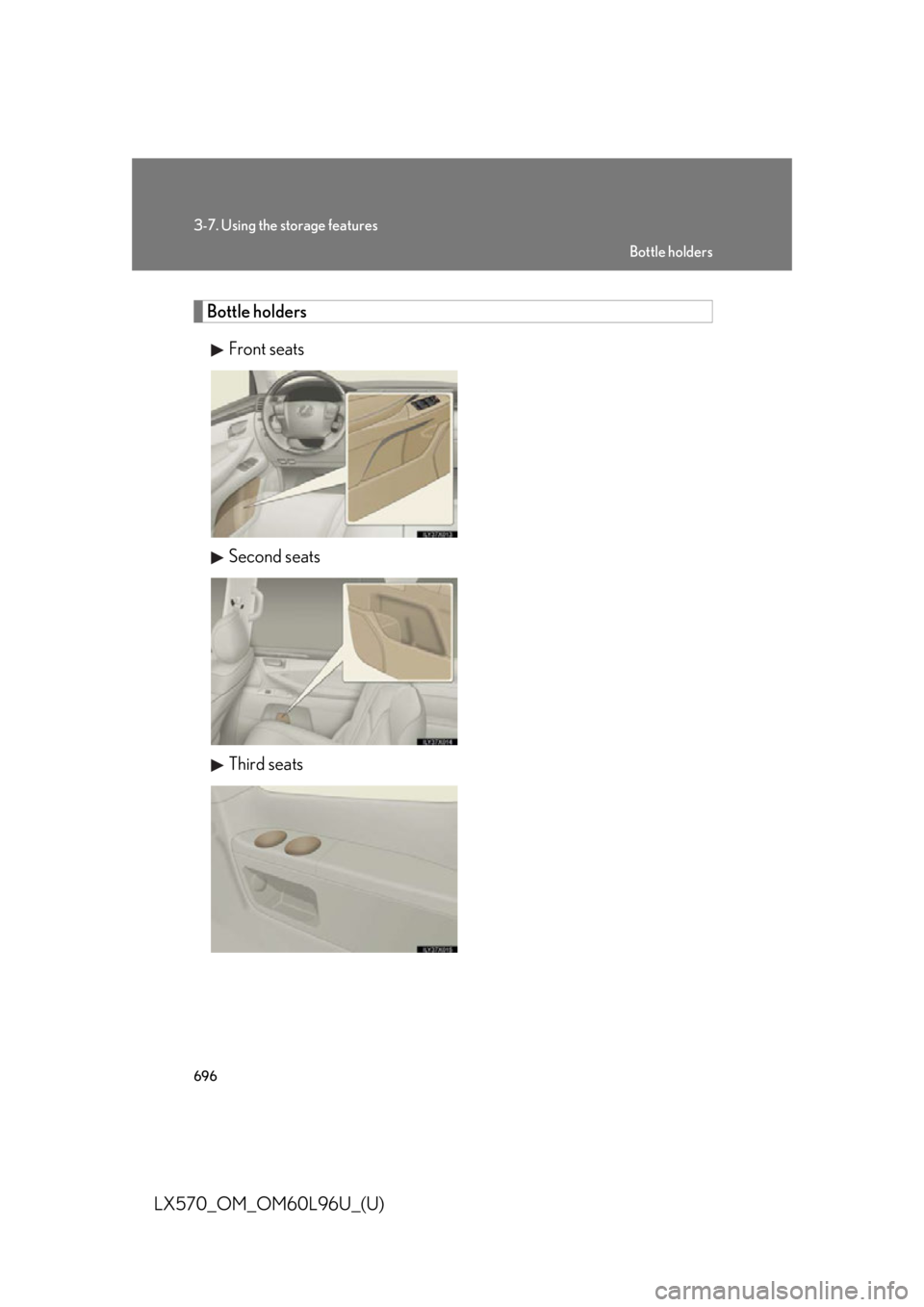
LX570_OM_OM60L96U_(U) Bottle holders
Front seats
Second seats
Third seats Bottle holders
Page 699 of 960
6973-7. Using the storage features
3
Interior features
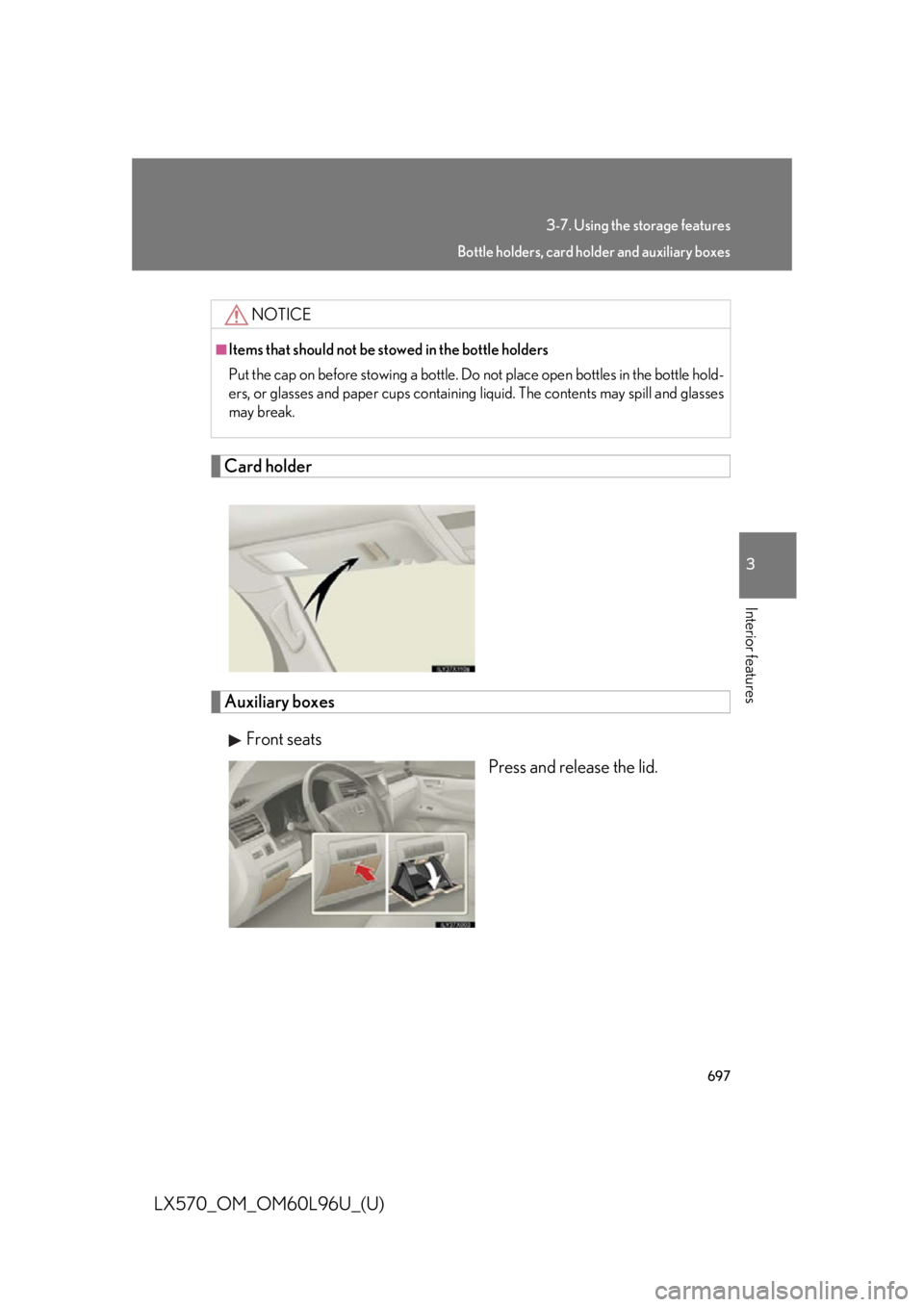
LX570_OM_OM60L96U_(U) Card holder
Auxiliary boxes
Front seats
Press and release the lid.NOTICE■
Items that should not be stowed in the bottle holders
Put the cap on before stowing a bottle. Do not place open bottles in the bottle hold-
ers, or glasses and paper cups containing liquid. The contents may spill and glasses
may break. Bottle holders, card ho lder and auxiliary boxes
Page 700 of 960
6983-7. Using the storage features
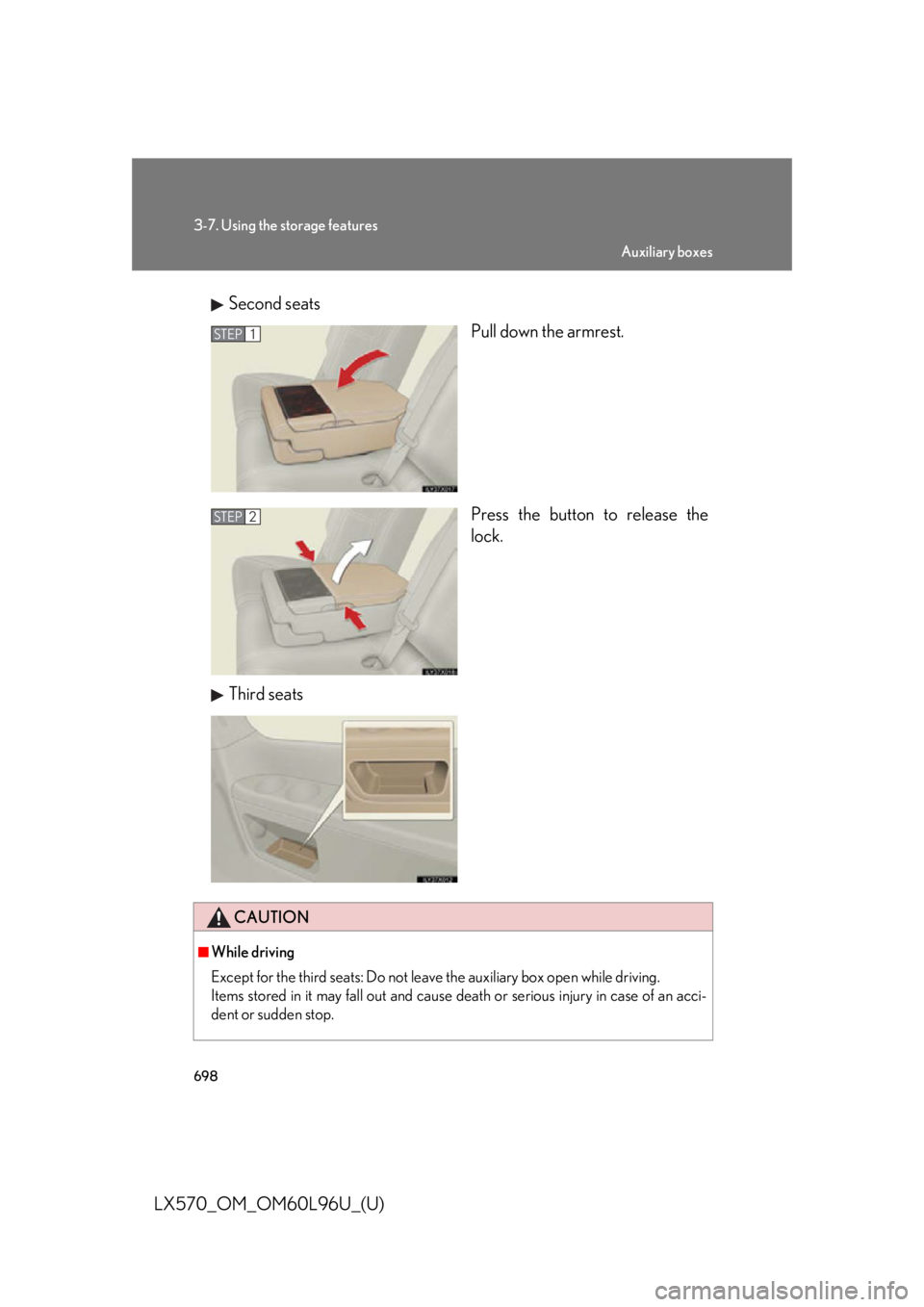
LX570_OM_OM60L96U_(U) Second seats
Pull down the armrest.
Press the button to release the
lock.
Third seats STEP 1
STEP 2
CAUTION■
While driving
Except for the third seats: Do not leave the auxiliary box open while driving.
Items stored in it may fall out and cause de ath or serious injury in case of an acci-
dent or sudden stop. Auxiliary boxes
Page 711 of 960
7093-8. Other interior features
3
Interior features
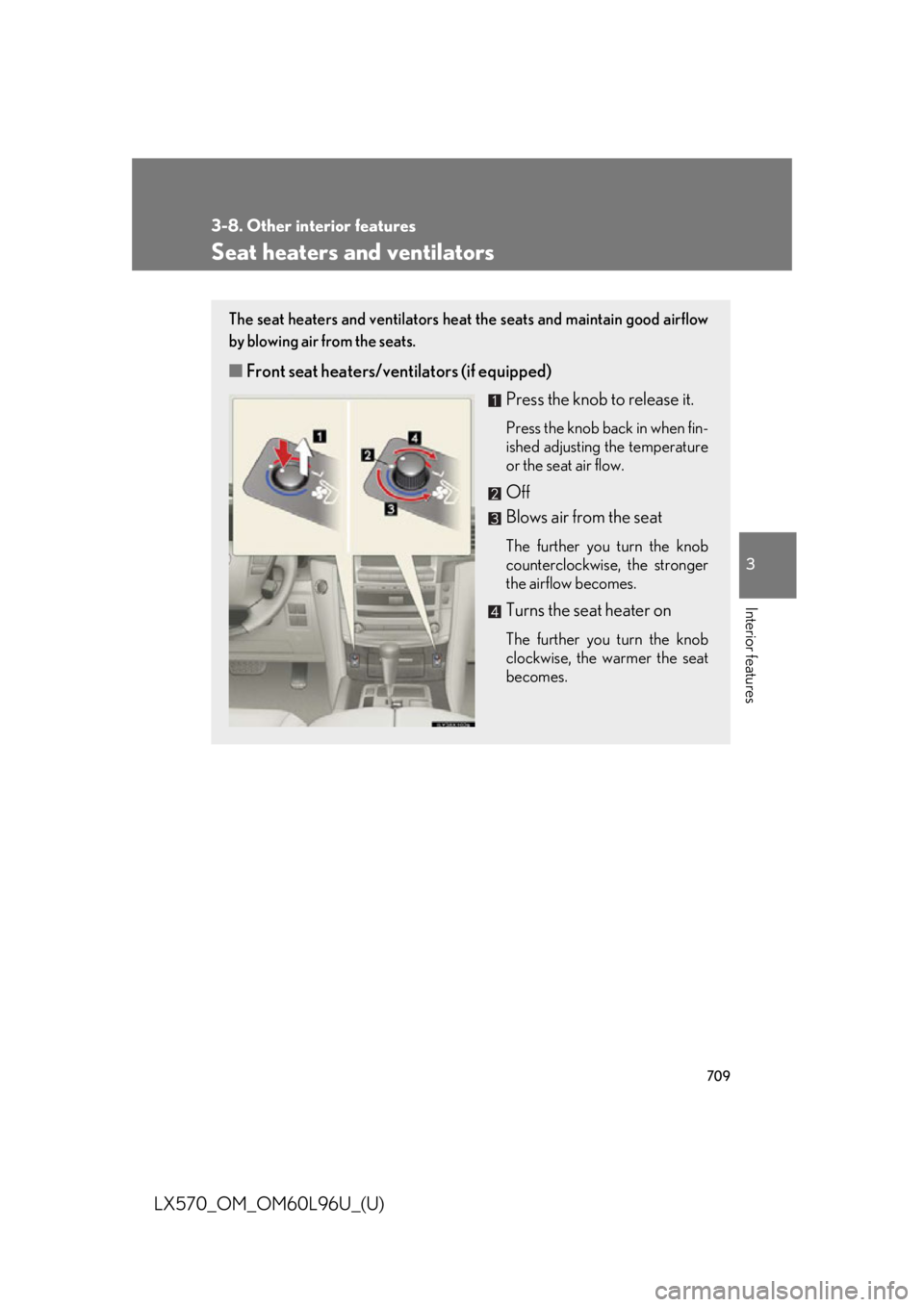
LX570_OM_OM60L96U_(U) Seat heaters and ventilators The seat heaters and ventilators heat the seats and maintain good airflow
by blowing air from the seats.
■ Front seat heaters/ventilators (if equipped)
Press the knob to release it. Press the knob back in when fin-
ished adjusting the temperature
or the seat air flow.
Off
Blows air from the seat The further you turn the knob
counterclockwise, the stronger
the airflow becomes.
Turns the seat heater on The further you turn the knob
clockwise, the warmer the seat
becomes.
Page 741 of 960
7394-1. Maintenance and care
4
Maintenance and care
LX570_OM_OM60L96U_(U) NOTICE■
Cleaning detergents ●
Do not use the following types of detergent, as they may discolor the vehicle inte-
rior or cause streaks or damage to painted surfaces.
• Non-seat portions: Organic substances such as benzene or gasoline, alkaline
or acidic solutions, dye, or bleach.
• Seats: Acidic solutions, such as thinner, benzene, or alcohol. ●
Do not use polish wax or po lish cleaner. The instrument panel’s or other interior
part’s painted surface may be damaged.■
Preventing damage to leather surfaces
Observe the following precautions to avoid damage to and deterioration of leather
surfaces. ●
Remove any dust or dirt on leather surfaces immediately. ●
Do not expose the vehicle to direct sunlight for extended periods of time. Park
the vehicle in the shade, especially during summer. ●
Do not place items made of vinyl, plastic, or that contain wax on the upholstery, as
they may stick to the leather surface if the vehicle interior heats up significantly.■
Water on the floor
Do not wash the vehicle floor with water.
Vehicle systems such as the audio syst em may be damaged if water comes into
contact with electrical components under the floor of the vehicle, and may also
cause the body to rust. ■
Cleaning the inside of the rear quarter windows and rear window ●
Do not use glass cleaner to clean the rear quarter windows and rear window, as
this may cause damage to the rear wind ow defogger heater wires or antenna.
Use a cloth dampened with lukewarm wa ter to gently wipe the window clean.
Wipe the window in stroke s running parallel to the heater wires or antenna.●
Be careful not to scratch or damage the heater wires or antenna.
Page 746 of 960
7444-2. Maintenance
LX570_OM_OM60L96U_(U) Vehicle interior Items Check points
Accelerator pedal • Moves smoothly (without uneven
pedal effort or catching)?
Automatic transmission “Park”
mechanism • Can the vehicle be held securely
on an incline with the shift lever in
“P”?
Brake pedal • Moves smoothly?
• Does it have appropriate clearance
and correct amount of free play?
Brakes • Pulls to one side when applied?
• Loss of brake effectiveness?
• Spongy feeling brake pedal?
• Pedal almost touches floor?
Head restraints • Move smoothly and lock securely?
Indicators/buzzers • Function properly?
Lights • Do all the lights come on?
• Headlights aimed correctly?
Parking brake • Moves smoothly?
• Can hold the vehicle securely on
an incline?
Seat belts • Does the seat belt system operate
smoothly?
• Are the belts undamaged?
Seats • Do the seat controls operate prop-
erly?
Steering wheel • Moves smoothly?
• Has correct free play?
• No strange noises?
Page 910 of 960

9066-1. Specifications
LX570_OM_OM60L96U_(U) Warning: The temperature grades of a tire assume that it is properly inflated
and not overloaded.
Excessive speed, underinflation, or exce ssive loading, either separately or
in combination, can cause heat bu ildup and possible tire failure.
Glossary of tire terminology Tire related term Meaning
Cold tire inflation
pressure Tire pressure when the vehicle has been parked for
three hours or more, or ha s not been driven more
than 1 mile or 1.5 km under that condition
Maximum inflation pres-
sure The maximum cold inflated pressure to which a tire
may be inflated, shown on the sidewall of the tire
Recommended inflation
pressure Cold tire inflation pressure recommended by a manu-
facturer
Accessory weight The combined weight (in excess of those standard
items which may be replaced) of automatic transmis-
sion, power steering, power brakes, power windows,
power seats, radio and heater, to the extent that these
items are available as f actory-installed equipment
(whether installed or not)
Curb weight The weight of a motor vehi cle with standard equip-
ment, including the maximum capacity of fuel, oil and
coolant, and if so equipped, air conditioning and addi-
tional weight optional engine
Maximum loaded
vehicle weight The sum of:
(a) Curb weight
(b) Accessory weight
(c) Vehicle capacity weight
(d) Production options weight
Normal occupant weight 150 lb. (68 kg) times the nu mber of occupants speci-
fied in the second column of Table 1
* that follows
Occupant distribution Distribution of occupants in a vehicle as specified in
the third column of Table 1
* below
Page 923 of 960

9196-2. Customization
6
Vehicle specifications
LX570_OM_OM60L96U_(U) Illumination
( P. 686) Outer foot lights On Off — — O
Sensitivity of the
ambient light sen-
sor used for dim-
ming the meter
lights etc. Standard -2 to 2 — — O
Sensitivity of the
ambient light sen-
sor used for bright-
ening the meter
lights etc. Standard -2 to 2 — — O
Intuitive
parking assist
( P. 251) Detection distance
of the rear center
sensor Far Near O — O
Alert Volume
(alert volume can
be adjusted) 3 1 to 5 O — O
Display setting
(when intuitive
parking assist is
operating) All sensors
displayed Display off O — O
Automatic air
conditioning
system
( P. 444) Exhaust gas sensor
sensitivity Standard -3 to 3 O — O
A/C Auto switch
operation Auto Manual O — O
Front seats
( P. 67) Power easy access
system Partial Off
O — O
FullItem Function Default
setting Customized
setting