lock LEXUS LX570 2015 Manual Online
[x] Cancel search | Manufacturer: LEXUS, Model Year: 2015, Model line: LX570, Model: LEXUS LX570 2015Pages: 960, PDF Size: 11.33 MB
Page 245 of 960

2452-4. Using other driving systems
2
When driving
LX570_OM_OM60L96U_(U) ■
Automatic cancelation of constant speed control
The cruise control will stop maintaining th e vehicle speed in the following situations:●
Actual vehicle speed is more than approximately 10 mph (16 km/h) below the
set vehicle speed.
At this time, the memorized set speed is not retained.●
Actual vehicle speed falls below approximately 25 mph (40 km/h). ●
VSC is activated. ●
The switching operation continues for 5 seconds or more after the center dif-
ferential lock switch has been operated.■
Radar sensor and grille cover
Always keep the sensor and grille cover clean to ensure that the vehicle-to-vehicle
distance control operates properly. (Some obstructions, such as snow, ice and plas-
tic objects, cannot be detect ed by the obstruction sensor.)
Dynamic radar cruise control is canceled if an obstruction is detected.
■
Warning messages and buzzers for dynamic radar cruise control
Warning messages and buzzers are used to indicate a system malfunction or to
inform the driver of the need for caution while driving. ( P. 837)Grille cover
Radar sensor
Page 308 of 960

3082-4. Using other driving systems
LX570_OM_OM60L96U_(U) Using the side monitor
Simultaneous display
Individual display Front wheel contact point Shows the position of the vehicle’s
front tire.
Vehicle front edge line Shows the position of the vehicle’s
leading edge.
Vehicle width line (blue) Indicates the width of the vehicle
including the outside rear view mir-
ror.
Projected course line (yellow) Displays a rough guide of the vehi-
cle path that moves according to
the steering wheel position. Dis-
played along with the minimum
projected turning circle.
Minimum projected turning cir-
cle (blue) Displays the smallest turning circle
projected by the system if the
steering wheel is turned to full lock.
Displayed when the steering wheel
is turned to the right (further than
90 from straight ahead).
Rear wheel contact point Shows the position of the vehicle’s
rear tire.
When in individual display mode, the ri ght front view will be expanded and dis-
played.
Page 319 of 960
3192-4. Using other driving systems
2
When driving
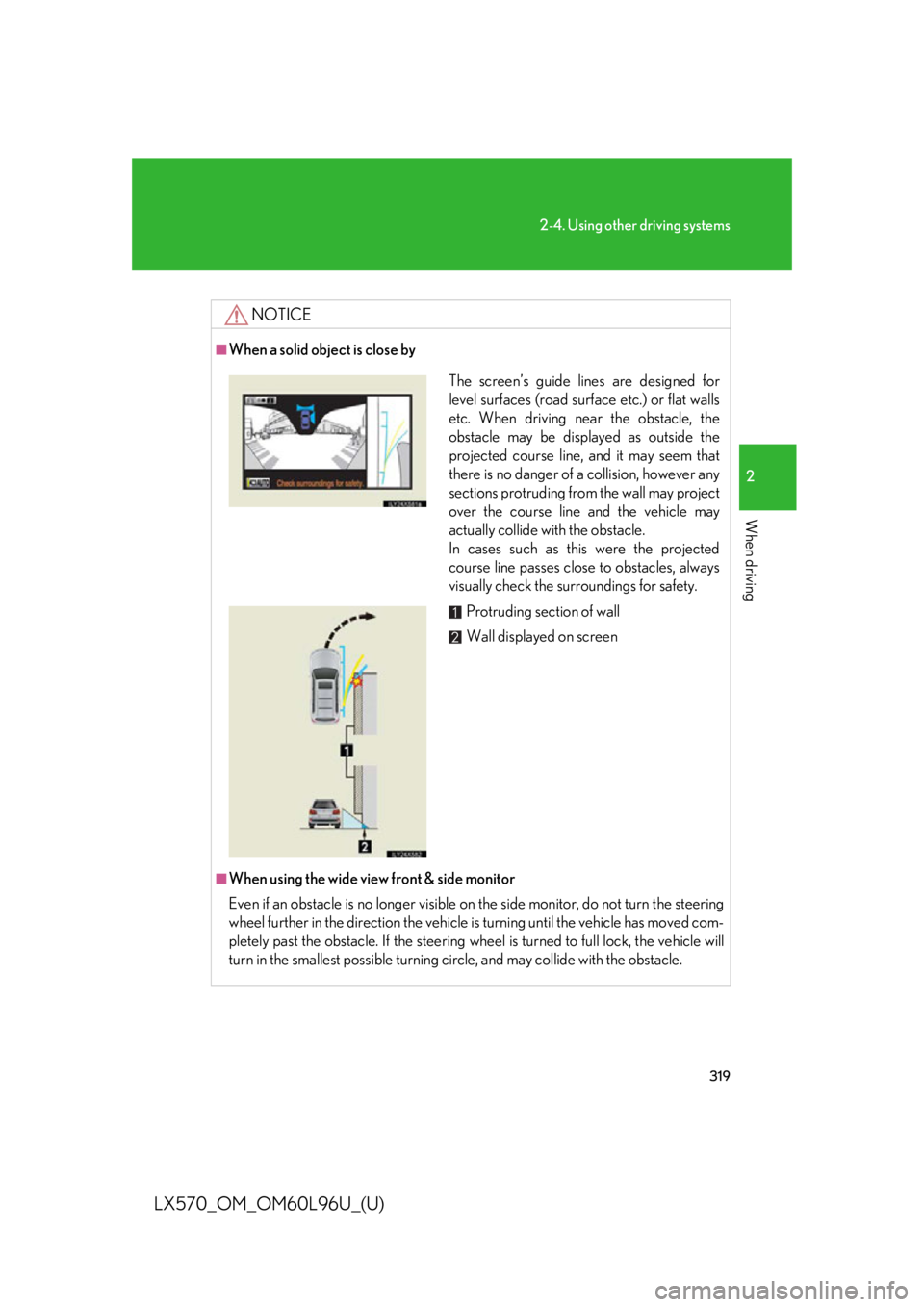
LX570_OM_OM60L96U_(U) NOTICE■
When a solid object is close by
■
When using the wide view front & side monitor
Even if an obstacle is no longer visible on the side monitor, do not turn the steering
wheel further in the direction the vehicle is turning until the vehicle has moved com-
pletely past the obstacle. If the steering wh eel is turned to full lock, the vehicle will
turn in the smallest possi ble turning circle, and may collide with the obstacle. The screen’s guide lines are designed for
level surfaces (road surface etc.) or flat walls
etc. When driving ne ar the obstacle, the
obstacle may be displayed as outside the
projected course line, and it may seem that
there is no danger of a collision, however any
sections protruding from the wall may project
over the course line and the vehicle may
actually collide with the obstacle.
In cases such as this were the projected
course line passes close to obstacles, always
visually check the su rroundings for safety.
Protruding section of wall
Wall displayed on screen
Page 327 of 960

3272-4. Using other driving systems
2
When driving
LX570_OM_OM60L96U_(U) ■
Automatic leveling function
The vehicle is adjusted to a fixed height for each mode, regardless of the number of
occupants and the luggage load. ●
However the vehicle cannot be raised if the vehicle load exceeds the following
limits:
• Up to 4 occupants
* plus approximately 661 lb. (300 kg) in the normal mode
• Up to 4 occupants
* plus approximately 441 lb. (200 kg) in the high mode
* : average weight 150 lb. (68 kg) per person●
If the vehicle height cannot be raised when in the normal mode, and “LO”
appears on the display, the vehicle is loaded too heavily. Take extra care when
driving in this condition.
If the vehicle height cannot be raised ev en after unloading the vehicle, pull the
height select switch to “ ” then push to “ ”. If the vehicle height still cannot be
raised, turn the ignition off then on again, then try once more.■
When the vehicle is st opped during driving
The activation of the automatic leveling function may cause the vehicle height to
change. This is not a malfunction. ■
If the vehicle height does not change
If the vehicle is loaded too heavily, or the undercarriage has come into contact with
the road surface, the vehicle height cannot be raised/lowered. ■
In the following cases the 4-Wheel AHC will not operate ●
The brake pedal has been depressed for a few seconds or longer while the vehi-
cle is stopped. ●
Vehicle height control has not been frequently used. ●
The suspension fluid temperature is lower than -22°F (-30°C). ●
There is ice on the suspension. ●
Driving on bumpy roads which may caus e the suspension to fully elongate.●
If the steering wheel is abruptly turned more than 3/4 of a revolution with the
center differential lock system activated.
Page 332 of 960

3322-4. Using other driving systems
LX570_OM_OM60L96U_(U) Four-wheel drive system Use the four-wheel drive control switch and center differential lock/
unlock switch to select the following transfer and center differential
modes.
■ Four-wheel drive control switch
“H4” (high speed position) Normal driving on all types of
roads.
“L4” (low speed position) Driving requiring maximum
power and traction such as
climbing or descending steep
hills, off-road driving, and hard
pulling in sand or mud, etc.
■ Center differential lock/unlock switch
Lock the center differential
when your vehicle’s wheels get
stuck in a ditch or when driving
on a slippery or bumpy surface. Unlock the center differential
after the wheels have been
freed, or after moving to a flat,
Page 334 of 960

3342-4. Using other driving systems
LX570_OM_OM60L96U_(U) ■
Advice for driving on slippery roads ●
If you shift the four-wheel drive control switch to “L4” and the shift lever to the
“2” range of “S” or “D” (vehicles with paddle shift switches) while driving in
steep off-road areas, the output of the brake can be controlled effectively by the
Active TRAC, which assists the driver to control the driving power of 4 wheels. ●
Use the “1” range of “S” or “D” (vehicles with paddle shift switches) of the shift
lever for maximum power and traction wh en your wheels get stuck or when
driving down a steep incline.■
The center differential lock indicator light
The indicator light blinks while lock ing/unlocking the center differential.■
The center differential lock/unlock switch can be operated when ●
The “ENGINE START STOP” switch is in IGNITION ON mode.●
The vehicle speed is less than 60 mph (100 km/h).■
Locking/unlocking the center differential ●
When the four-wheel drive control switch is in L4 with the center differential
locked, VSC is automatically turned off. (The center differential lock and VSC
OFF indicator lights come on.) ●
If the operation is not completed, the center differential lock indicator blinks. If
the indicator light does not turn off when unlocking the center differential, drive
straight ahead while accelerating or decelerating, or drive in reverse. ●
If the center differential lock/unlock is not completed within 5 seconds while
the cruise control system is on, cancel the cruise control system.
Page 335 of 960

3352-4. Using other driving systems
2
When driving
LX570_OM_OM60L96U_(U) ■
If the low speed four-wheel drive indicato r light or the center differential lock
indicator light blinks ●
If the low speed four-wheel drive indicat or light continues to blink when using
the four-wheel drive control switch, stop the vehicle completely, move the shift
lever to “N” and operate the switch again. ●
If the shift lever is moved before the low speed four-wheel drive indicator turns
on/off, the transfer mode may not be shifted comple tely. The transfer mode dis-
engages both the front and rear driveshafts from the powertrain and allows the
vehicle to move regardless of the shift po sition. (At this time, the indicator blinks
and the buzzer sounds.)
Therefore, the vehicle is free to roll even if the automatic transmission is in “P”.
You or someone else could be seriously injured. You must complete the shifting
of the transfer mode.
To complete the shifting, stop the vehicle completely, return the shift lever to “N”,
and confirm that the shift was comp leted (the indicator turns on/off).●
If the engine coolant temperature is t oo low, the four-wheel drive control sys-
tem may not be able to shift. When the engine is warmer operate the switch
again.
If the low speed four-wheel drive indicator li ght or the center diff erential lock indi-
cator light continues to blink even after attempting the above, there may be a mal-
function in the engine, the brake system or the four-wheel drive system. In this case,
you may not be able to shift between “H4” and “L4”, and the center differential lock
may not be operable. Have the vehicle in spected by your Lexus dealer immedi-
ately.
Page 336 of 960

3362-4. Using other driving systems
LX570_OM_OM60L96U_(U) CAUTION■
While driving
Never move the four-wheel drive control switch if the wheels have lost traction.
Doing so may cause an accident resulting in death or serious injury. ■
When the vehicle is parked
If the shift lever is moved before the low speed four-wheel drive indicator turns on/
off, the transfer mode may not be shifted completely. The transfer mode disengages
both the front and rear driveshafts from the powertrain and al lows the vehicle to
move regardless of the shift position. (At this time, the indicator blinks and the
buzzer sounds.)
Therefore, the vehicle is free to roll even if the automatic transmission is in “P”. You
or someone else could be se riously injured. You must complete the shifting of the
transfer mode. ( P. 332)
NOTICE■
To prevent damage to the center differential ●
For normal driving on dry an d hard surface roads, unlock the center differential.●
Unlock the center differential after the wh eels are out of the ditch or off the slip-
pery or bumpy surface. ●
Do not push the center differential lock/u nlock switch when the vehicle is turning
or when its wheels are spinning freely off the ground.
Page 341 of 960

3412-4. Using other driving systems
2
When driving
LX570_OM_OM60L96U_(U) ■
The Crawl Control and Turn Assist function can be operated when
Crawl Control ●
The engine is running. ●
The shift lever is in any gear other than “P” or “N”. ●
The four-wheel drive control switch is in “L4”. ●
The driver’s door is closed.
Turn Assist function ●
Crawl Control is operating. ●
The center differential is not locked. ●
The accelerator and brake are not being operated. ●
The shift lever is in any gear other than “P”, “R” or “N”. ●
The steering wheel is turned very far.■
Automatic system cancelation
Crawl Control
In the following situations, the buzzer will sound intermittently and Crawl Control
will be canceled automatically. In this ev ent, the Crawl Control indicator will flash
and then go off, the Turn Assist indicator will go off (if the Turn Assist function is in
use), and a message stating that Crawl Control has been turned off will be dis-
played on the multi-information display for several seconds. ●
When the shift lever is moved to “P” or “N”. ●
When the four-wheel drive control switch is in “H4”. ●
When the driver’s door is opened.
Turn Assist function
When the center differential is locked, the buzzer will sound intermittently and the
Turn Assist function will be canceled au tomatically. In this event, the Turn Assist
indicator will go off, and a message statin g that the Turn Assi st function has been
turned off will be displayed on the multi-information display for several seconds.
Page 348 of 960

3482-4. Using other driving systems
LX570_OM_OM60L96U_(U) ■
When the vehicle is stuck
Switching the transfer and differential
For the operation of the following func tions, refer to the following pages.●
Four-wheel drive system ( P. 332)●
Center differential lock ( P. 332)■
When the brake system operates continuously
The brake system may overheat. In this case, a buzzer will sound, the “TRAC OFF”
will be displayed on the multi-information display, and Multi-terrain Select will be
temporarily inoperable. In this event, stop the vehicle immediately in a safe place,
and allow the brake system to cool down sufficiently. (There is no problem with
continuing normal driving.)
After a short time, the message on the multi-information display will go off, and you
will be able to use Multi-terrain Select. ■
When there is a malfunction in the system
The slip indicator light will come on. Have the vehicle inspected by your Lexus
dealer immediately.
CAUTION■
When using the Multi-terrain Select
Observe the following precautions to avoid an accident that could result in death or
serious injuries: ●
There is a chance that the selected mode may not be the most appropriate in
terms of road conditions such as pi tch, slipperiness, undulation, etc. ( P. 345)●
Multi-terrain Select is not intended to expand the limits of the vehicle. Check the
road conditions thoroughly beforeha nd, and drive safely and carefully.
NOTICE■
Precaution for use
The Multi-terrain Select is intended for use during off-road driving. Do not use the
system at any other time.