change time LEXUS LX570 2016 User Guide
[x] Cancel search | Manufacturer: LEXUS, Model Year: 2016, Model line: LX570, Model: LEXUS LX570 2016Pages: 632, PDF Size: 10.34 MB
Page 216 of 632
216
LX570_OM_OM60N01U_(U) 4-2. Driving procedures
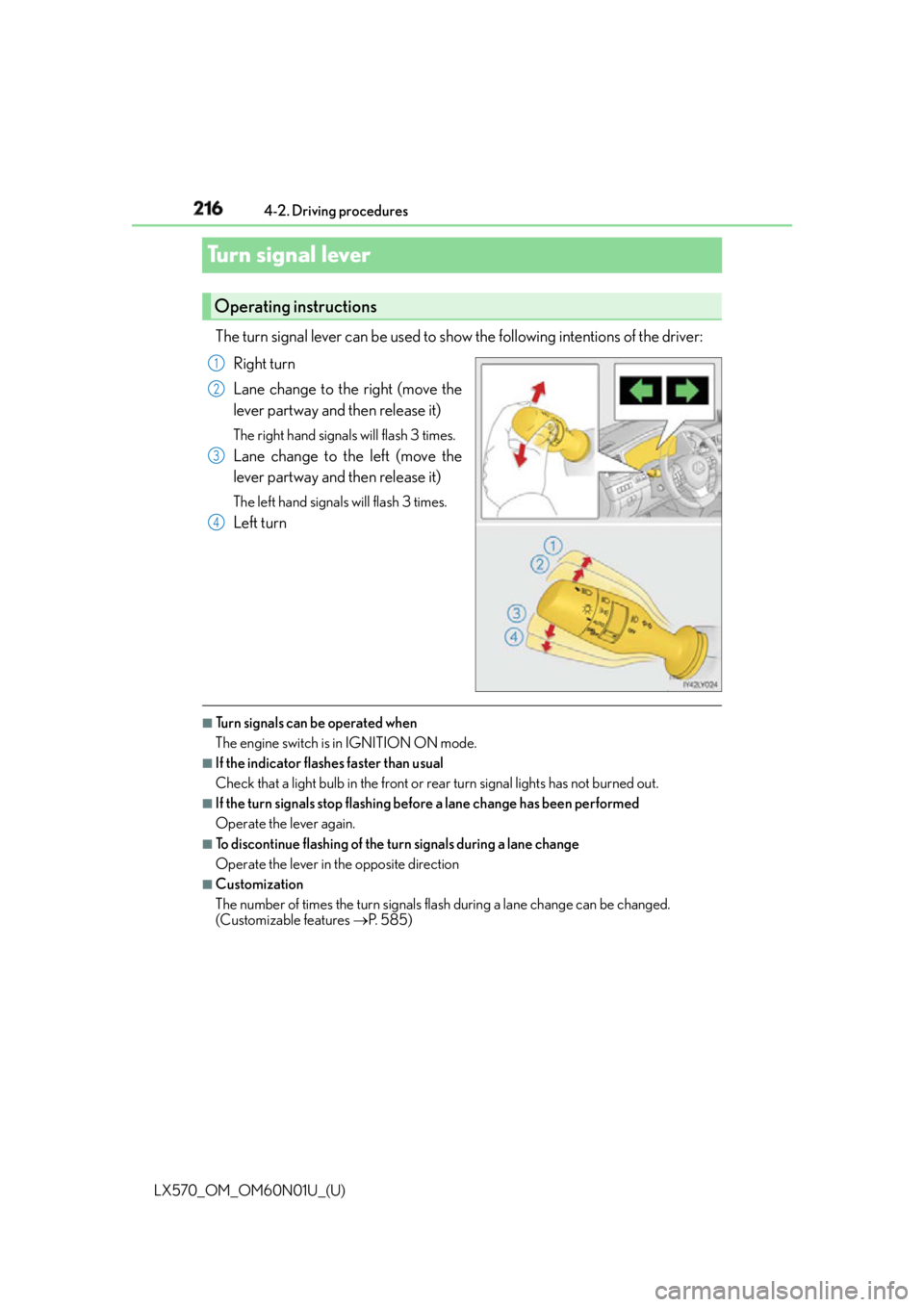
Turn signal lever The turn signal lever can be used to show the following intentions of the driver:
Right turn
Lane change to the right (move the
lever partway and then release it) The right hand signals will flash 3 times.
Lane change to the left (move the
lever partway and then release it) The left hand signals will flash 3 times.
Left turn
■
Turn signals can be operated when
The engine switch is in IGNITION ON mode. ■
If the indicator flashes faster than usual
Check that a light bulb in the front or rear turn signal lights has not burned out. ■
If the turn signals stop flashing befo re a lane change has been performed
Operate the lever again. ■
To discontinue flashing of the turn signals during a lane change
Operate the lever in the opposite direction ■
Customization
The number of times the turn signals flash during a lane change can be changed.
(Customizable features P. 585)Operating instructions 1
2
3
4
Page 234 of 632
234
LX570_OM_OM60N01U_(U) 4-3. Operating the lights and wipers■
Effects of vehicle speed on wiper operation
With the settings other than “AUTO” also, the time until drip prevention wiper sweep
occurs is changed depending on vehicle speed.
Ty p e A
With selected, wiper operation will be switched from low sp eed to intermittent
wiper operation only when the vehicle is stat ionary. (However, when the sensor sensitiv-
ity is adjusted to the highest le vel, the mode cannot be switched.)
Ty p e B
With selected, wiper operation will be switched from low speed to intermittent
wiper operation only when the vehicle is stat ionary. (However, when the sensor sensitiv-
ity is adjusted to the highest le vel, the mode cannot be switched.)■
If no windshield washer fluid sprays
Check that the washer nozzles are not blocked if there is washer fluid in the windshield
washer fluid reservoir.
WA R N I N G ■
Caution regarding the use of wind shield wipers in “AUTO” mode
The windshield wipers may operate unexpectedly if the sensor is touched or the wind-
shield is subject to vibration in “AUTO” mode . Take care that your fingers etc. anything
else does not become caught in the windshield wipers. ■
Caution regarding the use of washer fluid
When it is cold, do not use the washer fluid until the windshield becomes warm. The
fluid may freeze on the windshield and cause lo w visibility. This may lead to an accident,
resulting in death or serious injury.
NOTICE ■
When the windshield is dry
Do not use the wipers, as they may damage the windshield. ■
When the washer fluid tank is empty
Do not operate the switch continually as the washer fluid pump may overheat. ■
When there is no washer fluid spray from the nozzle
Damage to the washer fluid pump may be caused if the lever is pulled toward you and
held continually. ■
When a nozzle becomes blocked
Do not try to clear it with a pin or other object. The nozzle will be damaged.
Page 237 of 632

LX570_OM_OM60N01U_(U) 2374-3. Operating the lights and wipers
4
Driving ■
The rear window wiper and washer can be operated when
The engine switch is in IGNITION ON mode. ■
If no washer fluid sprays
Check that the washer nozzles are not blocked if there is washer fluid in the washer fluid
reservoir. ■
Dripping prevention wiper sweep
After washing and wiping operation several times, the wipers operate one more time
after a short delay to prevent dripping. ■
Effect of vehicle and shift position on wiper operation
Ty p e A ●
With selected, wiper operation will be switched from low speed to intermittent
wiper operation only the vehicle is stationary. ●
With or selected, the rear window wiper sweeps once when you shift the
shift lever to R while windshield wipers oper ating or with 17 seco nds from their deacti-
vation.
Ty p e B ●
With selected, wiper operation will be switched from low speed to intermittent
wiper operation only the vehicle is stationary. ●
With or selected, the rear window wiper sweeps once when you shift the
shift lever to R while windshield wipers oper ating or with 17 seco nds from their deacti-
vation. ■
Customization
Settings (e.g. drip prevention function) can be changed.
(Customizable features P. 585)
NOTICE ■
When the rear window is dry
Do not use the wiper, as it may damage the rear window. ■
When the washer fluid tank is empty
Do not operate the switch continually as the washer fluid pump may overheat.
Page 254 of 632
254
LX570_OM_OM60N01U_(U) 4-5. Using the driving support systems
■
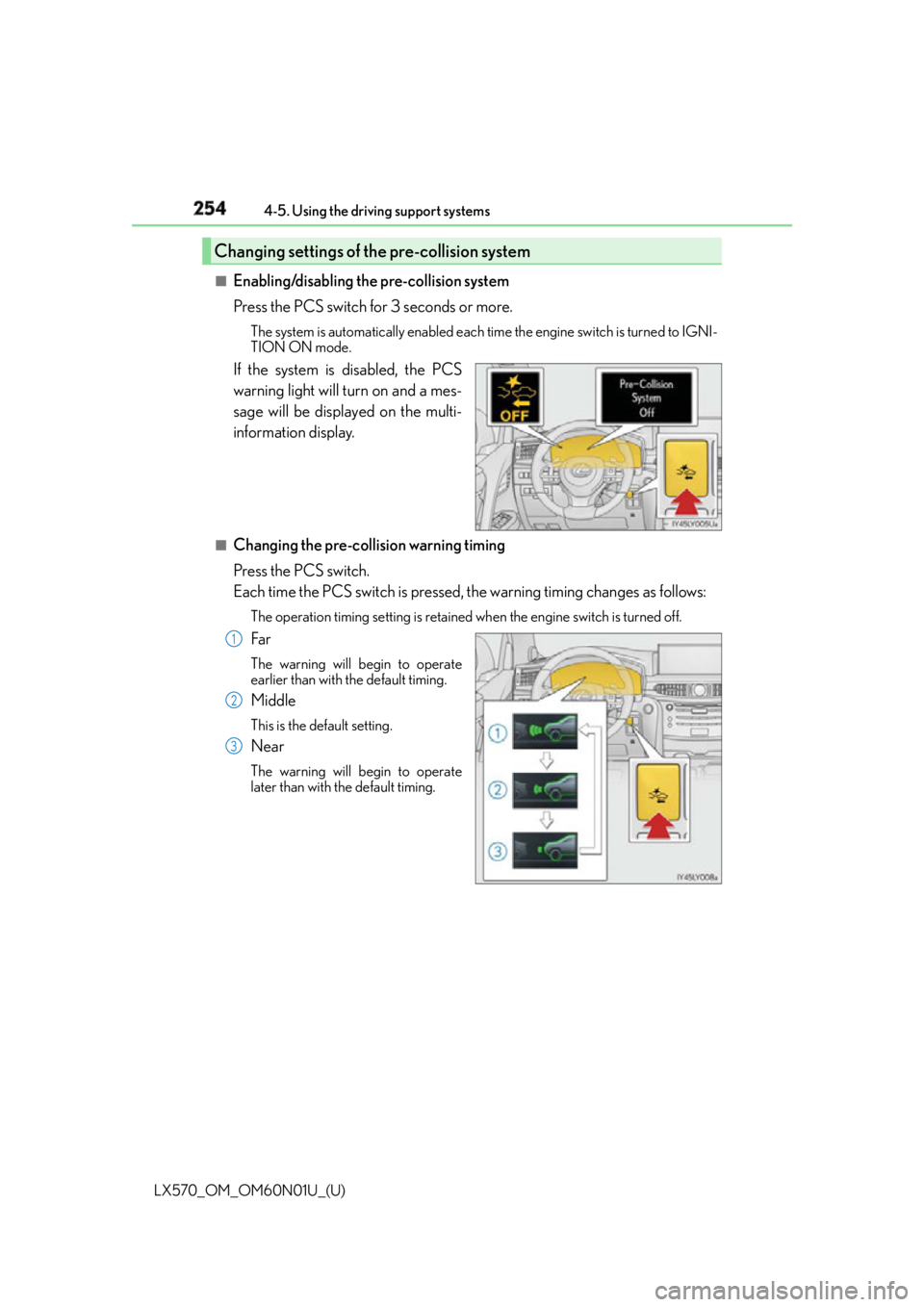
Enabling/disabling the pre-collision system
Press the PCS switch for 3 seconds or more. The system is automatically enabled each time the engine switch is turned to IGNI-
TION ON mode.
If the system is disabled, the PCS
warning light will turn on and a mes-
sage will be displayed on the multi-
information display. ■
Changing the pre-col lision warning timing
Press the PCS switch.
Each time the PCS switch is pressed, the warning timing changes as follows: The operation timing setting is retained when the engine switch is turned off.
Far The warning will begin to operate
earlier than with the default timing.
Middle This is the default setting.
Near The warning will begin to operate
later than with the default timing.Changing settings of the pre-collision system
1
2
3
Page 260 of 632
260
LX570_OM_OM60N01U_(U) 4-5. Using the driving support systems
• If a vehicle ahead is carrying a load which protrudes past its rear bumper
• If a vehicle ahead is irregularly shaped, such as a tractor or side car
• If the sun or other light is shin ing directly on a vehicle ahead
• If a vehicle cuts in front of your vehicle or emerges from beside a vehicle
• If a vehicle ahead makes an abrupt maneuver (such as sudden swerving, accelera-
tion or deceleration)
• When suddenly cutting behind a preceding vehicle
• When driving in inclement weather such as heavy rain, fog, snow or a sandstorm
• When the vehicle is hit by water, snow, dust, etc. from a vehicle ahead
• When driving through steam or smoke
• When driving in a place where the surrounding brightness changes suddenly, such
as at the entrance or exit of a tunnel
• When a very bright light, such as the sun or the headlights of oncoming traffic, shines
directly into the camera sensor
• When the surrounding area is dim, such as at dawn or dusk, or while at night or in a
tunnel
• After the engine has started the vehicle has not been driven for a certain amount of
time
• While making a left/right turn and for a few seconds after making a left/right turn
• While driving on a curve and for a few seconds after driving on a curve
• If your vehicle is skidding
• If the front of the vehicle is raised or lowered, such as when the road surface is
uneven or undulating
• If the wheels are misaligned
• If a wiper blade is blocking the camera sensor
• The vehicle is wobbling.
• The vehicle is being driven at extremely high speeds.
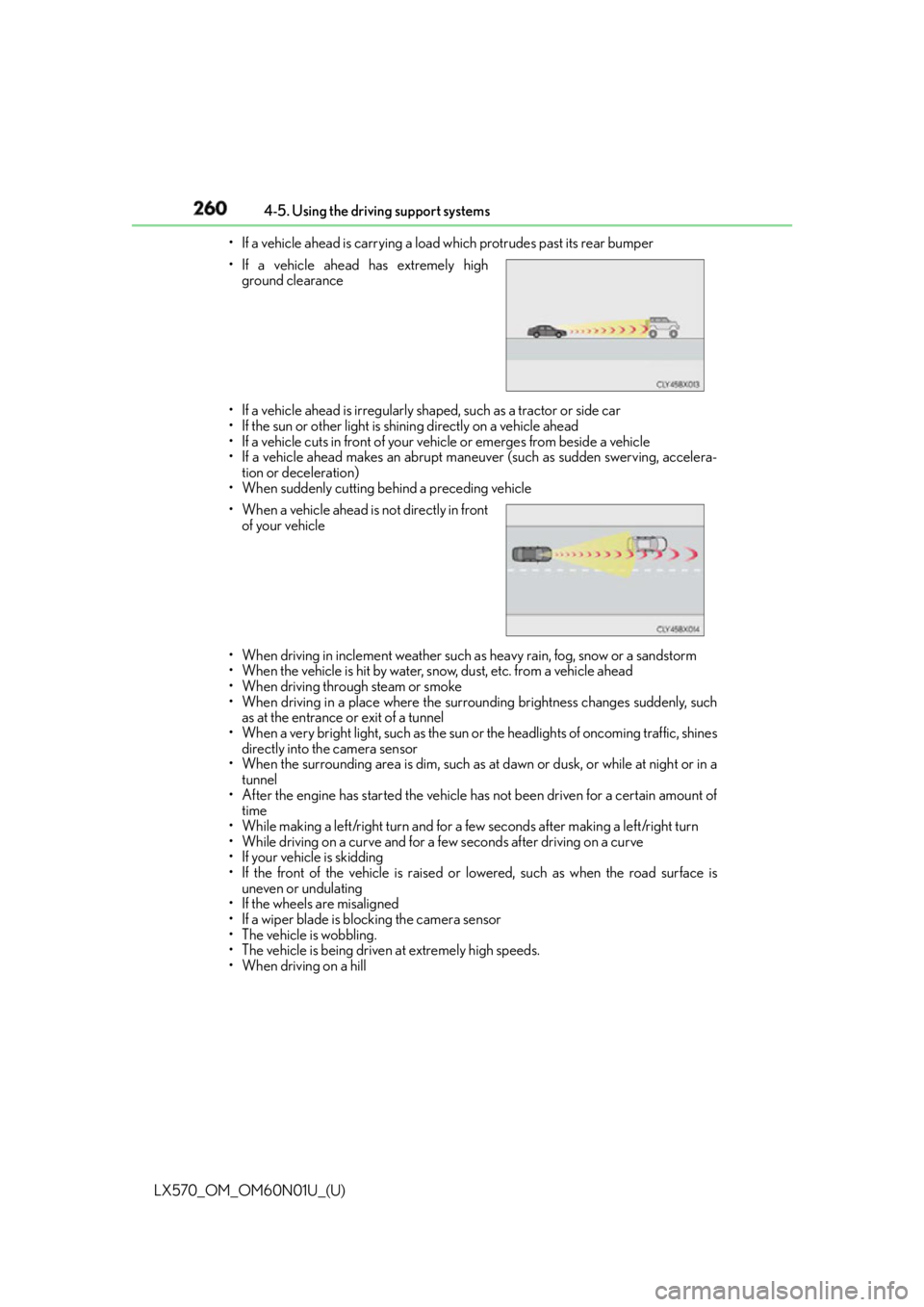
• When driving on a hill • If a vehicle ahead has extremely high
ground clearance
• When a vehicle ahead is not directly in front
of your vehicle
Page 274 of 632
274
LX570_OM_OM60N01U_(U) 4-5. Using the driving support systems
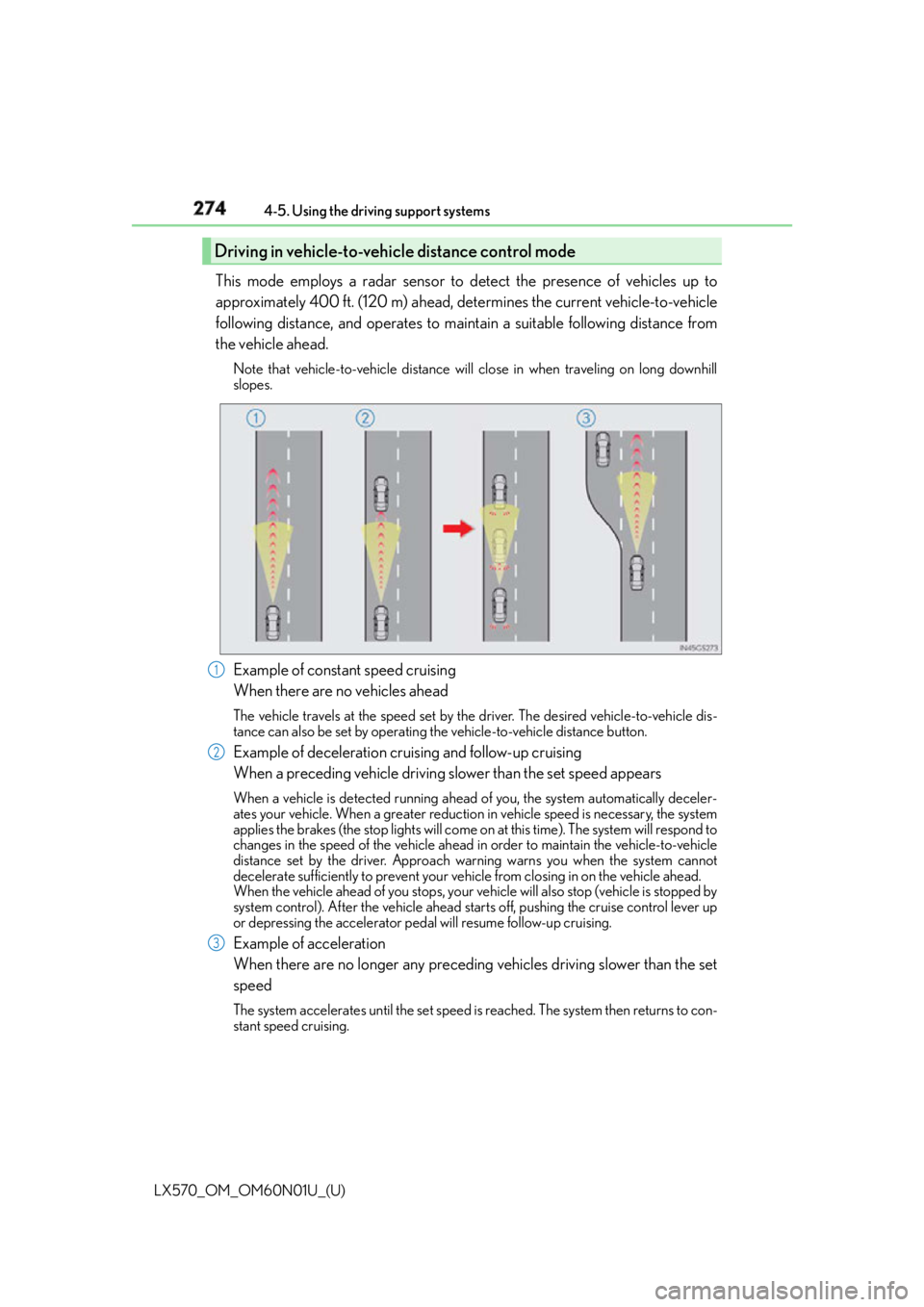
This mode employs a radar sensor to detect the presence of vehicles up to
approximately 400 ft. (120 m) ahead, determines the current vehicle-to-vehicle
following distance, and operates to main tain a suitable following distance from
the vehicle ahead. Note that vehicle-to-vehicle distance will close in when traveling on long downhill
slopes.
Example of constant speed cruising
When there are no vehicles ahead The vehicle travels at the speed set by the driver. The desired vehicle-to-vehicle dis-
tance can also be set by operating th e vehicle-to-vehicle distance button.
Example of deceleration cruising and follow-up cruising
When a preceding vehicle driving slower than the set speed appears When a vehicle is detected running ahead of you, the system automatically deceler-
ates your vehicle. When a greater reduction in vehicle speed is necessary, the system
applies the brakes (the stop lights will come on at this time). The system will respond to
changes in the speed of the vehicle ahead in order to maintain the vehicle-to-vehicle
distance set by the driver. Approach wa rning warns you when the system cannot
decelerate sufficiently to prevent your ve hicle from closing in on the vehicle ahead.
When the vehicle ahead of you stops, your ve hicle will also stop (vehicle is stopped by
system control). After the vehicle ahead starts off, pushing the cruise control lever up
or depressing the accelerator peda l will resume follow-up cruising.
Example of acceleration
When there are no longer any preceding vehicles driving slower than the set
speed The system accelerates until the set speed is reached. The system then returns to con-
stant speed cruising.Driving in vehicle-to-vehicle distance control mode
1
2
3
Page 276 of 632
276
LX570_OM_OM60N01U_(U) 4-5. Using the driving support systems
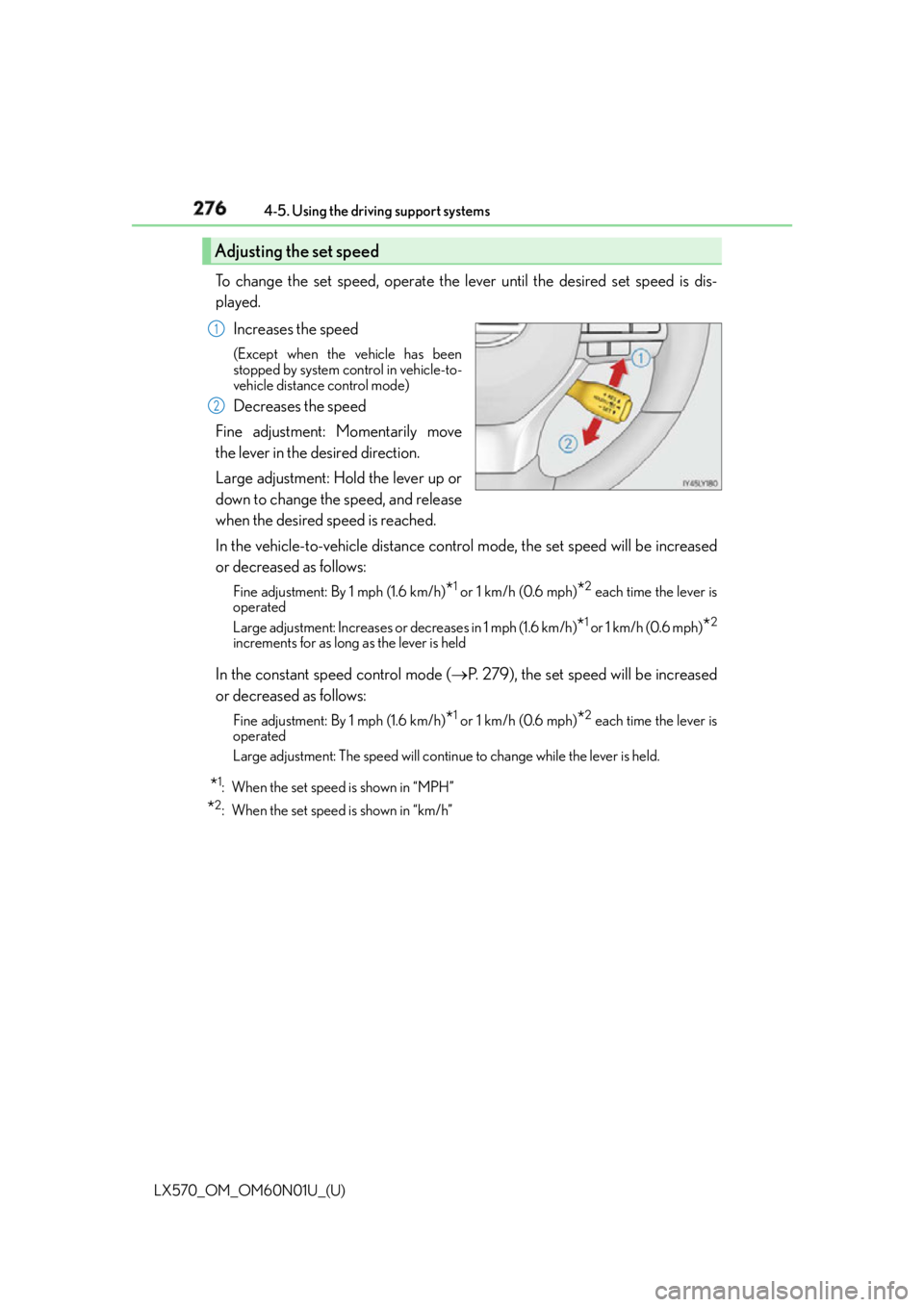
To change the set speed, operate the lever until the desired set speed is dis-
played.
Increases the speed (Except when the vehicle has been
stopped by system control in vehicle-to-
vehicle distance control mode)
Decreases the speed
Fine adjustment: Momentarily move
the lever in the desired direction.
Large adjustment: Hold the lever up or
down to change the speed, and release
when the desired speed is reached.
In the vehicle-to-vehicle distance control mode, the set speed will be increased
or decreased as follows: Fine adjustment: By 1 mph (1.6 km/h)
* 1
or 1 km/h (0.6 mph)
* 2
each time the lever is
operated
Large adjustment: Increases or decreases in 1 mph (1.6 km/h)
* 1
or 1 km/h (0.6 mph)
* 2
increments for as long as the lever is held
In the constant speed control mode ( P. 279), the set speed will be increased
or decreased as follows: Fine adjustment: By 1 mph (1.6 km/h)
* 1
or 1 km/h (0.6 mph)
* 2
each time the lever is
operated
Large adjustment: The speed will continue to change while the lever is held.
* 1
: When the set speed is shown in “MPH”
* 2
: When the set speed is shown in “km/h”Adjusting the set speed 1
2
Page 284 of 632
284
LX570_OM_OM60N01U_(U) 4-5. Using the driving support systems
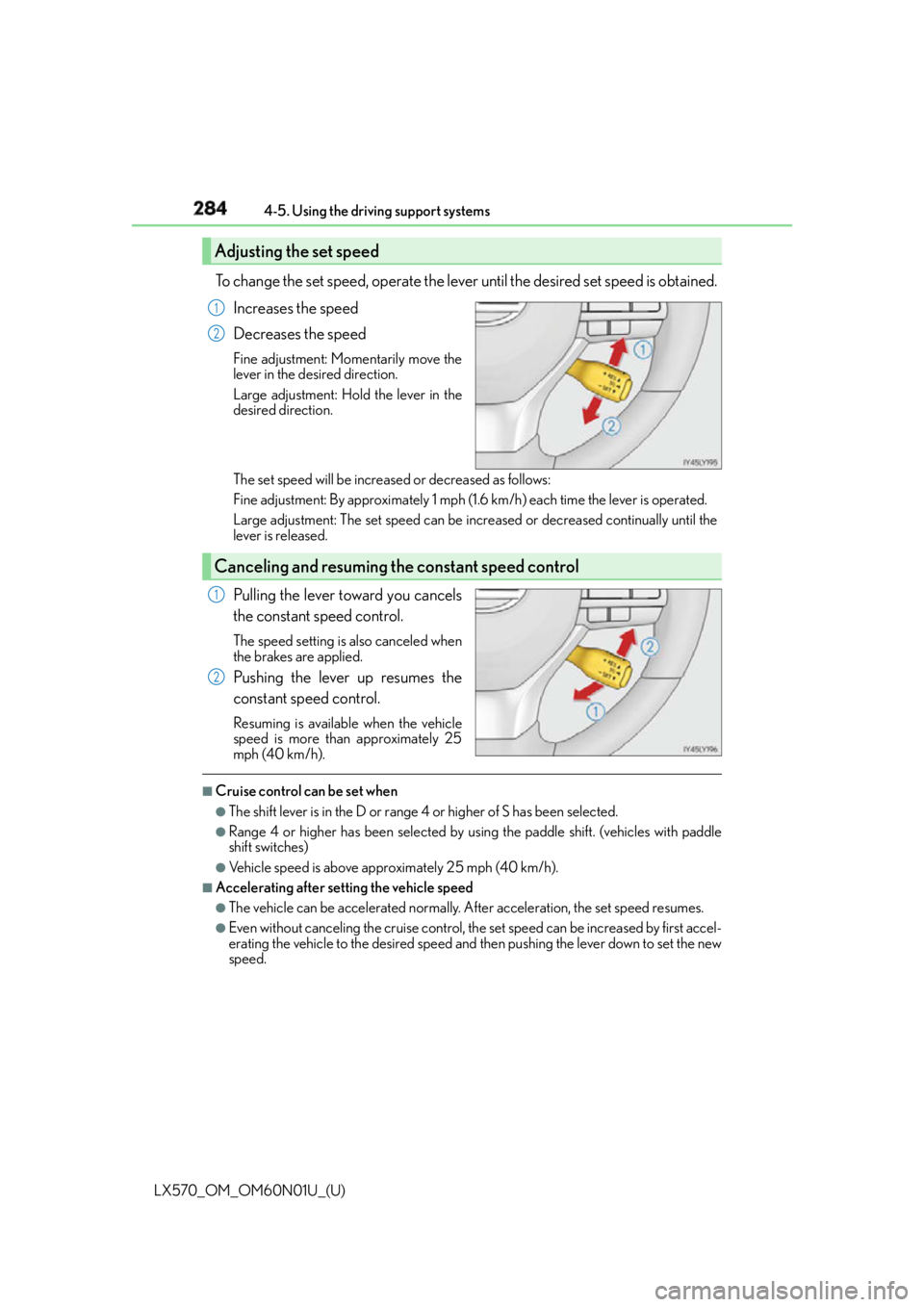
To change the set speed, operate the lever until the desired set speed is obtained.
Increases the speed
Decreases the speed Fine adjustment: Mo mentarily move the
lever in the desired direction.
Large adjustment: Hold the lever in the
desired direction.
The set speed will be increase d or decreased as follows:
Fine adjustment: By approximately 1 mph (1.6 km/h) each time the lever is operated.
Large adjustment: The set speed can be incr eased or decreased co ntinually until the
lever is released.
Pulling the lever toward you cancels
the constant speed control. The speed setting is also canceled when
the brakes are applied.
Pushing the lever up resumes the
constant speed control. Resuming is available when the vehicle
speed is more than approximately 25
mph (40 km/h). ■
Cruise control can be set when ●
The shift lever is in the D or range 4 or higher of S has been selected.●
Range 4 or higher has been selected by us ing the paddle shift. (vehicles with paddle
shift switches) ●
Vehicle speed is above approximately 25 mph (40 km/h). ■
Accelerating after setting the vehicle speed ●
The vehicle can be accelerated normally. After acceleration, the set speed resumes.●
Even without canceling the cruise control, the set speed can be increased by first accel-
erating the vehicle to the desired speed and then pushing the lever down to set the new
speed.Adjusting the set speed 1
2
Canceling and resuming the constant speed control 1
2
Page 286 of 632
286
LX570_OM_OM60N01U_(U) 4-5. Using the driving support systems
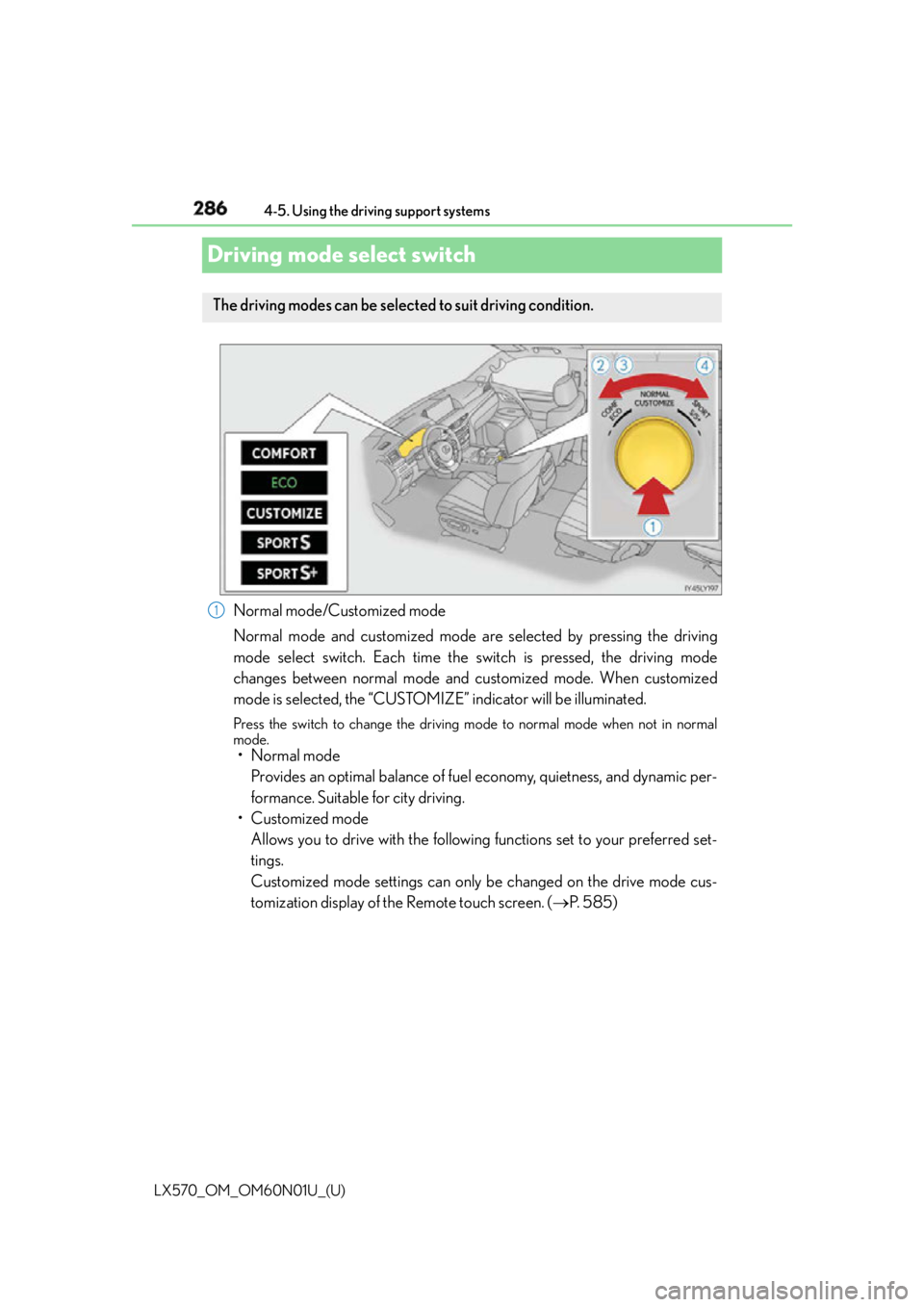
Driving mode select switch
Normal mode/Customized mode
Normal mode and customized mode are selected by pressing the driving
mode select switch. Each time the switch is pressed, the driving mode
changes between normal mode and customized mode. When customized
mode is selected, the “CUSTOMIZE” indicator will be illuminated. Press the switch to change the driving mo de to normal mode when not in normal
mode.
• Normal mode
Provides an optimal balance of fuel economy, quietness, and dynamic per-
formance. Suitable for city driving.
• Customized mode
Allows you to drive with the following functions set to your preferred set-
tings.
Customized mode settings can only be changed on the drive mode cus-
tomization display of the Remote touch screen. ( P. 5 8 5 )The driving modes can be selected to suit driving condition.
1
Page 302 of 632

302
LX570_OM_OM60N01U_(U) 4-5. Using the driving support systems■
In the following cases the 4-Wheel AHC will not operate ●
The brake pedal has been depressed for a few seconds or longer while the vehicle is
stopped. ●
Vehicle height control has not been frequently used. ●
The suspension fluid temperature is lower than -22°F (-30°C). ●
There is ice on the suspension. ●
Driving on bumpy roads which may cause the suspension to fully elongate.●
If the steering wheel is abruptly turned more than 3/4 of a revolution with the center
differential lock system activated. ■
Cold weather operation
It may take longer for the vehicle height to change if the suspension fluid temperature
drops below 5°F (-15°C).
The 4-Wheel AHC does not operate when the suspension fluid temperature drops
below -22°F (-30°C). ●
In this case, even if the height select switch is pressed, th e vehicle height will not change.
Once the vehicle has been driven for a sh ort time and the suspension fluid has been
warmed to within normal operating limits, the 4-Wheel AHC will begin operating and
the vehicle height will automatically change to the selected mode. ●
When the suspension fluid is around -22°F (-30°C), the vehicle height may not be able
to be raised, even if the 4-Wheel AHC is oper ating. In this case, pull the height select
switch to “ ” then push to “ ” after driving for a short time longer to select the desired
vehicle height. ■
Parking and stopping tips ●
If you immediately stop the engine after off-road driving, the vehicle height may gradu-
ally lower. When parking, make sure ther e is nothing under the vehicle that may come
in contact with the underbody. The vehicle will return to the set height when the engine
is started. ●
The vehicle height may change as the temperature changes when the engine is
stopped. The vehicle will return to the set height when the engine is started.■
Propeller shaft noise
If the vehicle height is adjusted on a slope, or with the shift lever in a position other than P
or N while the vehicle is stopped, you may hear a sound caused by the expansion and
contraction of the propeller shaft. Th is does not indicate a malfunction.■
4-Wheel AHC failure warning
If a malfunction occurs in the 4-Wheel AHC , normal mode is automatically selected.
However, the system may not switch to norm al mode depending on the location of the
malfunction.
The warning message is displayed on the mu lti-information display, and the 4-Wheel
AHC cannot be activated until the malfunction is corrected.
Stop the engine and start it again. If the warning message turns off, the system is operat-
ing correctly. If the warning message continue s to be displayed, have the vehicle checked
at your Lexus dealer as soon as possible.