power steering LEXUS LX570 2016 User Guide
[x] Cancel search | Manufacturer: LEXUS, Model Year: 2016, Model line: LX570, Model: LEXUS LX570 2016Pages: 632, PDF Size: 10.34 MB
Page 207 of 632

LX570_OM_OM60N01U_(U) 2074-2. Driving procedures
4
Driving If the engine is stopped with the shift le ver in a position other than P, the engine
switch will not be turned off but inst ead be turned to ACCESSORY mode. Per-
form the following procedure to turn the switch off:
Check that the parking brake is set.
Shift the shift lever to P.
Check that “Turn Off Vehicle” is displayed on the multi-information display
and then press the engine switch once.
Check that “Turn Off Vehicle” on the multi-information display is off. ■
Auto power off function
If the vehicle is left in ACCESSORY mode for more than 20 minutes or IGNITION ON
mode (the engine is not running) for more than an hour with the shift lever in P, the engine
switch will automatically turn off. However, this function cannot en tirely prevent battery
discharge. Do not leave the vehicle with the engine switch in ACCESSORY or IGNI-
TION ON mode for long periods of ti me when the engine is not running.■
Operation of the engine switch ●
When operating the engine switch, one short, firm press is enough. If the switch is
pressed improperly, the engine may not start or the engine switch mode may not
change. It is not necessary to press and hold the switch. ●
If attempting to restart the engine immediat ely after turning the engine switch off, the
engine may not start in some cases. After turning the engine off, please wait a few sec-
onds before restarting the engine. ■
Electronic key battery depletion
P. 112 ■
Conditions affe cting operation
P. 1 3 4 ■
Note for the entry function
P. 1 3 5 ■
If the engine does not start ●
The engine immobilizer system may not have been deactivated. ( P. 76 )
Contact your Lexus dealer. ●
Check that the shift lever is securely set in P. The engine may not start if the shift lever is
displaced out of P.
A message will be displayed on the multi-information display. ■
Steering lock
After turning the engine switch off and opening and closing the doors, the steering wheel
will be locked due to the stee ring lock function. Operating the engine switch again auto-
matically cancels the steering lock.When stopping the engine with the shift lever in a position other than P1
2
3
4
Page 208 of 632
208
LX570_OM_OM60N01U_(U) 4-2. Driving procedures■
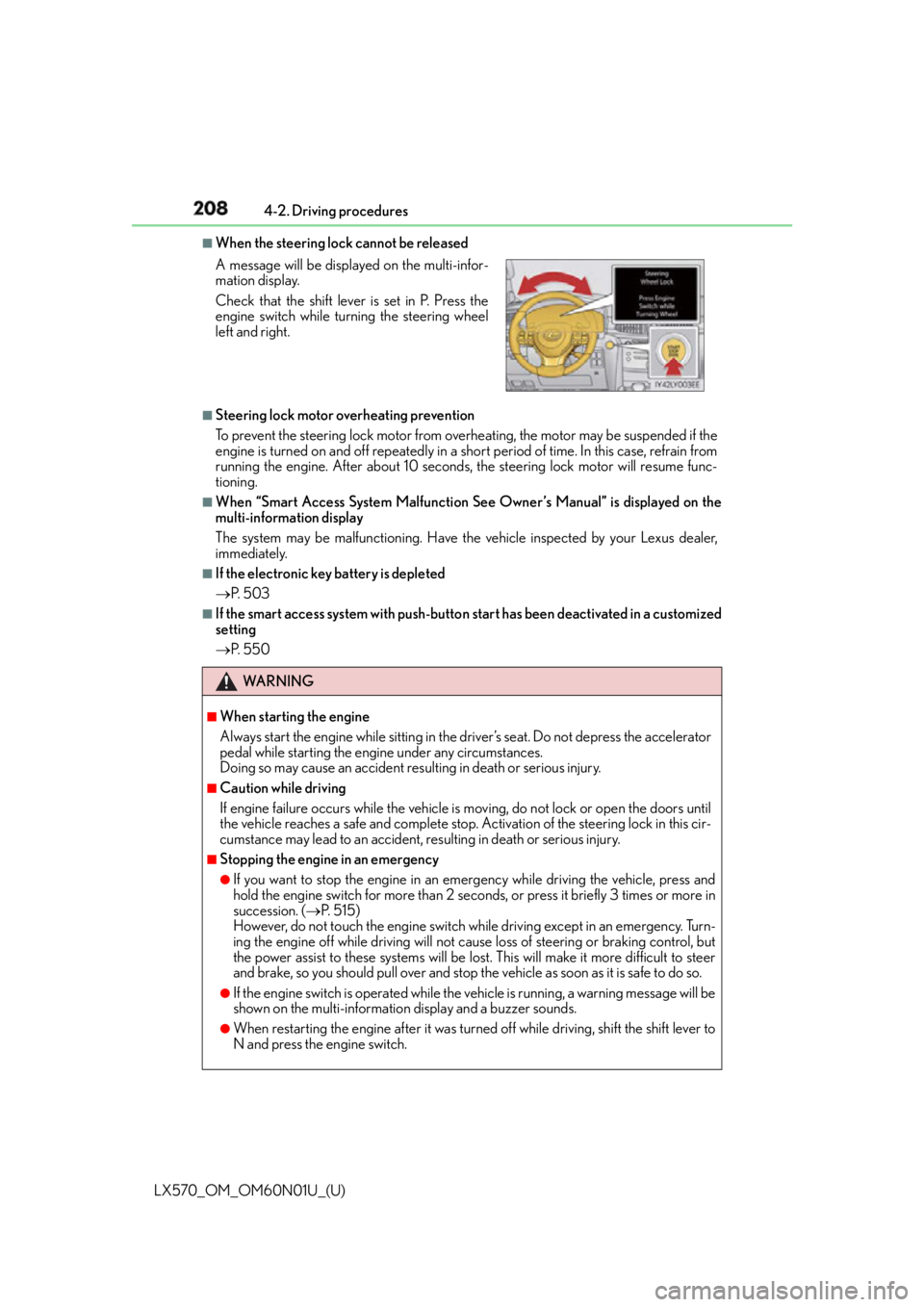
When the steering lock cannot be released
■
Steering lock motor overheating prevention
To prevent the steering lock motor from overheating, the motor may be suspended if the
engine is turned on and off repeatedly in a sh ort period of time. In this case, refrain from
running the engine. After about 10 seconds, the steering lock motor will resume func-
tioning. ■
When “Smart Access System Malfunction See Owner’s Manual” is displayed on the
multi-information display
The system may be malfunctioning. Have the vehicle inspected by your Lexus dealer,
immediately. ■
If the electronic key battery is depleted
P. 5 0 3 ■
If the smart access system with push-butto n start has been deactivated in a customized
setting
P. 5 5 0A message will be displayed on the multi-infor-
mation display.
Check that the shift lever is set in P. Press the
engine switch while turning the steering wheel
left and right.
WA R N I N G ■
When starting the engine
Always start the engine while sitting in the driver’s seat. Do not depress the accelerator
pedal while starting the engine under any circumstances.
Doing so may cause an accident resu lting in death or serious injury.■
Caution while driving
If engine failure occurs while the vehicle is moving, do not lock or open the doors until
the vehicle reaches a safe and complete stop. Activation of the steering lock in this cir-
cumstance may lead to an accident, re sulting in death or serious injury.■
Stopping the engine in an emergency ●
If you want to stop the engine in an emergency while driving the vehicle, press and
hold the engine switch for more than 2 seco nds, or press it briefly 3 times or more in
succession. ( P. 5 1 5 )
However, do not touch the engine switch while driving except in an emergency. Turn-
ing the engine off while driving will not cause loss of steering or braking control, but
the power assist to these systems will be lost . This will make it more difficult to steer
and brake, so you should pull over and stop th e vehicle as soon as it is safe to do so.●
If the engine switch is operated while the vehicle is running, a warning message will be
shown on the multi-information display and a buzzer sounds.●
When restarting the engine after it was turn ed off while driving, shift the shift lever to
N and press the engine switch.
Page 287 of 632
LX570_OM_OM60N01U_(U) 2874-5. Using the driving support systems
4
Driving Comfort mode
By controlling the suspension, riding comfort is further enhanced. Suitable for
city driving. When not in comfort mode and the driving mode select switch is turned to the left, the
“COMFORT” indicator comes on in the multi-information display.
Eco drive mode
Helps the driver accelerate in an eco- friendly manner and improve fuel econ-
omy through moderate throttle characteristics and by controlling the opera-
tion of the air conditioning system (heating/cooling). When in comfort mode, if the driving mode select switch is turned to the left, the
“ECO” indicator will come on in the multi-information display.
Sport mode
•SPORT S mode
Controls the transmission and engine to provide quick, powerful accelera-
tion. This mode is suitable for when agile driving response is desired, such
as when driving on roads with many curves. When not in SPORT S mode, if the driving mode select switch is turned to the
right, the “SPORT S” indicator will come on in the multi-information display.
•SPORT S+ mode
Helps to ensure steering performanc e and driving stability by simulta-
neously controlling the steering and suspen sion in addition to the transmis-
sion and engine. Suitable for sportier driving. When in SPORT S mode, if the driving mode select switch is turned to the right,
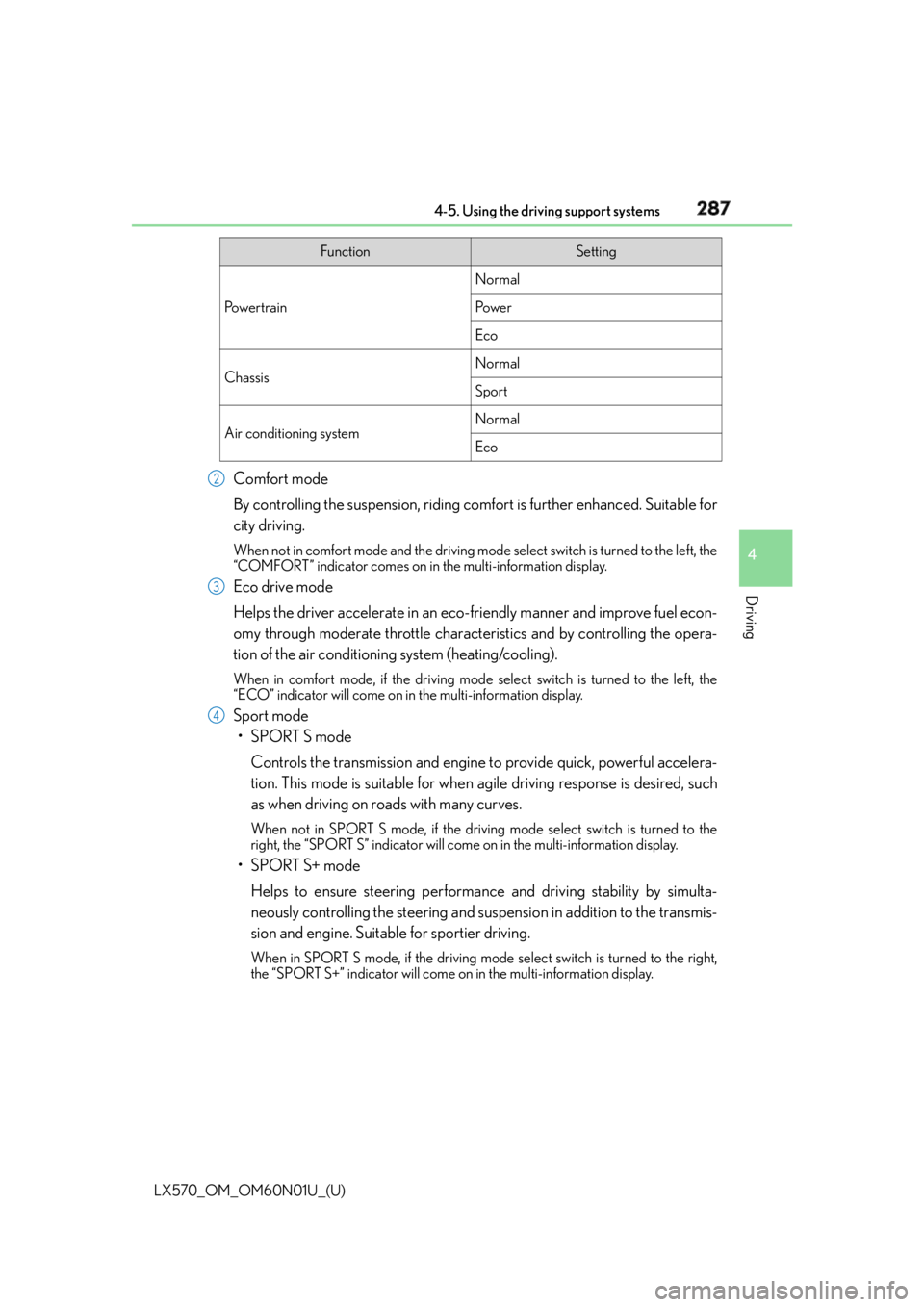
the “SPORT S+” indicator will come on in the multi-information display. Function Setting
Po w e r t r a i n Normal
Po w e r
Eco
Chassis Normal
Sport
Air conditioning system Normal
Eco2
3
4
Page 379 of 632
379
LX570_OM_OM60N01U_(U) 4-5. Using the driving support systems
4
Driving
Driving assist systems ◆ Multi Terrain ABS (Anti-lock Brake System) Helps to prevent wheel lock when the brakes are applied suddenly, or if the brakes are
applied while driving on a slippery road su rface, or in off-road conditions (such as
rough roads, sand and mud)
◆ Brake assist Generates an increased leve l of braking force after the brake pedal is depressed
when the system detects a panic stop situation
◆ VSC (Vehicle Stability Control) Helps the driver to control skidding when swerving suddenly or turning on slippery
road surfaces
◆ Active TRAC (Traction Control) Helps to maintain drive power and prevent the 4 wheels from spinning when starting
the vehicle or accelerating on slippery roads, or in off-road conditions
◆ Hill-start assist control Helps to reduce the backward movement of the vehicle when starting on an incline or
slippery slope
◆ AVS (Adaptive Variable Suspension system) By independently controlling the damping force of the shock absorbers for each of
the 4 wheels according to the road and dr iving conditions, this system helps riding
comfort with superior stee ring stability, and helps good vehicle posture. When
SPORT S+ mode is selected by the drivin g mode select switches, the damping force
is suitable for sporty driving. ( P. 2 8 6 )
◆ VGRS (Variable Gear Ratio Steering) Helps to adjust the wheel turning angle in accordance with the vehicle speed and
steering wheel movement.
◆ Trailer Sway Control Helps the driver to control trailer sway by selectively applying brake pressure for indi-
vidual wheels and reducing engine to rque when trailer sway is detected.
Trailer Sway Control is part of the VSC system and will not operate if VSC turned off
or experiences a malfunction.To help enhance driving safety and performance, the following systems oper-
ate automatically in response to various driving situations. Be aware, however,
that these systems are supplementary and should not be relied upon too
heavily when operating the vehicle.
Page 393 of 632

393
LX570_OM_OM60N01U_(U) 5Interior features5-1. Remote Touch screen
Remote Touch/12.3-inch
display ..........................................394
5-2. Lexus Climate Concierge
Lexus Climate Concierge ..... 400
5-3. Using the air conditioning
system and defogger
Front automatic air
conditioning system ................ 401
Rear air conditioning
system ........................................... 412
Heated steering wheel/seat
heaters/seat ventilators.......... 415 5-4. Using the interior lights
Interior lights list .......................... 419
• Interior lights .......................... 420
• Personal lights .........................421
5-5. Using the storage features
List of storage features ............ 422
• Glove box ............................... 423
• Console box........................... 423
• Overhead console .............. 424
• Cup holders ........................... 425
• Bottle holders ........................ 426
• Card holder............................ 426
• Auxiliary boxes ......................427
Luggage compartment
features........................................ 429
5-6. Using the other interior
features
Other interior features ............. 431
• Cool box ................................... 431
• Sun visors ................................ 432
• Vanity mirrors ........................ 432
• Clock ........................................ 433
• Power outlets ......................... 434
• Wireless charger.................. 436
• Armrest .................................... 443
• Rear door sunshades ......... 444
• Coat hooks ............................. 444
• Assist grips.............................. 445
Garage door opener................ 446
LEXUS Enform Safety
Connect ........................................451
Page 466 of 632
466
LX570_OM_OM60N01U_(U) 6-2. Maintenance
General maintenance Listed below are the general maintenance items that should be performed at
the intervals specified in the “Warranty and Service Guide” or “Owner’s
Manual Supplement”. It is recommende d that any problem you notice should
be brought to the attention of your Lexu s dealer or qualifie d service shop for
advice.
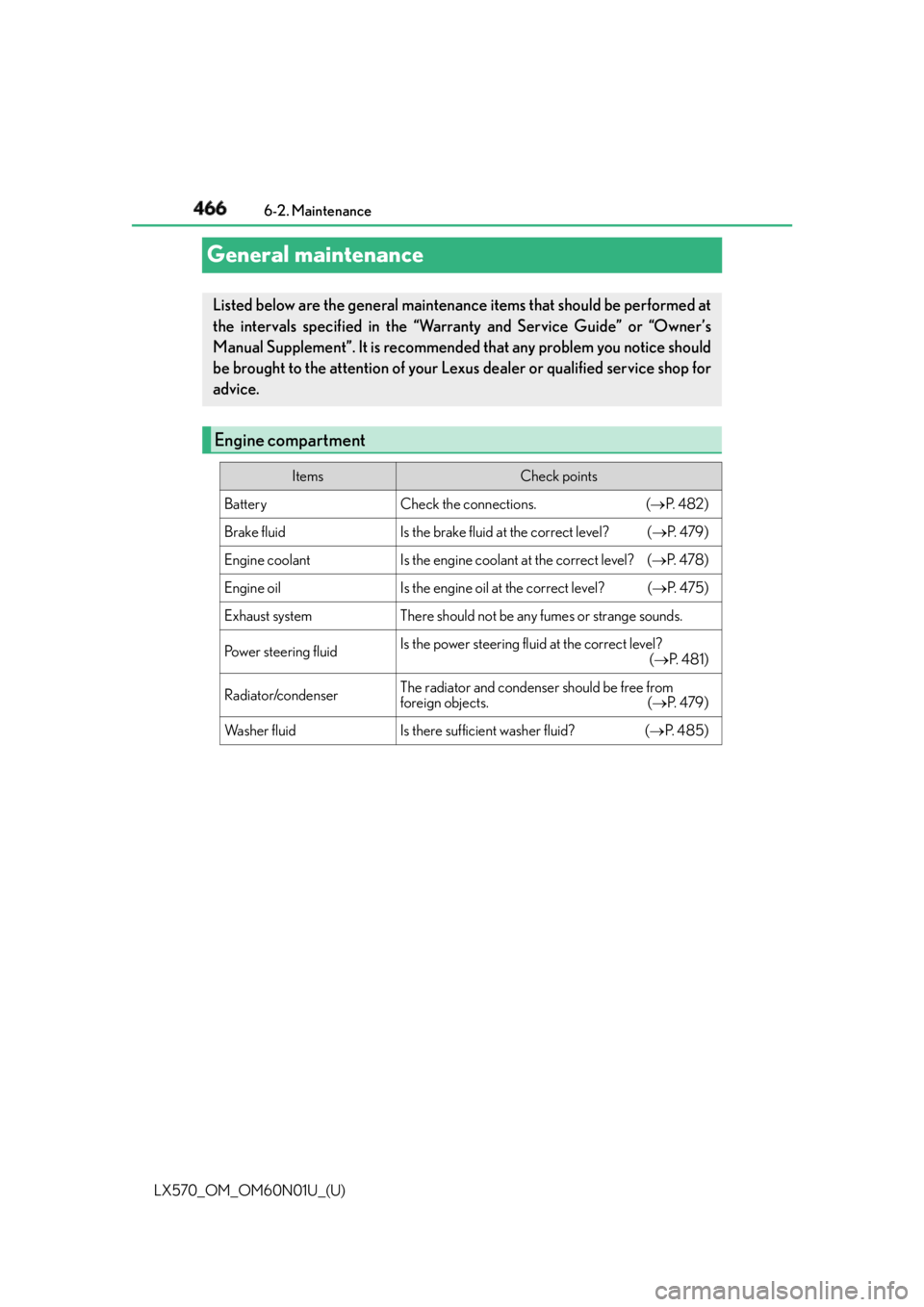
Engine compartment Items Check points
Battery Check the connections. ( P. 4 8 2 )
Brake fluid Is the brake fluid at the correct level? ( P. 4 7 9 )
Engine coolant Is the engine coolant at the correct level? ( P. 4 7 8 )
Engine oil Is the engine oil at the correct level? ( P. 4 7 5 )
Exhaust system There should not be any fumes or strange sounds.
Power steering fluid Is the power steering fluid at the correct level?
( P. 4 8 1 )
Radiator/condenser The radiator and condenser should be free from
foreign objects. ( P. 4 7 9 )
Wa s h e r f l u i d Is there sufficient washer fluid? ( P. 4 8 5 )
Page 470 of 632
470
LX570_OM_OM60N01U_(U) 6-3. Do-it-yourself maintenance
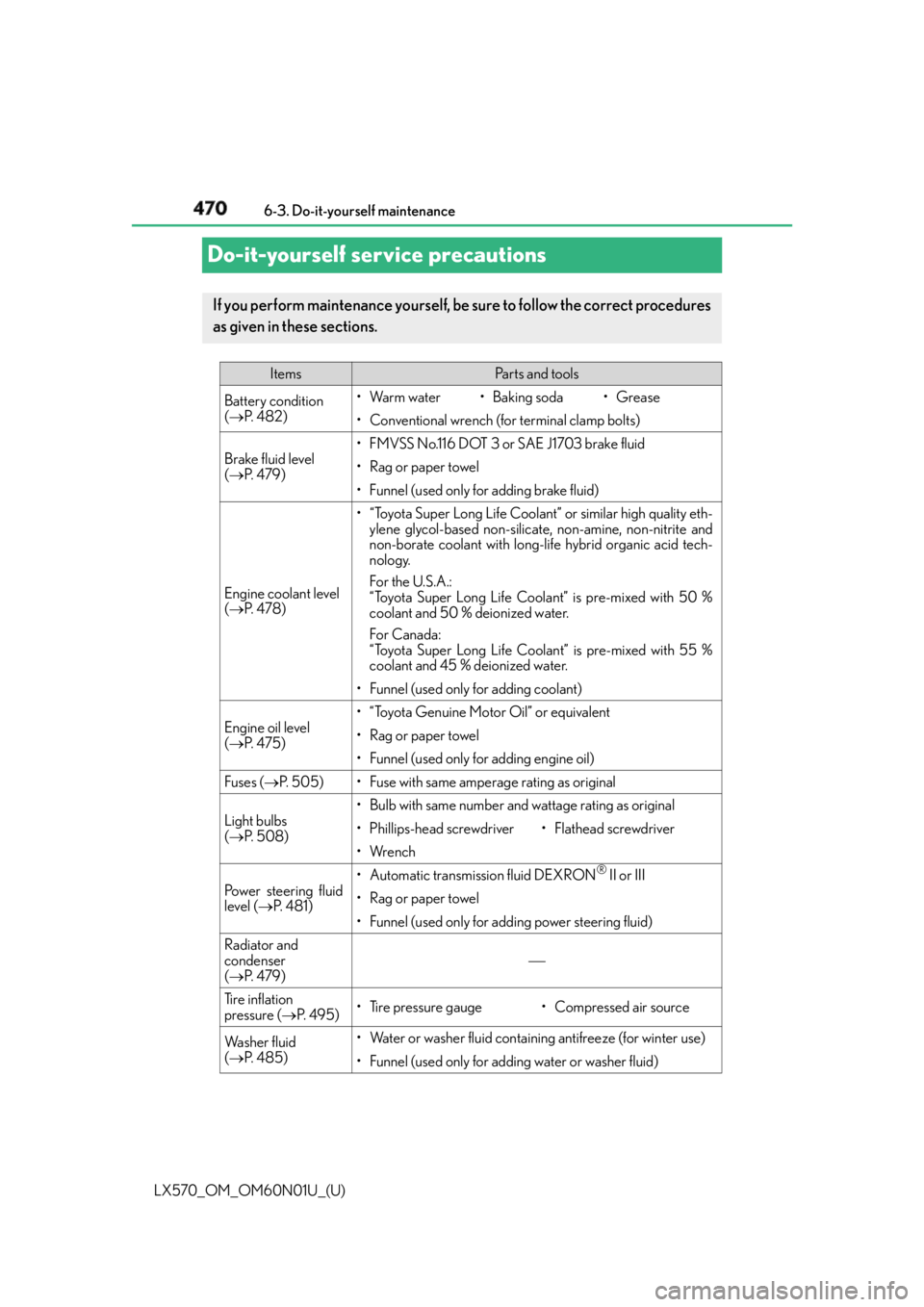
Do-it-yourself service precautions If you perform maintenance yourself, be sure to follow the correct procedures
as given in these sections. Items Pa r t s a n d t o o l s
Battery condition
( P. 4 8 2 ) •Warm water • Baking soda •Grease
• Conventional wrench (for terminal clamp bolts)
Brake fluid level
( P. 4 7 9 ) • FMVSS No.116 DOT 3 or SAE J1703 brake fluid
• Rag or paper towel
• Funnel (used only for adding brake fluid)
Engine coolant level
( P. 4 7 8 ) • “Toyota Super Long Life Coolant” or similar high quality eth-
ylene glycol-based non-silicate, non-amine, non-nitrite and
non-borate coolant with long-life hybrid organic acid tech-
nology.
For the U.S.A.:
“Toyota Super Long Life Coolant” is pre-mixed with 50 %
coolant and 50 % deionized water.
For Canada:
“Toyota Super Long Life Coolant” is pre-mixed with 55 %
coolant and 45 % deionized water.
• Funnel (used only for adding coolant)
Engine oil level
( P. 4 7 5 ) • “Toyota Genuine Motor Oil” or equivalent
• Rag or paper towel
• Funnel (used only for adding engine oil)
Fuses ( P. 505) • Fuse with same amperage rating as original
Light bulbs
( P. 5 0 8 ) • Bulb with same number and wattage rating as original
• Phillips-head screwdriver •Flathead screwdriver
•Wrench
Power steering fluid
level ( P. 4 8 1 ) • Automatic transmission fluid DEXRON ®
II or III
• Rag or paper towel
• Funnel (used only for adding power steering fluid)
Radiator and
condenser
( P. 4 7 9 )
Tire inflation
pressure ( P. 4 9 5 ) • Tire pressure gauge • Compressed air source
Wa s h e r f l u i d
( P. 4 8 5 ) • Water or washer fluid containi ng antifreeze (for winter use)
• Funnel (used only for adding water or washer fluid)
Page 473 of 632
473
LX570_OM_OM60N01U_(U) 6-3. Do-it-yourself maintenance
6
Maintenance and care
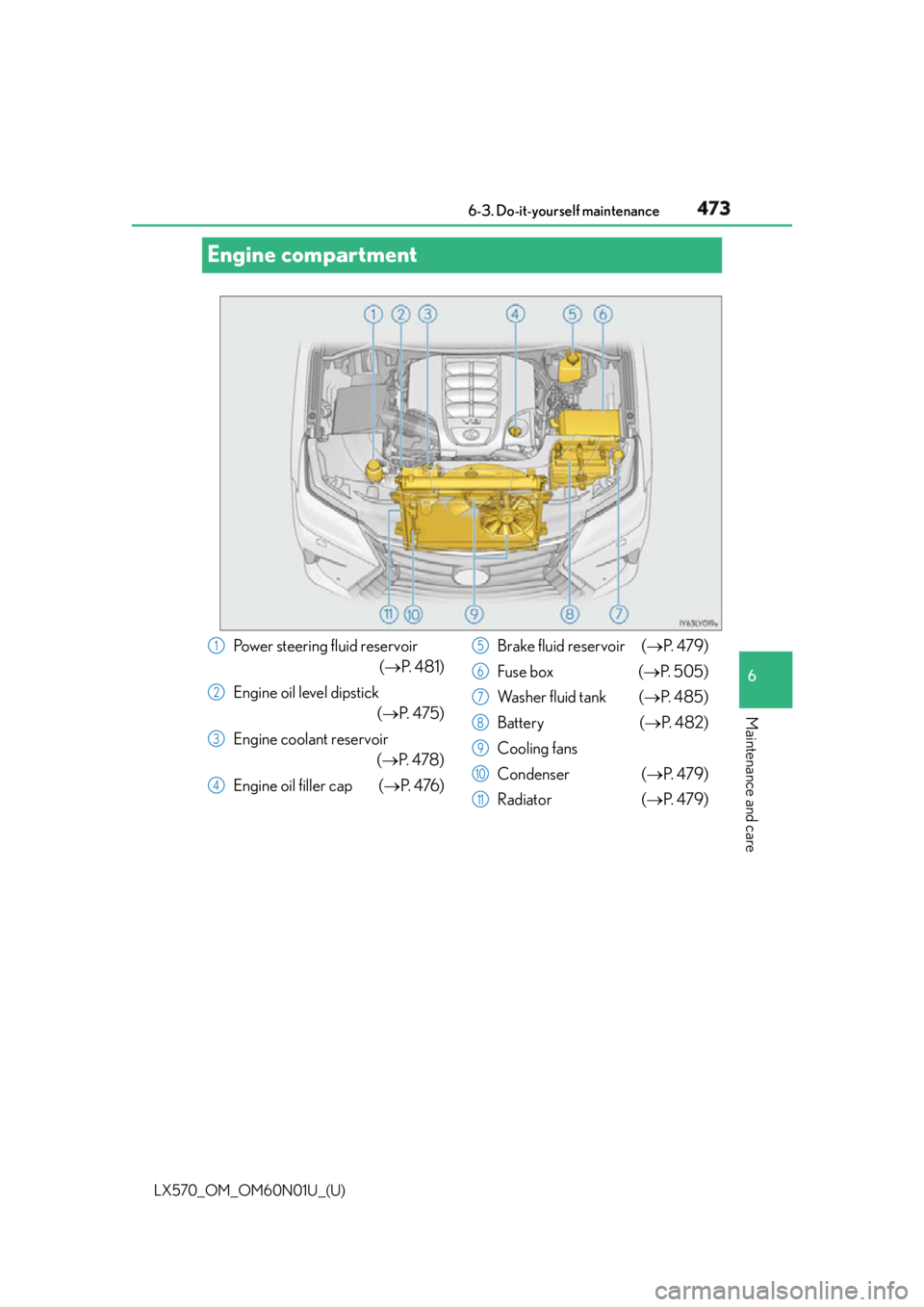
Engine compartment
Power steering fluid reservoir
( P. 4 8 1 )
Engine oil level dipstick
( P. 4 7 5 )
Engine coolant reservoir
( P. 4 7 8 )
Engine oil filler cap ( P. 4 76 ) Brake fluid reservoir ( P. 4 7 9 )
Fuse box ( P. 505)
Wa s h e r f l u i d t a n k ( P. 4 8 5 )
Battery ( P. 4 8 2 )
Cooling fans
Condenser ( P. 4 7 9 )
Radiator ( P. 4 7 9 )1
2
3
4 5
6
7
8
9
10
11
Page 481 of 632
LX570_OM_OM60N01U_(U) 4816-3. Do-it-yourself maintenance
6
Maintenance and care ■
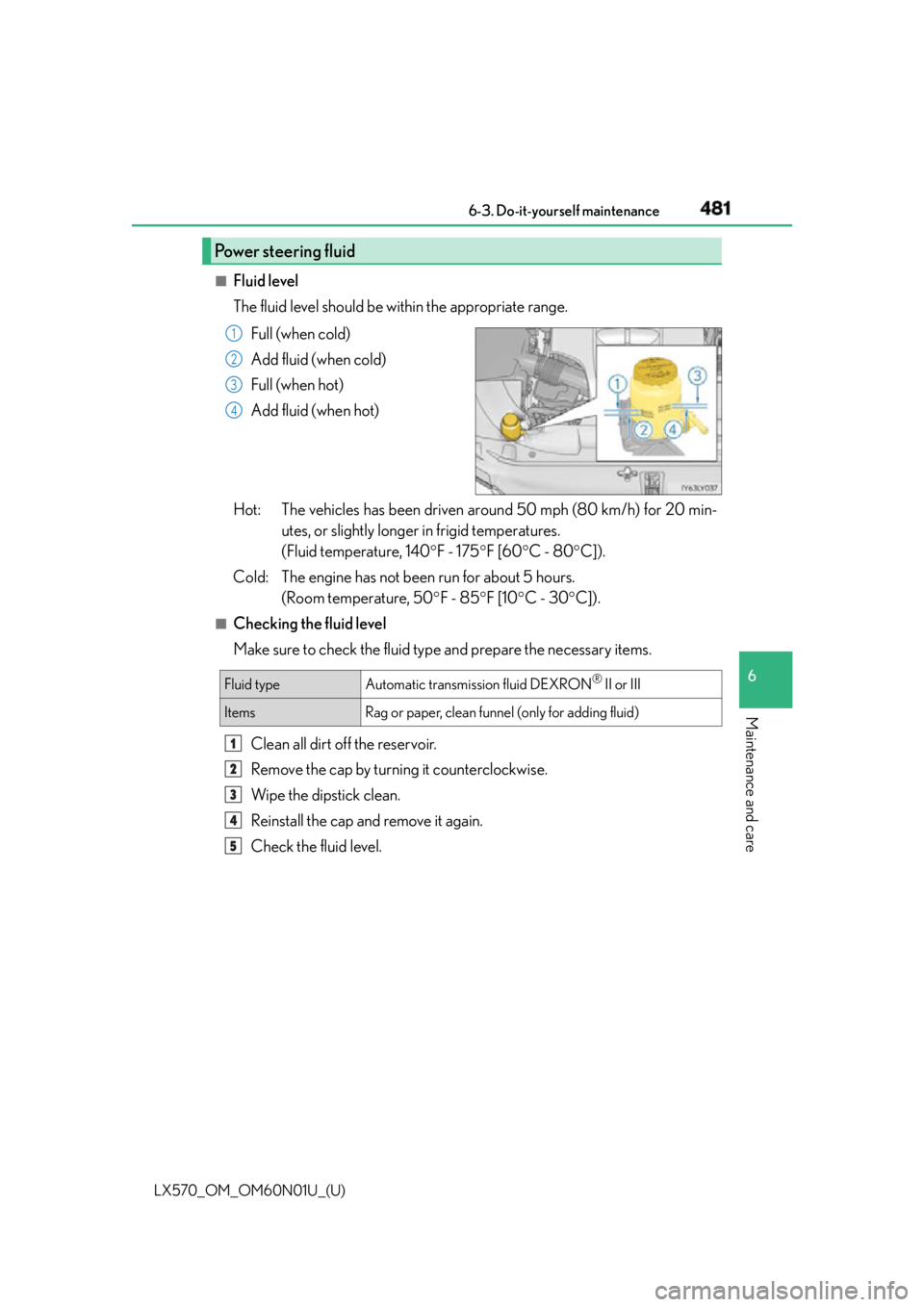
Fluid level
The fluid level should be within the appropriate range.
Full (when cold)
Add fluid (when cold)
Full (when hot)
Add fluid (when hot)
Hot: The vehicles has been driven around 50 mph (80 km/h) for 20 min-
utes, or slightly longer in frigid temperatures.
(Fluid temperature, 140 F - 175 F [60 C - 80 C]).
Cold: The engine has not been run for about 5 hours.
(Room temperature, 50 F - 85 F [10 C - 30 C]).■
Checking the fluid level
Make sure to check the fluid type and prepare the necessary items.
Clean all dirt off the reservoir.
Remove the cap by turnin g it counterclockwise.
Wipe the dipstick clean.
Reinstall the cap and remove it again.
Check the fluid level.Power steering fluid 1
2
3
4
Fluid type Automatic transmission fluid DEXRON ®
II or III
Items Rag or paper, clean funnel (only for adding fluid)1
2
3
4
5
Page 515 of 632
515
LX570_OM_OM60N01U_(U) 7
When trouble arises 7-1. Essential information
If your vehicle has to be stopped in an emergency Steadily step on the brake pedal with both feet and firmly depress it.Do not pump the brake pedal repeatedly as this will increase the effort required to
slow the vehicle.
Shift the shift lever to N.
If the shift lever is shifted to N
After slowing down, stop the vehicle in a safe place by the road.
Stop the engine.
If the shift lever cannot be shifted to N
Keep depressing the brake pedal with both feet to reduce vehicle speed as
much as possible.
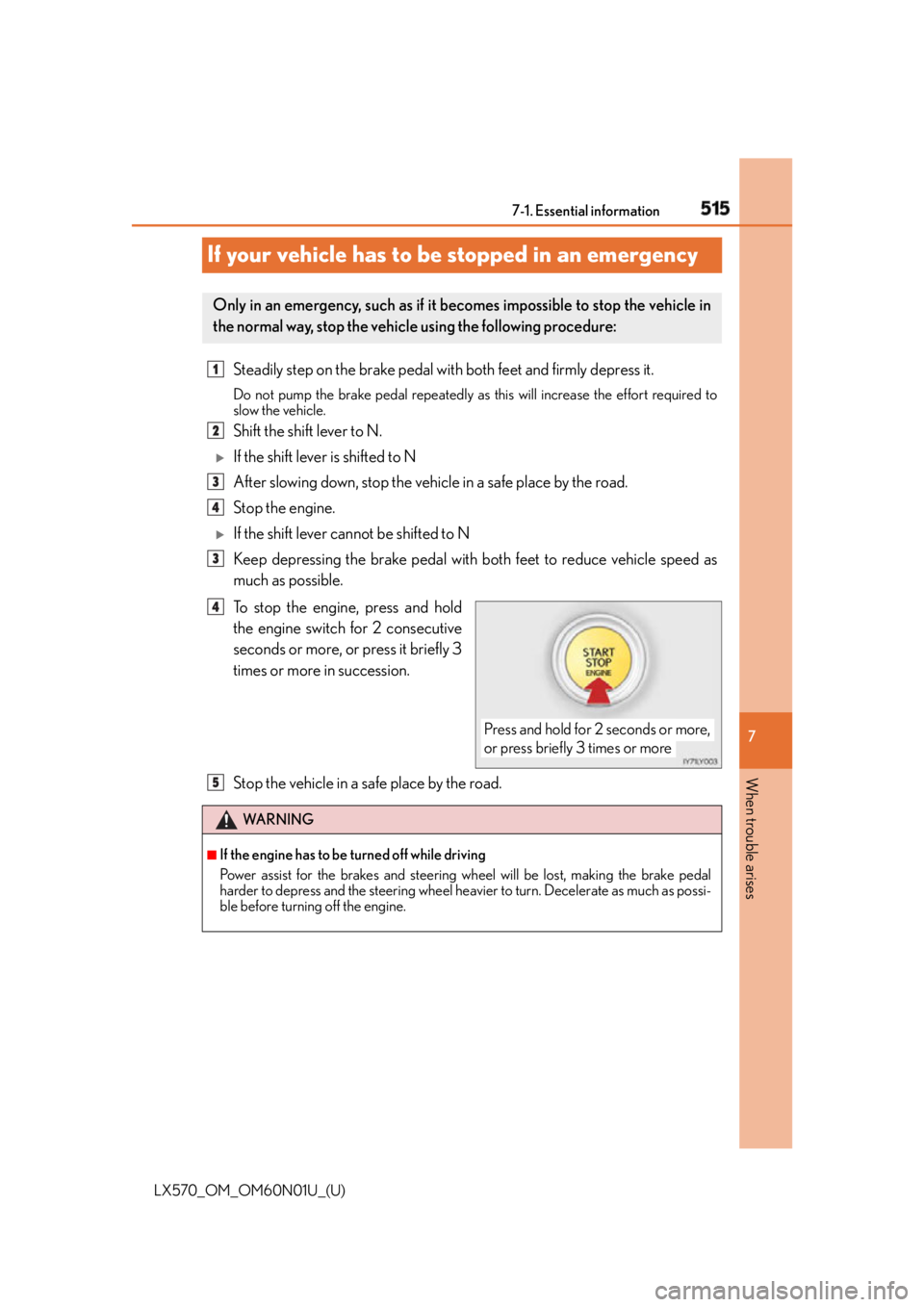
To stop the engine, press and hold
the engine switch for 2 consecutive
seconds or more, or press it briefly 3
times or more in succession.
Stop the vehicle in a safe place by the road.Only in an emergency, such as if it becomes impossible to stop the vehicle in
the normal way, stop the vehicl e using the following procedure:1
2
3
4
3
Press and hold for 2 seconds or more,
or press briefly 3 times or more4
WA R N I N G ■
If the engine has to be turned off while driving
Power assist for the brakes and steering wheel will be lost, making the brake pedal
harder to depress and the steering wheel heavier to turn. Decelerate as much as possi-
ble before turning off the engine. 5