oil LEXUS LX570 2016 Owners Manual
[x] Cancel search | Manufacturer: LEXUS, Model Year: 2016, Model line: LX570, Model: LEXUS LX570 2016Pages: 632, PDF Size: 10.34 MB
Page 6 of 632
TABLE OF CONTENTS
6
LX570_OM_OM60N01U_(U) 8-1. Specifications
Maintenance data
(fuel, oil level, etc.) .................. 562
Fuel information............................ 571
Tire information............................ 574
8-2. Customization
Customizable features ............585
8-3. Initialization
Items to initialize ......................... 598
Reporting safety defects
for U.S. owners.....................................600
Seat belt instructions
for Canadian owners
(in French) ............................................... 601
SRS airbag instructions
for Canadian owners
(in French) .............................................. 603 What to do if...
(Troubleshooting) ................................. 612
Alphabetical index .................................. 6168
Vehicle specifications
9
For owners Index
For vehicles with a navigation system or a multimedia system, refer to the
“NAVIGATION SYSTEM OWNER’S MANUAL” for information regarding
the equipment listed below.
• Navigation system
• Audio/video system
• Rear seat entertainment system
• Hands-free system (for cellular phone)
Page 15 of 632
15Pictorial index
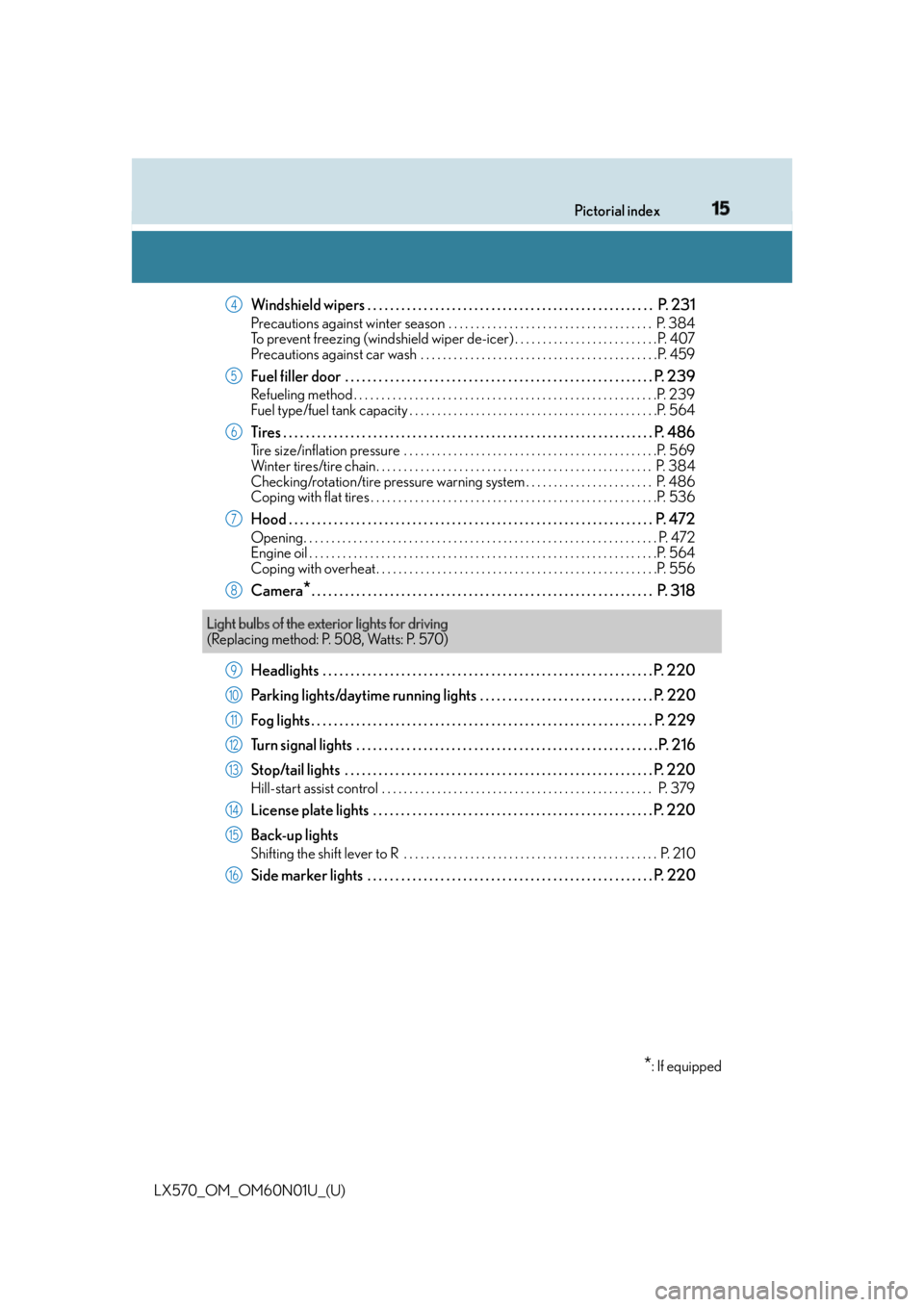
LX570_OM_OM60N01U_(U) Windshield wipers . . . . . . . . . . . . . . . . . . . . . . . . . . . . . . . . . . . . . . . . . . . . . . . . . . . P. 231 Precautions against winter season . . . . . . . . . . . . . . . . . . . . . . . . . . . . . . . . . . . . . P. 384
To prevent freezing (windshield wiper de-icer) . . . . . . . . . . . . . . . . . . . . . . . . . .P. 407
Precautions against car wash . . . . . . . . . . . . . . . . . . . . . . . . . . . . . . . . . . . . . . . . . . .P. 459
Fuel filler door . . . . . . . . . . . . . . . . . . . . . . . . . . . . . . . . . . . . . . . . . . . . . . . . . . . . . . . P . 239Refueling method . . . . . . . . . . . . . . . . . . . . . . . . . . . . . . . . . . . . . . . . . . . . . . . . . . . . . . .P. 239
Fuel type/fuel tank capacity . . . . . . . . . . . . . . . . . . . . . . . . . . . . . . . . . . . . . . . . . . . . .P. 564
Tires . . . . . . . . . . . . . . . . . . . . . . . . . . . . . . . . . . . . . . . . . . . . . . . . . . . . . . . . . . . . . . . . . . P. 486Tire size/inflation pressure . . . . . . . . . . . . . . . . . . . . . . . . . . . . . . . . . . . . . . . . . . . . . .P. 569
Winter tires/tire chain. . . . . . . . . . . . . . . . . . . . . . . . . . . . . . . . . . . . . . . . . . . . . . . . . . P. 3 84
Checking/rotation/tire pressure warning system . . . . . . . . . . . . . . . . . . . . . . . P. 486
Coping with flat tires . . . . . . . . . . . . . . . . . . . . . . . . . . . . . . . . . . . . . . . . . . . . . . . . . . . .P. 536
Hood . . . . . . . . . . . . . . . . . . . . . . . . . . . . . . . . . . . . . . . . . . . . . . . . . . . . . . . . . . . . . . . . . P. 472Opening. . . . . . . . . . . . . . . . . . . . . . . . . . . . . . . . . . . . . . . . . . . . . . . . . . . . . . . . . . . . . . . . P. 472
Engine oil . . . . . . . . . . . . . . . . . . . . . . . . . . . . . . . . . . . . . . . . . . . . . . . . . . . . . . . . . . . . . . .P. 564
Coping with overheat . . . . . . . . . . . . . . . . . . . . . . . . . . . . . . . . . . . . . . . . . . . . . . . . . . .P. 556
Camera
* . . . . . . . . . . . . . . . . . . . . . . . . . . . . . . . . . . . . . . . . . . . . . . . . . . . . . . . . . . . . . P. 31 8
Headlights . . . . . . . . . . . . . . . . . . . . . . . . . . . . . . . . . . . . . . . . . . . . . . . . . . . . . . . . . . . P. 220
Parking lights/daytime running lights . . . . . . . . . . . . . . . . . . . . . . . . . . . . . . . P. 220
Fog lights . . . . . . . . . . . . . . . . . . . . . . . . . . . . . . . . . . . . . . . . . . . . . . . . . . . . . . . . . . . . . P. 229
Turn signal lights . . . . . . . . . . . . . . . . . . . . . . . . . . . . . . . . . . . . . . . . . . . . . . . . . . . . . .P . 216
Stop/tail lights . . . . . . . . . . . . . . . . . . . . . . . . . . . . . . . . . . . . . . . . . . . . . . . . . . . . . . . P . 220Hill-start assist control . . . . . . . . . . . . . . . . . . . . . . . . . . . . . . . . . . . . . . . . . . . . . . . . . P. 379
License plate lights . . . . . . . . . . . . . . . . . . . . . . . . . . . . . . . . . . . . . . . . . . . . . . . . . . P. 220
Back-up lights Shifting the shift lever to R . . . . . . . . . . . . . . . . . . . . . . . . . . . . . . . . . . . . . . . . . . . . . . P. 21 0
Side marker lights . . . . . . . . . . . . . . . . . . . . . . . . . . . . . . . . . . . . . . . . . . . . . . . . . . . P. 220 4
5
6
7
8
Light bulbs of the exterior lights for driving
(Replacing method: P. 508, Watts: P. 570)
* : If equipped9
10
11
12
13
14
15
16
Page 88 of 632
88
LX570_OM_OM60N01U_(U) 2. Instrument cluster
Gauges and meters
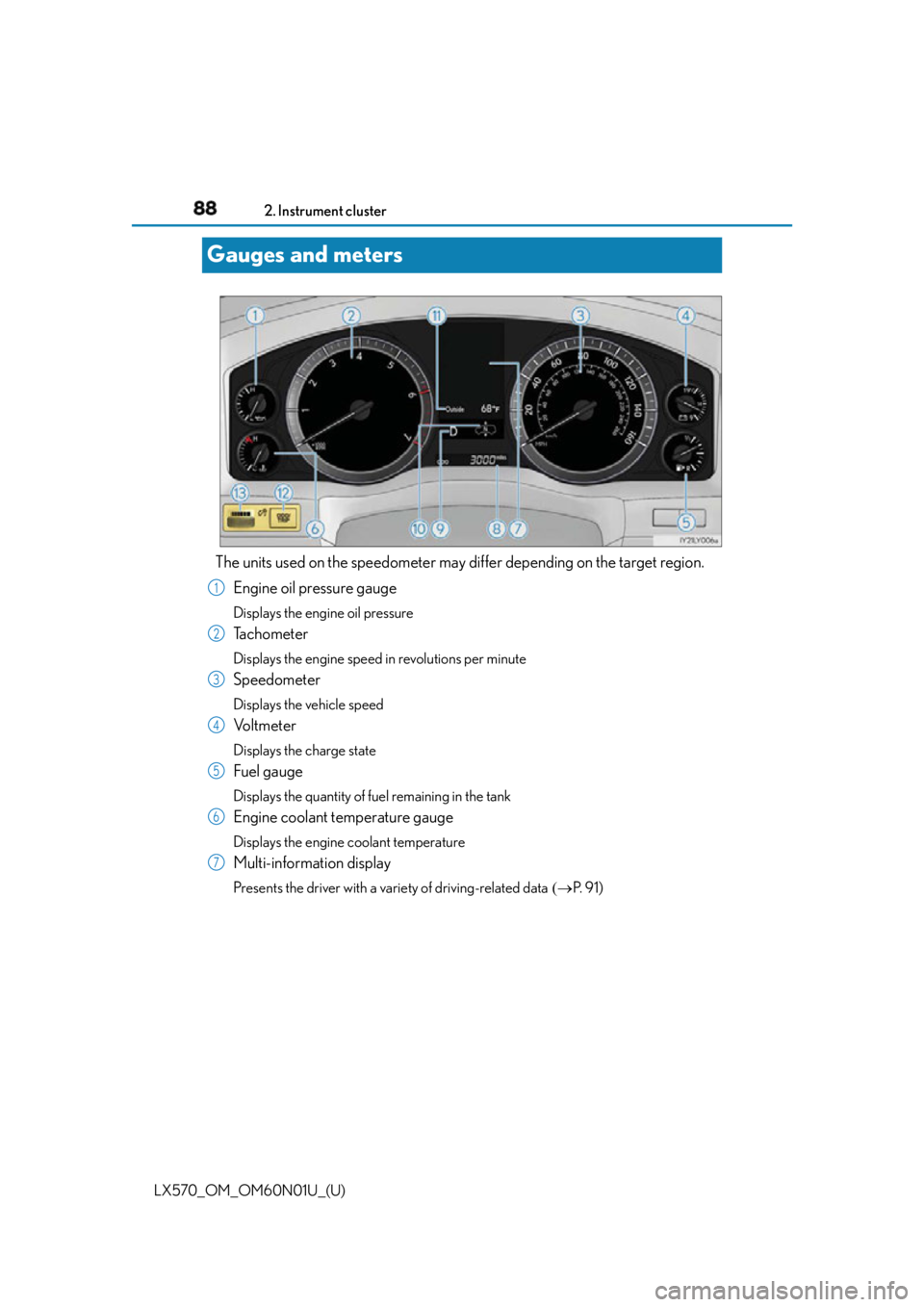
The units used on the speedometer may di ffer depending on the target region.
Engine oil pressure gauge Displays the engine oil pressure
Tachometer Displays the engine speed in revolutions per minute
Speedometer Displays the vehicle speed
Vo l t m e t e r Displays the charge state
Fuel gauge Displays the quantity of fuel remaining in the tank
Engine coolant temperature gauge Displays the engine coolant temperature
Multi-information display Presents the driver with a variety of driving-related data P. 9 1 )1
2
3
4
5
6
7
Page 90 of 632

90
LX570_OM_OM60N01U_(U) 2. Instrument cluster■
The meters and display illuminate when
The engine switch is in IGNITION ON mode. ■
The brightness of the instrument panel lights
When the tail lights are turned on, the meter’ s brightness will be reduced slightly unless
the meter brightness leve l adjustment is set to the brightest setting.
If the tail lights are turned on when the surroundings are dark, the meter’s brightness will
be reduced slightly. However, when the surroundings are bright, such as during the day-
time, the meter’s brightness will not be reduced even if the tail lights are turned on. ■
Customization
The meter display can be customized on the multi-information display. ( P. 585)
WA R N I N G ■
The information display at low temperatures
Allow the interior of the vehicle to warm up before using the liquid crystal information
display. At extremely low temperatures, th e information display monitor may respond
slowly, and display changes may be delayed.
For example, there is a lag between the driver’s shifting and the new gear number
appearing on the display. This lag could cau se the driver to downshift again, causing
rapid and excessive engine braking and po ssibly an accident resulting in death or
injury.
NOTICE ■
To prevent damage to the engine and its components ●
Do not let the indicator needle of the tachometer enter the red zone, which indicates
the maximum engine speed. ●
The engine may be overheating if the engine coolant temperature gauge is in the red
zone (H). In this case, immediately stop the vehicle in a safe place, and check the
engine after it has cooled completely. ( P. 5 5 6 )■
Vo l t m e t e r
When the voltmeter indicates 19 V or higher or 9 V or lower while the engine is run-
ning, there may be a battery or charging system malfunction. Have the vehicle
inspected at your Lexus dealer. ■
Engine oil pressure gauge
When the value of the engine oil pressure gauge drops while the engine is running,
stop the vehicle in a safe place immediat ely and check the amount of engine oil.
( P. 4 7 5 )
When the oil pressure drops even though th e engine oil amount has not decreased, or
if the oil pressure does not increase when engine oil is added, contact your Lexus
dealer, as there may be a proble m with the lubrication system.
Page 95 of 632
LX570_OM_OM60N01U_(U) 952. Instrument cluster
2
Instrument cluster ■
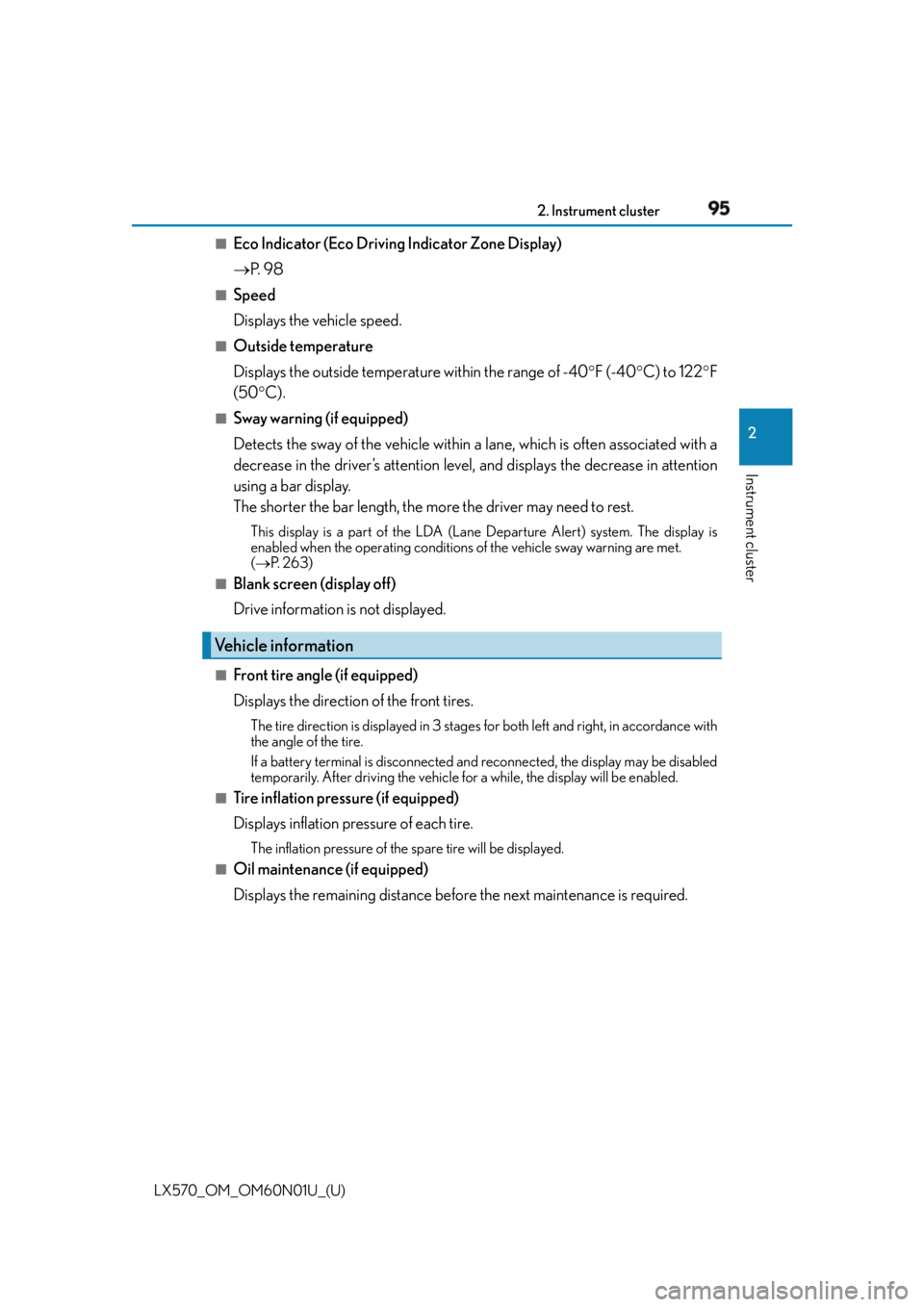
Eco Indicator (Eco Driving Indicator Zone Display)
P. 9 8■
Speed
Displays the vehicle speed. ■
Outside temperature
Displays the outside temperature within the range of -40 F (-40 C) to 122 F
(50 C).■
Sway warning (if equipped)
Detects the sway of the vehicle within a lane, which is often associated with a
decrease in the driver’s attention level, and displays the decrease in attention
using a bar display.
The shorter the bar length, the more the driver may need to rest. This display is a part of the LDA (Lane Departure Alert) system. The display is
enabled when the operating conditions of the vehicle sway warning are met.
( P. 2 6 3 )■
Blank screen (display off)
Drive information is not displayed. ■
Front tire angle (if equipped)
Displays the direction of the front tires. The tire direction is displaye d in 3 stages for both left and right, in accordance with
the angle of the tire.
If a battery terminal is disconnected an d reconnected, the display may be disabled
temporarily. After driving the vehicle fo r a while, the display will be enabled.■
Tire inflation pressure (if equipped)
Displays inflation pressure of each tire. The inflation pressure of the spare tire will be displayed.■
Oil maintenance (if equipped)
Displays the remaining distance before the next maintenance is required.Vehicle information
Page 96 of 632

96
LX570_OM_OM60N01U_(U) 2. Instrument cluster
The settings of some features can be changed by using the meter control
switches. ■
Setting procedure
For functions that can be enabled or disabled, the function switches between
on and off each time is pressed. ■
Setting items ●
LDA (Lane Departure Alert)
*Select to set up LDA. ( P. 585)
•Alert method
• Alert sensitivity
•Sway warning
• Sway sensitivity ●
BSM (Blind Spot Monitor)
*Select to set up BSM. ( P. 585)
•BSM on/off
• RCTA (Rear Cross Traffic Alert) on/off ●
Head-up display
*Select to set up Head-up display. ( P. 585)
• Display brightness/location
• Display content ●
Scheduled maintenance
Select to reset the message indicating maintenance is required. ●
Oil maintenance
Select to reset the engine oil maintenance informationSettings display
Page 134 of 632
134
LX570_OM_OM60N01U_(U) 3-2. Opening, closing and locking the doors■
Battery-saving function
The battery-saving function will be activated in order to prevent the electronic key bat-
tery and the battery from being discharged wh ile the vehicle is not in operation for a long
time. ●
In the following situations, the smart access system with push-button start may take
some time to unlock the doors.
• The electronic key has been left in an area of approximately 6 ft. (2 m) of the outside
of the vehicle for 10 minutes or longer.
• The smart access system with push-butto n start has not been used for 5 days or
longer. ●
If the smart access system with push-butto n start has not been used for 14 days or
longer, the doors cannot be unlocked at any doors except the driver’s door. In this case,
take hold of the driver’s door handle, or us e the wireless remote control or the mechan-
ical key, to unlock the doors. ■
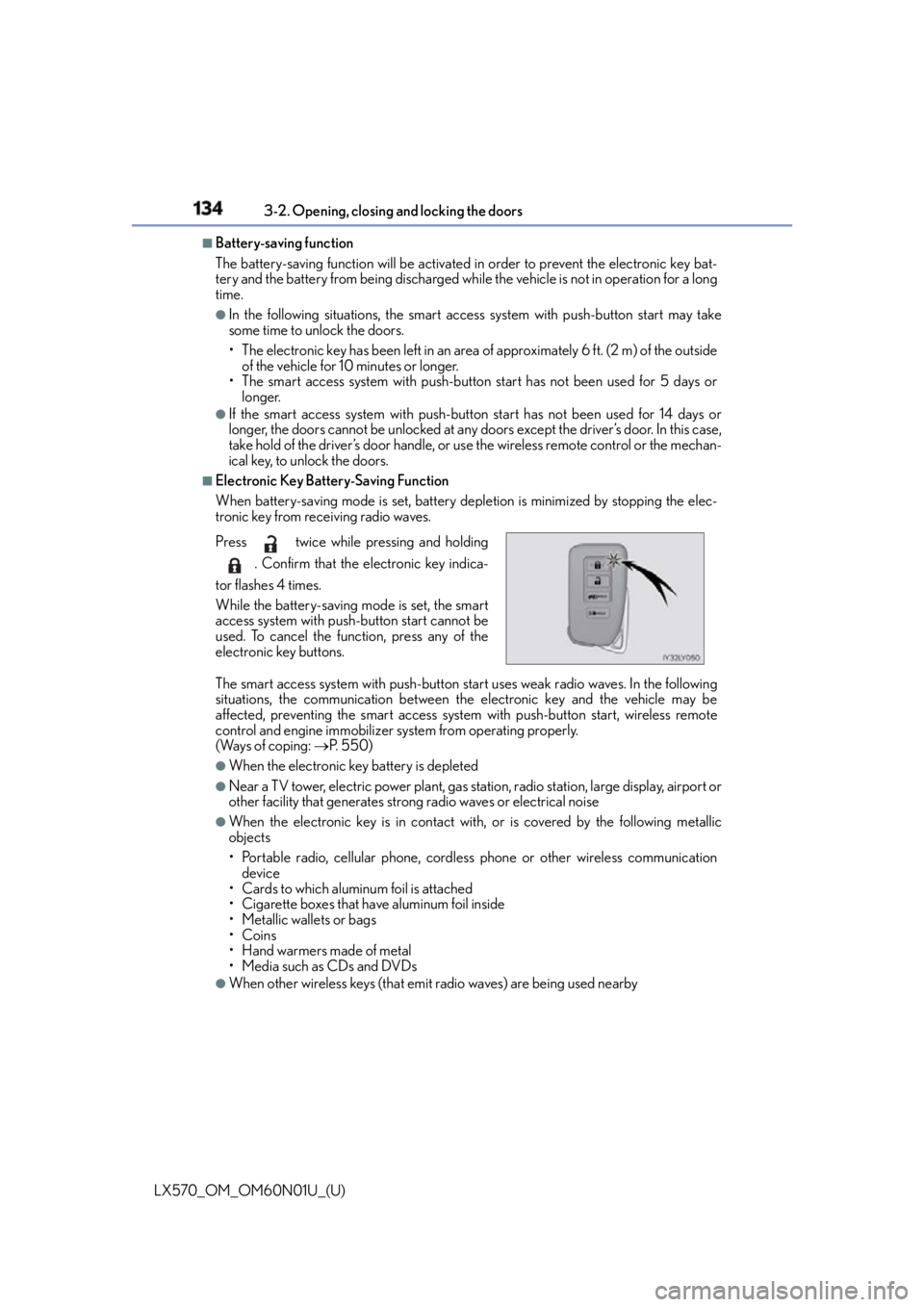
Electronic Key Battery-Saving Function
When battery-saving mode is set, battery depletion is minimized by stopping the elec-
tronic key from receiving radio waves.
The smart access system with push-button start uses weak radio waves. In the following
situations, the communication between th e electronic key and the vehicle may be
affected, preventing the smart access system with push-button start, wireless remote
control and engine immobilizer system from operating properly.
(Ways of coping: P. 5 5 0 )●
When the electronic key battery is depleted ●
Near a TV tower, electric powe r plant, gas station, radio stat ion, large display, airport or
other facility that generates strong radio waves or electrical noise ●
When the electronic key is in contact wi th, or is covered by the following metallic
objects
• Portable radio, cellular phone, cordless phone or other wireless communication
device
• Cards to which aluminum foil is attached
• Cigarette boxes that have aluminum foil inside
• Metallic wallets or bags
•Coins
•Hand warmers made of metal
• Media such as CDs and DVDs ●
When other wireless keys (that emit radio waves) are being used nearbyPress twice while pressing and holding
. Confirm that the electronic key indica-
tor flashes 4 times.
While the battery-saving mode is set, the smart
access system with push-button start cannot be
used. To cancel the function, press any of the
electronic key buttons.
Page 181 of 632

LX570_OM_OM60N01U_(U) 1814-1. Before driving
4
Driving NOTICE ■
When driving the vehicle ●
Do not depress the accelerator and brake peda ls at the same time during driving, as
this may restrain the engine output. ●
Do not use the accelerator pedal or depress the accelerator and brake pedals at the
same time to hold the vehicle on a hill. ■
When parking the vehicle
Always shift the shift lever to P. Failure to do so may cause the vehicle to move or the
vehicle may accelerate suddenly if the accelerator pedal is ac cidentally depressed.■
Avoiding damage to vehicle parts ●
Do not turn the steering wheel fully in either direction and hold it there for an
extended period of time.
Doing so may damage the power steering pump. ●
When driving over bumps in the road, drive as slowly as possible to avoid damaging
the wheels, underside of the vehicle, etc. ■
If you get a flat tire while driving
A flat or damaged tire may cause the follo wing situations. Hold the steering wheel
firmly and gradually depress the brak e pedal to slow down the vehicle.●
It may be difficult to control your vehicle. ●
The vehicle will make abnormal sounds or vibrations. ●
The vehicle will lean abnormally.
Information on what to do in case of a flat tire. ( P. 5 3 6 )■
When encountering flooded roads
Do not drive on a road that has flooded after heavy rain etc. Doing so may cause the
following serious damage to the vehicle: ●
Engine stalling ●
Short in electrical components ●
Engine damage caused by water immersion
In the event that you drive on a flooded road and the vehicle is flooded, be sure to have
your Lexus dealer check the following: ●
Brake function ●
Changes in quantity and quality of oil and fluid used for the engine, transmission,
transfer, differentials, etc. ●
Lubricant condition for the propeller shaft, bearings and suspension joints (where
possible), and the function of all joints, bearings, etc.
Page 246 of 632
246
LX570_OM_OM60N01U_(U) 4-5. Using the driving support systems
WA R N I N G ■
To avoid malfunction of the camera sensor
Observe the following precautions.
Otherwise, the camera sensor may not operat e properly, possibly leading to an acci-
dent resulting in death or serious injury. ●
Keep the windshield clean at all times.
If the windshield is dirty or covered with an oily film, water droplets, snow, etc., clear
the windshield.
If the inner side of the windshield where the camera sensor is installed is dirty, contact
your Lexus dealer.
●
If the part of the windshield in front of th e camera sensor is fogged up or covered with
condensation or ice, use the windshield defogger to remove the fog, condensation or
ice. ( P. 4 0 1 )●
Do not apply glass coating agents to the area of the windshield in front of the camera
sensor.
Glass coating agents can be applied to the windshield in areas other than in front of
the camera sensor. However, it will still be necessary to use the wipers if the area of
the windshield in front of the camera sensor is covered with water droplets. ●
If water droplets cannot be properly remove d from the area of the windshield in front
of the camera sensor by the windshield wipers, replace the wiper insert or wiper
blade.
If the wiper inserts or wiper blades need to be replaced, contact your Lexus dealer. ●
Do not attach window tinting to the windshield. ●
Replace the windshield if it is damaged or cracked.
If the windshield needs to be re placed, contact your Lexus dealer.●
Do not get the camera sensor wet. ●
Do not allow bright lights to shine into the camera sensor. ●
Do not dirty or damage the camera sensor.
When cleaning the inside of the windshield , do not allow glass cleaner to contact the
lens. Also, do not touch the lens.
If the lens is dirty or damage d, contact your Lexus dealer.●
Do not subject the camera sensor to a strong impact. ●
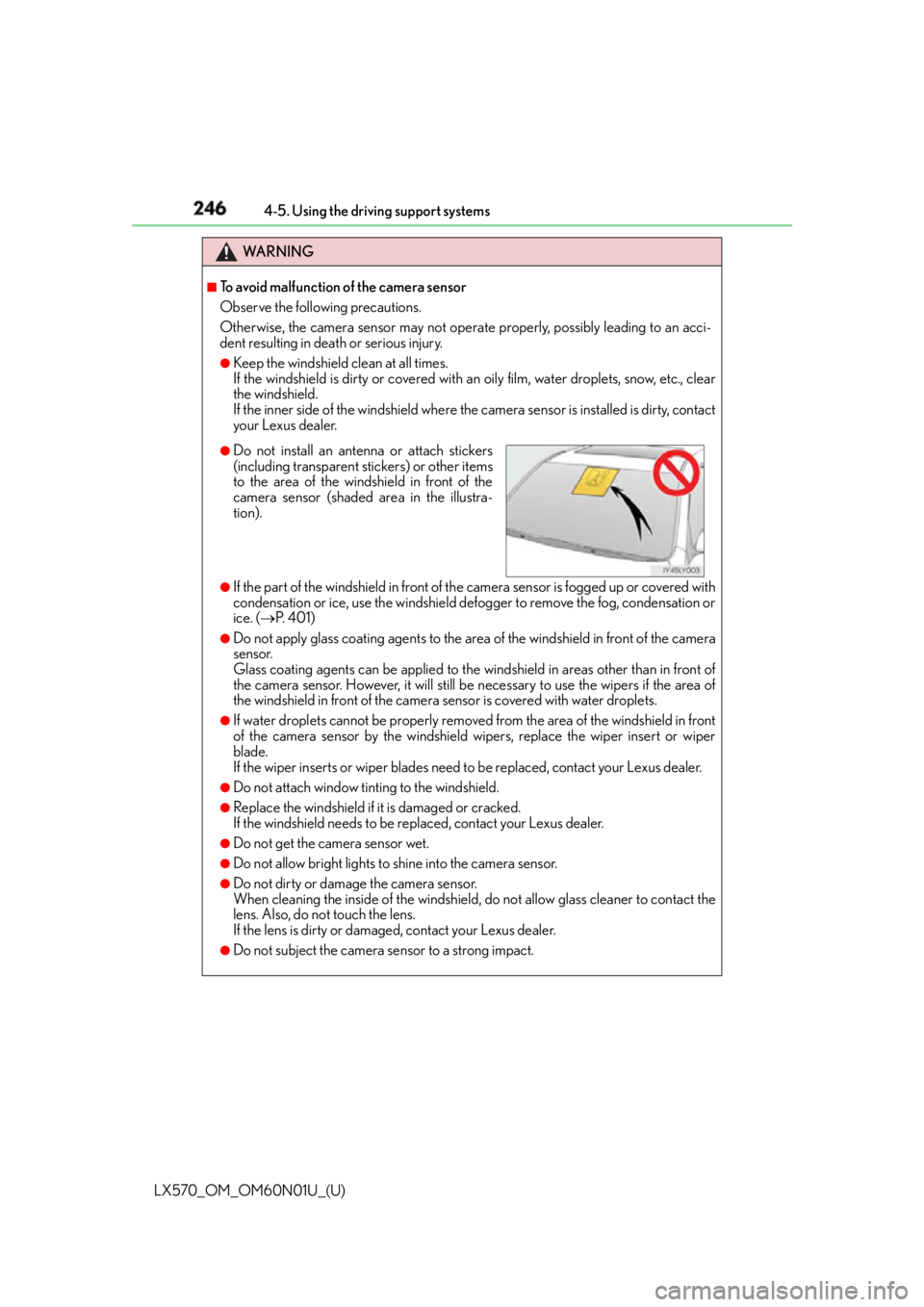
Do not install an antenna or attach stickers
(including transparent stickers) or other items
to the area of the windshield in front of the
camera sensor (shaded area in the illustra-
tion).
Page 355 of 632
LX570_OM_OM60N01U_(U) 3554-5. Using the driving support systems
4
Driving ■
Multi-terrain Monitor cameras ●
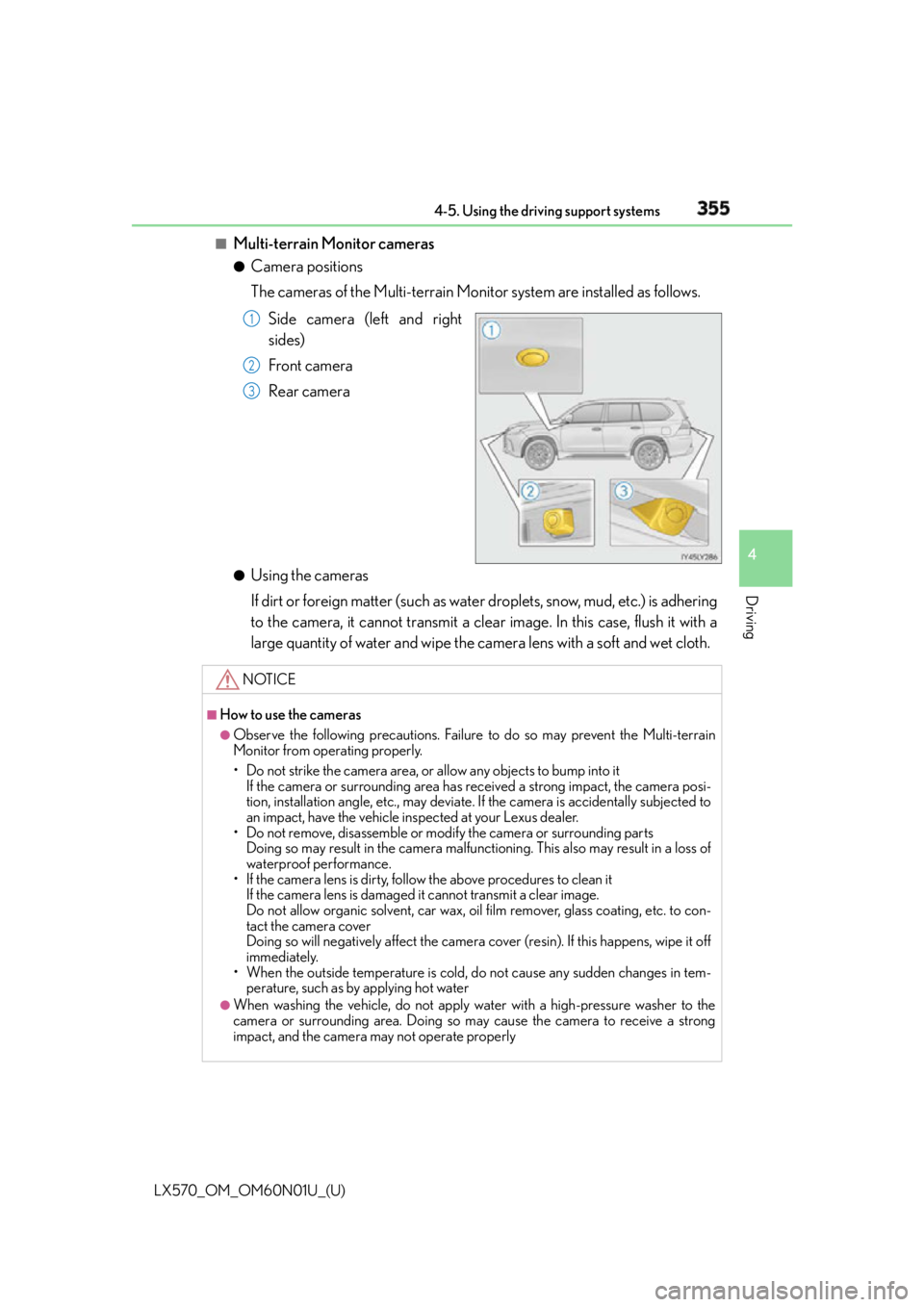
Camera positions
The cameras of the Multi-terrain Monitor system are installed as follows.
Side camera (left and right
sides)
Front camera
Rear camera
●
Using the cameras
If dirt or foreign matter (such as wate r droplets, snow, mud, etc.) is adhering
to the camera, it cannot transmit a clear image. In this case, flush it with a
large quantity of water and wipe the camera lens with a soft and wet cloth. 1
2
3
NOTICE ■
How to use the cameras ●
Observe the following precautions. Failure to do so may prevent the Multi-terrain
Monitor from operating properly.
• Do not strike the camera area, or allow any objects to bump into it
If the camera or surrounding area has re ceived a strong impact, the camera posi-
tion, installation angle, etc., may deviate. If the camera is accidentally subjected to
an impact, have the vehicle inspected at your Lexus dealer.
• Do not remove, disassemble or modify the camera or surrounding parts
Doing so may result in the camera malfunct ioning. This also may result in a loss of
waterproof performance.
• If the camera lens is dirty, follow the above procedures to clean it
If the camera lens is damaged it cannot transmit a clear image.
Do not allow organic solvent, car wax, oil film remover, glass coating, etc. to con-
tact the camera cover
Doing so will negatively affect the camera co ver (resin). If this happens, wipe it off
immediately.
• When the outside temperature is cold, do not cause any sudden changes in tem-
perature, such as by applying hot water ●
When washing the vehicle, do not apply water with a high-pressure washer to the
camera or surrounding area . Doing so may cause the camera to receive a strong
impact, and the camera may not operate properly