warning light LEXUS LX570 2016 Owner's Manual
[x] Cancel search | Manufacturer: LEXUS, Model Year: 2016, Model line: LX570, Model: LEXUS LX570 2016Pages: 632, PDF Size: 10.34 MB
Page 149 of 632
LX570_OM_OM60N01U_(U) 1493-3. Adjusting the seats
3
Operation of each component ■
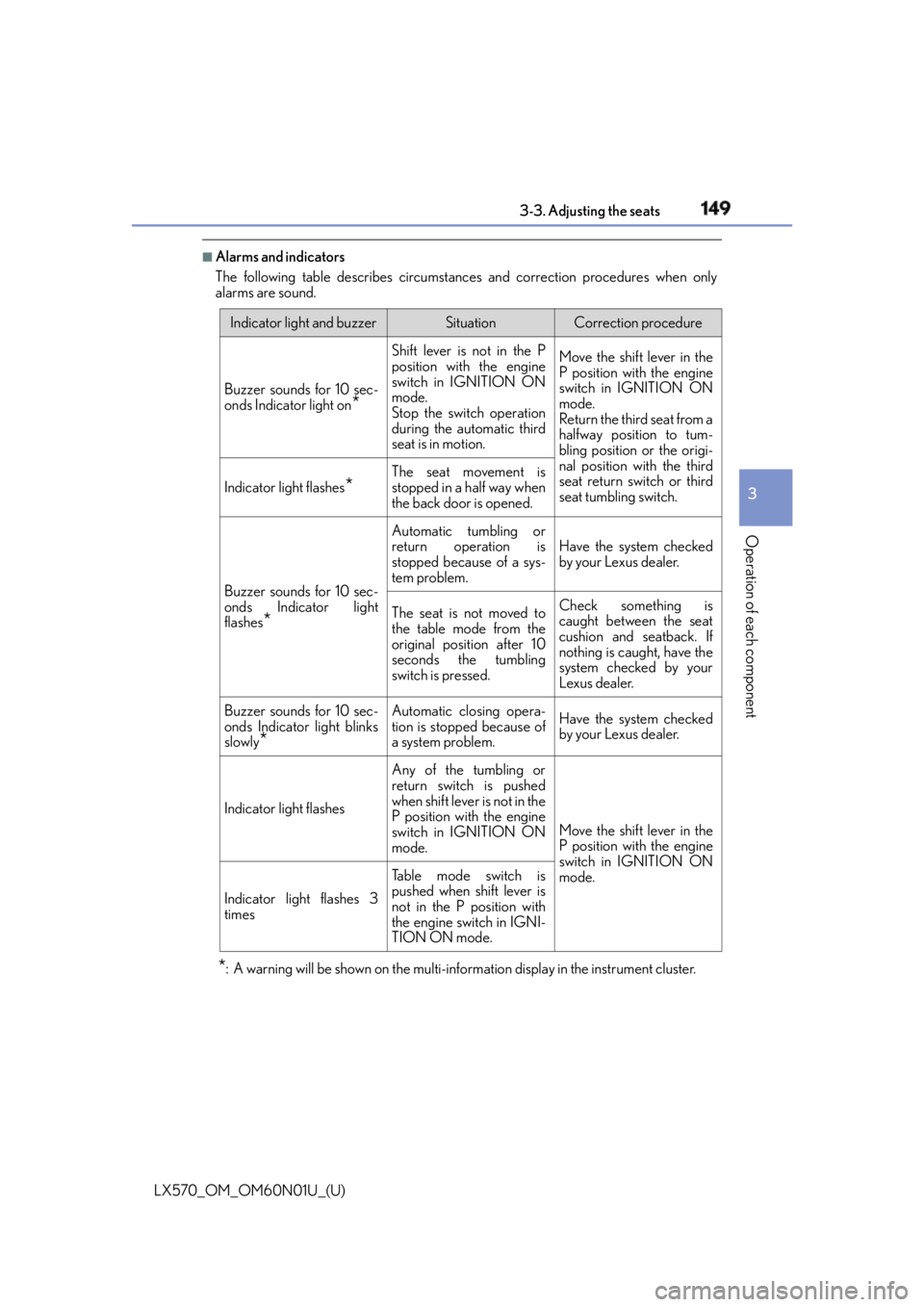
Alarms and indicators
The following table describes circumstance s and correction procedures when only
alarms are sound.
* : A warning will be shown on the multi-inform ation display in the instrument cluster. Indicator light and buzzer Situation Correction procedure
Buzzer sounds for 10 sec-
onds Indicator light on
* Shift lever is not in the P
position with the engine
switch in IGNITION ON
mode.
Stop the swit ch operation
during the automatic third
seat is in motion. Move the shift lever in the
P position with the engine
switch in IGNITION ON
mode.
Return the third seat from a
halfway position to tum-
bling position or the origi-
nal position with the third
seat return switch or third
seat tumbling switch. Indicator light flashes
* The seat movement is
stopped in a half way when
the back door is opened.
Buzzer sounds for 10 sec-
onds Indicator light
flashes
* Automatic tumbling or
return operation is
stopped because of a sys-
tem problem. Have the system checked
by your Lexus dealer.
The seat is not moved to
the table mode from the
original position after 10
seconds the tumbling
switch is pressed. Check something is
caught between the seat
cushion and seatback. If
nothing is caught, have the
system checked by your
Lexus dealer.
Buzzer sounds for 10 sec-
onds Indicator light blinks
slowly
* Automatic closing opera-
tion is stopped because of
a system problem. Have the system checked
by your Lexus dealer.
Indicator light flashes Any of the tumbling or
return switch is pushed
when shift lever is not in the
P position with the engine
switch in IGNITION ON
mode. Move the shift lever in the
P position with the engine
switch in IGNITION ON
mode.
Indicator light flashes 3
times Table mode switch is
pushed when shift lever is
not in the P position with
the engine switch in IGNI-
TION ON mode.
Page 170 of 632

170
LX570_OM_OM60N01U_(U) 3-5. Opening, closing the windows and moon roof●
If the moon roof tilts down but then tilts back up
Stop the vehicle.
Press and hold the “UP” switch
* 1
until the moon roof moves into the tilt up position
and stops.
Release the “UP” switch once and then press and hold the “UP” switch again.
* 1
The moon roof will pause for approximatel y 10 seconds in the tilt up position.
* 2
Then it will adjust slightly and pause for approximately 1 second.
Finally, it will tilt down, open and close.
Check to make sure that the moon roof is completely closed and then release the
switch.
* 1
: If the switch is released at the incorrec t time, the procedure will have to be per-
formed again from the beginning.
* 2
: If the switch is released after the above mentioned 10 second pause, automatic
operation will be disabled. In that case, press and hold the “CLOSE” or “UP” switch,
and the moon roof will tilt up and pause fo r approximately 1 second . Then it will tilt
down, open and close. Check to make sure that the moon roof is completely closed
and then release the switch.
If the moon roof does not fully close even after performing the above procedure cor-
rectly, have the vehicle inspected by your Lexus dealer. ■
Moon roof open warning buzzer
The buzzer sounds and message is shown on the multi-information di splay in th e instru-
ment panel when the engine switch is turned off and the driver’s door is opened with the
moon roof open. ■
Customization
Settings (e.g. linked door lock operation) can be changed.
(Customizable features: P. 585) 1
2
3
4
Page 218 of 632
218
LX570_OM_OM60N01U_(U) 4-2. Driving procedures
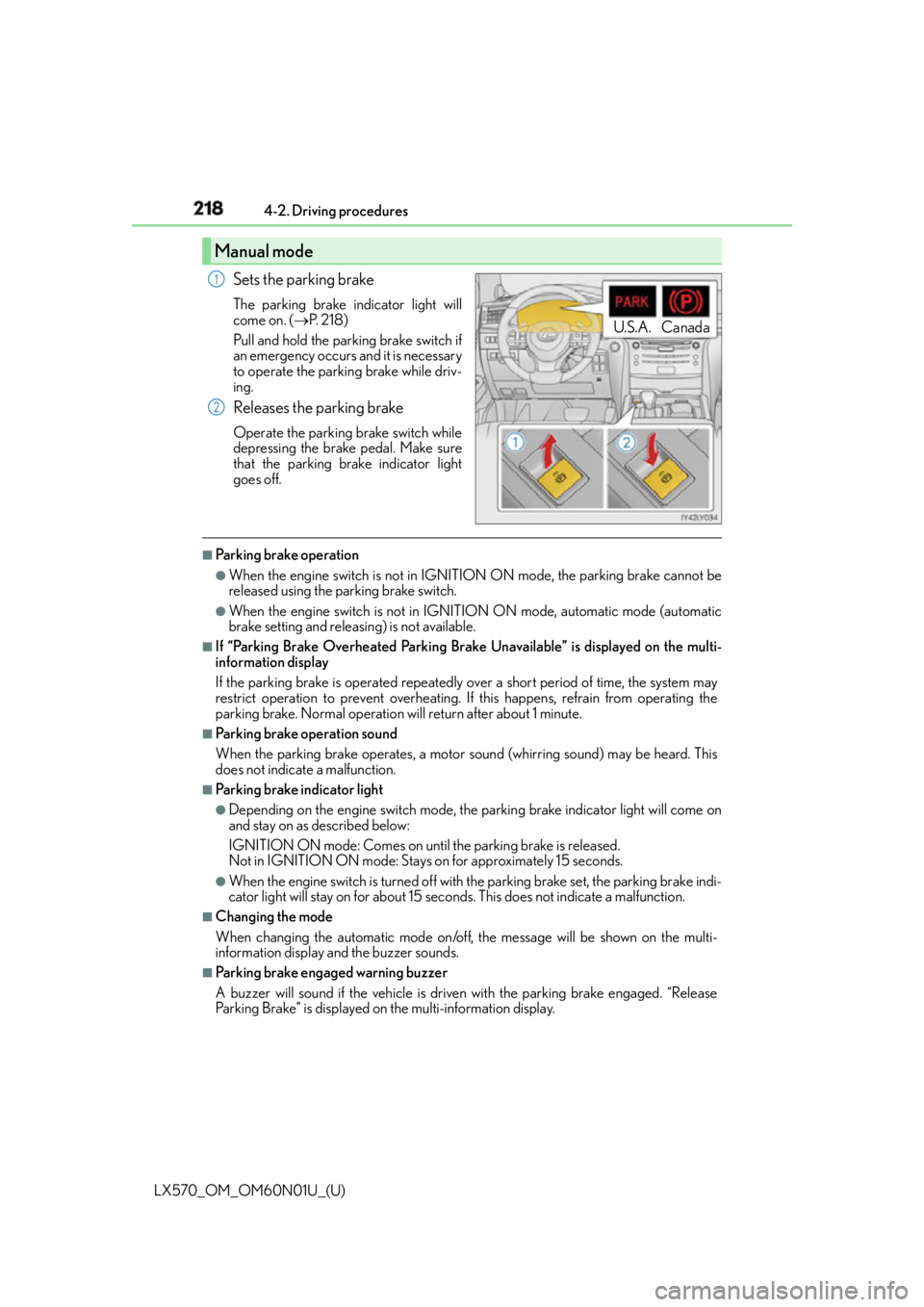
Sets the parking brake The parking brake indicator light will
come on. ( P. 2 1 8 )
Pull and hold the parking brake switch if
an emergency occurs and it is necessary
to operate the parking brake while driv-
ing.
Releases the parking brake Operate the parking brake switch while
depressing the brake pedal. Make sure
that the parking brake indicator light
goes off. ■
Parking brake operation ●
When the engine switch is not in IGNITION ON mode, the parking brake cannot be
released using the pa rking brake switch.●
When the engine switch is not in IGNI TION ON mode, automatic mode (automatic
brake setting and releas ing) is not available.■
If “Parking Brake Overheated Parking Brake Unavailable” is displayed on the multi-
information display
If the parking brake is operated repeatedly over a short period of time, the system may
restrict operation to prevent overheating. If this happens, refrain from operating the
parking brake. Normal operation will return after about 1 minute. ■
Parking brake operation sound
When the parking brake operates, a motor sound (whirring sound) may be heard. This
does not indicate a malfunction. ■
Parking brake indicator light ●
Depending on the engine switch mode, the parking brake indicator light will come on
and stay on as described below:
IGNITION ON mode: Comes on until the parking brake is released.
Not in IGNITION ON mode: Stays on for approximately 15 seconds. ●
When the engine switch is turned off with the parking brake set, the parking brake indi-
cator light will stay on for about 15 seco nds. This does not indicate a malfunction.■
Changing the mode
When changing the automatic mode on/off , the message will be shown on the multi-
information display and the buzzer sounds. ■
Parking brake engaged warning buzzer
A buzzer will sound if the vehicle is driven with the parking brake engaged. “Release
Parking Brake” is displayed on the multi-information display.Manual mode U.S.A. Canada1
2
Page 219 of 632

LX570_OM_OM60N01U_(U) 2194-2. Driving procedures
4
Driving ■
Warning messages and buzzers
Warning messages and buzzers are used to indicate a system malfunction or to inform
the driver of the need for caution. If a warn ing message is shown on the multi-information
display, read the message and follow the instructions.■
If the brake system warning light comes on
P. 5 2 6 ■
Usage in winter time
P. 3 8 4
WA R N I N G ■
When parking the vehicle
Do not leave a child in the vehicle alone. The parking brake may be released uninten-
tionally and there is the danger of the vehicle moving that may lead to an accident
resulting in death or serious injury.
NOTICE ■
When parking the vehicle
Before you leave the vehicle, set the parking brake, shift the shift lever to P and make
sure that the vehicle does not move. ■
When the system malfunctions
Stop the vehicle in a safe place and check the warning messages. ■
When the parking brake cannot be released due to a malfunction
Driving the vehicle with the parking brake set will lead to brake components overheat-
ing, which may affect braking performance and increase brake wear. Have the vehicle
inspected by your Lexus dealer immediately if this occurs.
Page 223 of 632

LX570_OM_OM60N01U_(U) 2234-3. Operating the lights and wipers
4
Driving ■
Automatic headlight leveling system
The level of the headlights is automatically ad justed according to the number of passen-
gers and the loading condition of the vehicle to ensure that the headlights do not inter-
fere with other road users. ■
We l c o m e l i g h t i n g
If the headlight switch is turned to and the surrounding area is dark, unlocking the
doors using the smart access system with pu sh-button start or wireless remote control
will turn the parking lights and tail lights on automatically. ■
If the automatic headlight leveling system warning light flashes
It may indicate a malfunction in the system. Contact your Lexus dealer. ■
Light reminder buzzer
A buzzer sounds when the engine switch is turned off or turned to ACCESSORY mode
and the driver’ door is opened while the tail lights remain on.■
Customization
Settings (e.g. light sensor sensitivity) can be changed.
(Customizable features: P. 585)
NOTICE ■
To prevent battery discharge
Do not leave the lights on longer than ne cessary when the engine is not running.
Page 254 of 632
254
LX570_OM_OM60N01U_(U) 4-5. Using the driving support systems
■
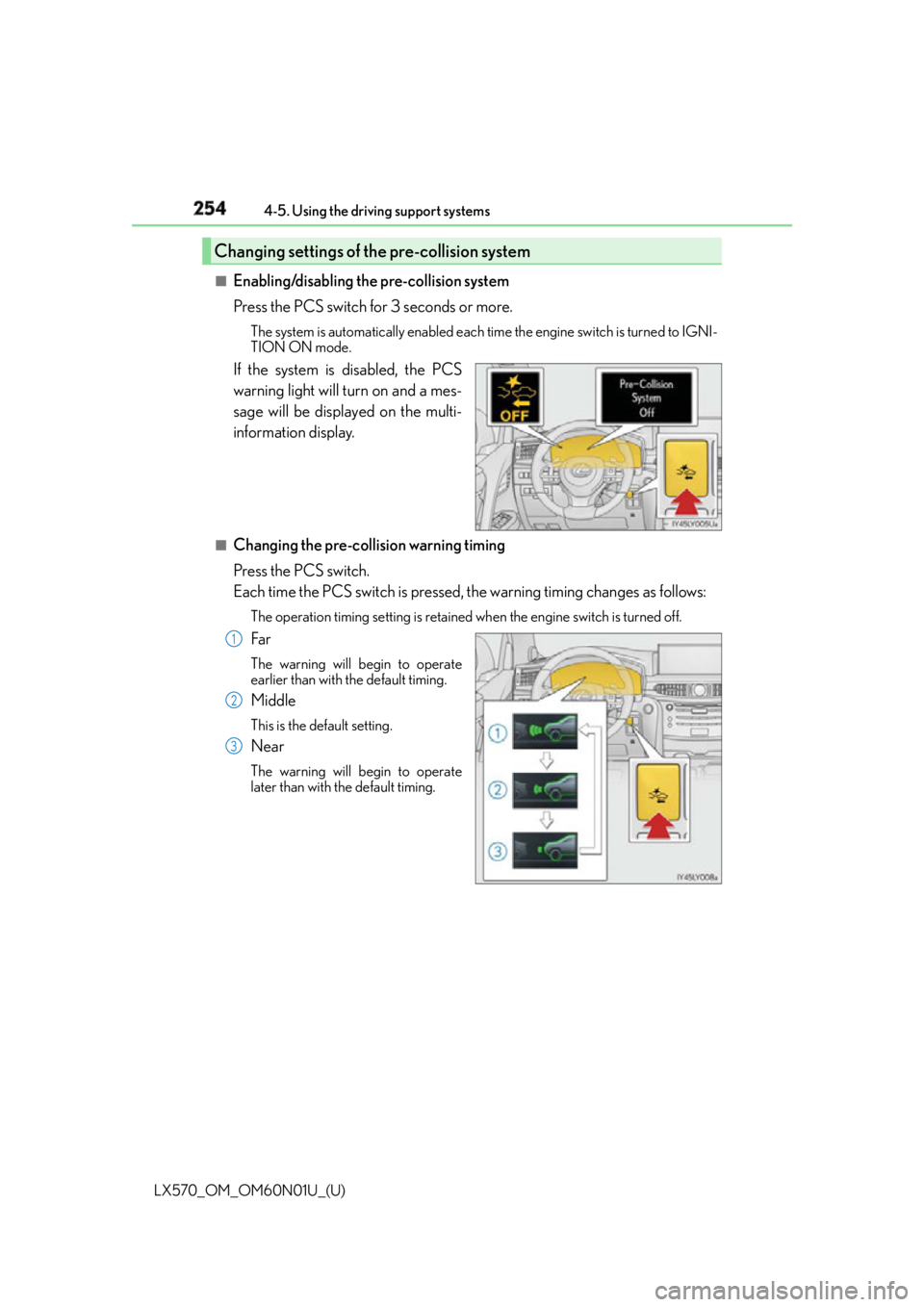
Enabling/disabling the pre-collision system
Press the PCS switch for 3 seconds or more. The system is automatically enabled each time the engine switch is turned to IGNI-
TION ON mode.
If the system is disabled, the PCS
warning light will turn on and a mes-
sage will be displayed on the multi-
information display. ■
Changing the pre-col lision warning timing
Press the PCS switch.
Each time the PCS switch is pressed, the warning timing changes as follows: The operation timing setting is retained when the engine switch is turned off.
Far The warning will begin to operate
earlier than with the default timing.
Middle This is the default setting.
Near The warning will begin to operate
later than with the default timing.Changing settings of the pre-collision system
1
2
3
Page 255 of 632

LX570_OM_OM60N01U_(U) 2554-5. Using the driving support systems
4
Driving ■
Operational conditions
For vehicles sold in regions where the pede strian detection function and pre-collision
braking function are available
* 4
The pre-collision system is enabled and the sy stem determines that the possibility of a
frontal collision with a vehicle or pedestrian is high.
Each function is operationa l at the following speeds:●
Pre-collision warning:
• Vehicle speed is approximately 7 mph (1 0 km/h) or more. (For detecting a pedes-
trian, vehicle speed is between approxim ately 7 and 50 mph (10 and 80 km/h).)
• The relative speed between your vehicl e and the vehicle or pedestrian ahead is
approximately 7 mph (10 km/h) or more. ●
Pre-collision brake assist:
• Vehicle speed is approximately 19 mph (3 0 km/h) or more. (For detecting a pedes-
trian, vehicle speed is between approxim ately 19 and 50 mph (30 and 80 km/h).)
• The relative speed between your vehicl e and the vehicle or pedestrian ahead is
approximately 19 mph (30 km/h) or more. ●
Pre-collision braking:
• Vehicle speed is approximately 7 mph (1 0 km/h) or more. (For detecting a pedes-
trian, vehicle speed is between approxim ately 7 and 50 mph (10 and 80 km/h).)
• The relative speed between your vehicl e and the vehicle or pedestrian ahead is
approximately 7 mph (10 km/h) or more.
The system may not operate in the following situations: ●
If a battery terminal has be en disconnected and reconnected and then the vehicle has
not been driven for a certain amount of time ●
If the shift lever is in R ●
If VSC is disabled (only the pre-collision warning function will be operational) ●
If the PCS warning light is flashing or illuminated
Page 256 of 632

256
LX570_OM_OM60N01U_(U) 4-5. Using the driving support systems
For vehicles sold in regions where the pede strian detection function is not available
and the pre-collision braking function is available
* 4
The pre-collision system is enabled and the sy stem determines that the possibility of a
frontal collision with a vehicle is high.
Each function is operationa l at the following speeds:●
Pre-collision warning:
• Vehicle speed is approximately 10 mph (15 km/h) or more.
• The relative speed between your vehicl e and the vehicle or pedestrian ahead is
approximately 7 mph (10 km/h) or more. ●
Pre-collision brake assist:
• Vehicle speed is approximately 19 mph (30 km/h) or more.
• The relative speed between your vehicl e and the vehicle or pedestrian ahead is
approximately 19 mph (30 km/h) or more. ●
Pre-collision braking:
• Vehicle speed is approximately 10 mph (15 km/h) or more.
• The relative speed between your vehicl e and the vehicle or pedestrian ahead is
approximately 7 mph (10 km/h) or more.
The system may not operate in the following situations: ●
If a battery terminal has be en disconnected and reconnected and then the vehicle has
not been driven for a certain amount of time ●
If the shift lever is in R ●
If VSC is disabled (only the pre-collision warning function will be operational) ●
If the PCS warning light is flashing or illuminated
For vehicles sold in regions where the pede strian detection function and pre-collision
braking function are not available
* 4
The pre-collision system is enabled and the sy stem determines that the possibility of a
frontal collision with a vehicle is high.
Each function is operationa l at the following speeds:●
Pre-collision warning:
• Vehicle speed is approximately 10 mph (15 km/h) or more.
• The relative speed between your vehicl e and the vehicle or pedestrian ahead is
approximately 7 mph (10 km/h) or more. ●
Pre-collision brake assist:
• Vehicle speed is approximately 19 mph (30 km/h) or more.
• The relative speed between your vehicl e and the vehicle or pedestrian ahead is
approximately 19 mph (30 km/h) or more.
The system may not operate in the following situations: ●
If a battery terminal has be en disconnected and reconnected and then the vehicle has
not been driven for a certain amount of time ●
If the shift lever is in R ●
If VSC is disabled (only the pre-collision warning function will be operational) ●
If the PCS warning light is flashing or illuminated
* 4
: Depending on the region in which the vehicle was sold, the pedestrian detection func-
tion and pre-collision braking function may not be available.
Page 262 of 632

262
LX570_OM_OM60N01U_(U) 4-5. Using the driving support systems■
If the PCS warning light flashes and a warnin g message is displayed on the multi-infor-
mation display
The pre-collision system may be temporarily unavailable or there may be a malfunction
in the system. ●
In the following situations, the warning light will turn off, the message will disappear and
the system will become operational when normal operating conditions return:
• When the radar sensor or camera sensor or the area around either sensor is hot,
such as in the sun
• When the radar sensor or camera sensor or the area around either sensor is cold,
such as in an extremely cold environment
• When the radar sensor or front grille embl em is dirty or covered with snow, etc.
• If the camera sensor is obst ructed, such as when the h ood is open or a sticker is
attached to the windshield near the camera sensor ●
If the PCS warning light continues to flash or the warning messag e does not disappear,
the system may be malfunctioning. Have the vehicle inspected by your Lexus dealer
immediately. ■
If VSC is disabled ●
If VSC is disabled ( P. 380), the pre-collision brake as sist and pre-collision braking
functions are also disabled. ●
The PCS warning light will turn on and “V SC Turned Off Pre-collision Brake System
Unavailable” will be displayed on the multi-information display.
Page 294 of 632

294
LX570_OM_OM60N01U_(U) 4-5. Using the driving support systems■
The intuitive parking assist can be operated when ●
Front corner sensors:
• The engine switch is in IGNITION ON mode.
• The shift lever is in a position other than P.
• The vehicle speed is less than approximately 6 mph (10 km/h).
(At any speed when the shift lever is in R) ●
Front center sensors:
• The engine switch is in IGNITION ON mode.
• The shift lever is in a position other than P or R.
• The vehicle speed is less than about 6 mph (10 km/h). ●
Rear corner and rear center sensors:
• The engine switch is in IGNITION ON mode.
• The shift lever is in R. ■
Intuitive parking assist display
When an obstacle is detected while the re ar view monitor system, Lexus parking assist
monitor or Multi-terrain Monitor is in use, the warning indicator will appear in the upper
corner of the screen even if the display setting has been set to off. ■
Sensor detectio n information●
The sensor’s detection areas are limited to the areas around the vehicle’s bumper. ●
Certain vehicle conditions and the surround ing environment may affect the ability of a
sensor to correctly detect an obstacle. Particular instances where this may occur are
listed below.
• There is dirt, snow or ice on the sensor . (Wiping the sensors will resolve this prob-
lem.)
• The sensor is frozen. (Thawing th e area will resolve this problem.)
In especially cold weather, if a sensor is frozen the screen may show an abnormal
display, or obstacles may not be detected.
• The sensor is covered in any way.
• The vehicle is leaning co nsiderably to one side.
• On an extremely bumpy road, on an incline, on gravel, or on grass.
• The vicinity of the vehicle is noisy due to vehicle horns, motorcycle engines, air
brakes of large vehicles, or other loud noises producing ultrasonic waves.
• There is another vehicle equipped with parking assist sensors in the vicinity.
• The sensor is coated with a sheet of spray or heavy rain.
• The vehicle is equipped with a fender pole or wireless antenna.
• The bumper or sensor receives a strong impact.
• The vehicle is approaching a tall or curved curb.
• In harsh sunlight or intense cold weather.
• The area directly under the bumpers is not detected.
• If obstacles draw too close to the sensor.
• A non-genuine Lexus suspension (low ered suspension etc.) is installed.
• People may not be detected if they are wearing certain types of clothing.
In addition to the examples above, there are instances in which, because of their shape,
signs and other objects may be judged by a sensor to be closer than they are.