brake LEXUS LX570 2016 Owner's Guide
[x] Cancel search | Manufacturer: LEXUS, Model Year: 2016, Model line: LX570, Model: LEXUS LX570 2016Pages: 632, PDF Size: 10.34 MB
Page 207 of 632

LX570_OM_OM60N01U_(U) 2074-2. Driving procedures
4
Driving If the engine is stopped with the shift le ver in a position other than P, the engine
switch will not be turned off but inst ead be turned to ACCESSORY mode. Per-
form the following procedure to turn the switch off:
Check that the parking brake is set.
Shift the shift lever to P.
Check that “Turn Off Vehicle” is displayed on the multi-information display
and then press the engine switch once.
Check that “Turn Off Vehicle” on the multi-information display is off. ■
Auto power off function
If the vehicle is left in ACCESSORY mode for more than 20 minutes or IGNITION ON
mode (the engine is not running) for more than an hour with the shift lever in P, the engine
switch will automatically turn off. However, this function cannot en tirely prevent battery
discharge. Do not leave the vehicle with the engine switch in ACCESSORY or IGNI-
TION ON mode for long periods of ti me when the engine is not running.■
Operation of the engine switch ●
When operating the engine switch, one short, firm press is enough. If the switch is
pressed improperly, the engine may not start or the engine switch mode may not
change. It is not necessary to press and hold the switch. ●
If attempting to restart the engine immediat ely after turning the engine switch off, the
engine may not start in some cases. After turning the engine off, please wait a few sec-
onds before restarting the engine. ■
Electronic key battery depletion
P. 112 ■
Conditions affe cting operation
P. 1 3 4 ■
Note for the entry function
P. 1 3 5 ■
If the engine does not start ●
The engine immobilizer system may not have been deactivated. ( P. 76 )
Contact your Lexus dealer. ●
Check that the shift lever is securely set in P. The engine may not start if the shift lever is
displaced out of P.
A message will be displayed on the multi-information display. ■
Steering lock
After turning the engine switch off and opening and closing the doors, the steering wheel
will be locked due to the stee ring lock function. Operating the engine switch again auto-
matically cancels the steering lock.When stopping the engine with the shift lever in a position other than P1
2
3
4
Page 208 of 632
208
LX570_OM_OM60N01U_(U) 4-2. Driving procedures■
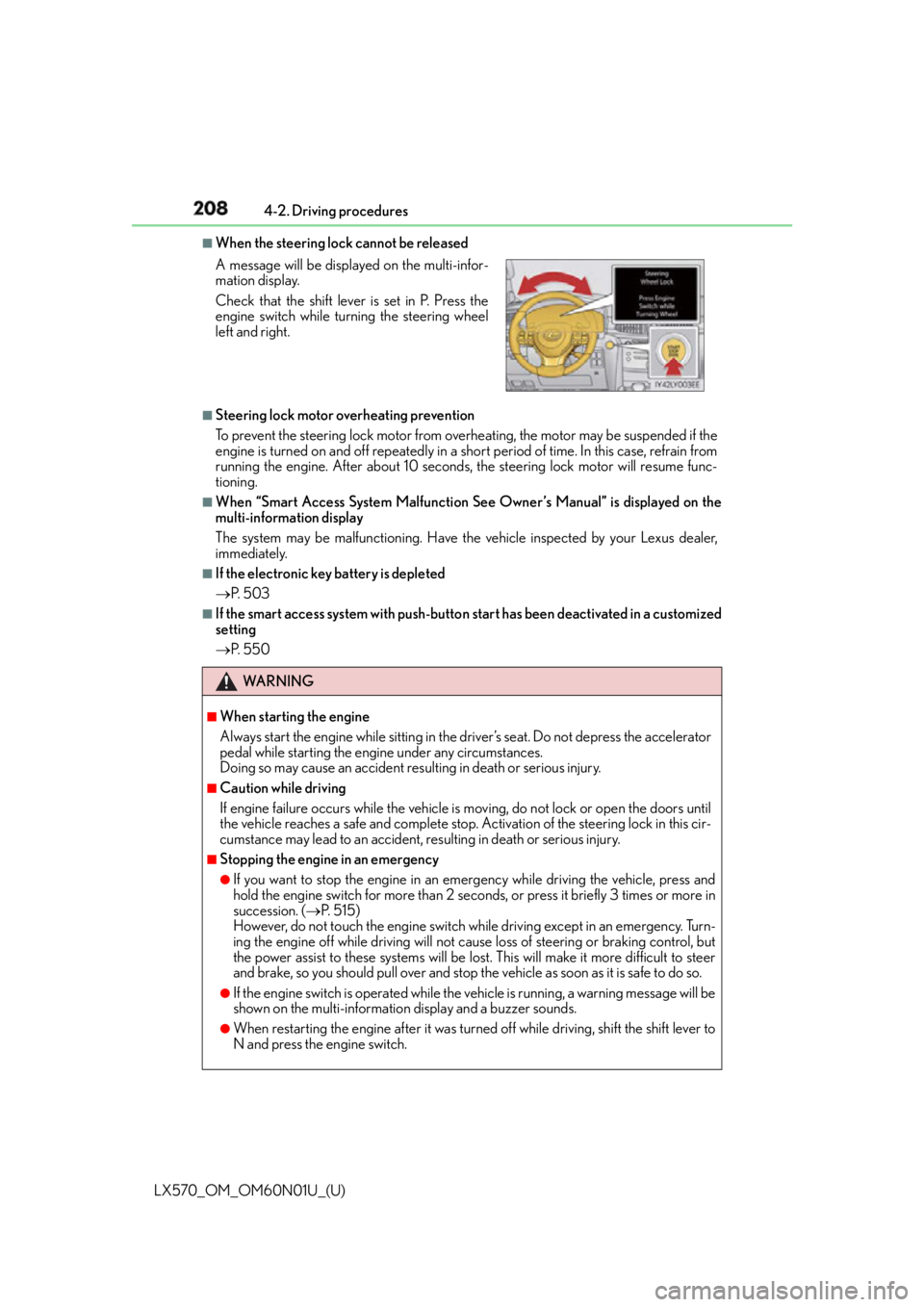
When the steering lock cannot be released
■
Steering lock motor overheating prevention
To prevent the steering lock motor from overheating, the motor may be suspended if the
engine is turned on and off repeatedly in a sh ort period of time. In this case, refrain from
running the engine. After about 10 seconds, the steering lock motor will resume func-
tioning. ■
When “Smart Access System Malfunction See Owner’s Manual” is displayed on the
multi-information display
The system may be malfunctioning. Have the vehicle inspected by your Lexus dealer,
immediately. ■
If the electronic key battery is depleted
P. 5 0 3 ■
If the smart access system with push-butto n start has been deactivated in a customized
setting
P. 5 5 0A message will be displayed on the multi-infor-
mation display.
Check that the shift lever is set in P. Press the
engine switch while turning the steering wheel
left and right.
WA R N I N G ■
When starting the engine
Always start the engine while sitting in the driver’s seat. Do not depress the accelerator
pedal while starting the engine under any circumstances.
Doing so may cause an accident resu lting in death or serious injury.■
Caution while driving
If engine failure occurs while the vehicle is moving, do not lock or open the doors until
the vehicle reaches a safe and complete stop. Activation of the steering lock in this cir-
cumstance may lead to an accident, re sulting in death or serious injury.■
Stopping the engine in an emergency ●
If you want to stop the engine in an emergency while driving the vehicle, press and
hold the engine switch for more than 2 seco nds, or press it briefly 3 times or more in
succession. ( P. 5 1 5 )
However, do not touch the engine switch while driving except in an emergency. Turn-
ing the engine off while driving will not cause loss of steering or braking control, but
the power assist to these systems will be lost . This will make it more difficult to steer
and brake, so you should pull over and stop th e vehicle as soon as it is safe to do so.●
If the engine switch is operated while the vehicle is running, a warning message will be
shown on the multi-information display and a buzzer sounds.●
When restarting the engine after it was turn ed off while driving, shift the shift lever to
N and press the engine switch.
Page 210 of 632
210
LX570_OM_OM60N01U_(U) 4-2. Driving procedures
Automatic transmission
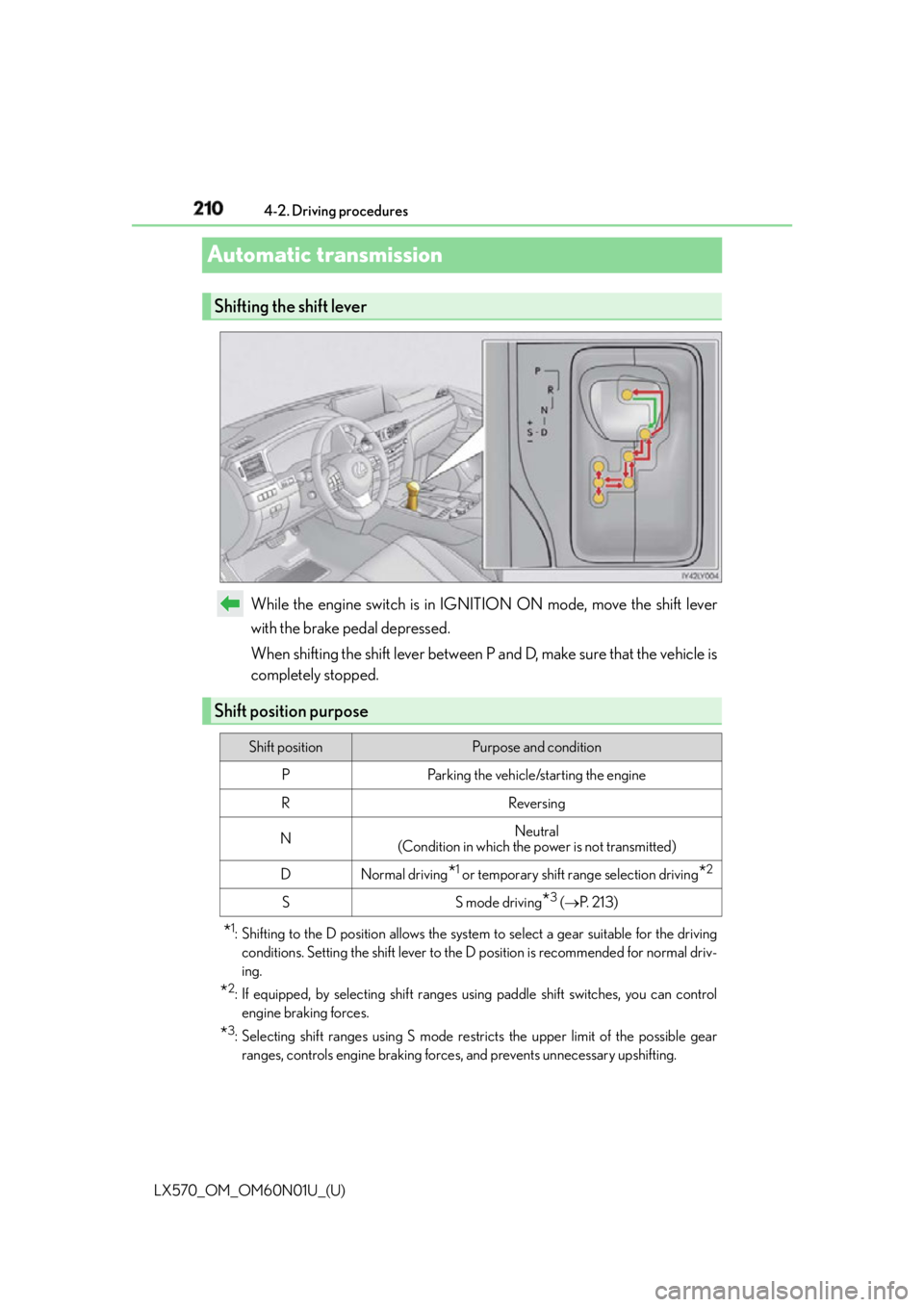
While the engine switch is in IGNITION ON mode, move the shift lever
with the brake pedal depressed.
When shifting the shift lever between P and D, make sure that the vehicle is
completely stopped.
* 1
: Shifting to the D position allows the system to select a gear su itable for the driving
conditions. Setting the shift lever to the D position is recommended for normal driv-
ing.
* 2
: If equipped, by selecting shift ranges us ing paddle shift switches, you can control
engine braking forces.
* 3
: Selecting shift ranges using S mode rest ricts the upper limit of the possible gear
ranges, controls engine braking forces , and prevents unnecessary upshifting.Shifting the shift lever
Shift position purpose Shift position Purpose and condition
P Parking the vehicle/starting the engine
R Reversing
N Neutral
(Condition in which the power is not transmitted)
D Normal driving
* 1
or temporary shift range selection driving
* 2
S S mode driving
* 3
( P. 2 1 3 )
Page 217 of 632
217
LX570_OM_OM60N01U_(U) 4-2. Driving procedures
4
Driving
Parking brake The parking brake is set or released automatically according to shift lever opera-
tion.
Even when in automatic mode, the parkin g brake can be set and released manu-
ally. (
P. 2 1 8 )■
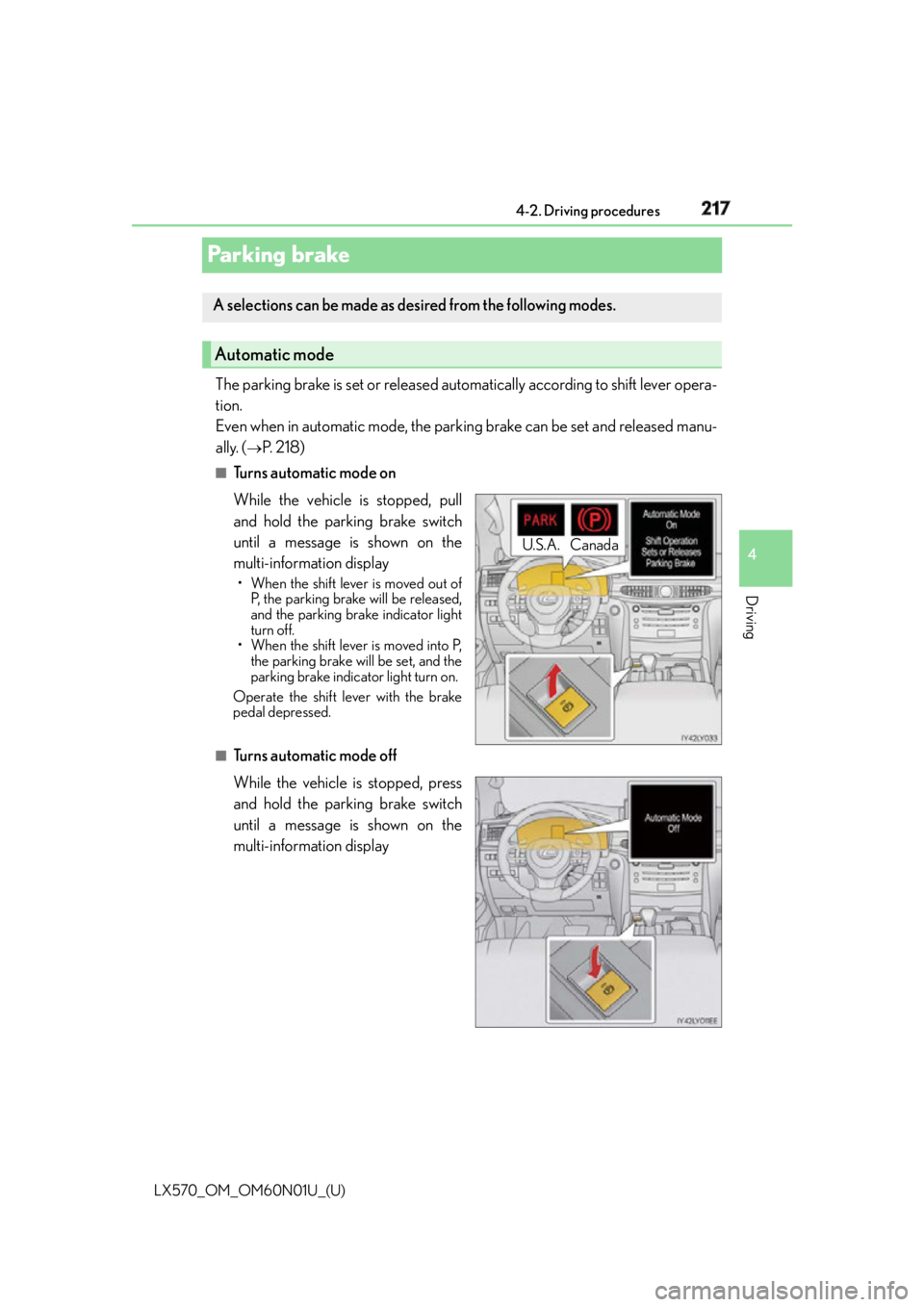
Turns automatic mode on
While the vehicle is stopped, pull
and hold the parking brake switch
until a message is shown on the
multi-information display • When the shift lever is moved out of
P, the parking brake will be released,
and the parking brake indicator light
turn off.
• When the shift lever is moved into P,
the parking brake will be set, and the
parking brake indicator light turn on.
Operate the shift lever with the brake
pedal depressed.
■
Turns automatic mode off
While the vehicle is stopped, press
and hold the parking brake switch
until a message is shown on the
multi-information displayA selections can be made as de sired from the following modes.
Automatic mode
U.S.A. Canada
Page 218 of 632
218
LX570_OM_OM60N01U_(U) 4-2. Driving procedures
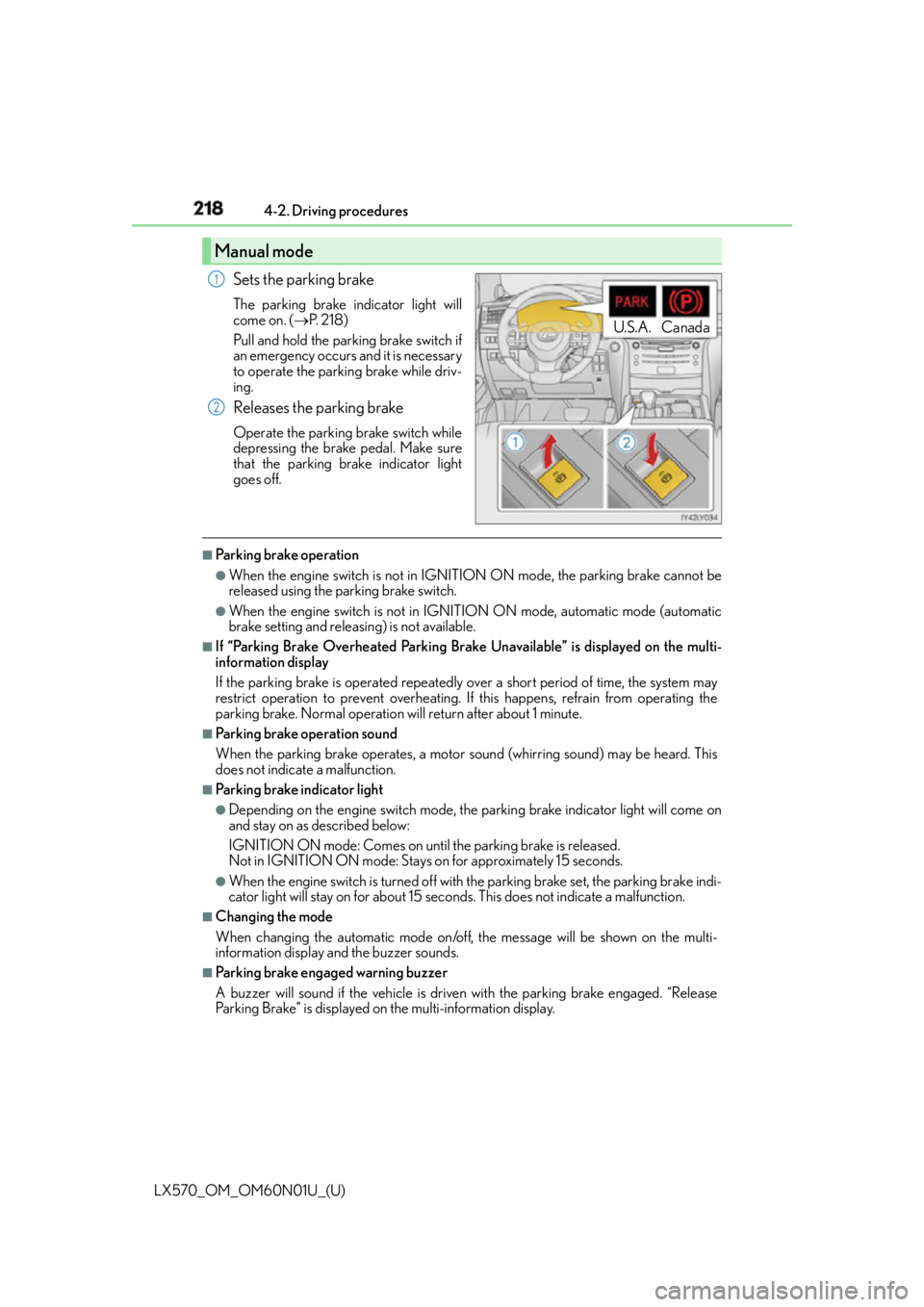
Sets the parking brake The parking brake indicator light will
come on. ( P. 2 1 8 )
Pull and hold the parking brake switch if
an emergency occurs and it is necessary
to operate the parking brake while driv-
ing.
Releases the parking brake Operate the parking brake switch while
depressing the brake pedal. Make sure
that the parking brake indicator light
goes off. ■
Parking brake operation ●
When the engine switch is not in IGNITION ON mode, the parking brake cannot be
released using the pa rking brake switch.●
When the engine switch is not in IGNI TION ON mode, automatic mode (automatic
brake setting and releas ing) is not available.■
If “Parking Brake Overheated Parking Brake Unavailable” is displayed on the multi-
information display
If the parking brake is operated repeatedly over a short period of time, the system may
restrict operation to prevent overheating. If this happens, refrain from operating the
parking brake. Normal operation will return after about 1 minute. ■
Parking brake operation sound
When the parking brake operates, a motor sound (whirring sound) may be heard. This
does not indicate a malfunction. ■
Parking brake indicator light ●
Depending on the engine switch mode, the parking brake indicator light will come on
and stay on as described below:
IGNITION ON mode: Comes on until the parking brake is released.
Not in IGNITION ON mode: Stays on for approximately 15 seconds. ●
When the engine switch is turned off with the parking brake set, the parking brake indi-
cator light will stay on for about 15 seco nds. This does not indicate a malfunction.■
Changing the mode
When changing the automatic mode on/off , the message will be shown on the multi-
information display and the buzzer sounds. ■
Parking brake engaged warning buzzer
A buzzer will sound if the vehicle is driven with the parking brake engaged. “Release
Parking Brake” is displayed on the multi-information display.Manual mode U.S.A. Canada1
2
Page 219 of 632

LX570_OM_OM60N01U_(U) 2194-2. Driving procedures
4
Driving ■
Warning messages and buzzers
Warning messages and buzzers are used to indicate a system malfunction or to inform
the driver of the need for caution. If a warn ing message is shown on the multi-information
display, read the message and follow the instructions.■
If the brake system warning light comes on
P. 5 2 6 ■
Usage in winter time
P. 3 8 4
WA R N I N G ■
When parking the vehicle
Do not leave a child in the vehicle alone. The parking brake may be released uninten-
tionally and there is the danger of the vehicle moving that may lead to an accident
resulting in death or serious injury.
NOTICE ■
When parking the vehicle
Before you leave the vehicle, set the parking brake, shift the shift lever to P and make
sure that the vehicle does not move. ■
When the system malfunctions
Stop the vehicle in a safe place and check the warning messages. ■
When the parking brake cannot be released due to a malfunction
Driving the vehicle with the parking brake set will lead to brake components overheat-
ing, which may affect braking performance and increase brake wear. Have the vehicle
inspected by your Lexus dealer immediately if this occurs.
Page 222 of 632
222
LX570_OM_OM60N01U_(U) 4-3. Operating the lights and wipers■
Daytime running light system ●
To make your vehicle more visible to other drivers during daytime driving, the daytime
running lights turn on automatically whenever the engine is started and the parking
brake is released. (Illuminate brighter than the parking lights.) Daytime running lights
are not designed for use at night.
For the U.S.A.: Daytime running lights can be turned off by operating the switch.●
Compared to turning on the headlights, the daytime running light system offers greater
durability and consumes less electricity, so it can help improve fuel economy. ■
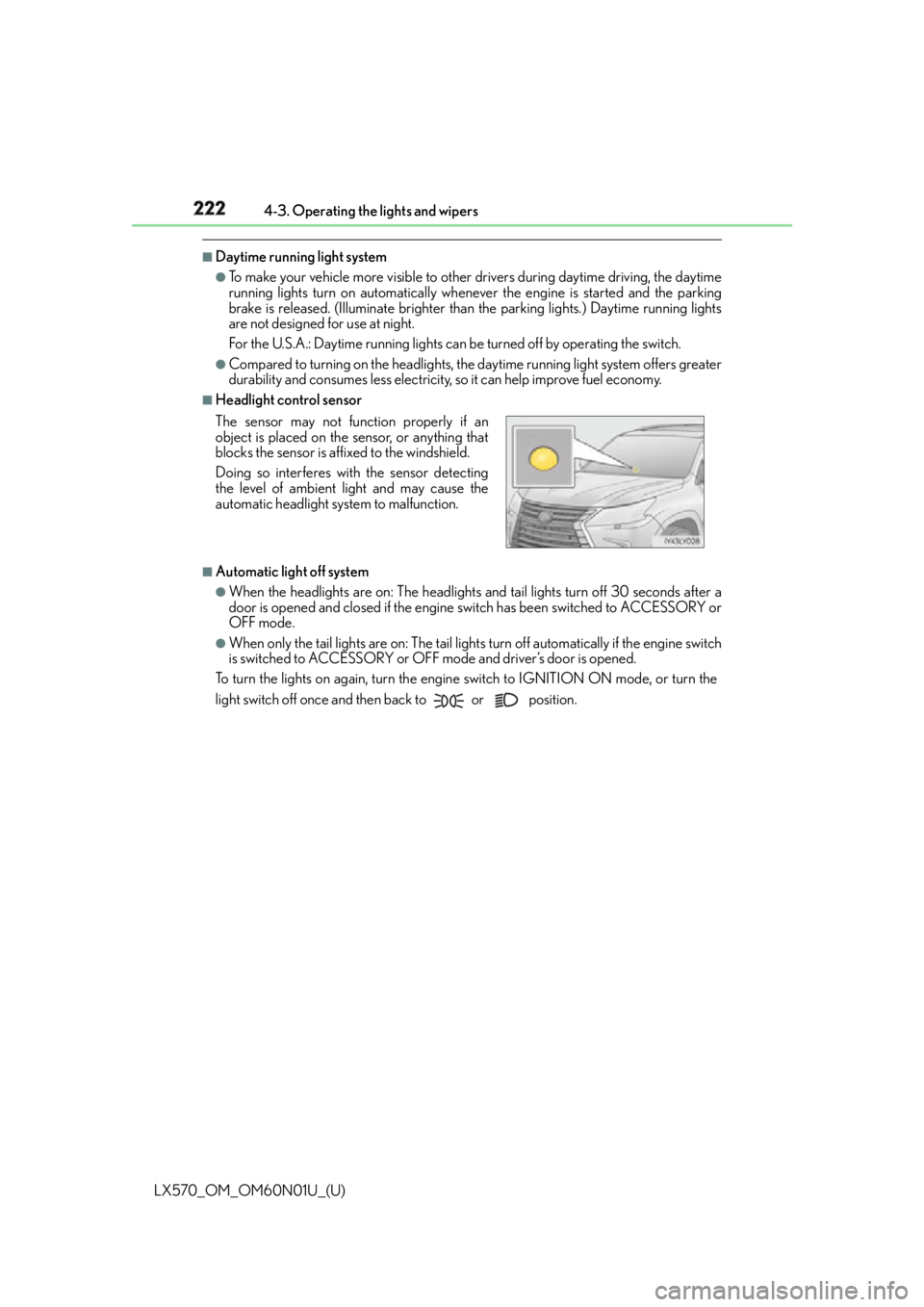
Headlight control sensor
■
Automatic light off system ●
When the headlights are on: The headlights an d tail lights turn off 30 seconds after a
door is opened and closed if the engine switch has been switched to ACCESSORY or
OFF mode. ●
When only the tail lights are on : The tail lights turn off auto matically if the engine switch
is switched to ACCESSORY or OFF mo de and driver’s door is opened.
To turn the lights on again, turn the engine switch to IGNITION ON mode, or turn the
light switch off once and then back to or position.The sensor may not function properly if an
object is placed on the sensor, or anything that
blocks the sensor is affixed to the windshield.
Doing so interferes with the sensor detecting
the level of ambient light and may cause the
automatic headlight system to malfunction.
Page 243 of 632

LX570_OM_OM60N01U_(U) 2434-5. Using the driving support systems
4
Driving The pre-collision system is equipped wi th a sophisticated computer that will
record certain data, such as:
• How far (if at all) the driver was depressing the accelerator and/or brake
pedal
• Vehicle speed
• Operation status of the pre-collision system functions
• Information (such as the distance and relative speed between your vehicle
and the vehicle ahead or other objects)
Additionally, if the pre-collision braking fu nction is operating, image information
from the camera sensor will also be re corded. The pre-collisio n system does not
record conversations, sounds or pictures. ●
Data usage
Lexus may use the data recorded in this computer to diagnose malfunctions,
conduct research and development, and improve quality.
Lexus will not disclose the recorded data to a third party except:
• With the consent of the vehicle owner or with the consent of the lessee if
the vehicle is leased
• In response to an official request by the police, a court of law or a govern-
ment agency
• For use by Lexus in a lawsuit
• For research purposes where the data is not tied to a specific vehicle or
vehicle owner●
Recorded image information can be erased using a specialized device.
The image information recording function can be disabled. However, if the
function is disabled, data from when the pre-collision system operates will not
be available.Vehicle data recording
Page 250 of 632
250
LX570_OM_OM60N01U_(U) 4-5. Using the driving support systems
PCS (Pre-Collision System)
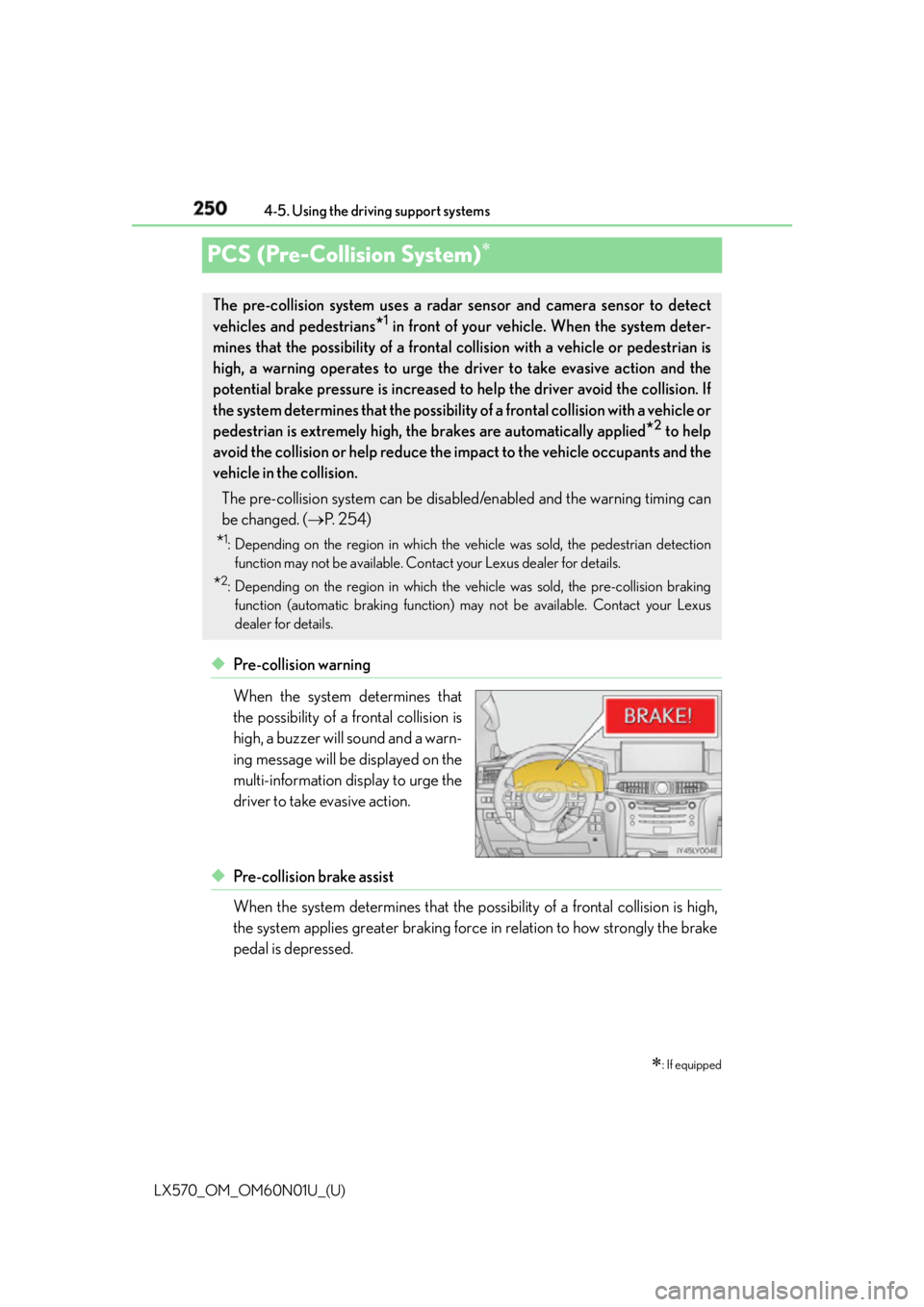
◆ Pre-collision warning
When the system determines that
the possibility of a frontal collision is
high, a buzzer will sound and a warn-
ing message will be displayed on the
multi-information display to urge the
driver to take evasive action.
◆ Pre-collision brake assist
When the system determines that the po ssibility of a frontal collision is high,
the system applies greater braking force in relation to how strongly the brake
pedal is depressed.
: If equippedThe pre-collision system uses a radar sensor and camera sensor to detect
vehicles and pedestrians
* 1
in front of your vehicle. When the system deter-
mines that the possibility of a frontal collision with a vehicle or pedestrian is
high, a warning operates to urge the driver to take evasive action and the
potential brake pressure is increased to help the driver avoid the collision. If
the system determines that th e possibility of a frontal collision with a vehicle or
pedestrian is extremely high, the brakes are automatically applied
* 2
to help
avoid the collision or help reduce the impact to the vehicle occupants and the
vehicle in the collision.
The pre-collision system can be disabl ed/enabled and the warning timing can
be changed. ( P. 2 5 4 )
* 1
: Depending on the region in which the vehicle was sold, the pedestrian detection
function may not be available. Contact your Lexus dealer for details.
* 2
: Depending on the region in which the ve hicle was sold, the pre-collision braking
function (automatic braking function) may not be available. Contact your Lexus
dealer for details.
Page 251 of 632

LX570_OM_OM60N01U_(U) 2514-5. Using the driving support systems
4
Driving ◆ Pre-collision braking
* 3
When the system determines that the po ssibility of a frontal collision is high,
the system warns the driver. If the system determines that the possibility of a
collision is extremely high, the brakes are automatically applied to help avoid
the collision or reduce the collision speed.
* 3
: Depending on the region in which the vehi cle was sold, the pre-collision braking func-
tion may not be available.
◆ Suspension control
When the system determines that the po ssibility of a frontal collision is high,
the Adaptive Variable Suspension System ( P. 379) will control the damping
force of the shock absorbers.