tow LEXUS LX570 2016 Owner's Guide
[x] Cancel search | Manufacturer: LEXUS, Model Year: 2016, Model line: LX570, Model: LEXUS LX570 2016Pages: 632, PDF Size: 10.34 MB
Page 201 of 632

LX570_OM_OM60N01U_(U) 2014-1. Before driving
4
Driving ■
Driving mode select switch
The suspension can be switched fo r improvement in driveability. ( P. 2 8 6 )■
Break-in schedule
If your vehicle is new or equipped with any new power train components (such as an
engine, transmission, differential or wheel bearing), Lexus recommends that you do not
tow a trailer until the vehicle has been driven for over 500 miles (800 km).
After the vehicle has been driven for over 500 miles (800 km), you can start towing.
However, for the next 500 miles (800 km), drive the vehicle at a speed of less than
50 mph (80 km/h) when towing a trailer, and avoid full throttle acceleration.■
Maintenance ●
If you tow a trailer, your vehicle will requir e more frequent maintenance due to the addi-
tional load. (See “Owner’s Guide”, “Warranty and Services Guide”, “Owner’s Manual
Supplement” or “Warranty Booklet”.) ●
Retighten the fixing bolts of the towing ba ll and bracket after approximately 600 miles
(1000 km) of trailer towing. ■
If trailer sway occurs
One or more factors (crosswinds, passing vehicles, rough roads, etc.) can adversely
affect handling of your vehicle and trailer, causing instability.●
If trailer swaying occurs:
• Firmly grip the steering wheel. Steer straight ahead.
Do not try to control trailer sway ing by turning the steering wheel.
• Begin releasing the accelerator pedal i mmediately but very gradually to reduce
speed.
Do not increase speed. Do not apply vehicle brakes.
If you make no extreme correction with the steering or brakes, your vehicle and trailer
should stabilize. ●
After the trailer sw aying has stopped:
• Stop in a safe place. Get all occupants out of the vehicle.
• Check the tires of the vehicle and the trailer.
• Check the load in the trailer.
Make sure the load has not shifted.
Make sure the tongue weight is appropriate, if possible.
• Check the load in the vehicle.
Make sure the vehicle is not overloaded after occupants get in.
If you cannot find any problems, the speed at which trailer swaying occurred is beyond
the limit of your particular vehicle-trailer combination.
Drive at a lower speed to prevent instability. Remember that swaying of the towing vehi-
cle-trailer increases as speed increases.
Page 202 of 632

202
LX570_OM_OM60N01U_(U) 4-1. Before driving
WA R N I N G ■
Trailer towing precautions ●
To tow a trailer safely, use extreme care an d drive the vehicle in accordance with the
trailer’s characteristics and operating conditions. Failure to do so could cause an acci-
dent resulting in death or serious injury. Vehicle stability and braking performance are
affected by trailer stability, brake setting an d performance, and the hitch. Your vehicle
will handle differently when towing a trailer. ●
Set the vehicle height to the “LO” mode and turn off the 4-Wheel AHC when you
connect a trailer, otherwise the vehicle heig ht may change due to the automatic level-
ing function, and you may catch part of your body in the vehicle, resulting in an acci-
dent. ( P. 2 9 7 )■
To avoid accident or injury ●
Do not exceed the TWR, unbrak ed TWR, GCWR, GVWR or GAWR.●
If the gross trailer weight is over 2000 lb. (907 kg), a sway control device with suffi-
cient capacity is required. ●
If the gross trailer weight is over 5000 lb. (2268 kg), a weight distributing hitch with
sufficient capacity is required. ●
Adjust the tongue weight within the approp riate range. Place heavier loads as close
to the trailer axle as possible. ●
Do not exceed 65 mph (104 km/h), the posted towing speed limit or the speed limit
for your trailer as set forth in your trailer owner’s manual, whichever is lowest. Slow
down sufficiently before making a turn, in crosswinds, on wet or slippery surface, etc.
to help avoid an accident. If you experience a vehicle-trailer instability from reducing
a certain speed, slow down and make sure you keep your vehicle speed under the
speed of which you expe rience the instability.●
Do not make jerky, abrupt or sharp turns. ●
Do not apply the brakes suddenly as you ma y skid, resulting in ja ckknifing and loss of
vehicle control. This is especially true on wet or slippery surfaces. ●
Do not exceed the trailer hitch assembly weight, gross vehicle weight, gross axle
weight and trailer tongue weight capacities. ●
Do not use cruise control (if equipped) or dynamic radar cruise control (if equipped)
when trailer towing. ●
Slow down and downshift before descending steep or long downhill grades. Do not
make sudden downshifts while descen ding steep or long downhill grades.●
Vehicle-trailer instability is more likely on steep long down hills. Before descending
steep or long downhill grades, slow down and downshift. Do not make sudden down-
shifts when descending stee p or long downhill grades. Avoid holding the brake pedal
down too long or applying the brakes too frequently. This could cause the brakes to
overheat and result in reduced braking efficiency.
Page 203 of 632

LX570_OM_OM60N01U_(U) 2034-1. Before driving
4
Driving WA R N I N G ■
Hitch
Trailer hitch assemblies have different weight capacities established by the hitch manu-
facturer. Even though the vehicle may be physically capable of towing a higher weight,
the operator must determine the maximum weig ht rating of the particular hitch assem-
bly and never exceed the maximum weight rating specified for the trailer-hitch.
Exceeding the maximum weight rating set by the trailer-hitch manufacturer can cause
an accident resulting in death or serious personal injuries.■
When towing a trailer
Lexus recommends trailers with brakes that conform to any applicable federal and
state/provincial regulations. ●
If the gross trailer weight exceeds unbraked TWR, trailer brakes are required. Lexus
recommends trailers with brakes that conform to all applicable federal and state/pro-
vincial regulations. ●
Never tap into your vehicle’s hydraulic system, as this will lower the vehicle’s braking
effectiveness. ●
Never tow a trailer without using a safety ch ain securely attached to both the trailer
and the vehicle. If damage occurs to the coupling unit or hitch ball, there is danger of
the trailer wandering into another lane.
NOTICE ■
When installing a trailer hitch
Use only the position recommended by your Lexus dealer. Do not install the trailer
hitch on the bumper; this may cause body damage.■
Do not directly splice trailer lights
Do not directly splice trailer lights. Dire ctly splicing trailer lights may damage your
vehicle’s electrical system and cause a malfunction.
Page 204 of 632
204
LX570_OM_OM60N01U_(U) 4-1. Before driving
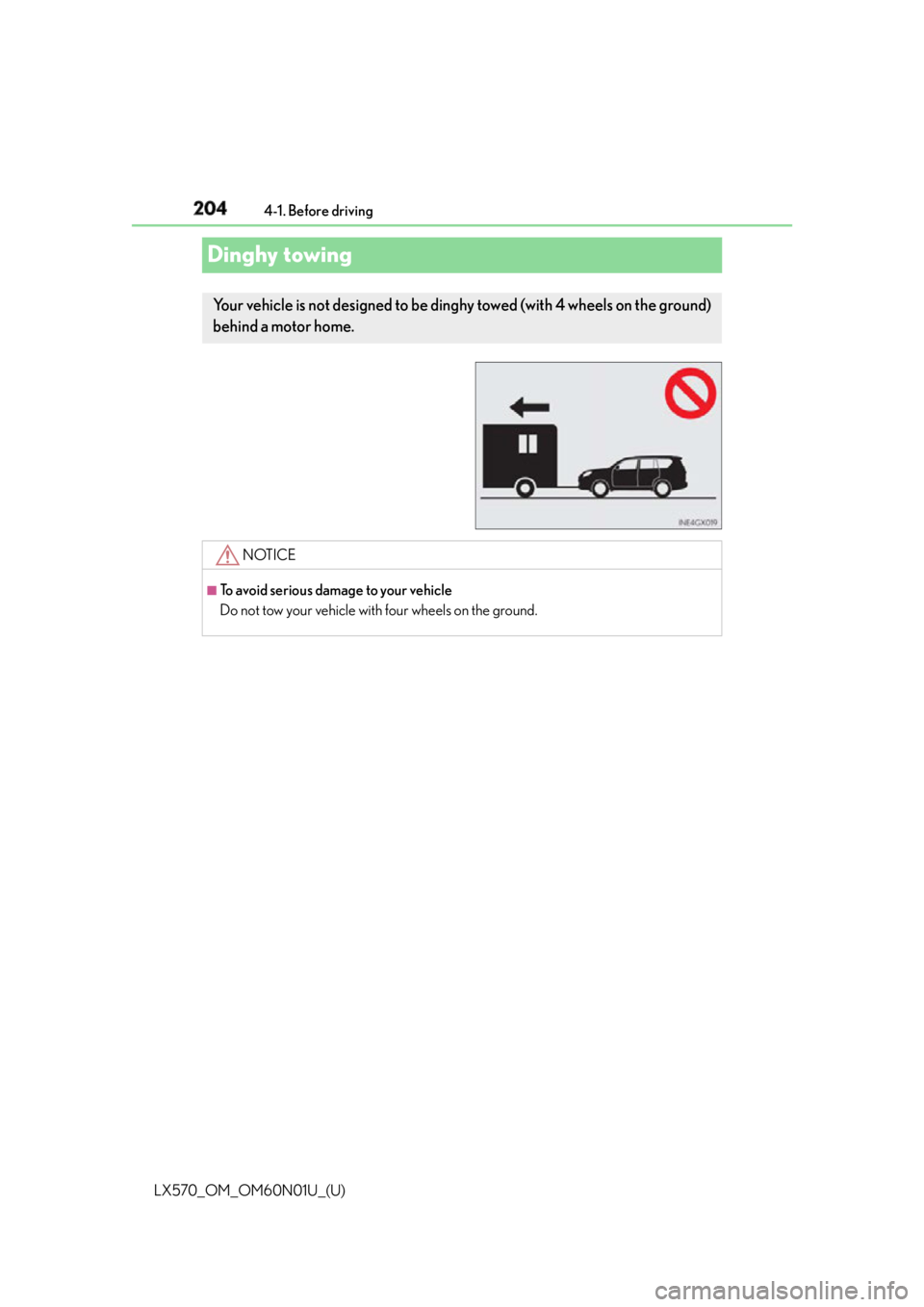
Dinghy towing Your vehicle is not designed to be ding hy towed (with 4 wheels on the ground)
behind a motor home.
NOTICE ■
To avoid serious damage to your vehicle
Do not tow your vehicle with four wheels on the ground.
Page 214 of 632

214
LX570_OM_OM60N01U_(U) 4-2. Driving procedures■
Paddle shift switches (if equipped) ●
When the “-” paddle shift switch is operated in the D position, a shift range will be auto-
matically selected. The highest gear of the fi rst shift range will be one gear lower than
the gear in use during normal D position driving. ●
Automatic deactivation of shift range selection in the D position
Shift range selection in the D position will be deactivated in the following situations:
• When the vehicle comes to a stop
• If the accelerator pedal is depressed for long er than a certain period of time in one
shift range■
Driving on a downhill
On declines, there may be case where the ve hicle shifts down automatically to obtain
engine braking. As a result of the down shifting, the engine speed may increase.■
Second start mode automatic deactivation
Second start mode is automatically deactivated if the engine is turned off after driving in
second start mode. ■
S mode
When the shift range is 7 or lower, holding the shift lever toward “+” sets the shift range to
8. ■
AI-SHIFT
AI-SHIFT automatically select s the suitable gear according to driver performance and
driving conditions.
AI-SHIFT automatically operates when the shift lever is in the D position. (Shifting the
shift lever to the S position cancels the function.) ■
When driving with cruise control or dynamic radar cruise control activated
Even when performing the following actions with the intent of enabling engine braking,
engine braking will not activate because cruise control or radar cruise control will not be
canceled. ●
While driving in D position (vehicles with paddle shift switches) or S mode, downshift-
ing to 7, 6, 5 or 4. ( P. 2 7 1 , 2 8 3 )●
When switching the driving mode to spor t mode while driving in D position. ( P. 2 8 6 )■
If the shift lever cannot be shifted from P
P. 5 4 9 ■
If the “S” indicator does not come on ev en after shifting the shift lever to S
This may indicate a malfunction in the automatic transmission system. Have the vehicle
inspected by your Lexus dealer immediately.
(In this situation, the transmission will operat e in the same manner as when the shift lever
is in D.) ■
Downshift restriction warning buzzer
To help ensure safety and driving performa nce, downshifting operation may sometimes
be restricted. In some circumstances, downshifting may not be possible even when the
shift lever is operated. (A buzzer will sound twice.)
Page 221 of 632
LX570_OM_OM60N01U_(U) 2214-3. Operating the lights and wipers
4
Driving
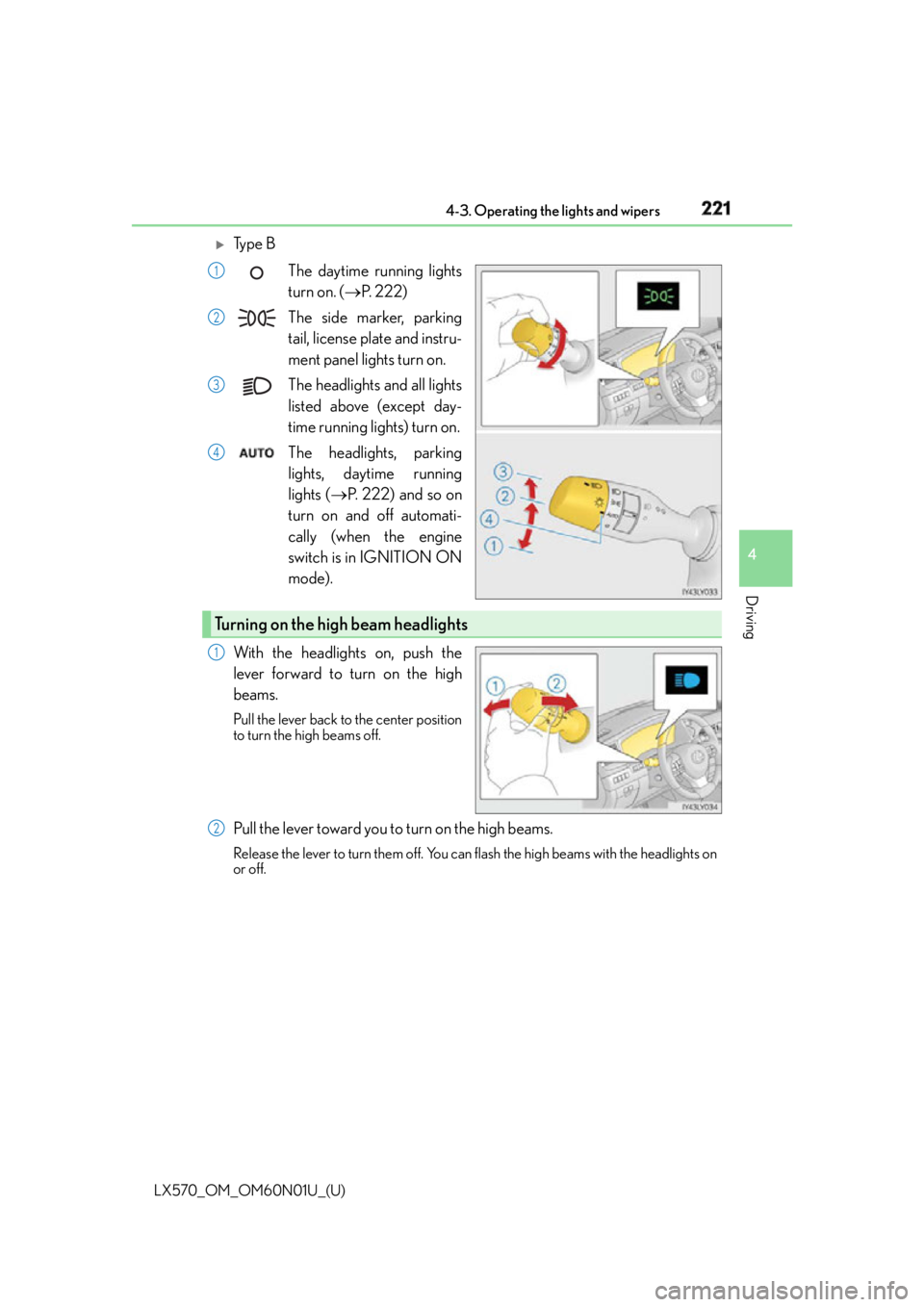
Ty p e B
The daytime running lights
turn on. ( P. 222)
The side marker, parking
tail, license plate and instru-
ment panel lights turn on.
The headlights and all lights
listed above (except day-
time running lights) turn on.
The headlights, parking
lights, daytime running
lights ( P. 222) and so on
turn on and off automati-
cally (when the engine
switch is in IGNITION ON
mode).
With the headlights on, push the
lever forward to turn on the high
beams. Pull the lever back to the center position
to turn the high beams off.
Pull the lever toward you to turn on the high beams. Release the lever to turn them off. You can flash the high beams with the headlights on
or off. 1
2
3
4
Turning on the high beam headlights 1
2
Page 227 of 632

LX570_OM_OM60N01U_(U) 2274-3. Operating the lights and wipers
4
Driving ■
Camera sensor dete ction information●
The high beam may not be automatically turned off in the following situations:
• When oncoming vehicles sudd enly appear from a curve
• When the vehicle is cut in front of by another vehicle
• When vehicles ahead are hidden from sight due to repeated curves, road dividers or
roadside trees
• When vehicles ahead appear from the faraway lane on wide road
• When vehicles ahead have no lights ●
The high beam may be turned off if a vehicl e ahead that is using fog lights without using
the headlights is detected. ●
House lights, street lights, traffic signals, and illuminated billboards or signs may cause
the high beam to switch to the low be ams, or the low beams to remain on.●
The following factors may affect the amount of time taken to turn the high beam on or
off:
• The brightness of headlig hts, fog lights, and tail lights of vehicles ahead
• The movement and direction of vehicles ahead
• When a vehicle ahead only has operational lights on one side
• When a vehicle ahead is a two-wheeled vehicle
• The condition of the road (gradient, curve, condition of the road surface etc.)
• The number of passengers and amount of luggage ●
The high beam may be turned on or off when the driver does not expect it. ●
Bicycles or similar objects may not be detected. ●
In the situations shown below, the system may not be able to accurately detect sur-
rounding brightness levels. This may caus e the low beams to remain on or the high
beams to cause problems for pedestrians, vehicles ahead or other parties. In these
cases, manually switch between the high and low beams.
• In bad weather (rain, snow, fog, sandstorms etc.)
• The windshield is obscured by fog, mist, ice, dirt etc.
• The windshield is cracked or damaged.
• The camera sensor is deformed or dirty.
• The camera sensor temperature is extremely high.
• Surrounding brightness levels are equal to those of headlights, ta il lights or fog lights.
• Vehicles ahead have headlights that are either switched off, dirty, are changing color,
or have are not aimed properly.
• When driving through an area of intermit tently changing brightness and darkness.
• When frequently and repeatedly driving ascending/descending roads, or roads with
rough, bumpy or uneven surfaces (such as stone-paved roads, gravel tracks etc.).
• When frequently and repeat edly taking curves or driving on a winding road.
• There is a highly reflective object ahead of the vehicle, such as a sign or a mirror.
• The back of a vehicle ahead is highly reflective, such as a container on a truck.
• The vehicle’s headlights are damaged or dirty.
• The vehicle is listing or tilting, due to a flat tire, a trailer being towed etc.
• The high beam and low beam are repeated ly being switched between in an abnor-
mal manner.
• The driver believes that the high beam may be causing problems or distress to other
drivers or pedestrians nearby.
Page 233 of 632
LX570_OM_OM60N01U_(U) 2334-3. Operating the lights and wipers
4
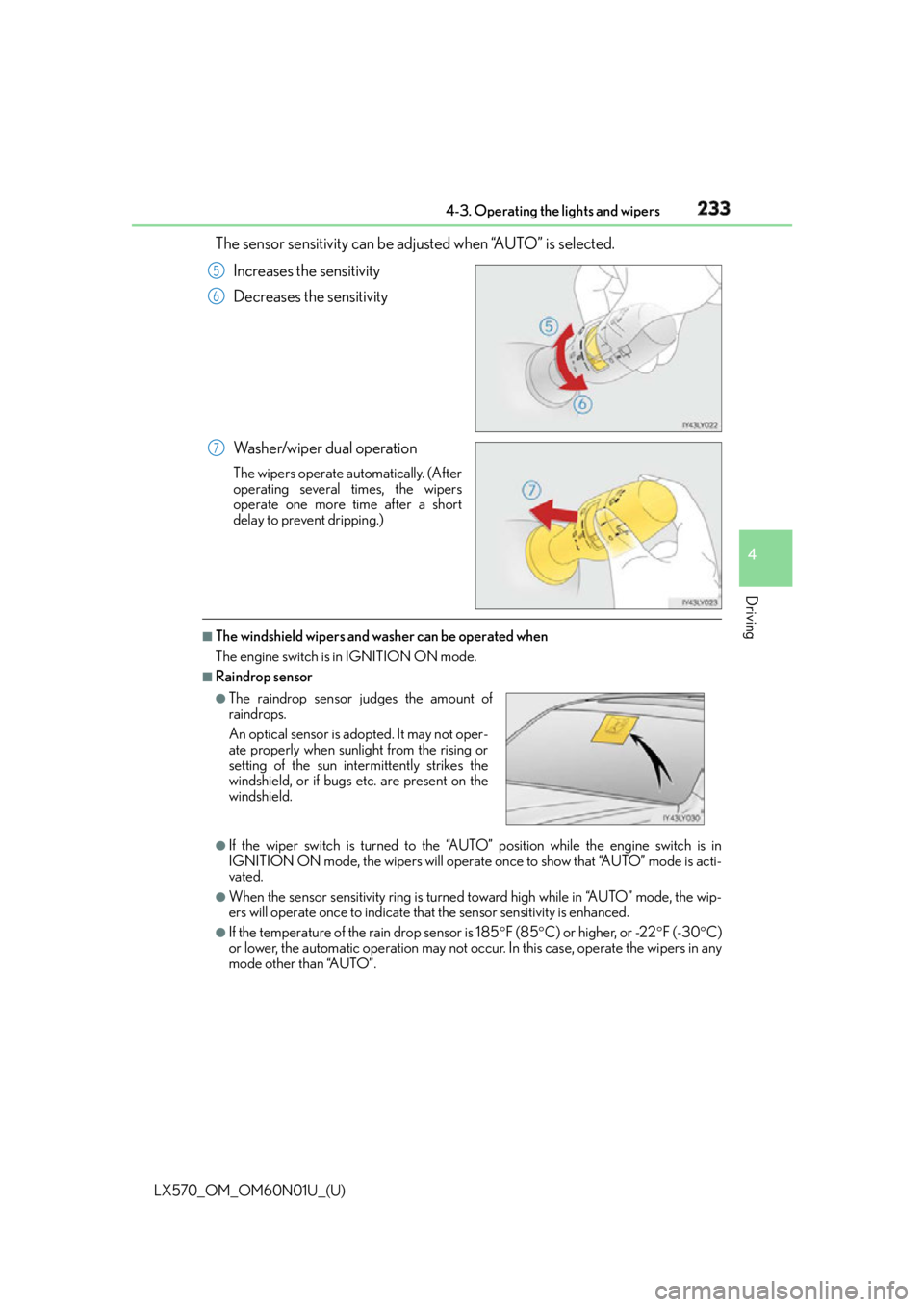
Driving The sensor sensitivity can be adjusted when “AUTO” is selected.
Increases the sensitivity
Decreases the sensitivity
Washer/wiper dual operation The wipers operate automatically. (After
operating several times, the wipers
operate one more time after a short
delay to prevent dripping.) ■
The windshield wipers and washer can be operated when
The engine switch is in IGNITION ON mode. ■
Raindrop sensor
●
If the wiper switch is turned to the “AUT O” position while the engine switch is in
IGNITION ON mode, the wipers will operate on ce to show that “AUTO” mode is acti-
vated. ●
When the sensor sensitivity ri ng is turned toward high wh ile in “AUTO” mode, the wip-
ers will operate once to indicate that the sensor sensitivity is enhanced. ●
If the temperature of the rain drop sensor is 185 F (85 C) or higher, or -22 F (-30 C)
or lower, the automatic operation may not occu r. In this case, operate the wipers in any
mode other than “AUTO”. 5
6
7
●
The raindrop sensor judges the amount of
raindrops.
An optical sensor is ad opted. It may not oper-
ate properly when sunlight from the rising or
setting of the sun intermittently strikes the
windshield, or if bugs etc. are present on the
windshield.
Page 234 of 632

234
LX570_OM_OM60N01U_(U) 4-3. Operating the lights and wipers■
Effects of vehicle speed on wiper operation
With the settings other than “AUTO” also, the time until drip prevention wiper sweep
occurs is changed depending on vehicle speed.
Ty p e A
With selected, wiper operation will be switched from low sp eed to intermittent
wiper operation only when the vehicle is stat ionary. (However, when the sensor sensitiv-
ity is adjusted to the highest le vel, the mode cannot be switched.)
Ty p e B
With selected, wiper operation will be switched from low speed to intermittent
wiper operation only when the vehicle is stat ionary. (However, when the sensor sensitiv-
ity is adjusted to the highest le vel, the mode cannot be switched.)■
If no windshield washer fluid sprays
Check that the washer nozzles are not blocked if there is washer fluid in the windshield
washer fluid reservoir.
WA R N I N G ■
Caution regarding the use of wind shield wipers in “AUTO” mode
The windshield wipers may operate unexpectedly if the sensor is touched or the wind-
shield is subject to vibration in “AUTO” mode . Take care that your fingers etc. anything
else does not become caught in the windshield wipers. ■
Caution regarding the use of washer fluid
When it is cold, do not use the washer fluid until the windshield becomes warm. The
fluid may freeze on the windshield and cause lo w visibility. This may lead to an accident,
resulting in death or serious injury.
NOTICE ■
When the windshield is dry
Do not use the wipers, as they may damage the windshield. ■
When the washer fluid tank is empty
Do not operate the switch continually as the washer fluid pump may overheat. ■
When there is no washer fluid spray from the nozzle
Damage to the washer fluid pump may be caused if the lever is pulled toward you and
held continually. ■
When a nozzle becomes blocked
Do not try to clear it with a pin or other object. The nozzle will be damaged.
Page 253 of 632

LX570_OM_OM60N01U_(U) 2534-5. Using the driving support systems
4
Driving WA R N I N G ■
When to disable the pre-collision system
In the following situations, disable the syst em, as it may not operate properly, possibly
leading to an accident resultin g in death or serious injury:●
When the vehicle is being towed ●
When your vehicle is towing another vehicle ●
When transporting the vehicle via truck, boat, train or similar means of transportation ●
When the vehicle is raised on a lift with the engine running and the tires are allowed to
rotate freely ●
When inspecting the vehicle using a drum tester such as a chassis dynamometer or
speedometer tester, or when using an on vehicle wheel balancer ●
When a strong impact is app lied to the front bumper or front grille, due to an accident
or other reasons ●
If the vehicle cannot be driven in a stable manner, such as when the vehicle has been
in an accident or is malfunctioning ●
When the vehicle is driven in a sporty manner or off-road ●
When the tires are not properly inflated ●
When the tires are very worn ●
When tires of a size other than specified are installed●
When tire chains are installed ●
If the suspensi on is modified●
If the front of the vehicle is raised or lowered, such as when loaded with heavy lug-
gage