air conditioning LEXUS LX570 2016 Owners Manual
[x] Cancel search | Manufacturer: LEXUS, Model Year: 2016, Model line: LX570, Model: LEXUS LX570 2016Pages: 632, PDF Size: 10.34 MB
Page 4 of 632

TABLE OF CONTENTS
4
LX570_OM_OM60N01U_(U) 5-1. Remote Touch screen
Remote Touch/12.3-inch
display.......................................... 394
5-2. Lexus Climate Concierge
Lexus Climate Concierge......400
5-3. Using the air conditioning
system and defogger
Front automatic air
conditioning system ................ 401
Rear air conditioning
system ............................................ 412
Heated steering wheel/seat
heaters/seat ventilators ..........415
5-4. Using the interior lights
Interior lights list ...........................419
• Interior lights .......................... 420
• Personal lights ......................... 421 5-5. Using the storage features
List of storage features .............422
• Glove box ............................... 423
• Console box .......................... 423
• Overhead console ...............424
• Cup holders ........................... 425
• Bottle holders .........................426
• Card holder ............................426
• Auxiliary boxes ...................... 427
Luggage compartment
features ....................................... 429
5-6. Using the other interior
features
Other interior features ..............431
• Cool box....................................431
• Sun visors ................................ 432
• Vanity mirrors ........................ 432
• Clock ........................................ 433
• Power outlets ......................... 434
• Wireless charger.................. 436
• Armrest.................................... 443
• Rear door sunshades ......... 444
• Coat hooks............................. 444
• Assist grips ............................. 445
Garage door opener ............... 446
LEXUS Enform Safety
Connect........................................ 4515
Interior features
Page 5 of 632

5 1
8765432
LX570_OM_OM60N01U_(U) 96-1. Maintenance and care
Cleaning and protecting
the vehicle exterior ................ 458
Cleaning and protecting
the vehicle inte rior.................... 461
6-2. Maintenance
Maintenance
requirements ............................ 464
General maintenance.............. 466
Emission inspection and
maintenance (I/M)
programs .................................... 469
6-3. Do-it-yourself maintenance
Do-it-yourself service
precautions.................................470
Hood ................................................ 472
Engine compartment ................473
Tires.................................................. 486
Tire inflation pressure ............... 495
Wheels ........................................... 499
Air conditioning filter ................ 501
Electronic key battery.............. 503
Checking and replacing
fuses..............................................505
Light bulbs ....................................508 7-1. Essential information
Emergency flashers ....................514
If your vehicle has to be
stopped in an emergency......515
7-2. Steps to take in an emergency
If your vehicle needs
to be towed..................................516
If you think something is
wrong........................................... 522
Fuel pump shut off system ...... 523
If a warning light turns
on or a warning buzzer
sounds ..........................................524
If a warning message is
displayed .................................... 532
If you have a flat tire .................. 536
If the engine will not start .........547
If the shift lever cannot be
shifted from P ........................... 549
If the electronic key does
not operate properly ............. 550
If the vehicle battery is
discharged ................................. 553
If your vehicle overheats ......... 556
If the vehicle becomes
stuck ............................................. 5596
Maintenance and care 7
When trouble arises
Page 17 of 632

17Pictorial index
LX570_OM_OM60N01U_(U) Multi-information display . . . . . . . . . . . . . . . . . . . . . . . . . . . . . . . . . . . . . . . . . . . . . P. 91 Display . . . . . . . . . . . . . . . . . . . . . . . . . . . . . . . . . . . . . . . . . . . . . . . . . . . . . . . . . . . . . . . . . . . P. 91
When the warning messages are displayed . . . . . . . . . . . . . . . . . . . . . . . . . . . . .P. 532
Parking brake . . . . . . . . . . . . . . . . . . . . . . . . . . . . . . . . . . . . . . . . . . . . . . . . . . . . . . . . . P . 217Applying/releasing. . . . . . . . . . . . . . . . . . . . . . . . . . . . . . . . . . . . . . . . . . . . . . . . . . . . . . P . 217
Precautions against winter season . . . . . . . . . . . . . . . . . . . . . . . . . . . . . . . . . . . . . P. 385
Warning buzzer/message . . . . . . . . . . . . . . . . . . . . . . . . . . . . . . . . . . . . . . . . . .P. 219, 532
Turn signal lever. . . . . . . . . . . . . . . . . . . . . . . . . . . . . . . . . . . . . . . . . . . . . . . . . . . . . . .P . 216
Headlight switch . . . . . . . . . . . . . . . . . . . . . . . . . . . . . . . . . . . . . . . . . . . . . . . . . . . . . P. 220 Headlights/parking lights/tail lights/daytime ru nning lights . . . . . . . . . . . . . .P. 220
Fog lights . . . . . . . . . . . . . . . . . . . . . . . . . . . . . . . . . . . . . . . . . . . . . . . . . . . . . . . . . . . . . . .P. 229
Windshield wiper and washer switch. . . . . . . . . . . . . . . . . . . . . . . . . . . . . . . . P. 231
Rear window wiper and washer switch. . . . . . . . . . . . . . . . . . . . . . . . . . . . . . P. 235 Usage . . . . . . . . . . . . . . . . . . . . . . . . . . . . . . . . . . . . . . . . . . . . . . . . . . . . . . . . . . . . . P. 231, 235
Adding washer fluid . . . . . . . . . . . . . . . . . . . . . . . . . . . . . . . . . . . . . . . . . . . . . . . . . . . P. 48 5
Warning messages . . . . . . . . . . . . . . . . . . . . . . . . . . . . . . . . . . . . . . . . . . . . . . . . . . . . .P. 53 2
Emergency flasher switch . . . . . . . . . . . . . . . . . . . . . . . . . . . . . . . . . . . . . . . . . . . .P. 514
Fuel filler door opener . . . . . . . . . . . . . . . . . . . . . . . . . . . . . . . . . . . . . . . . . . . . . . . P. 240
Hood lock release lever . . . . . . . . . . . . . . . . . . . . . . . . . . . . . . . . . . . . . . . . . . . . . P. 472
Tilt and telescopic steering control switch . . . . . . . . . . . . . . . . . . . . . . . . . . P. 158Adjustment . . . . . . . . . . . . . . . . . . . . . . . . . . . . . . . . . . . . . . . . . . . . . . . . . . . . . . . . . . . . . P. 158
Driving position memory . . . . . . . . . . . . . . . . . . . . . . . . . . . . . . . . . . . . . . . . . . . . . . . . P. 151
Front air conditioning system . . . . . . . . . . . . . . . . . . . . . . . . . . . . . . . . . . . . . . . P. 401 Usage . . . . . . . . . . . . . . . . . . . . . . . . . . . . . . . . . . . . . . . . . . . . . . . . . . . . . . . . . . . . . . . . . . P. 401
Rear window defogger . . . . . . . . . . . . . . . . . . . . . . . . . . . . . . . . . . . . . . . . . . . . . . . . .P. 407
Audio system
*Hands-free system
*
* : Refer to “NAVIGATION SYSTEM OWNER’S MANUAL”.4
5
6
7
8
9
10
11
12
13
Page 22 of 632
22 Pictorial index
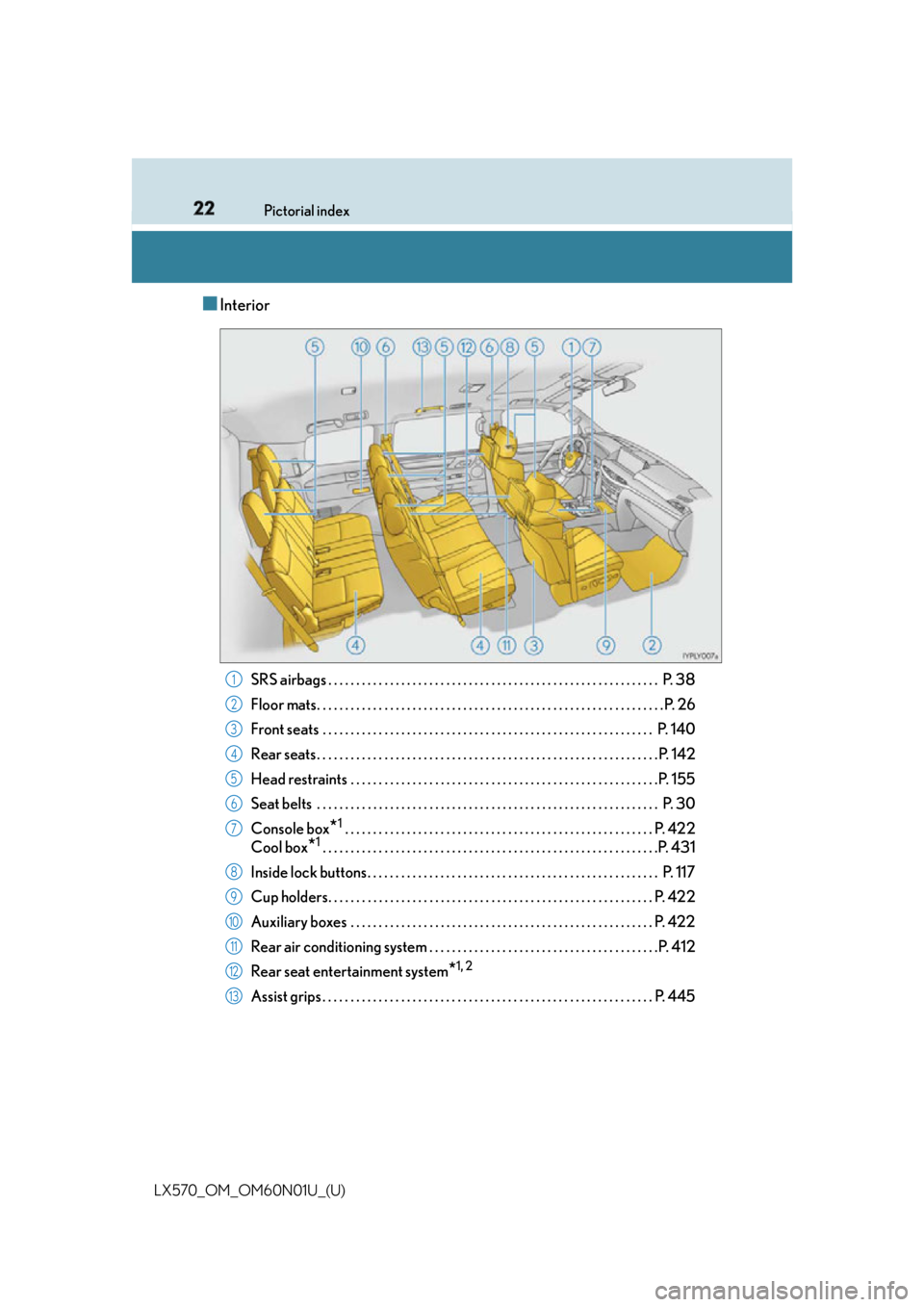
LX570_OM_OM60N01U_(U) ■ Interior
SRS airbags . . . . . . . . . . . . . . . . . . . . . . . . . . . . . . . . . . . . . . . . . . . . . . . . . . . . . . . . . . . P. 38
Floor mats. . . . . . . . . . . . . . . . . . . . . . . . . . . . . . . . . . . . . . . . . . . . . . . . . . . . . . . . . . . . . . P. 26
Front seats . . . . . . . . . . . . . . . . . . . . . . . . . . . . . . . . . . . . . . . . . . . . . . . . . . . . . . . . . . . P. 140
Rear seats . . . . . . . . . . . . . . . . . . . . . . . . . . . . . . . . . . . . . . . . . . . . . . . . . . . . . . . . . . . . .P. 142
Head restraints . . . . . . . . . . . . . . . . . . . . . . . . . . . . . . . . . . . . . . . . . . . . . . . . . . . . . . .P. 155
Seat belts . . . . . . . . . . . . . . . . . . . . . . . . . . . . . . . . . . . . . . . . . . . . . . . . . . . . . . . . . . . . . P. 30
Console box
* 1
. . . . . . . . . . . . . . . . . . . . . . . . . . . . . . . . . . . . . . . . . . . . . . . . . . . . . . . P. 422
Cool box
* 1
. . . . . . . . . . . . . . . . . . . . . . . . . . . . . . . . . . . . . . . . . . . . . . . . . . . . . . . . . . . .P. 431
Inside lock buttons. . . . . . . . . . . . . . . . . . . . . . . . . . . . . . . . . . . . . . . . . . . . . . . . . . . . P. 1 17
Cup holders. . . . . . . . . . . . . . . . . . . . . . . . . . . . . . . . . . . . . . . . . . . . . . . . . . . . . . . . . . P. 422
Auxiliary boxes . . . . . . . . . . . . . . . . . . . . . . . . . . . . . . . . . . . . . . . . . . . . . . . . . . . . . . P. 4 22
Rear air conditioning system . . . . . . . . . . . . . . . . . . . . . . . . . . . . . . . . . . . . . . . . .P. 412
Rear seat entertainment system
* 1, 2
Assist grips . . . . . . . . . . . . . . . . . . . . . . . . . . . . . . . . . . . . . . . . . . . . . . . . . . . . . . . . . . . P. 4451
2
3
4
5
6
7
8
9
10
11
12
13
Page 287 of 632
LX570_OM_OM60N01U_(U) 2874-5. Using the driving support systems
4
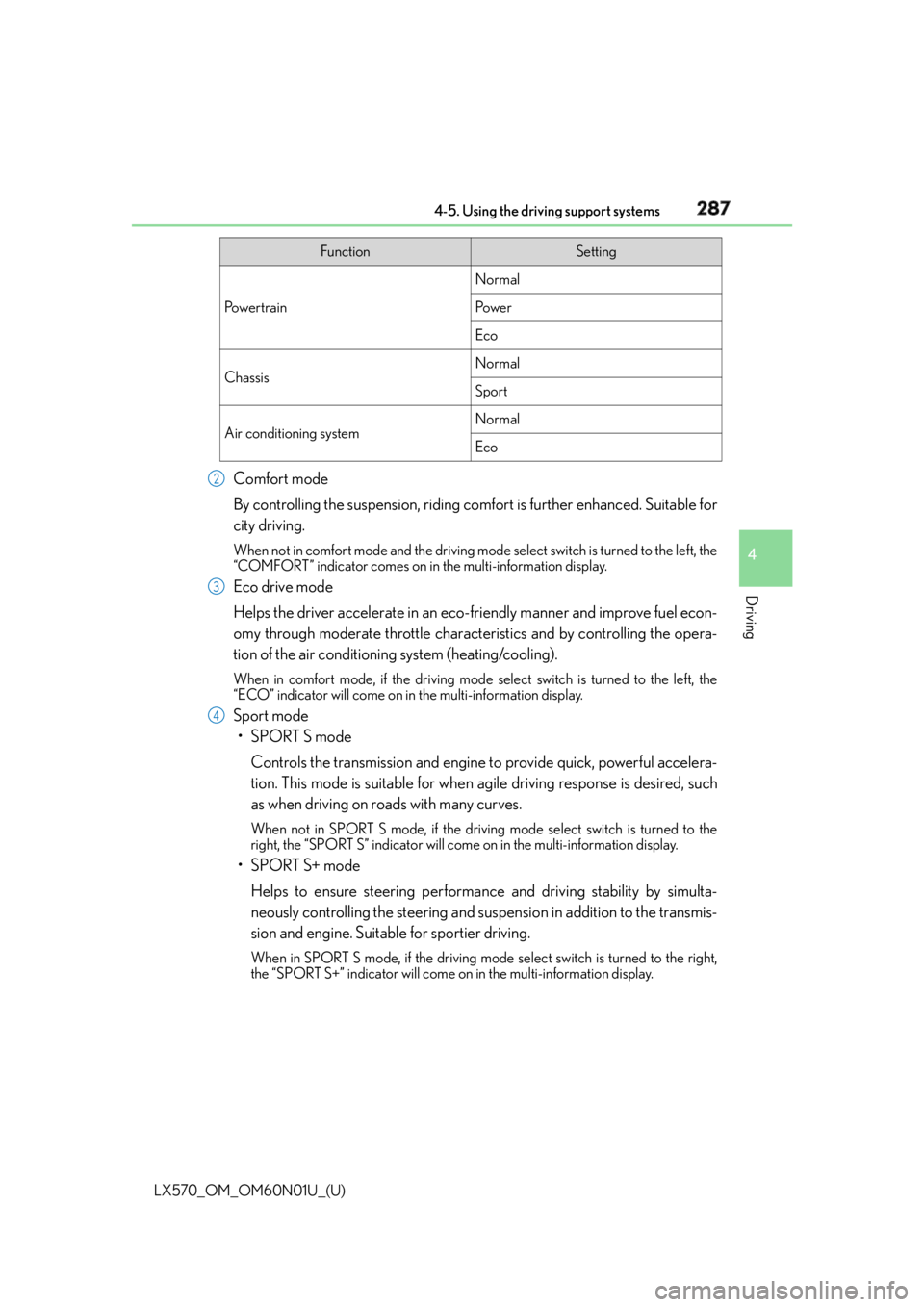
Driving Comfort mode
By controlling the suspension, riding comfort is further enhanced. Suitable for
city driving. When not in comfort mode and the driving mode select switch is turned to the left, the
“COMFORT” indicator comes on in the multi-information display.
Eco drive mode
Helps the driver accelerate in an eco- friendly manner and improve fuel econ-
omy through moderate throttle characteristics and by controlling the opera-
tion of the air conditioning system (heating/cooling). When in comfort mode, if the driving mode select switch is turned to the left, the
“ECO” indicator will come on in the multi-information display.
Sport mode
•SPORT S mode
Controls the transmission and engine to provide quick, powerful accelera-
tion. This mode is suitable for when agile driving response is desired, such
as when driving on roads with many curves. When not in SPORT S mode, if the driving mode select switch is turned to the
right, the “SPORT S” indicator will come on in the multi-information display.
•SPORT S+ mode
Helps to ensure steering performanc e and driving stability by simulta-
neously controlling the steering and suspen sion in addition to the transmis-
sion and engine. Suitable for sportier driving. When in SPORT S mode, if the driving mode select switch is turned to the right,
the “SPORT S+” indicator will come on in the multi-information display. Function Setting
Po w e r t r a i n Normal
Po w e r
Eco
Chassis Normal
Sport
Air conditioning system Normal
Eco2
3
4
Page 288 of 632

288
LX570_OM_OM60N01U_(U) 4-5. Using the driving support systems■
Operation of the air conditioning system in Eco drive mode
Eco drive mode controls the heating/cooling operations and fan speed of the air condi-
tioning system to enhance fuel efficiency. To improve air conditioning performance,
adjust the fan speed or turn off eco mo de of the air conditioning system. ( P. 4 0 1 )■
Automatic deactivation of sport mode and customized mode
If the engine switch is turned off after dr iving in sport mode or customized mode, the
drive mode will be changed to normal mode. ■
Driving mode pop-up display
When the driving mode is changed, the selected driving mode will be temporarily dis-
played on the side display. ( P. 3 9 4 )
Page 295 of 632

LX570_OM_OM60N01U_(U) 2954-5. Using the driving support systems
4
Driving ●
The shape of the obstacle may prevent a sensor from detecting it. Pay particular atten-
tion to the following obstacles:
• Wires, fences, ropes, etc.
• Cotton, snow and other materials that absorb sound waves
• Sharply-angled objects
•Low obstacles
• Tall obstacles with upper sections projecting outwards in the direction of your vehi-
cle ●
The following situations may occur during use.
• Depending on the shape of the obstacle and other factors, the detection distance
may shorten, or detect ion may be impossible.
• Obstacles may not be detected if they are too close to the sensor.
• There will be a short delay between obst acle detection and display. Even at slow
speeds, there is a possibility that the obstacle w ill come within the sensor’s detection
areas before the display is shown and the buzzer sounds.
• Thin posts or objects lower than the sensor may not be detected when approached,
even if they have been detected once.
• It might be difficult to hear beeps due to th e volume of audio system or air flow noise
of the air conditioning system.■
If “Clean Parking Assist Sensor” is di splayed on the multi-information display
A sensor may be dirty or covered with snow or ice. In such cases, if it is removed from the
sensor, the system should return to normal.
Also, due to the sensor being frozen at low temperatures, a malfunction display may
appear or an obstacle may no t be detected. If the sensor thaws out, the system should
return to normal. ■
If “Parking Assist Malfunction” is di splayed on the multi-information display
Depending on the malfunction of the sensor, the device may not be working normally.
Have the vehicle inspected by your Lexus dealer. ■
Certification for the intuitive parking assist (Canada only)
This ISM device complies with Canadian ICES-001. ■
Customization
Settings (e.g. buzzer sounds volume) can be changed.
(Customizable features: P. 585)
Page 393 of 632

393
LX570_OM_OM60N01U_(U) 5Interior features5-1. Remote Touch screen
Remote Touch/12.3-inch
display ..........................................394
5-2. Lexus Climate Concierge
Lexus Climate Concierge ..... 400
5-3. Using the air conditioning
system and defogger
Front automatic air
conditioning system ................ 401
Rear air conditioning
system ........................................... 412
Heated steering wheel/seat
heaters/seat ventilators.......... 415 5-4. Using the interior lights
Interior lights list .......................... 419
• Interior lights .......................... 420
• Personal lights .........................421
5-5. Using the storage features
List of storage features ............ 422
• Glove box ............................... 423
• Console box........................... 423
• Overhead console .............. 424
• Cup holders ........................... 425
• Bottle holders ........................ 426
• Card holder............................ 426
• Auxiliary boxes ......................427
Luggage compartment
features........................................ 429
5-6. Using the other interior
features
Other interior features ............. 431
• Cool box ................................... 431
• Sun visors ................................ 432
• Vanity mirrors ........................ 432
• Clock ........................................ 433
• Power outlets ......................... 434
• Wireless charger.................. 436
• Armrest .................................... 443
• Rear door sunshades ......... 444
• Coat hooks ............................. 444
• Assist grips.............................. 445
Garage door opener................ 446
LEXUS Enform Safety
Connect ........................................451
Page 396 of 632
396 5-1. Remote Touch screen
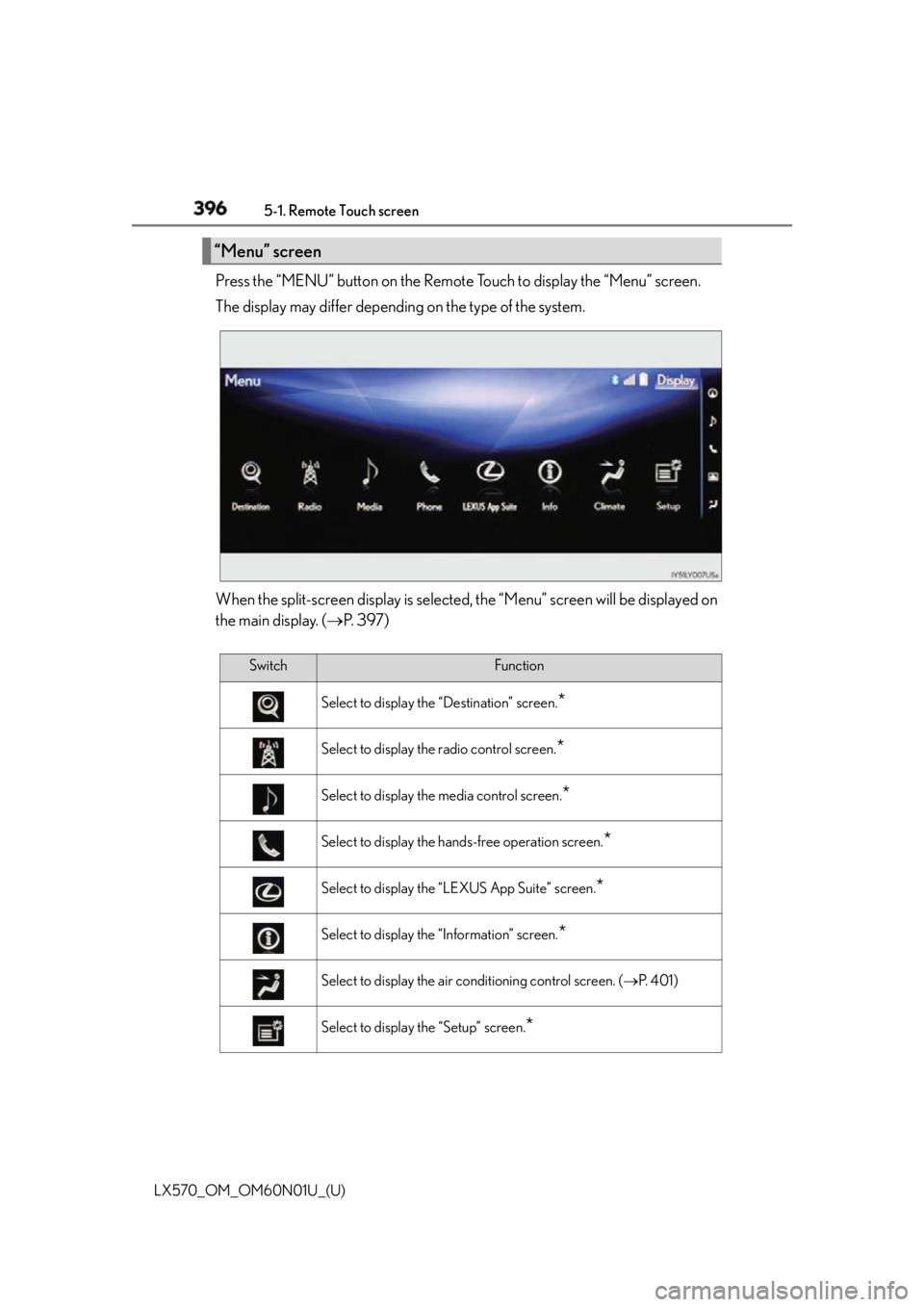
LX570_OM_OM60N01U_(U) Press the “MENU” button on the Remote Touch to display the “Menu” screen.
The display may differ depending on the type of the system.
When the split-screen display is selected , the “Menu” screen will be displayed on
the main display. ( P. 3 9 7 )“Menu” screen
Switch Function
Select to display the “Destination” screen.
*Select to display the radio control screen.
*Select to display the media control screen.
*Select to display the hands-free operation screen.
*Select to display the “LEXUS App Suite” screen.
*Select to display the “Information” screen.
*Select to display the air conditioning control screen. ( P. 4 0 1 )
Select to display the “Setup” screen.
*
Page 398 of 632
398 5-1. Remote Touch screen
LX570_OM_OM60N01U_(U) ■
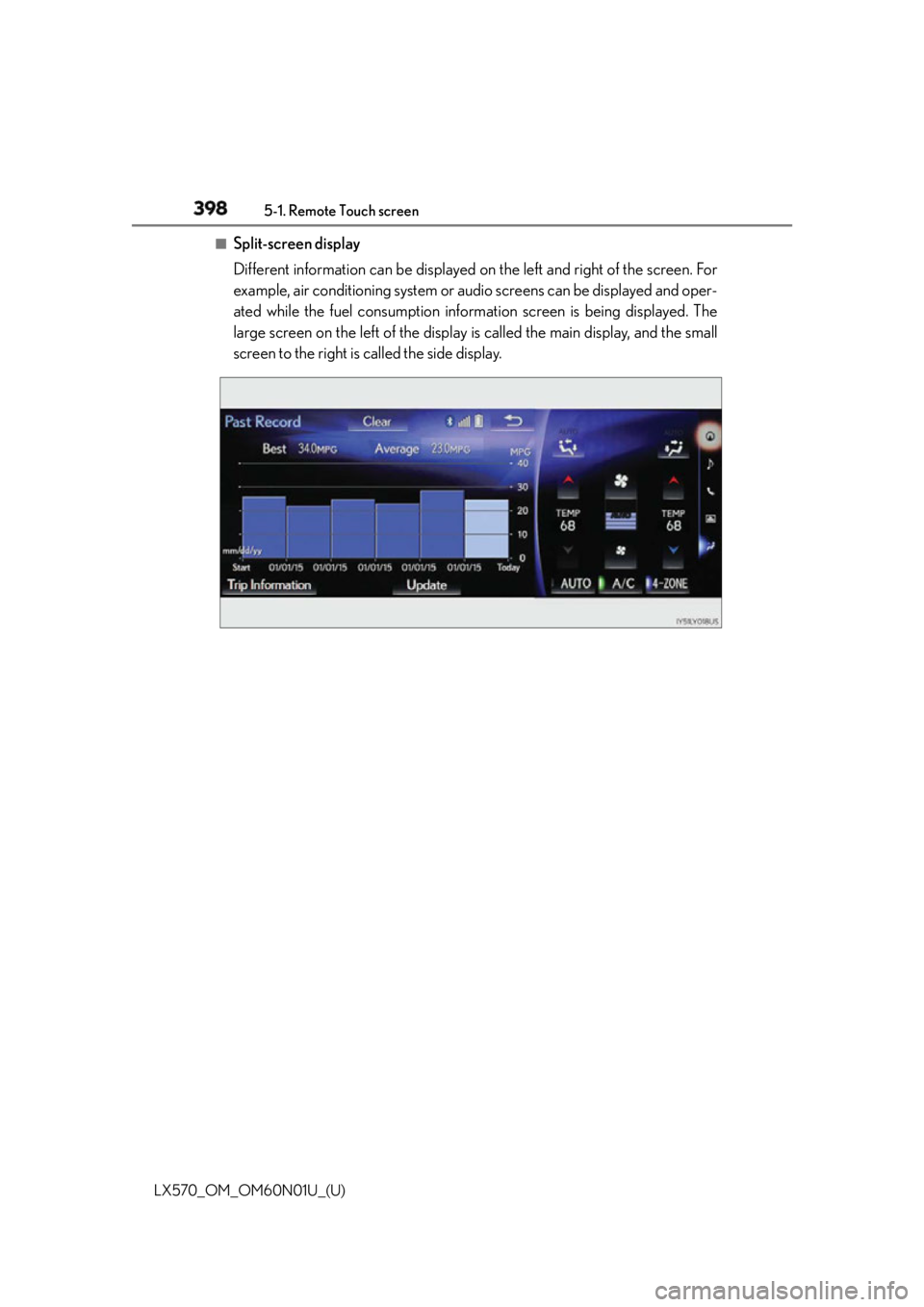
Split-screen display
Different information can be displayed on the left and right of the screen. For
example, air conditioning system or audio screens can be displayed and oper-
ated while the fuel consumption inform ation screen is being displayed. The
large screen on the left of the display is called the main display, and the small
screen to the right is called the side display.