air conditioning LEXUS LX570 2016 User Guide
[x] Cancel search | Manufacturer: LEXUS, Model Year: 2016, Model line: LX570, Model: LEXUS LX570 2016Pages: 632, PDF Size: 10.34 MB
Page 399 of 632
LX570_OM_OM60N01U_(U) 3995-1. Remote Touch screen
5
Interior features ■
Main Display
For details about the functions and operat ion of the main display, refer to the
respective section and “NAVIGATION SYSTEM OWNER’S MANUAL”. ■
Side Display
Basic screens
To change the screen displayed on the side display, use the screen buttons on
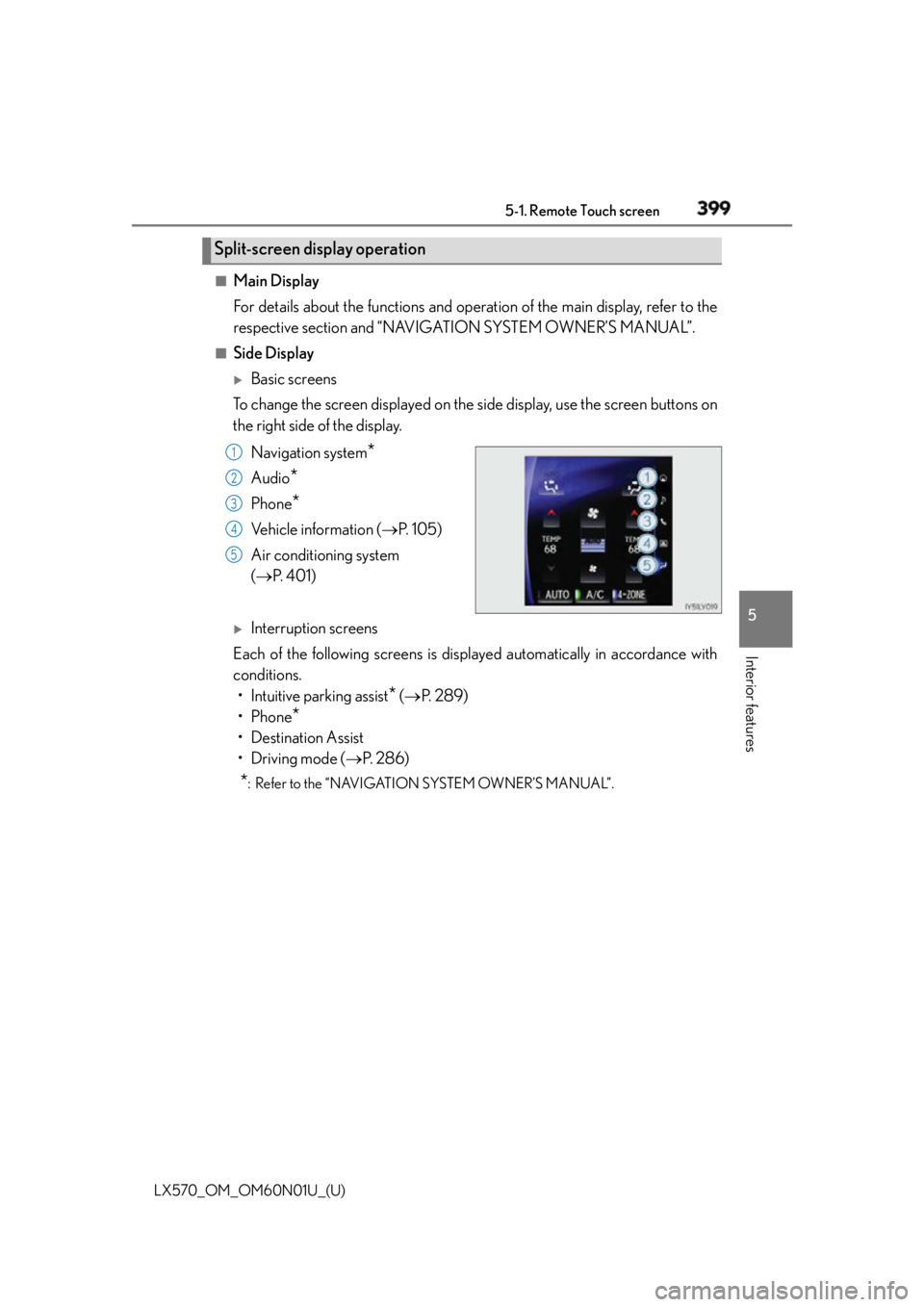
the right side of the display.
Navigation system
*Audio
* Phone
* Vehicle information ( P. 1 0 5 )
Air conditioning system
( P. 4 0 1 )
Interruption screens
Each of the following screens is displayed automatically in accordance with
conditions.
• Intuitive parking assist
* ( P. 2 8 9 )
•Phone
*• Destination Assist
•Driving mode ( P. 2 8 6 )
* : Refer to the “NAVIGATION SYSTEM OWNER’S MANUAL”.Split-screen display operation 1
2
3
4
5
Page 400 of 632
400
LX570_OM_OM60N01U_(U) 5-2. Lexus Climate Concierge
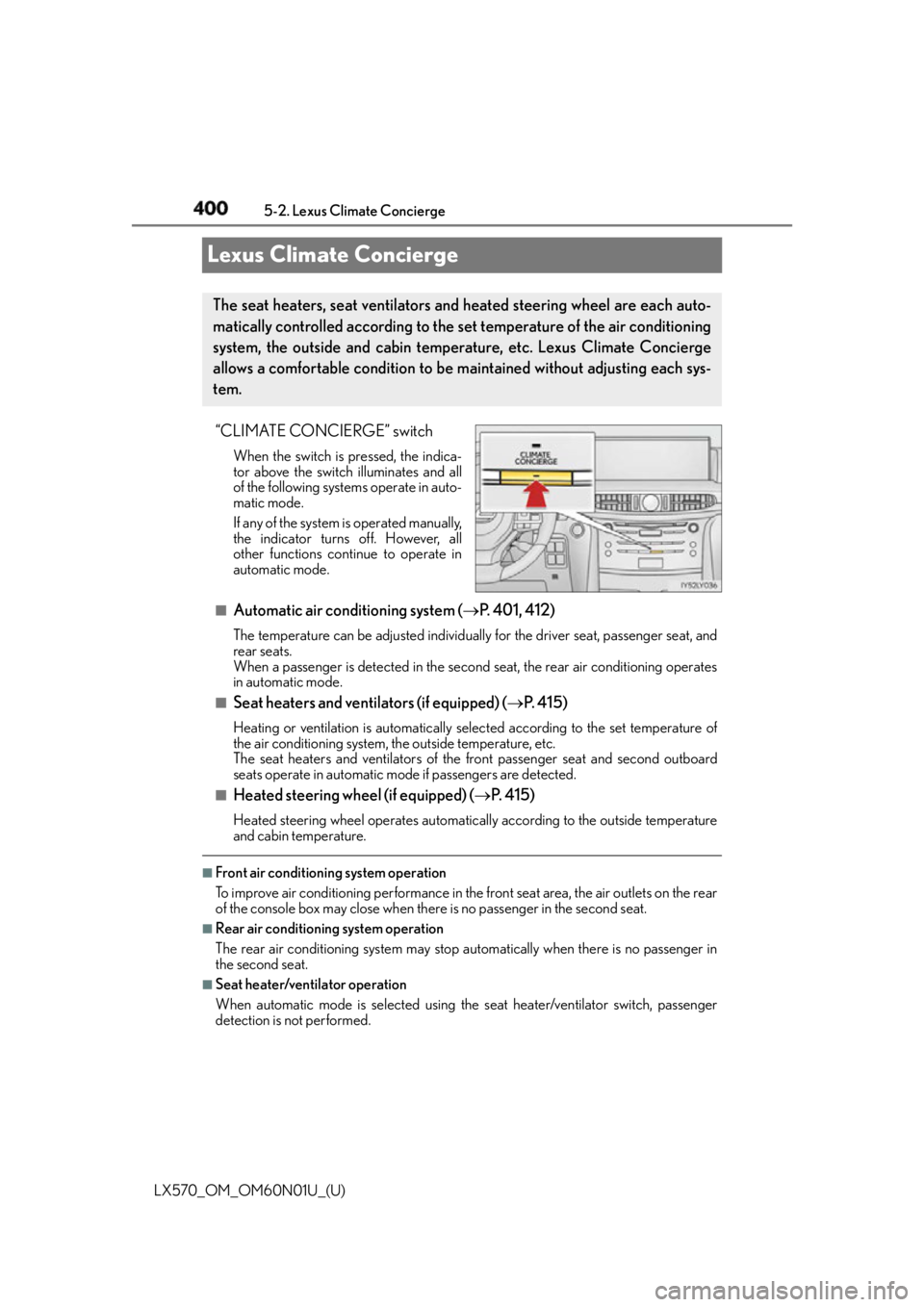
Lexus Climate Concierge “CLIMATE CONCIERGE” switch When the switch is pressed, the indica-
tor above the switch illuminates and all
of the following systems operate in auto-
matic mode.
If any of the system is operated manually,
the indicator turns off. However, all
other functions continue to operate in
automatic mode.
■
Automatic air conditioning system ( P. 4 0 1 , 4 1 2 )The temperature can be adjusted individually for the driver seat, passenger seat, and
rear seats.
When a passenger is detected in the second seat, the rear air conditioning operates
in automatic mode.■
Seat heaters and ventilators (if equipped) ( P. 4 1 5 )Heating or ventilation is automatically selected according to the set temperature of
the air conditioning system, the outside temperature, etc.
The seat heaters and ventilators of the front passenger seat and second outboard
seats operate in automatic mode if passengers are detected.■
Heated steering wheel (if equipped) ( P. 4 1 5 )Heated steering wheel operat es automatically according to the outside temperature
and cabin temperature. ■
Front air conditioning system operation
To improve air conditioning performance in the front seat area, the air outlets on the rear
of the console box may close when there is no passenger in the second seat. ■
Rear air conditioning system operation
The rear air conditioning system may stop automatically when there is no passenger in
the second seat. ■
Seat heater/ventilator operation
When automatic mode is selected using th e seat heater/ventilator switch, passenger
detection is not performed.The seat heaters, seat ventilators and heated steering wheel are each auto-
matically controlled according to the set temperature of the air conditioning
system, the outside and cabin temperature, etc. Lexus Climate Concierge
allows a comfortable condition to be maintained without adjusting each sys-
tem.
Page 401 of 632
401
LX570_OM_OM60N01U_(U) 5-3. Using the air conditio ning system and defogger
5
Interior features
Front automatic air conditioning system
■
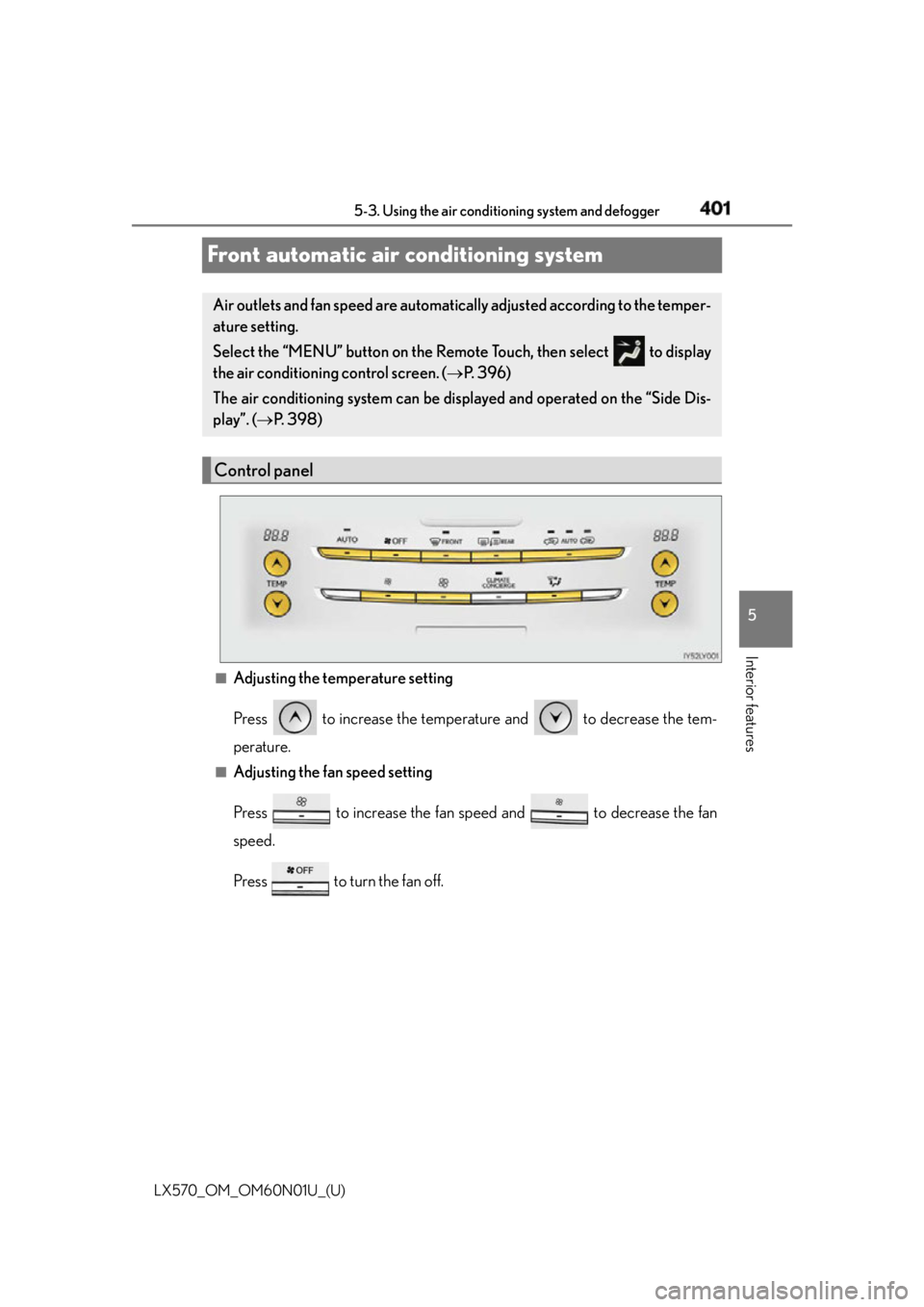
Adjusting the temperature setting
Press to increase the temperature and to decrease the tem-
perature. ■
Adjusting the fan speed setting
Press to increase the fan speed and to decrease the fan
speed.
Press to turn the fan off.Air outlets and fan speed are automatica lly adjusted according to the temper-
ature setting.
Select the “MENU” button on the Remote Touch, then select to display
the air conditioning control screen. ( P. 3 9 6 )
The air conditioning system can be disp layed and operated on the “Side Dis-
play”. ( P. 3 9 8 )
Control panel
Page 402 of 632
402 5-3. Using the air conditioning system and defogger
LX570_OM_OM60N01U_(U) ■
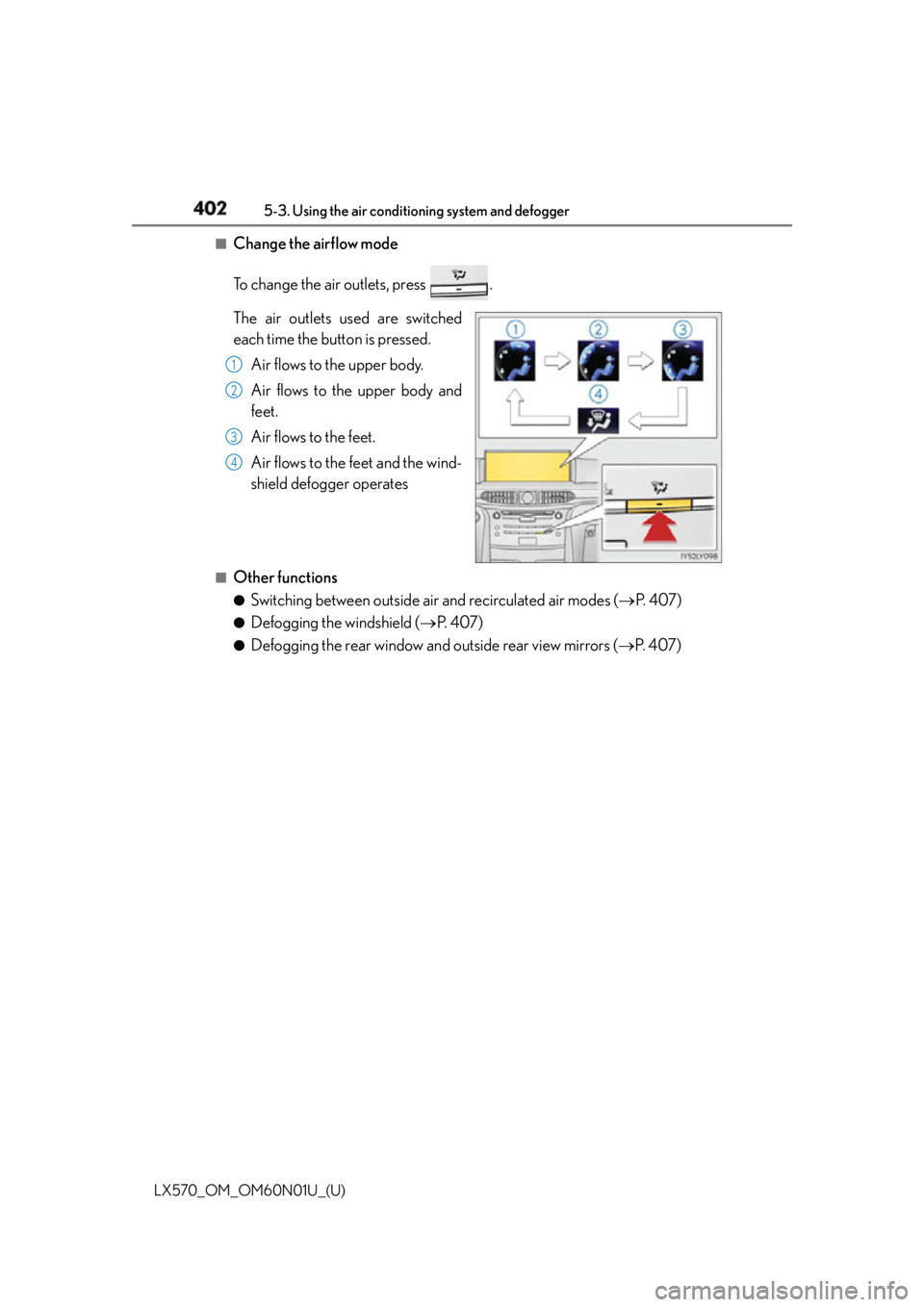
Change the airflow mode
To change the air outlets, press .
The air outlets used are switched
each time the button is pressed.
Air flows to the upper body.
Air flows to the upper body and
feet.
Air flows to the feet.
Air flows to the feet and the wind-
shield defogger operates■
Other functions ●
Switching between outside air and recirculated air modes ( P. 4 0 7 )●
Defogging the windshield ( P. 4 0 7 )●
Defogging the rear window and outside rear view mirrors ( P. 4 0 7 )1
2
3
4
Page 403 of 632
LX570_OM_OM60N01U_(U) 4035-3. Using the air conditio ning system and defogger
5
Interior features ■
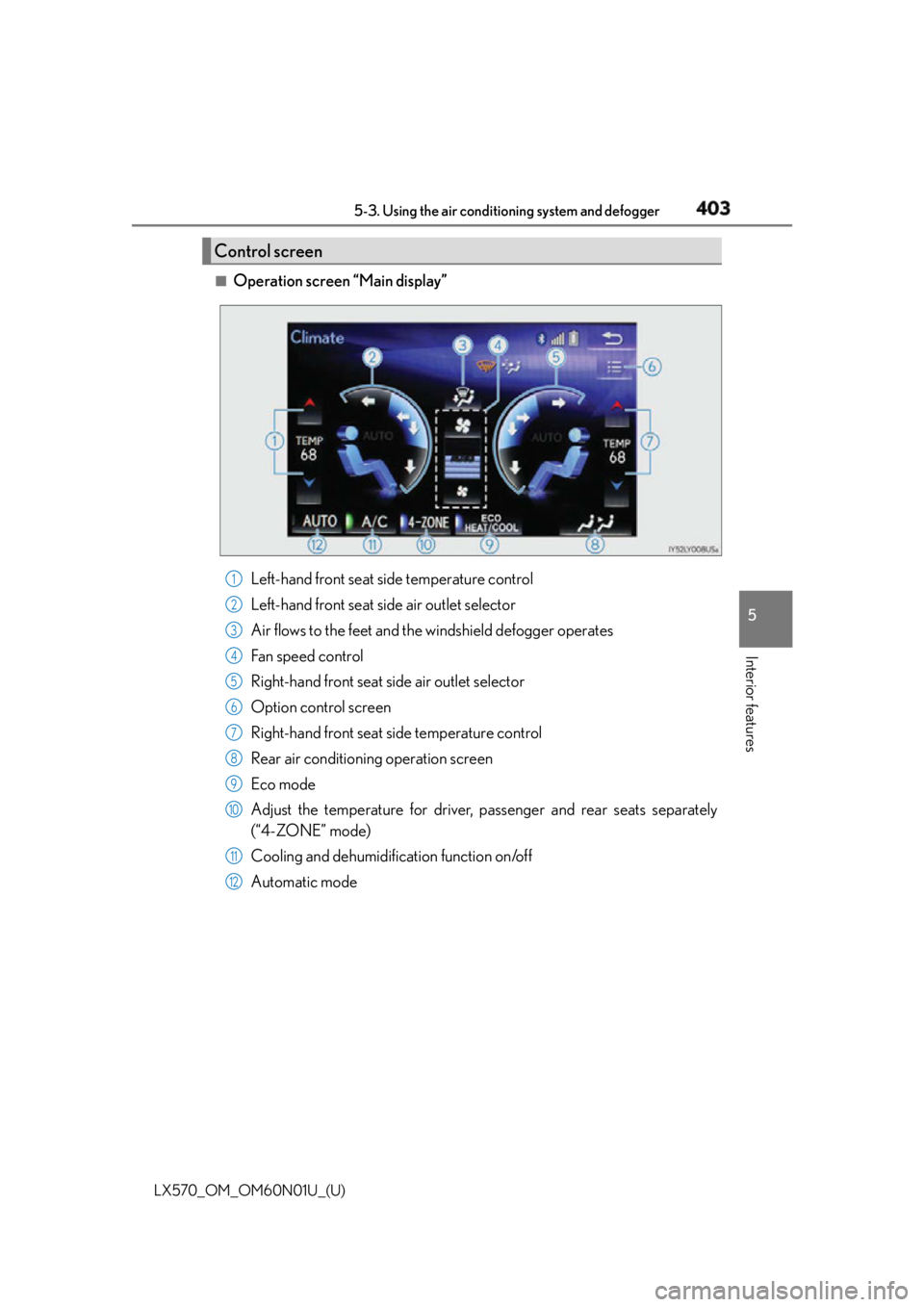
Operation screen “Main display”
Left-hand front seat side temperature control
Left-hand front seat side air outlet selector
Air flows to the feet and the windshield defogger operates
Fan speed control
Right-hand front seat side air outlet selector
Option control screen
Right-hand front seat side temperature control
Rear air conditioning operation screen
Eco mode
Adjust the temperature for driver, passenger and rear seats separately
(“4-ZONE” mode)
Cooling and dehumidification function on/off
Automatic modeControl screen
1
2
3
4
5
6
7
8
9
10
11
12
Page 404 of 632
404 5-3. Using the air conditioning system and defogger
LX570_OM_OM60N01U_(U) ■
Changing the air flow mode
To adjust settings, select the screen button.
Air flows to the upper body.
Air flows to the upper body and feet.
Air flows to the feet.
Air flows to the feet and the windshield defogger operates.■
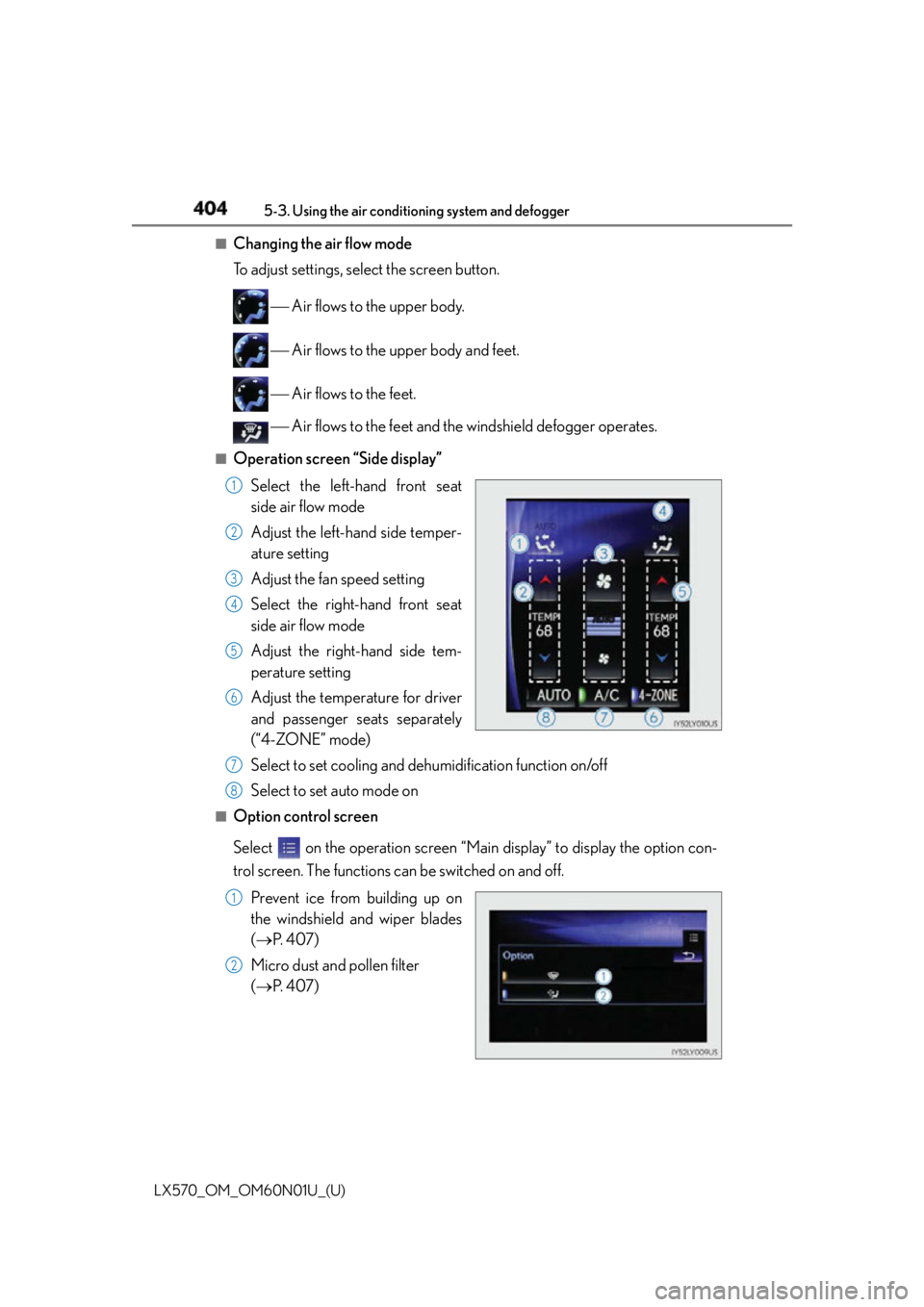
Operation screen “Side display”
Select the left-hand front seat
side air flow mode
Adjust the left-hand side temper-
ature setting
Adjust the fan speed setting
Select the right-hand front seat
side air flow mode
Adjust the right-hand side tem-
perature setting
Adjust the temperature for driver
and passenger seats separately
(“4-ZONE” mode)
Select to set cooling and dehu midification function on/off
Select to set auto mode on■
Option control screen
Select on the operation screen “Mai n display” to display the option con-
trol screen. The functions can be switched on and off.
Prevent ice from building up on
the windshield and wiper blades
( P. 4 0 7 )
Micro dust and pollen filter
( P. 4 0 7 ) 1
2
3
4
5
6
7
8
1
2
Page 405 of 632
LX570_OM_OM60N01U_(U) 4055-3. Using the air conditio ning system and defogger
5
Interior features ■
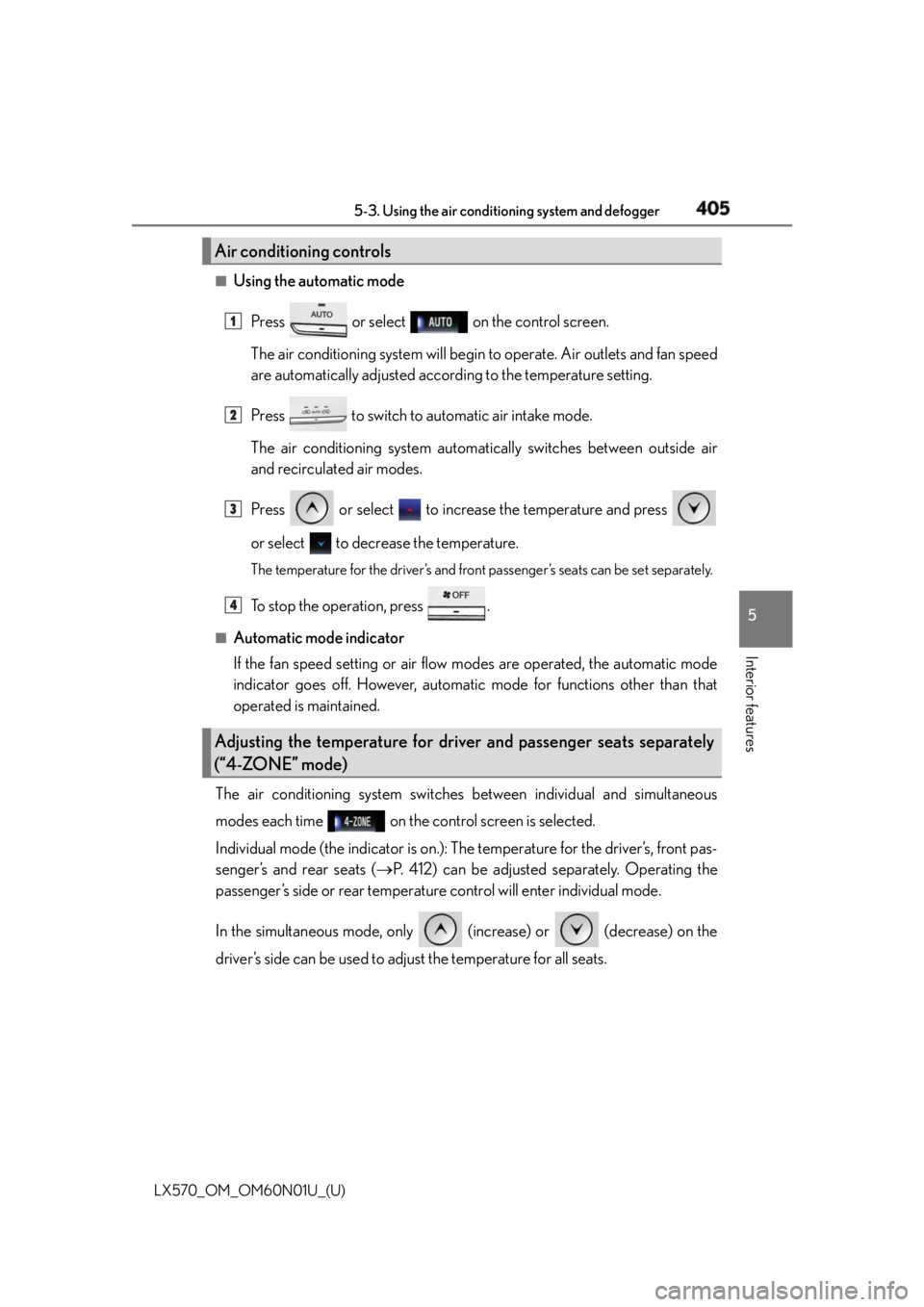
Using the automatic mode
Press or select on the control screen.
The air conditioning system will begin to operate. Air outlets and fan speed
are automatically adjusted according to the temperature setting.
Press to switch to automatic air intake mode.
The air conditioning system automati cally switches between outside air
and recirculated air modes.
Press or select to increase the temperature and press
or select to decrease the temperature. The temperature for the driver’s and front passenger’s seats can be set separately.
To stop the operation, press .■
Automatic mode indicator
If the fan speed setting or air flow modes are operated, the automatic mode
indicator goes off. However, automati c mode for functions other than that
operated is maintained.
The air conditioning system switches between individual and simultaneous
modes each time on the control screen is selected.
Individual mode (the indicator is on.): The temperature for the driver’s, front pas-
senger’s and rear seats ( P. 412) can be adjusted separately. Operating the
passenger’s side or rear temperatur e control will enter individual mode.
In the simultaneous mode, only (increase) or (decrease) on the
driver’s side can be used to ad just the temperature for all seats.Air conditioning controls
Adjusting the temperature for driver and passenger seats separately
(“4-ZONE” mode) 1
2
3
4
Page 406 of 632
406 5-3. Using the air conditioning system and defogger
LX570_OM_OM60N01U_(U) ■
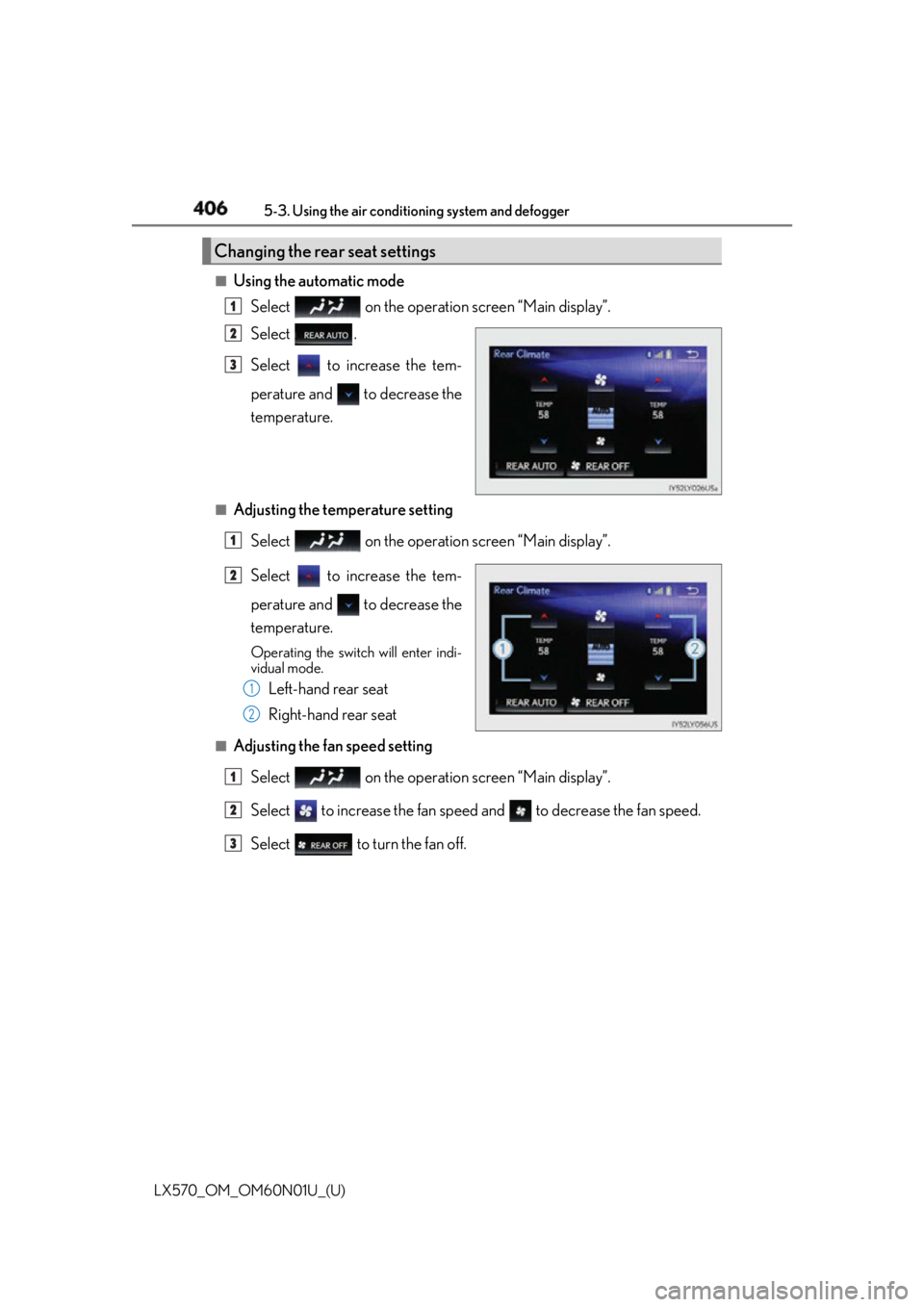
Using the automatic mode
Select on the operation screen “Main display”.
Select .
Select to increase the tem-
perature and to decrease the
temperature.■
Adjusting the temperature setting
Select on the operation screen “Main display”.
Select to increase the tem-
perature and to decrease the
temperature. Operating the switch will enter indi-
vidual mode.
Left-hand rear seat
Right-hand rear seat■
Adjusting the fan speed setting
Select on the operation screen “Main display”.
Select to increase the fan speed and to decrease the fan speed.
Select to turn the fan off.Changing the rear seat settings 1
2
3
1
2
1
2
1
2
3
Page 408 of 632
408 5-3. Using the air conditioning system and defogger
LX570_OM_OM60N01U_(U) ■
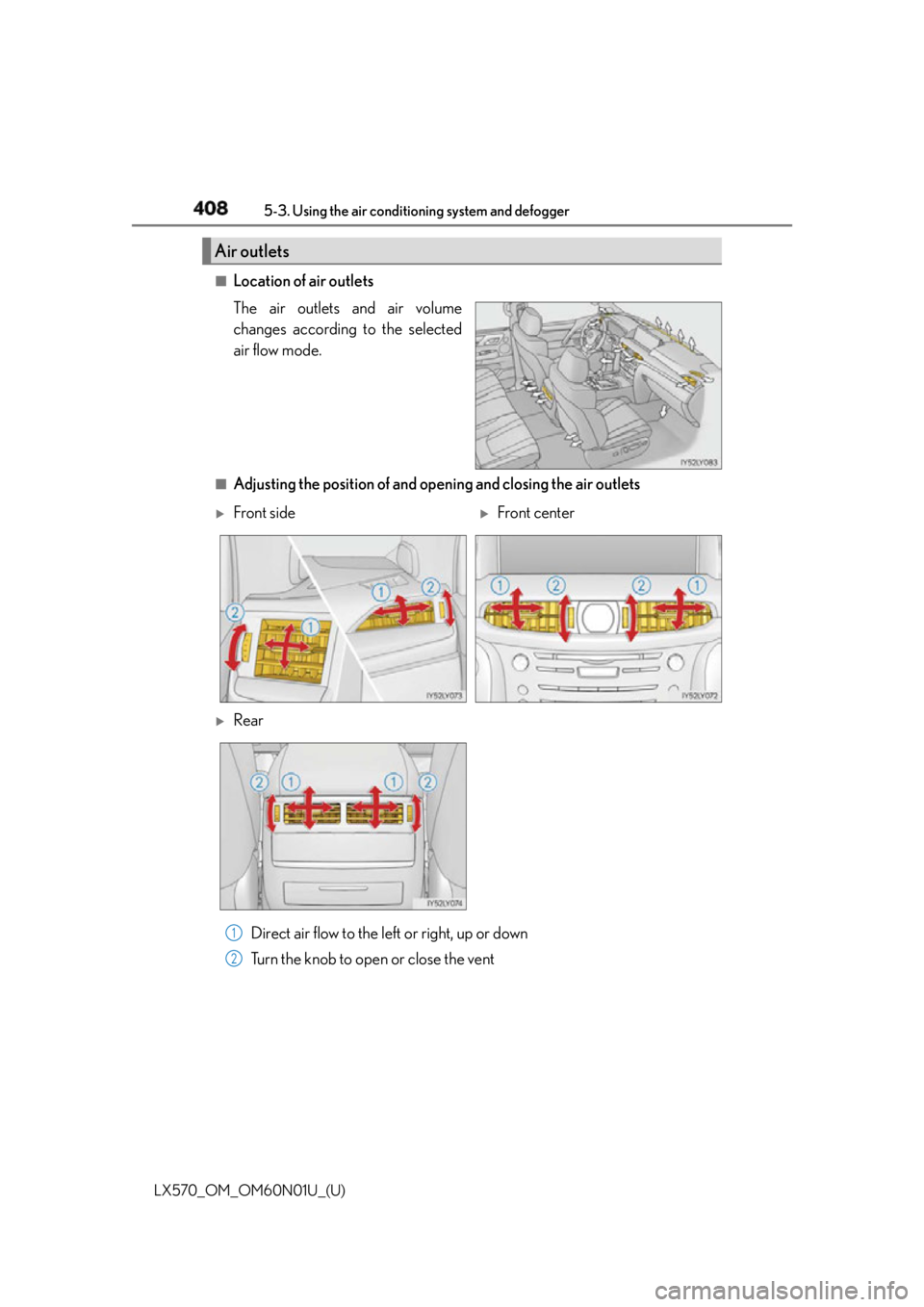
Location of air outlets
The air outlets and air volume
changes according to the selected
air flow mode.
■
Adjusting the position of and opening and closing the air outlets
Direct air flow to the left or right, up or down
Turn the knob to open or close the ventAir outlets
Front side
Front center
Rear
1
2
Page 409 of 632
LX570_OM_OM60N01U_(U) 4095-3. Using the air conditio ning system and defogger
5
Interior features ■
Using automatic mode
Fan speed is adjusted automatically accordin g to the temperature setting and the ambi-
ent conditions.
Therefore, the fan may stop for a while until warm or cool air is ready to flow immediately
after the is pressed or on the control screen is selected.■
Operation of the air conditioning system in Eco drive mode ●
In the Eco drive mode, the air conditioning sy stem is controlled as follows to prioritize
fuel efficiency
• Engine speed and compressor operation controlled to restrict heating/cooling
capacity
• Fan speed restricted when automatic mode is selected ●
To improve air conditioning performa nce, perform the following operations
• Adjust the fan speed
• Turn off Eco mode ■
Using the voice command system
Air conditioning system can be operated usin g voice commands. For details, refer to the
“NAVIGATION SYSTEM OWNER’S MANUAL”. ■
Fogging up of the windows ●
The windows will easily fog up when the humidity in the vehicle is high. Selecting
will dehumidify the air from the outlet s and defog the windshield effectively. ●
If you turn off, the windows may fog up more easily. ●
The windows may fog up if the recirculated air mode is used. ■
Outside/recirculated air mode ●
When driving on dusty roads such as tunnels or in heavy traffic, set the outside/recircu-
lated air mode button to the recirculated ai r mode. This is effective in preventing out-
side air from entering the vehicle interi or. During cooling operation, setting the
recirculated air mode will also cool the vehicle interior effectively. ●
Outside/recirculated air mode may automa tically switch depending on the tempera-
ture setting or the inside temperature. ■
When the outside temperature exceeds 75 F (24 C) and the air conditioning system
is on ●
In order to reduce the air conditioning po wer consumption, the ai r conditioning system
may switch to recirculated air mode automatically.
This may also reduce fuel consumption. ●
Recirculated air mode is selected as a defaul t mode when the engine switch is turned to
IGNITION ON mode. ●
It is possible to switch to outside air mode at any time by pressing .■
Automatic mode for air intake control
In automatic mode, the system detects exhaust gas and other pollutants and automati-
cally switches between outside air and recirculated air modes.
When the dehumidification function is off, and the fan is operating, turning automatic
mode on will activate the dehumidification function.