air condition LEXUS LX570 2016 User Guide
[x] Cancel search | Manufacturer: LEXUS, Model Year: 2016, Model line: LX570, Model: LEXUS LX570 2016Pages: 632, PDF Size: 8.94 MB
Page 287 of 632
LX570_OM_OM60N01U_(U)
2874-5. Using the driving support systems
4
Driving
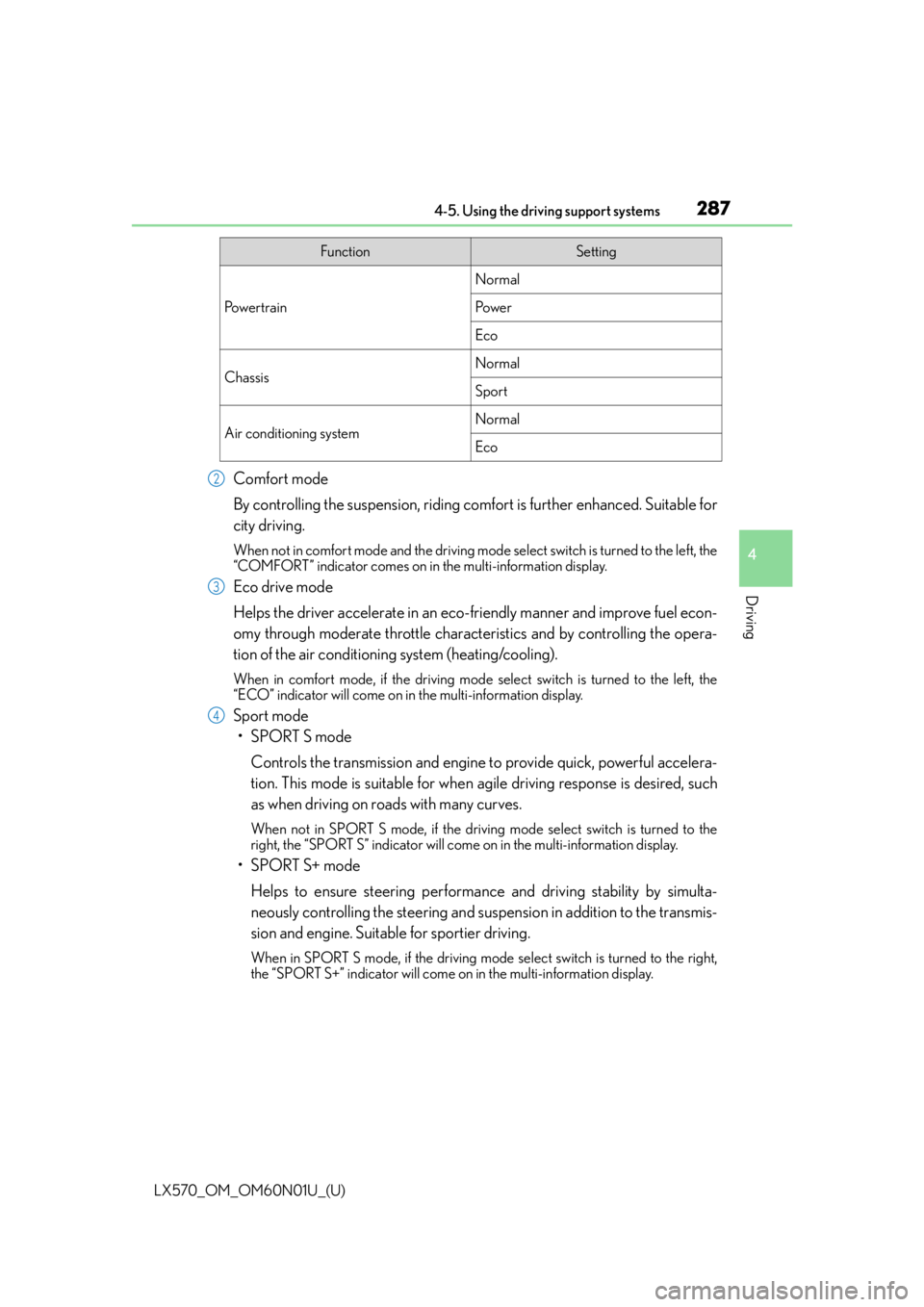
Comfort mode
By controlling the suspension, riding comfort is further enhanced. Suitable for
city driving.
When not in comfort mode and the driving mode select switch is turned to the left, the
“COMFORT” indicator comes on in the multi-information display.
Eco drive mode
Helps the driver accelerate in an eco- friendly manner and improve fuel econ-
omy through moderate throttle characteristics and by controlling the opera-
tion of the air conditioning system (heating/cooling).
When in comfort mode, if the driving mode select switch is turned to the left, the
“ECO” indicator will come on in the multi-information display.
Sport mode
•SPORT S mode
Controls the transmission and engine to provide quick, powerful accelera-
tion. This mode is suitable for when agile driving response is desired, such
as when driving on roads with many curves.
When not in SPORT S mode, if the driving mode select switch is turned to the
right, the “SPORT S” indicator will come on in the multi-information display.
•SPORT S+ mode
Helps to ensure steering performanc e and driving stability by simulta-
neously controlling the steering and suspen sion in addition to the transmis-
sion and engine. Suitable for sportier driving.
When in SPORT S mode, if the driving mode select switch is turned to the right,
the “SPORT S+” indicator will come on in the multi-information display.
FunctionSetting
Po w e r t r a i n
Normal
Po w e r
Eco
ChassisNormal
Sport
Air conditioning systemNormal
Eco
2
3
4
Page 288 of 632

288
LX570_OM_OM60N01U_(U)4-5. Using the driving support systems
■Operation of the air conditioning system in Eco drive mode
Eco drive mode controls the heating/cooling
operations and fan speed of the air condi-
tioning system to enhance fuel efficiency. To improve air conditioning performance,
adjust the fan speed or turn off eco mo de of the air conditioning system. (P. 4 0 1 )
■Automatic deactivation of sport mode and customized mode
If the engine switch is turned off after dr iving in sport mode or customized mode, the
drive mode will be changed to normal mode.
■Driving mode pop-up display
When the driving mode is changed, the selected driving mode will be temporarily dis-
played on the side display. ( P. 3 9 4 )
Page 294 of 632

294
LX570_OM_OM60N01U_(U)4-5. Using the driving support systems
■The intuitive parking assist can be operated when
●Front corner sensors:
• The engine switch is in IGNITION ON mode.
• The shift lever is in a position other than P.
• The vehicle speed is less than approximately 6 mph (10 km/h).
(At any speed when the shift lever is in R)
●Front center sensors:
• The engine switch is in IGNITION ON mode.
• The shift lever is in a position other than P or R.
• The vehicle speed is less than about 6 mph (10 km/h).
●Rear corner and rear center sensors:
• The engine switch is in IGNITION ON mode.
• The shift lever is in R.
■Intuitive parking assist display
When an obstacle is detected while the re ar view monitor system, Lexus parking assist
monitor or Multi-terrain Monitor is in use, the warning indicator will appear in the upper
corner of the screen even if the display setting has been set to off.
■Sensor detectio n information
●The sensor’s detection areas are limited to the areas around the vehicle’s bumper.
●Certain vehicle conditions and the surround ing environment may affect the ability of a
sensor to correctly detect an obstacle. Particular instances where this may occur are
listed below.
• There is dirt, snow or ice on the sensor . (Wiping the sensors will resolve this prob-
lem.)
• The sensor is frozen. (Thawing th e area will resolve this problem.)
In especially cold weather, if a sensor is frozen the screen may show an abnormal
display, or obstacles may not be detected.
• The sensor is covered in any way.
• The vehicle is leaning co nsiderably to one side.
• On an extremely bumpy road, on an incline, on gravel, or on grass.
• The vicinity of the vehicle is noisy due to vehicle horns, motorcycle engines, air brakes of large vehicles, or other loud noises producing ultrasonic waves.
• There is another vehicle equipped with parking assist sensors in the vicinity.
• The sensor is coated with a sheet of spray or heavy rain.
• The vehicle is equipped with a fender pole or wireless antenna.
• The bumper or sensor receives a strong impact.
• The vehicle is approaching a tall or curved curb.
• In harsh sunlight or intense cold weather.
• The area directly under the bumpers is not detected.
• If obstacles draw too close to the sensor.
• A non-genuine Lexus suspension (low ered suspension etc.) is installed.
• People may not be detected if they are wearing certain types of clothing.
In addition to the examples above, there are instances in which, because of their shape,
signs and other objects may be judged by a sensor to be closer than they are.
Page 295 of 632

LX570_OM_OM60N01U_(U)
2954-5. Using the driving support systems
4
Driving
●The shape of the obstacle may prevent a sensor from detecting it. Pay particular atten-
tion to the following obstacles:
• Wires, fences, ropes, etc.
• Cotton, snow and other materials that absorb sound waves
• Sharply-angled objects
•Low obstacles
• Tall obstacles with upper sections projecting outwards in the direction of your vehi-
cle
●The following situations may occur during use.
• Depending on the shape of the obstacle and other factors, the detection distance may shorten, or detect ion may be impossible.
• Obstacles may not be detected if they are too close to the sensor.
• There will be a short delay between obst acle detection and display. Even at slow
speeds, there is a possibility that the obstacle will come within the sensor’s detection
areas before the display is shown and the buzzer sounds.
• Thin posts or objects lower than the sensor may not be detected when approached, even if they have been detected once.
• It might be difficult to hear beeps due to th e volume of audio system or air flow noise
of the air conditioning system.
■If “Clean Parking Assist Sensor” is di splayed on the multi-information display
A sensor may be dirty or covered with snow or ice. In such cases, if it is removed from the
sensor, the system should return to normal.
Also, due to the sensor being frozen at low temperatures, a malfunction display may
appear or an obstacle may no t be detected. If the sensor thaws out, the system should
return to normal.
■If “Parking Assist Malfunction” is di splayed on the multi-information display
Depending on the malfunction of the sensor, the device may not be working normally.
Have the vehicle inspected by your Lexus dealer.
■Certification for the intuitive parking assist (Canada only)
This ISM device complies with Canadian ICES-001.
■Customization
Settings (e.g. buzzer sounds volume) can be changed.
(Customizable features: P. 585)
Page 384 of 632

384
LX570_OM_OM60N01U_(U)4-6. Driving tips
Winter driving tips
●Use fluids that are appropriate to the prevailing outside temperatures.
•Engine oil
• Engine coolant
• Washer fluid
●Have a service technician inspect the condition of the battery.
●Have the vehicle fitted with four snow tires or purchase a set of tire chains for
the rear tires.
*
Ensure that all tires are the same size and br and, and that chains match the size of the
tires.
*: Tire chains cannot be mounted on vehicles with 21-inch tires
Perform the following according to the driving conditions:
●Do not try to forcibly open a window or move a wiper that is frozen. Pour
warm water over the frozen area to melt the ice. Wipe away the water imme-
diately to prevent it from freezing.
●To ensure proper operation of the climate control system fan, remove any
snow that has accumulated on the air in let vents in front of the windshield.
●Check for and remove any excess ice or snow that may have accumulated on
the exterior lights, vehicle’s roof, chassis, around the tires or on the brakes.
●Remove any snow or mud from the bottom of your shoes before getting in the
vehicle.
Carry out the necessary preparations and inspections before driving the vehi-
cle in winter. Always drive the vehicle in a manner appropriate to the prevail-
ing weather conditions.
Pre-winter preparations
Before driving the vehicle
Page 393 of 632

393
LX570_OM_OM60N01U_(U)
5Interior features
5-1. Remote Touch screenRemote Touch/12.3-inch display ..........................................394
5-2. Lexus Climate Concierge Lexus Climate Concierge ..... 400
5-3. Using the air conditioning system and defogger
Front automatic air conditioning system ................ 401
Rear air conditioning system ........................................... 412
Heated steering wheel/seat heaters/seat ventilators.......... 415 5-4. Using the interior lights
Interior lights list .......................... 419• Interior lights .......................... 420
• Personal lights .........................421
5-5. Using the storage features List of storage features ............ 422• Glove box ............................... 423
• Console box........................... 423
• Overhead console .............. 424
• Cup holders ........................... 425
• Bottle holders ........................ 426
• Card holder............................ 426
• Auxiliary boxes ......................427
Luggage compartment features........................................ 429
5-6. Using the other interior features
Other interior features ............. 431 • Cool box ................................... 431
• Sun visors ................................ 432
• Vanity mirrors ........................ 432
• Clock ........................................ 433
• Power outlets ......................... 434
• Wireless charger.................. 436
• Armrest .................................... 443
• Rear door sunshades ......... 444
• Coat hooks ............................. 444
• Assist grips.............................. 445
Garage door opener................ 446
LEXUS Enform Safety Connect ........................................451
Page 396 of 632
3965-1. Remote Touch screen
LX570_OM_OM60N01U_(U)
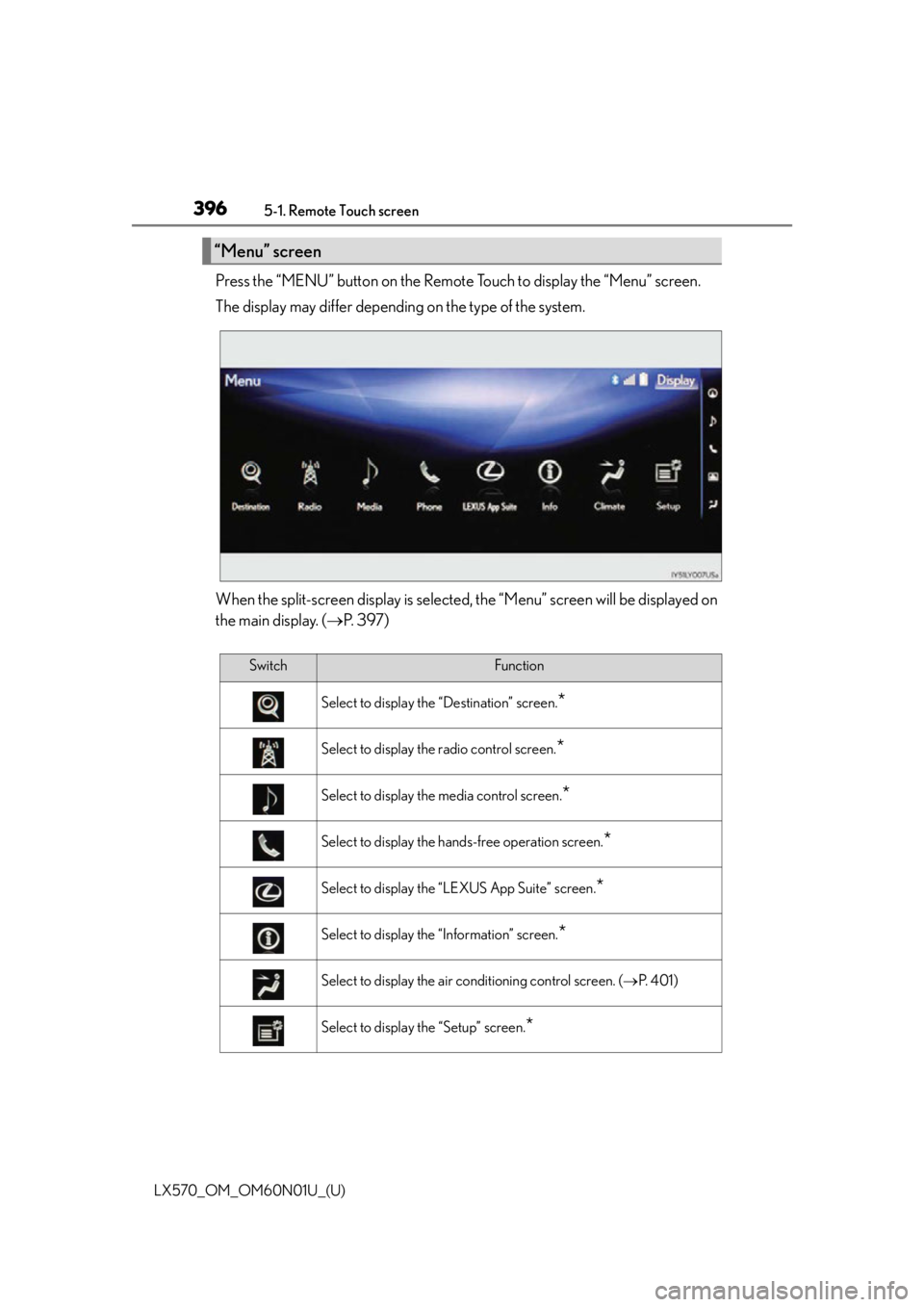
Press the “MENU” button on the Remote Touch to display the “Menu” screen.
The display may differ depending on the type of the system.
When the split-screen display is selected , the “Menu” screen will be displayed on
the main display. ( P. 3 9 7 )
“Menu” screen
SwitchFunction
Select to display the “Destination” screen.*
Select to display the radio control screen.*
Select to display the media control screen.*
Select to display the hands-free operation screen.*
Select to display the “LEXUS App Suite” screen.*
Select to display the “Information” screen.*
Select to display the air conditioning control screen. ( P. 4 0 1 )
Select to display the “Setup” screen.*
Page 398 of 632
3985-1. Remote Touch screen
LX570_OM_OM60N01U_(U)
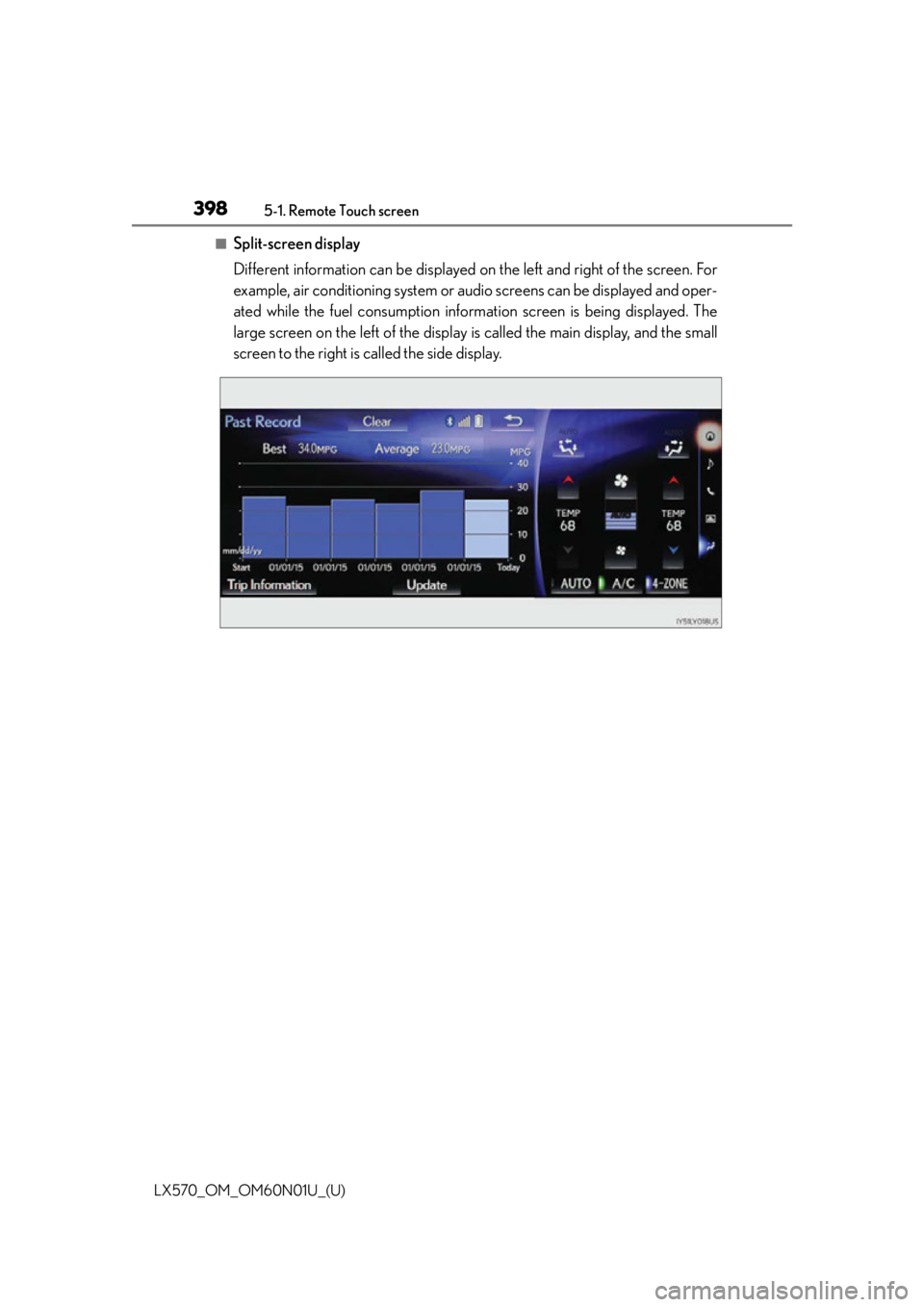
■Split-screen display
Different information can be displayed on the left and right of the screen. For
example, air conditioning system or audio screens can be displayed and oper-
ated while the fuel consumption inform ation screen is being displayed. The
large screen on the left of the display is called the main display, and the small
screen to the right is called the side display.
Page 399 of 632
LX570_OM_OM60N01U_(U)
3995-1. Remote Touch screen
5
Interior features
■Main Display
For details about the functions and operation of the main display, refer to the
respective section and “NAVIGATION SYSTEM OWNER’S MANUAL”.
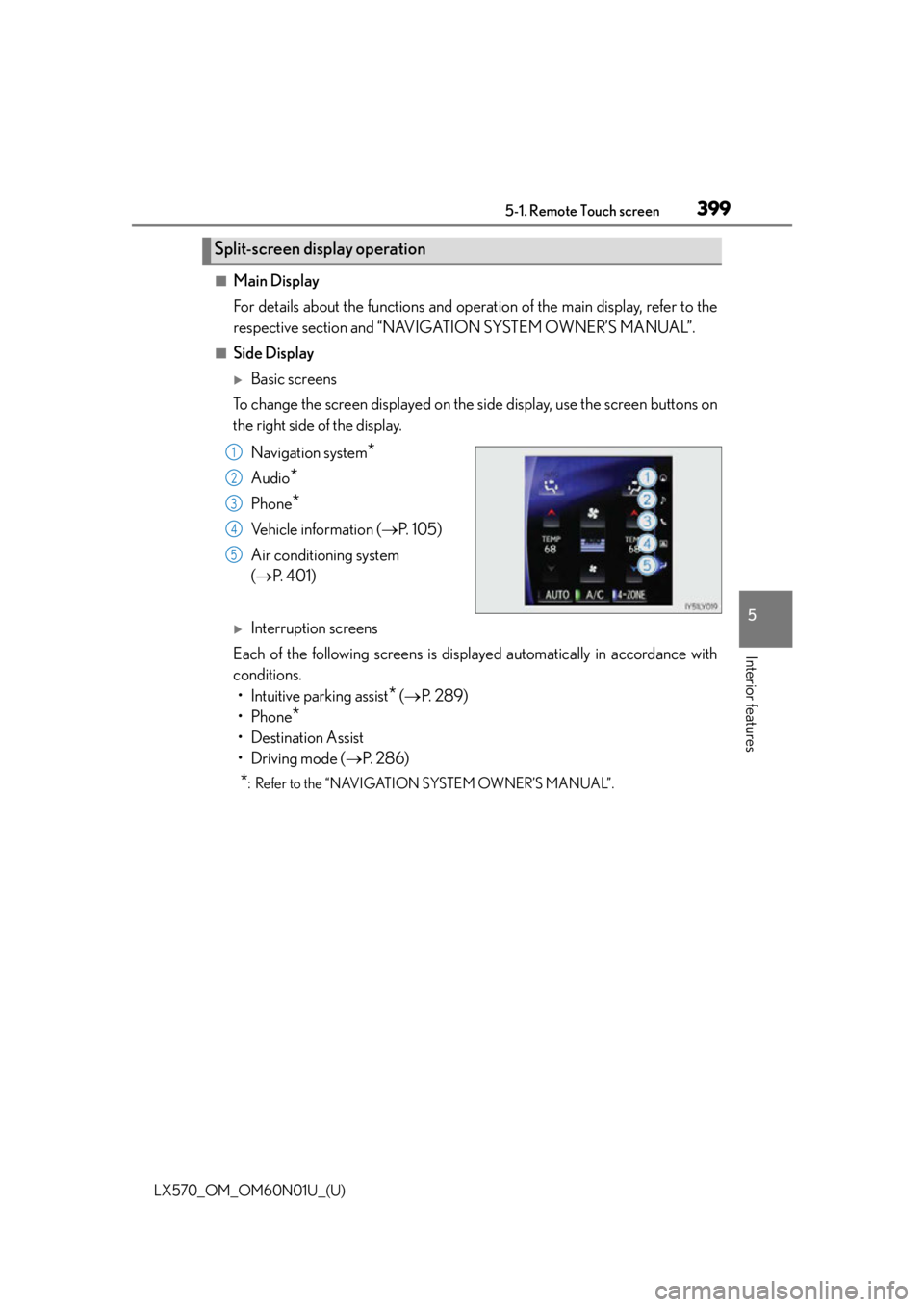
■Side Display
Basic screens
To change the screen displayed on the side display, use the screen buttons on
the right side of the display.
Navigation system
*
Audio*
Phone*
Vehicle information ( P. 1 0 5 )
Air conditioning system
( P. 4 0 1 )
Interruption screens
Each of the following screens is displayed automatically in accordance with
conditions. • Intuitive parking assist
* ( P. 2 8 9 )
•Phone
*
• Destination Assist
•Driving mode ( P. 2 8 6 )
*: Refer to the “NAVIGATION SYSTEM OWNER’S MANUAL”.
Split-screen display operation
1
2
3
4
5
Page 400 of 632
400
LX570_OM_OM60N01U_(U)5-2. Lexus Climate Concierge
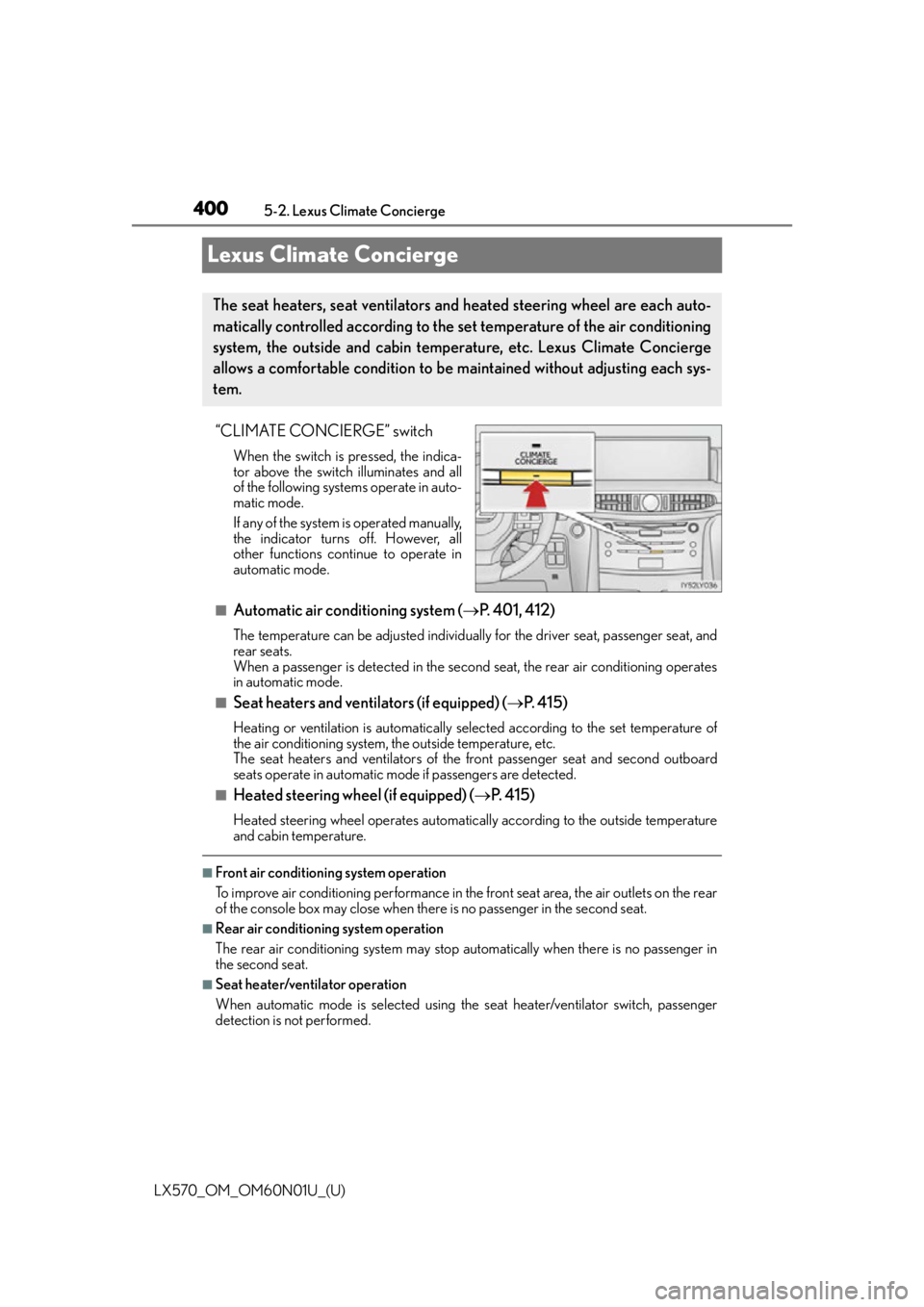
Lexus Climate Concierge
“CLIMATE CONCIERGE” switch
When the switch is pressed, the indica-
tor above the switch illuminates and all
of the following systems operate in auto-
matic mode.
If any of the system
is operated manually,
the indicator turns off. However, all
other functions continue to operate in
automatic mode.
■Automatic air conditioning system ( P. 4 0 1 , 4 1 2 )
The temperature can be adjusted individually for the driver seat, passenger seat, and
rear seats.
When a passenger is detected in the second seat, the rear air conditioning operates
in automatic mode.
■Seat heaters and ventilators (if equipped) ( P. 4 1 5 )
Heating or ventilation is automatically selected according to the set temperature of
the air conditioning system, the outside temperature, etc.
The seat heaters and ventilators of the front passenger seat and second outboard
seats operate in automatic mode if passengers are detected.
■Heated steering wheel (if equipped) ( P. 4 1 5 )
Heated steering wheel operat es automatically according to the outside temperature
and cabin temperature.
■Front air conditioning system operation
To improve air conditioning performance in the front seat area, the air outlets on the rear
of the console box may close when there is no passenger in the second seat.
■Rear air conditioning system operation
The rear air conditioning system may stop automatically when there is no passenger in
the second seat.
■Seat heater/ventilator operation
When automatic mode is selected using th e seat heater/ventilator switch, passenger
detection is not performed.
The seat heaters, seat ventilators and heated steering wheel are each auto-
matically controlled according to the set temperature of the air conditioning
system, the outside and cabin temperature, etc. Lexus Climate Concierge
allows a comfortable condition to be maintained without adjusting each sys-
tem.