lock LEXUS LX570 2016 Owner's Manual
[x] Cancel search | Manufacturer: LEXUS, Model Year: 2016, Model line: LX570, Model: LEXUS LX570 2016Pages: 632, PDF Size: 8.94 MB
Page 74 of 632
741-1. For safe use
LX570_OM_OM60N01U_(U)
WA R N I N G
■When installing a child restraint system
●When a booster seat is installed, always ensure that the shoulder belt is positioned
across the center of the child’s shoulder. The belt should be kept away from the child’s
neck, but not so that it could fall off the ch ild’s shoulder. Failing to do so may result in
death or serious injury in the event of sudden braking, sudden swerving or an acci-
dent.
●Ensure that the belt and plate are securely locked and the seat belt is not twisted.
●Shake the child restraint system left and right, and forward and backward to ensure
that it has been securely installed.
●After securing a child restraint system, never adjust the seat.
●Follow all installation instructions provided by the child restraint system manufacturer.
●When securing some types of child restraint systems in second or third row seats, it
may not be possible to properly use the se at belts in positions next to the child
restraint without interfering with it or affecting seat belt effectiveness. Be sure your
seat belt fits snugly across your shoulder and low on your hips. If it does not, or if it
interferes with the child restraint, move to a different position. Failure to do so may
result in death or serious injury.
■Do not use a seat belt extender
If a seat belt extender is used when instal ling a child restraint system, the seat belt will
not securely hold the child restraint system, which could cause death or serious injury
to the child or other passengers in the event of sudden braking, sudden swerving or an
accident.
■To correctly attach a child re straint system to the anchors
When using the LATCH anchors, be sure that there are no foreign objects around the
anchors and that the seat belt is not caught behind the child restraint system. Make sure
the child restraint system is securely attached , or it may cause death or serious injury to
the child or other passengers in the event of a sudden stop, sudden swerve or accident.
Page 78 of 632

781-2. Theft deterrent system
LX570_OM_OM60N01U_(U)
Alarm
The alarm uses light and sound to give an alert when an intrusion is detected.
The alarm is triggered in the following situations when the alarm is set:
●A locked door is unlocked or opened in any way other than using the entry
function or wireless remote control. (The doors will lock again automatically.)
●The hood is opened.
●The battery is reconnected.
Close the doors and hood, and lock all
the doors using the entry function or
wireless remote control. The system will
be set automatically after 30 seconds.
The indicator light changes from being
on to flashing when the system is set.
Do one of the following to de activate or stop the alarms:
●Unlock the doors using the entry function or wireless remote control.
●Turn the engine switch to ACCESSORY or IGNITION ON mode, or start
the engine. (The alarm will be deactivat ed or stopped after a few seconds.)
The alarm
Setting the alarm system
Deactivating or stopping the alarm
Page 79 of 632

791-2. Theft deterrent system
LX570_OM_OM60N01U_(U)
1
For safety and security
■System maintenance
The vehicle has a maintenance-free type alarm system.
■Items to check before locking the vehicle
To prevent unexpected triggering of the alarm and vehicle theft, make sure of the follow-
ing.
●Nobody is in the vehicle.
●The windows and moon roof are closed before the alarm is set.
●No valuables or other personal items are left in the vehicle.
■Triggering of the alarm
The alarm may be triggered in the following situations:
(Stopping the alarm deactivates the alarm system.)
●The doors are unlocked using the mechanical
key.
●A person inside the vehicle opens a door or
hood, or unlocks the vehicle using an inside
lock button.
●The battery is recharged or replaced when the
vehicle is locked. ( P. 5 5 3 )
Page 80 of 632

801-2. Theft deterrent system
LX570_OM_OM60N01U_(U)
■Alarm-operated door lock
In the following cases, depending on the situation, the door may automatically lock to
prevent improper entry into the vehicle:
●When a person remaining in the vehicle unlocks the door and the alarm is activated.
●While the alarm is activated, a person re maining in the vehicle unlocks the door.
●When recharging or replacing the battery.
NOTICE
■To ensure the system operates correctly
Do not modify or remove the system. If modified or removed, the proper operation of
the system cannot be guaranteed.
Page 83 of 632

LX570_OM_OM60N01U_(U)
832. Instrument cluster
2
Instrument cluster
Warning lights inform the driver of malfunctions in any of the vehicle’s systems.
Warning lights
*1
(U.S.A.)
Brake system warning light
( P. 5 2 4 )*1Automatic headlight
leveling system warning
light ( P. 5 2 5 )
*1
(Canada)
Brake system warning light
( P. 5 2 4 )*2Low speed four-wheel
drive indicator light
( P. 5 2 6 )
*1Charging system warning
light ( P. 5 2 4 )*2Center differential lock
indicator light ( P. 5 2 6 )
*1
(U.S.A.)
Malfunction indicator lamp
( P. 5 2 4 ) Open door warning light
(
P. 5 2 6 )
*1
(Canada)
Malfunction indicator lamp
( P. 5 2 4 ) Low fuel level warning light
(
P. 5 2 6 )
*1SRS warning light
( P. 5 2 4 ) Driver’s seat belt reminder
light (
P. 5 2 6 )
*1
(U.S.A.)
ABS warning light
( P. 5 2 4 )*3Front passenger’s seat belt
reminder light ( P. 5 2 6 )
*1
(Canada)
ABS warning light
( P. 5 2 4 )*1Master warning light
( P. 5 2 6 )
*1, 2
(if equipped)
PCS warning light
( P. 5 2 5 )*1Tire pressure warning light
( P. 5 2 6 )
*1Slip indicator light
( P. 5 2 5 )*2
(U.S.A.)
Parking brake indicator
( P. 5 2 6 )
Page 85 of 632
LX570_OM_OM60N01U_(U)
852. Instrument cluster
2
Instrument cluster
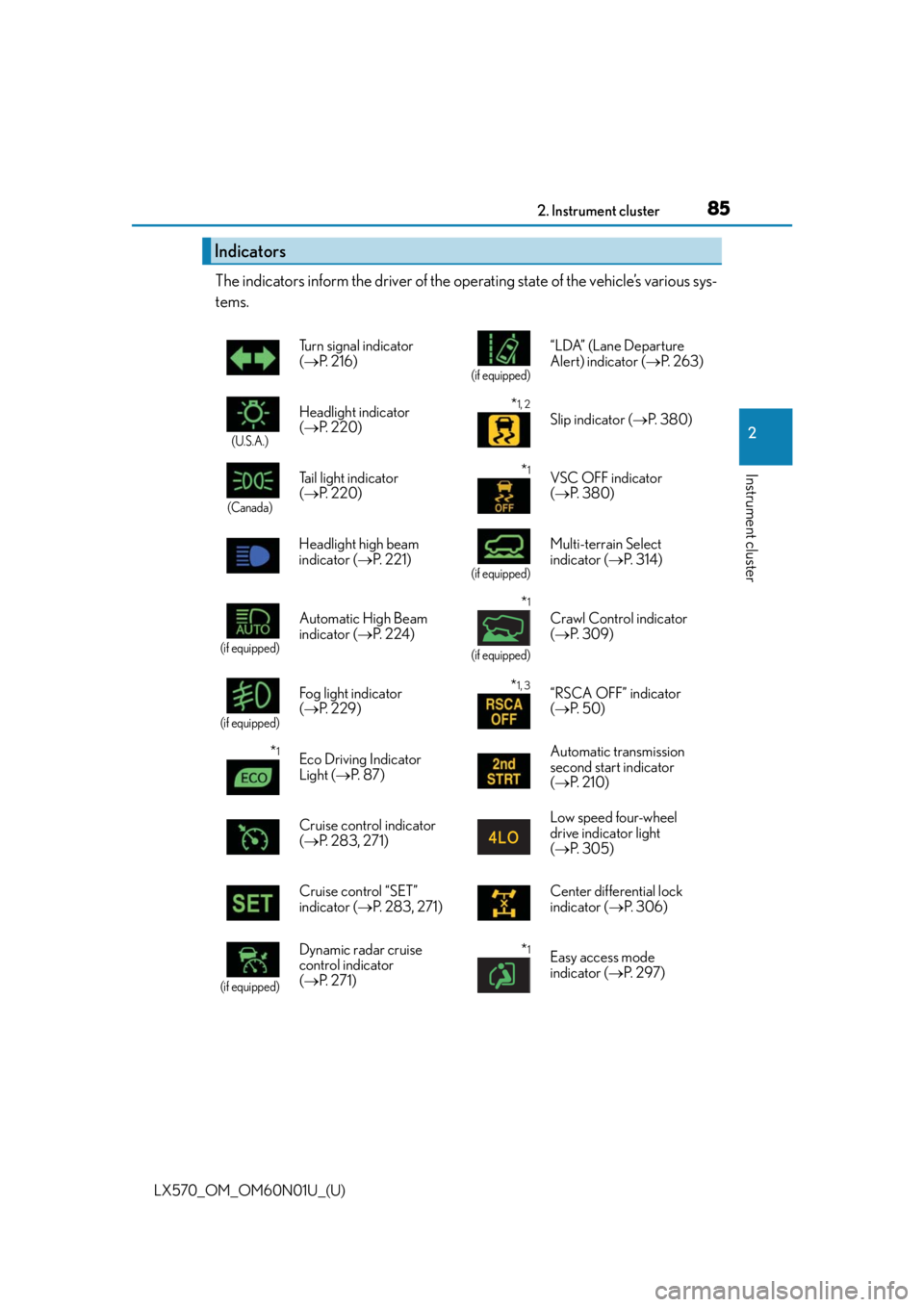
The indicators inform the driver of the operating state of the vehicle’s various sys-
tems.
Indicators
Turn signal indicator
( P. 2 1 6 )
(if equipped)
“LDA” (Lane Departure
Alert) indicator ( P. 2 6 3 )
(U.S.A.)
Headlight indicator
( P. 220)*1, 2
Slip indicator ( P. 3 8 0 )
(Canada)
Tail light indicator
( P. 220) *1VSC OFF indicator
( P. 3 8 0 )
Headlight high beam
indicator ( P. 221)
(if equipped)
Multi-terrain Select
indicator ( P. 3 1 4 )
(if equipped)
Automatic High Beam
indicator ( P. 2 2 4 )
*1
(if equipped)
Crawl Control indicator
( P. 3 0 9 )
(if equipped)
Fog light indicator
( P. 2 2 9 )*1, 3“RSCA OFF” indicator
( P. 5 0 )
*1Eco Driving Indicator
Light ( P. 8 7 ) Automatic transmission
second start indicator
(
P. 2 1 0 )
Cruise control indicator
( P. 2 8 3 , 2 7 1 ) Low speed four-wheel
drive indicator light
(
P. 3 0 5 )
Cruise control “SET”
indicator ( P. 2 8 3 , 2 7 1 ) Center differential lock
indicator (
P. 3 0 6 )
(if equipped)
Dynamic radar cruise
control indicator
( P. 2 7 1 )*1Easy access mode
indicator ( P. 2 9 7 )
Page 109 of 632

109
LX570_OM_OM60N01U_(U)
3
Operation of
each component
3-1. Key information
Keys ....................................................110
3-2. Opening, closing and locking the doors
Side doors ........................................ 115
Back door........................................122
Smart access system with push-button start...................... 132
3-3. Adjusting the seats Front seats ...................................... 140
Rear seats ........................................142
Driving position memory ........... 151
Head restraints ............................ 155
3-4. Adjusting the steering wheel and mirrors
Steering wheel ............................. 158
Inside rear view mirror.............. 160
Outside rear view mirrors ........162
3-5. Opening, closing the windows and moon roof
Power windows ............................ 165
Moon roof ...................................... 168
Page 110 of 632

110
LX570_OM_OM60N01U_(U)3-1. Key information
Keys
The following keys are provided with the vehicle.
Electronic keys
• Operating the smart access systemwith push-button start ( P. 1 3 2 )
• Operating the wireless remote con-
trol function
Mechanical keys
Key number plate
Card key (electronic key)
Operating the smart access system with
push-button start ( P. 1 3 2 )
Locks the doors ( P. 1 1 5 )
Unlocks the doors ( P. 115)
Opens the windows and moon roof
*
( P. 1 1 5 )
Opens/closes the power back door
( P. 1 2 2 )
Sounds the alarm ( P. 111)
*: This setting must be customized at your Lexus dealer.
The keys
1
2
3
4
Wireless remote control
1
2
3
4
5
Page 111 of 632

LX570_OM_OM60N01U_(U)
1113-1. Key information
3
Operation of each component
To take out the mechanical key, push
the release button and take the key out.
The mechanical key can only be
inserted in one direction, as the key only
has grooves on one side. If the key can-
not be inserted in a lock cylinder, turn it
over and re-attempt to insert it.
After using the mechanical key, store it
in the electronic key. Carry the mechan-
ical key together with the electronic key.
If the electronic key battery is depleted
or the entry function does not operate
properly, you will need the mechanical
key. (P. 5 5 0 )
■Panic mode
■Card key
●The mechanical key that is stored inside the card key should be used only in an emer-
gency, such as when the key does not operate properly.
●If it is difficult to take out the mechanical key, push down the lock release button using a
pen tip etc. If it is difficult to pull it out, use a coin etc.
Using the mechanical key
When is pressed for longer than about
one second, an alarm will sound intermittently
and the vehicle lights will flash to deter any per-
son from trying to break into or damage your
vehicle.
To stop the alarm, press any button on the elec-
tronic key.
●To store the mechanical key in the card key,
insert it inside while pressing the lock release
button.
Page 112 of 632

112
LX570_OM_OM60N01U_(U)3-1. Key information
●The card key is not waterproof.
■When required to leave the vehicle’s key with a parking attendant
Lock the glove box as circumstances demand. (
P. 4 2 3 )
Remove the mechanical key for your own use and provide the attendant with the elec-
tronic key only.
■If you lose your mechanical keys
New genuine mechanical keys can be made by your Lexus dealer using another
mechanical key and the key number stamped on your key number plate. Keep the plate
in a safe place such as your wallet, not in the vehicle.
■When riding in an aircraft
When bringing an electronic key onto an aircraft, make sure you do not press any but-
tons on the electronic key while inside the airc raft cabin. If you are carrying an electronic
key in your bag etc., ensure that the buttons are not likely to be pressed accidentally.
Pressing a button may cause the electronic key to emit radio waves that could interfere
with the operation of the aircraft.
■Electronic key battery depletion
●The standard battery life is 1 to 2 years. (The card key battery life is about a year and a
half.)
●If the battery becomes low, an alarm will sound in the cabin when the engine stops.
●As the electronic key always receives ra dio waves, the battery will become depleted
even if the electronic key is not used. The following symptoms indicate that the elec-
tronic key battery may be depleted. Replace the battery when necessary. ( P. 5 0 3 )
• The smart access system with push-button start or the wireless remote control does
not operate.
• The detection area becomes smaller.
• The LED indicator on the key surface does not turn on.
●To avoid serious deterioration, do not leave the electronic key within 3 ft. (1 m) of the
following electrical appliances that produce a magnetic field:
•TVs
• Personal computers
• Cellular phones, cordless phones and battery chargers
• Recharging cellular phones or cordless phones
• Table lamps
• Induction cookers
●If the battery cover is not installed and the bat-
tery falls out or if the battery was removed
because the key got wet, reinstall the battery
with the positive terminal facing the Lexus
emblem.