lock LEXUS LX570 2016 Repair Manual
[x] Cancel search | Manufacturer: LEXUS, Model Year: 2016, Model line: LX570, Model: LEXUS LX570 2016Pages: 632, PDF Size: 8.94 MB
Page 155 of 632
155
LX570_OM_OM60N01U_(U)3-3. Adjusting the seats
3
Operation of each component
Head restraints
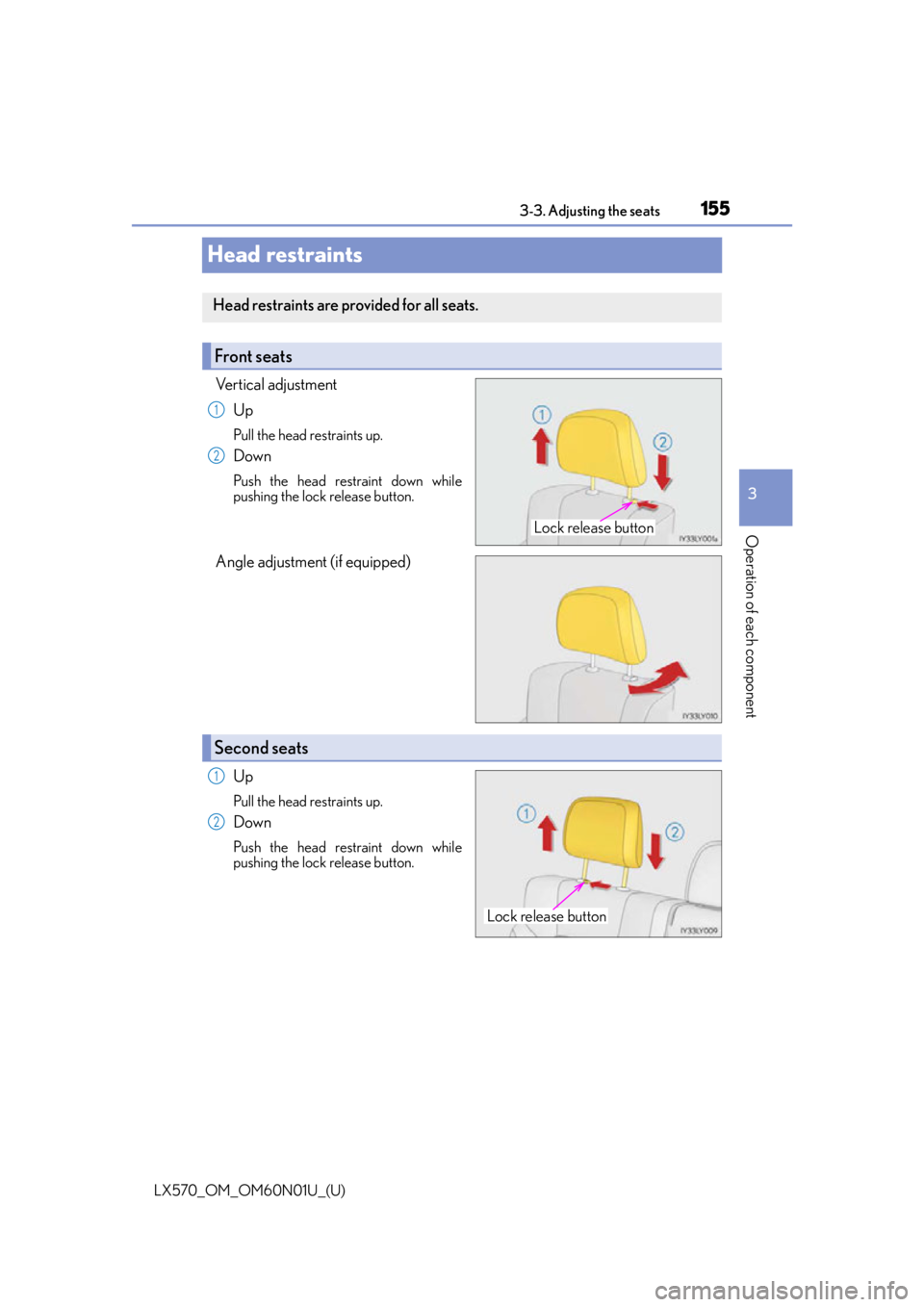
Vertical adjustment
Up
Pull the head restraints up.
Down
Push the head restraint down while
pushing the lock release button.
Angle adjustment (if equipped)
Up
Pull the head restraints up.
Down
Push the head restraint down while
pushing the lock release button.
Head restraints are provided for all seats.
Front seats
Lock release button
1
2
Second seats
Lock release button
1
2
Page 156 of 632
156
LX570_OM_OM60N01U_(U)3-3. Adjusting the seats
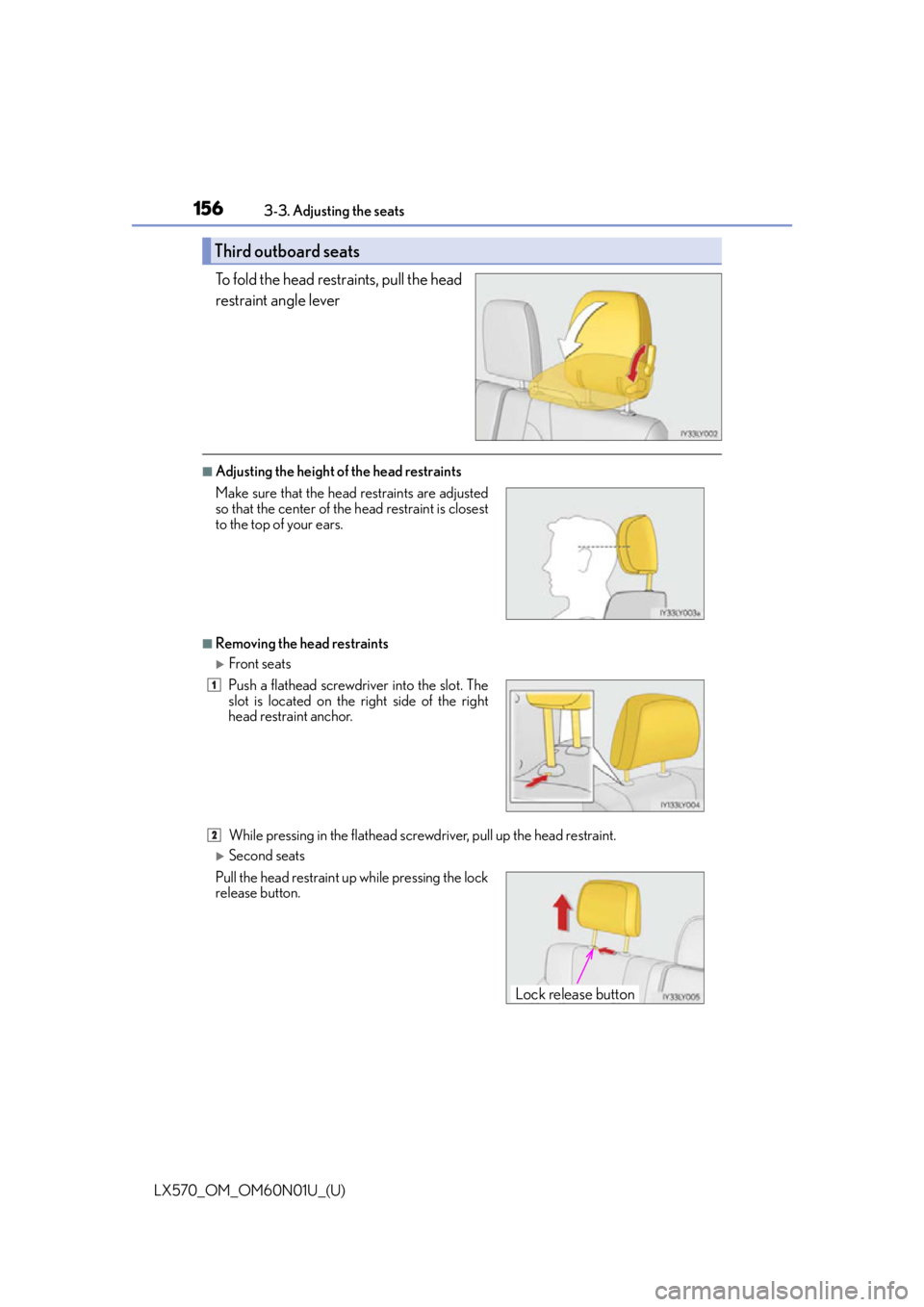
To fold the head restraints, pull the head
restraint angle lever
■Adjusting the height of
the head restraints
■Removing the head restraints
Front seats
While pressing in the flathead screwd river, pull up the head restraint.
Second seats
Third outboard seats
Make sure that the head restraints are adjusted
so that the center of the head restraint is closest
to the top of your ears.
Push a flathead screwdriver into the slot. The
slot is located on the right side of the right
head restraint anchor.
Pull the head restraint up while pressing the lock
release button.
1
2
Lock release button
Page 157 of 632
LX570_OM_OM60N01U_(U)
1573-3. Adjusting the seats
3
Operation of each component
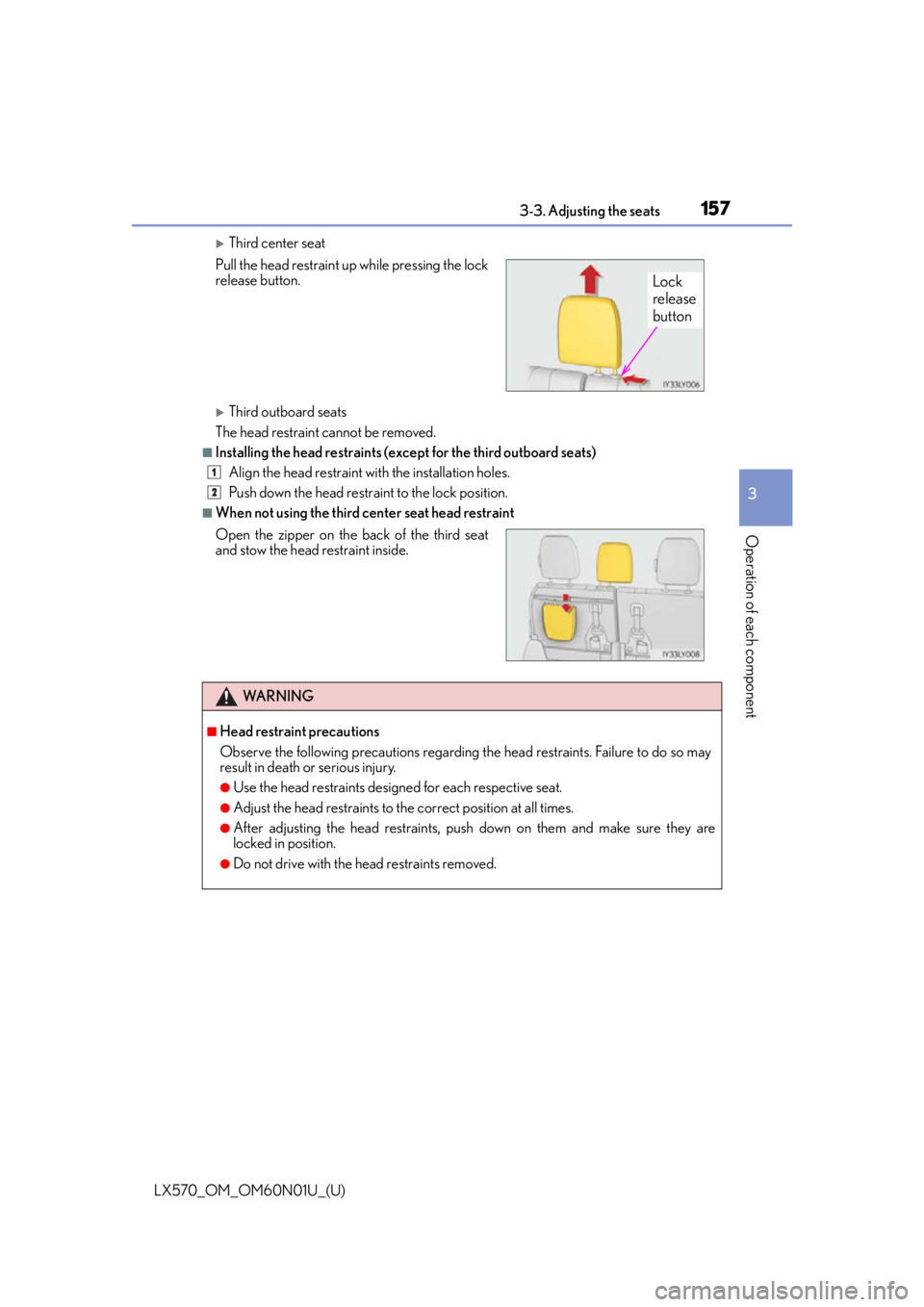
Third center seat
Third outboard seats
The head restraint cannot be removed.
■Installing the head restraints (e xcept for the third outboard seats)
Align the head restraint with the installation holes.
Push down the head restraint to the lock position.
■When not using the third center seat head restraint Pull the head restraint up while pressing the lock
release button.
Open the zipper on the back of the third seat
and stow the head restraint inside.
WA R N I N G
■Head restraint precautions
Observe the following precautions regarding the head restraints. Failure to do so may
result in death or serious injury.
●Use the head restraints designed for each respective seat.
●Adjust the head restraints to the correct position at all times.
●After adjusting the head restraints, push down on them and make sure they are
locked in position.
●Do not drive with the head restraints removed.
Lock
release
button
1
2
Page 163 of 632
1633-4. Adjusting the steering wheel and mirrors
3
Operation of each component
LX570_OM_OM60N01U_(U)
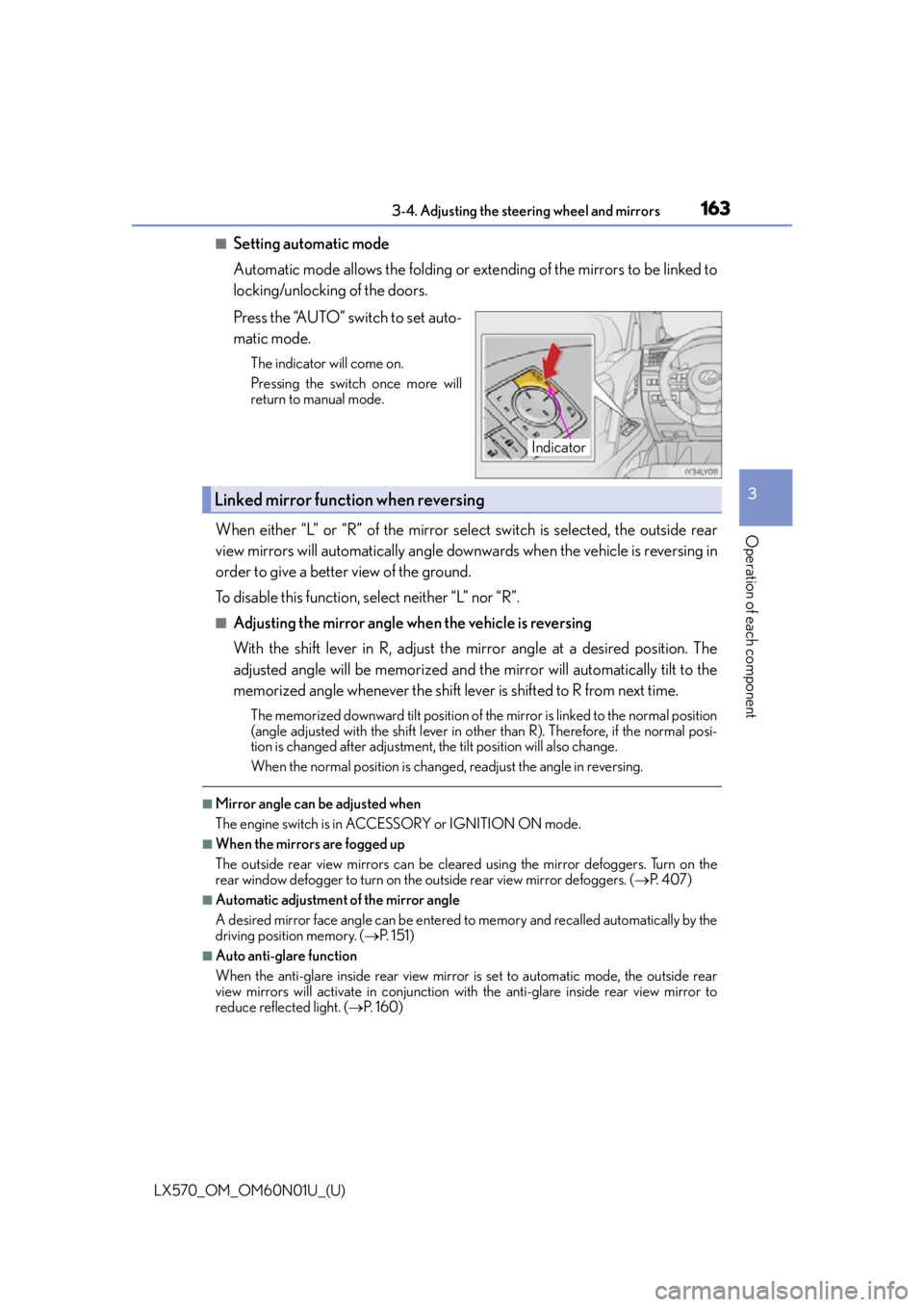
■Setting automatic mode
Automatic mode allows the folding or extending of the mirrors to be linked to
locking/unlocking of the doors.
Press the “AUTO” switch to set auto-
matic mode.
The indicator will come on.
Pressing the switch once more will
return to manual mode.
When either “L” or “R” of the mirror select switch is selected, the outside rear
view mirrors will automatically angle downwards when the vehicle is reversing in
order to give a better view of the ground.
To disable this function, select neither “L” nor “R”.
■Adjusting the mirror angle when the vehicle is reversing
With the shift lever in R, adjust the mirror angle at a desired position. The
adjusted angle will be memorized and the mirror will automatically tilt to the
memorized angle whenever the shift lever is shifted to R from next time.
The memorized downward tilt position of the mirror is linked to the normal position
(angle adjusted with the shif t lever in other than R). Therefore, if the normal posi-
tion is changed after adjustment, th e tilt position will also change.
When the normal position is chang ed, readjust the angle in reversing.
■Mirror angle can be adjusted when
The engine switch is in ACCESSORY or IGNITION ON mode.
■When the mirrors are fogged up
The outside rear view mirrors can be cleare d using the mirror defoggers. Turn on the
rear window defogger to turn on the outside rear view mirror defoggers. ( P. 4 0 7 )
■Automatic adjustment of the mirror angle
A desired mirror face angle can be entered to memory and recalled automatically by the
driving position memory. ( P. 1 5 1 )
■Auto anti-glare function
When the anti-glare inside rear view mirror is set to automatic mode, the outside rear
view mirrors will activate in conjunction with the anti-glare inside rear view mirror to
reduce reflected light. ( P. 1 6 0 )
Indicator
Linked mirror function when reversing
Page 165 of 632

165
LX570_OM_OM60N01U_(U)3-5. Opening, closing the windows and moon roof
3
Operation of each component
Power windows
The power windows can be opened and closed using the switches.
Operating the switch moves the windows as follows:
Closing
One-touch closing
*
Opening
One-touch opening
*
*
: To stop the window partway, operate the switch in the opposite direction.
Press the switch to lock the passenger
window switches.
The indicator will come on.
Use this switch to prevent children from
accidentally opening or closing a pas-
senger window.
■The power windows can be operated when
The engine switch is in IGNITION ON mode.
■Operating the power windows after turning the engine off
The power windows can be operated for approximately 45 seconds even after the
engine switch is turned to ACCESSORY mode or turned off. They cannot, however, be
operated once either front door is opened.
■Jam protection function
If an object becomes jammed between the wi ndow and the window frame while the win-
dow is closing, window movement is stop ped and the window is opened slightly.
■Catch protection function
If an object becomes caught between the door and window while the window is opening,
window movement is stopped.
Opening and closing procedures
1
2
3
4
Window lock switch
Indicator
Page 166 of 632

166
LX570_OM_OM60N01U_(U)3-5. Opening, closing the windows and moon roof
■When the window cannot be opened or closed
When the jam protection function or catch
protection function operates unusually and
the door window cannot be open ed or closed, perform the following operations with the
power window switch of that door.
●Stop the vehicle. With the engine switch in IGNITION ON mode, within 4 seconds of
the jam protection function or catch protecti on function activating, continuously oper-
ate the power window switch in the one-to uch closing direction or one-touch opening
direction so that the door wind ow can be opened and closed.
●If the door window cannot be opened and closed even when performing the above
operations, perform the following proc edure for function initialization.
Turn the engine switch to IGNITION ON mode.
Pull and hold the power window switch in the one-touch closing direction and com-
pletely close the door window.
Release the power window switch for a moment and then resume pulling and hold-
ing the switch in the one-touch closing direction for approximately 4 seconds.
Press and hold the power window switch in the one-touch opening direction. After
the door window is complete ly opened, continue holding the switch for an additional
1 second or more.
Pull and hold the power window switch in the one-touch closing direction again.
After the door window is completely clos ed, continue holding the switch for a fur-
ther 1 second or more.
If you release the switch while the window is moving, start again from the beginning.
If the window reverses and cannot be fully cl osed or opened, have the vehicle inspected
by your Lexus dealer.
■When the battery is disconnected
The window lock switch is disabled. If nece ssary, press the window lock switch after
reconnecting the battery.
■Door lock linked window operation
●The power windows can be opened an d closed using the mechanical key.* ( P. 5 5 0 )
●The power windows can be opened us ing the wireless remote control.* ( P. 1 1 5 )
*: These settings must be cust omized at your Lexus dealer.
■Power windows open warning buzzer
The buzzer sounds and a message is shown on the multi-information display in the instru-
ment cluster when the engine switch is turned off and the driver’s door is opened with the
power windows open.
■Customization
Settings (e.g. linked door lock operation) can be changed.
(Customizable features: P. 585)
1
2
3
4
5
Page 167 of 632

LX570_OM_OM60N01U_(U)
1673-5. Opening, closing the windows and moon roof
3
Operation of each component
WA R N I N G
Observe the following precautions.
Failing to do so may result in death or serious injury.
■Closing the windows
●The driver is responsible for all the power window operations, including the operation
for the passengers. In order to prevent accidental operation, especially by a child, do
not let a child operate the power windows. It is possible for children and other passen-
gers to have body parts caught in the power window. Also, when riding with a child, it
is recommended to use the window lock switch. ( P. 1 6 5 )
●Check to make sure that all passengers do not have any part of their body in a posi-
tion where it could be caught when a window is being operated.
●When using the wireless remote control or mechanical key and operating the power
windows, operate the power window after checking to make sure that there is no pos-
sibility of any passenger having any of their body parts caught in the window. Also, do
not let a child operate window by the wireless remote control or mechanical key. It is
possible for children and other passengers to get caught in the power window.
●When exiting the vehicle, turn the engine sw itch off, carry the key and exit the vehicle
along with the child. There may be accidental operation, due to mischief, etc., that
may possibly lead to an accident.
■Jam protection function
●Never use any part of your body to intentio nally activate the jam protection function.
●The jam protection function may not work if something gets caught just before the
window fully closes.
■Catch protection function
●Never use hands, arms, clothing, etc., to intentionally activate the catch protection
function.
●The catch protection function may not operate if something gets caught just before
the window is fully opened. Be careful not to get hands, arms, clothing, etc., caught in
the window.
Page 169 of 632

LX570_OM_OM60N01U_(U)
1693-5. Opening, closing the windows and moon roof
3
Operation of each component
■The moon roof can be operated when
The engine switch is in IGNITION ON mode.
■Operating the moon roof after turning the engine off
The moon roof can be operated for approximately 45 seconds after the engine switch is
turned to ACCESSORY mode or turned off. It cannot, however, be operated once either
front door is opened.
■Jam protection function
If an object is detected between the moon roof and the frame while the moon roof is clos-
ing or tilting down, travel is stoppe d and the moon roof opens slightly.
■Sunshade
The sunshade can be opened and closed manually. However, the sunshade will open
automatically when the moon roof is opened.
■Door lock linked moon roof operation
●The moon roof can be opened and closed using the mechanical key*. ( P. 5 5 0 )
●The moon roof can be opened using the wireless remote control*. ( P. 1 1 5 )
*: These settings must be cust omized at your Lexus dealer.
■If the moon roof cannot be closed automatically
Keep the switch depressed.
■When the moon roof does not close normally
Perform the following procedure:
●If the moon roof closes but then re-opens slightly
Stop the vehicle.
Press and hold the “CLOSE” switch.
*1
The moon roof will close, re-open an d pause for approximately 10 seconds.*2 Then
it will close again, tilt up and pause for appr oximately 1 second. Finally, it will tilt down,
open and close.
Check to make sure that the moon roof is completely closed and then release the
switch.
1
2
3
Page 170 of 632

170
LX570_OM_OM60N01U_(U)3-5. Opening, closing the windows and moon roof
●If the moon roof tilts down but then tilts back up
Stop the vehicle.
Press and hold the “UP” switch
*1 until the moon roof moves into the tilt up position
and stops.
Release the “UP” switch once and then press and hold the “UP” switch again.
*1
The moon roof will pause for approximatel y 10 seconds in the tilt up position.*2
Then it will adjust slightly and pause for approximately 1 second.
Finally, it will tilt down, open and close.
Check to make sure that the moon roof is completely closed and then release the
switch.
*1: If the switch is released at the incorrec t time, the procedure will have to be per-
formed again from the beginning.
*2: If the switch is released after the above mentioned 10 second pause, automatic operation will be disabled. In that case, press and hold the “CLOSE” or “UP” switch,
and the moon roof will tilt up and pause fo r approximately 1 second. Then it will tilt
down, open and close. Check to make sure that the moon roof is completely closed
and then release the switch.
If the moon roof does not fully close even after performing the above procedure cor-
rectly, have the vehicle inspected by your Lexus dealer.
■Moon roof open warning buzzer
The buzzer sounds and message is shown on the multi-information display in the instru-
ment panel when the engine switch is turned off and the driver’s door is opened with the
moon roof open.
■Customization
Settings (e.g. linked door lock operation) can be changed.
(Customizable features: P. 585)
1
2
3
4
Page 174 of 632
174
LX570_OM_OM60N01U_(U)4-1. Before driving
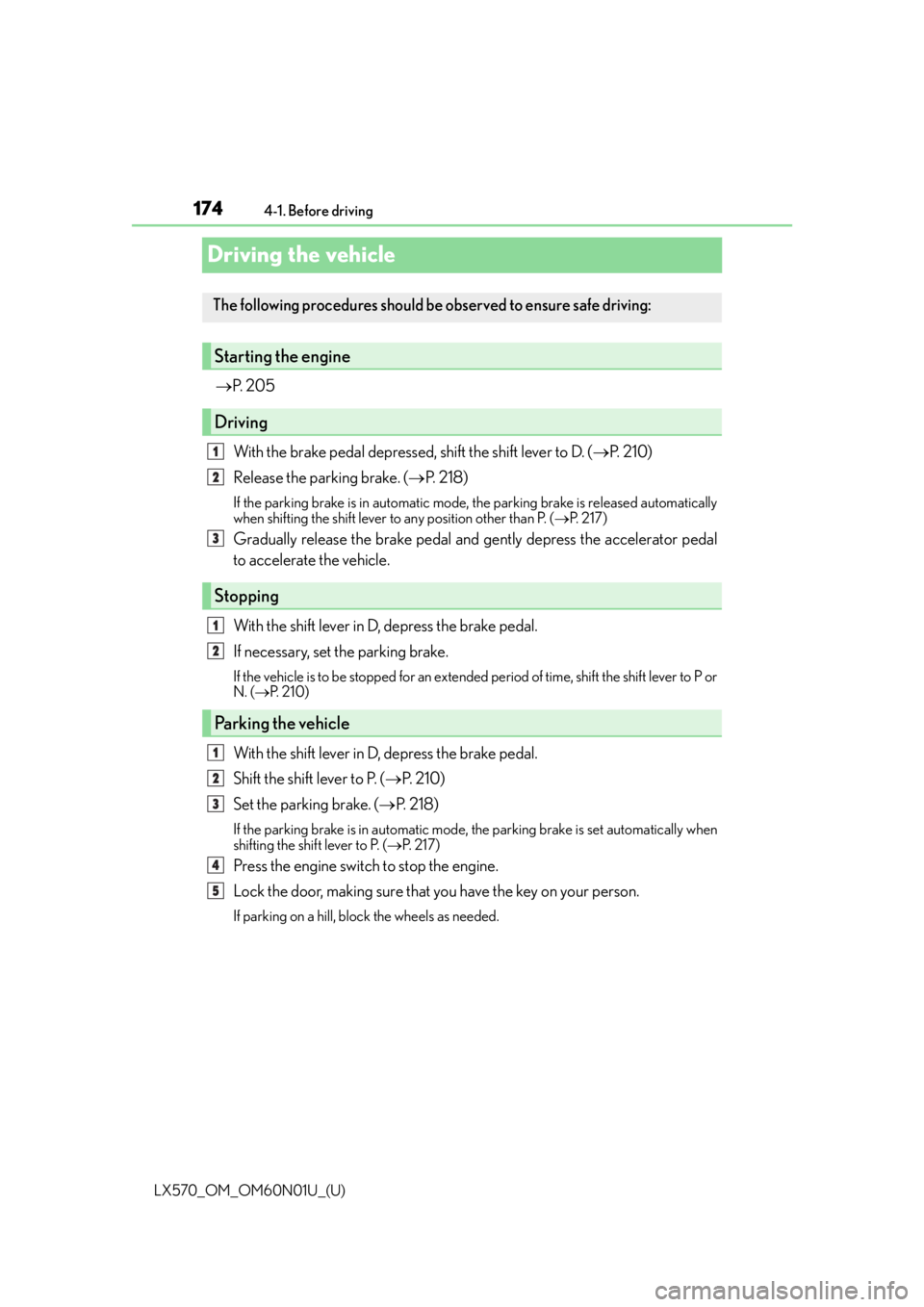
Driving the vehicle
P. 2 0 5
With the brake pedal depressed, shift the shift lever to D. ( P. 2 1 0 )
Release the parking brake. ( P. 2 1 8 )
If the parking brake is in automatic mode, the parking brake is released automatically
when shifting the shift lever to any position other than P. ( P. 2 1 7 )
Gradually release the brake pedal and gently depress the accelerator pedal
to accelerate the vehicle.
With the shift lever in D, depress the brake pedal.
If necessary, set the parking brake.
If the vehicle is to be stopped for an extended period of time, shift the shift lever to P or
N. ( P. 2 1 0 )
With the shift lever in D, depress the brake pedal.
Shift the shift lever to P. ( P. 2 1 0 )
Set the parking brake. ( P. 2 1 8 )
If the parking brake is in automatic mode, the parking brake is set automatically when
shifting the shift lever to P. ( P. 2 1 7 )
Press the engine switch to stop the engine.
Lock the door, making sure that you have the key on your person.
If parking on a hill, bloc k the wheels as needed.
The following procedures should be observed to ensure safe driving:
Starting the engine
Driving
Stopping
Parking the vehicle
1
2
3
1
2
1
2
3
4
5