warning LEXUS LX570 2016 Owner's Guide
[x] Cancel search | Manufacturer: LEXUS, Model Year: 2016, Model line: LX570, Model: LEXUS LX570 2016Pages: 632, PDF Size: 8.94 MB
Page 175 of 632

LX570_OM_OM60N01U_(U)
1754-1. Before driving
4
Driving
With the brake pedal depressed, shift the shift lever to D. (P. 2 1 0 )
Pull the parking brake switch and parking brake is set manually. ( P. 2 1 8 )
Release the brake pedal and gently depress the accelerator pedal to acceler-
ate the vehicle.
Press the parking brake switch and parking brake is released manually.
( P. 2 1 8 )
■When starting off on a uphill (vehicles with hill-start assist control system)
The hill-start assist control is available. ( P. 3 7 9 )
■Driving in the rain
●Drive carefully when it is raining, because visibility will be reduced, the windows may
become fogged-up, and th e road will be slippery.
●Drive carefully when it starts to rain, becau se the road surface will be especially slip-
pery.
●Refrain from high speeds when driving on an expressway in the rain, because there may
be a layer of water between the tires and the road surface, preventing the steering and
brakes from operating properly.
■Engine speed while driving
In the following conditions, the engine speed may become high while driving. This is due
to automatic up-shifting control or down-shi fting implementation to meet driving condi-
tions. It does not indica te sudden acceleration.
●The vehicle is judged to be driving uphill or downhill
●When the accelerator pedal is released
●When the brake pedal is depressed
■Restraining engine output (Brake Override System)
●When the accelerator and brake pedals are depressed at the same time, the engine
output may be restrained.
●A warning message is displayed on the multi-information display while the system is
operating. If a warning message is shown on the multi-information display, read the
message and follow the instructions.
■Breaking in your new Lexus
To extend the life of the ve hicle, observing the followin g precautions is recommended:
●For the first 200 miles (300 km):
Avoid sudden stops.
●For the first 500 miles (800 km):
Do not tow a trailer.
●For the first 600 miles (1000 km):
• Do not drive at extremely high speeds.
• Avoid sudden acceleration.
• Do not drive continuously in the low gears.
• Do not drive at a constant speed for extended periods.
Starting off on a steep uphill
1
2
3
4
Page 208 of 632
208
LX570_OM_OM60N01U_(U)4-2. Driving procedures
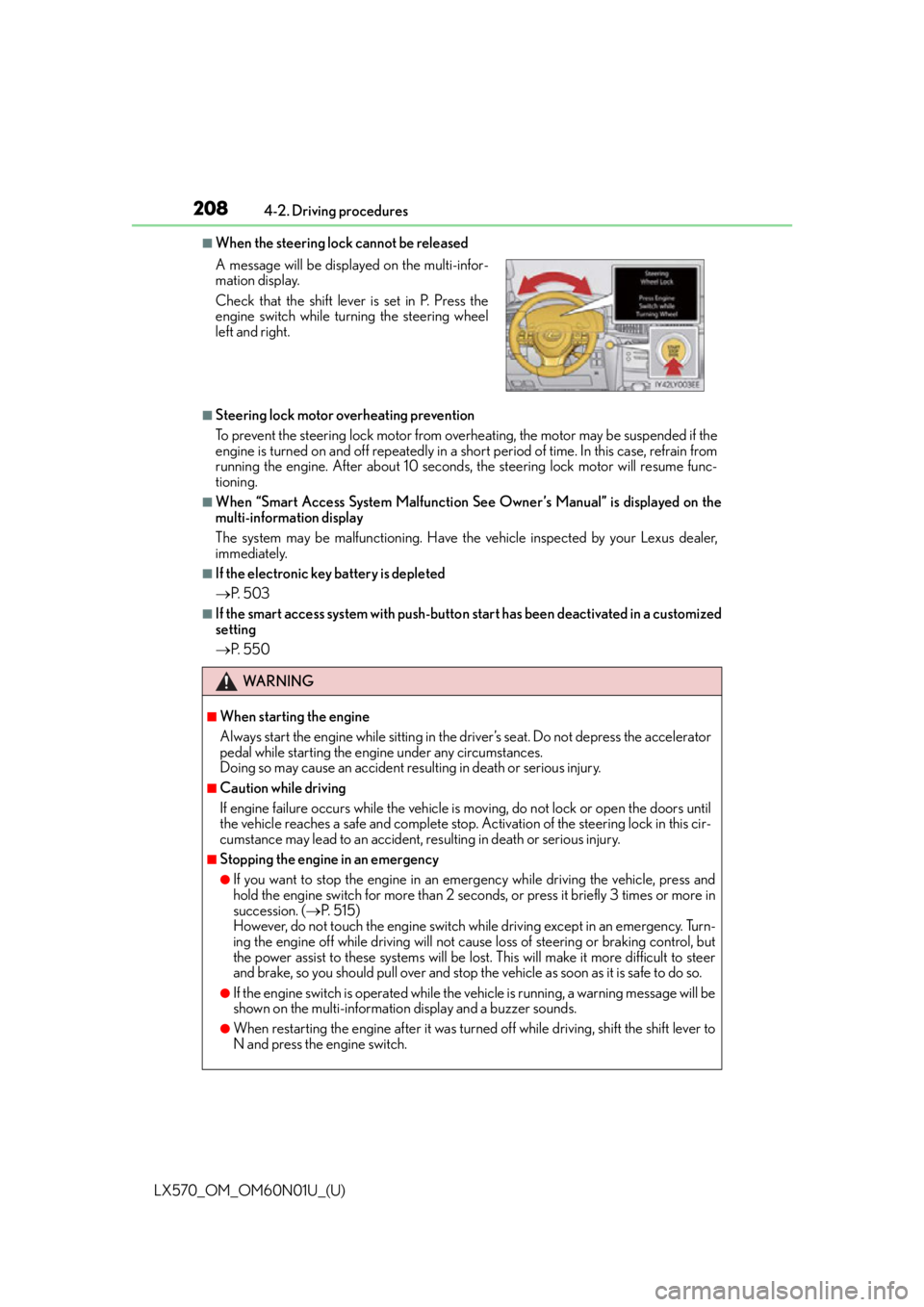
■When the steering lock cannot be released
■Steering lock motor overheating prevention
To prevent the steering lock motor from overheating, the motor may be suspended if the
engine is turned on and off repeatedly in a sh
ort period of time. In this case, refrain from
running the engine. After about 10 seconds, the steering lock motor will resume func-
tioning.
■When “Smart Access System Malfunction See Owner’s Manual” is displayed on the
multi-information display
The system may be malfunctioning. Have the vehicle inspected by your Lexus dealer,
immediately.
■If the electronic key battery is depleted
P. 5 0 3
■If the smart access system with push-butto n start has been deactivated in a customized
setting
P. 5 5 0
A message will be displayed on the multi-infor-
mation display.
Check that the shift lever is set in P. Press the
engine switch while turning the steering wheel
left and right.
WA R N I N G
■When starting the engine
Always start the engine while
sitting in the driver’s seat. Do not depress the accelerator
pedal while starting the engine under any circumstances.
Doing so may cause an accident resu lting in death or serious injury.
■Caution while driving
If engine failure occurs while the vehicle is moving, do not lock or open the doors until
the vehicle reaches a safe and complete stop. Activation of the steering lock in this cir-
cumstance may lead to an accident, re sulting in death or serious injury.
■Stopping the engine in an emergency
●If you want to stop the engine in an emergency while driving the vehicle, press and
hold the engine switch for more than 2 seco nds, or press it briefly 3 times or more in
succession. ( P. 5 1 5 )
However, do not touch the engine switch while driving except in an emergency. Turn-
ing the engine off while driving will not cause loss of steering or braking control, but
the power assist to these systems will be lost . This will make it more difficult to steer
and brake, so you should pull over and stop th e vehicle as soon as it is safe to do so.
●If the engine switch is operated while the vehicle is running, a warning message will be
shown on the multi-information display and a buzzer sounds.
●When restarting the engine after it was turn ed off while driving, shift the shift lever to
N and press the engine switch.
Page 214 of 632

214
LX570_OM_OM60N01U_(U)4-2. Driving procedures
■Paddle shift switches (if equipped)
●When the “-” paddle shift switch is operated
in the D position, a shift range will be auto-
matically selected. The highest gear of the fi rst shift range will be one gear lower than
the gear in use during normal D position driving.
●Automatic deactivation of shift range selection in the D position
Shift range selection in the D position will be deactivated in the following situations:
• When the vehicle comes to a stop
• If the accelerator pedal is depressed for long er than a certain period of time in one
shift range
■Driving on a downhill
On declines, there may be case where the ve hicle shifts down automatically to obtain
engine braking. As a result of the down shifting, the engine speed may increase.
■Second start mode automatic deactivation
Second start mode is automatically deactivated if the engine is turned off after driving in
second start mode.
■S mode
When the shift range is 7 or lower, holding the shift lever toward “+” sets the shift range to
8.
■AI-SHIFT
AI-SHIFT automatically selects the suitable gear according to driver performance and
driving conditions.
AI-SHIFT automatically operates when the shift lever is in the D position. (Shifting the
shift lever to the S position cancels the function.)
■When driving with cruise control or dynamic radar cruise control activated
Even when performing the following actions with the intent of enabling engine braking,
engine braking will not activate because cruise control or radar cruise control will not be
canceled.
●While driving in D position (vehicles with paddle shift switches) or S mode, downshift-
ing to 7, 6, 5 or 4. ( P. 2 7 1 , 2 8 3 )
●When switching the driving mode to spor t mode while driving in D position. (P. 2 8 6 )
■If the shift lever cannot be shifted from P
P. 5 4 9
■If the “S” indicator does not come on ev en after shifting the shift lever to S
This may indicate a malfunction in the automatic transmission system. Have the vehicle
inspected by your Lexus dealer immediately.
(In this situation, the transmission will operat e in the same manner as when the shift lever
is in D.)
■Downshift restriction warning buzzer
To help ensure safety and driving performa nce, downshifting operation may sometimes
be restricted. In some circumstances, downshifting may not be possible even when the
shift lever is operated. (A buzzer will sound twice.)
Page 218 of 632

218
LX570_OM_OM60N01U_(U)4-2. Driving procedures
Sets the parking brake
The parking brake indicator light will
come on. (
P. 2 1 8 )
Pull and hold the parking brake switch if
an emergency occurs and it is necessary
to operate the parking brake while driv-
ing.
Releases the parking brake
Operate the parking brake switch while
depressing the brake pedal. Make sure
that the parking brake indicator light
goes off.
■Parking brake operation
●When the engine switch is not in IGNITION ON mode, the parking brake cannot be
released using the pa rking brake switch.
●When the engine switch is not in IGNI TION ON mode, automatic mode (automatic
brake setting and releas ing) is not available.
■If “Parking Brake Overheated Parking Brake Unavailable” is displayed on the multi-
information display
If the parking brake is operated repeatedly over a short period of time, the system may
restrict operation to prevent overheating. If this happens, refrain from operating the
parking brake. Normal operation will return after about 1 minute.
■Parking brake operation sound
When the parking brake operates, a motor sound (whirring sound) may be heard. This
does not indicate a malfunction.
■Parking brake indicator light
●Depending on the engine switch mode, the parking brake indicator light will come on
and stay on as described below:
IGNITION ON mode: Comes on until the parking brake is released.
Not in IGNITION ON mode: Stays on for approximately 15 seconds.
●When the engine switch is turned off with the parking brake set, the parking brake indi-
cator light will stay on for about 15 seco nds. This does not indicate a malfunction.
■Changing the mode
When changing the automatic mode on/off , the message will be shown on the multi-
information display and the buzzer sounds.
■Parking brake engaged warning buzzer
A buzzer will sound if the vehicle is driven with the parking brake engaged. “Release
Parking Brake” is displayed on the multi-information display.
Manual mode
U.S.A. Canada
1
2
Page 219 of 632

LX570_OM_OM60N01U_(U)
2194-2. Driving procedures
4
Driving
■Warning messages and buzzers
Warning messages and buzzers are used to indicate a system malfunction or to inform
the driver of the need for caution. If a warning message is shown on the multi-information
display, read the message and follow the instructions.
■If the brake system warning light comes on
P. 5 2 6
■Usage in winter time
P. 3 8 4
WA R N I N G
■When parking the vehicle
Do not leave a child in the vehicle alone. The parking brake may be released uninten-
tionally and there is the danger of the vehicle moving that may lead to an accident
resulting in death or serious injury.
NOTICE
■When parking the vehicle
Before you leave the vehicle, set the parking brake, shift the shift lever to P and make
sure that the vehicle does not move.
■When the system malfunctions
Stop the vehicle in a safe place and check the warning messages.
■When the parking brake cannot be released due to a malfunction
Driving the vehicle with the parking brake set will lead to brake components overheat-
ing, which may affect braking performance and increase brake wear. Have the vehicle
inspected by your Lexus dealer immediately if this occurs.
Page 223 of 632

LX570_OM_OM60N01U_(U)
2234-3. Operating the lights and wipers
4
Driving
■Automatic headlight leveling system
The level of the headlights is automatically adjusted according to the number of passen-
gers and the loading condition of the vehicle to ensure that the headlights do not inter-
fere with other road users.
■We l c o m e l i g h t i n g
If the headlight switch is turned to and the surrounding area is dark, unlocking the
doors using the smart access system with pu sh-button start or wireless remote control
will turn the parking lights and tail lights on automatically.
■If the automatic headlight leveling system warning light flashes
It may indicate a malfunction in the system. Contact your Lexus dealer.
■Light reminder buzzer
A buzzer sounds when the engine switch is turned off or turned to ACCESSORY mode
and the driver’ door is opened while the tail lights remain on.
■Customization
Settings (e.g. light sensor sensitivity) can be changed.
(Customizable features:P. 585)
NOTICE
■To prevent battery discharge
Do not leave the lights on longer than ne cessary when the engine is not running.
Page 250 of 632

250
LX570_OM_OM60N01U_(U)4-5. Using the driving support systems
PCS (Pre-Collision System)
◆Pre-collision warning
When the system determines that
the possibility of a frontal collision is
high, a buzzer will sound and a warn-
ing message will be displayed on the
multi-information display to urge the
driver to take evasive action.
◆Pre-collision brake assist
When the system determines that the po
ssibility of a frontal collision is high,
the system applies greater braking force in relation to how strongly the brake
pedal is depressed.
: If equipped
The pre-collision system uses a radar sensor and camera sensor to detect
vehicles and pedestrians
*1 in front of your vehicle. When the system deter-
mines that the possibility of a frontal collision with a vehicle or pedestrian is
high, a warning operates to urge the driver to take evasive action and the
potential brake pressure is increased to help the driver avoid the collision. If
the system determines that th e possibility of a frontal collision with a vehicle or
pedestrian is extremely high, the brakes are automatically applied
*2 to help
avoid the collision or help reduce the impact to the vehicle occupants and the
vehicle in the collision.
The pre-collision system can be disabl ed/enabled and the warning timing can
be changed. ( P. 2 5 4 )
*1: Depending on the region in which the vehicle was sold, the pedestrian detection
function may not be available. Contact your Lexus dealer for details.
*2: Depending on the region in which the vehicle was sold, the pre-collision brakingfunction (automatic braking function) may not be available. Contact your Lexus
dealer for details.
Page 254 of 632

254
LX570_OM_OM60N01U_(U)4-5. Using the driving support systems
■Enabling/disabling the pre-collision system
Press the PCS switch for 3 seconds or more.
The system is automatically enabled each time the engine switch is turned to IGNI-
TION ON mode.
If the system is disabled, the PCS
warning light will turn on and a mes-
sage will be displayed on the multi-
information display.
■Changing the pre-col
lision warning timing
Press the PCS switch.
Each time the PCS switch is pressed, the warning timing changes as follows:
The operation timing setting is retained when the engine switch is turned off.
Far
The warning will begin to operate
earlier than with the default timing.
Middle
This is the default setting.
Near
The warning will begin to operate
later than with the default timing.
Changing settings of the pre-collision system
1
2
3
Page 255 of 632

LX570_OM_OM60N01U_(U)
2554-5. Using the driving support systems
4
Driving
■Operational conditions
For vehicles sold in regions where the pedestrian detection function and pre-collision
braking function are available*4
The pre-collision system is enabled and the sy stem determines that the possibility of a
frontal collision with a vehicle or pedestrian is high.
Each function is operationa l at the following speeds:
●Pre-collision warning:
• Vehicle speed is approximately 7 mph (1 0 km/h) or more. (For detecting a pedes-
trian, vehicle speed is between approxim ately 7 and 50 mph (10 and 80 km/h).)
• The relative speed between your vehicl e and the vehicle or pedestrian ahead is
approximately 7 mph (10 km/h) or more.
●Pre-collision brake assist:
• Vehicle speed is approximately 19 mph (3 0 km/h) or more. (For detecting a pedes-
trian, vehicle speed is between approxim ately 19 and 50 mph (30 and 80 km/h).)
• The relative speed between your vehicl e and the vehicle or pedestrian ahead is
approximately 19 mph (30 km/h) or more.
●Pre-collision braking:
• Vehicle speed is approximately 7 mph (1 0 km/h) or more. (For detecting a pedes-
trian, vehicle speed is between approxim ately 7 and 50 mph (10 and 80 km/h).)
• The relative speed between your vehicl e and the vehicle or pedestrian ahead is
approximately 7 mph (10 km/h) or more.
The system may not operate in the following situations:
●If a battery terminal has be en disconnected and reconnected and then the vehicle has
not been driven for a certain amount of time
●If the shift lever is in R
●If VSC is disabled (only the pre-collision warning function will be operational)
●If the PCS warning light is flashing or illuminated
Page 256 of 632

256
LX570_OM_OM60N01U_(U)4-5. Using the driving support systems
For vehicles sold in regions where the pedestrian detection function is not available
and the pre-collision braking function is available
*4
The pre-collision system is enabled and the sy
stem determines that the possibility of a
frontal collision with a vehicle is high.
Each function is operationa l at the following speeds:
●Pre-collision warning:
• Vehicle speed is approximately 10 mph (15 km/h) or more.
• The relative speed between your vehicl e and the vehicle or pedestrian ahead is
approximately 7 mph (10 km/h) or more.
●Pre-collision brake assist:
• Vehicle speed is approximately 19 mph (30 km/h) or more.
• The relative speed between your vehicl e and the vehicle or pedestrian ahead is
approximately 19 mph (30 km/h) or more.
●Pre-collision braking:
• Vehicle speed is approximately 10 mph (15 km/h) or more.
• The relative speed between your vehicl e and the vehicle or pedestrian ahead is
approximately 7 mph (10 km/h) or more.
The system may not operate in the following situations:
●If a battery terminal has be en disconnected and reconnected and then the vehicle has
not been driven for a certain amount of time
●If the shift lever is in R
●If VSC is disabled (only the pre-collision warning function will be operational)
●If the PCS warning light is flashing or illuminated
For vehicles sold in regions where the pede strian detection function and pre-collision
braking function are not available*4
The pre-collision system is enabled and the sy stem determines that the possibility of a
frontal collision with a vehicle is high.
Each function is operationa l at the following speeds:
●Pre-collision warning:
• Vehicle speed is approximately 10 mph (15 km/h) or more.
• The relative speed between your vehicl e and the vehicle or pedestrian ahead is
approximately 7 mph (10 km/h) or more.
●Pre-collision brake assist:
• Vehicle speed is approximately 19 mph (30 km/h) or more.
• The relative speed between your vehicl e and the vehicle or pedestrian ahead is
approximately 19 mph (30 km/h) or more.
The system may not operate in the following situations:
●If a battery terminal has be en disconnected and reconnected and then the vehicle has
not been driven for a certain amount of time
●If the shift lever is in R
●If VSC is disabled (only the pre-collision warning function will be operational)
●If the PCS warning light is flashing or illuminated
*4: Depending on the region in which the vehicle was sold, the pedestrian detection func-
tion and pre-collision braking function may not be available.