steering LEXUS LX570 2016 Service Manual
[x] Cancel search | Manufacturer: LEXUS, Model Year: 2016, Model line: LX570, Model: LEXUS LX570 2016Pages: 632, PDF Size: 8.94 MB
Page 282 of 632
282
LX570_OM_OM60N01U_(U)4-5. Using the driving support systems
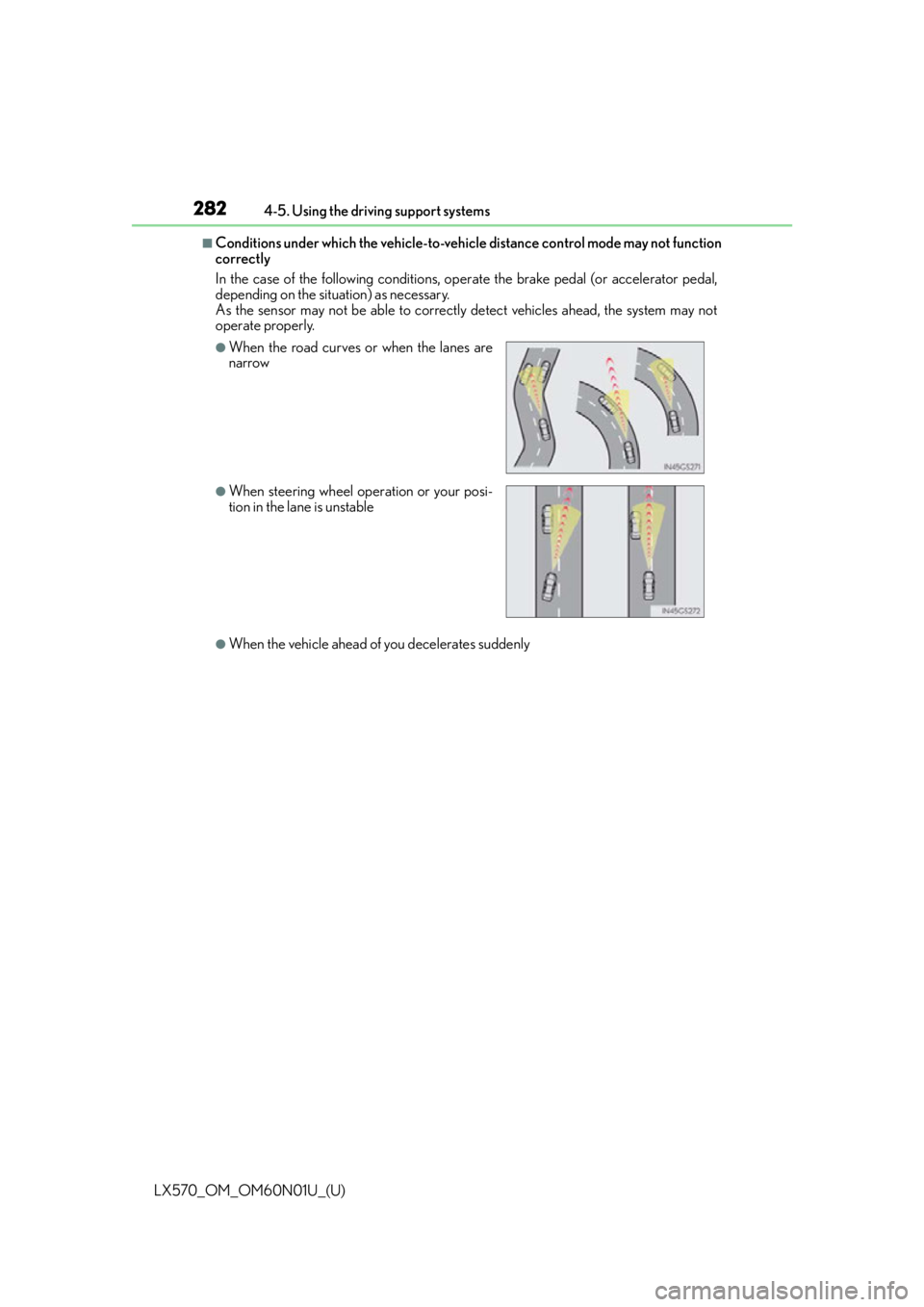
■Conditions under which the vehicle-to-vehicle distance co
ntrol mode may not function
correctly
In the case of the following conditions, op erate the brake pedal (or accelerator pedal,
depending on the situ ation) as necessary.
As the sensor may not be able to correctly detect vehicles ahead, the system may not
operate properly.
●When the vehicle ahead of you decelerates suddenly
●When the road curves or when the lanes are
narrow
●When steering wheel operation or your posi-
tion in the lane is unstable
Page 287 of 632
LX570_OM_OM60N01U_(U)
2874-5. Using the driving support systems
4
Driving
Comfort mode
By controlling the suspension, riding comfort is further enhanced. Suitable for
city driving.
When not in comfort mode and the driving mode select switch is turned to the left, the
“COMFORT” indicator comes on in the multi-information display.
Eco drive mode
Helps the driver accelerate in an eco- friendly manner and improve fuel econ-
omy through moderate throttle characteristics and by controlling the opera-
tion of the air conditioning system (heating/cooling).
When in comfort mode, if the driving mode select switch is turned to the left, the
“ECO” indicator will come on in the multi-information display.
Sport mode
•SPORT S mode
Controls the transmission and engine to provide quick, powerful accelera-
tion. This mode is suitable for when agile driving response is desired, such
as when driving on roads with many curves.
When not in SPORT S mode, if the driving mode select switch is turned to the
right, the “SPORT S” indicator will come on in the multi-information display.
•SPORT S+ mode
Helps to ensure steering performanc e and driving stability by simulta-
neously controlling the steering and suspen sion in addition to the transmis-
sion and engine. Suitable for sportier driving.
When in SPORT S mode, if the driving mode select switch is turned to the right,
the “SPORT S+” indicator will come on in the multi-information display.
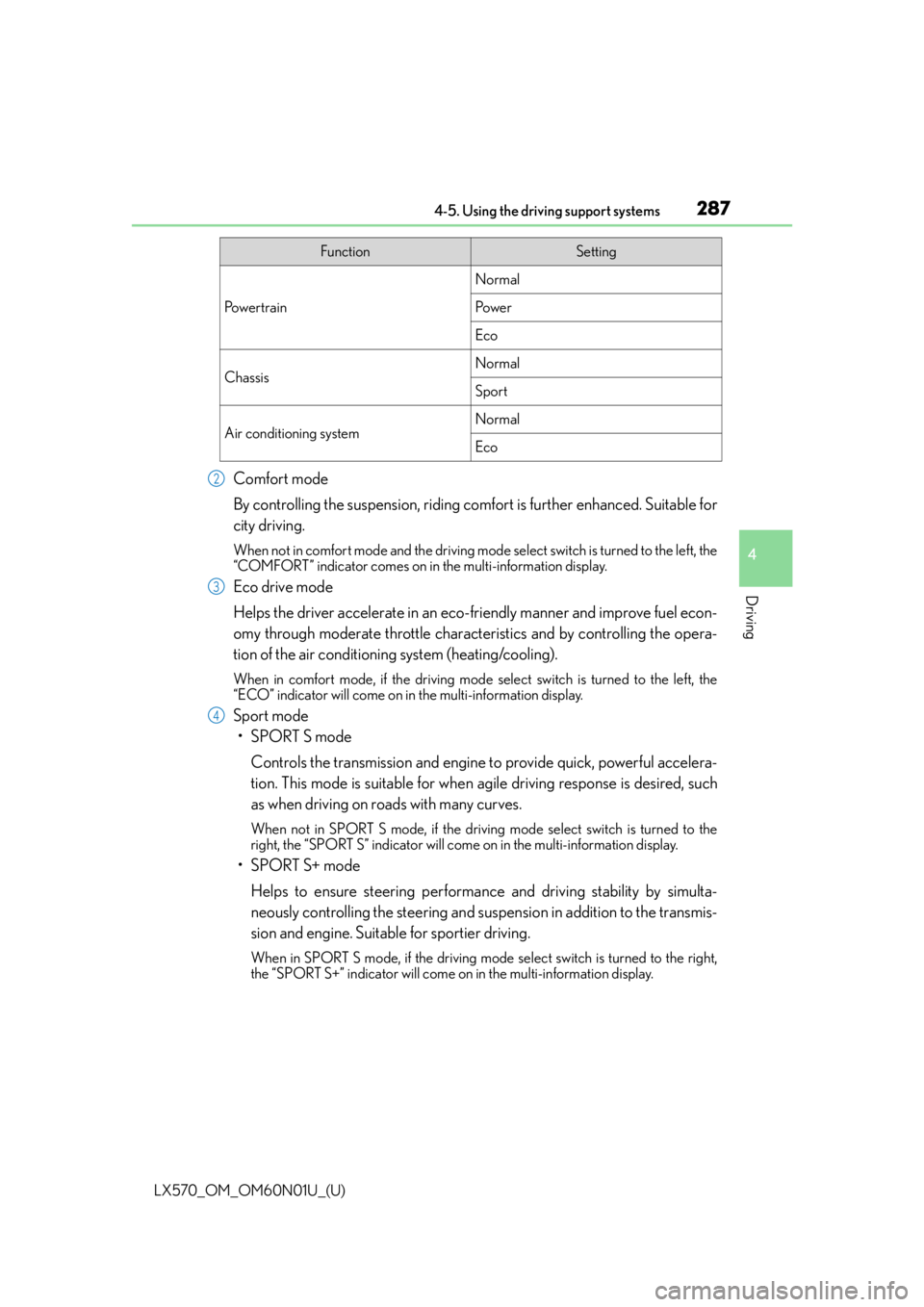
FunctionSetting
Po w e r t r a i n
Normal
Po w e r
Eco
ChassisNormal
Sport
Air conditioning systemNormal
Eco
2
3
4
Page 302 of 632

302
LX570_OM_OM60N01U_(U)4-5. Using the driving support systems
■In the following cases the 4-Wheel AHC will not operate
●The brake pedal has been depressed for a few seconds or longer while the vehicle is
stopped.
●Vehicle height control has not been frequently used.
●The suspension fluid temperature is lower than -22°F (-30°C).
●There is ice on the suspension.
●Driving on bumpy roads which may cause
the suspension to fully elongate.
●If the steering wheel is abruptly turned more than 3/4 of a revolution with the center
differential lock system activated.
■Cold weather operation
It may take longer for the vehicle height to change if the suspension fluid temperature
drops below 5°F (-15°C).
The 4-Wheel AHC does not operate when the suspension fluid temperature drops
below -22°F (-30°C).
●In this case, even if the height select switch is pressed, th e vehicle height will not change.
Once the vehicle has been driven for a short time and the suspension fluid has been
warmed to within normal operating limits, the 4-Wheel AHC will begin operating and
the vehicle height will automatically change to the selected mode.
●When the suspension fluid is around -22°F (-30°C), the vehicle height may not be able
to be raised, even if the 4-Wheel AHC is oper ating. In this case, pull the height select
switch to “ ” then push to “ ” after driving for a short time longer to select the desired
vehicle height.
■Parking and stopping tips
●If you immediately stop the engine after off-road driving, the vehicle height may gradu-
ally lower. When parking, make sure ther e is nothing under the vehicle that may come
in contact with the underbody. The vehicle will return to the set height when the engine
is started.
●The vehicle height may change as the temperature changes when the engine is
stopped. The vehicle will return to the set height when the engine is started.
■Propeller shaft noise
If the vehicle height is adjusted on a slope, or with the shift lever in a position other than P
or N while the vehicle is stopped, you may hear a sound caused by the expansion and
contraction of the propeller shaft. Th is does not indicate a malfunction.
■4-Wheel AHC failure warning
If a malfunction occurs in the 4-Wheel AHC , normal mode is automatically selected.
However, the system may not switch to norm al mode depending on the location of the
malfunction.
The warning message is displayed on the mu lti-information display, and the 4-Wheel
AHC cannot be activated until the malfunction is corrected.
Stop the engine and start it again. If the warning message turns off, the system is operat-
ing correctly. If the warning message continue s to be displayed, have the vehicle checked
at your Lexus dealer as soon as possible.
Page 303 of 632

LX570_OM_OM60N01U_(U)
3034-5. Using the driving support systems
4
Driving
WA R N I N G
■When switching the vehicle height mode
Before lowering the vehicle height, check that there are no people under or around the
vehicle, and check for obstacles.
If you do not do this, body parts may be caught in the vehicle, possibly leading to an
accident.
■Using the high mode
The high mode should only be used when driving on rough roads, for example when
driving off-road. Because the vehicle’s center of gravity will become higher when in the
mode, the vehicle may become unstable when turning abruptly, resulting in an acci-
dent.
■When jacking up the vehicle or installing tire chains
Turn off the height control and stop the engine, otherwise the vehicle height may
change due to the automatic leveling function and you may catch part of your body in
the vehicle, resultin g in an accident.
■When crossing rivers
Select the high mode and turn off the heig ht control. Drive at 30 km/h (18 mph) or
lower. Otherwise the vehicle height may change due to the automatic leveling function,
resulting in an accident.
■If your vehicle must be towed
Put the vehicle height in the normal mode and turn off the height control, otherwise the
vehicle height may change due to the automatic leveling function and you may catch
part of your body in the vehicle, resulting in an accident.
■If your vehicle becomes stuck in a ditch
Turn off the height control, otherwise the vehicle height may change due to the auto-
matic leveling function, re sulting in an accident.
■When loading cargo on the roof luggage carrier
Do not switch to high mode. Sudden steering could cause the vehicle to lose stability
due to the vehicle’s higher center of gr avity, possibly leading to an accident.
Page 310 of 632
310
LX570_OM_OM60N01U_(U)4-5. Using the driving support systems
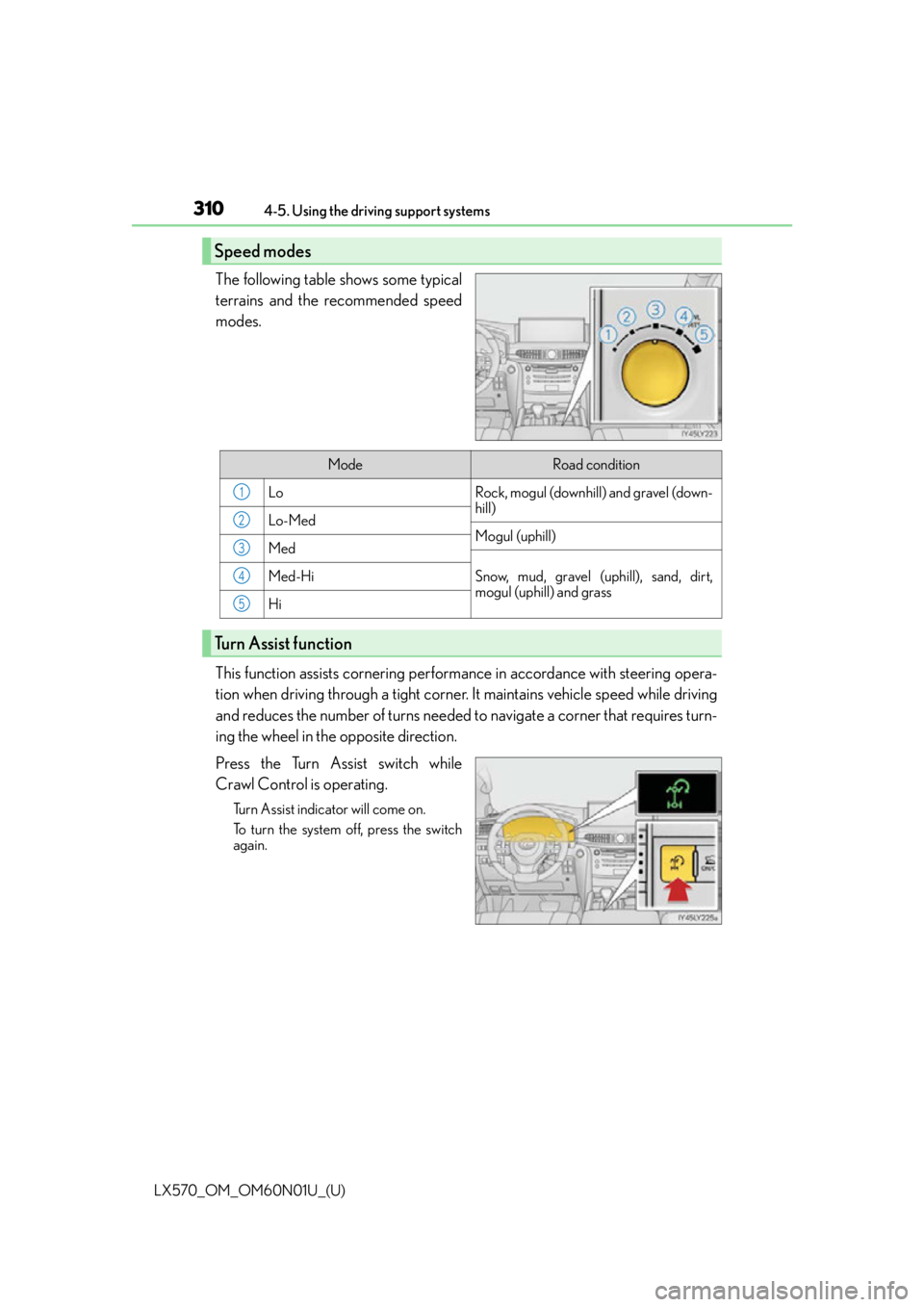
The following table shows some typical
terrains and the recommended speed
modes.
This function assists cornering perfor
mance in accordance with steering opera-
tion when driving through a tight corner. It maintains vehicle speed while driving
and reduces the number of turns needed to navigate a corner that requires turn-
ing the wheel in the opposite direction.
Press the Turn Assist switch while
Crawl Control is operating.
Turn Assist indicator will come on.
To turn the system off, press the switch
again.
Speed modes
ModeRoad condition
LoRock, mogul (downhill) and gravel (down-
hill)
Lo-MedMogul (uphill)Med
Snow, mud, gravel (uphill), sand, dirt,
mogul (uphill) and grassMed-Hi
Hi
Turn Assist function
1
2
3
4
5
Page 311 of 632

LX570_OM_OM60N01U_(U)
3114-5. Using the driving support systems
4
Driving
Crawl Control
Press the ON/OFF switch while Crawl Control is operating. If the switch is
turned off, the slip indicator and the Turn Assist indicator will go off (if the Turn
Assist function is in use), the Crawl Control indicator will flash until the system
has turned off completely, and a message stating that Crawl Control has been
turned off will be displayed on the multi-information display for several seconds.
When turning off Crawl Control while driv ing, stop the vehicle before the Crawl
Control indicator turns off, or drive extremely carefully.
Turn Assist function
Press the Turn Assist switch while the Turn Assist function is operating. When the
switch is pressed, the Turn Assist indicat or will go off, and a message stating that
the Turn Assist function has been turned off will be displayed on the multi-infor-
mation display for several seconds.
■The Crawl Control and Turn Assist function can be operated when
Crawl Control
●The engine is running.
●The shift lever is in any gear other than P or N.
●The four-wheel drive control switch is in L4.
●The driver’s door is closed.
Turn Assist function
●Crawl Control is operating.
●The center differential is not locked.
●The accelerator and brake are not being operated.
●The shift lever is in any gear other than P, R or N.
●The steering wheel is turned very far.
When the system is turned off
Page 313 of 632

LX570_OM_OM60N01U_(U)
3134-5. Using the driving support systems
4
Driving
■Sounds and vibrations caused by the Crawl Control system
●A sound may be heard from the engine compartment when the engine is started or just
after the vehicle begins to move. This sound does not indicate that a malfunction has
occurred in Crawl Control system.
●Either of the following conditions may occur when the Crawl Control system is operat-
ing. None of these are indicators that a malfunction has occurred.
• Vibrations may be felt through the vehicle body and steering.
• A motor sound may be heard after the vehicle comes to a stop.
■When there is a malfunction in the system
Warning lights and/or warning messages will turn on. ( P. 5 2 4 , 5 3 2 )
WA R N I N G
■When using Crawl Control and Turn Assist function
Do not rely solely on the Crawl Control and Turn Assist function. This function does not
extend the vehicle’s performance limitations. Always thoroughly check the road condi-
tions, and drive safely.
■These conditions may cause the system not to operate properly
When driving on the following surfaces, the sy stem may not be able to maintain a fixed
low speed, which may re sult in an accident:
●Extremely steep inclines.
●Extremely uneven surfaces.
●Snow-covered roads, or other slippery surfaces.
NOTICE
■When using Turn Assist function
The Turn Assist function is a function to assist turning performance when driving off
road. The function may be less effective on paved road surfaces.
Page 327 of 632

LX570_OM_OM60N01U_(U)
3274-5. Using the driving support systems
4
Driving
■Multi-terrain Monitor screen display
The amount of time that the Multi-terrain Monitor screen is displayed changes as follows
according to the vehicle speed at th e time the VIEW switch was pressed.
The Multi-terrain Monitor screen is displayed if the vehicle speed is approximately 7 mph
(12 km/h) or less when the camera switch is pressed.
If the vehicle speed exceeds approximately 7 mph (12 km/h), the Multi-terrain Monitor
display is canceled.
The various screens of the Multi-terrain Monitor display information to support
several different driving situations, such as when checking for obstacles when
moving forward or in reverse, or when judging road surface conditions during
off-road driving.
■Front view & dual side view
Front view & dual side view can be used to check the area around the front of
the vehicle. • In addition to an image of the front of the vehicle, guide lines are displayed in a composite view to provide refere nce for when deciding a direction to
move forward in.
• If the VIEW switch is pressed while the screen is displayed, the screen switches from normal to magnified display. (Pressing the switch again
returns the screen to the normal display)
• If the steering wheel is turned 270 or more, guide lines and other features
to support turning are automatically displayed.
Screen display and functions
Page 328 of 632
328
LX570_OM_OM60N01U_(U)4-5. Using the driving support systems
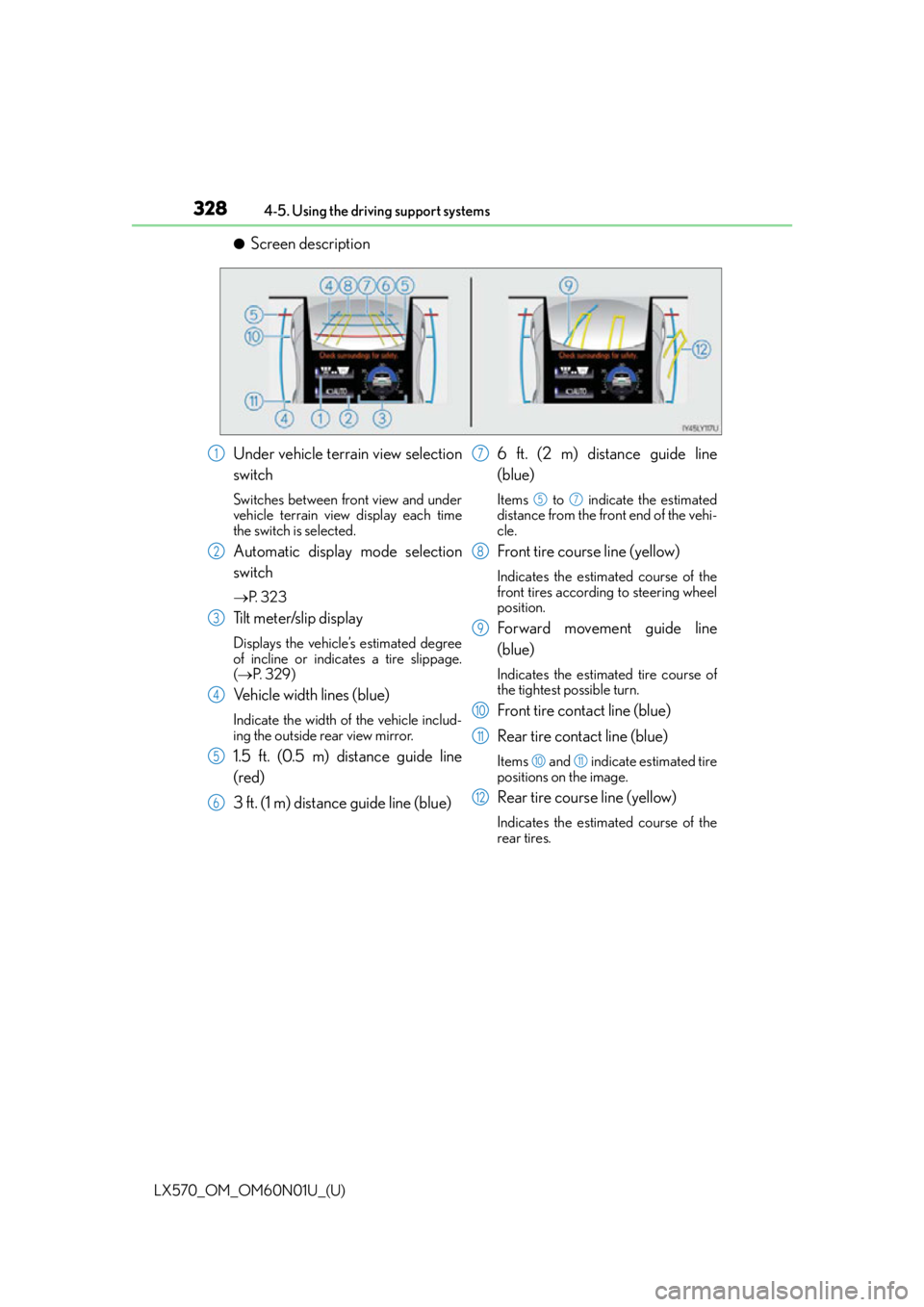
●Screen description
Under vehicle terrain view selection
switch
Switches between front view and under
vehicle terrain view display each time
the switch is selected.
Automatic display mode selection
switch
P. 3 2 3
Tilt meter/slip display
Displays the vehicle’s estimated degree
of incline or indicates a tire slippage.
( P. 3 2 9 )
Vehicle width lines (blue)
Indicate the width of the vehicle includ-
ing the outside rear view mirror.
1.5 ft. (0.5 m) distance guide line
(red)
3 ft. (1 m) distance guide line (blue) 6 ft. (2 m) distance guide line
(blue)
Items to indicate the estimated
distance from the front end of the vehi-
cle.
Front tire course line (yellow)
Indicates the estimated course of the
front tires according to steering wheel
position.
Forward movement guide line
(blue)
Indicates the estimated tire course of
the tightest possible turn.
Front tire contact line (blue)
Rear tire contact line (blue)
Items and indicate estimated tire
positions on the image.
Rear tire course line (yellow)
Indicates the estimated course of the
rear tires.
1
2
3
4
5
6
7
57
8
9
10
11
1011
12
Page 333 of 632
LX570_OM_OM60N01U_(U)
3334-5. Using the driving support systems
4
Driving
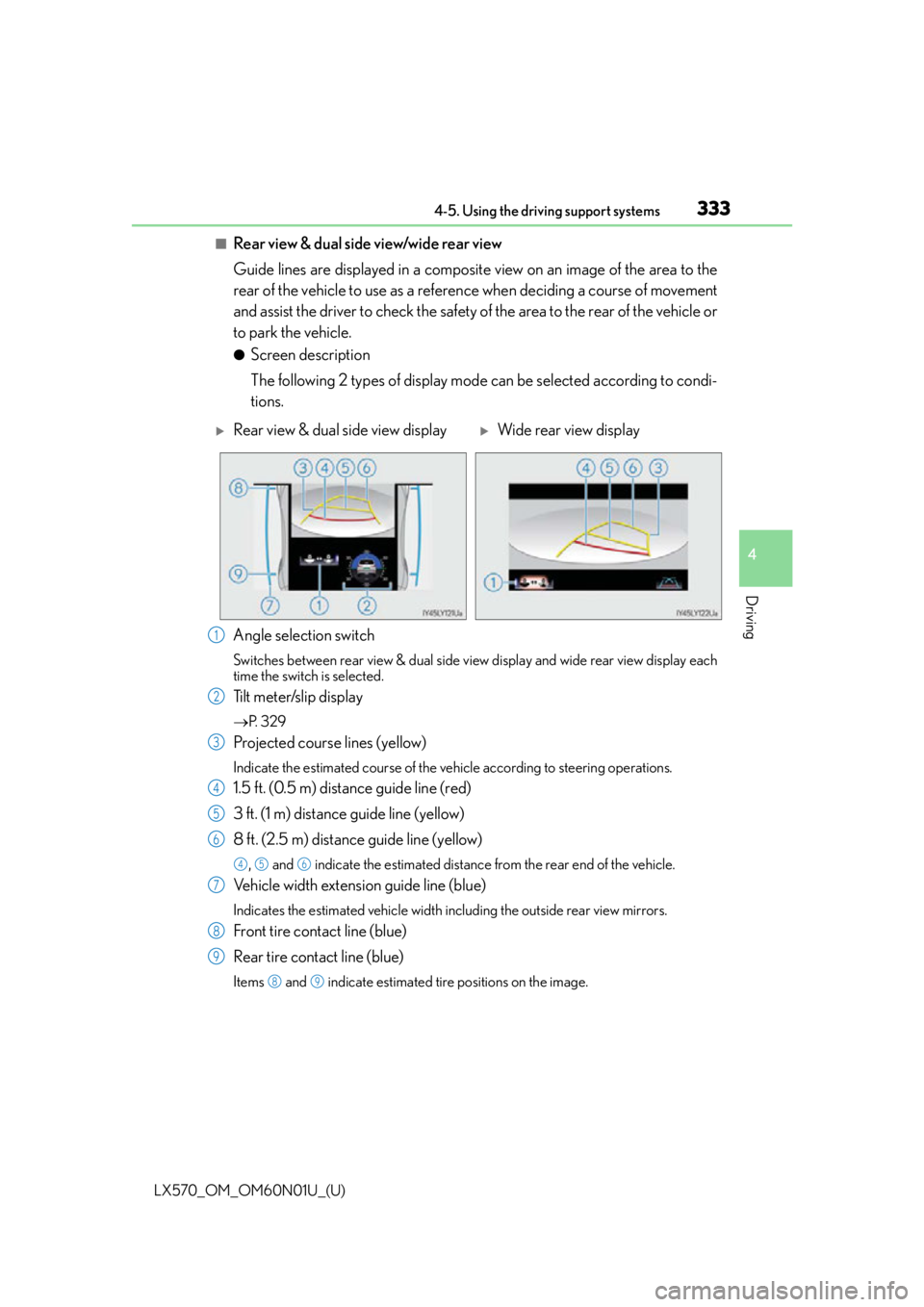
■Rear view & dual side view/wide rear view
Guide lines are displayed in a composite view on an image of the area to the
rear of the vehicle to use as a reference when deciding a course of movement
and assist the driver to check the safety of the area to the rear of the vehicle or
to park the vehicle.
●Screen description
The following 2 types of display mode can be selected according to condi-
tions.
Angle selection switch
Switches between rear view & dual side vi ew display and wide rear view display each
time the switch is selected.
Tilt meter/slip display
P. 3 2 9
Projected course lines (yellow)
Indicate the estimated course of the vehicle according to steering operations.
1.5 ft. (0.5 m) distance guide line (red)
3 ft. (1 m) distance guide line (yellow)
8 ft. (2.5 m) distance guide line (yellow)
, and indicate the estimated distance from the rear end of the vehicle.
Vehicle width extension guide line (blue)
Indicates the estimated vehicle width including the outside rear view mirrors.
Front tire contact line (blue)
Rear tire contact line (blue)
Items and indicate estimated tire positions on the image.
Rear view & dual side view displayWide rear view display
1
2
3
4
5
6
456
7
8
9
89