lights LEXUS LX570 2016 Workshop Manual
[x] Cancel search | Manufacturer: LEXUS, Model Year: 2016, Model line: LX570, Model: LEXUS LX570 2016Pages: 632, PDF Size: 8.94 MB
Page 268 of 632

268
LX570_OM_OM60N01U_(U)4-5. Using the driving support systems
■Conditions in which functions may not operate properly
In the following situations, the camera sensor
may not detect white (yellow) lines and var-
ious functions may not operate normally.
●There are shadows on the road that run paralle l with, or cover, the white (yellow) lines.
●The vehicle is driven in an area without white (yellow) lines, such as in front of a tollgate
or checkpoint, or at an intersection, etc.
●The white (yellow) lines are cracked, “Botts’ dots”, “Raised pavement marker” or stones
are present.
●The white (yellow) lines cannot be seen or are difficult to see due to sand, etc.
●The vehicle is driven on a road surface that is wet due to rain, puddles, etc.
●The traffic lines are yellow (which may be more difficult to recognize than lines that are
white).
●The white (yellow) lines cross over a curb, etc.
●The vehicle is driven on a brig ht surface, such as concrete.
●The vehicle is driven on a surface that is bright due to reflected light, etc.
●The vehicle is driven in an area where the brightness changes suddenly, such as at the
entrances and exits of tunnels, etc.
●Light from the headlights of an oncoming vehicle, the sun, etc., enters the camera.
●The vehicle is driven where the road diverges, merges, etc.
●The vehicle is driven on a slope.
●The vehicle is driven on a road which tilts left or right, or a winding road.
●The vehicle is driven on an unpaved or rough road.
●The vehicle is driven around a sharp curve.
●The traffic lane is excessively narrow or wide.
●The vehicle is extremely tilted due to carry ing heavy luggage or having improper tire
pressure.
●The distance to the preceding vehicle is extremely short.
●The vehicle is moving up and down a large am ount due to road conditions during driv-
ing (poor roads or road seams).
●The headlight lenses are dirty an d emit a faint amount of light at night, or the beam axis
has deviated.
●The vehicle is struck by a crosswind.
●The vehicle has just changed lane s or crossed an intersection.
Page 274 of 632
274
LX570_OM_OM60N01U_(U)4-5. Using the driving support systems
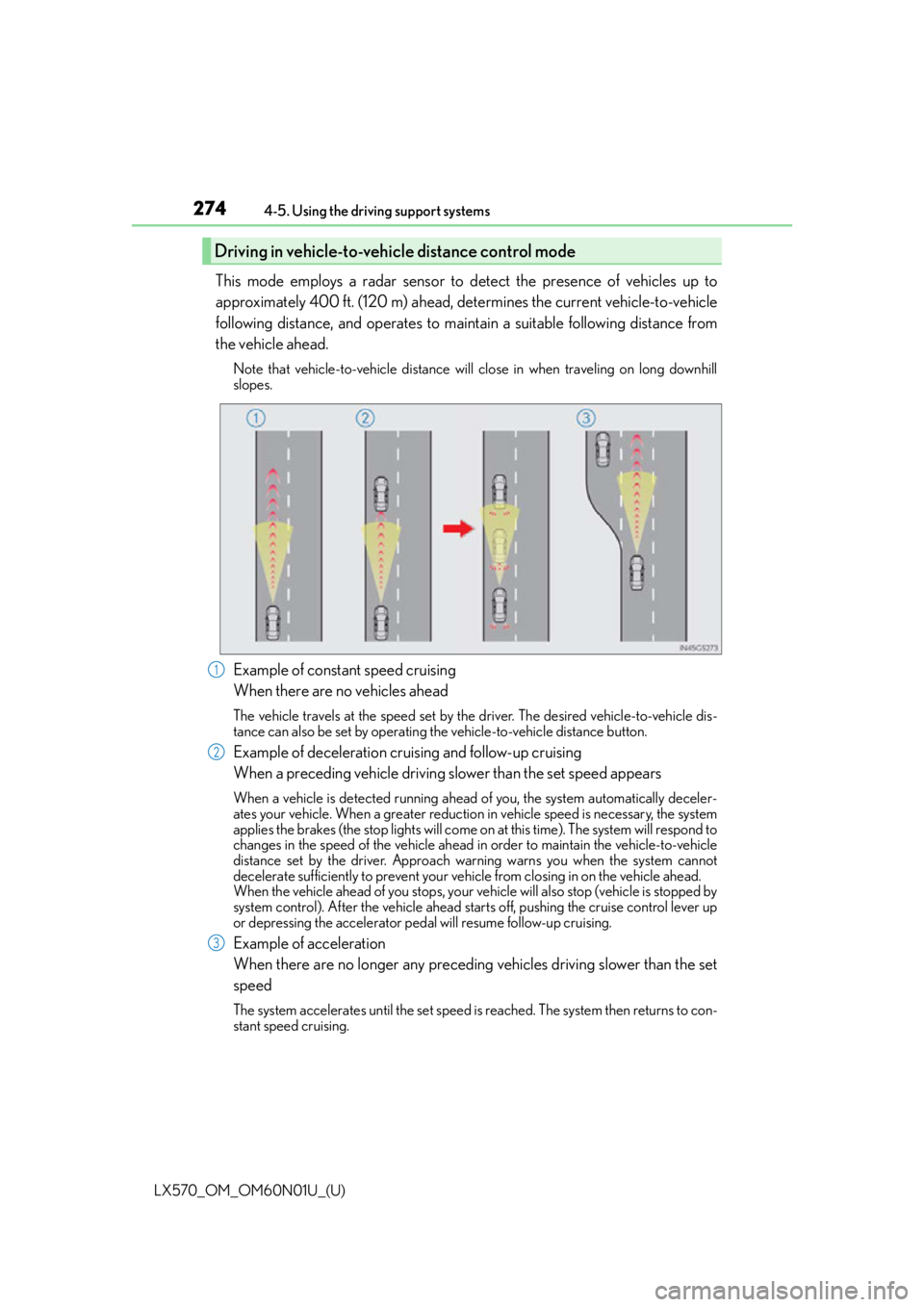
This mode employs a radar sensor to detect the presence of vehicles up to
approximately 400 ft. (120 m) ahead, determines the current vehicle-to-vehicle
following distance, and operates to main
tain a suitable following distance from
the vehicle ahead.
Note that vehicle-to-vehicle distance will close in when traveling on long downhill
slopes.
Example of constant speed cruising
When there are no vehicles ahead
The vehicle travels at the speed set by the driver. The desired vehicle-to-vehicle dis-
tance can also be set by operating th e vehicle-to-vehicle distance button.
Example of deceleration cruising and follow-up cruising
When a preceding vehicle driving slower than the set speed appears
When a vehicle is detected running ahead of you, the system automatically deceler-
ates your vehicle. When a greater reduction in vehicle speed is necessary, the system
applies the brakes (the stop lights will come on at this time). The system will respond to
changes in the speed of the vehicle ahead in order to maintain the vehicle-to-vehicle
distance set by the driver. Approach wa rning warns you when the system cannot
decelerate sufficiently to prevent your ve hicle from closing in on the vehicle ahead.
When the vehicle ahead of you stops, your ve hicle will also stop (vehicle is stopped by
system control). After the vehicle ahead starts off, pushing the cruise control lever up
or depressing the accelerator peda l will resume follow-up cruising.
Example of acceleration
When there are no longer any preceding vehicles driving slower than the set
speed
The system accelerates until the set speed is reached. The system then returns to con-
stant speed cruising.
Driving in vehicle-to-vehicle distance control mode
1
2
3
Page 307 of 632

LX570_OM_OM60N01U_(U)
3074-5. Using the driving support systems
4
Driving
■The center differential lock indicator light
The indicator light blinks while locking/unlocking the center differential.
■The center differential lock/unlock switch can be operated when
●The engine switch is in IGNITION ON mode.
●The vehicle speed is less than 62 mph (100 km/h).
■Locking/unlocking the center differential
●When the four-wheel drive control switch is in L4 with the center differential locked,
VSC is automatically turned off. (The center differential lock and VSC OFF indicator
lights come on.)
●If the operation is not completed, the center di fferential lock indicator blinks. If the indi-
cator light does not turn off when unlocking the center differential, drive straight ahead
while accelerating or decelerating, or drive in reverse.
●If the center differential lock/unlock is not completed within 5 seconds while the cruise
control system is on, cancel the cruise control system.
■If the low speed four-wheel drive indicator light or the center differential lock indicator
light blinks
●If the low speed four-wheel drive indicator lig ht continues to blink when using the four-
wheel drive control switch, stop the vehicle completely, move the shift lever to N and
operate the switch again.
●If the shift lever is moved before the low sp eed four-wheel drive indicator turns on/off,
the transfer mode may not be shifted comp letely. The transfer mode disengages both
the front and rear driveshafts from the powertrain and allows the vehicle to move
regardless of the shift position. (At this time , the indicator blinks and the buzzer sounds.)
Therefore, the vehicle is free to roll even if the automatic transmission is in P. You or
someone else could be seriously injured. You must complete the shifting of the transfer
mode.
To complete the shifting, stop the vehicle completely, return the shift lever to N, and
confirm that the shift was completed (the indicator turns on/off).
●If the engine coolant temperature is too low, the four-wheel drive control system may
not be able to shift. When the engine is warmer operate the switch again.
If the low speed four-wheel drive indicator light or the center differential lock indicator
light continues to blink even after attempti ng the above, there may be a malfunction in
the engine, the brake system or the four-wheel drive system. In this case, you may not be
able to shift between H4 and L4, and the center differential lock may not be operable.
Have the vehicle inspected by your Lexus dealer immediately.
Page 313 of 632

LX570_OM_OM60N01U_(U)
3134-5. Using the driving support systems
4
Driving
■Sounds and vibrations caused by the Crawl Control system
●A sound may be heard from the engine compartment when the engine is started or just
after the vehicle begins to move. This sound does not indicate that a malfunction has
occurred in Crawl Control system.
●Either of the following conditions may occur when the Crawl Control system is operat-
ing. None of these are indicators that a malfunction has occurred.
• Vibrations may be felt through the vehicle body and steering.
• A motor sound may be heard after the vehicle comes to a stop.
■When there is a malfunction in the system
Warning lights and/or warning messages will turn on. ( P. 5 2 4 , 5 3 2 )
WA R N I N G
■When using Crawl Control and Turn Assist function
Do not rely solely on the Crawl Control and Turn Assist function. This function does not
extend the vehicle’s performance limitations. Always thoroughly check the road condi-
tions, and drive safely.
■These conditions may cause the system not to operate properly
When driving on the following surfaces, the sy stem may not be able to maintain a fixed
low speed, which may re sult in an accident:
●Extremely steep inclines.
●Extremely uneven surfaces.
●Snow-covered roads, or other slippery surfaces.
NOTICE
■When using Turn Assist function
The Turn Assist function is a function to assist turning performance when driving off
road. The function may be less effective on paved road surfaces.
Page 363 of 632
LX570_OM_OM60N01U_(U)
3634-5. Using the driving support systems
4
Driving
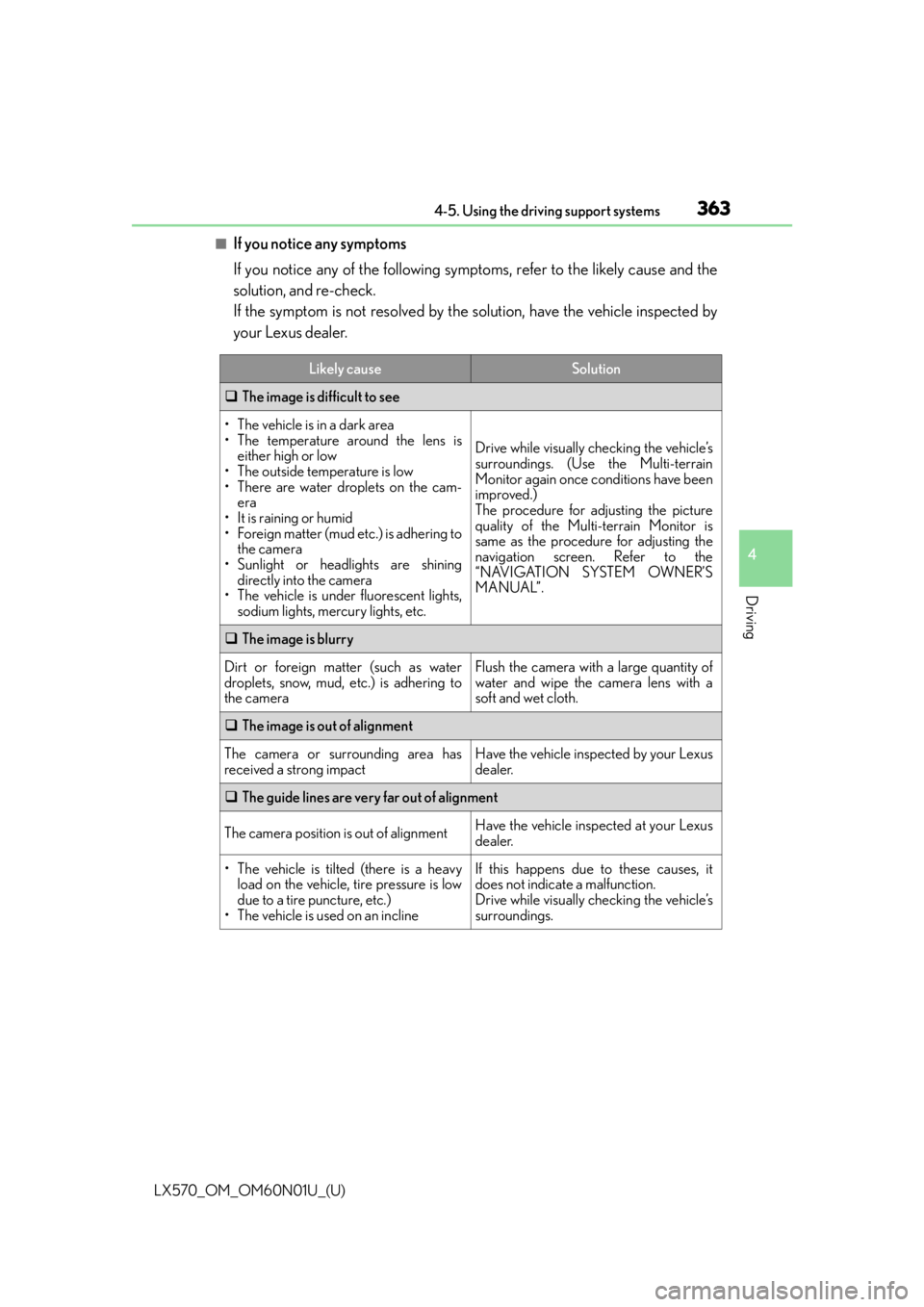
■If you notice any symptoms
If you notice any of the following symptoms, refer to the likely cause and the
solution, and re-check.
If the symptom is not resolved by the solution, have the vehicle inspected by
your Lexus dealer.
Likely causeSolution
The image is difficult to see
• The vehicle is in a dark area
• The temperature around the lens is
either high or low
• The outside temperature is low
• There are water droplets on the cam- era
• It is raining or humid
• Foreign matter (mud etc.) is adhering to the camera
• Sunlight or headlights are shining directly into the camera
• The vehicle is under fluorescent lights,
sodium lights, mercury lights, etc.
Drive while visually checking the vehicle’s
surroundings. (Use the Multi-terrain
Monitor again once conditions have been
improved.)
The procedure for adjusting the picture
quality of the Multi-terrain Monitor is
same as the procedure for adjusting the
navigation screen. Refer to the
“NAVIGATION SYSTEM OWNER’S
MANUAL”.
The image is blurry
Dirt or foreign matter (such as water
droplets, snow, mud, etc.) is adhering to
the cameraFlush the camera with a large quantity of
water and wipe the camera lens with a
soft and wet cloth.
The image is out of alignment
The camera or surrounding area has
received a strong impactHave the vehicle inspected by your Lexus
dealer.
The guide lines are very far out of alignment
The camera position is out of alignmentHave the vehicle inspected at your Lexus
dealer.
• The vehicle is tilted (there is a heavy
load on the vehicle, tire pressure is low
due to a tire puncture, etc.)
• The vehicle is used on an inclineIf this happens due to these causes, it
does not indicate a malfunction.
Drive while visually checking the vehicle’s
surroundings.
Page 364 of 632

364
LX570_OM_OM60N01U_(U)4-5. Using the driving support systems
The projected course lines move even thou gh the steering wheel is straight (vehi-
cle width extension guide lines and pr ojected course lines are not aligned)
There is a malfunction in the signals being
output by the steering sensorHave the vehicle inspected by your Lexus
dealer.
Guide lines are not displayed
The back door is open
Close the back door.
If this does not resolve the symptom, have
the vehicle inspected by your Lexus
dealer.
“!” is displayed
The battery is disconnected and recon-
nected
Turn the steering whee l fully to right and
left.
If this does not resolve the symptom, have
the vehicle inspected by your Lexus
dealer.
There is a malfunction in the Multi-terrain
MonitorHave the vehicle inspected by your Lexus
dealer.
NOTICE
■How to use the camera
●The Multi-terrain Monitor system may not operate properly in the following cases.
• If the front or the rear of the vehicle or the outside rear view mirror has been hit, the camera’s position and mounting angle may have changed.
• As the camera has a water proof construction, do not detach, disassemble or modify it. This may cause incorrect operation.
• Do not strongly rub the camera lens. If th e camera lens is scratched, it cannot
transmit a clear image.
• Do not allow organic solvent, car wax, window cleaner or glass coat to adhere to the camera. If this happens, wipe it off as soon as possible.
• If the temperature changes rapidly, such as when hot water is poured on the vehi- cle in cold weather, the system may not operate normally.
• When washing the vehicle, do not apply intensive bursts of water to the camera or
camera area. Doing so may result in the camera malfunctioning.
• When the camera is used under fluorescen t lights, sodium light or mercury light
etc., the lights and the illuminate d areas may appear to flicker.
• The camera can be damaged by flying rocks and other debris.
●Do not expose the camera to strong impact as this could cause a malfunction. If this
happens, have the vehicle inspected by your Lexus dealer as soon as possible.
Likely causeSolution
Page 380 of 632
380
LX570_OM_OM60N01U_(U)4-5. Using the driving support systems
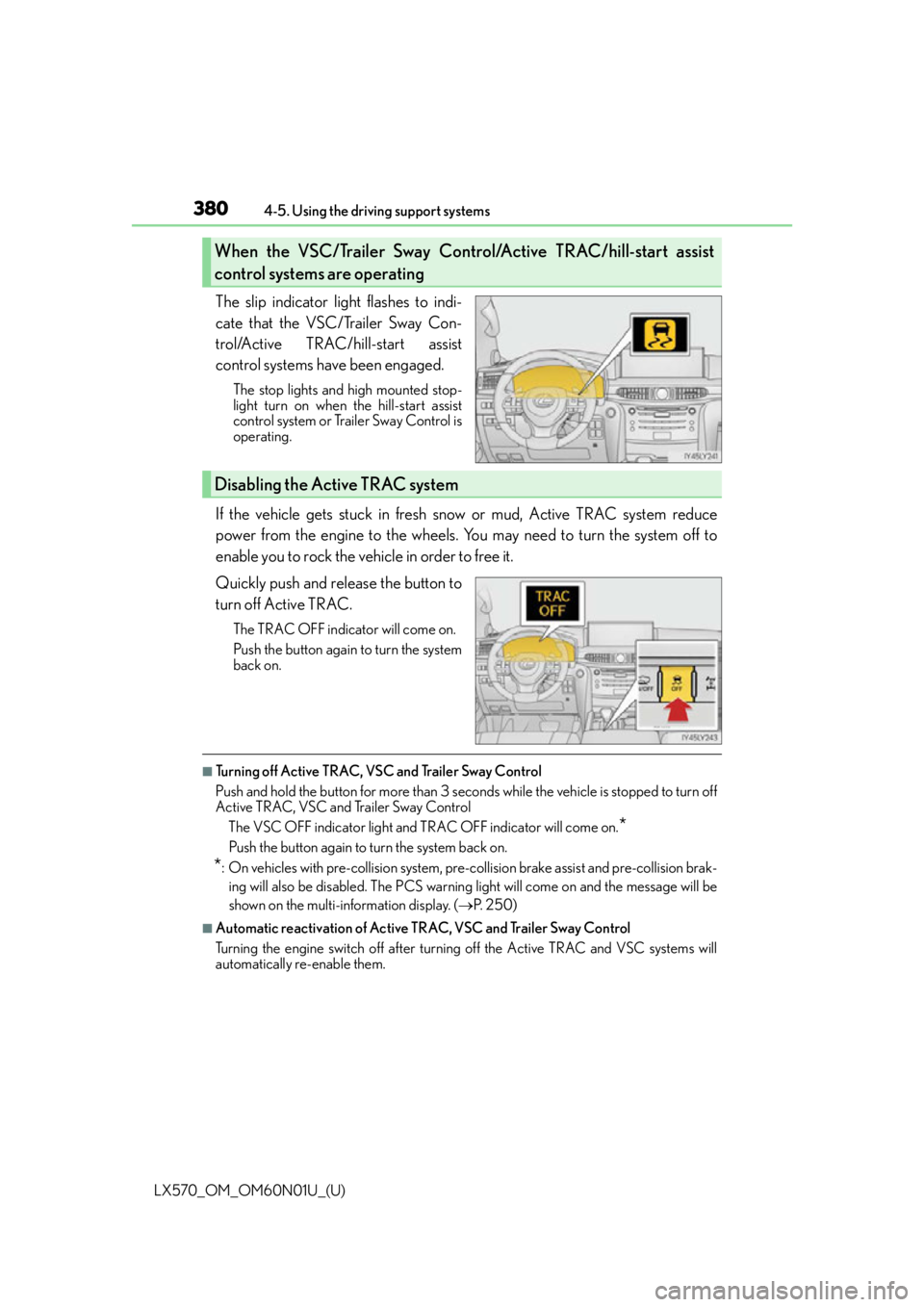
The slip indicator light flashes to indi-
cate that the VSC/Trailer Sway Con-
trol/Active TRAC/hill-start assist
control systems have been engaged.
The stop lights and high mounted stop-
light turn on when
the hill-start assist
control system or Trailer Sway Control is
operating.
If the vehicle gets stuck in fresh snow or mud, Active TRAC system reduce
power from the engine to the wheels. You may need to turn the system off to
enable you to rock the vehicle in order to free it.
Quickly push and release the button to
turn off Active TRAC.
The TRAC OFF indicator will come on.
Push the button again to turn the system
back on.
■Turning off Active TRAC, VSC and Trailer Sway Control
Push and hold the button for more than 3 seconds while the vehicle is stopped to turn off
Active TRAC, VSC and Trailer Sway Control
The VSC OFF indicator light and TRAC OFF indicator will come on.
*
Push the button again to turn the system back on.
*: On vehicles with pre-collision system, pre-collision brake assist and pre-collision brak-ing will also be disabled. The PCS warning light will come on and the message will be
shown on the multi-information display. ( P. 2 5 0 )
■Automatic reactivation of Active TRAC, VSC and Trailer Sway Control
Turning the engine switch off after turning off the Active TRAC and VSC systems will
automatically re-enable them.
When the VSC/Trailer Sway Control/Active TRAC/hill-start assist
control systems are operating
Disabling the Active TRAC system
Page 384 of 632

384
LX570_OM_OM60N01U_(U)4-6. Driving tips
Winter driving tips
●Use fluids that are appropriate to the prevailing outside temperatures.
•Engine oil
• Engine coolant
• Washer fluid
●Have a service technician inspect the condition of the battery.
●Have the vehicle fitted with four snow tires or purchase a set of tire chains for
the rear tires.
*
Ensure that all tires are the same size and br and, and that chains match the size of the
tires.
*: Tire chains cannot be mounted on vehicles with 21-inch tires
Perform the following according to the driving conditions:
●Do not try to forcibly open a window or move a wiper that is frozen. Pour
warm water over the frozen area to melt the ice. Wipe away the water imme-
diately to prevent it from freezing.
●To ensure proper operation of the climate control system fan, remove any
snow that has accumulated on the air in let vents in front of the windshield.
●Check for and remove any excess ice or snow that may have accumulated on
the exterior lights, vehicle’s roof, chassis, around the tires or on the brakes.
●Remove any snow or mud from the bottom of your shoes before getting in the
vehicle.
Carry out the necessary preparations and inspections before driving the vehi-
cle in winter. Always drive the vehicle in a manner appropriate to the prevail-
ing weather conditions.
Pre-winter preparations
Before driving the vehicle
Page 393 of 632

393
LX570_OM_OM60N01U_(U)
5Interior features
5-1. Remote Touch screenRemote Touch/12.3-inch display ..........................................394
5-2. Lexus Climate Concierge Lexus Climate Concierge ..... 400
5-3. Using the air conditioning system and defogger
Front automatic air conditioning system ................ 401
Rear air conditioning system ........................................... 412
Heated steering wheel/seat heaters/seat ventilators.......... 415 5-4. Using the interior lights
Interior lights list .......................... 419• Interior lights .......................... 420
• Personal lights .........................421
5-5. Using the storage features List of storage features ............ 422• Glove box ............................... 423
• Console box........................... 423
• Overhead console .............. 424
• Cup holders ........................... 425
• Bottle holders ........................ 426
• Card holder............................ 426
• Auxiliary boxes ......................427
Luggage compartment features........................................ 429
5-6. Using the other interior features
Other interior features ............. 431 • Cool box ................................... 431
• Sun visors ................................ 432
• Vanity mirrors ........................ 432
• Clock ........................................ 433
• Power outlets ......................... 434
• Wireless charger.................. 436
• Armrest .................................... 443
• Rear door sunshades ......... 444
• Coat hooks ............................. 444
• Assist grips.............................. 445
Garage door opener................ 446
LEXUS Enform Safety Connect ........................................451
Page 417 of 632
LX570_OM_OM60N01U_(U)
4175-3. Using the air conditioning system and defogger
5
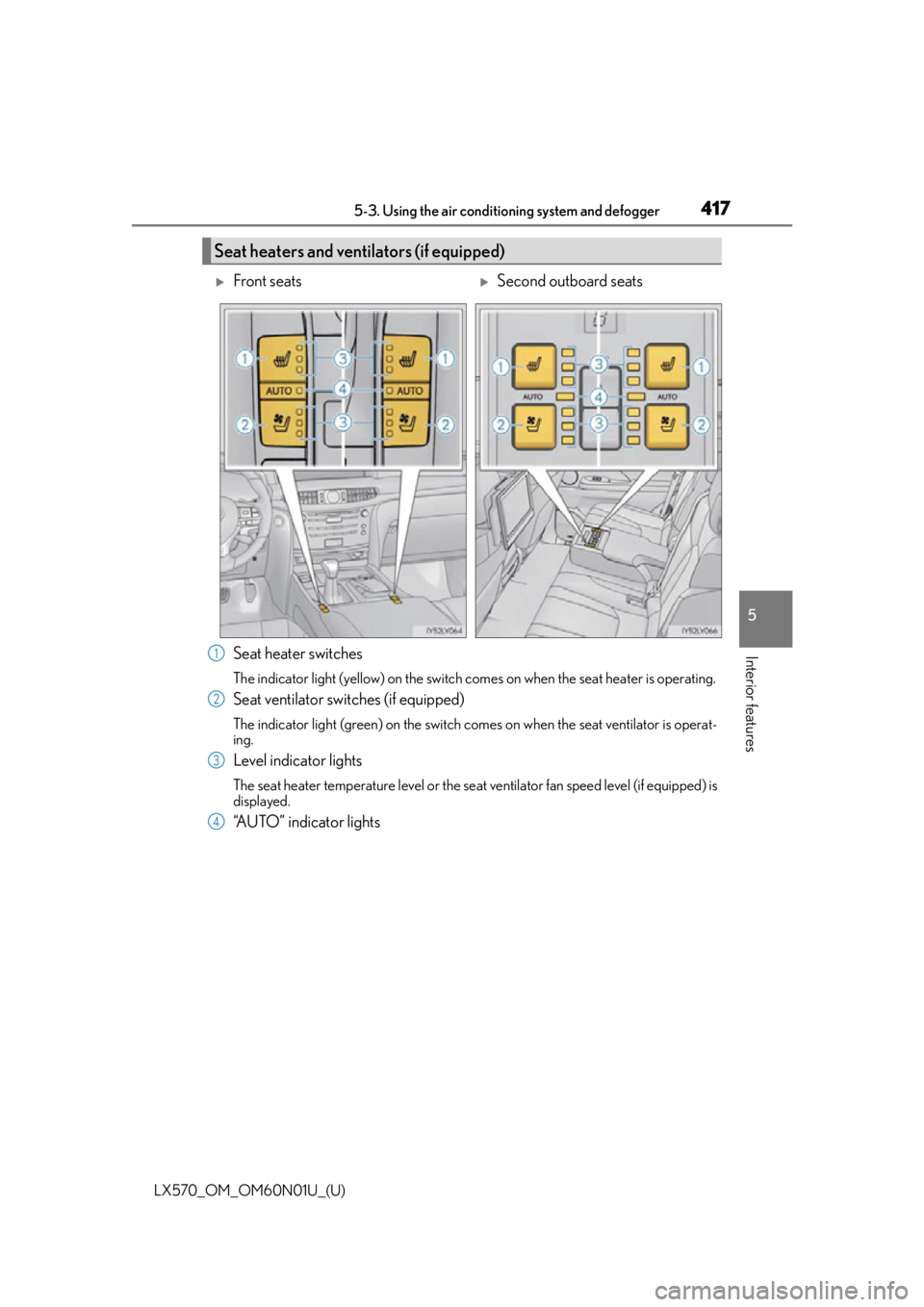
Interior featuresSeat heater switches
The indicator light (yellow) on the switch co mes on when the seat heater is operating.
Seat ventilator switches (if equipped)
The indicator light (green) on the switch comes on when the seat ventilator is operat-
ing.
Level indicator lights
The seat heater temperature level or the seat ventilator fan speed level (if equipped) is
displayed.
“AUTO” indicator lights
Seat heaters and ventilators (if equipped)
Front seatsSecond outboard seats
1
2
3
4