lights LEXUS LX570 2016 Repair Manual
[x] Cancel search | Manufacturer: LEXUS, Model Year: 2016, Model line: LX570, Model: LEXUS LX570 2016Pages: 632, PDF Size: 8.94 MB
Page 418 of 632
4185-3. Using the air conditioning system and defogger
LX570_OM_OM60N01U_(U)
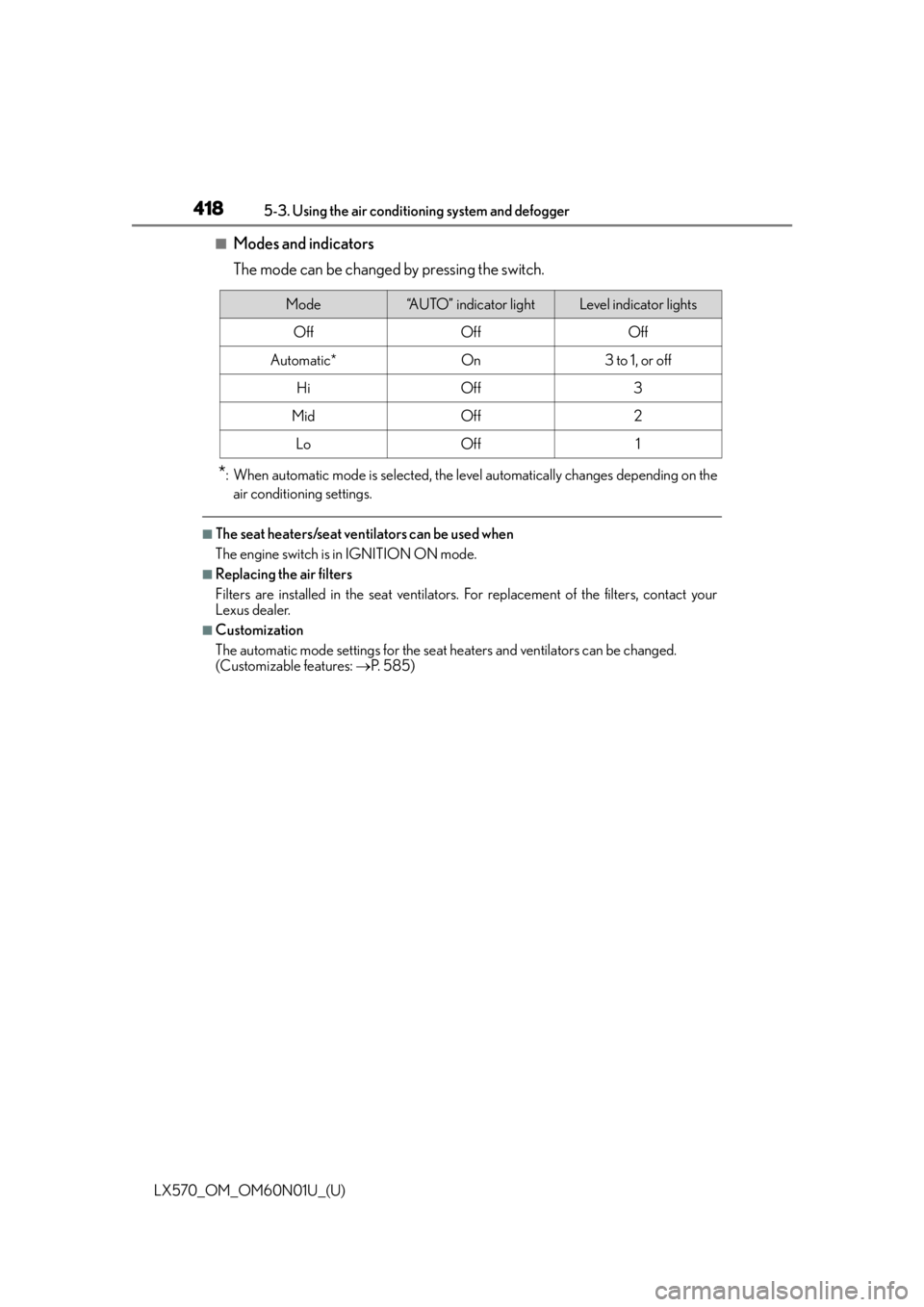
■Modes and indicators
The mode can be changed by pressing the switch.
*: When automatic mode is selected, the level automatically changes depending on the air conditioning settings.
■The seat heaters/seat ventilators can be used when
The engine switch is in IGNITION ON mode.
■Replacing the air filters
Filters are installed in the se at ventilators. For replacement of the filters, contact your
Lexus dealer.
■Customization
The automatic mode settings for the seat heaters and ventilators can be changed.
(Customizable features: P. 585)
Mode“AUTO” indicator lightLevel indicator lights
OffOffOff
Automatic*On3 to 1, or off
HiOff3
MidOff2
LoOff1
Page 419 of 632
419
LX570_OM_OM60N01U_(U)5-4. Using the interior lights
5
Interior features
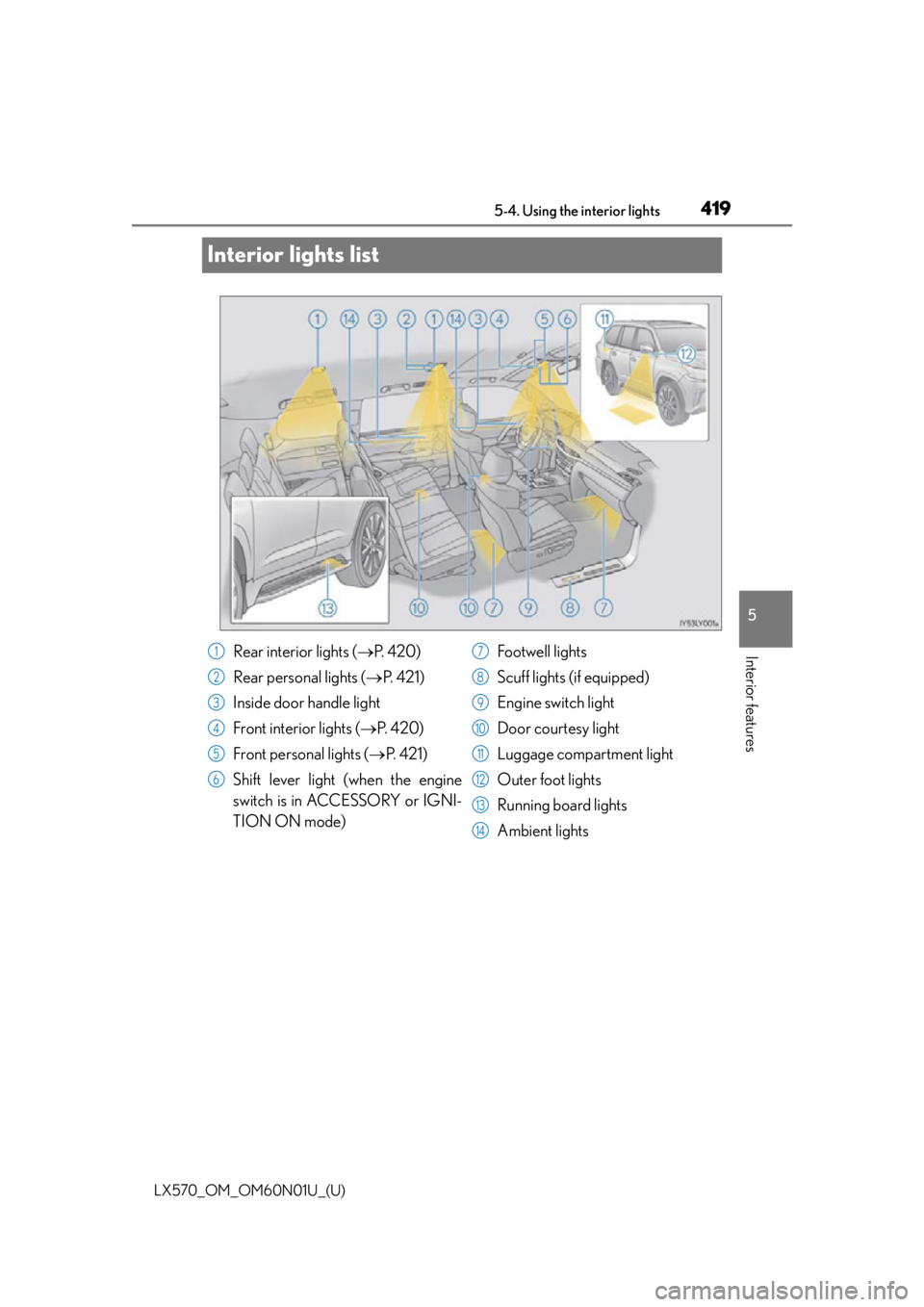
Interior lights list
Rear interior lights (
P. 4 2 0 )
Rear personal lights ( P. 4 2 1 )
Inside door handle light
Front interior lights ( P. 4 2 0 )
Front personal lights ( P. 4 2 1 )
Shift lever light (when the engine
switch is in ACCESSORY or IGNI-
TION ON mode) Footwell lights
Scuff lights (if equipped)
Engine switch light
Door courtesy light
Luggage compartment light
Outer foot lights
Running board lights
Ambient lights1
2
3
4
5
6
7
8
9
10
11
12
13
14
Page 420 of 632
420
LX570_OM_OM60N01U_(U)5-4. Using the
interior lights
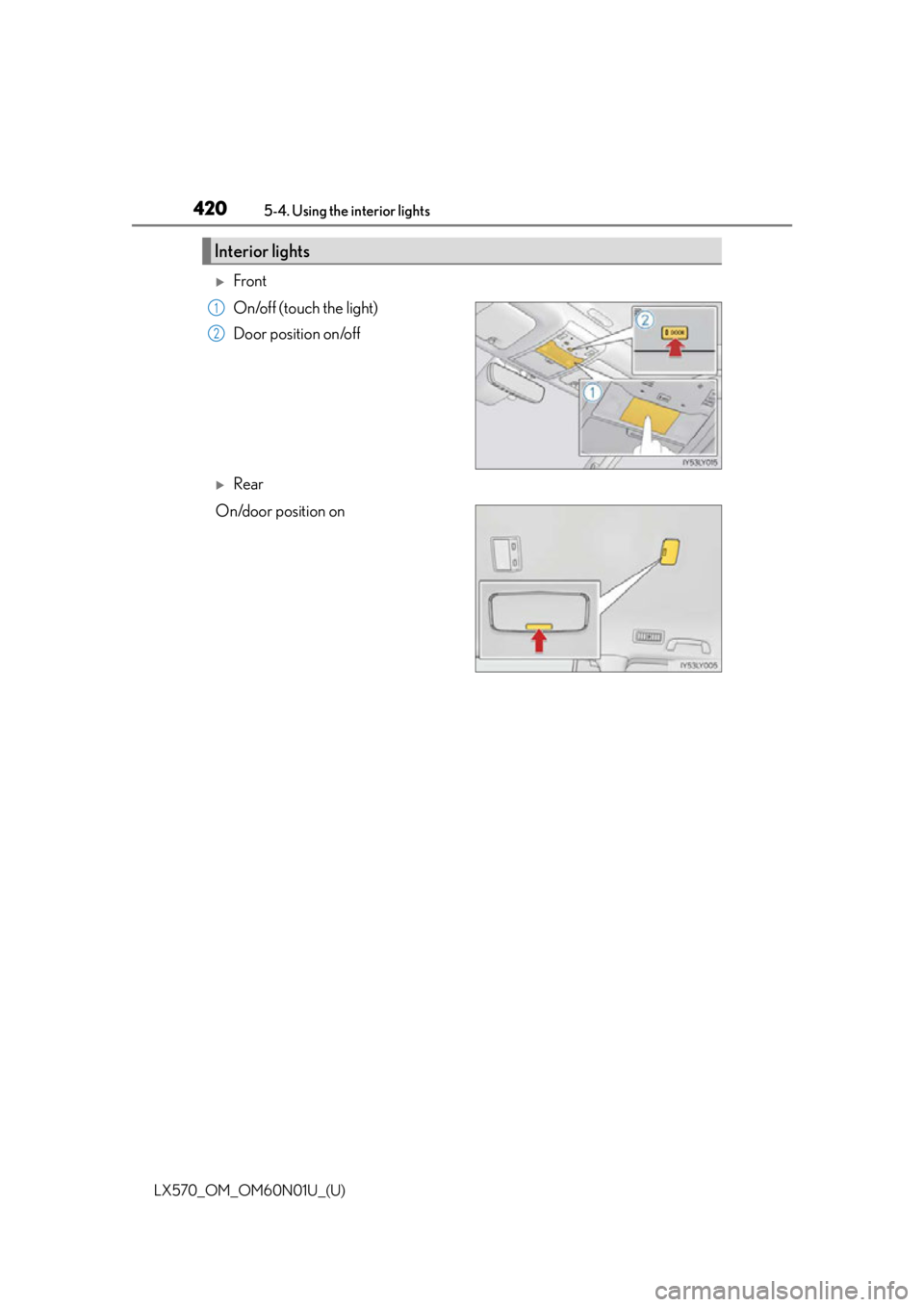
Front
On/off (touch the light)
Door position on/off
Rear
On/door position on
Interior lights
1
2
Page 421 of 632

LX570_OM_OM60N01U_(U)
4215-4. Using the interior lights
5
Interior features
■Illuminated entry system
The lights automatically turn on/off according to engine switch mode, the presence of the
electronic key, whether the doors are locked/unlocked, and whether the doors are
open/closed.
■To prevent battery discharge
If the interior lights remain on when the engine switch is turned off, the lights will go off
automatically after 20 minutes:
■Customization
Settings (e.g. adjust the time elapsed before the interior light s automatically turn off) can
be changed. (Customizable features: P. 5 8 5 )
Personal lights
Front Rear
Turns the lights on/off (touch the lights) Turns the lights on/off
NOTICE
To prevent battery discharge, do not leave the lights on longer than necessary when the
engine is not running.
Page 423 of 632
LX570_OM_OM60N01U_(U)
4235-5. Using the storage features
5
Interior features
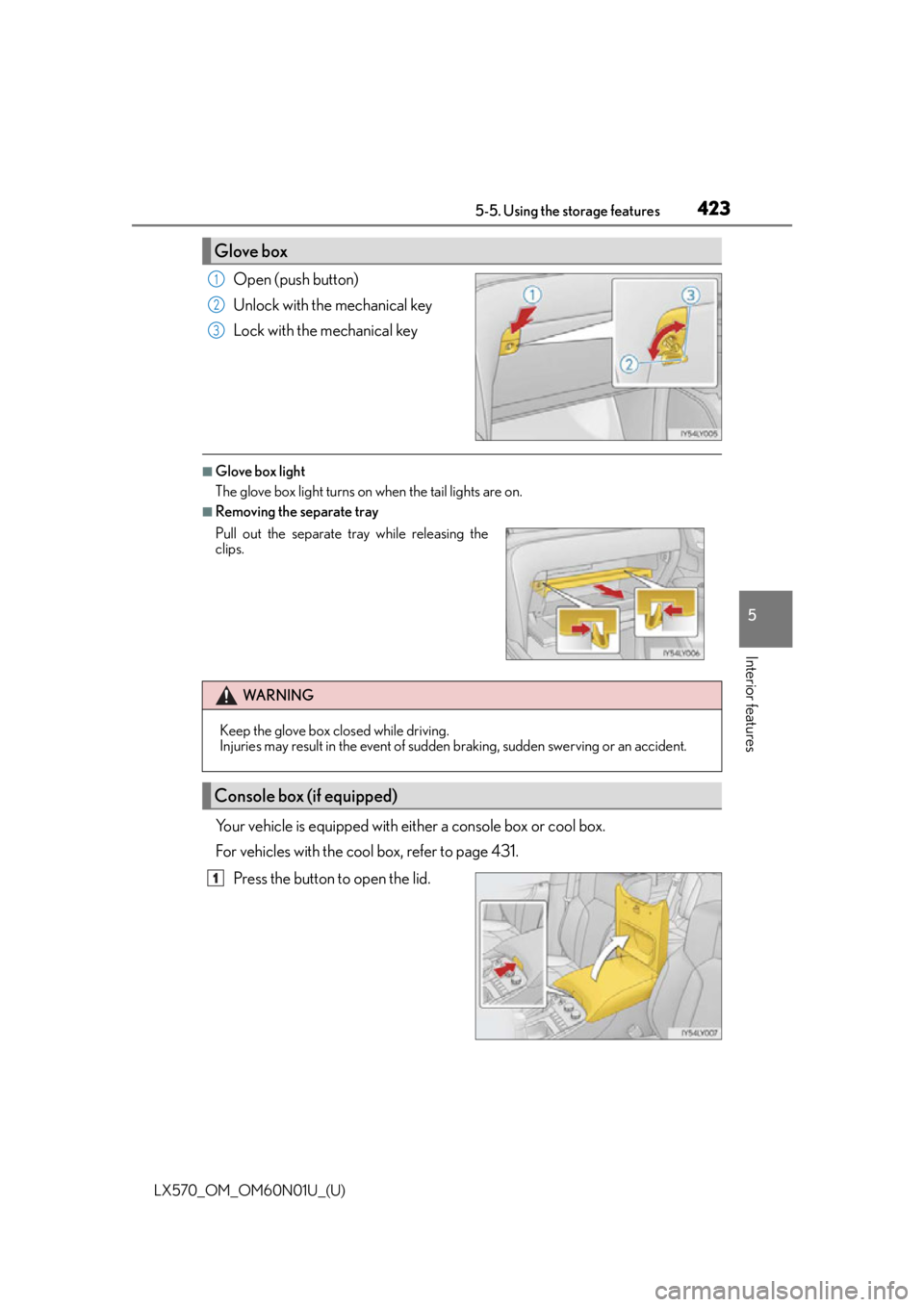
Open (push button)
Unlock with the mechanical key
Lock with the mechanical key
■Glove box light
The glove box light turns on when the tail lights are on.
■Removing the separate tray
Your vehicle is equipped with either a console box or cool box.
For vehicles with the cool box, refer to page 431.Press the button to open the lid.
Glove box
1
2
3
Pull out the separate tr ay while releasing the
clips.
WA R N I N G
Keep the glove box closed while driving.
Injuries may result in the event of sudden braking, sudden swerving or an accident.
Console box (if equipped)
1
Page 432 of 632
432
LX570_OM_OM60N01U_(U)5-6. Using the other interior features
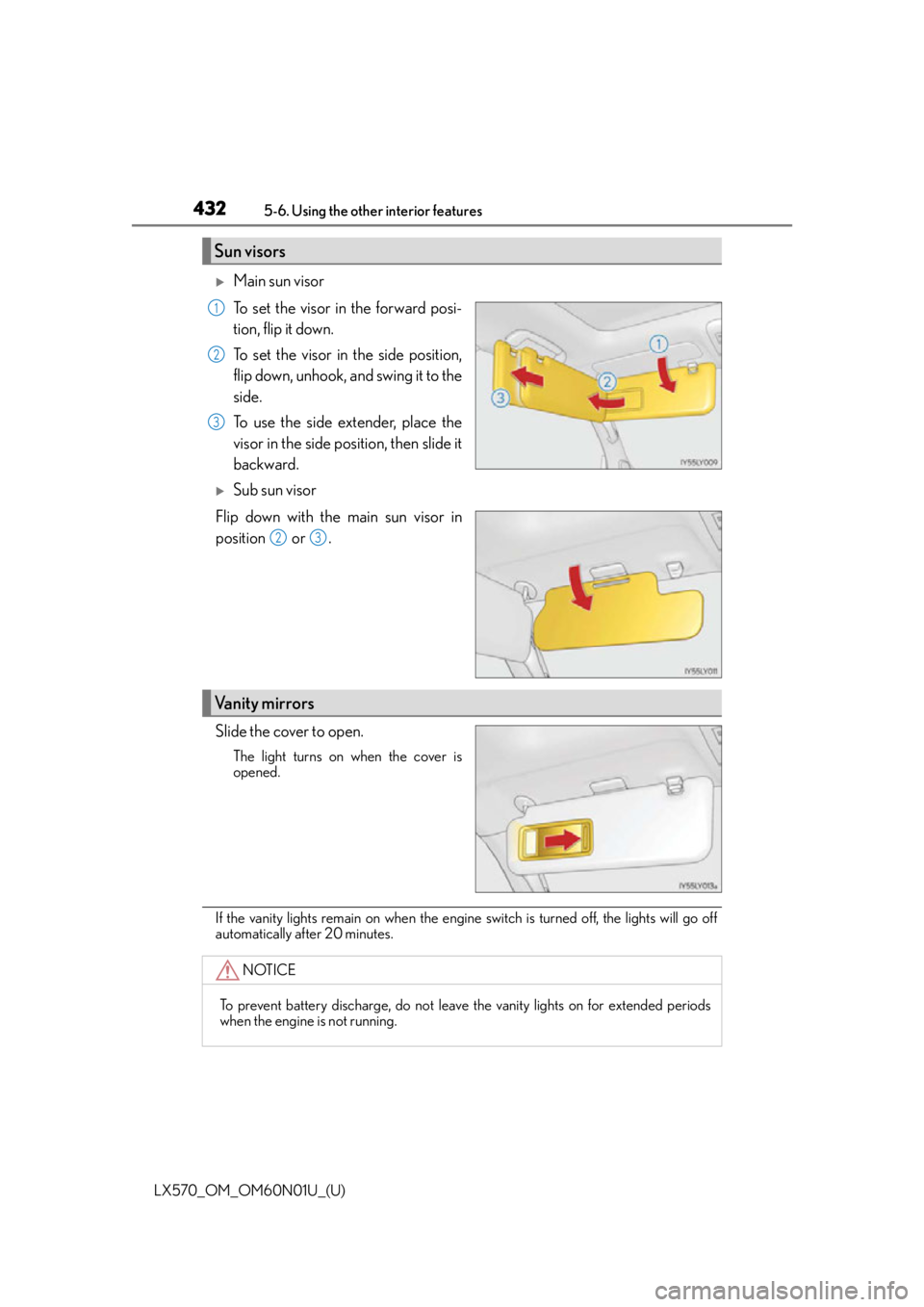
Main sun visor
To set the visor in the forward posi-
tion, flip it down.
To set the visor in the side position,
flip down, unhook, and swing it to the
side.
To use the side extender, place the
visor in the side position, then slide it
backward.
Sub sun visor
Flip down with the main sun visor in
position or .
Slide the cover to open.
The light turns on when the cover is
opened.
If the vanity lights remain on when the engine switch is turned off, the lights will go off
automatically after 20 minutes.
Sun visors
1
2
3
23
Vanity mirrors
NOTICE
To prevent battery discharge, do not leave the vanity lights on for extended periods
when the engine is not running.
Page 438 of 632
438
LX570_OM_OM60N01U_(U)5-6. Using the other interior features
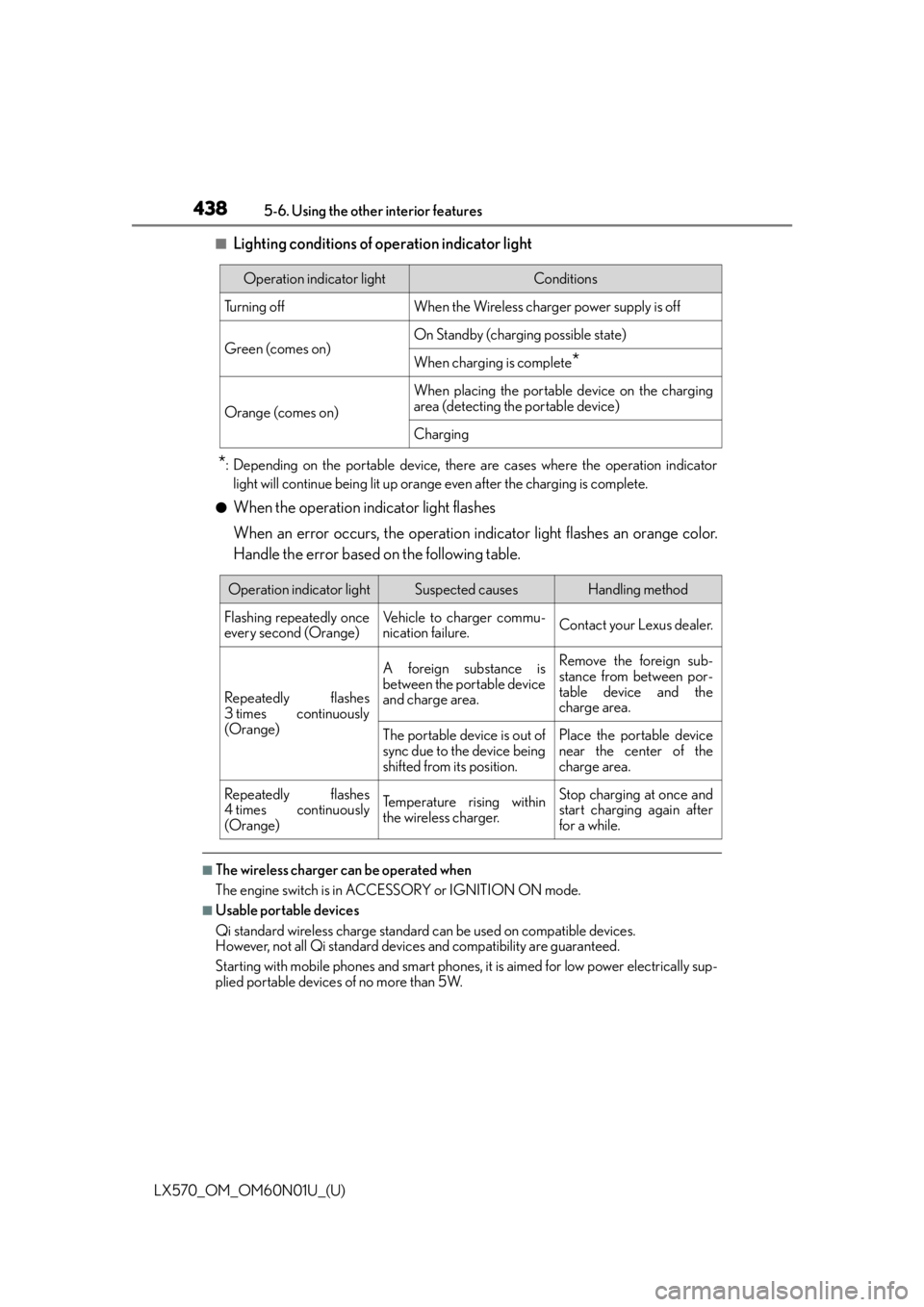
■Lighting conditions of operation indicator light
*: Depending on the portable device, there are cases where the operation indicator
light will continue being lit up orange even after the charging is complete.
●When the operation indicator light flashes
When an error occurs, the operation in dicator light flashes an orange color.
Handle the error based on the following table.
■The wireless charger can be operated when
The engine switch is in ACCESSORY or IGNITION ON mode.
■Usable portable devices
Qi standard wireless charge standard can be used on compatible devices.
However, not all Qi standard devi ces and compatibility are guaranteed.
Starting with mobile phones and smart phones , it is aimed for low power electrically sup-
plied portable devices of no more than 5W.
Operation indicator lightConditions
Tu r n i n g o f fWhen the Wireless charger power supply is off
Green (comes on)On Standby (charging possible state)
When charging is complete*
Orange (comes on)
When placing the portable device on the charging
area (detecting the portable device)
Charging
Operation indicator lightSuspected causesHandling method
Flashing repeatedly once
every second (Orange)Vehicle to charger commu-
nication failure.Contact your Lexus dealer.
Repeatedly flashes
3 times continuously
(Orange)
A foreign substance is
between the portable device
and charge area.Remove the foreign sub-
stance from between por-
table device and the
charge area.
The portable device is out of
sync due to the device being
shifted from its position.Place the portable device
near the center of the
charge area.
Repeatedly flashes
4 times continuously
(Orange)Te m p e r a t u r e r i s i n g w i t h i n
the wireless charger.Stop charging at once and
start charging again after
for a while.
Page 460 of 632

460
LX570_OM_OM60N01U_(U)6-1. Maintenance and care
NOTICE
■To prevent paint deterioration and corrosio
n on the body and components (aluminum
wheels etc.)
●Wash the vehicle immediately in the following cases:
• After driving near the sea coast
• After driving on salted roads
• If coal tar or tree sap is present on the paint surface
• If you see dead insects, insect droppings or bird droppings on the paint
• After driving in an area contaminated wi th soot, oily smoke, mine dust, iron pow-
der or chemical substances
• If the vehicle becomes heavily soiled in dust or mud
• If liquids such as benzene and gaso line are spilled on the paint surface
●If the paint is chipped or scratched, have it repaired immediately.
●To prevent the wheels from corroding, remo ve any dirt and store in a place with low
humidity when storing wheels.
■Cleaning the exterior lights
●Wash carefully. Do not use organic substances or scrub with a hard brush.
This may damage the su rfaces of the lights.
●Do not apply wax on the surfaces of the lights.
Wax may cause damage to the lenses.
■When using an automatic car wash
Set the wiper switch to the off position.
If the wiper switch is in “AUTO”, the wipers may operate and the wiper blades may be
damaged.
■When using a high pressure car wash
Do not bring the nozzle tip close to boots (rubber or resin manufactured cover), con-
nectors or the following parts. The parts may be damaged if they come into contact
with high-pressure water.
• Traction related parts
•Steering parts
• Suspension parts
•Brake parts
Page 467 of 632
LX570_OM_OM60N01U_(U)
4676-2. Maintenance
6
Maintenance and care
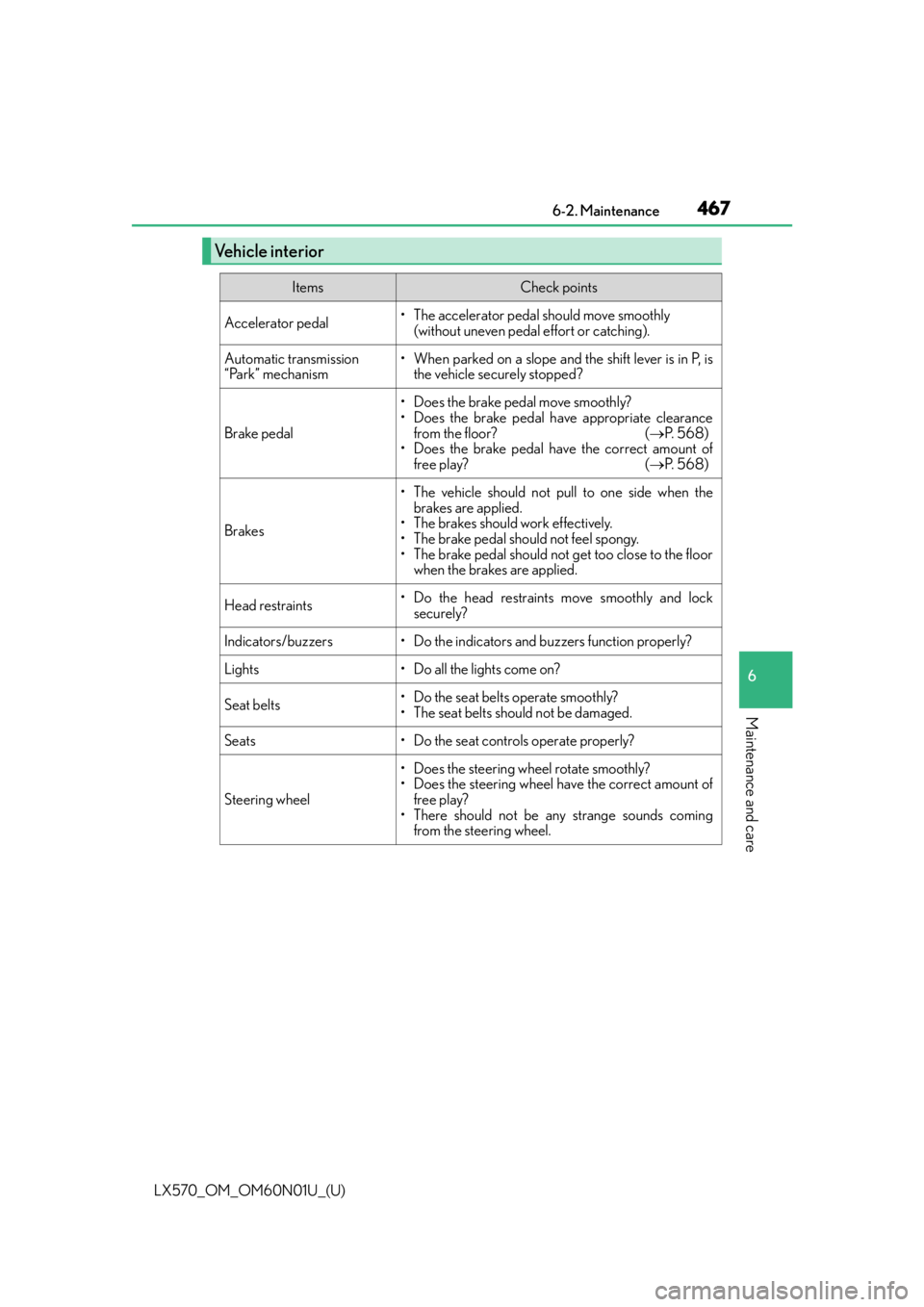
Vehicle interior
ItemsCheck points
Accelerator pedal• The accelerator pedal should move smoothly (without uneven pedal effort or catching).
Automatic transmission
“Park” mechanism• When parked on a slope and the shift lever is in P, isthe vehicle securely stopped?
Brake pedal
• Does the brake pedal move smoothly?
• Does the brake pedal have appropriate clearance
from the floor? ( P. 5 6 8 )
• Does the brake pedal have the correct amount of
free play? ( P. 5 6 8 )
Brakes
• The vehicle should not pull to one side when the
brakes are applied.
• The brakes should work effectively.
• The brake pedal should not feel spongy.
• The brake pedal should not get too close to the floor when the brakes are applied.
Head restraints• Do the head restraints move smoothly and lock
securely?
Indicators/buzzers• Do the indicators and buzzers function properly?
Lights• Do all the lights come on?
Seat belts•Do the seat belt s operate smoothly?
• The seat belts should not be damaged.
Seats• Do the seat controls operate properly?
Steering wheel
• Does the steering wheel rotate smoothly?
• Does the steering wheel have the correct amount of free play?
• There should not be an y strange sounds coming
from the steering wheel.
Page 507 of 632

LX570_OM_OM60N01U_(U)
5076-3. Do-it-yourself maintenance
6
Maintenance and care
■After a fuse is replaced
●If the lights do not turn on even after the fuse has been replaced, a bulb may need
replacement. (P. 5 0 8 )
●If the replaced fuse blows again, have the vehicle inspected by your Lexus dealer.
■If there is an overload in a circuit
The fuses are designed to blow, protecting the wiring harness from damage.
■When replacing light bulbs
Lexus recommends that you use genuine Le xus products designed for this vehicle.
Because certain bulbs are connected to circuits designed to prevent overload, non-gen-
uine parts or parts not designed for this vehicle may be unusable.
WA R N I N G
■To prevent system breakdowns and vehicle fire
Observe the following precautions.
Failure to do so may cause damage to the vehicle, and possibly a fire or injury.
●Never use a fuse of a higher amperage rati ng than indicated, or use any other object
in place of a fuse.
●Always use a genuine Lexus fuse or equivalent.
Never replace a fuse with a wire, even as a temporary fix.
●Do not modify the fuses or the fuse boxes.
NOTICE
■Before replacing fuses
Have the cause of electrical overload determined and repaired by your Lexus dealer,
as soon as possible.