ECU LEXUS LX570 2016 Repair Manual
[x] Cancel search | Manufacturer: LEXUS, Model Year: 2016, Model line: LX570, Model: LEXUS LX570 2016Pages: 632, PDF Size: 8.94 MB
Page 239 of 632
239
LX570_OM_OM60N01U_(U)4-4. Refueling
4
Driving
Opening the fuel tank cap
●Turn the engine switch off and ensure that all the doors and windows are
closed.
●Confirm the type of fuel.
■Fuel types
P. 5 7 1
■Fuel tank opening for unleaded gasoline
To help prevent incorrect fueling, your Lexus has a fuel tank opening that only accommo-
dates the special nozzle on unleaded fuel pumps.
Perform the following steps to open the fuel tank cap.
Before refueling the vehicle
WA R N I N G
■When refueling the vehicle
Observe the following precautions while refu eling the vehicle. Failure to do so may
result in death or serious injury.
●After exiting the vehicle and before openin g the fuel door, touch an unpainted metal
surface to discharge any static electricity. It is important to discharge static electricity
before refueling because sparks resulting fr om static electricity can cause fuel vapors
to ignite while refueling.
●Always hold the grips on th e fuel tank cap and turn it slowly to remove it.
A whooshing sound may be heard when the fuel tank cap is loosened. Wait until the
sound cannot be heard before fully removing the cap. In hot weather, pressurized fuel
may spray out of the filler neck and cause injury.
●Do not allow anyone that has not discharged static electricity from their bodies to
come close to an open fuel tank.
●Do not inhale vaporized fuel.
Fuel contains substances th at are harmful if inhaled.
●Do not smoke while refueling the vehicle.
Doing so may cause the fuel to ignite and cause a fire.
●Do not return to the vehicle or touch any person or object that is statically charged.
This may cause static electricity to build up, resulting in a possible ignition hazard.
■When refueling
Observe the following precautions to prevent fuel overflowing from the fuel tank:
●Securely insert the fuel nozzle into the fuel filler neck.
●Stop filling the tank after the fuel nozzle automatically clicks off.
●Do not top off the fuel tank.
Page 372 of 632

372
LX570_OM_OM60N01U_(U)4-5. Using the driving support systems
■Conditions under which the BSM function may not function correctly
●The BSM function may not detect vehicles correctly in the following situations:
• When the sensor is misaligned due to a strong impact to the sensor or its surround-
ing area
• When mud, snow, ice, a sticker, etc. is covering the sensor or surrounding area on the rear bumper
• When driving on a road surface that is wet with standing water during bad weather, such as heavy rain, snow, or fog
• When multiple vehicles are approaching wi th only a small gap between each vehicle
• When the distance between your vehicle and a following vehicle is short
• When there is a significant difference in speed between your vehicle and the vehicle that enters the detection area
• When the difference in speed between your vehicle and another vehicle is changing
• When a vehicle enters a detection area traveling at about the same speed as your vehicle
• As your vehicle starts from a stop, a vehicle remains in the detection area
• When driving up and down consecutive steep in clines, such as hills, dips in the road,
etc.
• When driving on roads with sharp bends, consecutive curves, or uneven surfaces
• When vehicle lanes are wide, or when drivin g on the edge of a lane, and the vehicle
in an adjacent lane is far away from your vehicle
• When a bicycle carrier or other accessory is installed to the rear of the vehicle
• When there is a significant difference in height between your vehicle and the vehicle
that enters the detection area
• Immediately after the BSM function is turned on
●Instances of the BSM function unnecessarily detecting a vehicle and/or object may
increase in the following situations:
• When the sensor is misaligned due to a strong impact to the sensor or its surround- ing area
• When the distance between your vehicle and a guardrail, wall, etc. that enters the detection area is short
• When driving up and down consecutive steep in clines, such as hills, dips in the road,
etc.
• When vehicle lanes are narrow, or when driving on the edge of a lane, and a vehicle traveling in a lane other than the ad jacent lanes enters the detection area
• When driving on roads with sharp bends, consecutive curves, or uneven surfaces
• When the tires are slipping or spinning
• When the distance between your vehicle and a following vehicle is short
• When a bicycle carrier or other accessory is installed to the rear of the vehicle
Page 429 of 632
429
LX570_OM_OM60N01U_(U)5-5. Using the storage features
5
Interior features
Luggage compartment features
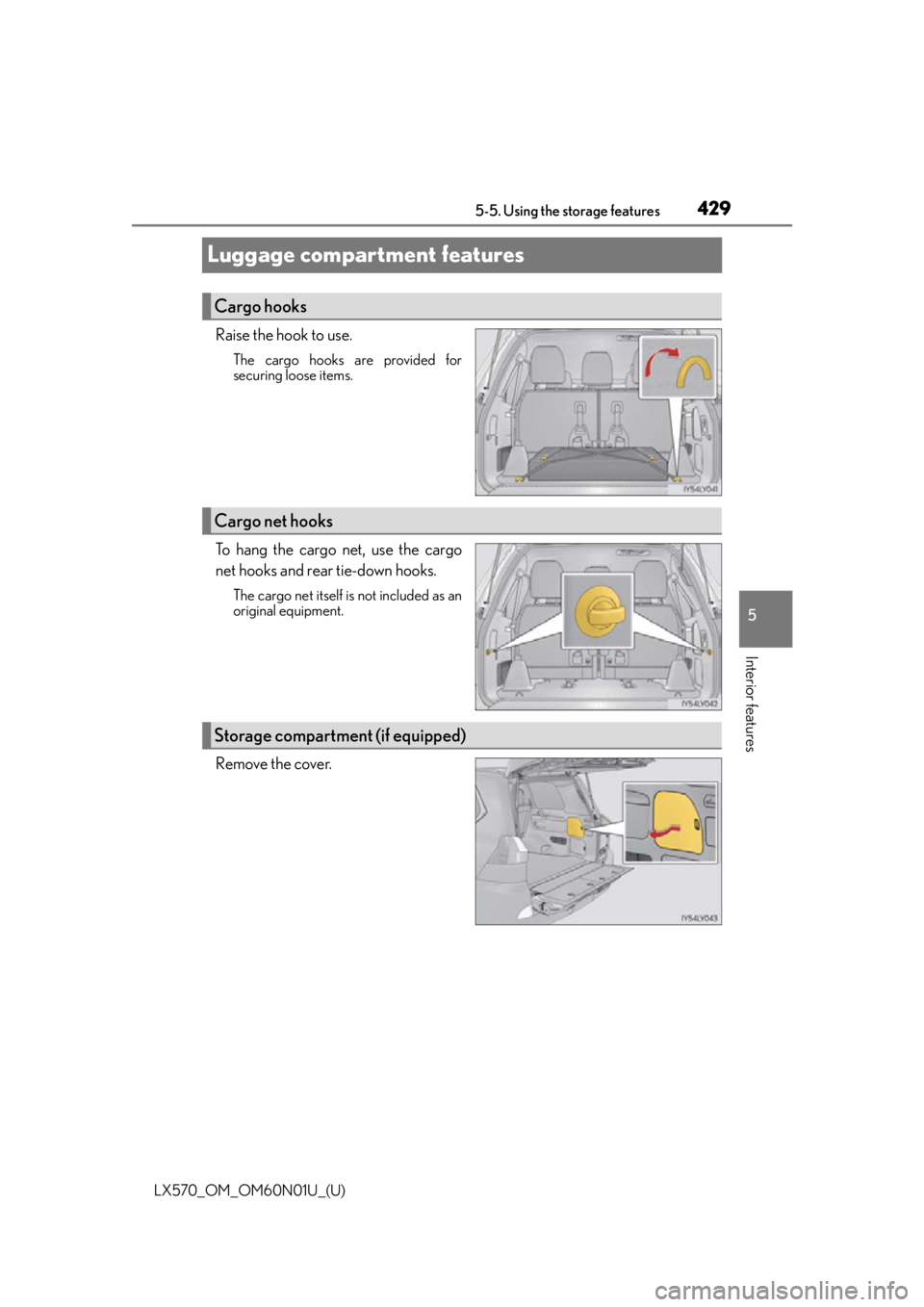
Raise the hook to use.
The cargo hooks are provided for
securing loose items.
To hang the cargo net, use the cargo
net hooks and rear tie-down hooks.
The cargo net itself is not included as an
original equipment.
Remove the cover.
Cargo hooks
Cargo net hooks
Storage compartment (if equipped)
Page 446 of 632
446
LX570_OM_OM60N01U_(U)5-6. Using the other interior features
Garage door opener
The garage door opener (HomeLink® Universal Transceiver) is manufactured under
license from HomeLink®.
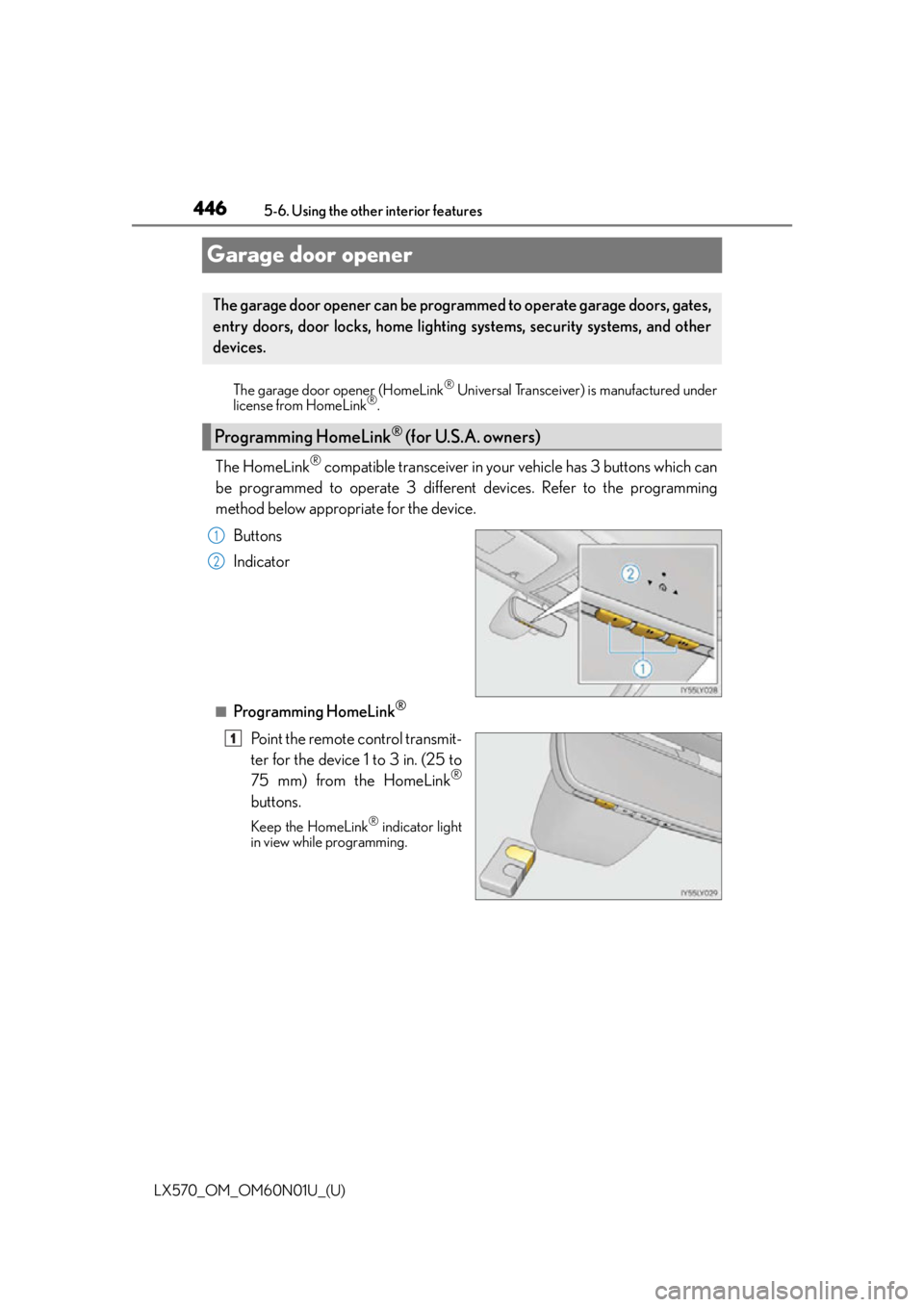
The HomeLink® compatible transceiver in your vehicle has 3 buttons which can
be programmed to operate 3 different devices. Refer to the programming
method below appropriate for the device.
Buttons
Indicator
■Programming HomeLink®
Point the remote control transmit-
ter for the device 1 to 3 in. (25 to
75 mm) from the HomeLink
®
buttons.
Keep the HomeLink® indicator light
in view while programming.
The garage door opener can be programmed to operate garage doors, gates,
entry doors, door locks, home lighting systems, security systems, and other
devices.
Programming HomeLink® (for U.S.A. owners)
1
2
1
Page 449 of 632
LX570_OM_OM60N01U_(U)
4495-6. Using the other interior features
5
Interior features
■Programming other devices
To program other devices such as home security systems, home door locks or
lighting, contact your Lexu s dealer for assistance.
■Reprogramming a button
The individual HomeLink
® buttons cannot be erased but can be repro-
grammed. To reprogram a button, fo llow the “Reprogramming a HomeLink®
button” instructions.
Press the appropriate HomeLink
® button. The HomeLink® indicator light
should come on.
The HomeLink® compatible transceiver in your vehi cle continues to send a signal for
up to 20 seconds as long as the button is pressed.
Press and hold the desired HomeLink® button. After 20 seconds, the
HomeLink® indicator light will start flashing slowly. Next, while still pressing and
holding the HomeLink® button, press and hold the button on the transmitter
until the HomeLink® indicator light changes from a slow to a rapid flash.
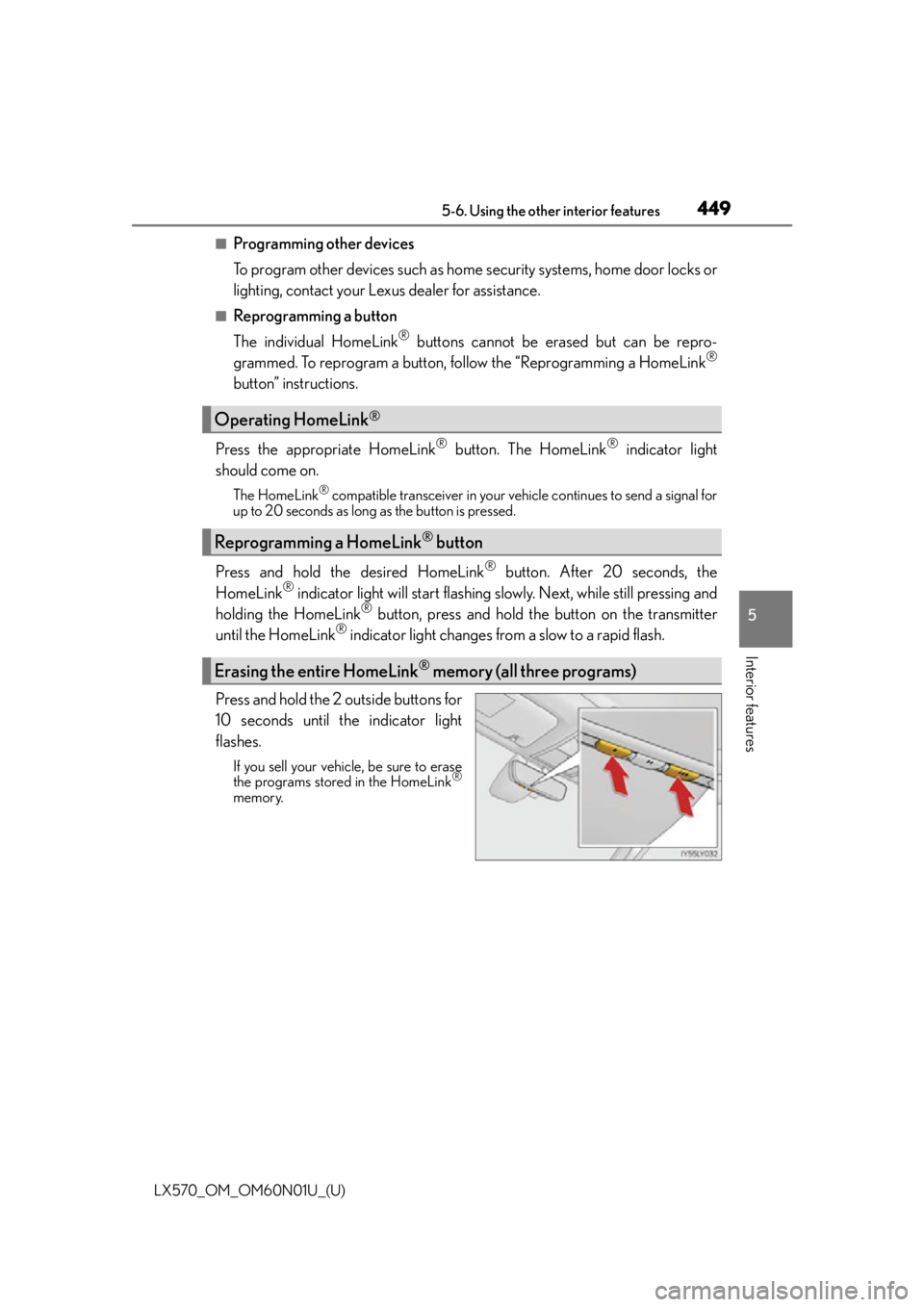
Press and hold the 2 outside buttons for
10 seconds until the indicator light
flashes.
If you sell your vehicle, be sure to erase
the programs stored in the HomeLink®
memory.
Operating HomeLink®
Reprogramming a HomeLink® button
Erasing the entire HomeLink® memory (all three programs)
Page 451 of 632

451
LX570_OM_OM60N01U_(U)5-6. Using the other interior features
5
Interior features
LEXUS Enform Safety Connect
Microphone
LED light indicators
“SOS” button
: If equipped
Safety Connect is a subscription-based telematics service that uses Global
Positioning System (GPS) data and embe
dded cellular technology to provide
safety and security features to subscribers. Safety Connect is supported by
Lexus’ designated response center, wh ich operates 24 hours per day, 7 days
per week.
Safety Connect service is available by su bscription on select, telematics hard-
ware-equipped vehicles.
By using the Safety Connect service, yo u are agreeing to be bound by the
Telematics Subscription Service Agreement and its Terms and Conditions, as
in effect and amended from time to time, a current copy of which is available
at Lexus.com. All use of the Safety Connect service is subject to such then-
applicable Terms and Conditions.
System components
1
2
3
Page 467 of 632
LX570_OM_OM60N01U_(U)
4676-2. Maintenance
6
Maintenance and care
Vehicle interior
ItemsCheck points
Accelerator pedal• The accelerator pedal should move smoothly (without uneven pedal effort or catching).
Automatic transmission
“Park” mechanism• When parked on a slope and the shift lever is in P, isthe vehicle securely stopped?
Brake pedal
• Does the brake pedal move smoothly?
• Does the brake pedal have appropriate clearance
from the floor? ( P. 5 6 8 )
• Does the brake pedal have the correct amount of
free play? ( P. 5 6 8 )
Brakes
• The vehicle should not pull to one side when the
brakes are applied.
• The brakes should work effectively.
• The brake pedal should not feel spongy.
• The brake pedal should not get too close to the floor when the brakes are applied.
Head restraints• Do the head restraints move smoothly and lock
securely?
Indicators/buzzers• Do the indicators and buzzers function properly?
Lights• Do all the lights come on?
Seat belts•Do the seat belt s operate smoothly?
• The seat belts should not be damaged.
Seats• Do the seat controls operate properly?
Steering wheel
• Does the steering wheel rotate smoothly?
• Does the steering wheel have the correct amount of free play?
• There should not be an y strange sounds coming
from the steering wheel.
Page 474 of 632
474
LX570_OM_OM60N01U_(U)6-3. Do-it-yourself maintenance
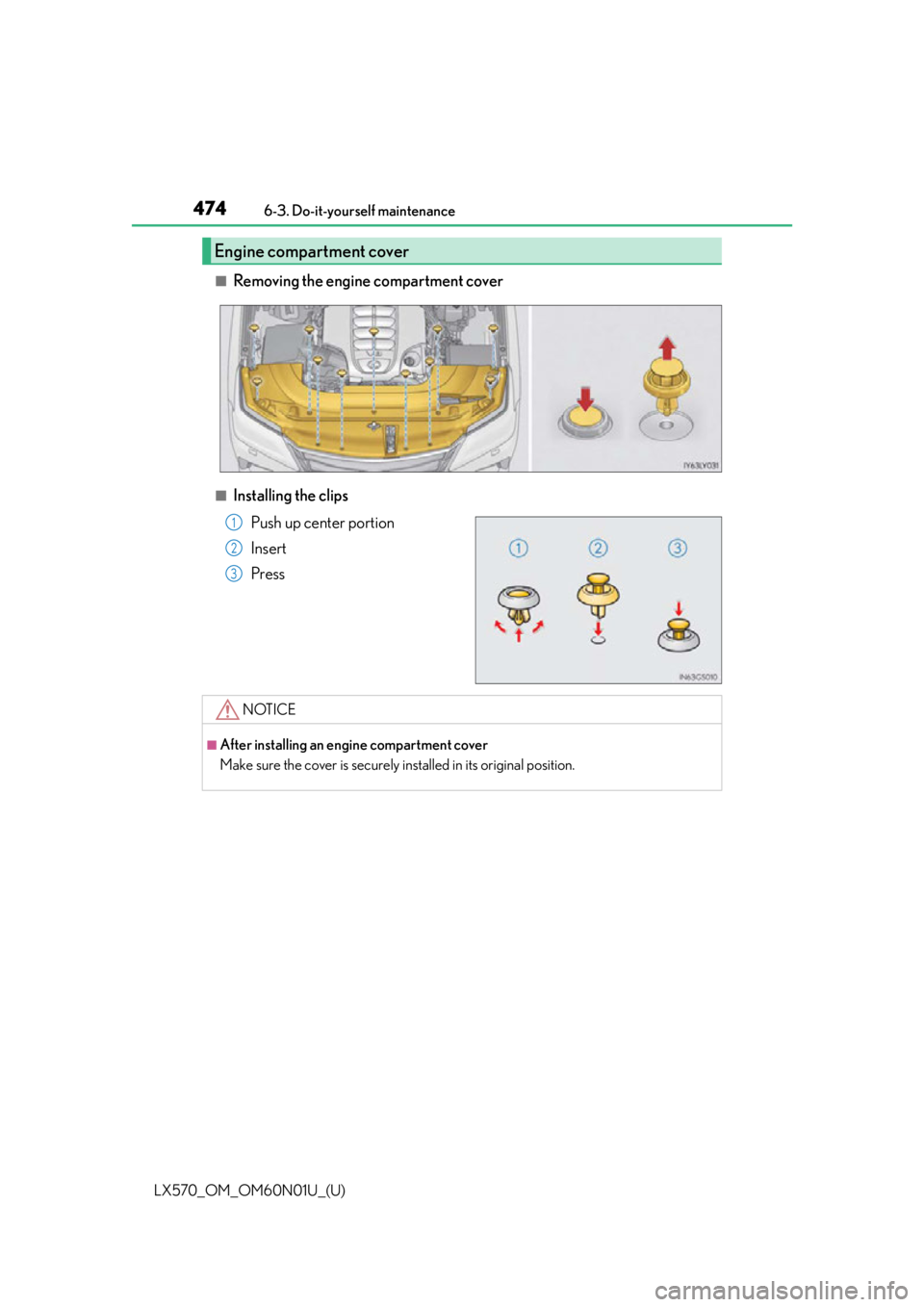
■Removing the engine compartment cover
■Installing the clips
Push up center portion
Insert
Press
Engine compartment cover
1
2
3
NOTICE
■After installing an engine compartment cover
Make sure the cover is securely installed in its original position.
Page 511 of 632

LX570_OM_OM60N01U_(U)
5116-3. Do-it-yourself maintenance
6
Maintenance and care
WA R N I N G
■Replacing light bulbs
●Turn off the headlights. Do not attempt to replace the bulb immediately after turning
off the headlights.
The bulbs become very hot and may cause burns.
●Do not touch the glass portion of the light bulb with bare hands. When it is unavoid-
able to hold the glass portion, use and ho ld with a clean dry cloth to avoid getting
moisture and oils on the bulb.
Also, if the bulb is scratched or dropped, it may blow out or crack.
●Fully install light bulbs and any parts used to secure them. Failure to do so may result
in heat damage, fire, or water entering the headlight unit. This may damage the head-
lights or cause condensation to build up on the lens.
●Do not attempt to repair or disassemble light bulbs, connectors, electric circuits or
component parts.
Doing so may result in death or se rious injury due to electric shock.
■To prevent damage or fire
●Make sure bulbs are fully seated and locked.
●Check the wattage of the bulb before installin g to prevent heat damage.
Page 515 of 632
515
LX570_OM_OM60N01U_(U)
7
When trouble arises
7-1. Essential information
If your vehicle has to be stopped in an emergency
Steadily step on the brake pedal with both feet and firmly depress it.
Do not pump the brake pedal repeatedly as this will increase the effort required to
slow the vehicle.
Shift the shift lever to N.
If the shift lever is shifted to N
After slowing down, stop the vehicle in a safe place by the road.
Stop the engine.
If the shift lever cannot be shifted to N
Keep depressing the brake pedal with both feet to reduce vehicle speed as
much as possible.
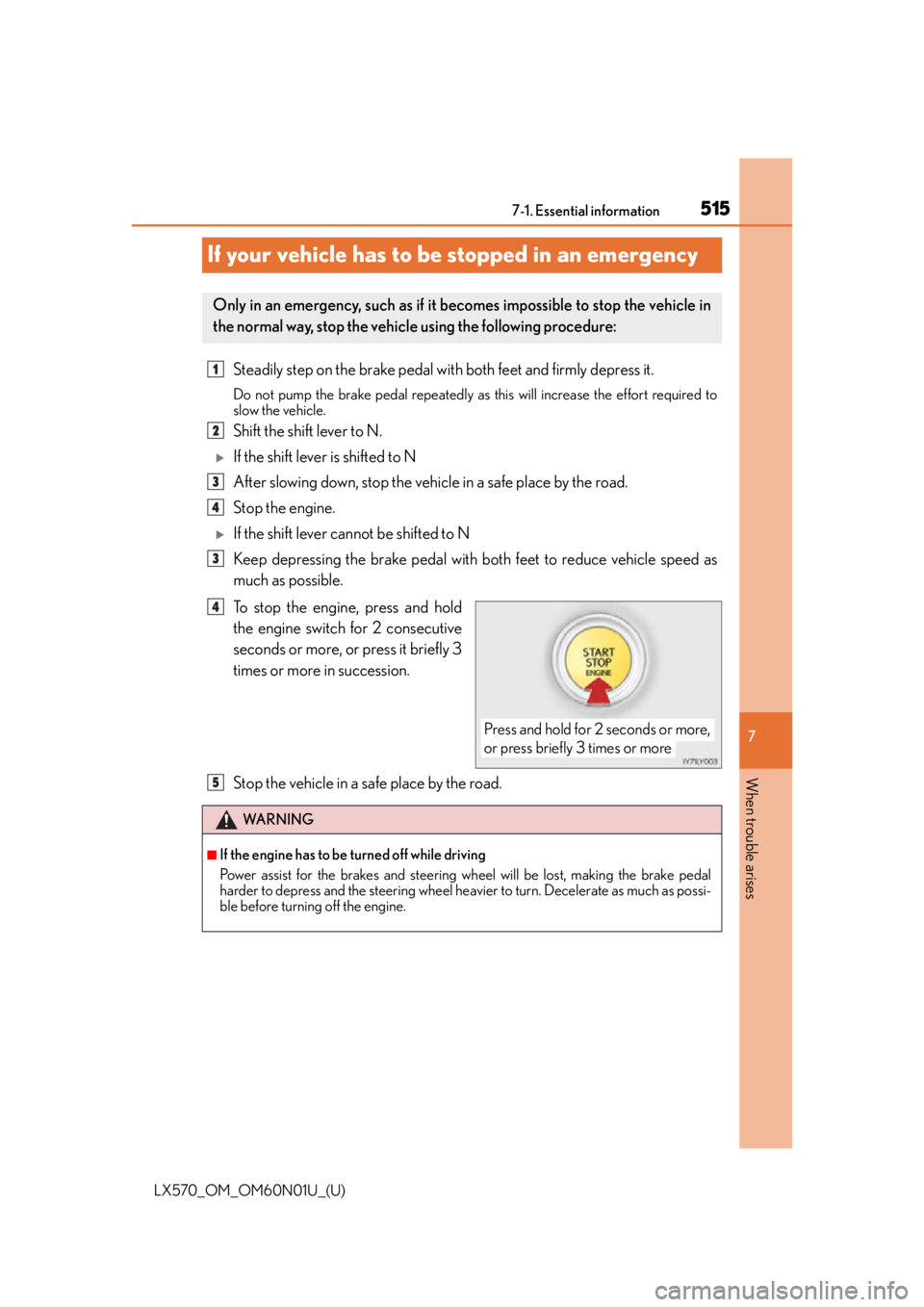
To stop the engine, press and hold
the engine switch for 2 consecutive
seconds or more, or press it briefly 3
times or more in succession.
Stop the vehicle in a safe place by the road.
Only in an emergency, such as if it becomes impossible to stop the vehicle in
the normal way, stop the vehicle using the following procedure:
1
2
3
4
3
Press and hold for 2 seconds or more,
or press briefly 3 times or more
4
WA R N I N G
■If the engine has to be turned off while driving
Power assist for the brakes and steering wheel will be lost, making the brake pedal
harder to depress and the steering wheel heavier to turn. Decelerate as much as possi-
ble before turning off the engine.
5