change wheel LEXUS LX570 2016 Owners Manual
[x] Cancel search | Manufacturer: LEXUS, Model Year: 2016, Model line: LX570, Model: LEXUS LX570 2016Pages: 632, PDF Size: 8.94 MB
Page 41 of 632

411-1. For safe use
LX570_OM_OM60N01U_(U)
1
For safety and security
Your vehicle is equipped with ADVANCED AIRBAGS designed based on the
US motor vehicle safety standards (FMVSS208). The airbag sensor assembly
(ECU) controls airbag deployment based on information obtained from the sen-
sors etc. shown in the system compon ents diagram above. This information
includes crash severity and occupant information. As the airbags deploy, a
chemical reaction in the inflators quickly fills the airbags with non-toxic gas to
help restrain the moti on of the occupants.
WA R N I N G
■SRS airbag precautions
Observe the following precautions regarding the SRS airbags.
Failure to do so may cause death or serious injury.
●The driver and all passengers in the vehicle must wear their seat belts properly.
The SRS airbags are supplemental device s to be used with the seat belts.
●The SRS driver airbag deploys with consider able force, and can cause death or seri-
ous injury especially if the driver is very close to the airbag. The National Highway
Traffic Safety Administration (NHTSA) advises:
Since the risk zone for the driver’s airbag is the first 2 - 3 in. (50 - 75 mm) of inflation,
placing yourself 10 in. (250 mm) from your driver airbag provides you with a clear
margin of safety. This distance is measured from the center of the steering wheel to
your breastbone. If you sit less than 10 in. (250 mm) away now, you can change your
driving position in several ways:
• Move your seat to the rear as far as you can while still reaching the pedals com- fortably.
• Slightly recline the back of the seat. Al though vehicle designs vary, many drivers
can achieve the 10 in. (250 mm) distance, even with the driver seat all the way for-
ward, simply by reclining the back of th e seat somewhat. If reclining the back of
your seat makes it hard to see the road, raise yourself by using a firm, non-slippery
cushion, or raise the seat if your vehicle has that feature.
• If your steering wheel is ad justable, tilt it downward. This points the airbag toward
your chest instead of your head and neck.
The seat should be adjusted as recommen ded by NHTSA above, while still maintain-
ing control of the foot pedals, steering whee l, and your view of the instrument panel
controls.
Page 89 of 632

LX570_OM_OM60N01U_(U)
892. Instrument cluster
2
Instrument cluster
Odometer and trip meter display
Odometer:
Displays the total distance the vehicle has been driven
Tr i p m e t e r :
Displays the distance the vehicle has been driven since the meter was last reset. Trip
meters A and B can be used to record an d display different distances independently.
Shift position and shift range display
Displays the selected shift position or selected shift range (P. 2 1 0 )
4-Wheel AHC display
Display the status of 4-Wheel AHC (A ctive Height Control Suspension). (P. 2 9 7 )
Outside temperature
Displays the outside temperature within the range of -40 F (-40 C) to 122 F
(50 C). Low outside temperature indicator comes on when the ambient temperature
is 37 F (3 C) or lower.
Odometer/trip meter display change button
Switches between odometer and trip meter displays
Instrument panel light control dial
The brightness of the instrume nt panel light can be adjusted
Switches between odometer and trip
meter displays. When the trip meter is
displayed, pressing and holding the
button will reset the trip meter.
The brightness of the instrument panel lights can be adjusted.
Darker
Brighter
Changing the display
8
9
10
11
12
13
Instrument panel light control
1
2
Page 163 of 632
1633-4. Adjusting the steering wheel and mirrors
3
Operation of each component
LX570_OM_OM60N01U_(U)
■Setting automatic mode
Automatic mode allows the folding or extending of the mirrors to be linked to
locking/unlocking of the doors.
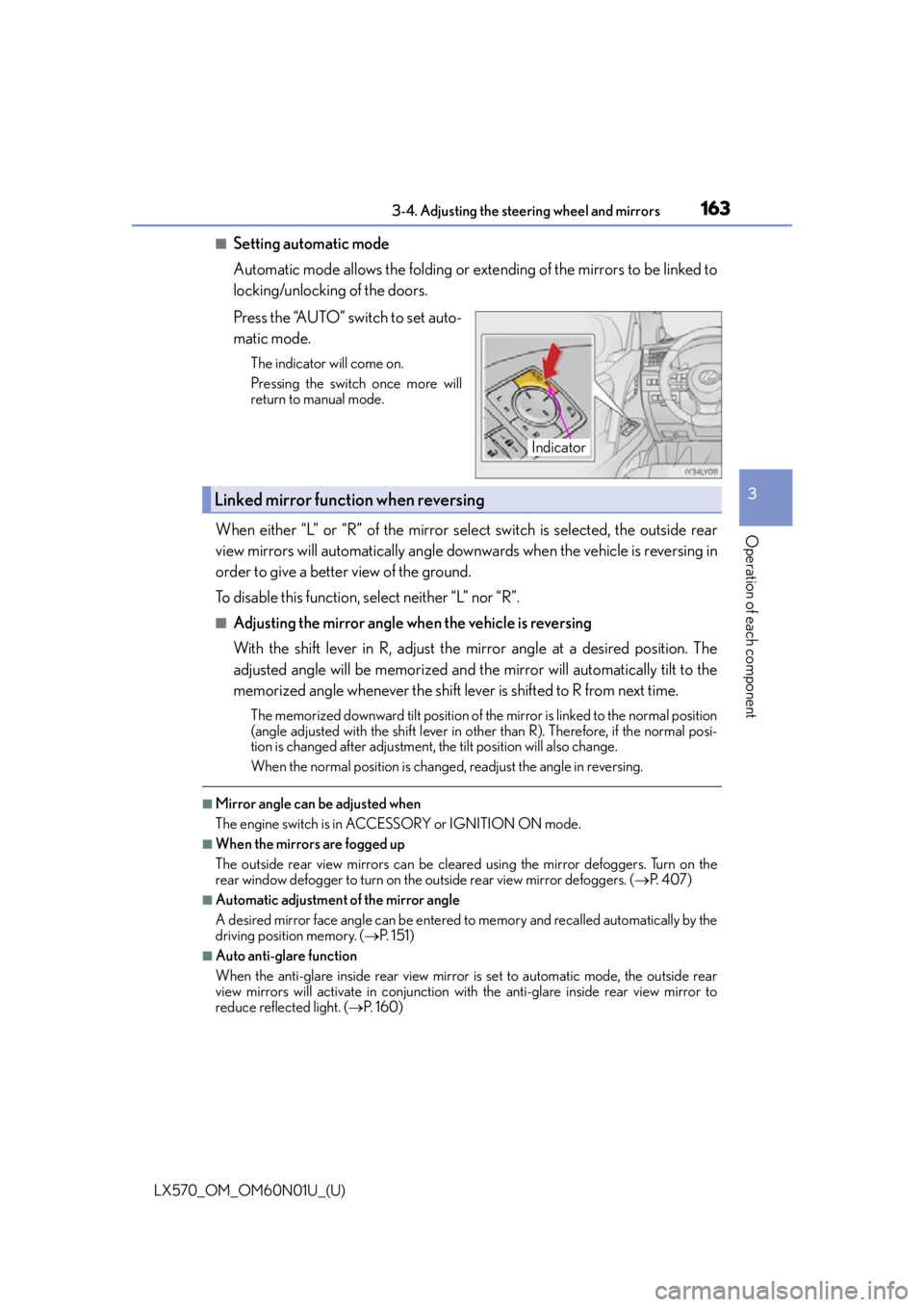
Press the “AUTO” switch to set auto-
matic mode.
The indicator will come on.
Pressing the switch once more will
return to manual mode.
When either “L” or “R” of the mirror select switch is selected, the outside rear
view mirrors will automatically angle downwards when the vehicle is reversing in
order to give a better view of the ground.
To disable this function, select neither “L” nor “R”.
■Adjusting the mirror angle when the vehicle is reversing
With the shift lever in R, adjust the mirror angle at a desired position. The
adjusted angle will be memorized and the mirror will automatically tilt to the
memorized angle whenever the shift lever is shifted to R from next time.
The memorized downward tilt position of the mirror is linked to the normal position
(angle adjusted with the shif t lever in other than R). Therefore, if the normal posi-
tion is changed after adjustment, th e tilt position will also change.
When the normal position is chang ed, readjust the angle in reversing.
■Mirror angle can be adjusted when
The engine switch is in ACCESSORY or IGNITION ON mode.
■When the mirrors are fogged up
The outside rear view mirrors can be cleare d using the mirror defoggers. Turn on the
rear window defogger to turn on the outside rear view mirror defoggers. ( P. 4 0 7 )
■Automatic adjustment of the mirror angle
A desired mirror face angle can be entered to memory and recalled automatically by the
driving position memory. ( P. 1 5 1 )
■Auto anti-glare function
When the anti-glare inside rear view mirror is set to automatic mode, the outside rear
view mirrors will activate in conjunction with the anti-glare inside rear view mirror to
reduce reflected light. ( P. 1 6 0 )
Indicator
Linked mirror function when reversing
Page 181 of 632

LX570_OM_OM60N01U_(U)
1814-1. Before driving
4
Driving
NOTICE
■When driving the vehicle
●Do not depress the accelerator and brake pedals at the same time during driving, as
this may restrain the engine output.
●Do not use the accelerator pedal or depress the accelerator and brake pedals at the
same time to hold the vehicle on a hill.
■When parking the vehicle
Always shift the shift lever to P. Failure to do so may cause the vehicle to move or the
vehicle may accelerate suddenly if the accelerator pedal is ac cidentally depressed.
■Avoiding damage to vehicle parts
●Do not turn the steering wheel fully in either direction and hold it there for an
extended period of time.
Doing so may damage the power steering pump.
●When driving over bumps in the road, drive as slowly as possible to avoid damaging
the wheels, underside of the vehicle, etc.
■If you get a flat tire while driving
A flat or damaged tire may cause the follo wing situations. Hold the steering wheel
firmly and gradually depress the brak e pedal to slow down the vehicle.
●It may be difficult to control your vehicle.
●The vehicle will make abnormal sounds or vibrations.
●The vehicle will lean abnormally.
Information on what to do in case of a flat tire. (P. 5 3 6 )
■When encountering flooded roads
Do not drive on a road that has flooded after heavy rain etc. Doing so may cause the
following serious damage to the vehicle:
●Engine stalling
●Short in electrical components
●Engine damage caused by water immersion
In the event that you drive on a flooded road and the vehicle is flooded, be sure to have
your Lexus dealer check the following:
●Brake function
●Changes in quantity and quality of oil and fluid used for the engine, transmission,
transfer, differentials, etc.
●Lubricant condition for the propeller shaft, bearings and suspension joints (where
possible), and the function of all joints, bearings, etc.
Page 202 of 632
202
LX570_OM_OM60N01U_(U)4-1. Before driving
WA R N I N G
■Trailer towing precautions
●To tow a trailer safely, use extreme care an
d drive the vehicle in accordance with the
trailer’s characteristics and operating conditions. Failure to do so could cause an acci-
dent resulting in death or serious injury. Vehicle stability and braking performance are
affected by trailer stability, brake setting an d performance, and the hitch. Your vehicle
will handle differently when towing a trailer.
●Set the vehicle height to the “LO” mode and turn off the 4-Wheel AHC when you
connect a trailer, otherwise the vehicle heig ht may change due to the automatic level-
ing function, and you may catch part of your body in the vehicle, resulting in an acci-
dent. ( P. 2 9 7 )
■To avoid accident or injury
●Do not exceed the TWR, unbrak ed TWR, GCWR, GVWR or GAWR.
●If the gross trailer weight is over 2000 lb. (907 kg), a sway control device with suffi-
cient capacity is required.
●If the gross trailer weight is over 5000 lb. (2268 kg), a weight distributing hitch with
sufficient capacity is required.
●Adjust the tongue weight within the approp riate range. Place heavier loads as close
to the trailer axle as possible.
●Do not exceed 65 mph (104 km/h), the posted towing speed limit or the speed limit
for your trailer as set forth in your trailer owner’s manual, whichever is lowest. Slow
down sufficiently before making a turn, in crosswinds, on wet or slippery surface, etc.
to help avoid an accident. If you experience a vehicle-trailer instability from reducing
a certain speed, slow down and make sure you keep your vehicle speed under the
speed of which you expe rience the instability.
●Do not make jerky, abrupt or sharp turns.
●Do not apply the brakes suddenly as you may skid, resulting in ja ckknifing and loss of
vehicle control. This is especially true on wet or slippery surfaces.
●Do not exceed the trailer hitch assembly weight, gross vehicle weight, gross axle
weight and trailer tongue weight capacities.
●Do not use cruise control (if equipped) or dynamic radar cruise control (if equipped)
when trailer towing.
●Slow down and downshift before descending steep or long downhill grades. Do not
make sudden downshifts while descen ding steep or long downhill grades.
●Vehicle-trailer instability is more likely on steep long down hills. Before descending
steep or long downhill grades, slow down and downshift. Do not make sudden down-
shifts when descending stee p or long downhill grades. Avoid holding the brake pedal
down too long or applying the brakes too frequently. This could cause the brakes to
overheat and result in reduced braking efficiency.
Page 207 of 632

LX570_OM_OM60N01U_(U)
2074-2. Driving procedures
4
Driving
If the engine is stopped with the shift lever in a position other than P, the engine
switch will not be turned off but inst ead be turned to ACCESSORY mode. Per-
form the following procedure to turn the switch off:
Check that the parking brake is set.
Shift the shift lever to P.
Check that “Turn Off Vehicle” is displayed on the multi-information display
and then press the engine switch once.
Check that “Turn Off Vehicle” on the multi-information display is off.
■Auto power off function
If the vehicle is left in ACCESSORY mode for more than 20 minutes or IGNITION ON
mode (the engine is not running) for more than an hour with the shift lever in P, the engine
switch will automatically turn off. However, this function cannot entirely prevent battery
discharge. Do not leave the vehicle with the engine switch in ACCESSORY or IGNI-
TION ON mode for long periods of ti me when the engine is not running.
■Operation of the engine switch
●When operating the engine switch, one short, firm press is enough. If the switch is
pressed improperly, the engine may not start or the engine switch mode may not
change. It is not necessary to press and hold the switch.
●If attempting to restart the engine immediat ely after turning the engine switch off, the
engine may not start in some cases. After turning the engine off, please wait a few sec-
onds before restarting the engine.
■Electronic key battery depletion
P. 112
■Conditions affe cting operation
P. 1 3 4
■Note for the entry function
P. 1 3 5
■If the engine does not start
●The engine immobilizer system may not have been deactivated. ( P. 76 )
Contact your Lexus dealer.
●Check that the shift lever is securely set in P. The engine may not start if the shift lever is
displaced out of P.
A message will be displayed on the multi-information display.
■Steering lock
After turning the engine switch off and opening and closing the doors, the steering wheel
will be locked due to the stee ring lock function. Operating the engine switch again auto-
matically cancels the steering lock.
When stopping the engine with the shift lever in a position other than P
1
2
3
4
Page 252 of 632

252
LX570_OM_OM60N01U_(U)4-5. Using the driving support systems
WA R N I N G
■Limitations of the pre-collision system
●The driver is solely responsible for safe
driving. Always drive safely, taking care to
observe your surroundings.
Do not use the pre-collision system instea d of normal braking operations under any
circumstances. This system will not preven t collisions or lessen collision damage or
injury in every situation. Do not overly rely on this system. Failure to do so may lead to
an accident, resulting in death or serious injury.
●Although this system is design ed to help avoid and reduce the impact of a collision, its
effectiveness may change according to various conditions, therefore the system may
not always be able to achieve the same level of performance.
Read the following conditions carefully. Do not overly rely on this system and always
drive carefully.
• Conditions under which the system may operat e even if there is no possibility of a
collision: P. 2 5 7
• Conditions under which the system may not operate properly: P. 2 5 9
●Do not attempt to test the operation of the pre-collision system yourself, as the system
may not operate properly, poss ibly leading to an accident.
■Pre-collision braking*3
●The pre-collision braking function may not operate if certain operations are per-
formed by the driver. If the accelerator peda l is being depressed strongly or the steer-
ing wheel is being turned, the system may de termine that the driver is taking evasive
action and possibly prevent the pre-colli sion braking function from operating.
●In some situations, while the pre-collision braking function is operating, operation of
the function may be canceled if the accele rator pedal is depressed strongly or the
steering wheel is turned and the system determines that the driver is taking evasive
action.
●A large amount of braking force is applied while the pre-collision braking function is
operating. Additionally, as the vehicle may creep if it has been stopped by the pre-
collision braking function, the driver should depress the brake pedal as necessary.
●If the brake pedal is being depressed, the system may determine that the driver is tak-
ing evasive action and possibly delay the op eration timing of the pre-collision braking
function.
*3: Depending on the region in which the ve hicle was sold, the pre-collision braking
function may not be available.
Page 260 of 632
260
LX570_OM_OM60N01U_(U)4-5. Using the driving support systems
• If a vehicle ahead is carrying a load which protrudes past its rear bumper
• If a vehicle ahead is irregularly shaped, such as a tractor or side car
• If the sun or other light is shin ing directly on a vehicle ahead
• If a vehicle cuts in front of your vehicle or emerges from beside a vehicle
• If a vehicle ahead makes an abrupt maneuver (such as sudden swerving, accelera- tion or deceleration)
• When suddenly cutting behind a preceding vehicle
• When driving in inclement weather such as heavy rain, fog, snow or a sandstorm
• When the vehicle is hit by water, snow, dust, etc. from a vehicle ahead
• When driving through steam or smoke
• When driving in a place where the surrounding brightness changes suddenly, such as at the entrance or exit of a tunnel
• When a very bright light, such as the sun or the headlights of oncoming traffic, shines
directly into the camera sensor
• When the surrounding area is dim, such as at dawn or dusk, or while at night or in a
tunnel
• After the engine has started the vehicle has not been driven for a certain amount of time
• While making a left/right turn and for a few seconds after making a left/right turn
• While driving on a curve and for a few seconds after driving on a curve
• If your vehicle is skidding
• If the front of the vehicle is raised or lowered, such as when the road surface is
uneven or undulating
• If the wheels are misaligned
• If a wiper blade is blocking the camera sensor
• The vehicle is wobbling.
• The vehicle is being driven at extremely high speeds.
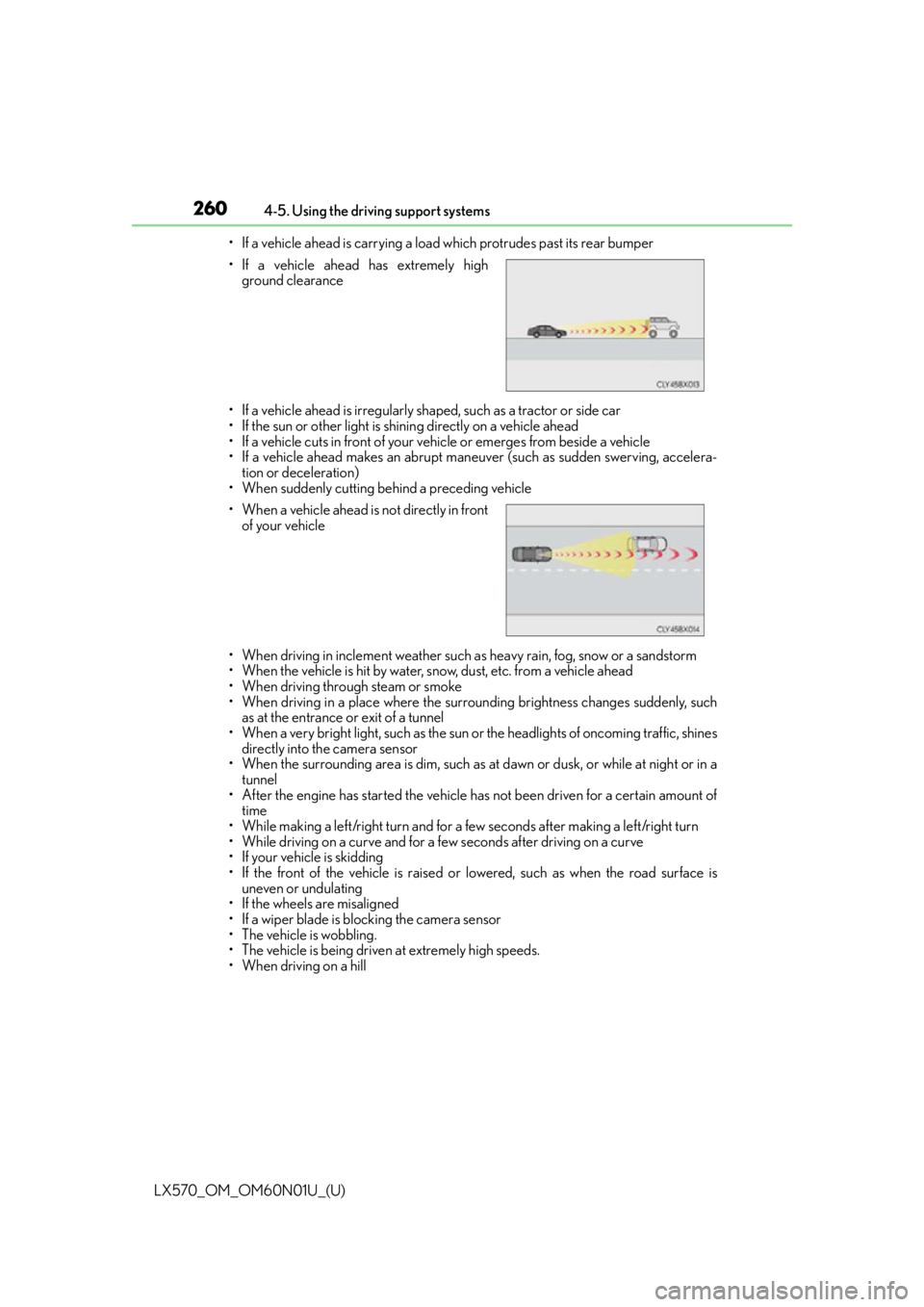
• When driving on a hill • If a vehicle ahead has extremely high
ground clearance
• When a vehicle ahead is not directly in front
of your vehicle
Page 300 of 632

300
LX570_OM_OM60N01U_(U)4-5. Using the driving support systems
When the height control OFF switch is
pressed with the vehicle stopped.
The height control “OFF” indicator will
appear on the multi-information display,
and the vehicle height will be fixed in the
current mode. Push the switch again to
turn the system back on.
■Operating conditions
●The engine must be running.
●Vehicle height control must be turned off.
●All side doors and the back door must be closed.
■Switching vehicle height mode while the engine is stopped
●If the engine is stopped while the vehicle height is being lowered, lowering will continue.
●If any luggage is removed from the vehicle
or if any occupants leave the vehicle within
approximately 30 seconds of the engine sw itch being turned OFF, the vehicle height
may be lowered by the auto leveling function.
●Operating the height select switch will have no effect while th e engine is stopped.
■Automatic change in vehicle height when the four-wheel drive control switch is in the
L4 position
If the vehicle speed exceeds 2 mph (3 km/h) while driving on an uneven road with the
four-wheel drive control switch in the “L4” position, high mode is automatically selected.
(On even roads, the height mode will not change.)
■Automatic change in vehicle height when in the high mode
●If the vehicle speed exceeds 18 mph (30 km/h) with the four-wheel drive control switch
in the “H4” position, normal mode is automatically selected.
●If the vehicle speed exceeds 30 mph (50 km/h) with the four-wheel drive control
switch in the “L4” position, the vehicle height is lowered to 1.0 in. (25 mm) higher than
the normal mode height. If the vehicle speed drops to 13 mph (20 km/h) or less, high
mode is automatically resumed.
Disabling the height control
Page 301 of 632

LX570_OM_OM60N01U_(U)
3014-5. Using the driving support systems
4
Driving
■Extra high mode
If the vehicle becomes stuck or the Crawl Control system requests the vehicle height be
raised, extra high mode may be automatically selected when the vehicle height is in high
mode with the four-wheel drive control switch in the L4 position.
The vehicle height is raised to 0.8 in. (20 mm) higher than the high mode height, or
slightly higher.
●Extra high mode will change back to high mode when:
• The vehicle speed exceeds 6 mph (10 km/h)
• The four-wheel drive control switch is shifted to H4.
●If you pull the height select switch to “ ” when in extra high mode, normal mode is
selected.
●Extra high mode cannot be manually selected.
■Tu r n i n g o f f t h e h e i g h t c o n t r o l
●The system will remain off until the height co ntrol “OFF” switch is pushed again, even if
the engine switch is turned off.
●Even if the system is turned off, the system will intervene automatically if the vehicle
speed exceeds the following.
• 18 mph (30 km/h) with high or low mode
• 50 mph (80 km/h) with normal mode
■Automatic leveling function
The vehicle is adjusted to a fixed height for each mode, regardless of the number of
occupants and the luggage load.
●However the vehicle cannot be raised if the vehicle load exceeds the following limits:
• Up to 4 occupants
* plus approximately 661 lb. (300 kg) in the normal mode
• Up to 4 occupants
* plus approximately 441 lb. (200 kg) in the high mode
*: average weight 150 lb. (68 kg) per person
●If the vehicle height cannot be raised when in the normal mode, and “LO” appears on
the display, the vehicle is loaded too heavily. Take extra care when driving in this condi-
tion.
If the vehicle height cannot be raised even after unloading the vehicle, pull the height
select switch to “ ” then push to “ ”. If the vehicle height st ill cannot be raised, turn the
ignition off then on again, then try once more.
■When the vehicle is stopped during driving
The activation of the automatic leveling func tion may cause the vehicle height to change.
This is not a malfunction.
■If the vehicle height does not change
If the vehicle is loaded too heavily, or the undercarriage has come into contact with the
road surface, the vehicle height cannot be raised/lowered.