engine LEXUS LX570 2018 Owners Manual
[x] Cancel search | Manufacturer: LEXUS, Model Year: 2018, Model line: LX570, Model: LEXUS LX570 2018Pages: 628, PDF Size: 12.38 MB
Page 414 of 628
414 5-3. Using the air conditioning system and defogger
LX570_OM_OM60Q78U_(U)
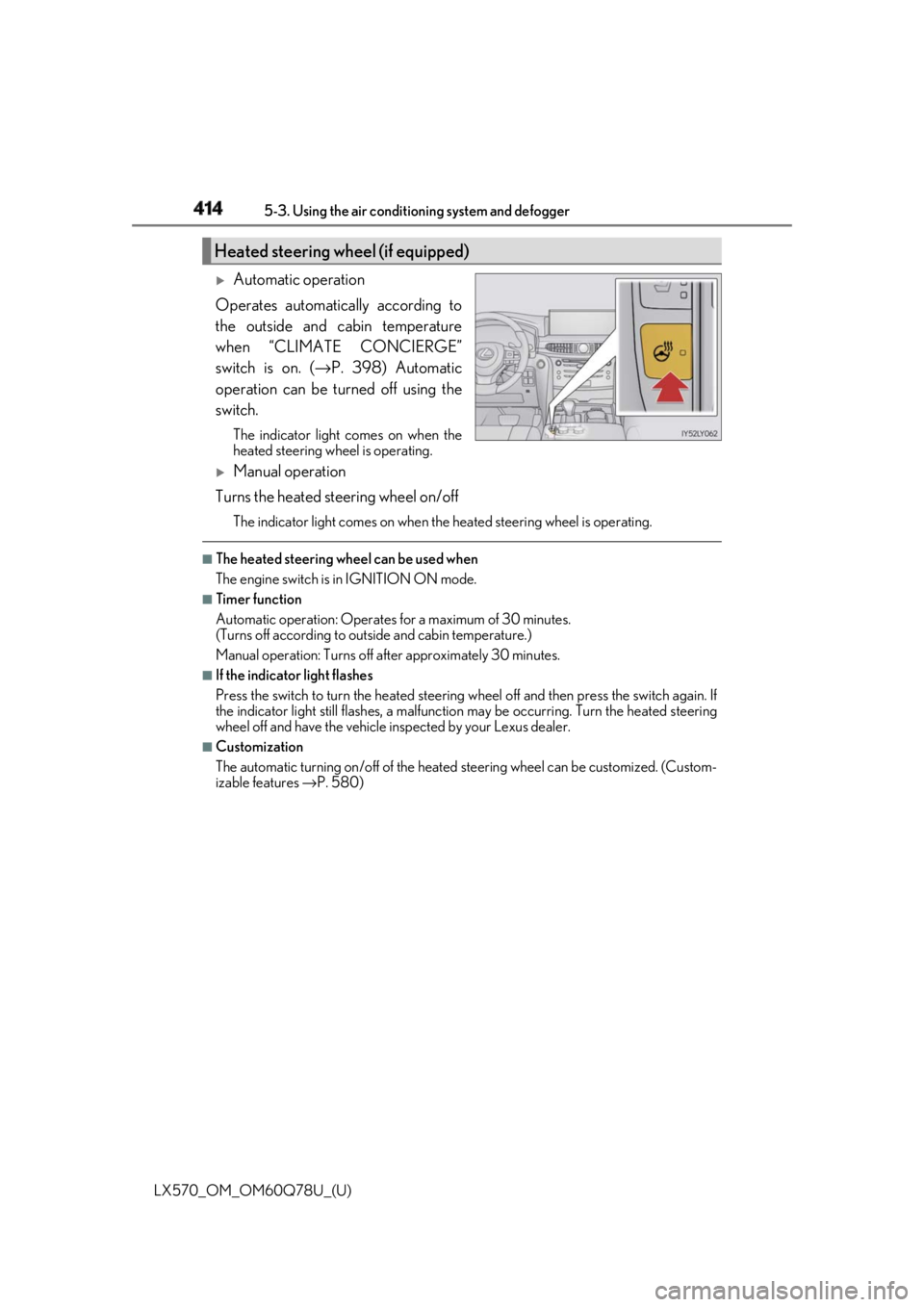
Automatic operation
Operates automatically according to
the outside and cabin temperature
when “CLIMATE CONCIERGE”
switch is on. ( → P. 398) Automatic
operation can be turned off using the
switch. The indicator light comes on when the
heated steering wheel is operating.
Manual operation
Turns the heated steering wheel on/off The indicator light comes on when the heated steering wheel is operating. ■
The heated steering wheel can be used when
The engine switch is in IGNITION ON mode. ■
Timer function
Automatic operation: Operates for a maximum of 30 minutes.
(Turns off according to outside and cabin temperature.)
Manual operation: Turns off after approximately 30 minutes. ■
If the indicator light flashes
Press the switch to turn the heated steering wheel off and then press the switch again. If
the indicator light still flashes, a malfunction may be occurri ng. Turn the heated steering
wheel off and have the vehicle inspected by your Lexus dealer. ■
Customization
The automatic turning on/off of the heated steering wheel can be customized. (Custom-
izable features → P. 580)Heated steering wheel (if equipped)
Page 416 of 628
416 5-3. Using the air conditioning system and defogger
LX570_OM_OM60Q78U_(U) ■
Modes and indicators
The mode can be changed by pressing the switch.
* : When automatic mode is selected, the leve l automatically change s depending on the
air conditioning settings. ■
The seat heaters/seat vent ilators can be used when
The engine switch is in IGNITION ON mode. ■
Replacing the air filters
Filters are installed in the se at ventilators. For replacement of the filters, contact your
Lexus dealer. ■
Customization
The automatic mode settings for the seat heaters and ventilators can be changed.
(Customizable features: → P. 580)Mode “AUTO” indicator light Level indicator lights
Off Off Off
Automatic* On 3 to 1, or off
Hi Off 3
Mid Off 2
Lo Off 1
Page 417 of 628
417
LX570_OM_OM60Q78U_(U) 5-4. Using the interior lights
5
Interior features
Interior lights list
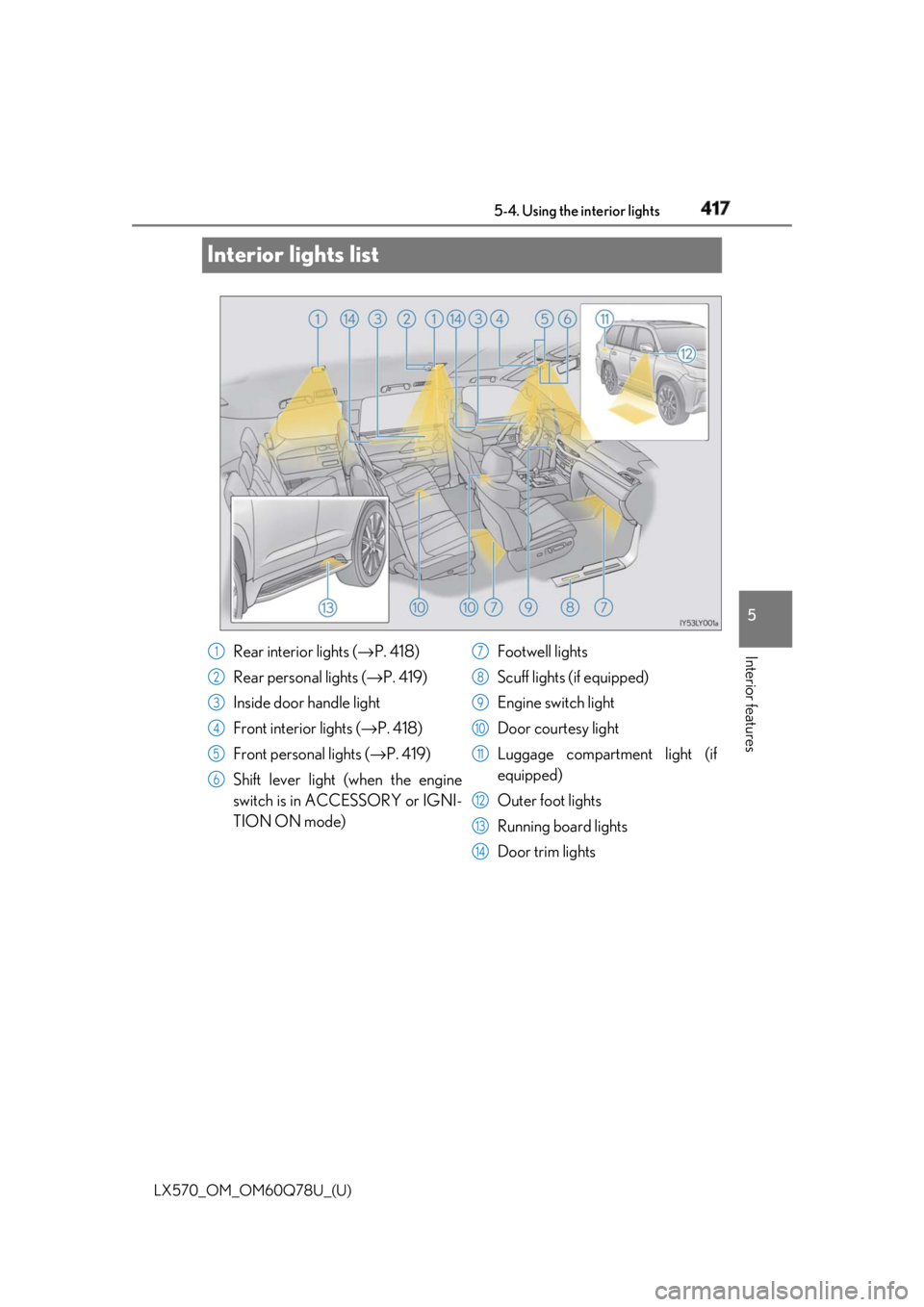
Rear interior lights ( → P. 418)
Rear personal lights ( → P. 419)
Inside door handle light
Front interior lights ( → P. 418)
Front personal lights ( → P. 419)
Shift lever light (when the engine
switch is in ACCESSORY or IGNI-
TION ON mode) Footwell lights
Scuff lights (if equipped)
Engine switch light
Door courtesy light
Luggage compartment light (if
equipped)
Outer foot lights
Running board lights
Door trim lights1
2
3
4
5
6 7
8
9
10
11
12
13
14
Page 419 of 628

LX570_OM_OM60Q78U_(U) 4195-4. Using the interior lights
5
Interior features ■
Illuminated entry system
The lights automatically turn on/off according to engine switch mode, the presence of the
electronic key, whether the doors are locked/unlocked, and whether the doors are
open/closed. ■
To prevent battery discharge
If the interior lights remain on when the engine switch is turn ed off, the lights will go off
automatically after 20 minutes: ■
Customization
Settings (e.g. adjust the time elapsed before th e interior lights automatically turn off) can
be changed. (Customizable features: → P. 580)Personal lights
Front
Rear
Turns the lights on/off (touch the lights) Turns the lights on/off
NOTICE
To prevent battery discharge, do not leave th e lights on longer than necessary when the
engine is not running.
Page 430 of 628
430
LX570_OM_OM60Q78U_(U) 5-6. Using the other interior features
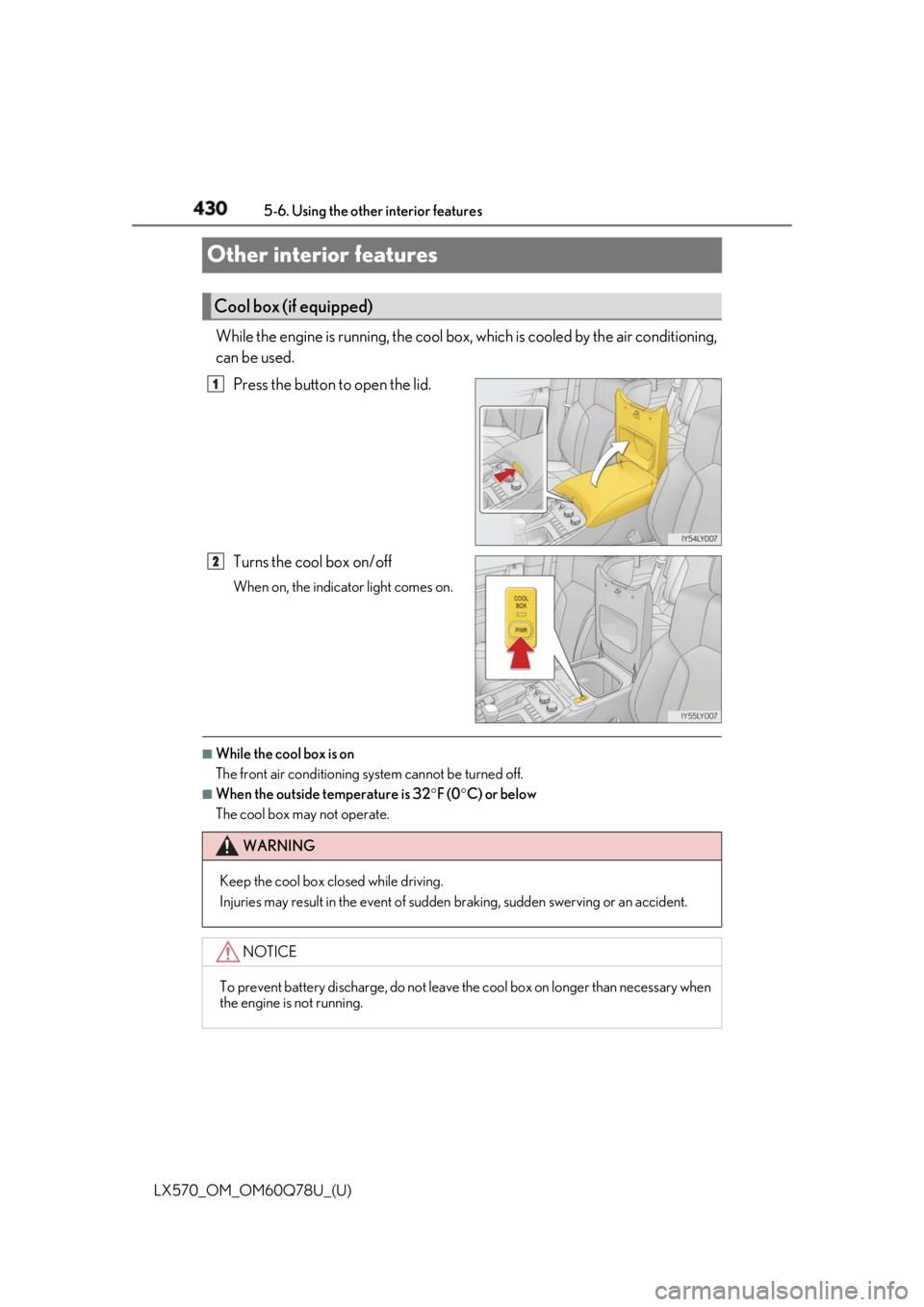
Other interior features While the engine is running, the cool box, which is cooled by the air conditioning,
can be used.
Press the button to open the lid.
Turns the cool box on/off When on, the indicator light comes on.
■
While the cool box is on
The front air conditioning sy stem cannot be turned off.■
When the outside temperature is 32 ° F (0 ° C) or below
The cool box may not operate.Cool box (if equipped) 1
2
WARNING
Keep the cool box closed while driving.
Injuries may result in the event of sudden braking, sudden swerving or an accident.
NOTICE
To prevent battery discharge, do not leave the cool box on longer than necessary when
the engine is not running.
Page 431 of 628
LX570_OM_OM60Q78U_(U) 4315-6. Using the other interior features
5
Interior features
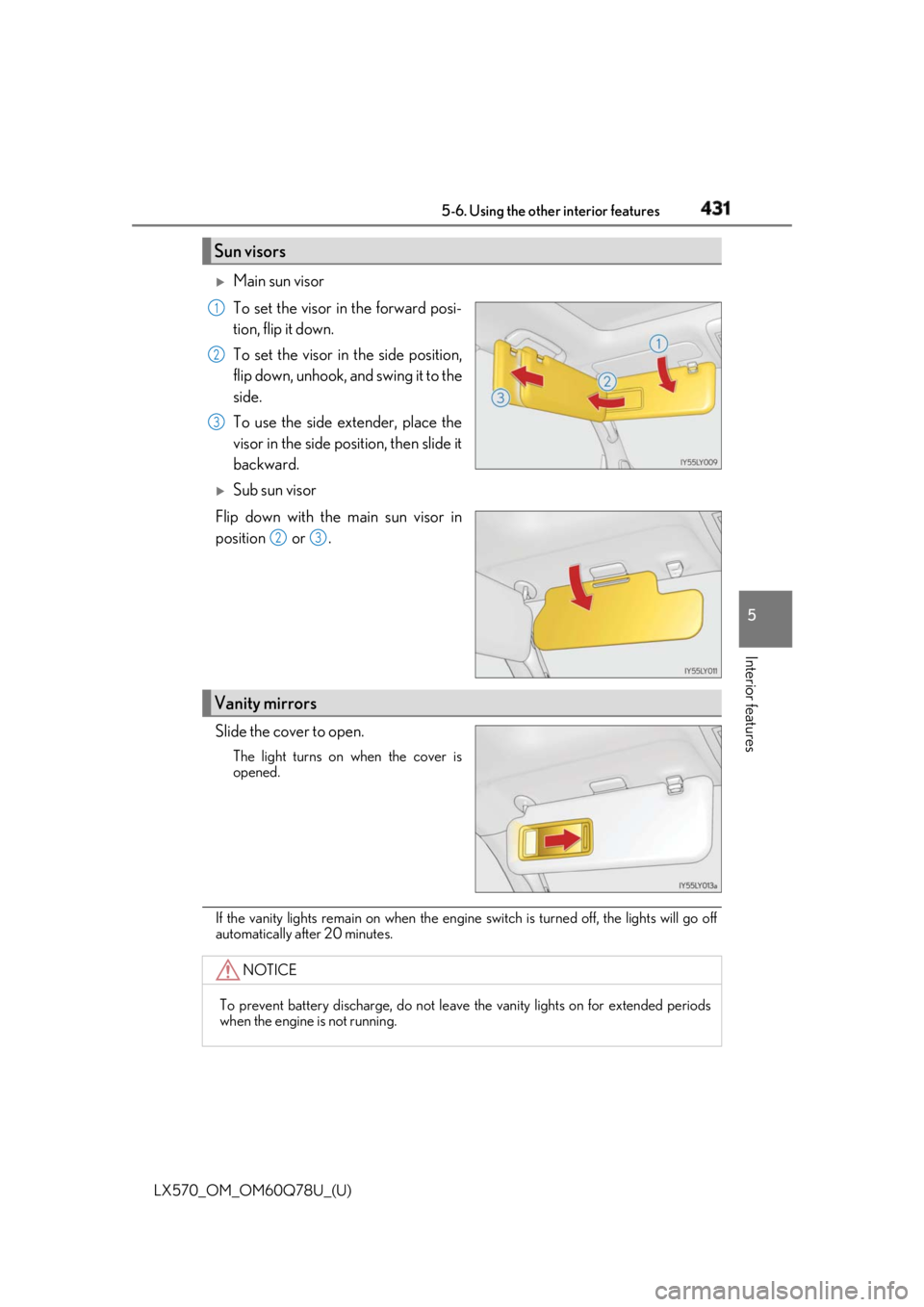
Main sun visor
To set the visor in the forward posi-
tion, flip it down.
To set the visor in the side position,
flip down, unhook, and swing it to the
side.
To use the side extender, place the
visor in the side position, then slide it
backward.
Sub sun visor
Flip down with the main sun visor in
position or .
Slide the cover to open. The light turns on when the cover is
opened.
If the vanity lights remain on when the engine switch is turned off, the lights will go off
automatically after 20 minutes.Sun visors 1
2
3
2 3
Vanity mirrors
NOTICE
To prevent battery discharge, do not leave the vanity lights on for extended periods
when the engine is not running.
Page 434 of 628
434
LX570_OM_OM60Q78U_(U) 5-6. Using the other interior features■
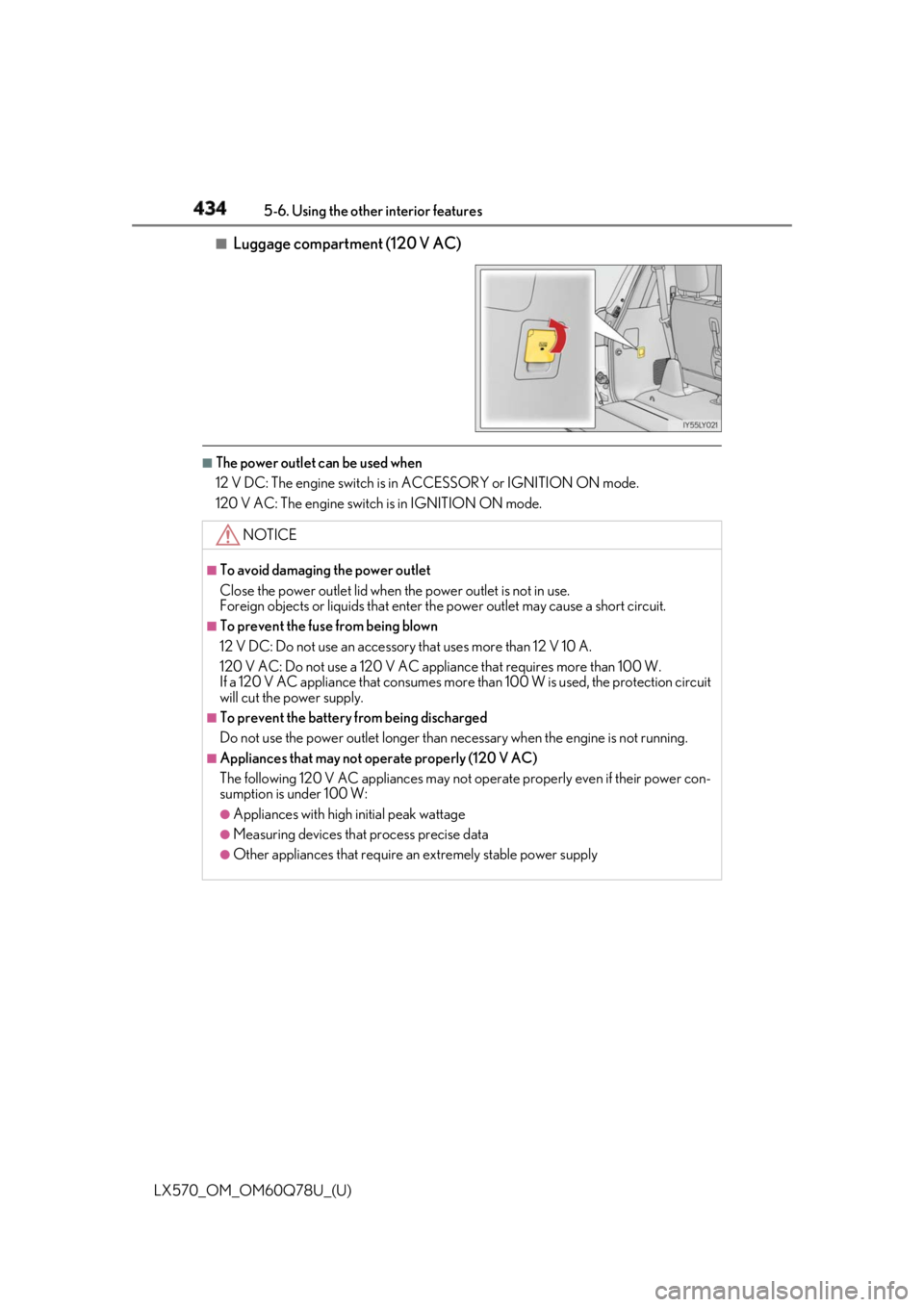
Luggage compartment (120 V AC) ■
The power outlet can be used when
12 V DC: The engine switch is in ACCESSORY or IGNITION ON mode.
120 V AC: The engine switch is in IGNITION ON mode.
NOTICE ■
To avoid damaging the power outlet
Close the power outlet lid when the power outlet is not in use.
Foreign objects or liquids that enter th e power outlet may cause a short circuit.■
To prevent the fuse from being blown
12 V DC: Do not use an accessory that uses more than 12 V 10 A.
120 V AC: Do not use a 120 V AC applia nce that requires more than 100 W.
If a 120 V AC appliance that consumes more than 100 W is used, the protection circuit
will cut the power supply. ■
To prevent the battery from being discharged
Do not use the power outlet longer than necessary when the engine is not running. ■
Appliances that may not operate properly (120 V AC)
The following 120 V AC appliances may not operate properly even if their power con-
sumption is under 100 W: ●
Appliances with high initial peak wattage●
Measuring devices that process precise data ●
Other appliances that require an extremely stable power supply
Page 436 of 628
436
LX570_OM_OM60Q78U_(U) 5-6. Using the other interior features■
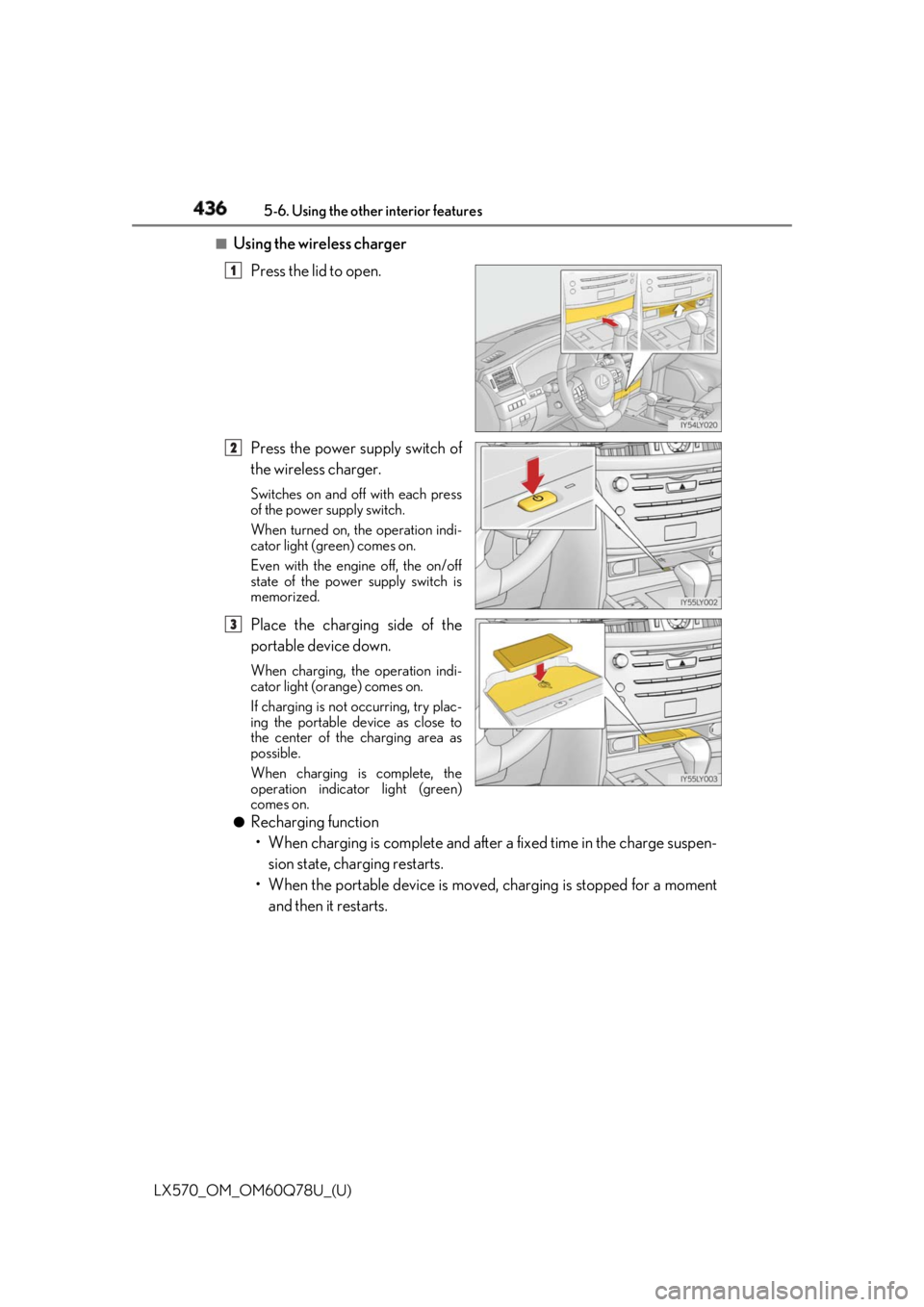
Using the wireless charger
Press the lid to open.
Press the power supply switch of
the wireless charger. Switches on and off with each press
of the power supply switch.
When turned on, the operation indi-
cator light (green) comes on.
Even with the engine off, the on/off
state of the power supply switch is
memorized.
Place the charging side of the
portable device down. When charging, the operation indi-
cator light (orange) comes on.
If charging is not occurring, try plac-
ing the portable device as close to
the center of the charging area as
possible.
When charging is complete, the
operation indicator light (green)
comes on.●
Recharging function
• When charging is complete and after a fixed time in the charge suspen-
sion state, char ging restarts.
• When the portable device is moved, charging is stopped for a moment
and then it restarts. 1
2
3
Page 437 of 628
LX570_OM_OM60Q78U_(U) 4375-6. Using the other interior features
5
Interior features ■
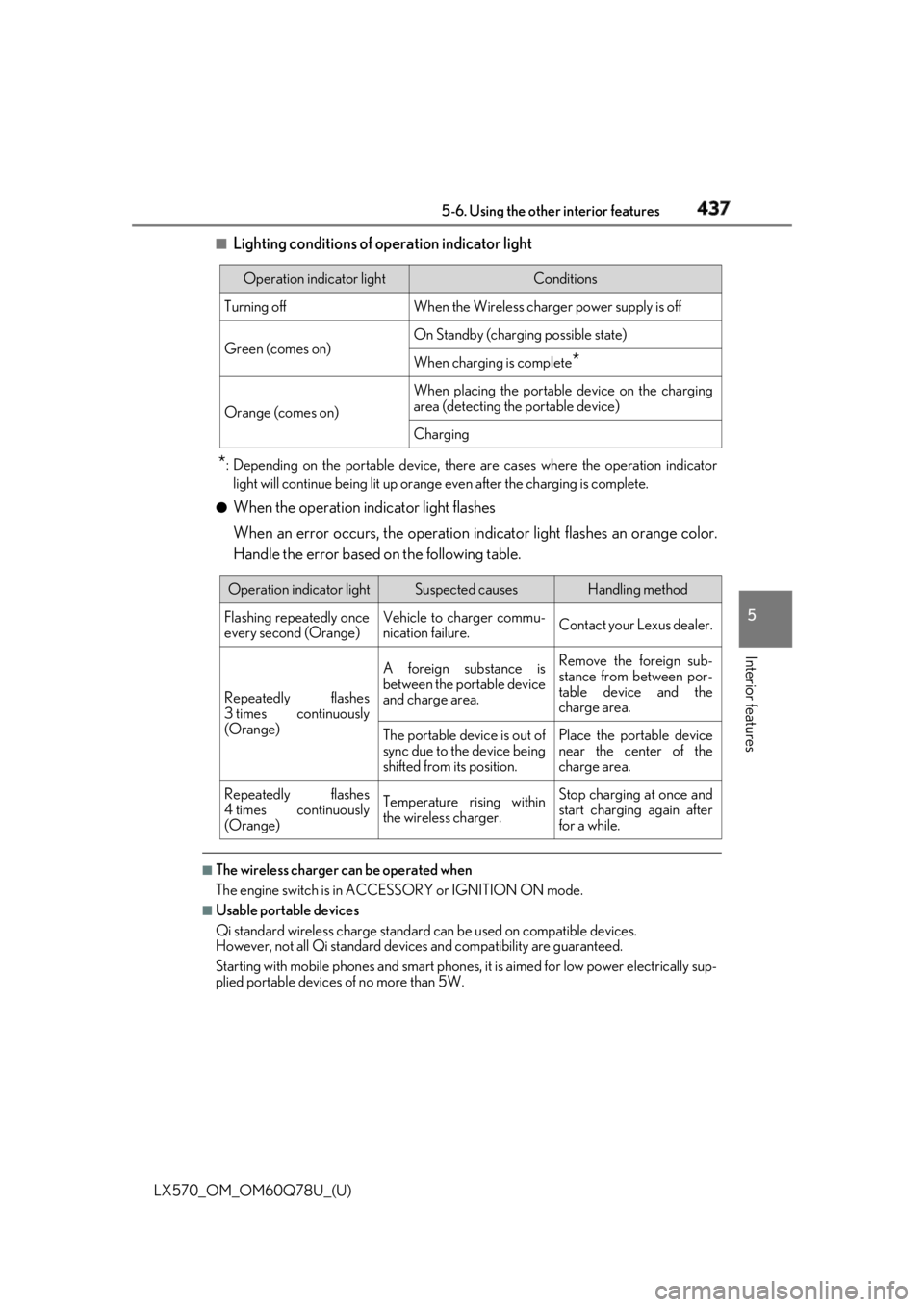
Lighting conditions of operation indicator light
* : Depending on the portable device, there are cases where the operation indicator
light will continue being lit up orange even after the charging is complete.●
When the operation indicator light flashes
When an error occurs, the operation in dicator light flashes an orange color.
Handle the error based on the following table.
■
The wireless charger can be operated when
The engine switch is in ACCESSORY or IGNITION ON mode. ■
Usable portable devices
Qi standard wireless charge standard can be used on compatible devices.
However, not all Qi st andard devices and compatibility are guaranteed.
Starting with mobile phones and smart phones, it is aimed for low power electrically sup-
plied portable devices of no more than 5W.Operation indicator light Conditions
Turning off When the Wireless charge r power supply is off
Green (comes on) On Standby (chargin g possible state)
When charging is complete
*Orange (comes on) When placing the portable device on the charging
area (detecting the portable device)
Charging
Operation indicator light Suspected causes Handling method
Flashing repeatedly once
every second (Orange) Vehicle to charger commu-
nication failure. Contact your Lexus dealer.
Repeatedly flashes
3 times continuously
(Orange) A foreign substance is
between the portable device
and charge area. Remove the foreign sub-
stance from between por-
table device and the
charge area.
The portable device is out of
sync due to the device being
shifted from its position. Place the portable device
near the center of the
charge area.
Repeatedly flashes
4 times continuously
(Orange) Temperature rising within
the wireless charger. Stop charging at once and
start charging again after
for a while.
Page 441 of 628

LX570_OM_OM60Q78U_(U) 4415-6. Using the other interior features
5
Interior features WARNING ■
Conditions in which the func tion may not operate correctly
In the following conditions, the wirele ss charger may not operate correctly●
The portable device is fully charged ●
There is foreign matter between th e charge area an d portable device●
The temperature of the portable device gets higher from charging ●
The charging surface of the portable device is facing up ●
The placement of the portable device is out of alignment with the charge area●
Near a TV tower, electric power plant, gas station, radio station, large display, airport
or other facility that generates strong radio wa ves or electrical noise●
When the electronic key is in contact with , or is covered by the following metallic
objects
• Cards to which aluminum foil is attached
• Cigarette boxes that ha ve aluminum foil inside
• Metallic wallets or bags
•Coins
• Hand warmers made of metal
• Media such as CDs and DVDs ●
When other wireless keys (that emit radio waves) are being used nearby
In addition, excluding the above-mentioned, when the charger does not perform nor-
mally or the operation indicator light is flashi ng continuously, it is considered that the
wireless charger is malfunctioni ng. Contact your Lexus dealer.■
To prevent failure or damage to data ●
Do not bring magnetic cards, such as credit cards, or magnetic recording media, etc.,
close to the charger while charging, otherw ise, data may disappear under the influ-
ence of magnetism. Also, do not bring pr ecision instruments such as wrist watches,
etc., close to the charger, as such objects may break. ●
Do not leave portable devices in the cab in. The temperature inside the cabin may
become high, when under the sun, and cause damage to the device.■
To prevent battery discharge
When the engine is stopped, do not use the wireless charger for a long time.