change wheel LEXUS LX570 2018 User Guide
[x] Cancel search | Manufacturer: LEXUS, Model Year: 2018, Model line: LX570, Model: LEXUS LX570 2018Pages: 628, PDF Size: 12.38 MB
Page 299 of 628

LX570_OM_OM60Q78U_(U) 2994-5. Using the driving support systems
4
Driving ■
Extra high mode
If the vehicle becomes stuck or the Crawl Co ntrol system requests the vehicle height be
raised, extra high mode may be automatically selected when the vehicle height is in high
mode with the four-wheel drive control switch in the L4 position.
The vehicle height is raised to 0.8 in. (2 0 mm) higher than the high mode height, or
slightly higher. ●
Extra high mode will change back to high mode when:
• The vehicle speed exceeds 6 mph (10 km/h)
• The four-wheel drive contro l switch is shifted to H4.●
If you pull the height select switch to “ ∨ ” when in extra high mode, normal mode is
selected. ●
Extra high mode cannot be manually selected. ■
Turning off the height control ●
The system will remain off until the height co ntrol “OFF” switch is pushed again, even if
the engine switch is turned off. ●
Even if the system is turned off, the system will interven e automatically if the vehicle
speed exceeds the following.
• 18 mph (30 km/h) with high or low mode
• 50 mph (80 km/h) with normal mode ■
Automatic leveling function
The vehicle is adjusted to a fixed height for each mode, regardless of the number of
occupants and the luggage load. ●
However the vehicle cannot be raised if the vehicle load exceeds the following limits:
• Up to 4 occupants
* plus approximately 661 lb. (300 kg) in the normal mode
• Up to 4 occupants
* plus approximately 441 lb. (200 kg) in the high mode
* : average weight 150 lb. (68 kg) per person ●
If the vehicle height cannot be raised when in the normal mode, and “LO” appears on
the display, the vehicle is loaded too heavily. Take extra care when driving in this condi-
tion.
If the vehicle height cannot be raised even after unloading the vehicle, pull the height
select switch to “ ∨ ” then push to “ ∧ ”. If the vehicle height stil l cannot be raised, turn the
ignition off then on again, then try once more. ■
When the vehicle is stopped during driving
The activation of the automatic leveling func tion may cause the vehicle height to change.
This is not a malfunction. ■
If the vehicle height does not change
If the vehicle is loaded too heavily, or the undercarriage has come into contact with the
road surface, the vehicle heig ht cannot be raised/lowered.
Page 300 of 628

300
LX570_OM_OM60Q78U_(U) 4-5. Using the driving support systems■
In the following cases the 4-Wheel AHC will not operate●
The brake pedal has been depressed for a few seconds or longer while the vehicle is
stopped. ●
Vehicle height control has not been frequently used. ●
The suspension fluid temperature is lower than -22°F (-30°C). ●
There is ice on the suspension. ●
Driving on bumpy roads which may caus e the suspension to fully elongate.●
If the steering wheel is abrupt ly turned more than 3/4 of a revolution with the center dif-
ferential lock system activated. ■
Cold weather operation
It may take longer for the vehicle height to change if the suspension fluid temperature
drops below 5°F (-15°C).
The 4-Wheel AHC does not operate when the suspension fluid temperature drops
below -22°F (-30°C). ●
In this case, even if the height select switch is pressed, the vehicle height will not change.
Once the vehicle has been driven for a sh ort time and the suspension fluid has been
warmed to within normal operating limits , the 4-Wheel AHC will begin operating and
the vehicle height will automatically change to the selected mode.●
When the suspension fluid is around -22°F (-30°C), the vehicle height may not be able
to be raised, even if the 4-Wheel AHC is operating. In this case, pull the height select
switch to “ ∨ ” then push to “ ∧ ” after driving for a short time longer to select the desired
vehicle height. ■
Parking and stopping tips ●
If you immediately stop the en gine after off-road driving, the vehicle height may gradu-
ally lower. When parking, ma ke sure there is nothing un der the vehicle that may come
in contact with the underbody. The vehicle will return to th e set height when the engine
is started. ●
The vehicle height may change as the temperature changes when the engine is
stopped. The vehicle will return to the set height when the engine is started. ■
Propeller shaft noise
If the vehicle height is adjusted on a slope, or with the shift lever in a position other than P
or N while the vehicle is stopped, you may hear a sound caused by the expansion and
contraction of the propeller shaft. This does not indicate a malfunction. ■
4-Wheel AHC failure warning
If a malfunction occurs in the 4-Wheel AHC , normal mode is automatically selected.
However, the system may not switch to norm al mode depending on the location of the
malfunction.
The warning message is displa yed on the multi-informatio n display, and the 4-Wheel
AHC cannot be activated until the malfunction is corrected.
Stop the engine and start it again. If the wa rning message turns off, the system is operat-
ing correctly. If the warning me ssage continues to be displayed, have the vehicle checked
at your Lexus dealer as soon as possible.
Page 325 of 628

LX570_OM_OM60Q78U_(U) 3254-5. Using the driving support systems
4
Driving ■
Multi-terrain Monitor screen display
The amount of time that the Multi-terrain Mo nitor screen is displayed changes as follows
according to the vehicle speed at the time the VIEW switch was pressed.
The Multi-terrain Monitor screen is displayed if the vehicle speed is approximately 7 mph
(12 km/h) or less when the camera switch is pressed.
If the vehicle speed exceeds approximately 7 mph (12 km/h), the Multi-terrain Monitor
display is canceled.
The various screens of the Multi-terrain Monitor display info rmation to support
several different driving situations, such as when checking for obstacles when
moving forward or in reverse, or when judging road surface conditions during
off-road driving. ■
Front view & dual side view
Front view & dual side view can be used to check the area around the front of
the vehicle.
• In addition to an image of the front of the vehicle, guide lines are displayed
in a composite view to provide refere nce for when deciding a direction to
move forward in.
• If the VIEW switch is pressed while the screen is displayed, the screen
switches from normal to magnified display. (Pressing the switch again
returns the screen to the normal display)
• If the steering wheel is turned 270 ° or more, guide lines and other features
to support turning are automatically displayed.Screen display and functions
Page 339 of 628
LX570_OM_OM60Q78U_(U) 3394-5. Using the driving support systems
4
Driving ●
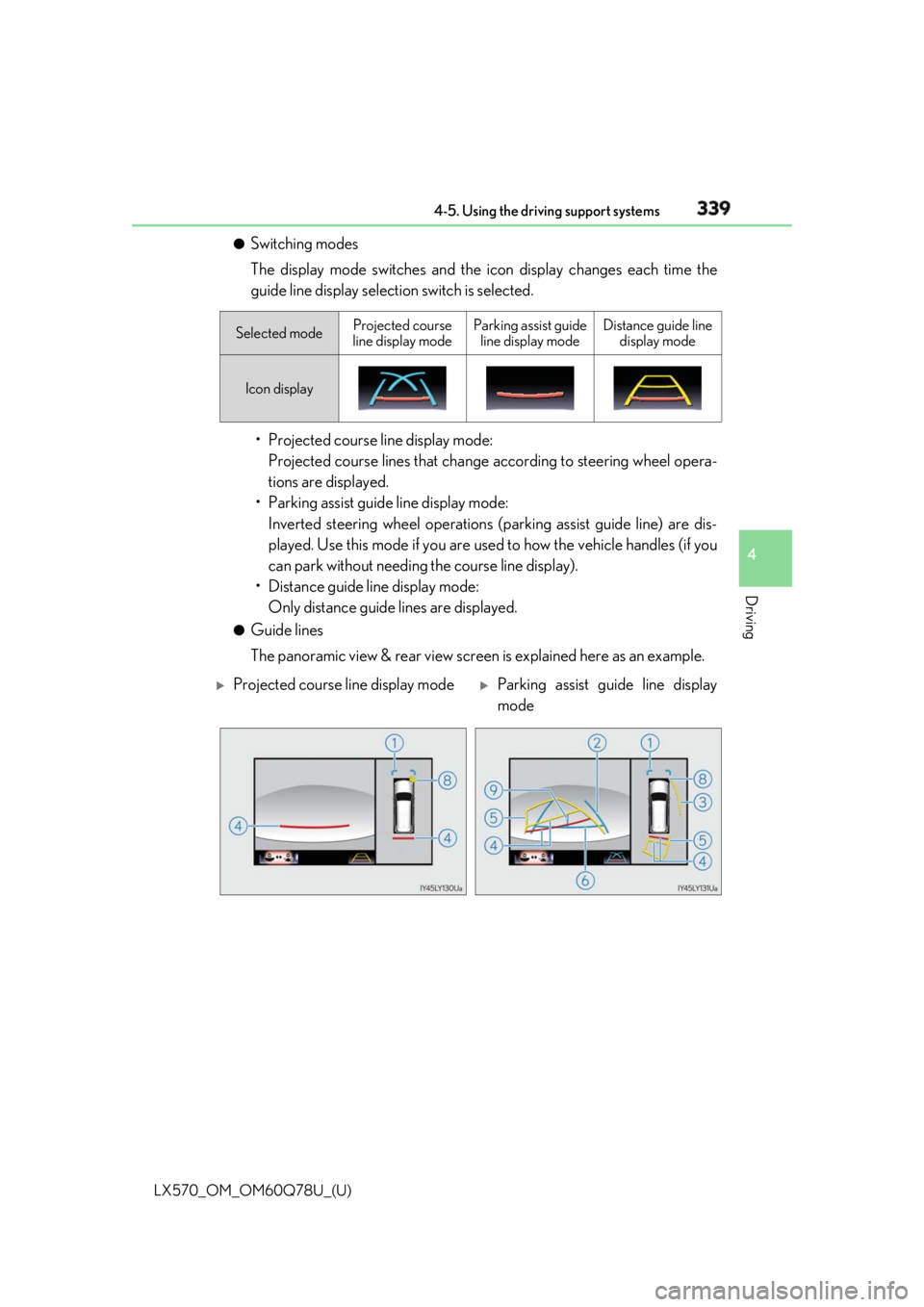
Switching modes
The display mode switches and the icon display changes each time the
guide line display selection switch is selected.
• Projected course line display mode:
Projected course lines that change according to steering wheel opera-
tions are displayed.
• Parking assist guide line display mode:
Inverted steering wheel operations (p arking assist guide line) are dis-
played. Use this mode if you are used to how the vehicle handles (if you
can park without needing the course line display).
• Distance guide line display mode:
Only distance guide lines are displayed. ●
Guide lines
The panoramic view & rear view screen is explained here as an example. Selected mode Projected course
line display mode Parking assist guide
line display mode Distance guide line
display mode
Icon display
Projected course line display mode
Parking assist guide line display
mode
Page 340 of 628

340
LX570_OM_OM60Q78U_(U) 4-5. Using the driving support systems
Front distance guide line (blue) Indicates a distance approximately 3 ft. (1 m) from the front end of the vehicle.
Rear vehicle width extension guide lines Indicate the estimated course of the vehicle when backing up straight.
• The displayed width is wider than the actual vehicle width.
• In projected course line disp lay mode, this item overlaps the projected course lines
when going straight.
Side projected course line (yellow) Indicates the projected reverse course calcu lated by the angle of the steering wheel.
The projected reverse course line on the outside of the turn is displayed according to
the direction of the steering wheel.
Rear distance guide line Indicates the estimated distance from the end of the rear bumper (at the center). (Red
line: approximately 1.5 ft. [0.5 m] away. Ye llow line: approximately 3 ft. [1 m] away.)
In projected course line display mode, the re ar distance guide line changes according
to steering wheel operations.
Projected reverse course (yellow) Changes according to steering wheel operations and indicates the estimated course
of the vehicle.
Rear distance guide line (blue) Indicates a distance approximately 1.5 ft. (0.5 m) from the end of the rear bumper (at
the center).
Parking assist guide line (blue) Indicates the estimated tire course of the tightest possible turn in reverse.
Intuitive parking assist When the intuitive parking assist is on, an icon will be displaye d when an obstacle is
detected. (Refer to P. 287 for informat ion about the intuitive parking assist.)
Vehicle center line (blue) Indicates the estimated vehicle center on the ground.
Distance guide line display mode
1
2
3
4
5
6
7
8
9
Page 362 of 628

362
LX570_OM_OM60Q78U_(U) 4-5. Using the driving support systems
The projected course lines move even though the steering wheel is straight (vehi-
cle width extension guide lines and projected course lines are not aligned)
There is a malfunction in the signals being
output by the steering sensor Have the vehicle inspected by your Lexus
dealer.
Guide lines are not displayed
The back door is open Close the back door.
If this does not resolve the symptom, have
the vehicle inspected by your Lexus
dealer.
“!” is displayed
The battery is disconnected and recon-
nected Turn the steering wheel fully to right and
left.
If this does not resolve the symptom, have
the vehicle inspected by your Lexus
dealer.
There is a malfunction in the Multi-terrain
Monitor Have the vehicle inspected by your Lexus
dealer.
NOTICE ■
How to use the camera ●
The Multi-terrain Monitor system may not operate properly in the following cases.
• If the front or the rear of the vehicle or the outside rear view mirror has been hit,
the camera’s position and mounting angle may have changed.
• As the camera has a water proof construction, do not detach, disassemble or
modify it. This may ca use incorrect operation.
• When cleaning the camera lens, flush the camera with a large quantity of water
and wipe it with a soft and wet cloth. Strongly rubbing the camera lens may cause
the camera lens to be scratched and unable to transmit a clear image.
• Do not allow organic solvent, car wax, window cleaner or glass coat to adhere to
the camera. If this happens, wi pe it off as soon as possible.
• If the temperature changes rapidly, such as when hot water is poured on the vehi-
cle in cold weather, the system may not operate normally.
• When washing the vehicle, do not apply intensive bursts of water to the camera or
camera area. Doing so may result in the camera malfunctioning.
• When the camera is used under fluorescen t lights, sodium light or mercury light
etc., the lights and the illuminated areas may appear to flicker.
• The camera can be damaged by flying rocks and other debris. ●
Do not expose the camera to strong impact as this could cause a malfunction. If this
happens, have the vehicle inspected by your Lexus dealer as soon as possible. Likely cause Solution
Page 379 of 628

LX570_OM_OM60Q78U_(U) 3794-5. Using the driving support systems
4
Driving ■
Automatic Active TRAC reactivation
If only the Active TRAC system is turned of f, the Active TRAC system will turn on when
vehicle speed increases. ■
Automatic Active TRAC, VSC and Tr ailer Sway Control reactivation
If the Active TRAC, VSC and Trailer Sway Control are turned off, the systems will not
turn on even when vehicle speed increases. ■
If the brake system overheats
The brake system may overheat . In this case, a buzzer w ill sound, and the TRAC OFF
indicator will flash, and Active TRAC and hill-s tart assist control will be temporarily inop-
erable. In this event, stop the vehicle immedi ately in a safe place, and allow the brake sys-
tem to cool down sufficiently until the TR AC OFF indicator goes off. (There is no
problem with continuing normal driving.) ■
Sounds and vibrations caused by the Multi Terrain AB S, brake assist, Active TRAC,
VSC, Trailer Sway Control, hill -start assist control and VGRS●
A sound may be heard from the engine compartment when the engine is started or just
after the vehicle begins to move. This soun d does not indicate that a malfunction has
occurred in any of these systems. ●
Any of the following conditions may occur when the above systems are operating.
None of these indicates that a malfunction has occurred.
• Vibrations may be felt through the vehicle body and steering.
• A motor sound may be heard afte r the vehicle comes to a stop.
• The brake pedal may pulsate slightly af ter the Multi Terrain ABS is activated.
• The brake pedal may move down slightly after the Multi Terrain ABS is activated.■
Hill-start assist control is operational when ●
The shift lever is in D or S. ●
The brake pedal is not depressed. ■
VGRS is disabled in the following situations ●
During stopping or the steering wheel has been moved for a long time while driving at
lower speeds. ●
After the engine is restarted at less than -22°F (-30°C). ●
If you disconnect the battery with the steering wheel turned, the center position of the
steering wheel could be slightly and tempor ary changed. To initialize the VGRS, drive
for a short while.
Page 384 of 628

384
LX570_OM_OM60Q78U_(U) 4-6. Driving tips
Regulations regarding the use of tire chains vary depending on location and type
of road. Always check local regu lations before installing chains.■
Tire chain installation
Observe the following precautions when installing and removing chains: ●
Install and remove tire chains in a safe location. ●
Install tire chains on the rear tires. Do not install tire chains on the front tires.●
Install tire chains on rear tires as tightly as possible. Retighten chains after driving 1/4 -
1/2 mile (0.5 - 1.0 km). ●
Install tire chains following the instru ctions provided with the tire chains.Regulations on the use of tire chains
WARNING ■
Driving with snow tires
Observe the following precautions to reduce the risk of accidents.
Failure to do so may result in a loss of vehi cle control and cause death or serious injury.●
Use tires of the specified size. ●
Maintain the recommended level of air pressure.●
Do not drive in excess of 75 mph (120 km/h ), regardless of the type of snow tires
being used. ●
Use snow tires on all, not just some wheels. ■
Driving with tire chains (vehicles with 20-inch tires)
Observe the following precautions to reduce the risk of accidents.
Failing to do so may result in the vehicle being unable to be driven safely, and may
cause death or serious injury. ●
Do not drive in excess of the speed limit specified for the ti re chains being used, or 30
mph (50 km/h), whichever is lower. ●
Avoid driving on bumpy road surfaces or over potholes.●
Avoid sudden acceleration, abrupt steering, sudden braking and shifting operations
that cause sudden engine braking. ●
Slow down sufficiently before entering a cu rve to ensure that vehicle control is main-
tained. ●
Do not use LDA (Lane Departure Alert) system. (if equipped) ■
When installing tire chains (vehicles with 20-inch tires)
Turn off the vehicle height control.
The vehicle height may change due to the automatic leveling function and you may
catch part of your body in the vehicle, resulting in an accident. ( → P. 298)
Page 487 of 628
LX570_OM_OM60Q78U_(U) 4876-3. Do-it-yourself maintenance
6
Maintenance and care Your Lexus is equipped with a tire pressu re warning system that uses tire pres-
sure warning valves and transmitters to detect low tire inflation pressure before
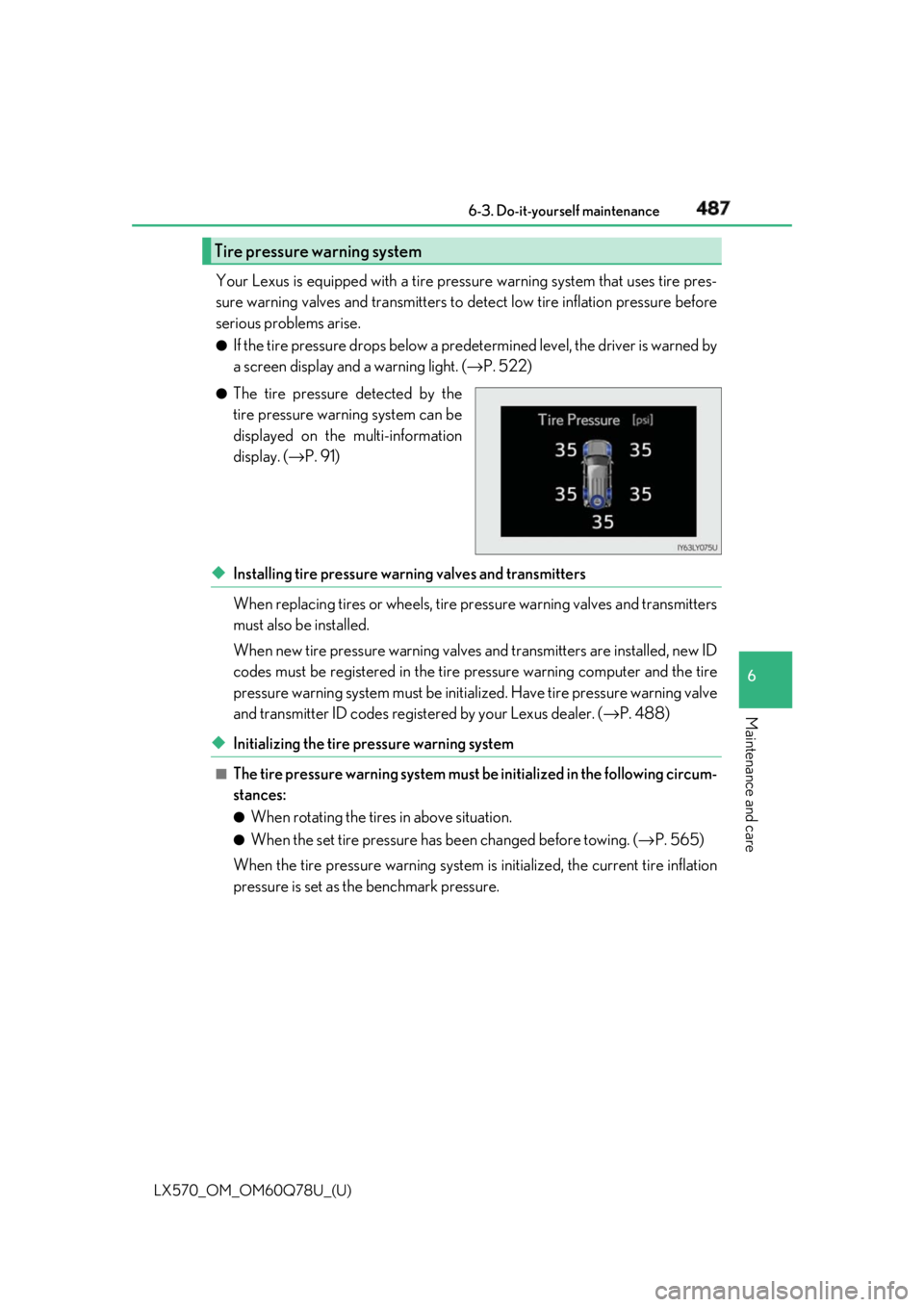
serious problems arise. ●
If the tire pressure drops below a predet ermined level, the driver is warned by
a screen display and a warning light. ( → P. 522)●
The tire pressure detected by the
tire pressure warning system can be
displayed on the multi-information
display. ( → P. 91)
◆ Installing tire pressure warning valves and transmitters
When replacing tires or wheels, tire pr essure warning valv es and transmitters
must also be installed.
When new tire pressure wa rning valves and transmitters are installed, new ID
codes must be registered in the tire pressure warning computer and the tire
pressure warning system must be initia lized. Have tire pressure warning valve
and transmitter ID codes registered by your Lexus dealer. ( → P. 488)
◆ Initializing the tire pressure warning system ■
The tire pressure warning system must be initialized in the following circum-
stances: ●
When rotating the tires in above situation. ●
When the set tire pressure has been changed before towing. ( → P. 565)
When the tire pressure warning system is initialized, the current tire inflation
pressure is set as the benchmark pressure.Tire pressure warning system
Page 515 of 628
5157-2. Steps to take in an emergency
LX570_OM_OM60Q78U_(U) 7
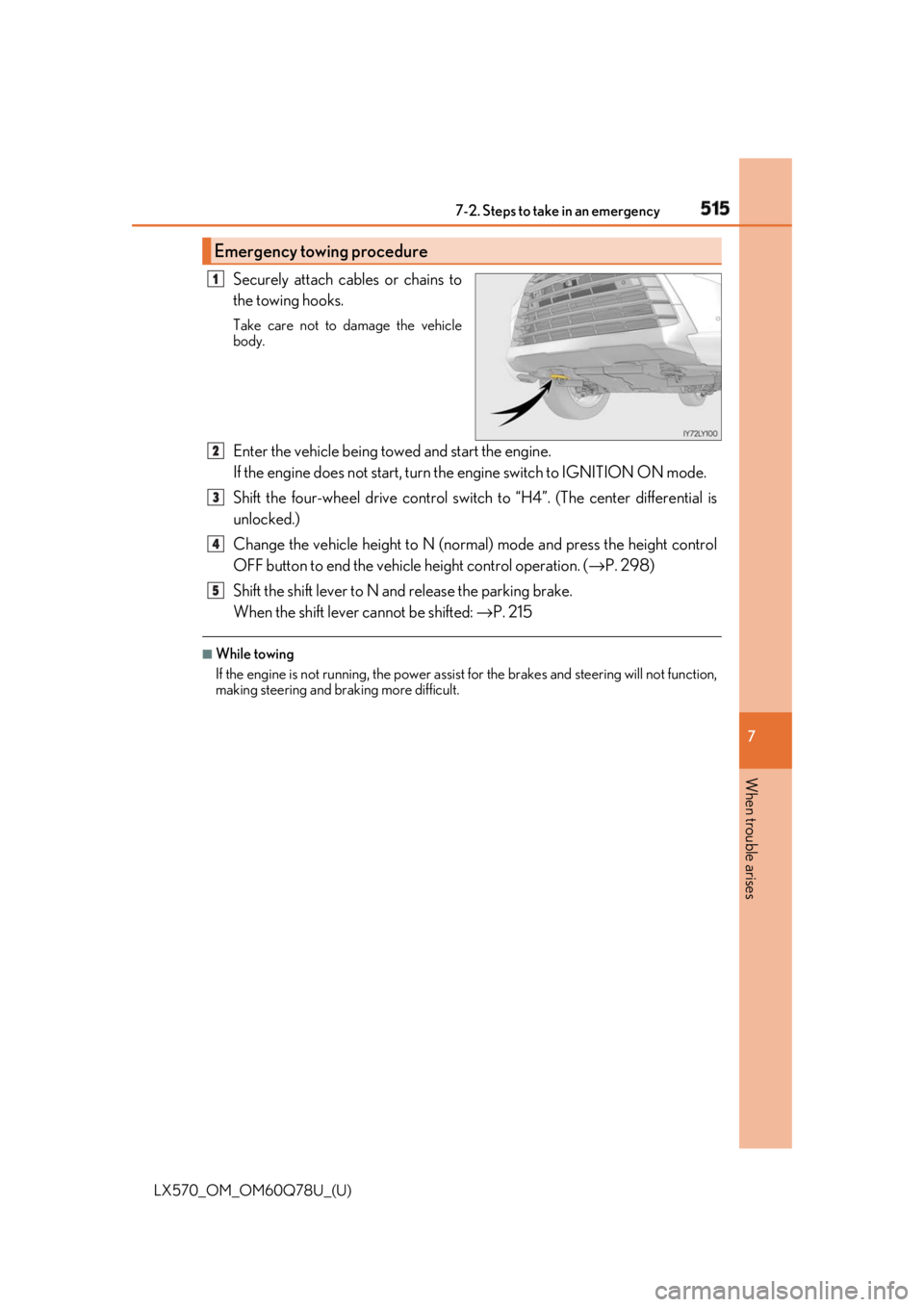
When trouble arises Securely attach cables or chains to
the towing hooks. Take care not to damage the vehicle
body.
Enter the vehicle being towed and start the engine.
If the engine does not start, turn th e engine switch to IGNITION ON mode.
Shift the four-wheel drive control switch to “H4”. (The center differential is
unlocked.)
Change the vehicle height to N (norma l) mode and press the height control
OFF button to end the vehicle height control operation. ( → P. 298)
Shift the shift lever to N and release the parking brake.
When the shift lever cannot be shifted: → P. 215■
While towing
If the engine is not running, the power assist for the brakes and steering will not function,
making steering and br aking more difficult.Emergency towing procedure 1
2
3
4
5