roof LEXUS LX570 2018 User Guide
[x] Cancel search | Manufacturer: LEXUS, Model Year: 2018, Model line: LX570, Model: LEXUS LX570 2018Pages: 628, PDF Size: 12.38 MB
Page 109 of 628

109
LX570_OM_OM60Q78U_(U) 3 Operation of
each component 3-1. Key information
Keys ....................................................110
3-2. Opening, closing and
locking the doors
Side doors ........................................ 115
Back door........................................122
Smart access system with
push-button start ...................... 132
3-3. Adjusting the seats
Front seats...................................... 140
Rear seats........................................142
Driving position memory ........... 151
Head restraints ............................ 155
3-4. Adjusting the steering
wheel and mirrors
Steering wheel ............................. 158
Inside rear view mirror ............. 160
Outside rear view mirrors........162
3-5. Opening, closing the
windows and moon roof
Power windows ........................... 165
Moon roof ...................................... 168
Page 110 of 628

110
LX570_OM_OM60Q78U_(U) 3-1. Key information
Keys The following keys are provided with the vehicle.
Electronic keys • Operating the smart access system
with push-button start ( → P. 132)
• Operating the wireless remote con-
trol function
Mechanical keys
Key number plate
Card key (electronic key) Operating the smart access system with
push-button start ( → P. 132)
Locks the doors ( → P. 115)
Unlocks the doors ( → P. 115)
Opens the windows and moon roof
*( → P. 115)
Opens/closes the power back door
( → P. 122)
Sounds the alarm ( → P. 111)
* : This setting must be custom ized at your Lexus dealer.The keys 1
2
3
4
Wireless remote control 1
2
3
4
5
Page 112 of 628

112
LX570_OM_OM60Q78U_(U) 3-1. Key information
●
The card key is not waterproof. ■
When required to leave the vehicle’s key with a parking attendant
Lock the glove box as circumstances demand. ( → P. 421)
Remove the mechanical key for your own use and provide the attendant with the elec-
tronic key only. ■
If you lose your mechanical keys
New genuine mechanical keys can be made by your Lexus dealer using another
mechanical key and the key number stamped on your key number plate. Keep the plate
in a safe place such as your wallet, not in the vehicle.■
When riding in an aircraft
When bringing an electronic key onto an aircraft, make sure you do not press any but-
tons on the electronic key while inside the airc raft cabin. If you are carrying an electronic
key in your bag etc., ensure that the buttons are not likely to be pressed accidentally.
Pressing a button may cause the electronic key to emit radio waves that could interfere
with the operation of the aircraft. ■
Electronic key battery depletion ●
The standard battery life is 1 to 2 years. (The card key battery life is about a year and a
half.) ●
If the battery becomes low, an alarm will sound in the cabin when the engine stops. ●
As the electronic key always receives ra dio waves, the battery will become depleted
even if the electronic key is not used. The following symptoms indi cate that the elec-
tronic key battery may be depleted. Replace the battery when necessary. ( → P. 503)
• The smart access system with push-button start or the wireless remote control does
not operate.
• The detection area becomes smaller.
• The LED indicator on the key surface does not turn on. ●
To avoid serious deterioration, do not leave the electronic key within 3 ft. (1 m) of the
following electrical appliances that produce a magnetic field:
•TVs
• Personal computers
• Cellular phones, cordless phones and battery chargers
• Recharging cellular phones or cordless phones
•Table lamps
• Induction cookers ●
If the battery cover is not installed and the bat-
tery falls out or if the battery was removed
because the key got wet, reinstall the battery
with the positive terminal facing the Lexus
emblem.
Page 115 of 628

115
LX570_OM_OM60Q78U_(U) 3-2. Opening, closing and locking the doors
3
Operation of each component
Side doors ◆ Smart access system with push-button start
Carry the electronic key to enable this function.
Grip the driver’s door handle to
unlock the door. Grip the passen-
ger’s door handle to unlock all the
doors.
* Make sure to touch the sensor on the
back of the handle.
The doors cannot be unlocked for
3 seconds after the doors are locked.
* : The door unlock settings can be
changed. ( → P. 120)
Touch the lock sensor (the indentatio n on the upper part or lower part of
the handle) to lock the doors. Check that the door is securely locked.
◆ Wireless remote control
Locks all the doors Check that the door is securely
locked.
Unlocks all the doors Pressing the button unlocks the
driver’s door. Pressing the button
again unlocks the other doors.
Press and hold to open the windows
and moon roof.
*
* : These settings must be cust omized at your Lexus dealer.The vehicle can be locked and unlock ed using the entry function, wireless
remote control or door lock switch.
Locking and unlocking the doors from the outside 1
2
1
2
Page 116 of 628

116
LX570_OM_OM60Q78U_(U) 3-2. Opening, closing and locking the doors■
Operation signals
Doors: A buzzer sounds and the emergency flas hers flash to indicate that the doors have
been locked/unlocked. (Loc ked: once; Unlocked: twice)
Windows and moon roof: A buzzer sounds to indicate that the windows and moon roof
are operating. ■
Security feature
If a door is not opened within approximately 60 seconds after the vehicle is unlocked, the
security feature automatically locks the vehicle again. ■
When the door cannot be locked by the lock sensor on the upper part of the door han-
dle
■
Door lock buzzer
If an attempt to lock the doors is made when a door is not fully closed, a buzzer sounds
continuously. Fully close the door to stop the buzzer, and lock the vehicle once more. ■
Setting the alarm
Locking the doors will set the alarm system. ( → P. 77)■
If the smart access system with push-button start or the wireless remote control does
not operate properly ●
Use the mechanical key to lock and unlock the doors. ( → P. 546)●
Replace the battery with a new one if it is depleted. ( → P. 503)If the door will not lock even when the topside
sensor area is touched, try touching both the
topside and underside sensor areas at the same
time.
Page 145 of 628
LX570_OM_OM60Q78U_(U) 1453-3. Adjusting the seats
3
Operation of each component ■
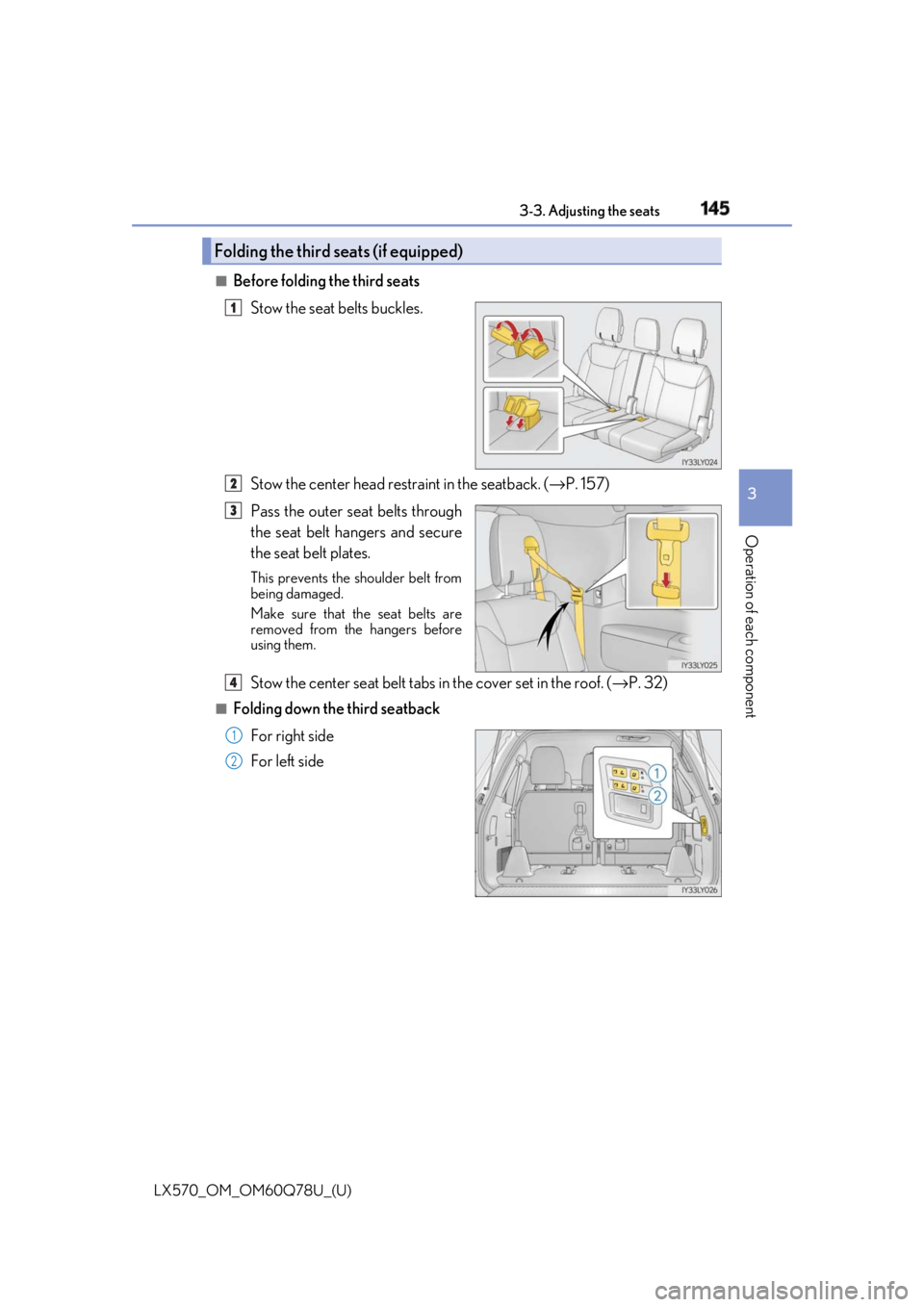
Before folding the third seats
Stow the seat belts buckles.
Stow the center head restraint in the seatback. ( → P. 157)
Pass the outer seat belts through
the seat belt hangers and secure
the seat belt plates. This prevents the shoulder belt from
being damaged.
Make sure that th e seat belts are
removed from the hangers before
using them.
Stow the center seat belt tabs in the cover set in the roof. ( → P. 32)■
Folding down the third seatback
For right side
For left sideFolding the third seats (if equipped) 1
2
3
4
1
2
Page 165 of 628
165
LX570_OM_OM60Q78U_(U) 3-5. Opening, closing the windows and moon roof
3
Operation of each component
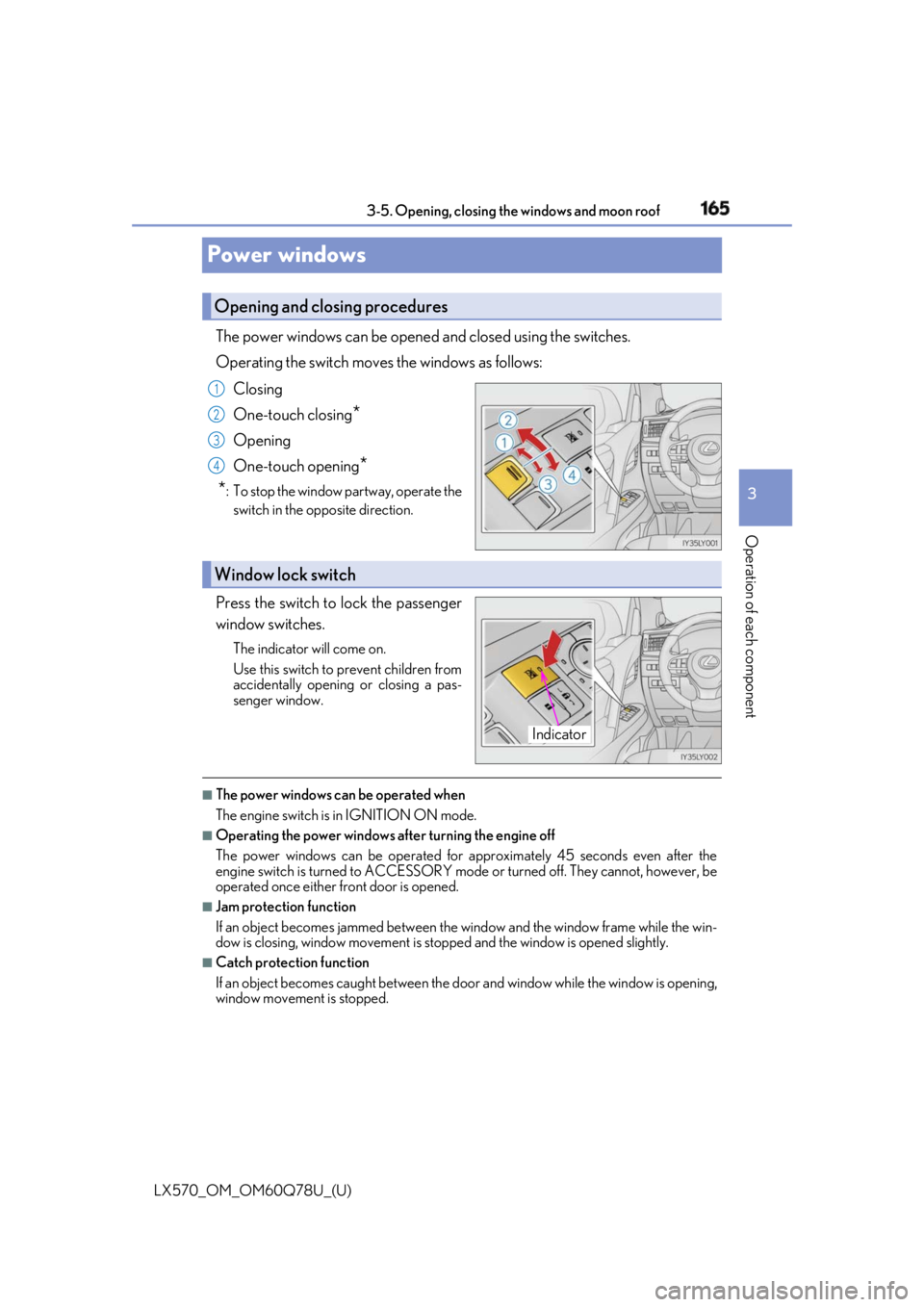
Power windows The power windows can be opened and closed using the switches.
Operating the switch move s the windows as follows:
Closing
One-touch closing
*Opening
One-touch opening
*
* : To stop the window partway, operate the
switch in the op posite direction.
Press the switch to lock the passenger
window switches. The indicator will come on.
Use this switch to prevent children from
accidentally opening or closing a pas-
senger window.
■
The power windows can be operated when
The engine switch is in IGNITION ON mode. ■
Operating the power windows after turning the engine off
The power windows can be operated for ap proximately 45 seconds even after the
engine switch is turned to ACCESSORY mode or turned off. They cannot, however, be
operated once either front door is opened.■
Jam protection function
If an object becomes jammed between the window and the window frame while the win-
dow is closing, window movement is stop ped and the window is opened slightly.■
Catch protection function
If an object becomes caught between the door and window while the window is opening,
window movement is stopped.Opening and closing procedures 1
2
3
4
Window lock switch
Indicator
Page 166 of 628

166
LX570_OM_OM60Q78U_(U) 3-5. Opening, closing the windows and moon roof■
When the window cannot be opened or closed
When the jam protection functi on or catch protection func tion operates unusually and
the door window cannot be opened or closed, perform the following operations with the
power window switch of that door. ●
Stop the vehicle. With the engine switch in IGNITION ON mode, within 4 seconds of
the jam protection function or catch protecti on function activating, continuously oper-
ate the power window switch in the one-to uch closing direction or one-touch opening
direction so that the door wind ow can be opened and closed.●
If the door window cannot be opened and closed even when performing the above
operations, perform the following procedure for function initialization.
Turn the engine switch to IGNITION ON mode.
Pull and hold the power window switch in the one-touch closing direction and com-
pletely close the door window.
Release the power window sw itch for a moment, resume pulling the switch in the
one-touch closing direction, and hold it there for approximately 6 seconds or more.
Press and hold the power window switch in the one-touch opening direction. After
the door window is completely opened, cont inue holding the switch for an additional
1 second or more.
Release the power window switch for a mo ment, resume pushing the switch in the
one-touch opening direction, and hold it there for approximately 4 seconds or
more.
Pull and hold the power window switch in the one-touch closing direction again.
After the door window is completely clos ed, continue holding the switch for a fur-
ther 1 second or more.
If you release the switch while the window is moving, start again from the beginning.
If the window reverses and cannot be fully cl osed or opened, have the vehicle inspected
by your Lexus dealer. ■
When the battery is disconnected
The window lock switch is disabled. If nece ssary, press the window lock switch after
reconnecting the battery. ■
Door lock linked window operation ●
The power windows can be opened an d closed using the mechanical key.
* ( → P. 546)●
The power windows can be opened using the wireless remote control.
* ( → P. 115)
* : These settings must be cust omized at your Lexus dealer.■
Power windows open warning buzzer
The buzzer sounds and a message is shown on the multi-information display in the instru-
ment cluster when the engine switch is turned off and the driver’s door is opened with the
power windows open. ■
Customization
Settings (e.g. linked door lock operation) can be changed.
(Customizable features: → P. 580) 1
2
3
4
5
6
Page 167 of 628

LX570_OM_OM60Q78U_(U) 1673-5. Opening, closing the windows and moon roof
3
Operation of each component WARNING
Observe the following precautions.
Failing to do so may result in death or serious injury.■
Closing the windows ●
The driver is responsible for all the power window operations, including the operation
for the passengers. In order to prevent acci dental operation, espe cially by a child, do
not let a child operate the power windows. It is possible for children and other passen-
gers to have body parts caught in the powe r window. Also, when riding with a child, it
is recommended to use the window lock switch. ( → P. 165)●
Check to make sure that all passengers do not have any part of their body in a posi-
tion where it could be caught wh en a window is being operated.●
When using the wireless remote control or mechanical key and operating the power
windows, operate the power window after checking to make sure that there is no pos-
sibility of any passenger having any of their body parts caught in the window. Also, do
not let a child operate window by the wirele ss remote control or mechanical key. It is
possible for children and other passengers to get caught in the power window. ●
When exiting the vehicle, turn the engine sw itch off, carry the ke y and exit the vehicle
along with the child. There may be accidental operation, due to mischief, etc., that
may possibly lead to an accident. ■
Jam protection function ●
Never use any part of your body to intentionally activate the jam protection function. ●
The jam protection function may not work if something gets jammed just before the
window is fully closed. Be careful not to get any part of your body jammed in the win-
dow. ■
Catch protection function ●
Never use any part of your body or clothing to intentionally activate the catch protec-
tion function. ●
The catch protection function may not work if something gets caught just before the
window is fully opened. Be ca reful not to get any part of your body or clothing caught
in the window.
Page 168 of 628
168
LX570_OM_OM60Q78U_(U) 3-5. Opening, closing the windows and moon roof
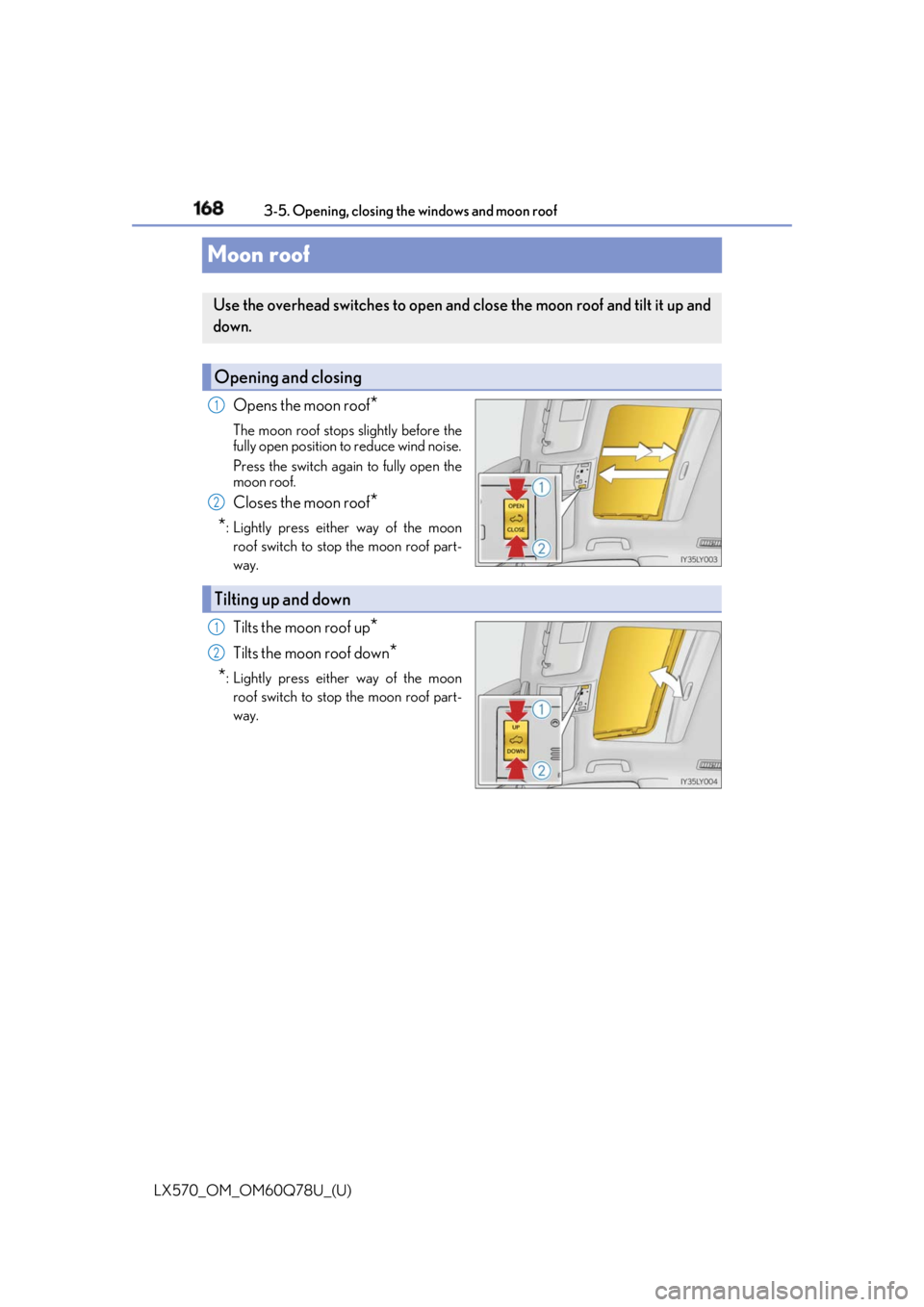
Moon roof Opens the moon roof
*The moon roof stops slightly before the
fully open position to reduce wind noise.
Press the switch again to fully open the
moon roof.
Closes the moon roof
*
* : Lightly press either way of the moon
roof switch to stop the moon roof part-
way.
Tilts the moon roof up
*Tilts the moon roof down
*
* : Lightly press either way of the moon
roof switch to stop the moon roof part-
way.Use the overhead switches to open and close the moon roof and tilt it up and
down.
Opening and closing 1
2
Tilting up and down 1
2