ignition LEXUS LX570 2018 Owners Manual
[x] Cancel search | Manufacturer: LEXUS, Model Year: 2018, Model line: LX570, Model: LEXUS LX570 2018Pages: 628, PDF Size: 12.38 MB
Page 75 of 628

751-2. Theft deterrent system
LX570_OM_OM60Q78U_(U) 1
For safety and security
Engine immobilizer system The indicator light flashes after the
engine switch has been turned off to
indicate that the system is operating.
The indicator light stops flashing after
the engine switch has been turned to
ACCESSORY or IGNITION ON
mode to indicate that the system has
been canceled. ■
System maintenance
The vehicle has a maintenance-free type engine immobilizer system. ■
Conditions that may cause the system to malfunction ●
If the key is in contact with a metallic object●
If the key is in close proximity to or touchi ng a key to the security system (key with a
built-in transponder ch ip) of another vehicleThe vehicle’s keys have built-in tran sponder chips that prevent the engine
from starting if a key has not been previously registered in the vehicle’s on-
board computer.
Never leave the keys inside the vehicle when you leave the vehicle.
This system is designed to help prev ent vehicle theft but does not guarantee
absolute security against all vehicle thefts.
Page 77 of 628

771-2. Theft deterrent system
LX570_OM_OM60Q78U_(U) 1
For safety and security
Alarm The alarm uses light and sound to give an alert when an intrusion is detected.
The alarm is triggered in the following situations when the alarm is set:●
A locked door is unlocked or opened in any way other than using the entry
function or wireless remote control. (The doors will lock again automatically.) ●
The hood is opened. ●
The battery is reconnected.
Close the doors and hood, and lock all
the doors using the entry function or
wireless remote control. The system will
be set automatically after 30 seconds. The indicator light changes from being
on to flashing when the system is set.
Do one of the following to de activate or stop the alarms:●
Unlock the doors using th e entry function or wi reless remote control.●
Turn the engine switch to ACCESSOR Y or IGNITION ON mode, or start
the engine. (The alarm will be deactivat ed or stopped after a few seconds.)The alarm
Setting the alarm system
Deactivating or stopping the alarm
Page 84 of 628

84
LX570_OM_OM60Q78U_(U) 2. Instrument cluster
* 1
: These lights turn on when the engine switch is turned to IGNITION ON mode to
indicate that a system check is being perfor med. They will turn off after the engine is
on, or after a few seconds. There may be a ma lfunction in a system if the lights do not
turn on, or turn off. Have the vehi cle inspected by your Lexus dealer.
* 2
: The light flashes to indicate a malfunction.
* 3
: This light illuminates on the center panel.
* 4
: The light flashes or illumina tes to indicate a malfunction.
* 5
: This light is displayed on the multi-information display. * 2
(Canada)
Parking brake indicator
( → P. 522)
* 1
Power steering system
warning light ( → P. 522)
* 1
Brake system warning light
( → P. 523)
* 5
Brake Override System
warning light ( → P. 175)
Page 86 of 628

86
LX570_OM_OM60Q78U_(U) 2. Instrument cluster
* 1
: These lights turn on when the engine switch is turned to IGNITION ON mode to
indicate that a system check is being perfor med. They will turn off after the engine is
on, or after a few seconds. There may be a ma lfunction in a system if the lights do not
turn on, or turn off. Have the vehi cle inspected by your Lexus dealer.
* 2
: The light flashes to indicate that the system is operating.
* 3
: The light turns on when the system is turned off.
* 4
: In order to confirm operation, the BSM outside rear view mirror indicators illumi-
nate in the following situations:
• When the engine switch is turned to IGNITION ON mode while the system is set
to on.
• When the system is set to on while the engine switch is in IGNITION ON mode.
If the system is functioning correctly, th e BSM outside rear view mirror indicators
will turn off after a few seconds.
If the BSM outside rear view mirror indicators do not illuminate or do not turn off,
there may be a malfunction with the system.
If this occurs, have the vehicle inspected by your Lexus dealer.
* 5
: This light illuminates on the outside rear view mirrors.
* 6
: This light illuminates on the center panel.
* 7
: When the outside temperat ure is approximately 37 ° F (3 ° C) or lower, the indicator
will flash for approximately 10 seconds, then stay on.* 1, 3
(if equipped)
PCS warning light
( → P. 249) Turn Assist indicator
( → P. 307)
BSM (Blind Spot Monitor)
indicator ( → P. 363) (U.S.A.)
Parking brake indicator
( → P. 218)
* 4, 5
BSM (Blind Spot Monitor)
outside rear view mirror
indicators ( → P. 363) (Canada)
Parking brake indicator
( → P. 218)
RCTA (Rear Cross Traffic
Alert) indicator ( → P. 371) TRAC OFF indicator
( → P. 378)
* 6
(U.S.A.)
“AIR BAG ON/
OFF” indicator
( → P. 50) * 7
Low outside temperature
indicator ( → P. 88)
* 6
(Canada)
“AIR BAG ON/
OFF” indicator
( → P. 50) * 8
Smart access system with
push-button start indicator
( → P. 205, 547)
Page 90 of 628

90
LX570_OM_OM60Q78U_(U) 2. Instrument cluster■
The meters and display illuminate when
The engine switch is in IGNITION ON mode. ■
The brightness of the instrument panel lights
When the tail lights are turned on, the meter’s brightness will be re duced slightly unless
the meter brightness leve l adjustment is set to the brightest setting.
If the tail lights are turned on when the surr oundings are dark, the meter’s brightness will
be reduced slightly. However, when the surro undings are bright, such as during the day-
time, the meter’s brightness w ill not be reduced even if th e tail lights are turned on.■
Customization
The meter display can be customized on the multi-information display. ( → P. 580)
WARNING ■
The information display at low temperatures
Allow the interior of the vehicle to warm up before using the liquid crystal information
display. At extremely low temperatures, th e information display monitor may respond
slowly, and display changes may be delayed.
For example, there is a lag between the dr iver’s shifting and the new gear number
appearing on the display. This lag could ca use the driver to downshift again, causing
rapid and excessive engine braking and possibly an accident resulting in death or
injury.
NOTICE ■
To prevent damage to the engine and its components●
Do not let the indicator needle of the tachometer enter the red zone, which indicates
the maximum engine speed. ●
The engine may be overheating if the engine coolant temperature gauge is in the red
zone (H). In this case, immediately stop the vehicle in a safe place, and check the
engine after it has cooled completely. ( → P. 552)■
Voltmeter
When the voltmeter indicates 19 V or higher or 9 V or lower while the engine is run-
ning, there may be a battery or charging system malfunction. Have the vehicle
inspected at your Lexus dealer. ■
Engine oil pressure gauge
When the value of the engine oil pressure gauge drops while the engine is running,
stop the vehicle in a safe place immediat ely and check the amount of engine oil.
( → P. 475)
When the oil pressure drops even though th e engine oil amount has not decreased, or
if the oil pressure does not increase when engine oil is added, contact your Lexus
dealer, as there may be a problem with the lubrication system.
Page 98 of 628

98
LX570_OM_OM60Q78U_(U) 2. Instrument cluster■
Eco Driving Indicator
■
When disconnecting and reco nnecting battery terminals
The drive information will be reset (only items that can be reset manually). ■
Pop-Up display
The pop-up display is displayed on the multi- information display according to the operat-
ing conditions of the following functions: ●
Route guidance display of the navigation system-linked system●
Incoming call display of the hands-free phone system (if equipped)
The pop-up display function can be disabled. ( → P. 96)■
Tire inflation pressure ●
It may take a few minutes to display the tire inflation pressure after the engine switch is
turned to IGNITION ON mode. It may also take a few minutes to display the tire infla-
tion pressure after inflation pressure has been adjusted.●
“---” may be displayed if the tire information cannot be determined due to unfavorable
radio wave conditions. ●
Tire inflation pressure changes with temperat ure. The displayed values may also be dif-
ferent from the values measured using a tire pressure gauge. ■
When setting up the display
Stop the vehicle in a safe place, apply the pa rking brake, and shift the shift lever to P. ■
Suspension of the settings display
In the following situations, the settings disp lay using the meter control switches will be
suspended. ●
When a warning message appears on the multi-information display●
When the vehicle begins to move ■
Liquid crystal display
Small spots or light spots may appear on the display. This phenomenon is characteristic
of liquid crystal displays, and there is no problem continuing to use the display.Eco Driving Indicator Light ( → P. 87)
Eco Driving Indicator Zone Display
Suggests the Zone of Eco driving with current
Eco driving ratio based on acceleration.
Eco driving ratio based on acceleration
If the acceleration exceeds Zone of Eco driv-
ing, the right side of Eco Driving Indicator
Zone Display will illuminate.
Zone of Eco driving 1
2
3
4
Page 102 of 628

102
LX570_OM_OM60Q78U_(U) 2. Instrument cluster
Displays the following multi-in formation display linked icons:
: Master warning icon
Displayed when a warning message is displayed on the multi-information
display. ( → P. 528)
: Information icon
Displayed when a suggestion/advice po p-up display is displayed on the
multi-information display. ( → P. 91)
Displays the following items in the appropriate situation: ■
Warning/Message (if equipped)
Displays the following system warning/messages: • Pre-collision warning (pre-collision system)
• Notification message (Dynamic radar cruise control with full-speed range)■
Audio system operation status
Displayed when the audio system is operated. ■
Outside temperature
Displayed in the following situations: • When the engine switch is turned to IGNITION ON mode
• When the low outside temperature indicator is flashing
Displayed content is the same as that di splayed on the multi-information display.
( → P. 88)
Displays the following items which ar e linked to the navigation system:■
Route guidance to destination
Displayed when the navigation system is performing route guidance. When
approaching an intersecti on, an arrow will be displayed to indicate the sug-
gested direction of travel. ■
Compass
Displays the direction of travel.Warning and information icons
Message display area
Navigation system-linked display area
Page 103 of 628

LX570_OM_OM60Q78U_(U) 1032. Instrument cluster
2
Instrument cluster ■
Head-up display
The head-up display may seem dark or hard to see when viewed through sunglasses,
especially pola rized sunglasses.
Adjust the brightness of the head-up display or remove your sunglasses.■
When the battery is disconnected
The customize settings of the head-up display will be reset.■
Display brightness ●
The brightness of the head-up display can be adjusted on of the multi-information
display. Also, it is automatically adju sted according to the ambient brightness.●
When the vehicle is stopped, the display may dim temporarily. This is not a malfunction. ■
Enabling/disabling of the head-up display
If the head-up display is disabled, it will rema in disabled when the engine switch is turned
off then back to IGNITION ON mode. ■
Head-up display automatic position adjustment
If the display position is recorded into memory, the head-up display will be automatically
adjusted to the desired position. ( → P. 151)
WARNING ■
Before using the head-up display ●
Check that the position and brightness of the head-up display image does not inter-
fere with safe driving. Inco rrect adjustment of the image’s position or brightness may
obstruct the driver’s view and lead to an acc ident, resulting in de ath or serious injury.●
Do not continuously look at the head-up di splay while driving as you may fail to see
pedestrians, objects on the road, etc. ahead of the vehicle. ■
Caution for changing settings of the head-up display
As the engine needs to be running while changing the settings of the head-up display,
ensure that the vehicle is parked in a place with adequate ventilation. In a closed area
such as a garage, exhaust gases including harmful carbon monoxide (CO) may collect
and enter the vehicle. This may lead to death or a serious health hazard.
Page 125 of 628
LX570_OM_OM60Q78U_(U) 1253-2. Opening, closing and locking the doors
3
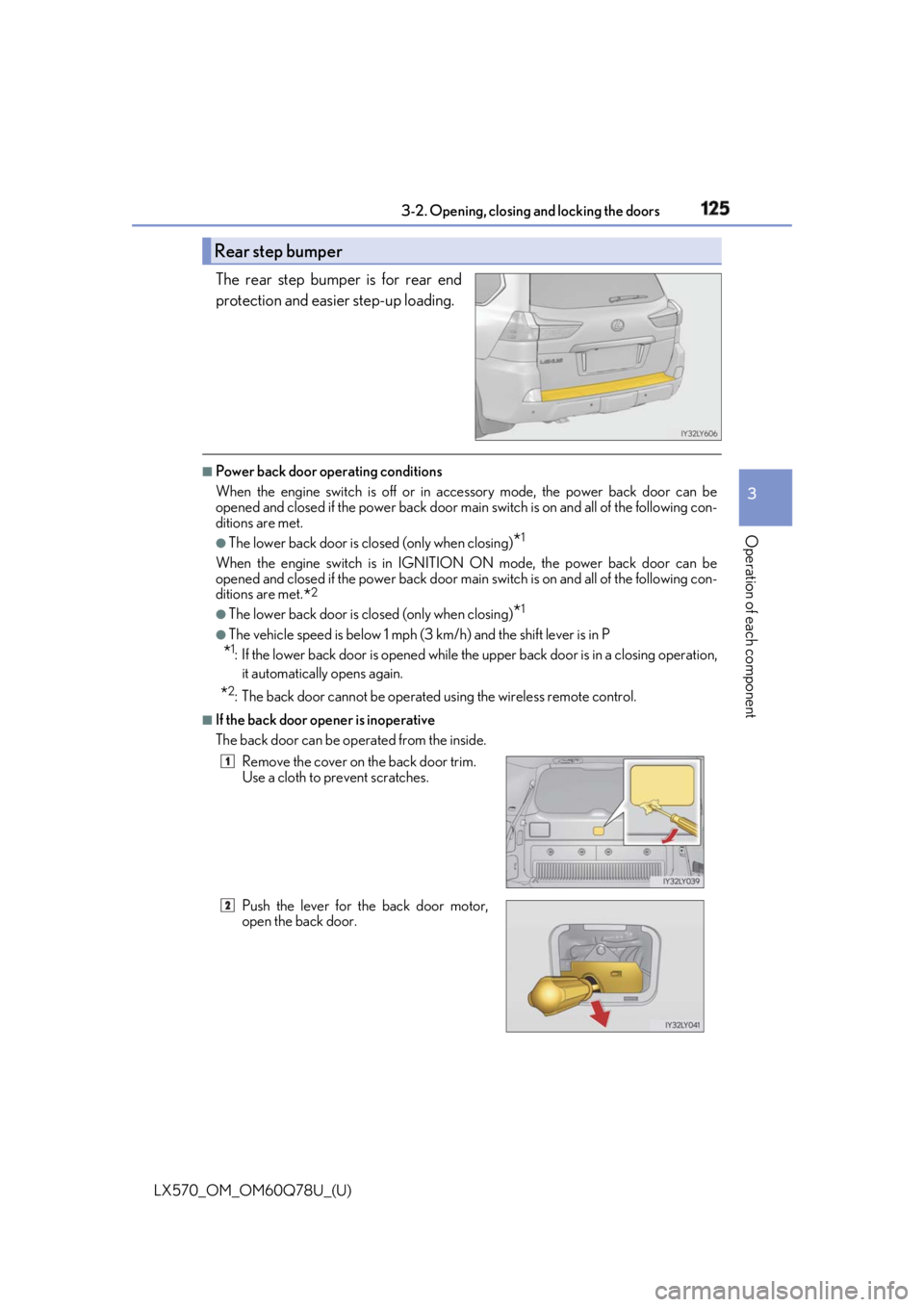
Operation of each component The rear step bumper is for rear end
protection and easier step-up loading. ■
Power back door op erating conditions
When the engine switch is off or in ac cessory mode, the power back door can be
opened and closed if the power back door main switch is on and all of the following con-
ditions are met. ●
The lower back door is closed (only when closing)
* 1
When the engine switch is in IGNITION ON mode, the power back door can be
opened and closed if the power back door main switch is on and all of the following con-
ditions are met.
* 2
●
The lower back door is closed (only when closing)
* 1
●
The vehicle speed is below 1 mph (3 km/h) and the shift lever is in P
* 1
: If the lower back door is opened while the upper back door is in a closing operation,
it automatically opens again.
* 2
: The back door cannot be operated using the wireless remote control. ■
If the back door opener is inoperative
The back door can be op erated from the inside.Rear step bumper
Remove the cover on the back door trim.
Use a cloth to prevent scratches.
Push the lever for the back door motor,
open the back door. 1
2
Page 130 of 628

130
LX570_OM_OM60Q78U_(U) 3-2. Opening, closing and locking the doors
WARNING ■
Power back door
Observe the following precautions wh en operating the power back door.
Failure to do so may cause death or serious injury. ●
Check the safety of the surrounding area to make sure there are no obstacles or any-
thing that could cause any of yo ur belongings to get caught.●
If anyone is in the vicinity, make sure they are safe and let them know that the back
door is about to open or close. ●
If the power back door system is turned off with the main switch while the back door is
operating automatically, the automatic operat ion is stopped. The back door then has
to be operated manually. Take extra care when on an incline, as the back door may
open or close unexpectedly. ●
When the back door opener switch is pr essed a second time during an automatic
open operation that was performed by pre ssing the back door opener switch, the
operation stops and the back door has to be operated manually. At this time, take
extra care, as the back door may open or close abruptly. ●
If the operating conditions of the power back door are no longer met, a buzzer may sound
and the back door may stop opening or closin g. The back door then has to be operated
manually. Take extra care when on an incline, as the back door may open or close abruptly.●
On an incline, the back door may suddenly shut after it opens. Make sure the back
door is fully open and secure. ●
In the following situations, the power back door may detect an abnormality and auto-
matic operation may be stopped. In this case, the back do or has to be operated man-
ually. Take extra care when on an incline, as the back door may open or close abruptly.
• When the back door contacts an obstacle
• When the battery voltage suddenly drops, such as when the engine switch is turned to
IGNITION ON mode or the engine is started during automatic operation●
If a bicycle carrier or similar heavy object is attached to the back door, the power back door
may not operate, causing itself to malfunction, or the back door may suddenly shut again
after being opened, causing some one’s hands, head or neck to be caught and injured. When
installing an accessory part to the back d oor, using a genuine Lexus part is recommended.■
Jam protection function
Observe the following precautions.
Failure to do so may cause death or serious injury. ●
Never use any part of your body to intentionally activate the jam protection function. ●
The jam protection function may not work if something gets caught just before the
back door fully closes. Be careful no t to catch fingers or anything else.●
The jam protection function may not work depending on the shape of the object that
is caught. Be careful not to catch fingers or anything else.