door lock LEXUS LX570 2018 Workshop Manual
[x] Cancel search | Manufacturer: LEXUS, Model Year: 2018, Model line: LX570, Model: LEXUS LX570 2018Pages: 628, PDF Size: 12.38 MB
Page 223 of 628
LX570_OM_OM60Q78U_(U) 2234-3. Operating the lights and wipers
4
Driving ■
Automatic light off system ●
When the headlights are on: The headlights an d tail lights turn off 30 seconds after a
door is opened and closed if the engine switch has been switched to ACCESSORY or
off mode. ●
When only the tail lights are on : The tail lights turn off auto matically if the engine switch
is switched to ACCESSORY or off mo de and driver’s door is opened.
To turn the lights on again, turn the engine switch to IGNITION ON mode, or turn the
light switch off once and then back to or position. ■
Automatic headlight leveling system
The level of the headlights is automatically adjusted accordi ng to the number of passen-
gers and the loading condition of the vehicle to ensure that the headlights do not inter-
fere with other road users. ■
Welcome lighting
If the headlight switch is turned to and the surrounding area is dark, unlocking the
doors using the smart access system with pu sh-button start or wireless remote control
will turn the parking lights and tail lights on automatically. ■
If the automatic headlight levelin g system warning light flashes
It may indicate a malfun ction in the system. Contact your Lexus dealer.■
Light reminder buzzer
A buzzer sounds when the engine switch is turned off or turned to ACCESSORY mode
and the driver’ door is opened while the tail lights remain on.■
Customization
Settings (e.g. light sensor sensitivity) ca n be changed.
(Customizable features: → P. 580)
NOTICE ■
To prevent battery discharge
Do not leave the lights on longer than ne cessary when the engine is not running.
Page 278 of 628

278
LX570_OM_OM60Q78U_(U) 4-5. Using the driving support systems■
Dynamic radar cruise control with full-speed range can be set when ●
The shift lever is in D or range 4 or higher of S has been selected.●
Range 4 or higher of D has been selected by using the paddle shift switch (vehicles with
paddle shift switches). ●
Vehicle speed is at or above approximately 30 mph (50 km/h).
However, when a preceding vehicle is detected, the dynamic radar cruise control with
full-speed range can be set even if the vehicle speed is below approximately 30 mph
(50 km/h). ■
Accelerating after setting the vehicle speed
The vehicle can accelerate by operating the accelerator pedal. After accelerating, the
set speed resumes. However, during vehicle-to-vehicle distance control mode, the vehi-
cle speed may decrease below the set speed in order to maintain the distance to the pre-
ceding vehicle. ■
When the vehicle stops while follow-up cruising ●
Pushing the lever up while the vehicle ahead stops will resume follow-up cruising if the
vehicle ahead starts off within approximatel y 3 seconds after the lever is pushed up.●
If the vehicle ahead starts off within 3 seco nds after your vehicle stops, follow-up cruis-
ing will be resumed. ■
Automatic cancelation of vehicle- to-vehicle distance control mode
Vehicle-to-vehicle distance control mode is automatically canceled in the following situ-
ations. ●
Actual vehicle speed falls below approximately 25 mph (40 km/h) when there are no
vehicles ahead. ●
The preceding vehicle leaves the lane when yo ur vehicle is following at a vehicle speed
at or below approximately 25 mph (40 km/h). Otherwise, the sensor can not properly
detect the vehicle. (“CRUISE NOT AVAILA BLE No Preceding Vehi cles” is displayed
on the multi-information display) ●
VSC is activated. ●
Active TRAC is activated for a period of time. ●
When the VSC or Active TR AC system is turned off.●
When second start mode is set. ●
The sensor cannot detect correctly because it is covered in some way. ●
Pre-collision braking is activated. ●
The parking brake is operated. ●
The vehicle is stopped by system control on a steep incline. ●
The following are detected when the vehicle has been stopped by system control:
• The driver is not wearing a seat belt.
• The driver’s door is opened.
• The vehicle has been stopped for about 3 minutes ●
The switching operation continues for 5 seco nds or more after the center differential
lock switch has been operated.
If vehicle-to-vehicle distance control mode is automatically canceled for any other rea-
son, there may be a malfunction in th e system. Contact your Lexus dealer.
Page 309 of 628
LX570_OM_OM60Q78U_(U) 3094-5. Using the driving support systems
4
Driving
Crawl Control
Press the ON/OFF switch while Crawl Cont rol is operating. If the switch is
turned off, the slip indicator and the Turn Assist indicator will go off (if the Turn
Assist function is in use), the Crawl Co ntrol indicator will flash until the system
has turned off completely, and a messag e stating that Crawl Control has been
turned off will be displayed on the multi- information display fo r several seconds.
When turning off Crawl Control while driv ing, stop the vehicle before the Crawl
Control indicator turns off, or drive extremely carefully.
Turn Assist function
Press the Turn Assist switch while the Turn Assist function is operating. When the
switch is pressed, the Turn Assist indicat or will go off, and a message stating that
the Turn Assist function ha s been turned off will be di splayed on the multi-infor-
mation display for several seconds. ■
The Crawl Control and Turn Assist function can be operated when
Crawl Control ●
The engine is running. ●
The shift lever is in any gear other than P or N.●
The four-wheel drive control switch is in L4. ●
The driver’s door is closed.
Turn Assist function ●
Crawl Control is operating. ●
The center differential is not locked. ●
The accelerator and brake are not being operated. ●
The shift lever is in any ge ar other than P, R or N.●
The steering wheel is turned very far.When the system is turned off
Page 310 of 628

310
LX570_OM_OM60Q78U_(U) 4-5. Using the driving support systems■
Automatic system cancelation
Crawl Control
In the following situations, the buzzer will sound intermittently an d Crawl Control will be
canceled automatically. In this event, the Crawl Control indicator will flash and then go
off, the Turn Assist indicator will go off (if th e Turn Assist function is in use), and a message
stating that Crawl Cont rol has been turned off will be di splayed on the multi-information
display for several seconds. ●
When the shift lever is moved to P or N. ●
When the four-wheel drive control switch is in H4. ●
When the driver’s door is opened.
Turn Assist function
When the center differential is locked, the buzzer will sound inte rmittently and the Turn
Assist function will be canceled automatically. In this event, the Turn Assist indicator will
go off, and a message stating that the Turn Assi st function has been turned off will be dis-
played on the multi-informatio n display for several seconds.■
Function limitations
Crawl Control ●
In the following situations, brake control can be used to drive downhill at a constant
speed. However, engine control is not available when drivin g uphill at a co nstant speed.
•When switched to second start mode.●
In the following situation, engine control an d brake control will stop temporarily. In this
event, the Crawl Control indicator will flash.
• When the vehicle speed exceeds approximately 15 mph (25 km/h).
Turn Assist function
In the following situations, the Turn Assist func tion will stop temporarily. In this event, the
Turn Assist indicator will flash. ●
When the vehicle speed exceeds approximately 6 mph (10 km/h). ●
When the shift lever is moved to R. ■
When the Crawl Control system is operated continuously●
If Crawl Control is used continuously for a long time, the buzzer will sound, a malfunc-
tion notification will be displayed on the multi-information display, the Crawl Control
indicator will go off, and Crawl Control will be temporarily inoperable as a result of the
brake system overheating. In this event, stop the vehicle immediately in a safe place,
and allow the brake system to cool down sufficiently until the TRAC OFF indicator
goes off. (In the meantime, normal driving is possible.) ●
If Crawl Control is used continuously for a long time, the buzzer will sound, the system
will be temporarily canceled, and a malfunct ion notification will be displayed on the
multi-information display as a result of th e automatic transmission system overheating.
Stop the vehicle in a safe place until the display goes off. ■
When depressing the accelerator pedal while the Crawl Control is operating
Multi-terrain Select operates in AUTO mode. ( → P. 313)
Page 391 of 628

391
LX570_OM_OM60Q78U_(U) 5Interior features5-1. Remote Touch screen
Remote Touch/12.3-inch
display ..........................................392
5-2. Lexus Climate Concierge
Lexus Climate Concierge ..... 398
5-3. Using the air conditioning
system and defogger
Front automatic air
conditioning system ...............399
Rear air conditioning
system ........................................... 410
Heated steering wheel/seat
heaters/seat ve ntilators......... 413
5-4. Using the interior lights
Interior lights list........................... 417
• Interior lights ........................... 418
• Personal lights ........................ 419 5-5. Using the storage features
List of storage features ............ 420
• Glove box .................................421
• Console box.............................421
• Overhead console .............. 422
• Cup holders ........................... 423
• Bottle holders ........................ 424
• Card holder............................ 424
• Auxiliary boxes ..................... 425
Luggage compartment
features ....................................... 427
5-6. Using the other interior
features
Other interior features ............430
• Cool box..................................430
• Sun visors ................................. 431
• Vanity mirrors ........................ 431
• Clock ........................................ 432
• Power outlets......................... 433
• Wireless charger ................. 435
• Armrest .................................... 442
• Rear door sunshades ......... 443
• Coat hooks ............................. 443
• Assist grips.............................. 444
Garage door opener ............... 445
LEXUS Enform Safety
Connect ...................................... 452
Page 419 of 628

LX570_OM_OM60Q78U_(U) 4195-4. Using the interior lights
5
Interior features ■
Illuminated entry system
The lights automatically turn on/off according to engine switch mode, the presence of the
electronic key, whether the doors are locked/unlocked, and whether the doors are
open/closed. ■
To prevent battery discharge
If the interior lights remain on when the engine switch is turn ed off, the lights will go off
automatically after 20 minutes: ■
Customization
Settings (e.g. adjust the time elapsed before th e interior lights automatically turn off) can
be changed. (Customizable features: → P. 580)Personal lights
Front
Rear
Turns the lights on/off (touch the lights) Turns the lights on/off
NOTICE
To prevent battery discharge, do not leave th e lights on longer than necessary when the
engine is not running.
Page 445 of 628
445
LX570_OM_OM60Q78U_(U) 5-6. Using the other interior features
5
Interior features
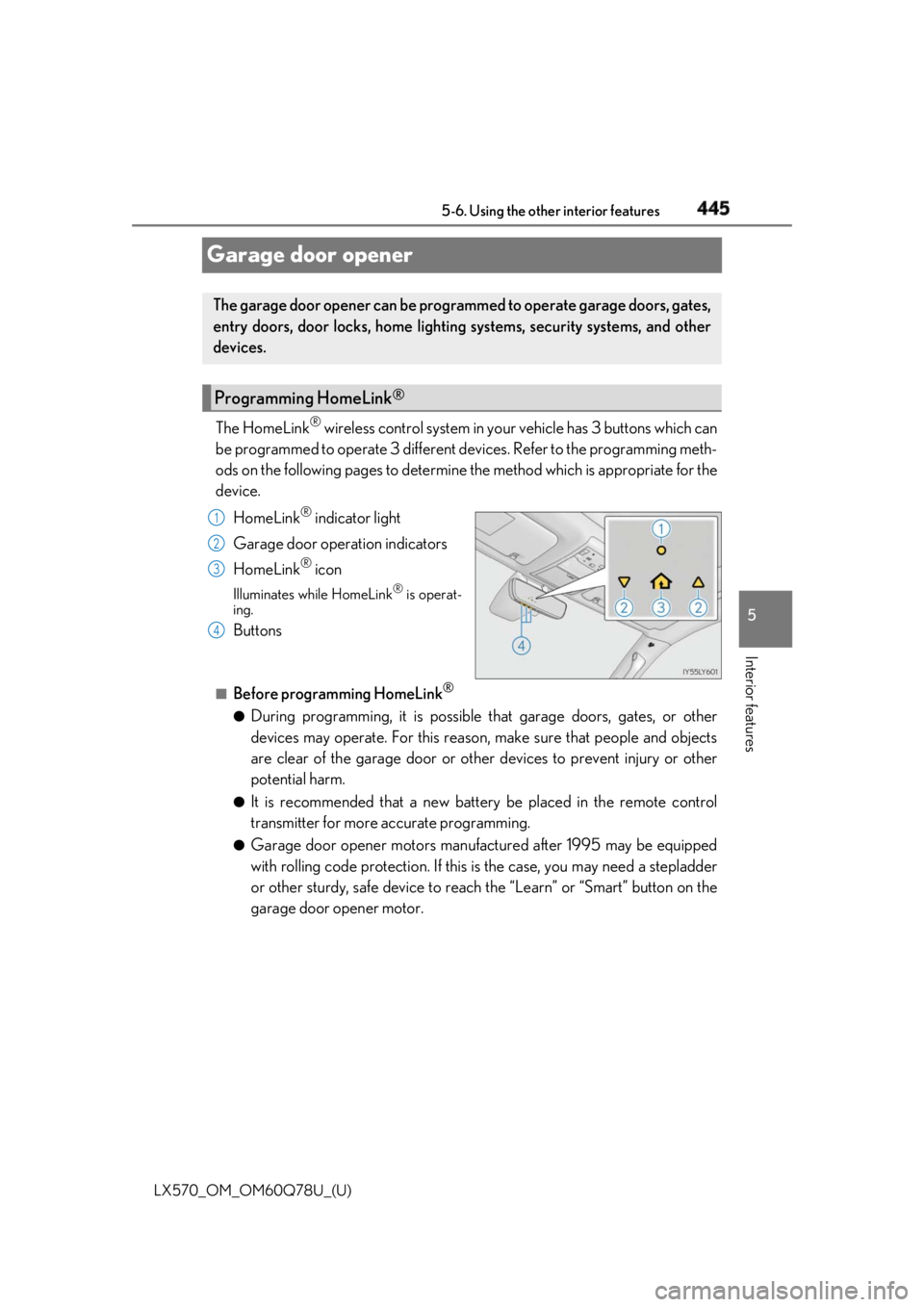
Garage door opener The HomeLink ®
wireless control system in your vehicle has 3 buttons which can
be programmed to operate 3 different de vices. Refer to the programming meth-
ods on the following pages to determine the method which is appropriate for the
device.
HomeLink ®
indicator light
Garage door operation indicators
HomeLink ®
iconIlluminates while HomeLink ®
is operat-
ing.
Buttons ■
Before programming HomeLink ®
●
During programming, it is possible that garage doors, gates, or other
devices may operate. For this reason, make sure that people and objects
are clear of the garage door or othe r devices to prevent injury or other
potential harm. ●
It is recommended that a new batter y be placed in the remote control
transmitter for more accurate programming. ●
Garage door opener motors manufa ctured after 1995 may be equipped
with rolling code protection. If this is the case, you may need a stepladder
or other sturdy, safe device to reach the “Learn” or “Smart” button on the
garage door opener motor.The garage door opener can be programmed to operate garage doors, gates,
entry doors, door locks, home lightin g systems, security systems, and other
devices.
Programming HomeLink ®
1
2
3
4
Page 459 of 628
LX570_OM_OM60Q78U_(U) 4596-1. Maintenance and care
6
Maintenance and care ■
Notes for a smart access system with push-button start ●
If the door handle becomes wet while the el ectronic key is within the effective range,
the door may lock and unlock repeatedly. Place the key in a position 6 ft. (2 m) or more
separate from the vehicle while the vehicle is being washed. (Take care to ensure that
the key is not stolen.) ●
If the electronic key is inside the vehicle and a door handle becomes wet during a car
wash, a message may be shown on the mult i-information display and a buzzer will
sound outside the vehicle. To turn off the alarm, lock all the doors.
WARNING ■
When washing the vehicle
Do not apply water to the inside of the engine compartment. Doing so may cause the
electrical components etc. to catch fire. ■
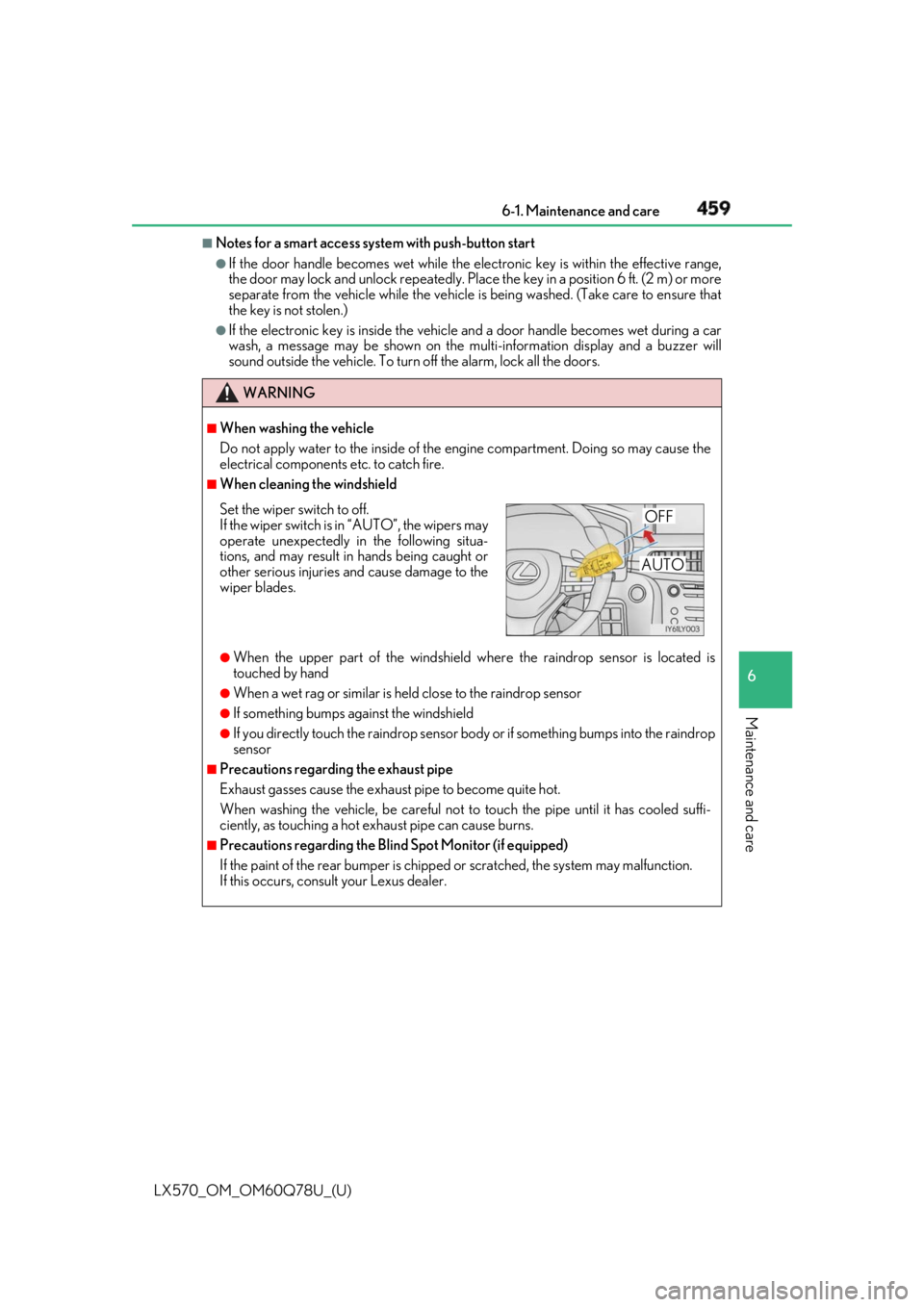
When cleaning the windshield
●
When the upper part of the windshield where the raindrop se nsor is located is
touched by hand ●
When a wet rag or similar is held close to the raindrop sensor ●
If something bumps against the windshield ●
If you directly touch the raindrop sensor bo dy or if something bumps into the raindrop
sensor ■
Precautions regarding the exhaust pipe
Exhaust gasses cause the exhaust pipe to become quite hot.
When washing the vehicle, be careful not to touch the pipe until it has cooled suffi-
ciently, as touching a hot exhaust pipe can cause burns. ■
Precautions regarding the Blind Spot Monitor (if equipped)
If the paint of the rear bump er is chipped or scratched, the system may malfunction.
If this occurs, consult your Lexus dealer.Set the wiper switch to off.
If the wiper switch is in “AUTO”, the wipers may
operate unexpectedly in the following situa-
tions, and may result in hands being caught or
other serious injuries and cause damage to the
wiper blades. OFF
AUTO
Page 468 of 628

468
LX570_OM_OM60Q78U_(U) 6-2. Maintenance
Vehicle exterior Items Check points
Doors • Do the doors operate smoothly?
Engine hood • Does the engine hood lock system work properly?
Fluid leaks • There should not be any si gns of fluid leakage after
the vehicle has been parked.
Tires • Is the tire inflation pressure correct?
• The tires should not be damaged or excessively
worn.
• Have the tires been rotated according to the mainte-
nance schedule?
• The wheel nuts should not be loose.
Windshield wipers/rear
window wiper •The wiper blades should no t show any signs of crack-
ing, splitting, wear, contamination or deformation.
• The wiper blades should clear the windshield/rear
window without streaking or skipping.
WARNING ■
If the engine is running
Turn off the engine and ensure that there is adequate ventilation before performing
maintenance checks.
Page 483 of 628

LX570_OM_OM60Q78U_(U) 4836-3. Do-it-yourself maintenance
6
Maintenance and care ■
Before recharging
When recharging, the battery produces hydrogen gas which is flammable and explosive.
Therefore, observe the following before recharging: ●
If recharging with the battery installed on the vehicle, be sure to disconnect the ground
cable. ●
Make sure the power switch on the charge r is off when connecting and disconnecting
the charger cables to the battery. ■
After recharging/reconnecting the battery
The engine may not start. Follow the procedure below to initialize the system.
Shift the shift lever to P.
Open and close any of the doors.
Restart the engine. ●
Unlocking the doors using the smart access system with push-button start may not be
possible immediately after reconnecting the battery. If this happens, use the wireless
remote control or the mechanical key to lock/unlock the doors.●
Start the engine with the engine switch in ACCESSORY mode. The engine may not
start with the engine switch turned off. However, the engine will operate normally from
the second attempt. ●
The engine switch mode is recorded by the vehicle. If the battery is reconnected, the
vehicle will return the engine switch mode to the status it was in before the battery was
disconnected. Make sure to turn off the engine before disconnect the battery. Take
extra care when connecting the battery if the engine switch mode prior to discharge is
unknown.
If the engine will not start even after multiple attempts, contact your Lexus dealer.
WARNING ■
Chemicals in the battery
Batteries contain poisonous and corrosive sulfuric acid and may produce hydrogen
gas which is flammable and explosive. To redu ce the risk of death or serious injury, take
the following precautions while working on or near battery:●
Do not cause sparks by touching the battery terminals with tools. ●
Do not smoke or light a match near the battery. ●
Avoid contact with eyes, skin and clothes. ●
Never inhale or swallow electrolyte. ●
Wear protective safety glasses when working near the battery. ●
Keep children away from the battery. ■
Where to safely charge the battery
Always charge the battery in an open area . Do not charge the battery in a garage or
closed room where there is not sufficient ventilation. 1
2
3