key battery LEXUS LX570 2018 Owners Manual
[x] Cancel search | Manufacturer: LEXUS, Model Year: 2018, Model line: LX570, Model: LEXUS LX570 2018Pages: 628, PDF Size: 12.38 MB
Page 5 of 628

5 1
8765432
LX570_OM_OM60Q78U_(U) 96-1. Maintenance and care
Cleaning and protecting
the vehicle exterior ................ 458
Cleaning and protecting
the vehicle interior....................461
6-2. Maintenance
Maintenance
requirements ............................ 464
General mainte nance.............. 466
Emission inspection and
maintenance (I/M)
programs.................................... 469
6-3. Do-it-yourself maintenance
Do-it-yourself service
precautions................................ 470
Hood ................................................472
Engine compartment ............... 473
Tires ................................................. 486
Tire inflation pressure .............. 495
Wheels ........................................... 499
Air conditioning filter ................ 501
Electronic key battery..............503
Checking and replacing
fuses..............................................505
Light bulbs ....................................508 7-1. Essential information
Emergency flashers ................... 510
If your vehicle has to be
stopped in an emergency ...... 511
7-2. Steps to take in an emergency
If your vehicle needs
to be towed .................................512
If you think something is
wrong............................................ 518
Fuel pump shut off system........519
If a warning light turns
on or a warning buzzer
sounds ......................................... 520
If a warning message is
displayed .................................... 528
If you have a flat tire .................. 532
If the engine will not start ........ 544
If the electronic key does
not operate properly ............. 546
If the vehicle battery is
discharged................................. 549
If your vehicle overheats......... 552
If the vehicle becomes
stuck ............................................. 5556
Maintenance and care 7
When trouble arises
Page 78 of 628

78 1-2. Theft deterrent system
LX570_OM_OM60Q78U_(U) ■
System maintenance
The vehicle has a maintenance-free type alarm system. ■
Items to check before locking the vehicle
To prevent unexpected triggering of the alarm and vehicle theft, make sure of the follow-
ing. ●
Nobody is in the vehicle. ●
The windows and moon roof are closed before the alarm is set. ●
No valuables or other personal items are left in the vehicle.■
Triggering of the alarm
The alarm may be triggered in the following situations:
(Stopping the alarm deactivates the alarm system.) ●
The doors are unlocked using the mechanical
key.
●
A person inside the vehicle opens a door or
hood, or unlocks the vehicle using an inside
lock button.
●
The battery is recharged or replaced when the
vehicle is locked. ( → P. 549)
Page 111 of 628
LX570_OM_OM60Q78U_(U) 1113-1. Key information
3
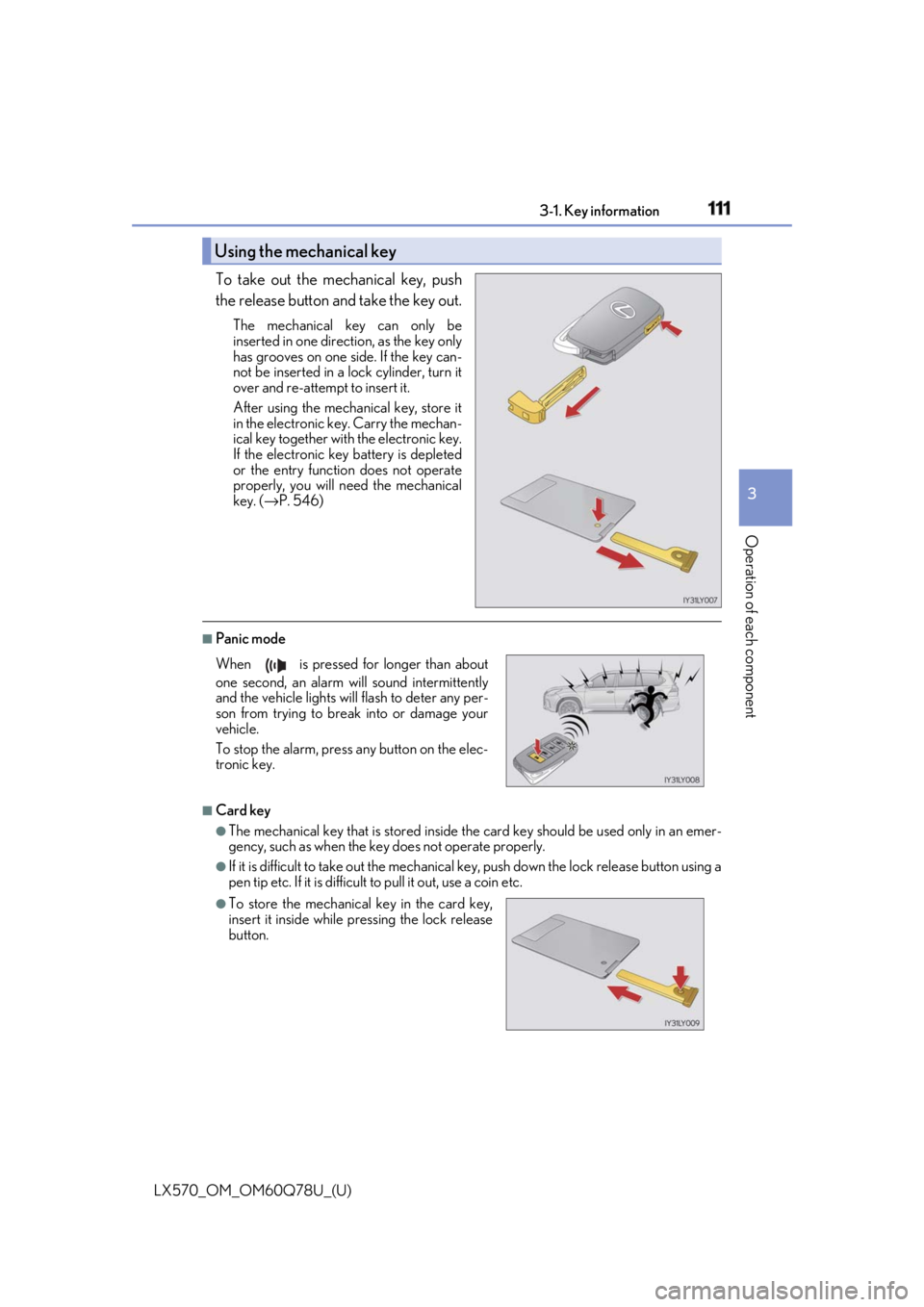
Operation of each component To take out the mechanical key, push
the release button and take the key out. The mechanical key can only be
inserted in one direction, as the key only
has grooves on one side. If the key can-
not be inserted in a lock cylinder, turn it
over and re-attempt to insert it.
After using the mechanical key, store it
in the electronic ke y. Carry the mechan-
ical key together with the electronic key.
If the electronic key battery is depleted
or the entry function does not operate
properly, you will need the mechanical
key. ( → P. 546)
■
Panic mode
■
Card key ●
The mechanical key that is stored inside the card key should be used only in an emer-
gency, such as when the key does not operate properly. ●
If it is difficult to take out the mechanical key, push down the lock release button using a
pen tip etc. If it is difficult to pull it out, use a coin etc.Using the mechanical key
When is pressed for longer than about
one second, an alarm will sound intermittently
and the vehicle lights will flash to deter any per-
son from trying to break into or damage your
vehicle.
To stop the alarm, press any button on the elec-
tronic key.
●
To store the mechanical key in the card key,
insert it inside while pr essing the lock release
button.
Page 112 of 628

112
LX570_OM_OM60Q78U_(U) 3-1. Key information
●
The card key is not waterproof. ■
When required to leave the vehicle’s key with a parking attendant
Lock the glove box as circumstances demand. ( → P. 421)
Remove the mechanical key for your own use and provide the attendant with the elec-
tronic key only. ■
If you lose your mechanical keys
New genuine mechanical keys can be made by your Lexus dealer using another
mechanical key and the key number stamped on your key number plate. Keep the plate
in a safe place such as your wallet, not in the vehicle.■
When riding in an aircraft
When bringing an electronic key onto an aircraft, make sure you do not press any but-
tons on the electronic key while inside the airc raft cabin. If you are carrying an electronic
key in your bag etc., ensure that the buttons are not likely to be pressed accidentally.
Pressing a button may cause the electronic key to emit radio waves that could interfere
with the operation of the aircraft. ■
Electronic key battery depletion ●
The standard battery life is 1 to 2 years. (The card key battery life is about a year and a
half.) ●
If the battery becomes low, an alarm will sound in the cabin when the engine stops. ●
As the electronic key always receives ra dio waves, the battery will become depleted
even if the electronic key is not used. The following symptoms indi cate that the elec-
tronic key battery may be depleted. Replace the battery when necessary. ( → P. 503)
• The smart access system with push-button start or the wireless remote control does
not operate.
• The detection area becomes smaller.
• The LED indicator on the key surface does not turn on. ●
To avoid serious deterioration, do not leave the electronic key within 3 ft. (1 m) of the
following electrical appliances that produce a magnetic field:
•TVs
• Personal computers
• Cellular phones, cordless phones and battery chargers
• Recharging cellular phones or cordless phones
•Table lamps
• Induction cookers ●
If the battery cover is not installed and the bat-
tery falls out or if the battery was removed
because the key got wet, reinstall the battery
with the positive terminal facing the Lexus
emblem.
Page 113 of 628

LX570_OM_OM60Q78U_(U) 1133-1. Key information
3
Operation of each component ■
Replacing the key battery
→ P. 503 ■
Confirmation of the registered key number
The number of keys already registered to the vehicle can be confirmed. Ask your Lexus
dealer.
NOTICE ■
To prevent key damage ●
Do not drop the keys, subject them to strong shocks or bend them.●
Do not expose the keys to high temp eratures for long periods of time.●
Do not get the keys wet or wash th em in an ultrasonic washer etc.●
Do not attach metallic or magnetic materials to the keys or place the keys close to
such materials. ●
Do not attach a sticker or anything else to the surface of the electronic key. ●
Do not disassemble the keys. ●
Do not place the keys near objects that pr oduce magnetic fields, such as TVs, audio
systems and induction cookers. ●
Do not place the keys near medical electri cal equipment such as low-frequency ther-
apy equipment or microwave therapy equipm ent, and do not receive medical atten-
tion with the keys on your person.
Page 114 of 628

114
LX570_OM_OM60Q78U_(U) 3-1. Key information
NOTICE ■
Handling the card keys ●
Do not apply excess force when inserting the mechanical key to the card key.
Doing so may damage the card key. ●
If the battery or card key terminals get wet, the battery may corrode and the card key
may stop working.
If the key is dropped into water, or if drin king water etc. is spilled on the key, immedi-
ately remove the battery cover and wipe the battery and terminals.
(To remove the battery cover, lightly grasp it and pull.) If the battery is corroded, have
your Lexus dealer replace the battery. ●
Do not crush the battery cover or use a screwdriver to remove the battery cover.
Forcibly removing the battery cover may bend or damage the key. ●
If the battery cover is frequently removed, the cover may become loose. ●
When installing the battery, make sure to check the direction of the battery.
Installing the battery in the wrong directio n may cause the battery to deplete rapidly.●
The surface of the card key may be damaged, or its coating may peel off in the follow-
ing situations:
• The card key is carried together with hard objects, such as coins or keys.
• The card key is scraped with a sharp object, such as a tip of mechanical pencil.
• The surface of the card key is wiped with thinners or benzene.■
Carrying the electronic key on your person
Carry the electronic key 3.9 in. (10 cm) or mo re away from electric appliances that are
turned on. Radio waves emitted from electric appliances within 3.9 in. (10 cm) of the
electronic key may interfere with the key, causing the key to not function properly.■
In case of a smart access system with pu sh-button start malfunction or other key-
related problems
Take your vehicle with all the electronic keys provided with your vehicle, including the
card key, to your Lexus dealer. ■
When an electronic key is lost
If the electronic key re mains lost, the risk of vehicle th eft increases significantly. Visit
your Lexus dealer immediately with all rema ining electronic keys and the card key that
were provided with your vehicle.
Page 116 of 628

116
LX570_OM_OM60Q78U_(U) 3-2. Opening, closing and locking the doors■
Operation signals
Doors: A buzzer sounds and the emergency flas hers flash to indicate that the doors have
been locked/unlocked. (Loc ked: once; Unlocked: twice)
Windows and moon roof: A buzzer sounds to indicate that the windows and moon roof
are operating. ■
Security feature
If a door is not opened within approximately 60 seconds after the vehicle is unlocked, the
security feature automatically locks the vehicle again. ■
When the door cannot be locked by the lock sensor on the upper part of the door han-
dle
■
Door lock buzzer
If an attempt to lock the doors is made when a door is not fully closed, a buzzer sounds
continuously. Fully close the door to stop the buzzer, and lock the vehicle once more. ■
Setting the alarm
Locking the doors will set the alarm system. ( → P. 77)■
If the smart access system with push-button start or the wireless remote control does
not operate properly ●
Use the mechanical key to lock and unlock the doors. ( → P. 546)●
Replace the battery with a new one if it is depleted. ( → P. 503)If the door will not lock even when the topside
sensor area is touched, try touching both the
topside and underside sensor areas at the same
time.
Page 126 of 628

126
LX570_OM_OM60Q78U_(U) 3-2. Opening, closing and locking the doors■
Jam protection function
If anything obstructs the power back door while it is closin g/opening, the back door will
automatically operate in the opposite direction. ■
When re-connecting the battery
To enable the power back door to op erate properly, perform the following:●
Unlock the back door using the door lock switch ●
Close the back door manually ■
Back door closer
In the event that the upper and lower back doors are left slightly open, the back door
closer will automatically close them to the fully closed position. ■
Fall-down protection function
While the power back door is opening automa tically, applying excessi ve force to it will
stop the opening operation to prevent the po wer back door from rapidly falling down.■
Back door reserve lock function
This function is a function which reserves lo cking of all doors, be forehand, when the back
door is open. When the following procedure is performed, all the doors except the back
door are locked and then back door will also be locked at the same time it is closed.
Close all doors, except the back door.
Perform any of the following during the auto matic closing operation of the back door.
• Press the lock button on th e wireless remote control. ( → P. 110)
• Touch the lock sensor on the side door handle with carrying the electronic key on
your person. ( → P. 115)
Also, if the back door does not fully clos e due to the operation of the jam protection
function, etc., while the back door is automatically closing after a reserve lock opera-
tion is performed, the reserv e lock function is canceled and all the doors will unlock.■
Customization
Settings (e.g. switch operation) can be changed.
(Customizable features → P. 580) 1
2
Page 134 of 628

134
LX570_OM_OM60Q78U_(U) 3-2. Opening, closing and locking the doors■
Battery-saving function
The battery-saving function w ill be activated in order to pr event the electronic key bat-
tery and the battery from being discharged while the vehicle is not in operation for a long
time. ●
In the following situations, the smart acce ss system with push-button start may take
some time to unlock the doors.
• The electronic key has been le ft in an area of approximatel y 6 ft. (2 m) of the outside
of the vehicle for 10 minutes or longer.
• The smart access system with push-button st art has not been used for 5 days or lon-
ger. ●
If the smart access system with push-button start has not been used for 14 days or lon-
ger, the doors cannot be unlocked at any doors except the driver’s door. In this case,
take hold of the driver’s d oor handle, or use the wireless remote control or the mechan-
ical key, to unlock the doors. ■
Electronic Key Battery-Saving Function
When battery-saving mode is set, battery depletion is minimized by stopping the elec-
tronic key from re ceiving radio waves.
The smart access system with push-button st art uses weak radio wa ves. In the following
situations, the communication between the electronic key and the vehicle may be
affected, preventing the smar t access system with push-but ton start, wireless remote
control and engine immobilizer sy stem from operating properly.
(Ways of coping: → P. 546)●
When the electronic key battery is depleted ●
Near a TV tower, electric power plant, gas st ation, radio station, la rge display, airport or
other facility that generates strong radio wave s or electrical noise●
When the electronic key is in contact wi th, or is covered by the following metallic
objects
• Portable radio, cellular phone, cordle ss phone or other wireless communication
device
• Cards to which aluminum foil is attached
• Cigarette boxes that have aluminum foil inside
• Metallic wallets or bags
•Coins
• Hand warmers made of metal
• Media such as CDs and DVDs ●
When other wireless keys (that emit radio waves) are being used nearbyPress twice while pressing and holding
. Confirm that the electronic key indica-
tor flashes 4 times.
While the battery-saving mode is set, the smart
access system with push -button start cannot be
used. To cancel the function, press any of the
electronic key buttons.
Page 135 of 628

LX570_OM_OM60Q78U_(U) 1353-2. Opening, closing and locking the doors
3
Operation of each component ●
When carrying the electronic key together with the following devices that emit radio
waves
• Another vehicle’s electronic key or a wireless key that emits radio waves
• Personal computers or person al digital assistants (PDAs)
• Digital audio players
• Portable game systems ●
If window tint with a metallic content or me tallic objects are atta ched to the rear win-
dow ●
When the electronic key is placed near a battery charger or electronic devices ■
Note for the entry function ●
Even when the electronic key is within the effective range (detection areas), the system
may not operate properly in the following cases:
• The electronic key is too close to the window or outside door handle, near the
ground, or in a high place when the doors are locked or unlocked.
• The electronic key is on the instrument panel, luggage cover (if equipped) or floor,
or in the door pockets or glove box when the engine is started or engine switch
modes are changed. ●
Do not leave the electronic key on top of th e instrument panel or near the door pockets
when exiting the vehicle. Depending on the radio wave reception conditions, it may be
detected by the antenna outside the cabin an d the doors will become lockable from the
outside, possibly trapping the electronic key inside the vehicle. ●
As long as the electronic key is within th e effective range, the doors may be locked or
unlocked by anyone. However, only the door s detecting the electronic key can be used
to unlock the vehicle. ●
Even if the electronic key is not inside the vehicle, it may be possible to start the engine
if the electronic key is near the window. ●
The doors may unlock or lock if a large amou nt of water splashes on the door handle,
such as in the rain or in a car wash, when th e electronic key is with in the effective range.
(The doors will automatically be locked af ter approximately 60 seconds if the doors
are not opened and closed.) ●
Touching the door lock or unlock sensor while wearing gloves may prevent lock or
unlock operation. ●
If the wireless remote control is used to lo ck the doors when the electronic key is near
the vehicle, there is a possibility that the d oor may not be unlocked by the entry func-
tion. (Use the wireless remote control to unlock the doors.) ●
When the lock operation is performed using the lock sensor, recognition signals will be
shown up to two consecutive times. After this, no recognition signals will be given.●
If the door handle becomes wet while the el ectronic key is within the effective range,
the door may lock and unlock repeatedly. In this case, follow th e following correction
procedures to wash the vehicle.
• Place the electronic key in a location 6 ft. (2 m) or more away from the vehicle. (Take
care to ensure that the key is not stolen.)
• Set electronic key to battery-saving mode to disable the smart access system with
push-button start. ( → P. 134)