flat LEXUS LX570 2020 User Guide
[x] Cancel search | Manufacturer: LEXUS, Model Year: 2020, Model line: LX570, Model: LEXUS LX570 2020Pages: 636, PDF Size: 12.73 MB
Page 59 of 636
591-1. For safe use
LX570_OM_OM60R61U_(U)
1
For safety and security
WARNING
■Child restraint precautions
●For effective protection in automobile accidents and sudden stops, a child must be
properly restrained, using a seat belt or child restraint system depending on the age
and size of the child. Holding a child in your arms is not a su bstitute for a child restraint
system. In an accident, the child can be crushed against the windshield, or between
you and the vehicle’s interior.
●Lexus strongly urges the use of a proper ch ild restraint system that conforms to the
size of the child, installed on the rear seat. According to accident statistics, the child is
safer when properly restrained in th e rear seat than in the front seat.
●Never install a rear-facing child restraint sy stem on the front passenger seat even if
the “AIR BAG OFF” indicator light is illuminated.
In the event of an accident, the force of the rapid inflation of the front passenger air-
bag can cause death or serious injury to the child if the rear-facing child restraint sys-
tem is installed on th e front passenger seat.
●A forward-facing child restraint system ma y be installed on the front passenger seat
only when it is unavoidable. A child restraint system that requires a top tether strap
should not be used in the front passenger seat since there is no top tether strap
anchor for the front passenger seat. Adjust the seatback as upright as possible and
always move the seat as far back as possible even if the “AIR BAG OFF” indicator
light is illuminated, because the front passenger airbag co uld inflate with considerable
speed and force. Otherwise, the chil d may be killed or seriously injured.
●Do not use the seat belt extender when inst alling a child restraint system on the front
or rear passenger seat. If in stalling a child restraint system with the seat belt extender
connected to the seat belt, th e seat belt will not securely hold the child restraint sys-
tem, which could cause death or serious injury to the child or other passengers in the
event of a sudden stop, sudden swerve or accident.
●Do not allow the child to lean his/her head or any part of his/her body against the
door or the area of the seat, front, side and rear pillars or roof side rails from which the
SRS side airbags or SRS curtain shield airbags deploy even if the child is seated in the
child restraint syst em. It is dangerous if the SRS side airbags and curtain shield air-
bags inflate, and the impact could caus e death or serious injury to the child.
●Make sure you have complied with all insta llation instructions provided by the child
restraint manufacturer and that the system is properly secured. If it is not secured
properly, it may cause death or serious inju ry to the child in the event of a sudden
stop, sudden swerve or accident.
Page 71 of 636

711-1. For safe use
LX570_OM_OM60R61U_(U)
1
For safety and security
WARNING
■When installing a booster seat
To prevent the belt from going into ALR lock mode, do not fully extend the shoulder
belt. ALR mode causes the belt to tighten only. This could cause injury or discomfort to
the child. ( P. 34)
■When installing a child restraint system
Follow the directions given in the child rest raint system installation manual and fix the
child restraint system securely in place.
If the child restraint system is not correctly fixed in place, the child or other passengers
may be seriously injured or even killed in th e event of sudden braking, sudden swerving
or an accident.
●When installing a child restraint system on the second center seat, adjust both seat
cushions to the same position and align bo th seatbacks at the same angle. The seat-
backs must be adjusted to the same angle. Otherwise, the child restraint system can-
not be securely restrained an d this may cause death or seri ous injuries in the event of
sudden braking, sudden swerving or an accident.
●When using the LATCH anchors for a child restraint system, move the seat as far
back as possible, with the seatback close to the child restraint system.
●If the driver’s seat interferes with the child
restraint system and prevents it from being
attached correctly, attach the child restraint
system to the right-hand rear seat.
●Adjust the front passenger seat so that it does
not interfere with the child restraint system.
●Vehicles with third seat s: Child restraint sys-
tem installed on the third seat should not con-
tact the second seatbacks.
●Only put a forward-faci ng child restraint sys-
tem on the front seat when unavoidable.
When installing a forward-facing child
restraint system on the front passenger seat,
move the seat as far back as possible even if
the “AIR BAG OFF” indicator light is illumi-
nated. Failure to do so may result in death or
serious injury if the airbags deploy (inflate).
Page 78 of 636

781-2. Lexus Enform
LX570_OM_OM60R61U_(U)
■Emergency Assistance Button (“SOS”)
In the event of an emergency on the road, push the “SOS” button to reach the
Safety Connect response center. Th e answering agent will determine your
vehicle’s location, assess the emergency, and dispatch the necessary assis-
tance required.
If you accidentally press the “SOS” button, tell the response-center agent that you
are not experiencing an emergency.
■Enhanced Roadside Assistance
Enhanced Roadside Assistance adds GP S data to the already included war-
ranty-based Lexus roadside service.
Subscribers can press the “SOS” button to reach a Safety Connect response-
center agent, who can help with a wide range of needs, such as: towing, flat
tire, fuel delivery, etc. For a descript ion of the Roadside Assistance services
and their limitations, please see the Safety Connect Terms and Conditions,
which are available at Lexus.com.
Important! Read this informatio n before using Safety Connect.
■Exposure to radio frequency signals
The Safety Connect system installed in your vehicle is a low-power radio\
transmitter and receiver. It receives and also sends out radio frequency (RF)
signals.
In August 1996, the Federal Commu nications Commission (FCC) adopted
RF exposure guidelines with safety levels for mobile wireless phones. Those
guidelines are consistent with the safe ty standards previously set by the fol-
lowing U.S. and internat ional standards bodies.
●ANSI (American National Stan dards Institute) C95.1 [1992]
●NCRP (National Council on Radiation Protection and Measurement)
Report 86 [1986]
●ICNIRP (International Commission on Non-Ionizing Radiation Protection)
[1996]
Those standards were based on comprehensive and periodic evaluations of
the relevant scientific literature. Over 120 scientists, engineers, and physi-
cians from universities, and governme nt health agencies and industries
reviewed the available body of rese arch to develop the ANSI Standard
(C95.1).
The design of Safety Connect complies wi th the FCC guidelines in addition to
those standards.
Safety information for Safety Connect
Page 100 of 636

100
LX570_OM_OM60R61U_(U)2. Instrument cluster
■Eco Indicator (Eco Driving Indicator Zone Display)
P. 103
■Speed
Displays the vehicle speed.
■Outside temperature
Displays the outside temperature within the range of -40 F (-40 C) to 122 F
(50 C).
■Sway warning (if equipped)
Detects the sway of the vehicle within a lane, which is often associated with a
decrease in the driver’s at tention level, and displays the decrease in attention
using a bar display.
The shorter the bar length, the more the driver may need to rest.
This display is a part of the LDA (Lane Departure Alert) system. The display is
enabled when the operating conditions of the vehicle sway warning are met.
( P. 268)
■Blank screen (display off)
Drive information is not displayed.
■Front tire angle (if equipped)
Displays the direction of the front tires.
The tire direction is displaye d in 3 stages for both left and right, in accordance with
the angle of the tire.
If a battery terminal is disconnected an d reconnected, the display may be disabled
temporarily. After driving the vehicle for a while, the display will be enabled.
■Tire inflation pressure
Displays inflation pressure of each tire.
The inflation pressure of the spare tire will be displayed.
■Oil maintenance (if equipped)
Displays the remaining distance before the next maintenance is required.\
Vehicle information
Page 103 of 636

LX570_OM_OM60R61U_(U)
1032. Instrument cluster
2
Instrument cluster
■Eco Driving Indicator
■When disconnecting and reconnecting battery terminals
The drive information will be reset (only items that can be reset manually).
■Pop-Up display
The pop-up display is displayed on the multi-information display according to the operat-
ing conditions of the following functions:
●Route guidance display of the navigation system-linked system
●Incoming call display of the hands-free phone system (if equipped)
The pop-up display function can be disabled. ( P. 101)
■Tire inflation pressure
●It may take a few minutes to display the tire inflation pressure after the engine switch is
turned to IGNITION ON mode. It may also take a few minutes to display the tire infla-
tion pressure after inflation pressure has been adjusted.
●“---” may be displayed if the tire information cannot be determined due to unfavorable
radio wave conditions.
●Tire inflation pressure changes with temperat ure. The displayed values may also be dif-
ferent from the values measured using a tire pressure gauge.
■When setting up the display
Stop the vehicle in a safe place, apply the pa rking brake, and shift the shift lever to P.
■Suspension of the settings display
In the following situations, the settings display using the meter control switches will be
suspended.
●When a warning message appears on the multi-information display
●When the vehicle begins to move
■Liquid crystal display
Small spots or light spots may appear on the display. This phenomenon is characteristic
of liquid crystal displays, and there is no problem continuing to use the display.
Eco Driving Indicator Light (
P. 91)
Eco Driving Indicator Zone Display
Suggests the Zone of Eco driving with current
Eco driving ratio based on acceleration.
Eco driving ratio based on acceleration
If the acceleration exceeds Zone of Eco driv-
ing, the right side of Eco Driving Indicator
Zone Display will illuminate.
Zone of Eco driving
1
2
3
4
Page 162 of 636
162
LX570_OM_OM60R61U_(U)3-3. Adjusting the seats
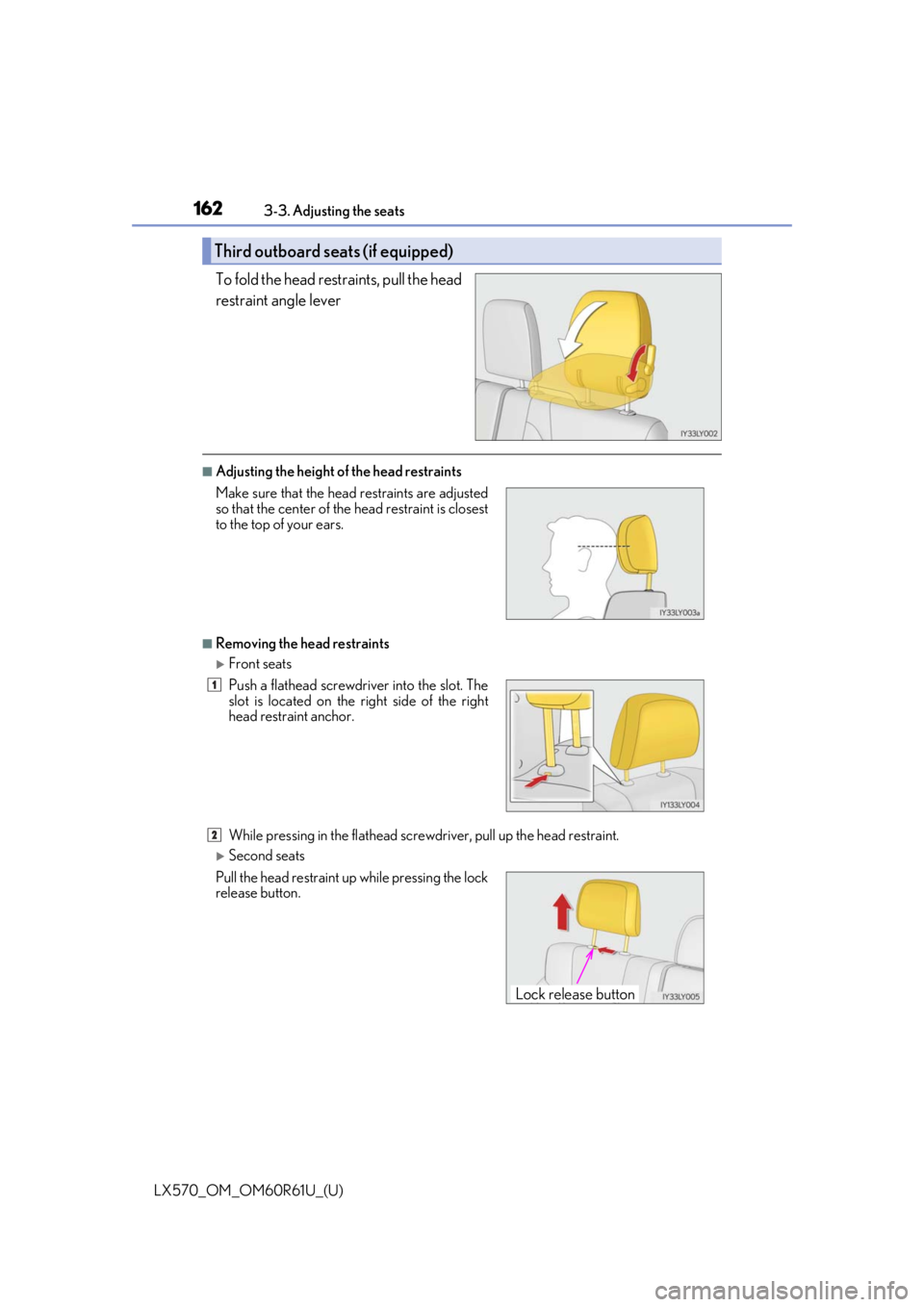
To fold the head restraints, pull the head
restraint angle lever
■Adjusting the height of the head restraints
■Removing the head restraints
Front seats
While pressing in the fl
athead screwdriver, pull up the head restraint.
Second seats
Third outboard seats (if equipped)
Make sure that the head restraints are adjusted
so that the center of the head restraint is closest
to the top of your ears.
Push a flathead screwdriver into the slot. The
slot is located on the right side of the right
head restraint anchor.
Pull the head restraint up while pressing the lock
release button.
1
2
Lock release button
Page 187 of 636
LX570_OM_OM60R61U_(U)
1874-1. Before driving
4
Driving
NOTICE
■When driving the vehicle
●Do not depress the accelerator and brake pedals at the same time during driving, as
this may restrain the engine output.
●Do not use the accelerator pedal or depre ss the accelerator and brake pedals at the
same time to hold the vehicle on a hill.
■When parking the vehicle
Always set the parking brake, and shift the sh ift lever to P. Failure to do so may cause
the vehicle to move or the vehicle may acce lerate suddenly if the accelerator pedal is
accidentally depressed.
■Avoiding damage to vehicle parts
●Do not turn the steering wheel fully in either direction and hold it there for an
extended period of time.
Doing so may damage the power steering pump.
●When driving over bumps in the road, drive as slowly as possible to avoid damaging
the wheels, underside of the vehicle, etc.
■If you get a flat tire while driving
A flat or damaged tire may cause the following situations . Hold the steering wheel
firmly and gradually depress the brake pedal to slow down the vehicle.
●It may be difficult to control your vehicle.
●The vehicle will make abnormal sounds or vibrations.
●The vehicle will lean abnormally.
Information on what to do in case of a flat tire. ( P. 537)
■When encountering flooded roads
Do not drive on a road that has flooded after heavy rain etc. Doing so may cause the
following serious damage to the vehicle:
●Engine stalling
●Short in electrical components
●Engine damage caused by water immersion
In the event that you drive on a flooded road and the vehicle is flooded, be sure to have
your Lexus dealer check the following:
●Brake function
●Changes in quantity and quality of oil and fluid used for the engine, transmission,
transfer, differentials, etc.
●Lubricant condition for the propeller shaft, bearings and suspension joints (where
possible), and the function of all joints, bearings, etc.
Page 203 of 636

LX570_OM_OM60R61U_(U)
2034-1. Before driving
4
Driving
Your vehicle will handle differently when towing a trailer. Help to avoid an acci-
dent, death or serious injury, keep the following in mind when towing:
●Speed limits for towing a trailer vary by state or province. Do not exceed the
posted towing speed limit.
●Lexus recommends that the vehicle-traile r speed limit is 65 mph (104 km/h)
on a flat, straight, dry road. Do not exce ed this limit, the posted towing speed
limit or the speed limit for your trailer as set forth in your trailer owner’s man-
ual, whichever is lowest. Instability of the towing vehicle-trailer combination
(trailer sway) increases as speed increases. Exceeding speed limits may cause
loss of control.
●Before starting out, check the trailer lights, tires and the vehicle-trailer con-
nections. Recheck after driving a short distance.
●Practice turning, stopping and reversing with the trailer attached in an area
away from traffic until you become acc ustomed to the feel of the vehicle-
trailer combination.
●Reversing with a trailer attached is di fficult and requires practice. Grip the
bottom of the steering wheel and move your hand to the left to move the
trailer to the left. Move your hand to the right to move the trailer to the right.
(This is generally opposite to reversing without a trailer attached.) Avoid sharp
or prolonged turning. Have someone gu ide you when reversing to reduce the
risk of an accident.
●As stopping distance is increased when towing a trailer, vehicle-to-vehicle dis-
tance should be increased. For each 10 mph (16 km/h) of speed, allow at least
one vehicle and trailer length.
●Avoid sudden braking as you may skid, re sulting in the trailer jackknifing and
loss of vehicle control. This is especi ally true on wet or slippery surfaces.
Trailer towing tips
Page 206 of 636
206
LX570_OM_OM60R61U_(U)4-1. Before driving
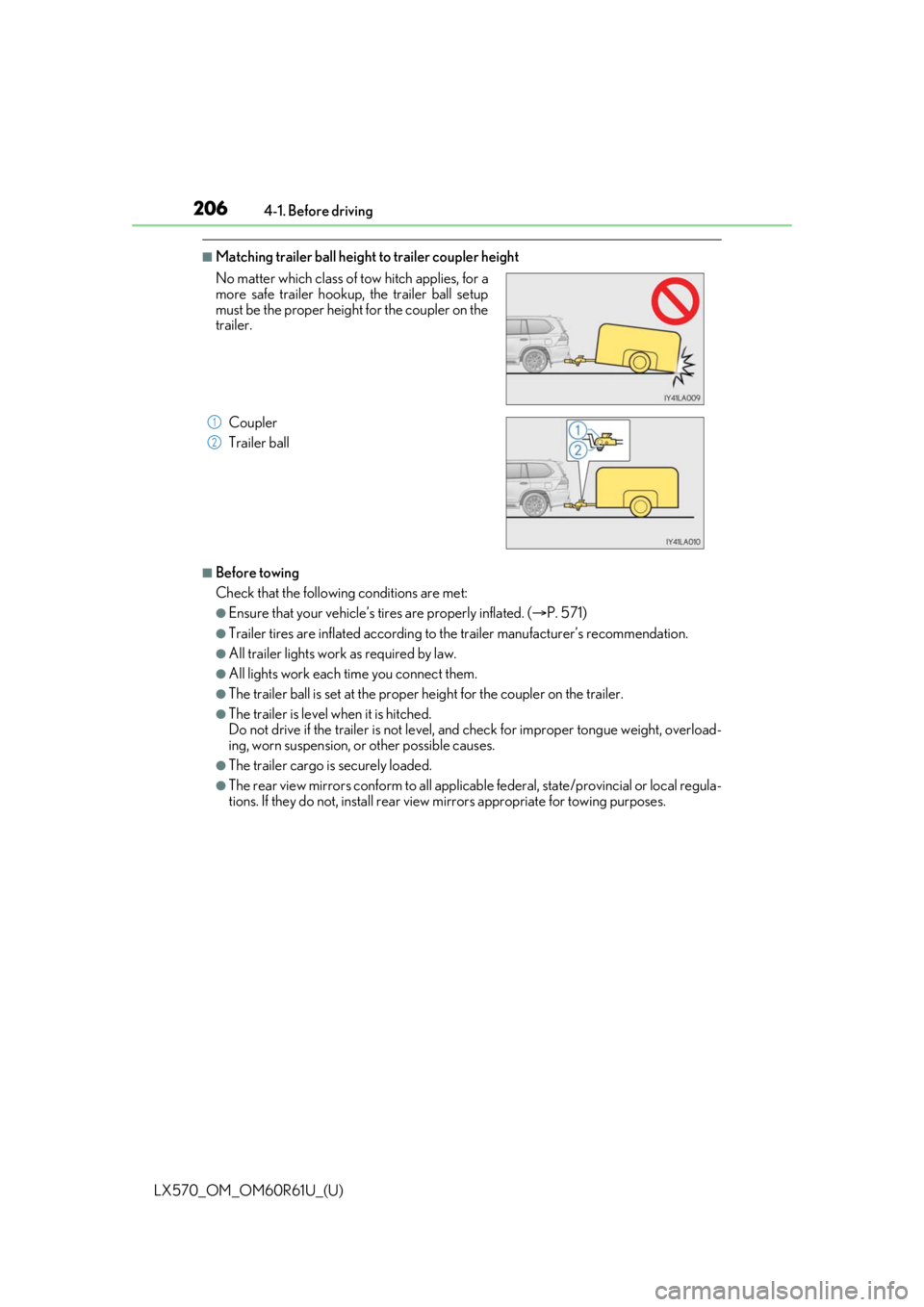
■Matching trailer ball height to trailer coupler height
■Before towing
Check that the followin
g conditions are met:
●Ensure that your vehicle’s tires are properly inflated. ( P. 571)
●Trailer tires are inflated according to the trailer manufacturer’s recommendation.
●All trailer lights work as required by law.
●All lights work each time you connect them.
●The trailer ball is set at the proper height for the coupler on the trailer.
●The trailer is level when it is hitched.
Do not drive if the trailer is not level, and check for improper to ngue weight, overload-
ing, worn suspension, or other possible causes.
●The trailer cargo is securely loaded.
●The rear view mirrors conform to all applicable federal, state/provincial or local regula-
tions. If they do not, install rear view mirrors appropriate for towing purposes.
No matter which class of tow hitch applies, for a
more safe trailer hookup, the trailer ball setup
must be the proper height for the coupler on the
trailer.
Coupler
Trailer ball
1
2
Page 222 of 636

222
LX570_OM_OM60R61U_(U)4-2. Driving procedures
■If the shift lever cannot be shifted from P
First, check whether the brak
e pedal is being depressed.
If the shift lever cannot be shifted with your foot on the brake pedal, there may be a prob-
lem with the shift lock system. Have the vehicle inspected by your Lexus dealer, immedi-
ately.
The following steps may be used as an emergency measure to ensure that the shift lever
can be shifted.
Releasing the shift lock: Set the parking brake.
Turn the engine switch off.
Depress the brake pedal.
■If the “S” indicator does not come on ev en after shifting the shift lever to S
This may indicate a malfunction in the automatic transmission system. Have the vehicle
inspected by your Lexus dealer immediately.
(In this situation, the transmission will operat e in the same manner as when the shift lever
is in D.)
■Downshift restriction warning buzzer
To help ensure safety and driving performance, downshifti ng operation may sometimes
be restricted. In some circum stances, downshifting may not be possible even when the
shift lever is operated. (A buzzer will sound twice.) Pry the cover up with
a flathead screwdriver
or equivalent tool.
To prevent damage to the cover, cover the tip
of the screwdriver with a rag.
Press the shift lock override button.
The shift lever can be shifted while the button
is pressed.
1
2
3
4
5