flat LEXUS LX570 2020 Owner's Manual
[x] Cancel search | Manufacturer: LEXUS, Model Year: 2020, Model line: LX570, Model: LEXUS LX570 2020Pages: 636, PDF Size: 12.73 MB
Page 234 of 636

234
LX570_OM_OM60R61U_(U)4-3. Operating the lights and wipers
■Camera sensor detection information
●The high beam may not be automatically
turned off in the following situations:
• When oncoming vehicles suddenly appear from a curve
• When the vehicle is cut in front of by another vehicle
• When vehicles ahead are hidden from sight due to repeated curves, road dividers or roadside trees
• When vehicles ahead appear from the faraway lane on wide road
• When vehicles ahead have no lights
●The high beam may be turned off if a vehicle ahead that is using fog lights without using
the headlights is detected.
●House lights, street lights, traffic signals, and illuminated billboards or signs may cause
the high beam to switch to the low beams, or the low beams to remain on.
●The following factors may affect the amount of time taken to turn the high beam on or
off:
• The brightness of headlights, fog lights, and tail lights of vehicles ahead
• The movement and direction of vehicles ahead
• When a vehicle ahead only has operational lights on one side
• When a vehicle ahead is a two-wheeled vehicle
• The condition of the road (gradient, cu rve, condition of the road surface etc.)
• The number of passengers and amount of luggage
●The high beam may be turned on or off when the driver does not expect it.
●Bicycles or similar objects may not be detected.
●In the situations shown below, the system may not be able to accurately detect sur-
rounding brightness levels. This may cause the low beams to remain on or the high
beams to cause problems for pedestrians, ve hicles ahead or other parties. In these
cases, manually switch between the high and low beams.
• In bad weather (rain, snow, fog, sandstorms etc.)
• The windshield is obscured by fog, mist, ice, dirt etc.
• The windshield is cracked or damaged.
• The camera sensor is deformed or dirty.
• The camera sensor temperature is extremely high.
• Surrounding brightness levels are equal to th ose of headlights, tail lights or fog lights.
• Vehicles ahead have headlights that are either switched off, dirty, are changing color,
or are not aimed properly.
• When driving through an area of intermittently changing brightness and darkness.
• When frequently and repeated ly driving ascending/descending roads, or roads with
rough, bumpy or uneven surfaces (such as stone-paved roads, gravel tracks etc.).
• When frequently and repeatedly taking curves or driving on a winding road.
• There is a highly reflective object ahead of the vehicle, such as a sign or a mirror.
• The back of a vehicle ahead is highly re flective, such as a container on a truck.
• The vehicle’s headlights are damaged or dirty.
• The vehicle is listing or tilting, due to a flat tire, a trailer being towed etc.
• The high beam and low beam are repeated ly being switched between in an abnor-
mal manner.
• The driver believes that the high beam may be causing problems or distress to other drivers or pedestrians nearby.
Page 259 of 636

LX570_OM_OM60R61U_(U)
2594-5. Using the driving support systems
4
Driving
WARNING
■When to disable the pre-collision system
In the following situations, disable the system, as it may not operate properly, possibly
leading to an accident resultin g in death or serious injury:
●When the vehicle is being towed
●When your vehicle is towing another vehicle
●When transporting the vehicle via truck, bo at, train or similar means of transportation
●When the vehicle is raised on a lift with the engine running and the tires are allowed to
rotate freely
●When inspecting the vehicle using a drum tester such as a chassis dynamometer or
speedometer tester, or when using an on vehicle wheel balancer
●When a strong impact is applied to the fron t bumper or front grille, due to an accident
or other reasons
●If the vehicle cannot be driven in a stable manner, such as when the vehicle has been
in an accident or is malfunctioning
●When the vehicle is driven in a sporty manner or off-road
●When the tires are not properly inflated
●When the tires are very worn
●When tires of a size other than specified are installed
●When tire chains are installed
●When a compact spare tire or an emergency tire puncture repair kit is used
●If equipment (snow plow, etc.) that may obstruct the radar sensor or camera sensor is
temporarily installed to the vehicle
Page 266 of 636

266
LX570_OM_OM60R61U_(U)4-5. Using the driving support systems
• When driving on a hill
• If the radar sensor or ca mera sensor is misaligned
●In some situations such as the following, sufficient braking forc e may not be obtained,
preventing the system from performing properly:
• If the braking functions cannot operate to their full extent, such as when the brake parts are extremely cold, extremely hot, or wet
• If the vehicle is not properly maintained (brakes or tires are excessively worn,
improper tire inflation pressure, etc.)
• When the vehicle is being driven on a gravel road or other slippery surface
●Some pedestrians such as the following may not be detected by the radar sensor and
camera sensor, preventing the system from operating properly:
• Pedestrians shorter than approximately 3.2 ft. (1 m) or taller than approximately
6.5 ft. (2 m)
• Pedestrians wearing oversized clothing (a rain coat, long skirt, etc.), making their
silhouette obscure
• Pedestrians who are carrying large baggage, holding an umbrella, etc., hiding part
of their body
• Pedestrians who are bending forward or squatting
• Pedestrians who are pushing a stroller , wheelchair, bicycle or other vehicle
• Groups of pedestrians which are close together
• Pedestrians who are wearing white and look extremely bright
• Pedestrians in the dark, such as at night or while in a tunnel
• Pedestrians whose clothing appears to be nearly the same color or brightness as
their surroundings
• Pedestrians near walls, fences , guardrails, or large objects
• Pedestrians who are on a metal object (manhole cover, steel plate, etc.) on the road
• Pedestrians who are walking fast
• Pedestrians who are changing speed abruptly
• Pedestrians running out from be hind a vehicle or a large object
• Pedestrians who are extremely close to the side of the vehicle (outside rear view mirror, etc.)
Page 304 of 636
304
LX570_OM_OM60R61U_(U)4-5. Using the driving support systems
Some modes may not be selectable depending on the vehicle speed when the
four-wheel drive control switch is in the
H4 position. Refer to the following table.
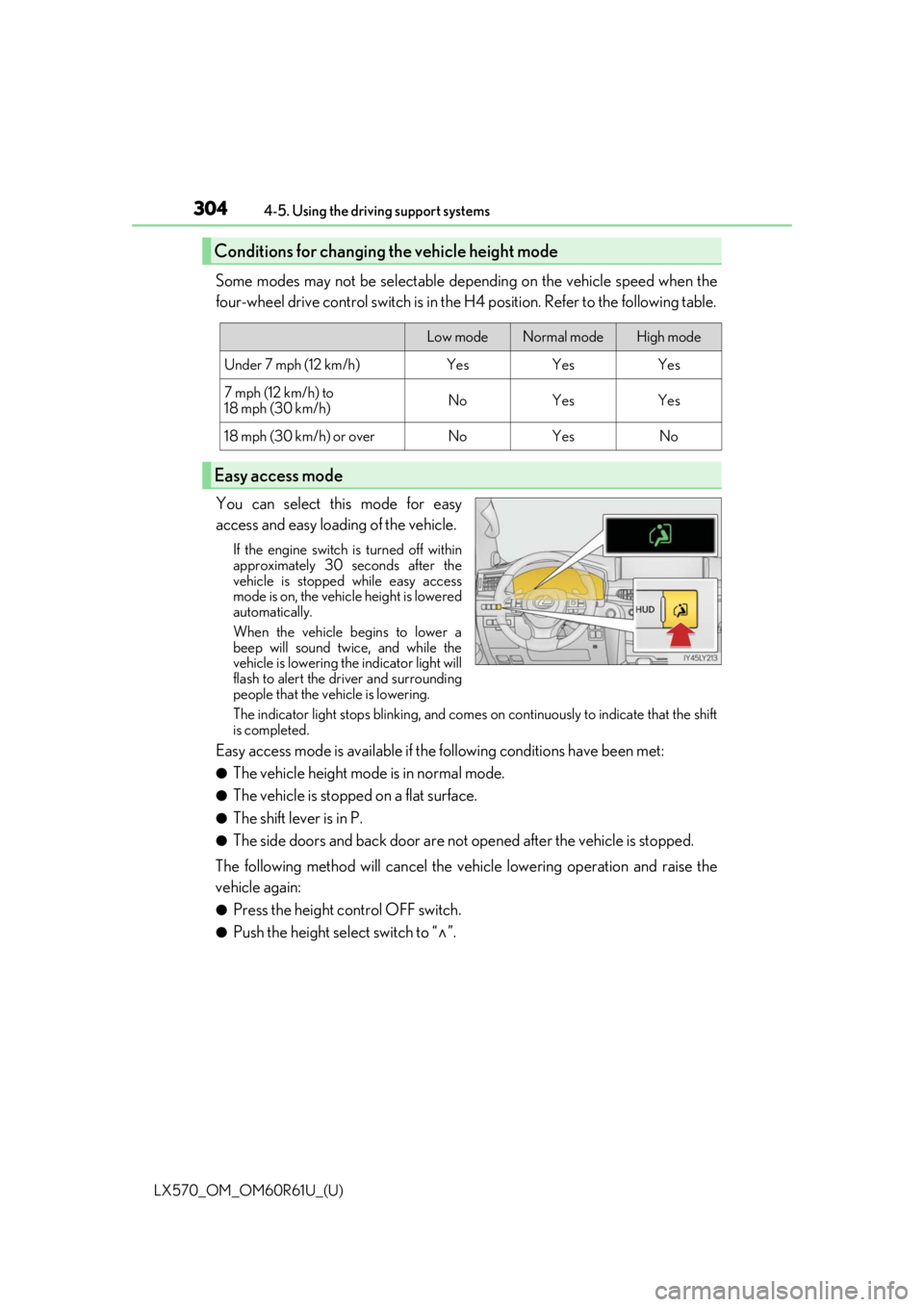
You can select this mode for easy
access and easy loading of the vehicle.
If the engine switch is turned off within
approximately 30 seconds after the
vehicle is stopped while easy access
mode is on, the vehicle height is lowered
automatically.
When the vehicle begins to lower a
beep will sound twice, and while the
vehicle is lowering the indicator light will
flash to alert the driver and surrounding
people that the vehicle is lowering.
The indicator light stops blinking, and comes on continuously to indicate that the shift
is completed.
Easy access mode is available if the following conditions have been met:
●The vehicle height mode is in normal mode.
●The vehicle is stopped on a flat surface.
●The shift lever is in P.
●The side doors and back door are not opened after the vehicle is stopped.
The following method will cancel the vehi cle lowering operation and raise the
vehicle again:
●Press the height control OFF switch.
●Push the height select switch to “ ”.
Conditions for changing the vehicle height mode
Low modeNormal modeHigh mode
Under 7 mph (12 km/h)YesYesYes
7 mph (12 km/h) to
18 mph (30 km/h)NoYesYes
18 mph (30 km/h) or overNoYesNo
Easy access mode
Page 311 of 636

LX570_OM_OM60R61U_(U)
3114-5. Using the driving support systems
4
Driving
Lock the center differential when your
vehicle’s wheels get stuck in a ditch or
when driving on a slippery or bumpy
surface.
The center differential lock indicator will
come on.
Unlock the center differential after the
wheels have been freed, or after moving
to a flat, non-slippery surface.
To unlock the center differential, push the switch again.
■Shifting from H4 to L4Stop the vehicle completely with brake pedal held down.
Shift the shift lever to N.
Push and shift the four-wheel drive control switch to L4.
Maintain this condition until the low sp eed four-wheel drive indicator turns on.
■Shifting from L4 to H4
Stop the vehicle completely with brake pedal held down.
Shift the shift lever to N.
Push and shift the four-wheel drive control switch to H4.
Maintain this condition until the low sp eed four-wheel drive indicator turns off.
■The four-wheel drive control switch can be operated when
●The engine switch is in IGNITION ON mode.
●The shift lever is in the N position.
●The vehicle is stopped completely.
■The low speed four-wheel drive indicator light
The indicator light blinks while shifting between H4 and L4.
■Advice for driving on slippery roads
●If you shift the four-wheel drive control switch to L4 and the shift lever to the 2 range of
S or D (vehicles with paddle shift switches) while driving in steep off-road areas, the
output of the brake can be co ntrolled effectively by the Active TRAC, which assists the
driver to control the driving power of 4 wheels.
●Use the 1 range of S or D (vehicles with pa ddle shift switches) for maximum power and
traction when your wheels get stuck or when driving down a steep incline.
Center differential lock/unlock switch
Shifting between H4 and L4
1
2
3
1
2
3
Page 359 of 636

LX570_OM_OM60R61U_(U)
3594-5. Using the driving support systems
4
Driving
■Panoramic view display range
●In the panoramic view, the system processes and displays images acquired form the 4
cameras under the assumption that the vehicle is on a flat road surface. Therefore, the
display may appear as follows.
• Three-dimensional objects may appear to have fallen over, and be long and thin or bigger than they actually are
• Three-dimensional obje cts at a point higher than the surface of the road may appear
further away than they actually are, or may not appear
• Tall objects may appear to emerge from the image processing seams
●Inconsistencies in th e brightness of images from each camera may occur depending on
lighting conditions.
●The displayed image may not be aligned when the tilt or height of the vehicle changed
due to the number of passengers, cargo we ight or remaining quantity of gasoline.
●The displayed image may not be aligned when the vehicle is in other than “N” (normal)
height mode. (P. 302)
●Images and guide lines may not be properly displayed when the doors are not com-
pletely closed.
●The relative distances between the vehicle ic on and road surface or an obstacle dis-
played in the panoramic view may differ from the actual state.
●If an illuminated license plate is used, it may appear on the screen.
●The black area around the vehicle icon is an area that is not appear in the camera.
Check these areas directly.
■Wide front view display range
●Certain areas at the front of the vehicle ha ve a different sense of distance, and are
masked in black so that they do not appear on the screen.
●There are limits to the range displayed on the screen. Objects at either corner of the
bumper or directly below the bumper are not displayed.
●The perceived distance in images displayed on the screen differs from the actual dis-
tance.
■Images displayed on the screen
Cameras of the Multi-terrain Monitor system use special lenses. The distance of the
image that appears on the screen differs from the actual distance.
●The circled areas shown in the illustration may
be difficult to see, as these are points where
images are combined.
Page 361 of 636

LX570_OM_OM60R61U_(U)
3614-5. Using the driving support systems
4
Driving
■Differences between the panoramic view screen and the actual road
The distance guide lines, the combined panoramic view image, guide lines,
etc., indicate estimated distances on a flat road surface. In the following situa-
tions, actual distances and vehicle course will differ from the guide lines on the
screen.
●When the ground behind the vehicle slopes up sharply
The distance guide lines will appear to be closer to the vehicle than the
actual distance. Therefore, obstacles on an upward slope appear further
away than they actually are. In the same way, the actual course of the vehi-
cle will differ from the course indicated by the guide lines.
Page 364 of 636

364
LX570_OM_OM60R61U_(U)4-5. Using the driving support systems
●Projected course lines
Projected course lines are displayed un
der the assumption that the vehicle
is on a flat road surface. Therefore, the position of three-dimensional
objects higher than the road surface (such as a vehicle bumper) cannot be
determined. Even if it seems that an obstacle is outside of the projected
course lines and a collision will no t occur according to the screen, an
obstacle may actually be in the vehicle course, resulting in a collision.
Projected course lines Three-dimensional objects in high positions (such as walls with protrusions
or the loading areas of trucks) may not be displayed on the screen. Con-
firm the safety of your surroundings directly.
Protrusion of a wall
1
1
Page 365 of 636

LX570_OM_OM60R61U_(U)
3654-5. Using the driving support systems
4
Driving
■Differences between the rear view or wide rear view and actual roads
The guide lines on the screen are intended for flat surfaces (such as the road).
Be aware of the following points when three-dimensional objects with protru-
sions (obstacles such as the cargo bed of a truck) are nearby.
●Projected course lines
Guide lines are displayed in reference to a level road surface and cannot
be used to determine the location of three-dimensional objects. Confirm
the safety of your surroundings directly . Even if it seems that the cargo bed
of a truck is outside the projected co urse lines and a collision will not occur
according to the screen, it may actually be in the vehicle course, resulting in
a collision.
Projected course lines
1
Page 388 of 636

388
LX570_OM_OM60R61U_(U)4-5. Using the driving support systems
WARNING
■Replacing tires
Make sure that all tires are of the same si
ze, brand, tread pattern and total load capac-
ity. In addition, make sure that the tires are inflated to the specified tire pressure level.
The Multi Terrain ABS, Active TRAC, VSC an d Trailer Sway Control will not function
correctly if different tires are fitted on the vehicle.
Contact your Lexus dealer for further in formation when replacing tires or wheels.
■Handling of tires and suspension
Using tires with any kind of problem or modi fying the suspension will affect the driving
assist systems, and may caus e the system to malfunction.
■Trailer Sway Control precaution
The Trailer Sway Control system is not able to reduce trailer sway in all situations.
Depending on many factors such as the condit ions of the vehicle, trailer, road surface,
and driving environment, the Trailer Sway Control system may not be effective. Refer to
your trailer owner’s manual for information on how to tow your trailer properly.
■If trailer sway occurs
Observe the following precautions.
Failing to do so may cause death or serious injury.
●Firmly grip the steering wh eel. Steer straight ahead.
Do not try to control trailer sway ing by turning the steering wheel.
●Begin releasing the accelerator pedal immediately but very gradually to reduce
speed.
Do not increase speed. Do not apply vehicle brakes.
If you make no extreme correction with the steering or brakes, your vehicle and trailer
should stabilize. ( P. 207)