warning LEXUS LX570 2020 Manual Online
[x] Cancel search | Manufacturer: LEXUS, Model Year: 2020, Model line: LX570, Model: LEXUS LX570 2020Pages: 636, PDF Size: 12.73 MB
Page 226 of 636
226
LX570_OM_OM60R61U_(U)4-2. Driving procedures
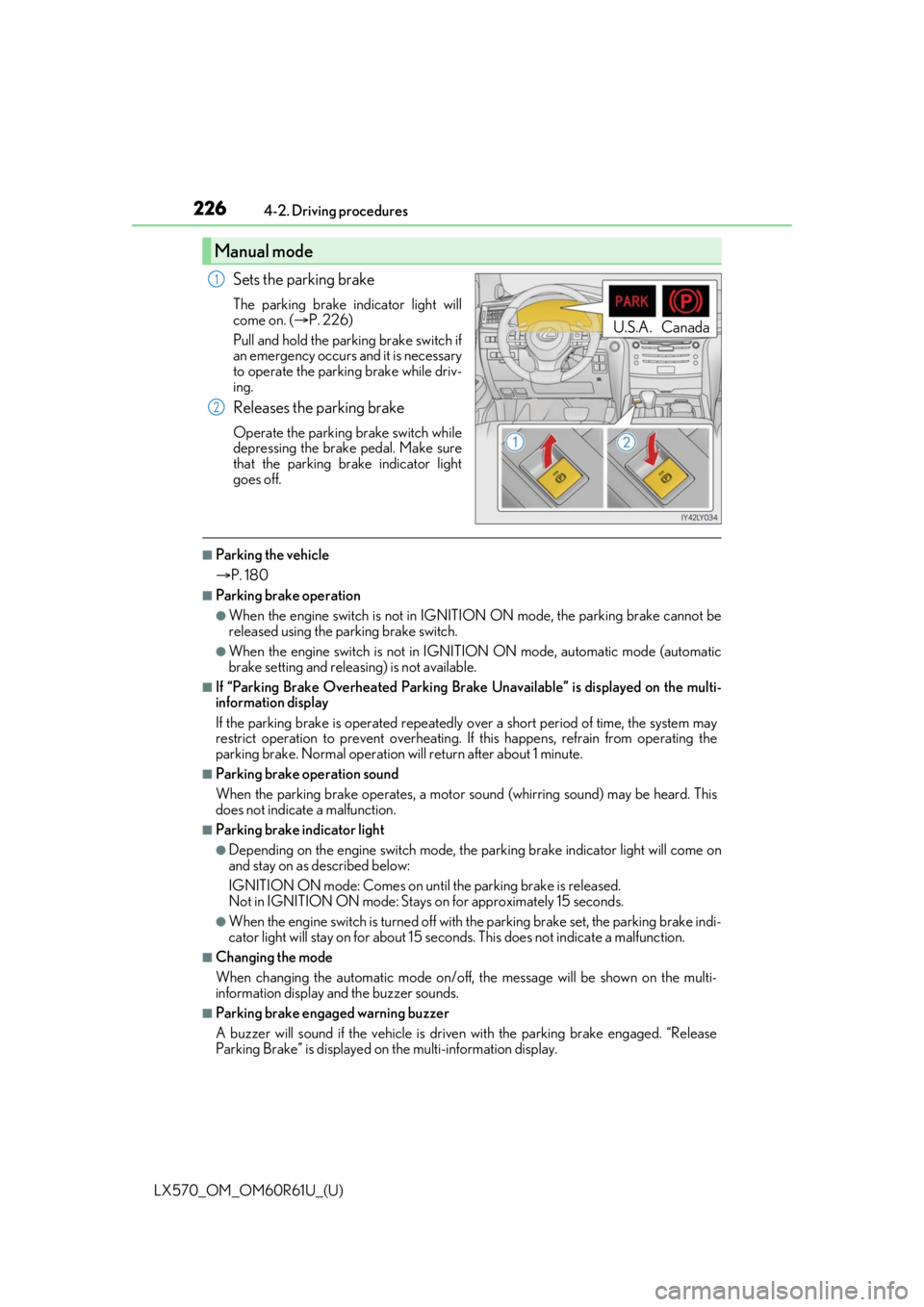
Sets the parking brake
The parking brake indicator light will
come on. (
P. 226)
Pull and hold the parking brake switch if
an emergency occurs and it is necessary
to operate the parking brake while driv-
ing.
Releases the parking brake
Operate the parking brake switch while
depressing the brake pedal. Make sure
that the parking brake indicator light
goes off.
■Parking the vehicle
P. 180
■Parking brake operation
●When the engine switch is not in IGNITION ON mode, the parking brake cannot be
released using the parking brake switch.
●When the engine switch is not in IGNITION ON mode, automatic mode (automatic
brake setting and releasing) is not available.
■If “Parking Brake Overheated Parking Brak e Unavailable” is displayed on the multi-
information display
If the parking brake is operated repeatedly over a short period of time, the system may
restrict operation to prevent overheating. If this happens, refrain from operating the
parking brake. Normal operation wi ll return after about 1 minute.
■Parking brake operation sound
When the parking brake operates, a motor so und (whirring sound) may be heard. This
does not indicate a malfunction.
■Parking brake indicator light
●Depending on the engine switch mode, the parking brake indicator light will come on
and stay on as described below:
IGNITION ON mode: Comes on unt il the parking brake is released.
Not in IGNITION ON mode: Stays on for approximately 15 seconds.
●When the engine switch is turned off with the parking brake set, the parking brake indi-
cator light will stay on for about 15 seconds. This does not in dicate a malfunction.
■Changing the mode
When changing the automatic mode on/off, the message will be shown on the multi-
information display and the buzzer sounds.
■Parking brake engaged warning buzzer
A buzzer will sound if the vehicle is driv en with the parking brake engaged. “Release
Parking Brake” is displayed on the multi-information display.
Manual mode
U.S.A. Canada
1
2
Page 227 of 636
LX570_OM_OM60R61U_(U)
2274-2. Driving procedures
4
Driving
■Warning messages and buzzers
Warning messages and buzzers are used to indicate a system malfunction or to inform
the driver of the need for caution. If a warn ing message is shown on the multi-information
display, read the message and follow the instructions.
■If the brake system warning light comes on
P. 527
■Usage in winter time
P. 389
WARNING
■When parking the vehicle
Do not leave a child in the vehicle alone. The parking brake may be released uninten-
tionally and there is the danger of the ve hicle moving that may lead to an accident
resulting in death or serious injury.
NOTICE
■When parking the vehicle
Before you leave the vehicle, set the parking brake, shift the shift lever to P and make
sure that the vehicle does not move.
■When the system malfunctions
Stop the vehicle in a safe place and check the warning messages.
■When the parking brake cannot be released due to a malfunction
Driving the vehicle with the parking brake se t will lead to brake components overheat-
ing, which may affect brakin g performance and increase brake wear. Have the vehicle
inspected by your Lexus dealer immediately if this occurs.
Page 230 of 636
230
LX570_OM_OM60R61U_(U)4-3. Operating the lights and wipers
■Automatic light off system
●When the headlights are on: The headlights an
d tail lights turn off 30 seconds after a
door is opened and closed if the engine switch has been switched to ACCESSORY or
off mode.
●When only the tail lights are on : The tail lights turn off automatically if the engine switch
is switched to ACCESSORY or off mo de and driver’s door is opened.
To turn the lights on again, turn the engine switch to IGNITION ON mode, or turn the
headlight switch to the or position once and then back to or
position.
■Automatic headlight leveling system
The level of the headlights is automatically adjusted accordi ng to the number of passen-
gers and the loading condition of the vehicle to ensure that the headlights do not inter-
fere with other road users.
■Welcome lighting
If the headlight switch is turned to and the surrounding area is dark, unlocking the
doors using the smart access system with pu sh-button start or wireless remote control
will turn the parking lights and tail lights on automatically.
■If the automatic headlight levelin g system warning light flashes
It may indicate a malfun ction in the system. Contact your Lexus dealer.
■Light reminder buzzer
A buzzer sounds when the engine switch is turned off or turned to ACCESSORY mode
and the driver’ door is opened while the tail lights remain on.
■Customization
Settings (e.g. light sensor sensitivity) can be changed.
(Customizable features: P. 586)
NOTICE
■To prevent battery discharge
Do not leave the lights on longer than ne cessary when the engine is not running.
Page 231 of 636

231
LX570_OM_OM60R61U_(U)4-3. Operating the lights and wipers
4
Driving
Automatic High Beam
The Automatic High Beam uses an in-vehicle camera sensor to assess the
brightness of streetlights, the lights of
vehicles ahead etc., and automatically
turns the high beam on or off as necessary.
WARNING
■Limitations of the Automatic High Beam
Do not rely on the Automatic High Beam. Al ways drive safely, taking care to observe
your surroundings and turning the high be am on or off manually if necessary.
■To prevent incorrect operation of the Automatic High Beam system
Do not overload the vehicle.
NOTICE
■Notes when using the Automatic High Beam system
Vehicles without PCS (Pre-Collision System):
Observe the following to ensure that the Automatic High Beam functions correctly.
●Do not place items on the dashboard. There is a possibility that the camera sensor will
mistake items reflected in the windshield for streetlights, the headlights of other vehi-
cles, etc.
●Do not install a parking tag or any other ac cessories near or around the inside rear
view mirror and the camera sensor.
●Do not modify the vehicle.
●Do not replace windshield wi th non-genuine windshield.
Contact your Lexus dealer.
●Do not replace headlights wi th non-genuine headlights.
Contact your Lexus dealer.
Vehicles with PCS (Pre-Collision System): P. 252
●Do not touch the camera sensor.
●Do not subject the inside rear view mirror or
the camera sensor to a strong impact.
●Do not disassemble the camera sensor.
●Do not spill liquid onto the inside rear view
mirror or the camera sensor.
●Do not apply window tinting or stickers to the
camera sensor or the area of windshield near
the camera sensor.
Page 241 of 636

LX570_OM_OM60R61U_(U)
2414-3. Operating the lights and wipers
4
Driving
■If no windshield washer fluid sprays
Check that the washer nozzles are not blocked if there is washer fluid in the windshield
washer fluid reservoir.
WARNING
■Caution regarding the use of windshield wipers in “AUTO” mode
The windshield wipers may operate unexpectedly if the sensor is touched or the wind-
shield is subject to vibration in “AUTO” mo de. Take care that your fingers etc. anything
else does not become caught in the windshield wipers.
■Caution regarding the use of washer fluid
When it is cold, do not use the washer fl uid until the windshield becomes warm. The
fluid may freeze on the windshield and cause lo w visibility. This may lead to an accident,
resulting in death or serious injury.
NOTICE
■When the windshield is dry
Do not use the wipers, as they may damage the windshield.
■When the washer fluid tank is empty
Do not operate the switch continually as the washer fluid pump may overheat.
■When there is no washer fluid spray from the nozzle
Damage to the washer fluid pump may be cau sed if the lever is pulled toward you and
held continually.
■When a nozzle becomes blocked
Do not try to clear it with a pin or other object. The nozzle will be damaged.
Page 247 of 636
LX570_OM_OM60R61U_(U)
2474-4. Refueling
4
Driving
WARNING
■When refueling the vehicle
Observe the following precautions while refueling the vehicle. Failure to do so may
result in death or serious injury.
●After exiting the vehicle and before opening the fuel door, touch an unpainted metal
surface to discharge any static electricity. It is important to discharge static electricity
before refueling because sparks resulting fr om static electricity can cause fuel vapors
to ignite while refueling.
●Always hold the grips on the fuel tank cap and turn it slowly to remove it.
A whooshing sound may be heard when the fu el tank cap is loosened. Wait until the
sound cannot be heard before fully removing the cap. In hot weather, pressurized fuel
may spray out of the filler neck and cause injury.
●Do not allow anyone that has not discharged static electricity from their bodies to
come close to an open fuel tank.
●Do not inhale vaporized fuel.
Fuel contains substances th at are harmful if inhaled.
●Do not smoke while refueling the vehicle.
Doing so may cause the fuel to ignite and cause a fire.
●Do not return to the vehicle or touch any pe rson or object that is statically charged.
This may cause static electricity to build up, resulting in a possible ignition hazard.
■When refueling
Observe the following precautions to prevent fuel overflowing from the fuel tank:
●Securely insert the fuel nozzle into the fuel filler neck.
●Stop filling the tank after the fuel nozzle automatically clicks off.
●Do not top off the fuel tank.
NOTICE
■Refueling
Do not spill fuel during refueling.
Doing so may damage the vehicle, such as causing the emission control systems to
operate abnormally or damaging fuel system components or the vehicle’s painted sur-
face.
Page 248 of 636
248
LX570_OM_OM60R61U_(U)4-4. Refueling
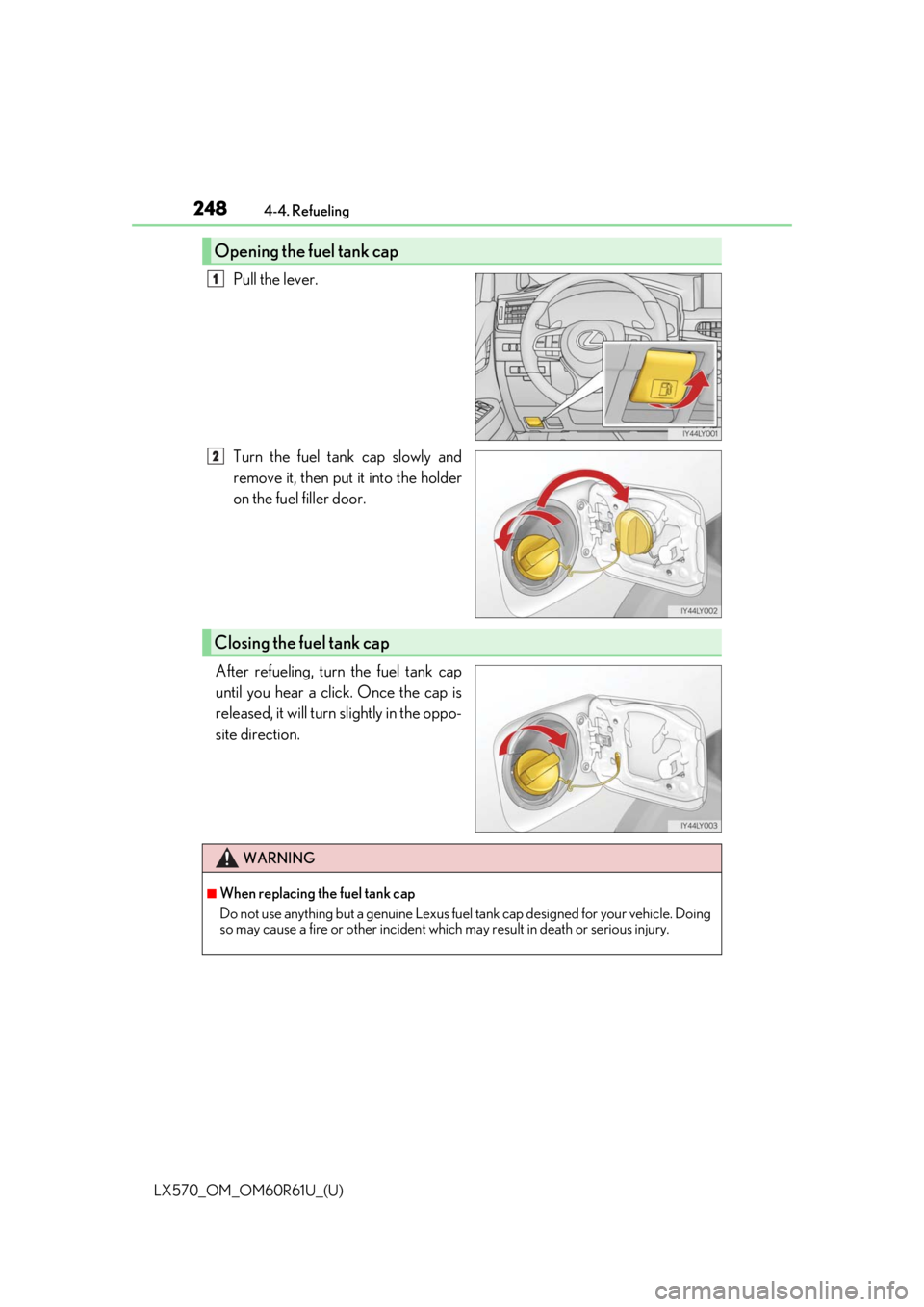
Pull the lever.
Turn the fuel tank cap slowly and
remove it, then put it into the holder
on the fuel filler door.
After refueling, turn the fuel tank cap
until you hear a click. Once the cap is
released, it will turn slightly in the oppo-
site direction.
Opening the fuel tank cap
1
2
Closing the fuel tank cap
WARNING
■When replacing the fuel tank cap
Do not use anything but a genuine Lexus fuel tank cap designed for your vehicle. Doing
so may cause a fire or other incident whic h may result in death or serious injury.
Page 249 of 636
249
LX570_OM_OM60R61U_(U)4-5. Using the driving support systems
4
Driving
Lexus Safety System +
◆PCS (Pre-Collision System)
P. 256
◆LDA (Lane Departure Alert)
P. 268
◆Dynamic radar cruise contro l with full-speed range
P. 276
◆Automatic High Beam
P. 231
: If equipped
The Lexus Safety System + consists of th e following drive assist systems and
contributes to a safe and comfo rtable driving experience:
WARNING
■Lexus Safety System +
The Lexus Safety System + is designed to operate under the assumption that the driver
will drive safely, and is designed to help reduce the impact to the occupants and the
vehicle in the case of a collision or assist the driver in normal driving conditions.
As there is a limit to the degree of reco gnition accuracy and control performance that
this system can provide, do not overly rely on this system. The driver is always responsi-
ble for paying attention to the vehicle’s surroundings and driving safely.
Page 251 of 636

LX570_OM_OM60R61U_(U)
2514-5. Using the driving support systems
4
Driving
Two types of sensors, located behind the front grille and windshield, detect infor-
mation necessary to operate the drive assist systems.
Radar sensor
Camera sensor
Sensors
1
2
WARNING
■To avoid malfunction of the radar sensor
Observe the following precautions.
Otherwise, the radar sensor may not operate properly, possibly leading to an accident
resulting in death or serious injury.
●Keep the radar sensor and front grille emblem clean at all times.
●Do not attach accessories, stickers (includi ng transparent stickers) or other items to
the radar sensor, front grille emblem or surrounding area.
●Do not subject the radar sensor or su rrounding area to a strong impact.
If the radar sensor, front grille, or front bumper has been subjected to a strong impact,
have the vehicle inspected by your Lexus dealer.
●Do not disassemble the radar sensor.
●Do not modify or paint the radar sensor, front grille emblem or surrounding area.
●If the radar sensor, front grille, or front bumper needs to be removed and installed, or
replaced, contact your Lexus dealer.
Radar sensor
Front grille emblem
If the front of the rada r sensor or the front or
back of the front grille emblem is dirty or
covered with water droplets, snow, etc., clean
it.
Clean the radar sensor and front grille
emblem with a soft cloth so you do not mark
or damage them.1
2
Page 252 of 636

252
LX570_OM_OM60R61U_(U)4-5. Using the driving support systems
WARNING
■To avoid malfunction of the camera sensor
Observe the following precautions.
Otherwise, the camera sensor may not oper
ate properly, possibly leading to an acci-
dent resulting in deat h or serious injury.
●Keep the windshield clean at all times.
• If the windshield is dirty or covered with an oily film, water droplets, snow, etc.,
clear the windshield.
• If a glass coating agent is applied to the wi ndshield, it will still be necessary to use
the windshield wipers to remove water droplets, etc. from the area of the wind-
shield in front of the camera sensor.
• If the inner side of the windshield where th e camera sensor is installed is dirty, con-
tact your Lexus dealer.
●If the part of the windshield in front of the camera sensor is fogged up or covered with
condensation or ice, use the windshield defogger to remove the fog, condensation or
ice. ( P. 407)
●If water droplets cannot be properly removed from the area of the windshield in front
of the camera sensor by th e windshield wipers, replace the wiper insert or wiper
blade.
If the wiper inserts or wiper blades need to be replaced, contact your Lexus dealer.
●Do not attach window tinting to the windshield.
●Replace the windshield if it is damaged or cracked.
If the windshield needs to be re placed, contact your Lexus dealer.
●Do not get the camera sensor wet.
●Do not allow bright lights to shine into the camera sensor.
●Do not dirty or damage the camera sensor.
When cleaning the inside of the windshield , do not allow glass cleaner to contact the
lens. Also, do not touch the lens.
If the lens is dirty or damaged, contact your Lexus dealer.
●Do not subject the camera sensor to a strong impact.
●Do not attach objects, such as stickers, trans-
parent stickers, and so forth, to the outer side
of the windshield in front of the camera sensor
(shaded area in the illustration).
A: From the top of the windshield to approxi-
mately 0.4 in. (1 cm) below the bottom of the
camera sensor
B: Approximately 7.9 in. (20 cm) (Approxi-
mately 4.0 in. (10 cm) to the right and left
from the center of the camera sensor)