audio LEXUS NX200T 2016 Owners Manual
[x] Cancel search | Manufacturer: LEXUS, Model Year: 2016, Model line: NX200T, Model: LEXUS NX200T 2016Pages: 660, PDF Size: 9.96 MB
Page 409 of 660

4095-12. Other function
5
Lexus Display Audio system
NX200t_OM_USA_OM78081U
■Disclaimers
Page 410 of 660

4105-12. Other function
NX200t_OM_USA_OM78081U
USB photo
Go to “USB Photo”: “MENU” button “Info” “USB1 Photo” or “USB2
Photo”
P. 3 3 5
Move the controller to the left to display the menu screen. Change the full screen mode.
Select to set the slide show display
on/off.
Start the slide show at a selected folder.
Change the play speed.
Change the play mode.
Move the controller to the right and select “Browse”.
Select the desired folder, and then select a desired file to begin using the
selected folder.
Connecting a USB memory device enables you to enjoy photo on the Lexus
Display Audio display.
USB photo screen
Connecting a USB memory device
Menu screen
1
2
3
4
Selecting a folder and a file
1
2
Page 411 of 660

4115-12. Other function
5
Lexus Display Audio system
NX200t_OM_USA_OM78081U
■USB memory functions
P. 3 6 8
■USB memory
●Compatible devices
USB memory device that can be used for JPEG display.
●Compatible device formats
The following device format can be used:
• USB communication format: USB2.0 FS (480 Mbps)
• File system format: FAT16/32 (Windows)
• Correspondence class: Mass storage class
●JPEG file compatibility
• Compatible image size: Maximum 10MB
• Compatible pixel size: Maximum 10,000,000 pixels
NOTICE
■To prevent damage to the USB memory device or its terminals
P. 3 7 0
Page 413 of 660
4135-12. Other function
5
Lexus Display Audio system
NX200t_OM_USA_OM78081U
Voice command system
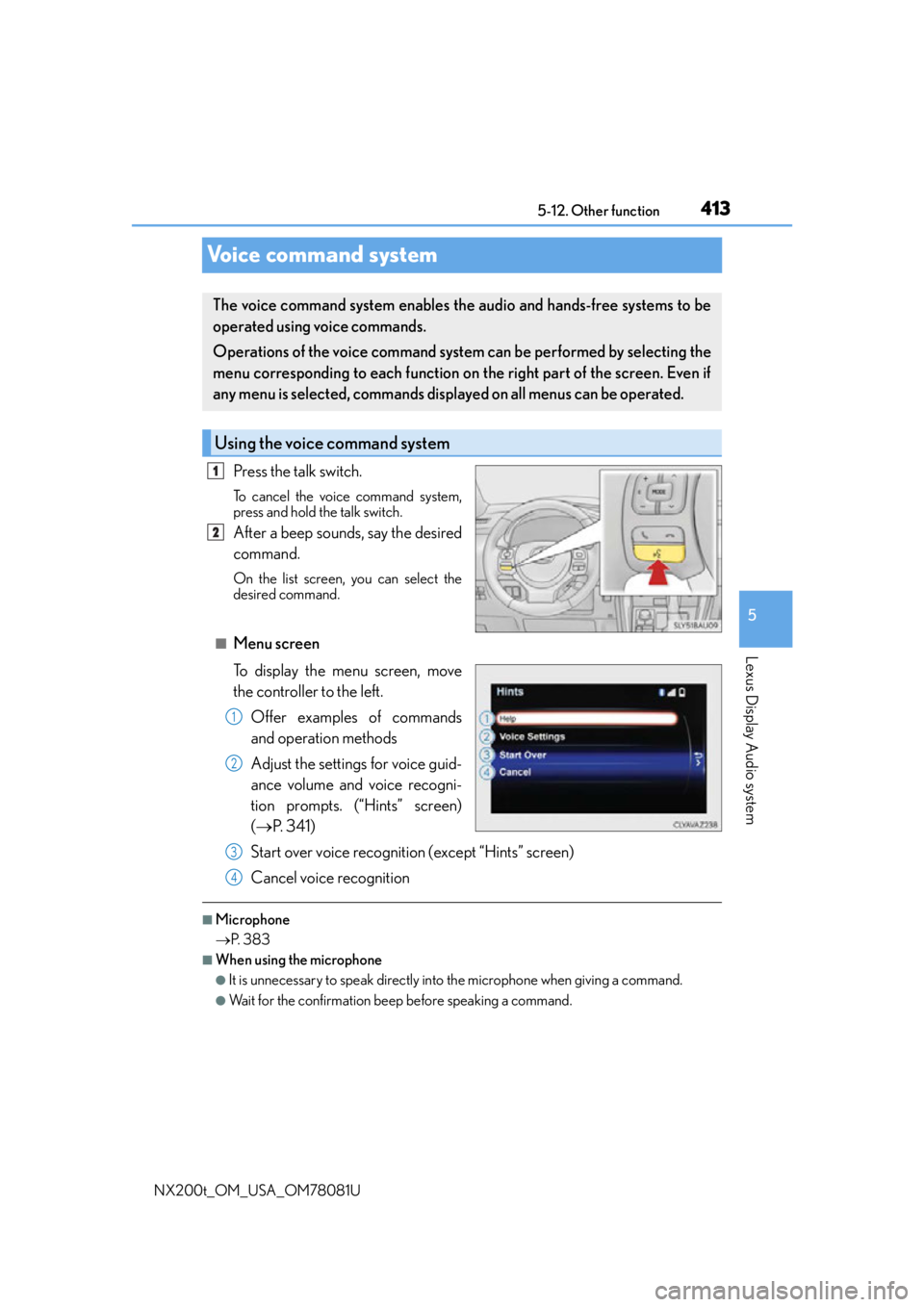
Press the talk switch.
To cancel the voice command system,
press and hold the talk switch.
After a beep sounds, say the desired
command.
On the list screen, you can select the
desired command.
■Menu screen
To display the menu screen, move
the controller to the left.
Offer examples of commands
and operation methods
Adjust the settings for voice guid-
ance volume and voice recogni-
tion prompts. (“Hints” screen)
( P. 3 4 1 )
Start over voice recognition (except “Hints” screen)
Cancel voice recognition
■Microphone
P. 3 8 3
■When using the microphone
●It is unnecessary to speak directly into the microphone when giving a command.
●Wait for the confirmation beep before speaking a command.
The voice command system enables the audio and hands-free systems to be
operated using voice commands.
Operations of the voice command system can be performed by selecting the
menu corresponding to each function on the right part of the screen. Even if
any menu is selected, commands displayed on all menus can be operated.
Using the voice command system
1
2
1
2
3
4
Page 415 of 660

4155-12. Other function
5
Lexus Display Audio system
NX200t_OM_USA_OM78081U
■Expression examples for each function
*: Say the desired artist name or album name in the place of the “<>”.
Some recognizable voice commands an d their actions are shown below as
examples.
Basic
CommandExpression examples
“Call
I need to call
“Dial
Ring <3334445555>.
“Play Artist
I’d like to hear the band
“Play Album
Music from album
*
Command list
CommandAction
“Help”Prompts voice guidance to offer examples of com-
mands or operation methods
“Go Back”Returns to the previous screen
“Go to
Page 416 of 660

4165-12. Other function
NX200t_OM_USA_OM78081U
Phone
Audio
Info
CommandAction
“Redial”Places a call to the phone nu mber of the latest outgo-
ing call
“Call Back”Places a call to the phone number of latest incoming
call
“Show Recent Calls”Displays the call history screen
“Dial
“Call
the phone book
CommandAction
“Play Playlist
“Play Artist
“Play Song
“Play Album
“Turn Music On/Off”Turns the audio system on/off
“Play the
Page 417 of 660
4175-12. Other function
5
Lexus Display Audio system
NX200t_OM_USA_OM78081U
LEXUS Enform Remote
After you sign the Telematics Subscription Service Agreement, download the
Lexus Enform Remote app from your cellular phone’s app store, and register
within the app (or enroll and complete registration at the dealer), you can begin
using these services. ( P. 4 6 6 )
A variety of subscription terms are available. Contact your Lexus dealer, or call 1-
800-25-LEXUS (1-800-255-3987) fo r further subscription details.
: If equipped
Lexus Enform Remote is a cellular phone application that lets you view and
remotely control certain aspects of your vehicle.
For details about the functions and services of this application, refer to
http://www.lexus.com/enform/
.
Function of the Lexus Enform Remote is achieved by using an embedded cel-
lular device in the vehicle (D CM: Data Communication Module).
Subscription
Page 420 of 660

4206-1. Using the air conditioning system and defogger
NX200t_OM_USA_OM78081U
Automatic air conditioning system
Air outlets and fan speed are automatica lly adjusted according to the temper-
ature setting.
Vehicles with a Lexus Display Audio sy stem: Press the “MENU” button on the
Lexus Display Audio controller, then select “Climate” to display the air condi-
tioning control screen.
For details on the Lexus Display Audio controller, refer to “Lexus Display
Audio controller” on P. 328
Vehicles with a navigati on system: Press the “MENU” button on the Remote
Touch, then select “Climate” to display the air conditioning control screen.
For details on the Remote Touch, refer to the “NAVIGATION SYSTEM
OWNER’S MANUAL”.
Page 423 of 660

4236-1. Using the air conditioning system and defogger
6
Interior features
NX200t_OM_USA_OM78081U
Vehicles with a Lexus Display Audio system
Adjust the left-hand side temper-
ature setting
Adjust the fan speed setting
Select to set auto mode on/off,
fan off, and displaying the option
control screen ( P. 4 2 4 )
Select the air flow mode
Adjust the right-hand side temperature setting
Move the Lexus Display Audio controller left/right to select the desired item
( to ).
When , or is selected:
Move the controller forward/backward or turn it left/right for adjusting.
When or is selected:
Move the controller forward/backward or turn it left/right to select a screen
button, then press the controller.
Vehicles with a navigation system
Adjust the left-hand side temper-
ature setting
Adjust the fan speed setting
Select the air flow mode
Adjust the right-hand side tem-
perature setting
Display the option control screen
( P. 4 2 4 )
Tu r n t h e f a n o f f
Select to set automatic mode on/off
Using the touchpad of the Remote Touch, select the button on the screen and
then activate it by pressing on or double tapping the touchpad.
Control screen
1
2
3
4
5
1
15
2125
34
1
2
3
4
5
6
7
Page 424 of 660

4246-1. Using the air conditioning system and defogger
NX200t_OM_USA_OM78081U
■Option control screen
Select on the climate screen to display the option control screen. The
functions can be switched on and off. Select to set cooling and dehumidification function on/off
Adjust the temperature for driver and passenger seats separately (“DUAL”
mode) ( P. 4 2 5 )
Prevent ice from building up on the windshield and wiper blades
(if equipped) ( P. 4 2 6 )
Remove pollen from the air (Micro dust and pollen filter) ( P. 4 2 6 )
■Using the automatic mode
Press the “AUTO” button.
Adjust the temperature setting.
To stop the operation, press the “OFF” button.
■Automatic mode indicator
If the fan speed setting or air flow modes are operated, the automatic mode
indicator goes off. However, automati c mode for functions other than that
operated are maintained.
Vehicles with a Lexus Display Audio
systemVehicles with a navigation system
Air conditioning controls
1
2
3
4
1
2
3