led LEXUS NX200T 2016 User Guide
[x] Cancel search | Manufacturer: LEXUS, Model Year: 2016, Model line: NX200T, Model: LEXUS NX200T 2016Pages: 660, PDF Size: 9.96 MB
Page 67 of 660

671-1. For safe use
1
For safety and security
NX200t_OM_USA_OM78081U
Place the child restraint system on the seat facing the front of the vehicle.
Sit the child in the child restraint
system. Fit the seat belt to the
child restraint system according
to the manufacturer’s instructions
and insert the plate into the
buckle. Make sure that the belt is
not twisted.
Check that the shoulder belt is cor-
rectly positioned over the child’s
shoulder and that the lap belt is as
low as possible. (P. 3 0 )
◆Removing a child restraint system installed with a seat belt
Press the buckle release button and
fully retract the seat belt.
When releasing the buckle, the child
restraint system ma y spring up due to
the rebound of the seat cushion.
Release the buckle while holding
down the child restraint system.
Since the seat belt automatically
reels itself, slowly return it to the
stowing position.
2
Booster typeHigh back type
3
Page 68 of 660

681-1. For safe use
NX200t_OM_USA_OM78081U
WA R N I N G
■When installing a child restraint system
Observe the following precautions.
Failure to do so may result in death or serious injury.
●Do not allow children to play with the seat belt. If the seat belt becomes twisted
around a child’s neck, it may lead to chokin g or other serious injuries that could result
in death.
If this occurs and the buckle cannot be unfa stened, scissors should be used to cut the
belt.
●Ensure that the belt and plate are securely locked and the seat belt is not twisted.
●Shake the child restraint system left and right, and forward and backward to ensure
that it has been securely installed.
●After securing a child restraint system, never adjust the seat.
●When a booster seat is installed, always en sure that the shoulder belt is positioned
across the center of the child’s shoulder. The belt should be kept away from the child’s
neck, but not so that it could fall off the child’s shoulder.
●Follow all installation instructions provided by the child restraint system manufacturer.
●When securing some types of child restraint systems in rear seats, it may not be possi-
ble to properly use the seat belts in positi ons next to the child restraint without inter-
fering with it or affecting se at belt effectiveness. Be sure your seat belt fits snugly
across your shoulder and low on your hips. If it does not, or if it interferes with the child
restraint, move to a different position. Failure to do so may result in death or serious
injury.
●When installing a child restraint system in the rear center seat, adjust both seatbacks
at the same angle. Otherwise, the child restraint system cannot be securely
restrained and this may cause death or seriou s injuries in the event of sudden braking,
sudden swerving or an accident.
■When installing a booster seat
To prevent the belt from going into ALR lock mode, do not fully extend the shoulder
belt. ALR mode causes the belt to tighten on ly. This could cause injury or discomfort to
the child. ( P. 3 4 )
■Do not use a seat belt extender
If a seat belt extender is used when instal ling a child restraint system, the seat belt will
not securely hold the child restraint system, which could cause death or serious injury
to the child or other passengers in the event of sudden braking, sudden swerving or an
accident.
Page 70 of 660
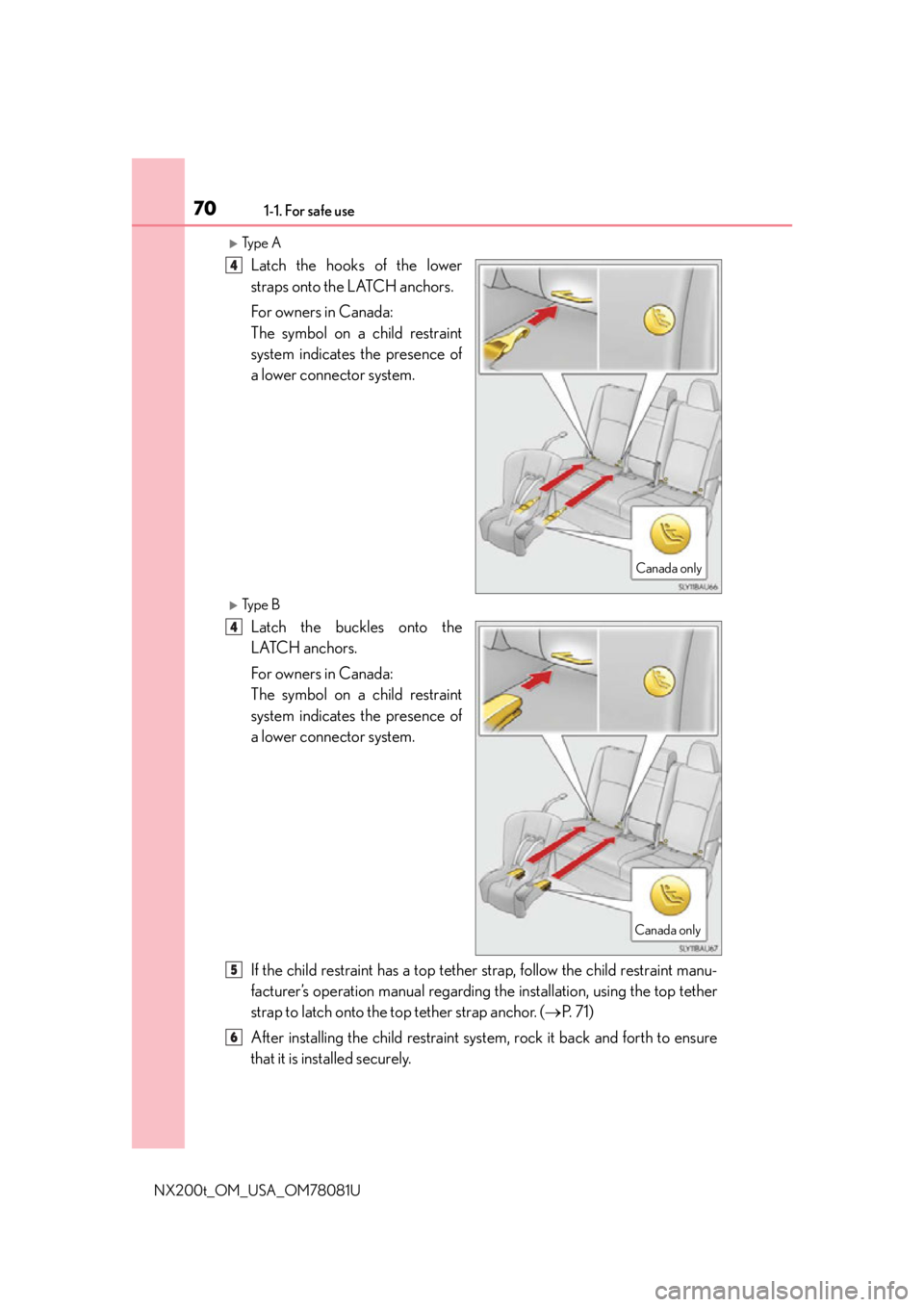
701-1. For safe use
NX200t_OM_USA_OM78081U
Ty p e A
Latch the hooks of the lower
straps onto the LATCH anchors.
For owners in Canada:
The symbol on a child restraint
system indicates the presence of
a lower connector system.
Ty p e B
Latch the buckles onto the
LATCH anchors.
For owners in Canada:
The symbol on a child restraint
system indicates the presence of
a lower connector system.
If the child restraint has a top tether strap, follow the child restraint manu-
facturer’s operation manual regarding the installation, using the top tether
strap to latch onto the top tether strap anchor. ( P. 7 1 )
After installing the child restraint syst em, rock it back and forth to ensure
that it is installed securely.
Canada only
4
Canada only
4
5
6
Page 71 of 660

711-1. For safe use
1
For safety and security
NX200t_OM_USA_OM78081U
■Laws and regulations pertaining to anchors
The LATCH system conforms to FMVSS225 or CMVSS210.2.
Child restraint systems conforming to FMVSS213 or CMVSS213 specifications can be
used.
This vehicle is designed to conform to SAE J1819.
■Anchor brackets (for top tether strap)
Anchor brackets are provided for
each rear seat.
Use anchor brackets when fixing the
top tether strap.
WA R N I N G
■When installing a child restraint system
Observe the following precautions.
Failure to do so may result in death or serious injury.
●Shake the child restraint system left and right, and forward and backward to ensure
that it has been securely installed.
●After securing a child restraint system, never adjust the seat.
●When using the LATCH anchors, be sure that there are no foreign objects around the
anchors and that the seat belt is not caught behind the child restraint system.
●Follow all installation instructions provided by the child restraint system manufacturer.
●When securing some types of child restraint systems in rear seats, it may not be possi-
ble to properly use the seat belts in positi ons next to the child restraint without inter-
fering with it or affecting se at belt effectiveness. Be sure your seat belt fits snugly
across your shoulder and low on your hips. If it does not, or if it interferes with the child
restraint, move to a different position. Failure to do so may result in death or serious
injury.
Using an anchor bracket (for top tether strap)
Anchor
brackets
Rear center seat
Outboard rear seats
Page 73 of 660

731-1. For safe use
1
For safety and security
NX200t_OM_USA_OM78081U
Open the anchor bracket cover,
latch the hook onto the anchor
bracket and tighten the top tether
strap.
Make sure the top tether strap is
securely latched.
When installing the child restraint
system with the head restraint being
lower, be sure to have the top tether
strap pass over the top of the head
restraint.
■Laws and regulations pertaining to anchors
The LATCH system conforms to FMVSS225 or CMVSS210.2.
Child restraint systems conforming to FMVSS213 or CMVSS213 specifications can be
used.
This vehicle is designed to conform to SAE J1819.
Hook
Top tether
strap2
WA R N I N G
■When installing a child restraint system
Observe the following precautions.
Failure to do so may result in death or serious injury.
●Firmly attach the top tether strap and make sure that the belt is not twisted.
●Do not attach the top tether strap to anything other than the anchor bracket.
●Shake the child restraint system left and right, and forward and backward to ensure
that it has been securely installed.
●After securing a child restraint system, never adjust the seat.
●Follow all installation instructions provided by the child restraint system manufacturer.
●Outboard rear seats: When installing the child restraint system with the head restraint
being raised, after the head restraint has been raised and then the anchor bracket has
been fixed, do not lower the head restraint.
●Rear center seat: When installing the chil d restraint system with the head restraint
being lowered, be sure to have the top tether strap pass over the top of the head
restraint. If the belt passes below the head restraint, it is possible that the child
restraint system may not be securely fixed.
NOTICE
■Anchor brackets (for top tether strap)
When not in use, make certain to close the lid. If it remains open, the lid may be dam-
aged.
Page 74 of 660

741-1. For safe use
NX200t_OM_USA_OM78081U
Exhaust gas precautions
Harmful substance to the human body are contained in exhaust gases if
inhaled.
WA R N I N G
Exhaust gases contain harmful carbon monoxi de (CO), which is colorless and odorless.
Observe the following precautions.
Failure to do so may cause exhaust gases enter the vehicle and may lead to an accident
caused by light-deadness, or may lead to death or a serious health hazard.
■Important points while driving
●Keep the back door closed.
●If you smell exhaust gases in the vehicle even when the back door is closed, open the
windows and have the vehicle inspected at your Lexus dealer as soon as possible.
■When parking
●If the vehicle is in a poorly ventilated area or a closed area, such as a garage, stop the
engine.
●Do not leave the vehicle with the engine running for a long time.
If such a situation cannot be avoided, park the vehicle in an open space and ensure
that exhaust fumes do not enter the vehicle interior.
●Do not leave the engine running in an area with snow build-up, or where it is snowing.
If snowbanks build up around the vehicle wh ile the engine is running, exhaust gases
may collect and enter the vehicle.
■Exhaust pipe
The exhaust system needs to be checked periodically. If there is a hole or crack caused
by corrosion, damage to a joint or abnormal exhaust noise, be sure to have the vehicle
inspected and repaired by your Lexus dealer.
Page 75 of 660

751-2. Theft deterrent system
1
For safety and security
NX200t_OM_USA_OM78081U
Engine immobilizer system
The indicator light flashes after the
engine switch has been turned off to
indicate that the system is operating.
The indicator light stops flashing after
the engine switch has been turned to
ACCESSORY or IGNITION ON
mode to indicate that the system has
been canceled.
■System maintenance
The vehicle has a maintenance-free type engine immobilizer system.
■Conditions that may cause the system to malfunction
●If the grip portion of the key is in contact with a metallic object
●If the key is in close proximity to or touching a key registered to the security system (key
with a built-in transponder chip) of another vehicle
■Certification for the engine immobilizer system
For vehicles sold in the U.S.A.
FCC ID: NI4TMIMB-3
This device complies with part 15 of the FC C Rules. Operation is subject to the following
two conditions: (1) This device may not caus e harmful interference; and (2) This device
must accept any interference received, incl uding interference that may cause undesired
operation.
Changes or modifications not expressly approved by the party responsible for compli-
ance could void the user’s authority to operate the equipment.
For vehicles sold in Canada
This device complies with Industry Canada licence-exempt RSSs. Operation is subject
to the following two conditions: (1) This de vice may not cause interference; and (2) This
device must accept any interference, includ ing interference that may cause undesired
operation of the device.
The vehicle’s keys have built-in transponder chips that prevent the engine
from starting if a key has not been prev iously registered in the vehicle’s on-
board computer.
Never leave the keys inside the vehicle when you leave the vehicle.
This system is designed to help prevent vehicle theft but does not guarantee
absolute security against all vehicle thefts.
Page 90 of 660

902. Instrument cluster
NX200t_OM_USA_OM78081U
WA R N I N G
■The information display at low temperatures
Allow the interior of the vehicle to warm up before using the liquid crystal information
display. At extremely low temperatures, th e information display monitor may respond
slowly, and display changes may be delayed.
For example, there is a lag between the driver's shifting and the new gear number
appearing on the display. This lag could cau se the driver to downshift again, causing
rapid and excessive engine braking and po ssibly an accident resulting in personal
death or injury.
NOTICE
■To prevent damage to the engine and its components
●Do not let the indicator needle of the tachometer enter the red zone, which indicates
the maximum engine speed.
●The engine may be overheating if the engine coolant temperature gauge is in the red
zone (H); or “Engine Coolant Temp High” is shown on the multi-information display.
In this case, immediately stop the vehicle in a safe place, and check the engine after it
has cooled completely. ( P. 5 8 4 )
Page 92 of 660

922. Instrument cluster
NX200t_OM_USA_OM78081U
Warning message display
Select to display warning messages and me asures to be taken if a malfunction is
detected. ( P. 5 5 7 )
Settings display
Select to change the meter display settings. ( P. 6 1 9 )
●Intuitive parking assist (if equipped)
Automatically displayed when the system is used. ( P. 2 7 0 )
The multi-information display is oper-
ated using the meter control switches. Select an item/change pages
Enter/Set
Return to the previous screen
Press:
Displays the screen registered to
When no screen has been registered, the drive information screen will be displayed.
Press and hold:
Registers the currently displayed screen to ( P. 6 1 9 )
The registration confirmation screen is di splayed. If the selected screen cannot be
registered, a registration failure message will be shown.
Items displayed can be switched by pressing or of the meter control
switches to select and pressing or .
■Current fuel consumption*1
Displays the current rate of fuel consumption
■Average fuel consumption (after reset*2/after start/after refuel)*1
Displays the average fuel consumptio n since the function was reset, the
engine was started, and the vehicle was refueled, respectively
Use the displayed average fuel consumption as a reference.
■Average vehicle speed (after reset*2/a f t e r s t a r t )*1
Displays the average vehicle speed since the function was reset and the
engine was started, respectively
Operating the meter control switches
1
2
3
4
Drive information
Page 93 of 660

932. Instrument cluster
2
Instrument cluster
NX200t_OM_USA_OM78081U
■Elapsed time (after reset*2/after start)*1
Displays the elapsed time since the function was reset and the engine was
started, respectively
■Distance (driving range/after start)*1
Displays the estimated maximum distance that can be driven with the quantity
of fuel remaining and the distance driven after the engine was started respec-
tively.
• This distance is computed based on your average fuel consumption. As a result,
the actual distance that can be driven may differ from that displayed.
• When only a small amount of fuel is added to the tank, the display may not be
updated.
When refueling, turn the engine switch off. If the vehicle is refueled without turning
the engine switch off, the display may not be updated.
■Eco Driving Indicator Zone Display
P. 9 4
■Boost Meter/Oil Temperature Gauge/Oil Pressure Gauge (if equipped)
Boost Meter:
Displays the boost pressure. The display changes colors when the set pres-
sure is exceeded.
Oil Temperature Gauge:
Displays the temperature of the engine oil. The display flashes when the
engine oil exceeds 284°F (140°C). ( P. 5 5 7 )
Oil Pressure Gauge:
Displays the oil pressure for the engine interior. A buzzer sounds and warning
message is displayed when the oil pressure gets low. ( P. 5 5 7 )
Depending on the road conditions, temperature, vehicle speed, etc., the actual
vehicle condition on the display screen may differ.
Use the display screen as a reference.
■G monitor (if equipped)
Displays the acceleration forces of the fr ont, back, left and right of the vehicle.
Also displays the turning angle of th e steering wheel, brake oil pressure,
accelerator opening.
• The actual vehicle conditions may differ from those on the display screen, depend- ing on the road conditions, outside temperature, vehicle speed, etc.
Use the display screen as a reference.
• If a battery terminal is disconnected and reconnected, the steering amount display
may be disabled temporarily. After drivin g the vehicle for a while, the display will
be enabled.
■Tire inflation pressure
Displays inflation pressure of each tire.
The inflation pressure of the spare tire will not be displayed.