change time LEXUS NX200T 2016 Owner's Manual
[x] Cancel search | Manufacturer: LEXUS, Model Year: 2016, Model line: NX200T, Model: LEXUS NX200T 2016Pages: 660, PDF Size: 9.96 MB
Page 269 of 660

2694-5. Using the driving support systems
4
Driving
NX200t_OM_USA_OM78081U
NOTICE
■To prevent damage to or incorrect operation of the LDA
Observe the following to ensure that the LDA system functions correctly
●Do not modify the headlights or attach stickers to the surface of the lights.
●Do not modify the suspension or replace it with non-genuine parts.
●Do not install or place anything on the hood or the grille. Also, do not install a grille
guard (bull bars, kangaroo bar, etc.).
●If your windshield needs repairs, contact your Lexus dealer.
●Do not overload with luggage
■ Lane recognition camera
Observe the following to ensure that the LDA system functions correctly
●Keep the windshield clean at all times.
Performance could be affected if the windshie ld is dirty, or if raindrops, condensation
or ice are adhering to the windshield.
●Do not spill liquids onto the lane recognition camera.
●Do not attach window tinting to the windshield.
●Do not install an antenna in fron t of the lane recognition camera.
●If the windshield area in front of the lane recognition camera is fogged up, use the
windshield defogger to remove the fog from that area. ( P. 4 2 5 )
When it is cold, using the he ater with air blowing to the feet may allow the upper part
of the windshield to fog up. This will have a negative effect on the images.
●Do not scratch the camera lens, or let it get dirty.
When cleaning the inside of the windshield , be careful not to get any glass cleaner,
etc., on the lens. Also, do not touch the lens.
For lens repair, contact your Lexus dealer.
●Do not change the installation position or direction of the lane recognition camera or
remove it.
The direction of the lane recognit ion camera is precisely adjusted.
●Do not subject the lane recognition camera to strong impact or force, and do not dis-
assemble the lane recognition camera.
●Do not replace windshield with non-genuine windshield.
Contact your Lexus dealer.
●Do not attach a sticker or other items to the
windshield near the lane recognition camera.
Page 304 of 660

3044-5. Using the driving support systems
NX200t_OM_USA_OM78081U
■Changing the alert timing of the pre-collision system
Each time the PCS switch is pressed,
the response to the distance
changes as follows. Far
Middle
*
Near
*:Default setting
■Turning off the pre-collision system
Press the PCS switch for 3 seconds
or more seconds.
The PCS warning light turns on and a
message is shown on the multi-infor-
mation display.
To turn on the system, press the PCS
switch again. The system is set to ON
each time the engine switch is turned
to IGNITION ON mode.
The radar sensor detects vehicles or
other obstacles on or near the road
ahead and determines whether a colli-
sion is imminent based on the position,
speed, and heading of the obstacles.
Changing the pre-collision system
1
2
3
Radar sensor
Page 343 of 660
3435-3. Using the audio system
5
Lexus Display Audio system
NX200t_OM_USA_OM78081U
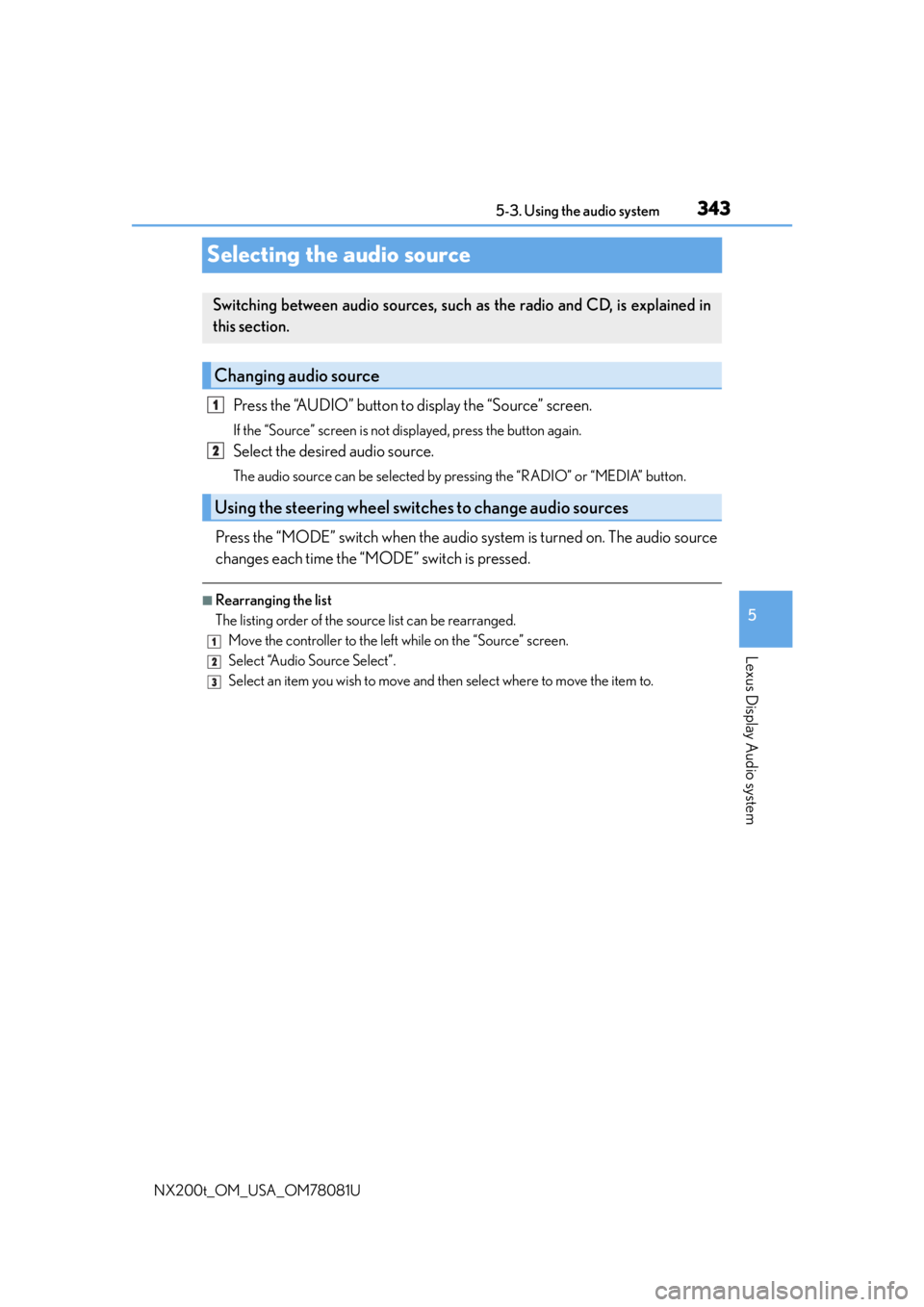
Selecting the audio source
Press the “AUDIO” button to display the “Source” screen.
If the “Source” screen is not displayed, press the button again.
Select the desired audio source.
The audio source can be selected by pressing the “RADIO” or “MEDIA” button.
Press the “MODE” switch when the audio system is turned on. The audio source
changes each time the “MODE” switch is pressed.
■Rearranging the list
The listing order of the sour ce list can be rearranged.
Move the controller to the left while on the “Source” screen.
Select “Audio Source Select”.
Select an item you wish to move and th en select where to move the item to.
Switching between audio sources, such as the radio and CD, is explained in
this section.
Changing audio source
Using the steering wheel switches to change audio sources
1
2
1
2
3
Page 355 of 660

3555-4. Using the radio
5
Lexus Display Audio system
NX200t_OM_USA_OM78081U
■XM Radio Services — Descriptions
●Radio and Entertainment
XM offers more than 170 satellite radio channels of commercial-free music and pre-
mier sports, news, talk, and entertainment. XM is broadcast via satellites to millions of
listeners across the continental United States . XM subscribers listen to XM on satellite
radio receivers for the car, home, and port able use. More information about XM is
available online at www.siriusxm.com
(U.S.A.) or www.xmradio.ca (Canada).
●Satellite tuner
The tuner supports only Audio Services (M usic and Talk) and the accompanying Text
Information of XM
® Satellite Radio.
■XM Radio Services — Subscription Instructions
For XM Services requiring a subscription (s uch as XM Radio), the following paragraph
shall be included.
Required XM Radio monthly subscriptions sold separately after trial period. Subscrip-
tion fee is consumer only. All fees and prog ramming subject to change. Subscriptions are
subject to the Customer Agreement available at www.siriusxm.com
(U.S.A.) or
www.xmradio.ca
(Canada) XM service only availa ble in the 48 contiguous United
States and 10 Canadian provinces. © 2011 Sirius XM Radio Inc. Sirius, XM and all
related marks and logos are trademarks of Sirius XM Radio Inc. All other marks, channel
names and logos are the property of their respective owners.
For more information, program schedules, and to subscribe or extend subscription after
complimentary trial period; more information is available at:
U.S.A. Customers:
Visit w w w.siriusxm.com or call 1-877-515-3987
Canadian Customers:
Visit w w w.xmradio.ca
or call 1-877-438-9677
●Radio ID
You will need the radio ID when activating XM service or reporting a problem. If
“Ch000” is selected using the “TUNE•SCRO LL” knob, the ID code, which is 8 alpha-
numeric characters, will be displayed. If anot her channel is selected, the ID code will no
longer be displayed. The channel (000) alte rnates between displaying the radio ID and
the specific radio code.
■XM Radio Services — Legal Disclaimers and Warnings
●Fees and Taxes — Subscription fee, taxes, on e time activation fee, and other fees may
apply. Subscription fee is consumer only. All fees and programming subject to change.
Subscriptions subject to Customer Agreement available at www.siriusxm.com
(U.S.A.)
or www.xmradio.ca
(Canada) XM service only availa ble in the 48 contiguous United
States and Canada
*.
*: Canada — some deterioration of service may occur in extreme northern latitudes.
This is beyond the control of XM Satellite Radio.
Explicit Language Notice — Channels with frequent explicit language are indicated
with an “XL” preceding the channel name. Channel blocking is available for XM Satel-
lite Radio receivers by notifying XM at;
U.S.A. Customers:
Visit www.siriusxm.com or calling 1-877-515-3987
Canadian Customers:
Visit w w w.xmradio.ca
or calling 1-877-438-9677
Page 356 of 660

3565-4. Using the radio
NX200t_OM_USA_OM78081U It is prohibited to copy, decompile, disassemble, reverse engineer, hack, manipulate, or
otherwise make available any technology or software incorporated in receivers compat-
ible with the XM Satellite Ra
dio System or that support the XM website, the Online Ser-
vice or any of its content. Furthermore, the AMBE
® voice compression software
included in this product is protected by intellectual property rights including patent
rights, copyrights, and trade secrets of Digital Voice Systems, Inc.
Note: this applies to XM receivers only and not XM Ready devices.
■If the satellite radio does not operate normally
If a problem occurs with the XM tuner, a me ssage will appear on the screen. Refer to the
table below to identify the problem, and take the suggested corrective action.
Contact the XM Listener Care Center at 1-877-515-3987 (U.S.A.) or 1-877-438-
9677 (Canada).
SAT Check Antenna
The XM antenna is not connected. Check whether the XM
antenna cable is attached securely.
There is a short-circuit in the antenna or the surrounding
antenna cable. See a Lexus certified dealer.
SAT Ch Unauthorized
Yo u h a v e n o t s u b s c r i b e d t o X M Satellite Radio. The radio is
being updated with the latest encryption code. Contact XM
Satellite Radio for subscription information. When a con-
tract is canceled, you can choose “Ch000” and all free-to-
air channels.
The premium channel you select ed is not authorized. Wait
for about 2 seconds until the radio returns to the previous
channel or “Ch001”. If it does not change automatically,
select another channel. To listen to the premium channel,
contact XM Satellite Radio.
SAT No SignalThe XM signal is too weak at the current location. Wait until
your vehicle reaches a location with a stronger signal.
SAT LoadingThe unit is acquiring audio or program information. Wait
until the unit has received the information.
SAT Channel Off AirThe channel you selected is not broadcasting any program-
ming. Select another channel.
-----There is no song/program title or artist name/feature asso-
ciated with the channel at that time. No action is required.
SAT Chan Unavailable
The channel you selected is no longer available. Wait for
about 2 seconds until the radio returns to the previous
channel or “Ch001”. If it does not change automatically,
select another channel.
Page 365 of 660
3655-6. Using an external device
5
Lexus Display Audio system
NX200t_OM_USA_OM78081U
●“Made for iPod” and “Made for iPhone” mean that an electronic accessory has been
designed to connect specifically to an iPod , or iPhone, respectively, and has been certi-
fied by the developer to meet Apple performance standards.
●Apple is not responsible for the operation of this device or its compliance with safety
and regulatory standards. Please note that th e use of this accessory with iPod or iPhone
may affect wireless performance.
●iPhone, iPod, iPod classic, iPod nano and iPod touch are trademarks of Apple Inc., reg-
istered in the U.S. and other countries.
■iPod cover art
●Depending on the iPod and songs in the iPod, iPod cover art may be displayed.
●This function can be changed to on/off. (P. 3 4 7 )
●It may take time to display iPod cover art, and the iPod may not be operated while the
cover art display is in process.
■iPod functions
●When an iPod is connected and the audio sour ce is changed to iPod mode, the iPod will
resume play from the same poin t in which it was last used.
●Depending on the iPod that is connected to the system, certain functions may not be
available. If a function is unavailable due to a malfunction (as opposed to a system spec-
ification), disconnecting the device and reconnecting it may resolve the problem.
●Depending on the iPod, while connected to the system, the iPod cannot be operated
with its own controls. It is necessary to use the controls of the vehicle’s audio system
instead.
●When the battery level of an iPod is very low, the iPod may not operate. If so, charge the
iPod before use.
●Compatible models (P. 366)
■iPod problems
To resolve most problems encountered when using your iPod, disconnect your iPod from
the vehicle iPod connection and reset it. For in structions on how to reset your iPod, refer
to your iPod Owner’s Manual.
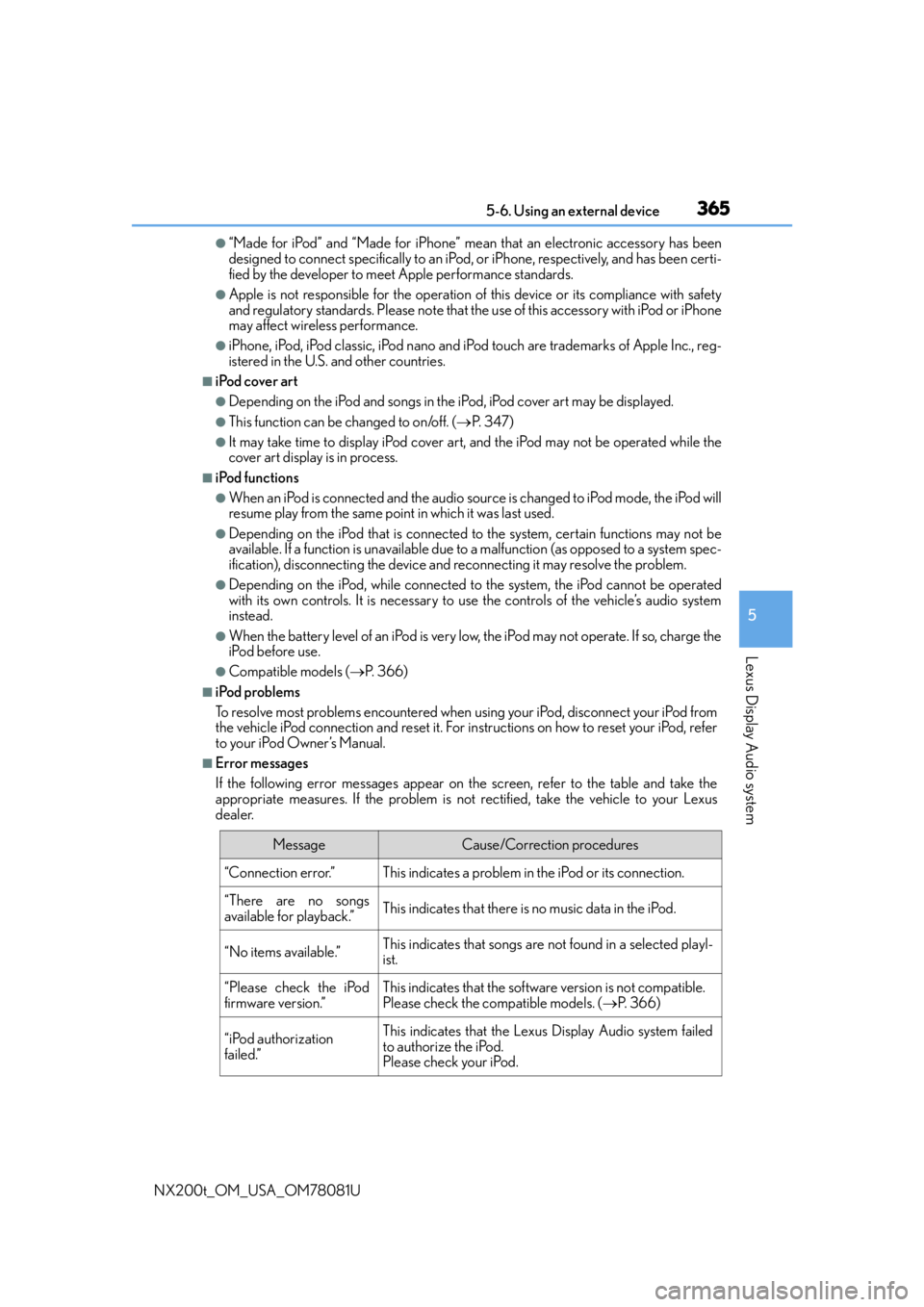
■Error messages
If the following error messages appear on the screen, refer to the table and take the
appropriate measures. If the pr oblem is not rectified, take the vehicle to your Lexus
dealer.
MessageCause/Correction procedures
“Connection error.”This indicates a problem in the iPod or its connection.
“There are no songs
available for playback.”This indicates that there is no music data in the iPod.
“No items available.”This indicates that songs are not found in a selected playl-
ist.
“Please check the iPod
firmware version.”This indicates that the software version is not compatible.
Please check the co mpatible models. (P. 3 6 6 )
“iPod authorization
failed.”This indicates that the Lexus Display Audio system failed
to authorize the iPod.
Please check your iPod.
Page 389 of 660
3895-9. Bluetooth® Phone
5
Lexus Display Audio system
NX200t_OM_USA_OM78081U
Phone number containing a “w” symbol
When the “w” symbol is dialed in an outgoing call, you need to go to the
“Release Tones” screen to dial the following digits. Move the controller to the
left and then select “Release Tones”.
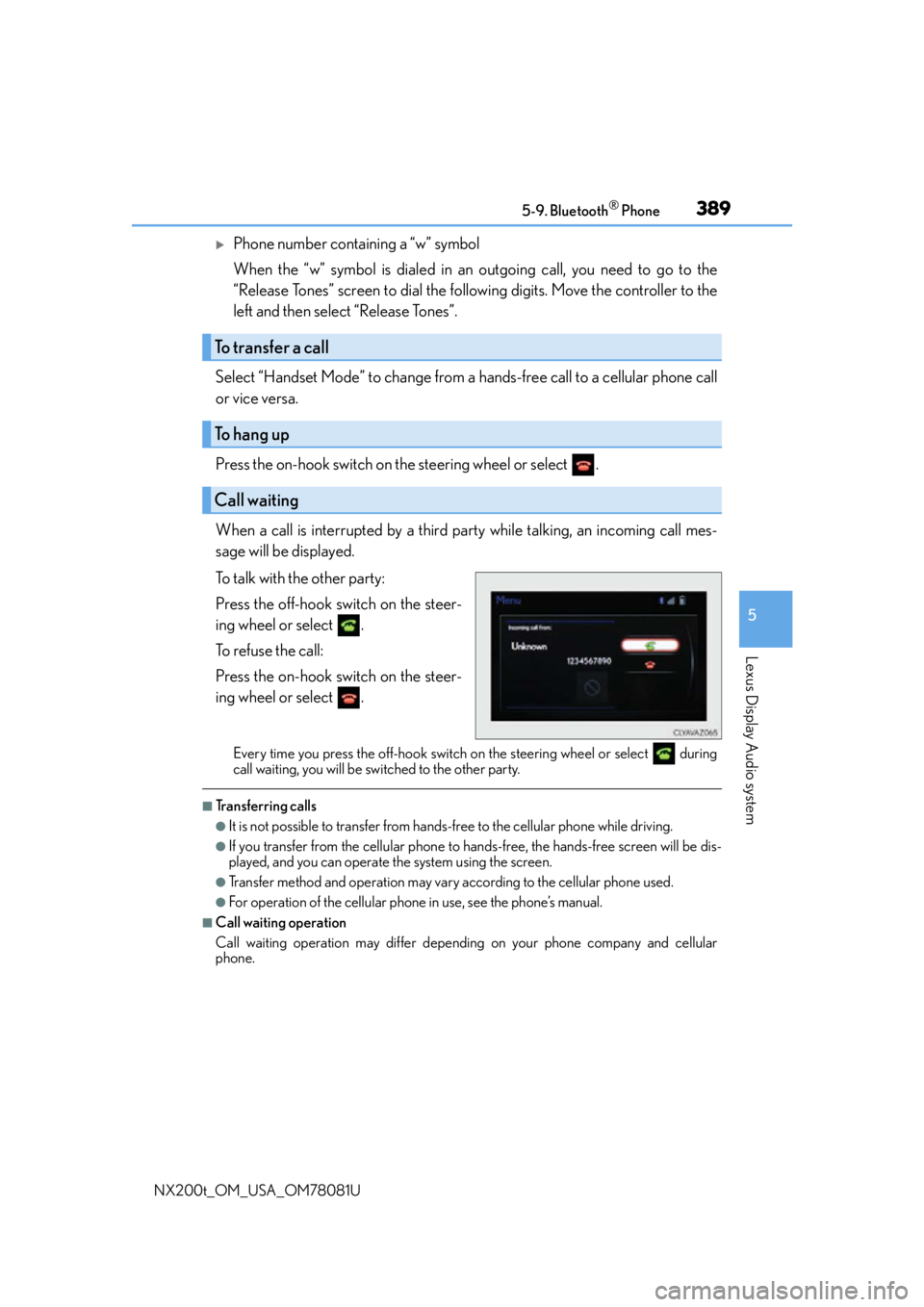
Select “Handset Mode” to change from a hands-free call to a cellular phone call
or vice versa.
Press the on-hook switch on the steering wheel or select .
When a call is interrupted by a third party while talking, an incoming call mes-
sage will be displayed.
To talk with the other party:
Press the off-hook switch on the steer-
ing wheel or select .
To refuse the call:
Press the on-hook switch on the steer-
ing wheel or select .
Every time you press the off-hook switch on the steering wheel or select during
call waiting, you will be switched to the other party.
■Transferring calls
●It is not possible to transfer from hand s-free to the cellular phone while driving.
●If you transfer from the cellular phone to ha nds-free, the hands-free screen will be dis-
played, and you can operate the system using the screen.
●Transfer method and operation may vary according to the cellular phone used.
●For operation of the cellular phone in use, see the phone’s manual.
■Call waiting operation
Call waiting operation may differ depend ing on your phone company and cellular
phone.
To transfer a call
To hang up
Call waiting
Page 422 of 660
4226-1. Using the air conditioning system and defogger
NX200t_OM_USA_OM78081U
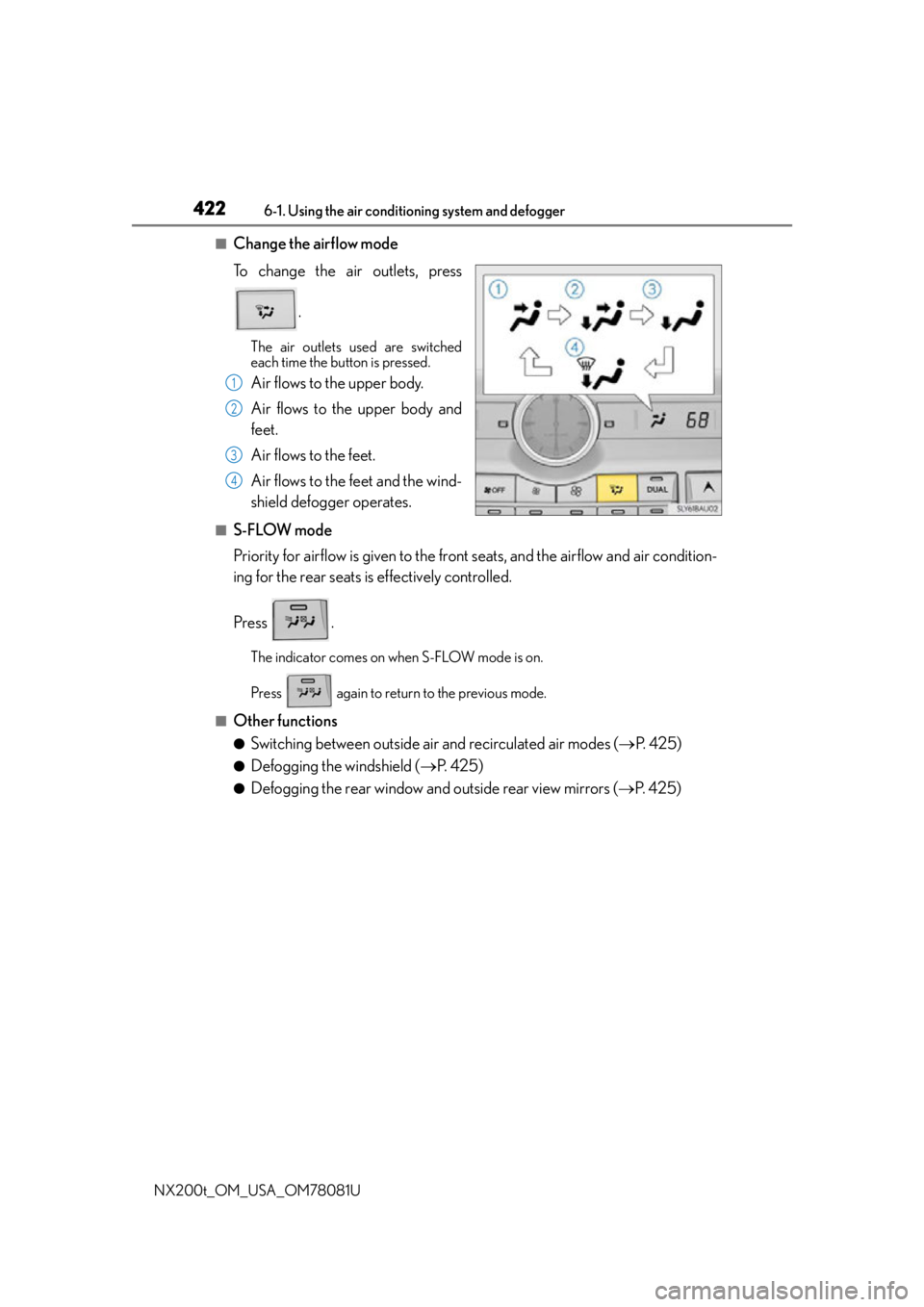
■Change the airflow mode
To change the air outlets, press .
The air outlets used are switched
each time the button is pressed.
Air flows to the upper body.
Air flows to the upper body and
feet.
Air flows to the feet.
Air flows to the feet and the wind-
shield defogger operates.
■S-FLOW mode
Priority for airflow is given to the front seats, and the airflow and air condition-
ing for the rear seats is effectively controlled.
Press .
The indicator comes on when S-FLOW mode is on.
Press again to return to the previous mode.
■Other functions
●Switching between outside air and recirculated air modes (P. 4 2 5 )
●Defogging the windshield ( P. 4 2 5 )
●Defogging the rear window and outside rear view mirrors ( P. 4 2 5 )
1
2
3
4
Page 426 of 660

4266-1. Using the air conditioning system and defogger
NX200t_OM_USA_OM78081U
■Micro dust and pollen filter
Pollen is removed from the air and the air flows to the upper part of the body.
Select on the option control screen.
When the micro dust and pollen filter is on, is displayed on the air condition-
ing control screen.
In order to prevent the windshield from fo gging up when the outside air is cold, the
dehumidification function may operate.
The pollens are filtered out even if the micro dust and pollen filter is turned off.
■Windshield wiper de-icer (if equipped)
This feature is used to prevent ice fr om building up on the windshield and
wiper blades.
Select on the option control screen.
When the windshield wiper de-icer is on , is displayed on the air condition-
ing control screen.
The windshield wiper de-icer will automati cally turn off after a period of time.
■Location of air outlets
The air outlets and air volume
changes according to the selected
air flow mode.
Air outlets
Page 427 of 660

4276-1. Using the air conditioning system and defogger
6
Interior features
NX200t_OM_USA_OM78081U
■Adjusting the position of and opening and closing the air outlets
Direct air flow to the left or right, up or down
Turn the knob to open or close the vent
■Registering air conditioning settings to elec tronic keys (vehicles with driving position
memory)
●Unlocking the vehicle using an electronic ke y and turning the engine switch to IGNI-
TION ON mode will recall that key’s registered air conditioning settings.
●When the engine switch is tu rned off, the current air conditioning settings will automat-
ically be registered to the electronic key that was used to unlock the vehicle.
●The system may not operate correctly if more th an one electronic key is in the vicinity or
if the smart access system with push-button start is used to unlock a passenger door.
●The doors that can recall the air conditioning setting when unlocked using the smart
access system with push-b utton start can be changed.
* For details, contact your Lexus
dealer.
*: The doors that can recall the driving positi on memory are changed at the same time.
■Using automatic mode
Fan speed is adjusted automatically accordin g to the temperature setting and the ambi-
ent conditions.
Therefore, the fan may stop for a while until warm or cool air is ready to flow immediately
after the “AUTO” button is pr essed or “AUTO” is selected.
■When the outside temperature exceeds 75 F (24 C) and the air conditioning system
is on
●In order to reduce the air conditioning po wer consumption, the air conditioning system
may switch to recirculated air mode automatically.
This may also reduce fuel consumption.
●Recirculated air mode is selected as a defaul t mode when the engine switch is turned to
IGNITION ON mode.
●It is possible to switch to outside air mode at any time by pressing .
FrontRear
1
2