warning LEXUS NX200T 2016 Workshop Manual
[x] Cancel search | Manufacturer: LEXUS, Model Year: 2016, Model line: NX200T, Model: LEXUS NX200T 2016Pages: 660, PDF Size: 9.96 MB
Page 268 of 660

2684-5. Using the driving support systems
NX200t_OM_USA_OM78081U
WA R N I N G
■Before using the LDA
Do not over rely on the LDA. The LDA does not drive the vehicle automatically, nor
does it reduce the amount of care you need to take. As such, the driver must always
assume full responsibility for understandin g his/her surroundings, for operating the
steering wheel to correct the driving line, and for driving safely. Also, take occasional
rests from fatigue due to driving over long periods of time, etc.
Inappropriate or negligent driving co uld lead to an unexpected accident.
■Do not drive without holding the steering wheel
While the steering control function is operating, when the system judges that the vehi-
cle is being driven without holding the steering wheel, a warning message is displayed.
( P. 2 6 2 )
Inappropriate steering wheel operations an d/or negligent driving could lead to an
unexpected accident. When driving, firmly ho ld the steering wheel and keep safe driv-
ing in mind.
■To avoid operating the LDA by mistake
Switch the LDA off using the LDA switch when not in use. ( P. 2 6 3 )
■Situations unsuitable for LDA
Do not use the LDA in any of the following situations.
Otherwise, the system may not function correctly and could result in an accident.
●When driving with tire chains, a spare tire, or similar equipment
●When a tire with a different structure, maker, brand, or tread pattern is used.
●When remain tread of the tire or the air pressure is insufficient
●When restructuring the suspension
●When there are objects or structures along the roadside that might be misinterpreted
as lane markers (such as guardrails, a curb, reflector posts, etc.)
●When driving on snowy roads
●When pavement lane markers are difficult to see due to rain, snow, fog, sand, dust,
etc.
●When there are visible lines on the pavement from road repairs, or if the remains of
old lane markers are still visible on the road
●When driving on a road with lane closures due to maintenance, or when driving in a
temporary lane
●When driving on road surfaces that are slippery from rain, snow, etc.
●When driving in traffic lanes other than highways and freeway
●When driving through construction areas
Page 303 of 660

3034-5. Using the driving support systems
4
Driving
NX200t_OM_USA_OM78081U
PCS (Pre-Collision System)
◆Pre-collision warning
When a high possibility of a frontal
collision is detected, a buzzer
sounds and a message is shown on
the multi-information display to urge
the driver to take evasive action.
◆Pre-collision brake assist
When there is a high possibility of a frontal collision, the system applies greater brak-
ing force in relation to how strongly the brake pedal is depressed.
◆Pre-collision braking
When there is a high possibility of a fronta l collision, the system warns the driver using
warning display and buzzer. If the system determines that a collision is unavoidable,
the brakes are automatically applied to reduce the collision speed.
◆Suspension control (vehicles with Ad aptive Variable Suspension system)
When the system determines that there is a high possibility of a frontal colli-
sion, the operation of Adaptive Variable Suspension system ( P. 2 9 8 ) o p t i -
mally controls the damping force of the shock absorber.
: If equipped
When the radar sensor detects possibilit y of a frontal collision, brakes are
automatically engaged to lessen im pact as well as vehicle damage.
The alert timing for the pre-collision system can be changed or turned ON/
OFF, as necessary, by operating the switch. ( P. 304)
Page 304 of 660

3044-5. Using the driving support systems
NX200t_OM_USA_OM78081U
■Changing the alert timing of the pre-collision system
Each time the PCS switch is pressed,
the response to the distance
changes as follows. Far
Middle
*
Near
*:Default setting
■Turning off the pre-collision system
Press the PCS switch for 3 seconds
or more seconds.
The PCS warning light turns on and a
message is shown on the multi-infor-
mation display.
To turn on the system, press the PCS
switch again. The system is set to ON
each time the engine switch is turned
to IGNITION ON mode.
The radar sensor detects vehicles or
other obstacles on or near the road
ahead and determines whether a colli-
sion is imminent based on the position,
speed, and heading of the obstacles.
Changing the pre-collision system
1
2
3
Radar sensor
Page 305 of 660
3054-5. Using the driving support systems
4
Driving
NX200t_OM_USA_OM78081U
■The pre-collision system is operational when
The pre-collision system is on (P. 304) and the following conditions are met:
●Pre-collision warning:
• Vehicle speed is greater th an about 10 mph (15 km/h).
• The speed at which your vehicle is approaching the obstacle or the vehicle running ahead of you is greater than about 7 mph (10 km/h).
●Pre-collision brake assist:
• The VSC is not turned off.
• Vehicle speed is greater than about 19 mph (30 km/h).
• The speed at which your vehicle is approaching the obstacle or the vehicle running
ahead of you is greater than about 19 mph (30 km/h).
• The brake pedal is depressed.
●Pre-collision braking:
• The VSC is not turned off.
• Vehicle speed is greater th an about 10 mph (15 km/h).
• The speed at which your vehicle is approaching the obstacle or the vehicle running ahead of you is greater than about 7 mph (10 km/h).
●Suspension control (vehicles with Ad aptive Variable Suspension system):
• Vehicle speed is greater than about 4 mph (5 km/h).
• The speed at which your vehicle is approaching the obstacle or the vehicle running ahead of you is greater than about 19 mph (30 km/h).
■Conditions that may trigger the system even if there is no possibility of a collision
In any of the following situations where the fr ontal area of the radar sensor is interrupted,
the radar sensor may detect possibility of a fr ontal collision and the system may be acti-
vated.
●When passing by an oncoming vehicle in a curve or a turn to the right or the left
●When rapidly approaching an obstacle ahead (e.g. preceding vehicle, toll gate barrier,
etc.)
●When there is a structural ob ject (billboard, low ceiling, fluorescent light, etc.) above
the uphill road ahead
●When driving on a narrow road or through under a low overhead structure (bridge,
tunnel, fly-under, etc.)
●When driving on an uneven road surface
●When there is a metal object, bump, or protrusion on the road surface
●When vehicle’s front part is raised or lowered depending on loading conditions
●When the direction of radar sensor is misa ligned by strong impact applied on an area
around the radar sensor, etc.
●When there is an obstacle (guard rail, etc.) by the roadside at the entrance to a curve
●When the front of your vehicle is pointing upwards (caused by towing a trailer or put-
ting a heavy load in the luggage compartment, etc.)
When the system is activated in the situations described above, there is also a possibility
that the brakes may be applied with a force greater than normal.
Page 306 of 660

3064-5. Using the driving support systems
NX200t_OM_USA_OM78081U
■Obstacles not detected
The sensor cannot detect plasti c obstacles such as traffic cones. There may also be occa-
sions when the sensor cannot detect pedestrians, animals, bicycles, motorcycles, trees,
or snowdrifts.
■Situations in which the pre-collision system does not function properly
The system may not function effectively in situations such as the following:
●On roads with sharp bends or uneven surfaces
●If a vehicle suddenly moves in front of your vehicle, such as at an intersection
●If a vehicle suddenly cuts in front of your vehicle, such as when overtaking
●In inclement weather such as heavy rain, fog, snow or sand storms
●When your vehicle is skidding with the VSC system off
●When an extreme change in vehicle height occurs
●When the radar sensor moves off position due to its surrounding area being subjected
to a strong impact
●Due to greatly turning the wheel when an obstacle suddenly appears ahead
■Automatic cancelation of the pre-collision system
When a malfunction occurs due to sensor contamination, etc., that results in the sensors
being unable to detect obstacles, the pre-collision syst em will be automatically disabled.
In this case, the system will not activate even if there is a collision possibility.
■When there is a malfunction in the system, or if the system is temporarily unavailable
The PCS warning light flashes and a warning message is shown on the multi-information
display. If a warning message is shown on th e multi-information display, read the message
and follow the instructions.
■When the TRAC and VSC are turned off
●When the TRAC and VSC operations are turned off ( P. 299), the pre-collision
brake assist and pre-collision braking are also turned off. However, the alert function
operates.
●The PCS warning light turns on and the “V SC Turned Off Pre-Collision Brake System
Unavailable” is shown on the multi-information display.
■Certification
For vehicles sold in the U.S.A.
FCC ID: HYQDNMWR007
This device complies with part 15 of the FC C Rules. Operation is subject to the following
two conditions: (1) This device may not caus e harmful interference, and (2) this device
must accept any interference received, incl uding interference that may cause undesired
operation.
FCC WARNING
Changes or modifications not expressly approved by the party responsible for compli-
ance could void the user’s authority to operate the equipment.
Radio frequency radiation exposure Information:
This equipment complies with FCC radiation exposure limits set forth for an uncontrolled
environment.
This equipment should be installed and operated with minimum distance of 20 cm
between the radiator (antenna) and your body.
This transmitter must not be co-located or operating in conjunction with any other
antenna or transmitter.
Page 310 of 660

3104-5. Using the driving support systems
NX200t_OM_USA_OM78081U
■The BSM outside rear view mirror indicators visibility
When under strong sunlight, the BSM outside rear view mirror indicator may be difficult
to see.
■Rear Cross Traffic Alert buzzer hearing
Rear Cross Traffic Alert function may be difficult to hear over loud noises such as high
audio volume.
■When “Blind Spot Monitor Unavailable” is shown on the multi-information display
Water, snow mud, etc., may be built up in the vicinity of the sensor area of bumper.
( P. 311) Removing the water, snow, mud, etc., from the vicinity of the sensor area
bumper should return it to normal. Also, the sensor may not function normally when used
in extremely hot or cold weather.
■When “Blind Spot Monitor System Malfunct ion” is shown on the multi-information
display
There may be a sensor malfunction or volta ge abnormality. Have the vehicle inspected at
a Lexus dealer.
■Certification for the Blind Spot Monitor system
For vehicles sold in the U.S.A.
FCC ID: OAYSRR2A
This device complies with part 15 of the FC C Rules. Operation is subject to the following
two conditions:
(1) This device may not cause harmful interference, and
(2) this device must accept any interference received, including interference that may cause undesired operation.
FCC Warning
Changes or modifications not expressly approved by the party responsible for compli-
ance could void the user’s authority to operate the equipment.
For vehicles sold in Canada
Applicable law: Canada 310
This device complies with Industry Canada licence-exempt RSS standard(s). Operation
is subject to the following two conditions: (1) this device may not cause interference, and
(2) this device must accept any interference, including interference that may cause
undesired operation of the device.
Frequency bands: 24.05-24.25 GHz
Output power: less than 20 milliwatts
Page 320 of 660

3204-6. Driving tips
NX200t_OM_USA_OM78081U
NOTICE
■Repairing or replacing snow tires
Request repairs or replacement of snow tires from Lexus dealers or legitimate tire
retailers.
This is because the removal and attachment of snow tires affects the operation of the
tire pressure warning valves and transmitters.
■Fitting tire chains
The tire pressure warning valves and transmitters may not function correctly when tire
chains are fitted.
Page 355 of 660

3555-4. Using the radio
5
Lexus Display Audio system
NX200t_OM_USA_OM78081U
■XM Radio Services — Descriptions
●Radio and Entertainment
XM offers more than 170 satellite radio channels of commercial-free music and pre-
mier sports, news, talk, and entertainment. XM is broadcast via satellites to millions of
listeners across the continental United States . XM subscribers listen to XM on satellite
radio receivers for the car, home, and port able use. More information about XM is
available online at www.siriusxm.com
(U.S.A.) or www.xmradio.ca (Canada).
●Satellite tuner
The tuner supports only Audio Services (M usic and Talk) and the accompanying Text
Information of XM
® Satellite Radio.
■XM Radio Services — Subscription Instructions
For XM Services requiring a subscription (s uch as XM Radio), the following paragraph
shall be included.
Required XM Radio monthly subscriptions sold separately after trial period. Subscrip-
tion fee is consumer only. All fees and prog ramming subject to change. Subscriptions are
subject to the Customer Agreement available at www.siriusxm.com
(U.S.A.) or
www.xmradio.ca
(Canada) XM service only availa ble in the 48 contiguous United
States and 10 Canadian provinces. © 2011 Sirius XM Radio Inc. Sirius, XM and all
related marks and logos are trademarks of Sirius XM Radio Inc. All other marks, channel
names and logos are the property of their respective owners.
For more information, program schedules, and to subscribe or extend subscription after
complimentary trial period; more information is available at:
U.S.A. Customers:
Visit w w w.siriusxm.com or call 1-877-515-3987
Canadian Customers:
Visit w w w.xmradio.ca
or call 1-877-438-9677
●Radio ID
You will need the radio ID when activating XM service or reporting a problem. If
“Ch000” is selected using the “TUNE•SCRO LL” knob, the ID code, which is 8 alpha-
numeric characters, will be displayed. If anot her channel is selected, the ID code will no
longer be displayed. The channel (000) alte rnates between displaying the radio ID and
the specific radio code.
■XM Radio Services — Legal Disclaimers and Warnings
●Fees and Taxes — Subscription fee, taxes, on e time activation fee, and other fees may
apply. Subscription fee is consumer only. All fees and programming subject to change.
Subscriptions subject to Customer Agreement available at www.siriusxm.com
(U.S.A.)
or www.xmradio.ca
(Canada) XM service only availa ble in the 48 contiguous United
States and Canada
*.
*: Canada — some deterioration of service may occur in extreme northern latitudes.
This is beyond the control of XM Satellite Radio.
Explicit Language Notice — Channels with frequent explicit language are indicated
with an “XL” preceding the channel name. Channel blocking is available for XM Satel-
lite Radio receivers by notifying XM at;
U.S.A. Customers:
Visit www.siriusxm.com or calling 1-877-515-3987
Canadian Customers:
Visit w w w.xmradio.ca
or calling 1-877-438-9677
Page 406 of 660

4065-11. Bluetooth®
NX200t_OM_USA_OM78081U
■Certification
FCC ID:AJDK066
IC:775E-K066
NOTE:
This device complies with Part 15 of FCC Rules and Industry Canada licence-exempt
RSS standard(s). Operation is subject to the following two conditions: (1) this device may
not cause interference, and (2) this device mu st accept any interference, including inter-
ference that may cause undesired operation of this device.
Le présent appareil est conforme aux la partie 15 des règles de la FCC et CNR
d’Industrie Canada applicables aux appareils radio exempts de licence. L’exploitation est
autorisée aux deux conditions suivantes : (1) l’ appareil ne doit pas produire de brouillage,
et (2) l’utilisateur de l’appare il doit accepter tout brouillage radioélectrique subi, même si
le brouillage est susceptible d’en compromettre le fonctionnement.
FCC WARNING:
Changes or modifications not expressly approved by the party responsible for compli-
ance could void the user’s authority to operate the equipment.
CAUTION:
This equipment complies with FCC/IC radiat ion exposure limits set forth for an uncon-
trolled environment and meets the FCC radio frequency (RF) Exposure Guidelines in
Supplement C to OET65 and RSS-102 of the IC radio frequency (RF) Exposure rules.
This equipment has very low levels of RF energy that it deemed to comply without maxi-
mum permissive exposure evaluation (MPE). But it is desirable that it should be installed
and operated keeping the radiator at least 20 cm or more away from person’s body
(excluding extremities: hand s, wrists, feet and ankles).
Cet équipement est conforme aux limites d’exposition aux rayonnements énoncées
pour un environnement non contrôlé et respec te les règles les radioélectriques (RF) de
la FCC lignes directrices d’exposition dans le Supplément C à OET65 et d’exposition
aux fréquences radioélectriques (RF) CNR-102 de l’IC. Cet équipement émet une
énergie RF très faible qui est considérée conforme sans évaluation de l’exposition
maximale autorisée. Cependant, cet équipement doit être installé et utilisé en gardant
une distance de 20 cm ou plus entre le dispositif rayonnant et le corps (à l’exception des
extrémités : mains, poignets, pieds et chevilles).
Co-Location:
This transmitter must not be co-located or operated in conjunction with any other
antenna or transmitter.
Under Industry Canada regulations, this radio transmitter may only operate using an
antenna of a type and maximum (or lesser) gain approved for the transmitter by Industry
Canada. To reduce potential radio interference to other users, the antenna type and its
gain should be so chosen that the equivalent isotropically radiated power (e.i.r.p.) is not
more than that necessary for successful communication.
Conformément à la réglementation d’Indust rie Canada, le présent émetteur radio peut
fonctionner avec une antenne d’un type et d’un gain maximal (ou inférieur) approuvé
pour l’émetteur par Industrie Canada. Dans le but de réduire les risques de brouillage
radioélectrique à l’intention des autres utilisateurs, il faut choisir le type d’antenne et son
gain de sorte que la puissance isotrope rayonnée équivalente (p.i.r.e.) ne dépasse pas
l’intensité nécessaire à l’établisseme nt d’une communication satisfaisante.
Page 441 of 660
4416-3. Using the storage features
6
Interior features
NX200t_OM_USA_OM78081U
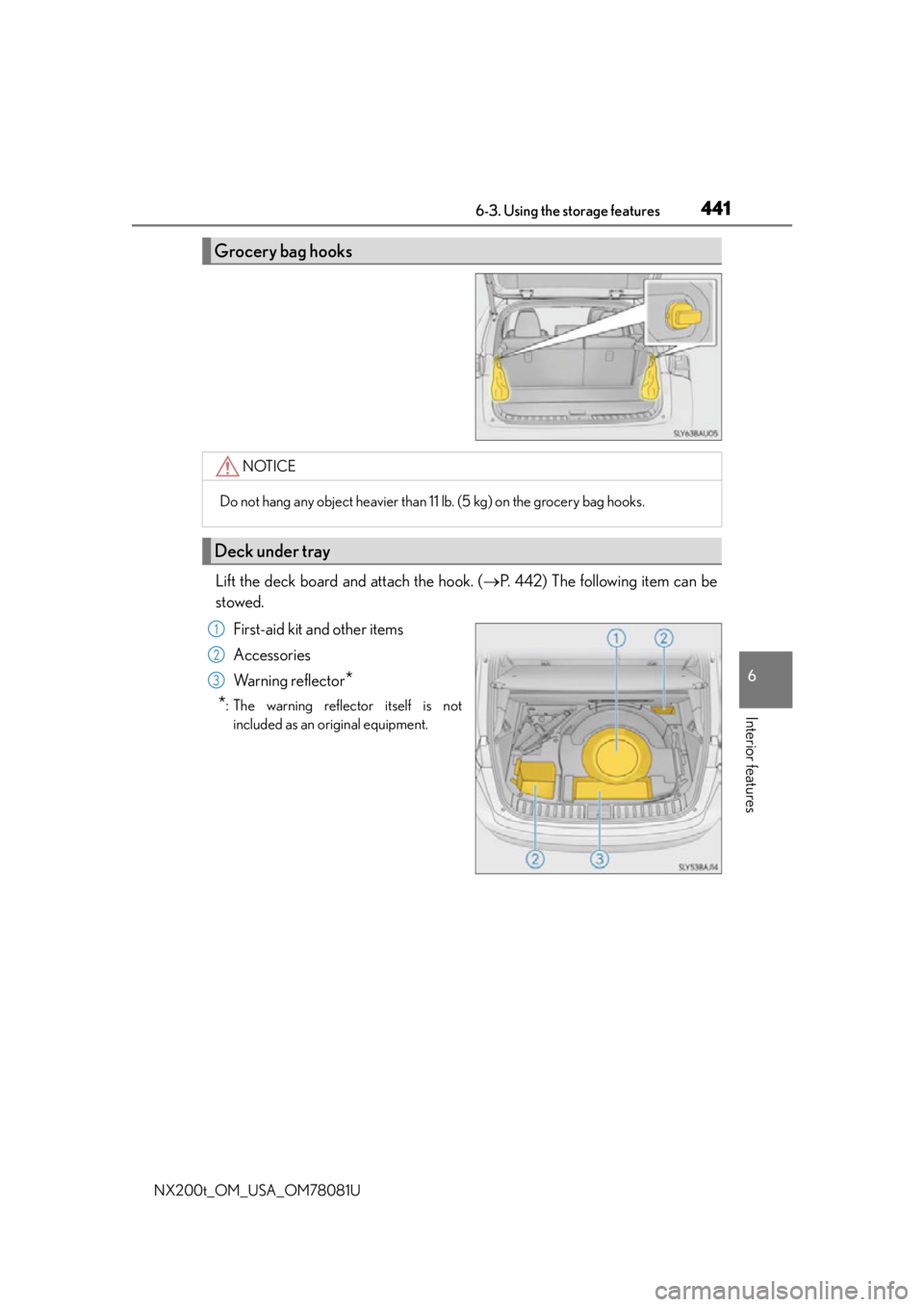
Lift the deck board and attach the hook. (P. 442) The following item can be
stowed.
First-aid kit and other items
Accessories
Wa r n i n g r e f l e c t o r
*
*
: The warning reflector itself is not included as an original equipment.
Grocery bag hooks
NOTICE
Do not hang any object heavier than 11 lb. (5 kg) on the grocery bag hooks.
Deck under tray
1
2
3