AUX LEXUS NX200T 2016 Owners Manual
[x] Cancel search | Manufacturer: LEXUS, Model Year: 2016, Model line: NX200T, Model: LEXUS NX200T 2016Pages: 660, PDF Size: 9.96 MB
Page 4 of 660

TABLE OF CONTENTS4
NX200t_OM_USA_OM78081U
5-1. Basic OperationsLexus Display Audio System ........................................ 326
Steering wheel audio switches...................................... 332
Mobile Assistant........................ 333
USB/AUX ports ........................ 335
5-2. Setup Setup menu ..................................337
General settings ........................ 338
Voice settings................................341
Display settings .......................... 342
5-3. Using the audio system Selecting the audio source ......................................... 343
Optimal use of the audio system ......................................... 344
Audio settings............................. 345
Audio menu screen operation ...................................348
5-4. Using the radio Radio operation ...........................351
5-5. Playing an audio CD and MP3/WMA/AAC discs
CD player operation ................357 5-6. Using an external device
Listening to an iPod .................. 364
Using USB memory device...........................................367
Using the AUX port .................. 371
5-7. Connecting Bluetooth
®
Steps for using Bluetooth®
devices.........................................372
Registering a Bluetooth
®
device........................................... 374
Selecting a Bluetooth
®
device...........................................375
Connecting a Bluetooth
®
audio player............................... 376
Connecting a Bluetooth
®
phone ........................................... 377
Displaying a Bluetooth
®
device details ............................378
Detailed Bluetooth
®
settings ........................................379
5-8. Bluetooth
® Audio
Listening to Bluetooth
®
Audio ..........................................380
5Lexus Display Audio system
Page 324 of 660

324
NX200t_OM_USA_OM78081U
5-1. Basic Operations Lexus Display Audio System ......................................... 326
Steering wheel audio switches ...................................... 332
Mobile Assistant ........................ 333
USB/AUX ports ........................ 335
5-2. Setup Setup menu.................................. 337
General settings ........................338
Voice settings............................... 341
Display settings .......................... 342
5-3. Using the audio system Selecting the audio source ..........................................343
Optimal use of the audio system ......................................... 344
Audio settings ............................. 345
Audio menu screen operation ...................................348
5-4. Using the radio Radio operation ........................... 351
5-5. Playing an audio CD and MP3/WMA/AAC discs
CD player operation ................ 357
Lexus Display Audio system
5
Page 325 of 660

325
Lexus DisplayAudio system
5
NX200t_OM_USA_OM78081U
5-6. Using an external device
Listening to an iPod ...................364Using USB memory device .......................................... 367
Using the AUX port ...................371
5-7. Connecting Bluetooth
®
Steps for using Bluetooth
®
devices ......................................... 372
Registering a Bluetooth
®
device ...........................................374
Selecting a Bluetooth
®
device .......................................... 375
Connecting a Bluetooth
®
audio player ...............................376
Connecting a Bluetooth
®
phone........................................... 377
Displaying a Bluetooth
®
device details............................ 378
Detailed Bluetooth
®
settings ........................................ 379
5-8. Bluetooth
® Audio
Listening to Bluetooth
®
Audio ........................................... 380 5-9. Bluetooth
® Phone
Using a Bluetooth
®
Phone ...........................................382
Making a call ...............................384
Receiving a call .......................... 387
Speaking on the phone .......... 388
Using a Bluetooth
®
phone message .......................390
Using the steering wheel switches ...................................... 392
Bluetooth
® phone
settings........................................ 393
5-10. Phonebook Contact settings ......................... 395
Messaging setting .....................398
5-11. Bluetooth
®
What to do if... (Troubleshooting).................... 399
Bluetooth
®.................................. 403
5-12. Other function “Information” screen ................ 408
USB photo .................................... 410
Weather information..................412
Voice command system .......... 413
LEXUS Enform Remote........... 417
Page 335 of 660

3355-1. Basic Operations
5
Lexus Display Audio system
NX200t_OM_USA_OM78081U
USB/AUX ports
Lift the lid while pushing the button
to release the lock.
Open the cover.
■iPod
Open the cover and connect an iPod using an iPod cable.
Turn on the power of the iPod if it is not turned on.
■USB memory
Open the cover and connect the USB memory device.
Turn on the power, if applicable, of the US B memory device if it is not turned on.
■Portable audio player
Open the cover and connect the portable audio player.
Turn on the power of the portable audio player if it is not turned on.
Connect an iPod, USB memory device or portable audio player to the USB/
AUX port as indicated below. Select “iPod”, “USB”, “AUX” or “A/V” on the
audio source selection screen and the device can be operated via Lexus Dis-
play Audio system.
Connecting using the USB/AUX port
1
2
Page 336 of 660

3365-1. Basic Operations
NX200t_OM_USA_OM78081U
To view a video on an iPod video or VTR, it is necessary to use a 4-pole AUX
cable to connect the portable audio device.
When connecting a portable audio device to the AUX port, use a 4-pole AUX
cable with a plug that matches the exact layout shown in the illustration. Connected device (portable audio
device, etc.)
Left audio
Right audio
Ground
Video
When using an iPod video, a cable
that has a 4-pole AUX plug and a
USB connector is necessary. Con-
nect the plug and connector to the
AUX and USB ports.
■When using a 4-pole AUX cable
If a 4-pole AUX cable with a different layout is used, audio and/or video may not be out-
put properly.
■When using the USB/AUX port
Using a 4-pole AUX cable
1
2
3
4
5
The notch in console box allows audio cables to
be passed through even when the console box
is closed.
WA R N I N G
■While driving
Do not connect a device or operate the device controls.
Page 371 of 660
3715-6. Using an external device
5
Lexus Display Audio system
NX200t_OM_USA_OM78081U
Using the AUX port
P. 3 3 5
Pressing the “MEDIA” button displays the top screen from any screen of the
selected source.
■Menu screen
P. 3 4 8
■Operating portable players connected to the audio system
Volume can be adjusted using the vehicle’s audio controls. All other adjustments must be
made on the portable player itself.
■When using a portable player connected to the power outlet
Noise may occur during playback. Use the power source of the portable player.
To use the AUX port, connect a portable player, press the “MEDIA” button or
select “AUX” or “A/V” on the “Source” screen.
Connecting a portable player
Top screen
NOTICE
■To prevent damage to the portable player or its terminal
●Do not leave portable player in the vehicl e. The temperature inside the vehicle may
become high.
●Do not push down on or apply unnecessary pressure to the portable player while it is
connected.
●Do not insert foreign objects into the port.
Page 406 of 660

4065-11. Bluetooth®
NX200t_OM_USA_OM78081U
■Certification
FCC ID:AJDK066
IC:775E-K066
NOTE:
This device complies with Part 15 of FCC Rules and Industry Canada licence-exempt
RSS standard(s). Operation is subject to the following two conditions: (1) this device may
not cause interference, and (2) this device mu st accept any interference, including inter-
ference that may cause undesired operation of this device.
Le présent appareil est conforme aux la partie 15 des règles de la FCC et CNR
d’Industrie Canada applicables aux appareils radio exempts de licence. L’exploitation est
autorisée aux deux conditions suivantes : (1) l’ appareil ne doit pas produire de brouillage,
et (2) l’utilisateur de l’appare il doit accepter tout brouillage radioélectrique subi, même si
le brouillage est susceptible d’en compromettre le fonctionnement.
FCC WARNING:
Changes or modifications not expressly approved by the party responsible for compli-
ance could void the user’s authority to operate the equipment.
CAUTION:
This equipment complies with FCC/IC radiat ion exposure limits set forth for an uncon-
trolled environment and meets the FCC radio frequency (RF) Exposure Guidelines in
Supplement C to OET65 and RSS-102 of the IC radio frequency (RF) Exposure rules.
This equipment has very low levels of RF energy that it deemed to comply without maxi-
mum permissive exposure evaluation (MPE). But it is desirable that it should be installed
and operated keeping the radiator at least 20 cm or more away from person’s body
(excluding extremities: hand s, wrists, feet and ankles).
Cet équipement est conforme aux limites d’exposition aux rayonnements énoncées
pour un environnement non contrôlé et respec te les règles les radioélectriques (RF) de
la FCC lignes directrices d’exposition dans le Supplément C à OET65 et d’exposition
aux fréquences radioélectriques (RF) CNR-102 de l’IC. Cet équipement émet une
énergie RF très faible qui est considérée conforme sans évaluation de l’exposition
maximale autorisée. Cependant, cet équipement doit être installé et utilisé en gardant
une distance de 20 cm ou plus entre le dispositif rayonnant et le corps (à l’exception des
extrémités : mains, poignets, pieds et chevilles).
Co-Location:
This transmitter must not be co-located or operated in conjunction with any other
antenna or transmitter.
Under Industry Canada regulations, this radio transmitter may only operate using an
antenna of a type and maximum (or lesser) gain approved for the transmitter by Industry
Canada. To reduce potential radio interference to other users, the antenna type and its
gain should be so chosen that the equivalent isotropically radiated power (e.i.r.p.) is not
more than that necessary for successful communication.
Conformément à la réglementation d’Indust rie Canada, le présent émetteur radio peut
fonctionner avec une antenne d’un type et d’un gain maximal (ou inférieur) approuvé
pour l’émetteur par Industrie Canada. Dans le but de réduire les risques de brouillage
radioélectrique à l’intention des autres utilisateurs, il faut choisir le type d’antenne et son
gain de sorte que la puissance isotrope rayonnée équivalente (p.i.r.e.) ne dépasse pas
l’intensité nécessaire à l’établisseme nt d’une communication satisfaisante.
Page 461 of 660

4616-4. Other interior features
6
Interior features
NX200t_OM_USA_OM78081U
■Codes stored in the HomeLink® memory
●The registered codes are not erased even if the battery cable is disconnected.
●If learning failed when registering a different code to a HomeLink® button that already
has a code registered to it, the already registered code will not be erased.
■Before programming
●Install a new battery in the transmitter.
●The battery side of the transmitter must be pointed away from the HomeLink®.
■Certification for the garage door opener
For vehicles sold in the U.S.A.
FCC ID: NZLAECHL5
NOTE:
This device complies with part 15 of the FC C Rules. Operation is subject to the following
two conditions: (1) This device may not caus e harmful interference, and (2) this device
must accept any interference received, incl uding interference that may cause undesired
operation.
FCC WARNING:
Changes or modifications not expressly approved by the party responsible for compli-
ance could void the user’s authority to operate the equipment.
For vehicles sold in Canada
NOTE:
This device complies with Industry Canada licence-exempt RSS standard(s).
Operation is subject to the following two co nditions: (1) this device may not cause inter-
ference, and (2) this device must accept any interference, including interference that
may cause undesired operation of the device.
REMARQUE:
Le présent appareil est conforme aux CNR d’Industrie Canada applicables aux appar-
eils radio exempts de licence. L’exploitation est autorisée aux deux conditions suivantes:
(1) l’appareil ne doit pas produire de brouillage, et (2) l’utilisateur de l’appareil doit
accepter tout brouillage radioé lectrique subi, même si le brouillage est susceptible d’en
compromettre le fonctionnement.
■When support is necessary
Visit on the web at www.homelink.com
or call 1-800-355-3515.
WA R N I N G
■When programming a garage door or other remote control device
The garage door or other device may operat e, so ensure people and objects are out of
danger to prevent potential harm.
■Conforming to federal safety standards
Do not use the HomeLink® compatible transceiver with any garage door opener or
device that lacks safety stop and reverse fe atures as required by federal safety stan-
dards.
This includes any garage door that canno t detect an interfering object. A door or
device without these features increases the risk of death or serious injury.
■When operating or programming HomeLink®
Never allow a child to operate or play with the HomeLink® buttons.
Page 488 of 660
4887-3. Do-it-yourself maintenance
NX200t_OM_USA_OM78081U
Hood
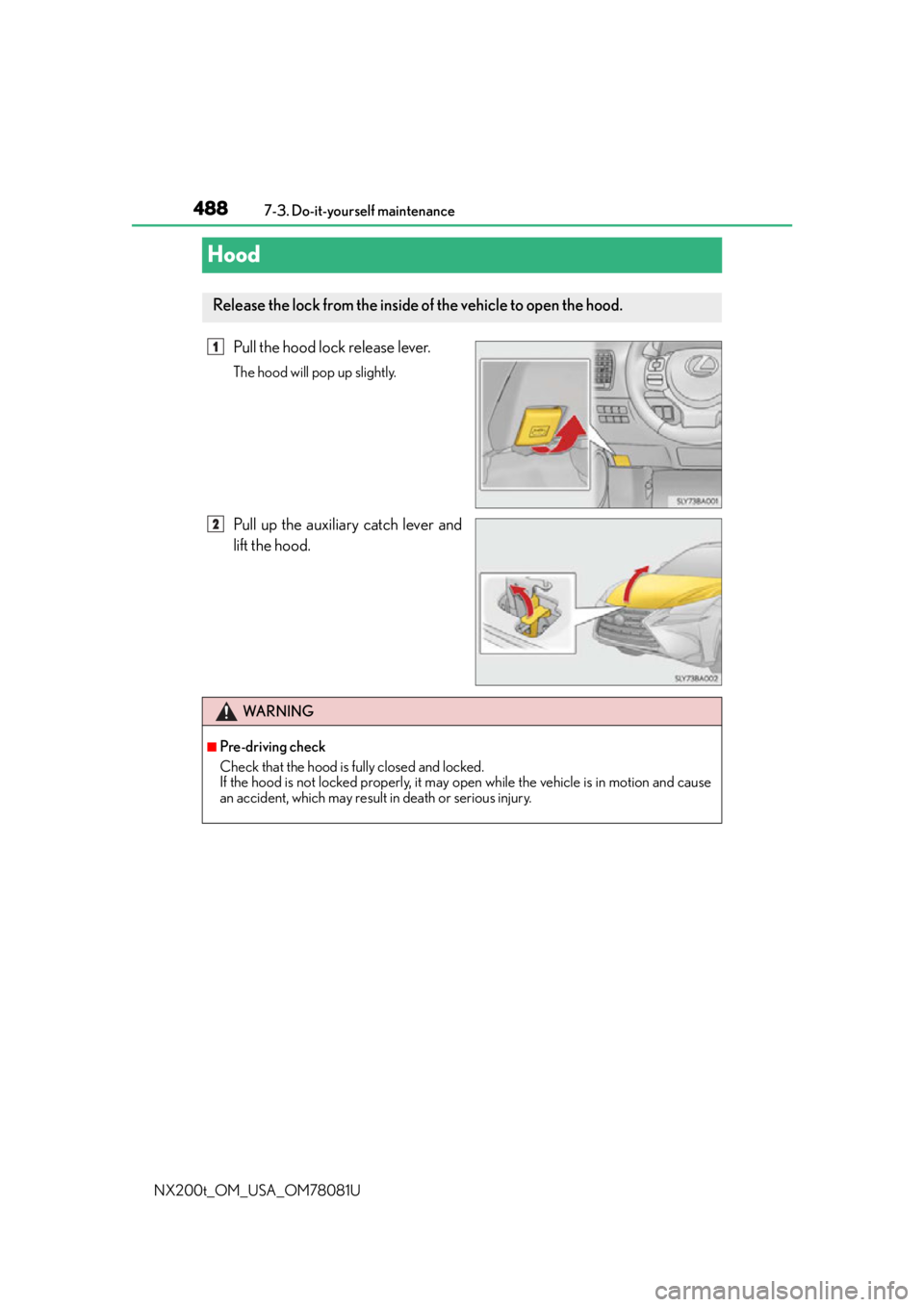
Pull the hood lock release lever.
The hood will pop up slightly.
Pull up the auxiliary catch lever and
lift the hood.
Release the lock from the inside of the vehicle to open the hood.
1
2
WA R N I N G
■Pre-driving check
Check that the hood is fully closed and locked.
If the hood is not locked properly, it may open while the vehicle is in motion and cause
an accident, which may result in death or serious injury.
Page 507 of 660

5077-3. Do-it-yourself maintenance
7
Maintenance and care
NX200t_OM_USA_OM78081U
■Situations in which the tire pressure warning system may not operate properly
●In the following cases, the tire pressure warning system may not operate properly.
• If non-genuine Lexus wheels are used.
• A tire has been replaced with a tire that is not an OE (Original Equipment) tire.
• A tire has been replaced with a tire that is not of the specified size.
• Tire chains etc. are equipped.
• An auxiliary-supported run-flat tire is equipped.
• If a window tint that affects the radio wave signals is installed.
• If there is a lot of snow or ice on the vehicle, particularly around the wheels or wheelhousings.
• If the tire inflation pressure is extremely higher than the specified level.
• If wheel without the tire pressure warning valve and transmitter is used.
• If the ID code on the tire pressure warning valves and transmitters is not registered in the tire pressure warning computer.
●Performance may be affected in the following situations.
• Near a TV tower, electric power plant, gas station, radio station, large display, air- port or other facility th at generates strong radio waves or electrical noise
• When carrying a portable radio, cellular phone, cordless phone or other wireless
communication device
●When the vehicle is parked, the time taken for the warning to start or go off could be
extended.
●When tire inflation pressure declines rapidly for example when a tire has burst, the
warning may not function.
■The initialization operation
●Make sure to carry out initialization af ter adjusting the tire inflation pressure.
Also, make sure the tires are cold before carry ing out initialization or tire inflation pres-
sure adjustment.
●If you have accidentally turned the engine swit ch off during initialization, it is not neces-
sary to press the reset switch again as init ialization will restart automatically when the
engine switch has been turned to IG NITION ON mode for the next time.
●If you accidentally press the reset switch when initialization is not necessary, adjust the
tire inflation pressure to the specified level when the tires are co ld, and conduct initial-
ization again.
■Warning performance of the tire pressure warning system
The warning of the tire pressure warning syst em will change in accordance with the con-
ditions under which it was initialized. For this reason, the system may give a warning even
if the tire pressure does not reach a low enough level, or if the pressure is higher than the
pressure that was adjusted to when the system was initialized.
■When initialization of the tire pressure warning system has failed
Initialization can be completed in a few minutes. However, in the following cases, the set-
tings have not been recorded and the system will not operate properly. If repeated
attempts to record tire inflation pressure settings are unsuccessful, have the vehicle
inspected by your Lexus dealer.
●When operating the tire pressure warning reset switch, the tire pressure warning light
does not blink 3 times.
●After carrying out the initializ ation procedure, the tire pressure warning light blinks for
1 minute then stays on after driving for 20 minutes.