change time LEXUS NX300 2020 User Guide
[x] Cancel search | Manufacturer: LEXUS, Model Year: 2020, Model line: NX300, Model: LEXUS NX300 2020Pages: 468, PDF Size: 10.24 MB
Page 141 of 468
1413-5. Opening, closing the windows and moon roof
LEXUS NX300 Owners Manual_USA_M78389_en
3
Before driving
■Tilting up and down
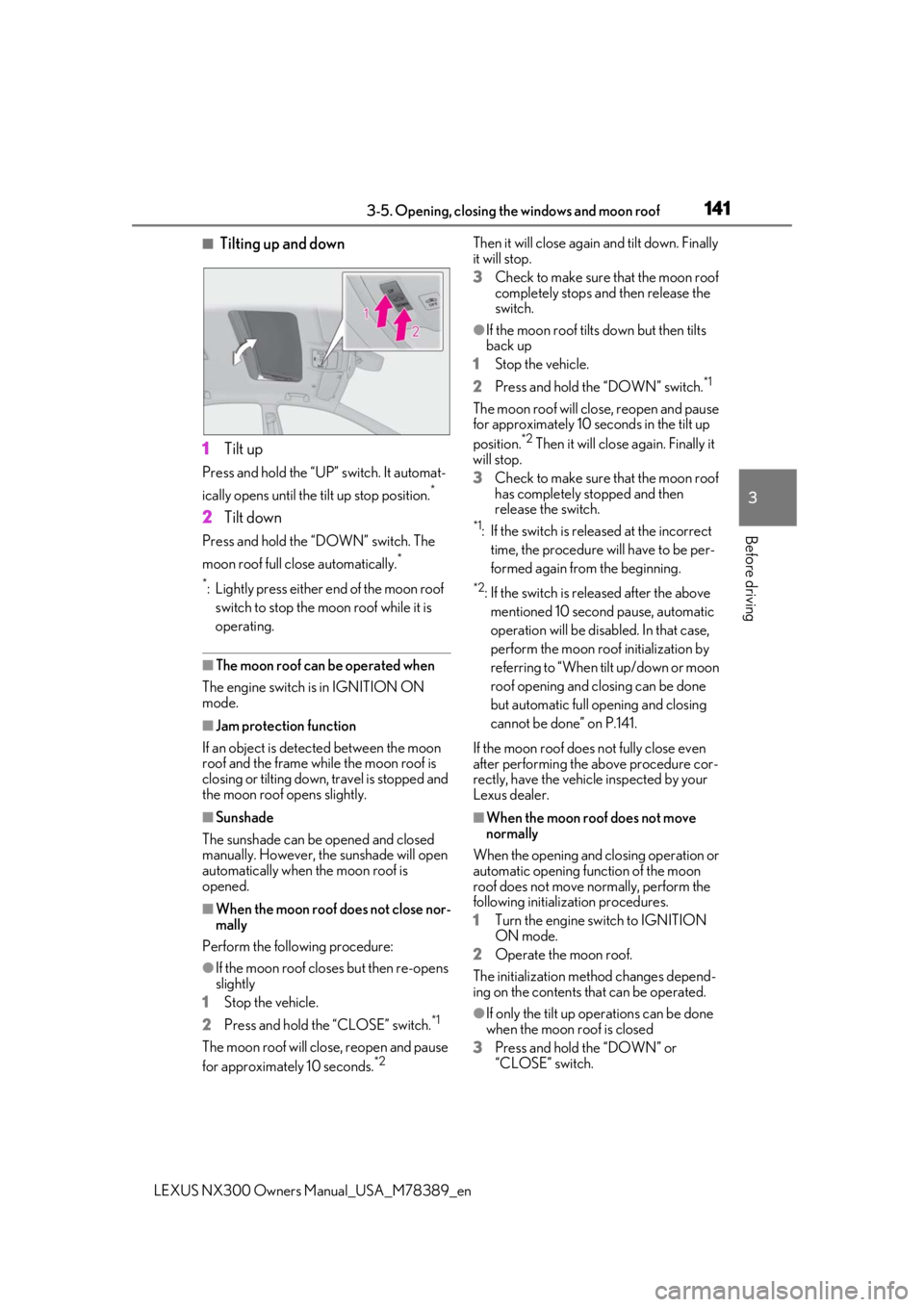
1 Tilt up
Press and hold the “UP” switch. It automat-
ically opens until the tilt up stop position.
*
2Tilt down
Press and hold the “DOWN” switch. The
moon roof full close automatically.
*
*
: Lightly press either end of the moon roof switch to stop the moon roof while it is
operating.
■The moon roof can be operated when
The engine switch is in IGNITION ON
mode.
■Jam protection function
If an object is detected between the moon
roof and the frame while the moon roof is
closing or tilting down, travel is stopped and
the moon roof opens slightly.
■Sunshade
The sunshade can be opened and closed
manually. However, the sunshade will open
automatically when the moon roof is
opened.
■When the moon roof does not close nor-
mally
Perform the following procedure:
●If the moon roof closes but then re-opens
slightly
1 Stop the vehicle.
2 Press and hold the “CLOSE” switch.
*1
The moon roof will close, reopen and pause
for approximately 10 seconds.*2 Then it will close again
and tilt down. Finally
it will stop.
3 Check to make sure that the moon roof
completely stops an d then release the
switch.
●If the moon roof tilts down but then tilts
back up
1 Stop the vehicle.
2 Press and hold the “DOWN” switch.
*1
The moon roof will close, reopen and pause
for approximately 10 seconds in the tilt up
position.
*2 Then it will close again. Finally it
will stop.
3 Check to make sure that the moon roof
has completely stopped and then
release the switch.
*1: If the switch is rele ased at the incorrect
time, the procedure will have to be per-
formed again from the beginning.
*2: If the switch is released after the above mentioned 10 second pause, automatic
operation will be disabled. In that case,
perform the moon roof initialization by
referring to “When tilt up/down or moon
roof opening and closing can be done
but automatic full opening and closing
cannot be done” on P.141.
If the moon roof does not fully close even
after performing the above procedure cor-
rectly, have the vehicle inspected by your
Lexus dealer.
■When the moon roof does not move
normally
When the opening and closing operation or
automatic opening function of the moon
roof does not move normally, perform the
following initialization procedures.
1 Turn the engine switch to IGNITION
ON mode.
2 Operate the moon roof.
The initialization meth od changes depend-
ing on the contents that can be operated.
●If only the tilt up op erations can be done
when the moon roof is closed
3 Press and hold the “DOWN” or
“CLOSE” switch.
Page 151 of 468
1514-1. Before driving
LEXUS NX300 Owners Manual_USA_M78389_en
4
Driving
NOTICE
■When driving the vehicle
●Do not depress the accelerator and
brake pedals at the same time during
driving, as this may restrain the engine
output.
●Do not use the accelerator pedal or
depress the accelerator and brake
pedals at the same time to hold the
vehicle on a hill.
■Avoiding damage to vehicle parts
●Do not turn the steering wheel fully in
either direction and hold it there for an
extended period of time.
Doing so may damage the power
steering motor.
●When driving over bumps in the road,
drive as slowly as possible to avoid
damaging the wheels, underside of the
vehicle, etc.
●Make sure to idle the engine immedi-
ately after high-speed driving or hill
climbing. Stop the engine only after
the turbocharger has cooled down.
Failure to do so may cause damage to
the turbocharger.
■If you get a flat tire while driving
A flat or damaged ti re may cause the fol-
lowing situations. Hold the steering
wheel firmly and gradually depress the
brake pedal to slow down the vehicle.
●It may be difficult to control your vehi-
cle.
●The vehicle will make abnormal
sounds or vibrations.
●The vehicle will lean abnormally.
Information on what to do in case of a flat
tire ( P.387)
■When encountering flooded roads
Do not drive on a road that has flooded
after heavy rain, etc. Doing so may cause
the following serious damage to the vehi-
cle:
●Engine stalling
●Short in electrical components
●Engine damage caused by water
immersion
In the event that you drive on a flooded
road and the vehicle is flooded, be sure
to have your Lexus dealer check the fol-
lowing:
●Brake function
●Changes in quantity and quality of oil
and fluid used for the engine, transmis-
sion, transfer (AWD vehicles), rear dif-
ferential (AWD vehicles), etc.
●Lubricant condition for the propeller
shaft (AWD models), bearings and
suspension joints (where possible),
and the function of all joints, bearings,
etc.
■When parking the vehicle
Always set the parking brake, and shift
the shift lever to P. Failure to do so may
cause the vehicle to move or the vehicle
may accelerate suddenly if the accelera-
tor pedal is accidentally depressed.
Page 165 of 468
1654-2. Driving procedures
LEXUS NX300 Owners Manual_USA_M78389_en
4
Driving
4-2.Driving procedures
1Check that the parking brake is set.
2 Check that the shift lever is in P.
3 Firmly depress the brake pedal.
and a message will be displayed on the
multi-information display.
If it is not displayed, the engine cannot be
started.
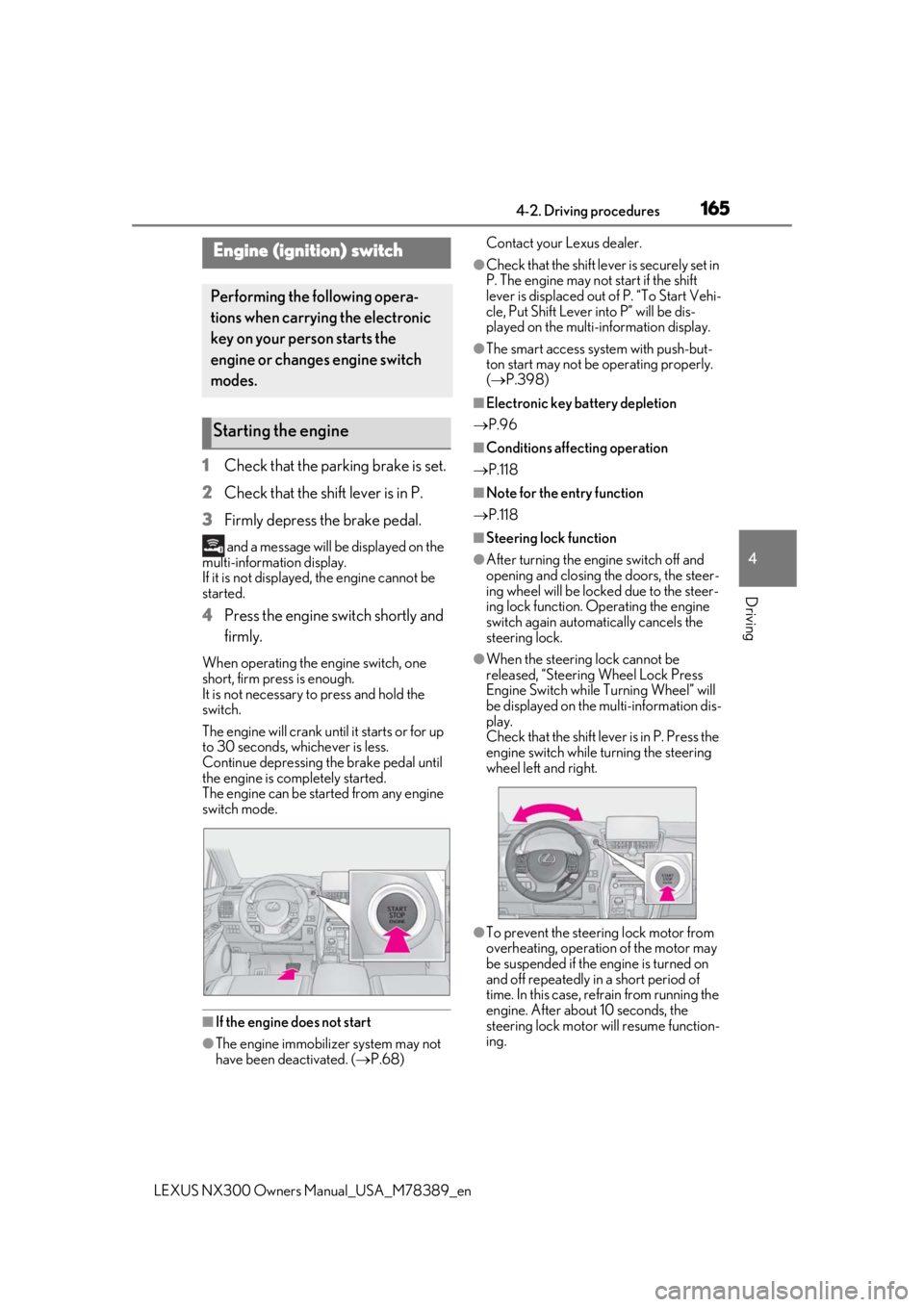
4 Press the engine switch shortly and
firmly.
When operating the engine switch, one
short, firm press is enough.
It is not necessary to press and hold the
switch.
The engine will crank until it starts or for up
to 30 seconds, whichever is less.
Continue depressing the brake pedal until
the engine is completely started.
The engine can be started from any engine
switch mode.
■If the engine does not start
●The engine immobilizer system may not
have been deactivated. ( P.68) Contact your Lexus dealer.
●Check that the shift leve
r is securely set in
P. The engine may not start if the shift
lever is displaced out of P. “To Start Vehi-
cle, Put Shift Lever into P” will be dis-
played on the multi-information display.
●The smart access system with push-but-
ton start may not be operating properly.
( P.398)
■Electronic key battery depletion
P.96
■Conditions affecting operation
P.118
■Note for the entry function
P.118
■Steering lock function
●After turning the engine switch off and
opening and closing the doors, the steer-
ing wheel will be lock ed due to the steer-
ing lock function. Operating the engine
switch again automatically cancels the
steering lock.
●When the steering lock cannot be
released, “Steering Wheel Lock Press
Engine Switch while Turning Wheel” will
be displayed on the multi-information dis-
play.
Check that the shift lever is in P. Press the
engine switch while turning the steering
wheel left and right.
●To prevent the steering lock motor from
overheating, operation of the motor may
be suspended if the engine is turned on
and off repeatedly in a short period of
time. In this case, refrain from running the
engine. After about 10 seconds, the
steering lock motor will resume function-
ing.
Engine (ignition) switch
Performing the following opera-
tions when carryin g the electronic
key on your person starts the
engine or changes engine switch
modes.
Starting the engine
Page 166 of 468

1664-2. Driving procedures
LEXUS NX300 Owners Manual_USA_M78389_en
■If “Smart Access System Malfunction
See Owner’s Manual” is displayed on
the multi-information display
The system may be malfunctioning. Have
the vehicle inspected by your Lexus dealer
immediately.
■Electronic key battery
P.356
■Operation of the engine switch
●If the switch is not pressed shortly and
firmly, the engine switch mode may not
change or the engine may not start.
●If attempting to restart the engine imme-
diately after turning the engine switch off,
the engine may not start in some cases.
After turning the engine switch off, please
wait a few seconds before restarting the
engine.
■If the smart access system with push-
button start has been deactivated by a
customized setting
P.427
1Stop the vehicle completely.
2
Set the parking brake ( P.173),
and shift the shift lever to P
( P.168).
3
Press the engine switch.
4
Release the brake pedal and check
that the display on the instrument
cluster is off.
Modes can be changed by pressing
the engine switch with brake pedal
WARNING
■When starting the engine
Always start the engine while sitting in
the driver’s seat. Do not depress the
accelerator pedal while starting the
engine under any circumstances.
Doing so may cause an accident result-
ing in death or serious injury.
■Caution while driving
If engine failure occurs while the vehicle
is moving, do not lock or open the doors
until the vehicle reaches a safe and com-
plete stop. The steering lock function will
activate and this may lead to an accident,
resulting in death or serious injury.
NOTICE
■When starting the engine
●Do not race a cold engine.
●If the engine becomes difficult to start
or stalls frequently, have your vehicle
checked by your Lexus dealer immedi-
ately.
■Symptoms indicating a malfunction
with the engine switch
If the engine switch seems to be operat-
ing somewhat differently than usual, such
as the switch sticking slightly, there may
be a malfunction. Contact your Lexus
dealer immediately.
Stopping the engine
WARNING
■Stopping the engine in an emergency
If you want to stop th e engine in an emer-
gency while driving the vehicle, press
and hold the engine switch for more than
2 seconds, or press it briefly 3 times or
more in succession. ( P.366)
However, do not touch the engine switch
while driving except in an emergency.
Turning the engine off while driving will
not cause loss of steering or braking con-
trol, but the power assist to these systems
will be lost. This will make it more difficult
to steer and brake, so you should pull
over and stop the vehicle as soon as it is
safe to do so.
Changing engine switch modes
Page 167 of 468
1674-2. Driving procedures
LEXUS NX300 Owners Manual_USA_M78389_en
4
Driving
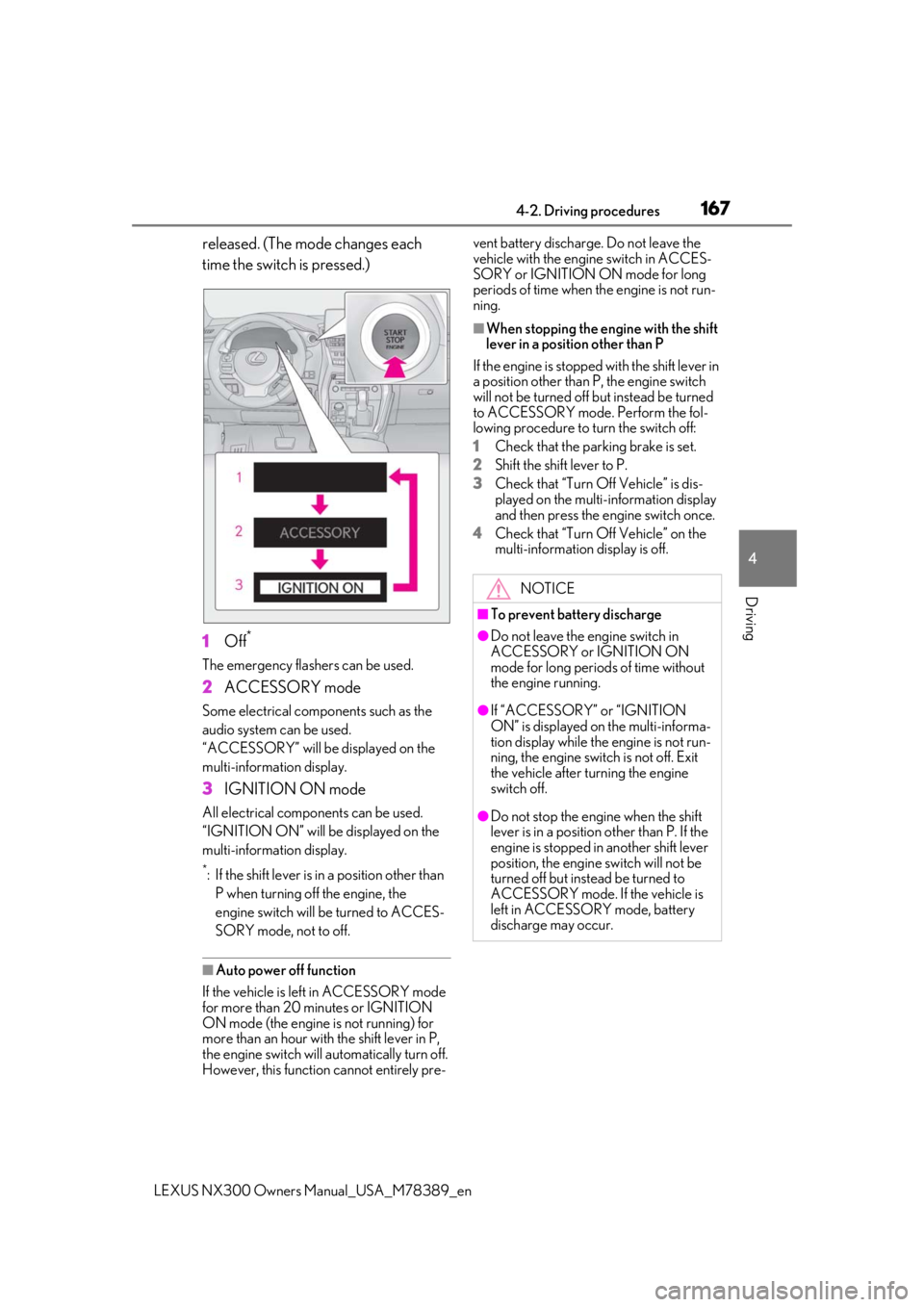
released. (The mode changes each
time the switch is pressed.)
1
Off*
The emergency flashers can be used.
2ACCESSORY mode
Some electrical components such as the
audio system can be used.
“ACCESSORY” will be displayed on the
multi-information display.
3IGNITION ON mode
All electrical components can be used.
“IGNITION ON” will be displayed on the
multi-information display.
*: If the shift lever is in a position other than
P when turning off the engine, the
engine switch will be turned to ACCES-
SORY mode, not to off.
■Auto power off function
If the vehicle is left in ACCESSORY mode
for more than 20 minutes or IGNITION
ON mode (the engine is not running) for
more than an hour with the shift lever in P,
the engine switch will automatically turn off.
However, this function cannot entirely pre- vent battery discharge. Do not leave the
vehicle with the engine switch in ACCES-
SORY or IGNITION ON mode for long
periods of time when the engine is not run-
ning.
■When stopping the engine with the shift
lever in a position other than P
If the engine is stopped with the shift lever in
a position other than P, the engine switch
will not be turned off but instead be turned
to ACCESSORY mode. Perform the fol-
lowing procedure to turn the switch off:
1
Check that the parking brake is set.
2
Shift the shift lever to P.
3
Check that “Turn Off Vehicle” is dis-
played on the multi-information display
and then press the engine switch once.
4
Check that “Turn Off Vehicle” on the
multi-information display is off.
NOTICE
■To prevent battery discharge
●Do not leave the engine switch in
ACCESSORY or IGNITION ON
mode for long periods of time without
the engine running.
●If “ACCESSORY” or “IGNITION
ON” is displayed on the multi-informa-
tion display while the engine is not run-
ning, the engine switch is not off. Exit
the vehicle after turning the engine
switch off.
●Do not stop the engine when the shift
lever is in a position other than P. If the
engine is stopped in another shift lever
position, the engine switch will not be
turned off but instead be turned to
ACCESSORY mode. If the vehicle is
left in ACCESSORY mode, battery
discharge may occur.
Page 171 of 468
1714-2. Driving procedures
LEXUS NX300 Owners Manual_USA_M78389_en
4
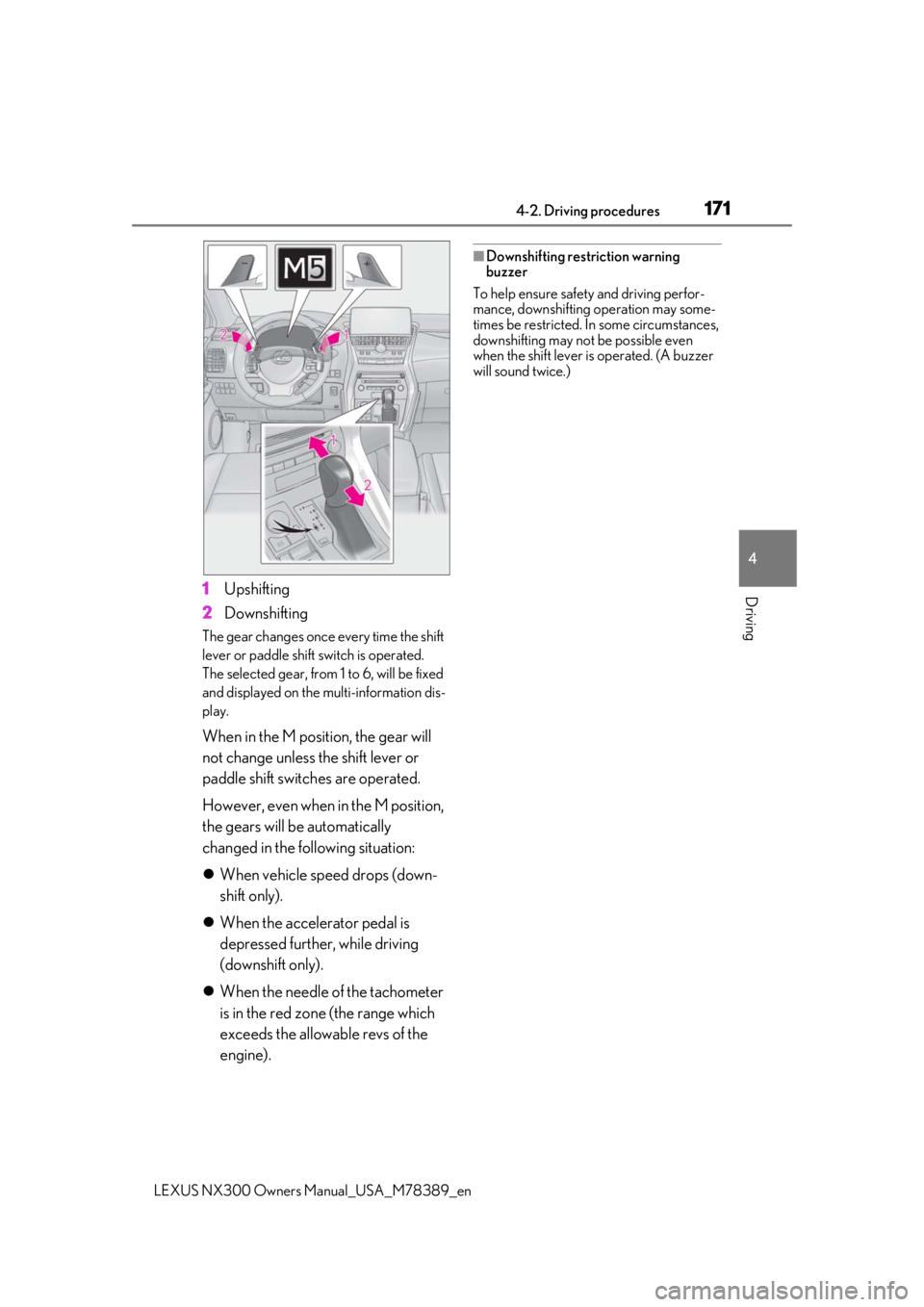
Driving1Upshifting
2 Downshifting
The gear changes once every time the shift
lever or paddle shift switch is operated.
The selected gear, from 1 to 6, will be fixed
and displayed on the multi-information dis-
play.
When in the M position, the gear will
not change unless the shift lever or
paddle shift switch es are operated.
However, even when in the M position,
the gears will be automatically
changed in the following situation:
When vehicle speed drops (down-
shift only).
When the accelerator pedal is
depressed further, while driving
(downshift only).
When the needle of the tachometer
is in the red zone (the range which
exceeds the allowable revs of the
engine).
■Downshifting restriction warning
buzzer
To help ensure safety and driving perfor-
mance, downshifting operation may some-
times be restricted. In some circumstances,
downshifting may not be possible even
when the shift lever is operated. (A buzzer
will sound twice.)
Page 172 of 468

1724-2. Driving procedures
LEXUS NX300 Owners Manual_USA_M78389_en
1Right turn
2 Lane change to the right (move the
lever partway and release it)
The right hand signals will flash 3
times.
3 Lane change to the left (move the
lever partway and release it)
The left hand signals will flash 3
times.
4 Left turn
■Turn signals can be operated when
The engine switch is in IGNITION ON
mode.
■If the indicator flashes faster than usual
Check that a light bulb in the front or rear
turn signal lights has not burned out.
■Customization
P.427
■Turns automatic mode on
While the vehicle is stopped, pull and
hold the parking brake switch until the
automatic mode lamp turns on.
Parking brake indicator (U.S.A.)
Parking brake indicator (Canada)
Parking brake lamp
Automatic mode lamp
Turn signal lever
Operating instructions
Parking brake
The parking brake can be set or
released automatically or manually.
In automatic mode, the parking
brake can be set or released auto-
matically according to shift lever
operation. Also, even in automatic
mode, the parking brake can be set
or released manually.
Operating instructions
A
B
C
D
Page 198 of 468
1984-5. Using the driving support systems
LEXUS NX300 Owners Manual_USA_M78389_en
●In the following situations, if the situation has changed (or the vehicle has been driven for
some time) and the normal operating conditio ns are detected, the message will disappear
and the system will become operational.
If the message does not disappea r, contact your Lexus dealer.
• When the temperature around the radar sensor is outside of the operational range, such as when the vehicle is in the sun or in an extremely cold environment
• When the front camera cannot detect objects in front of the vehicle, such as when driving
in the dark, snow, or fog, or when brig ht lights are shining into the front camera
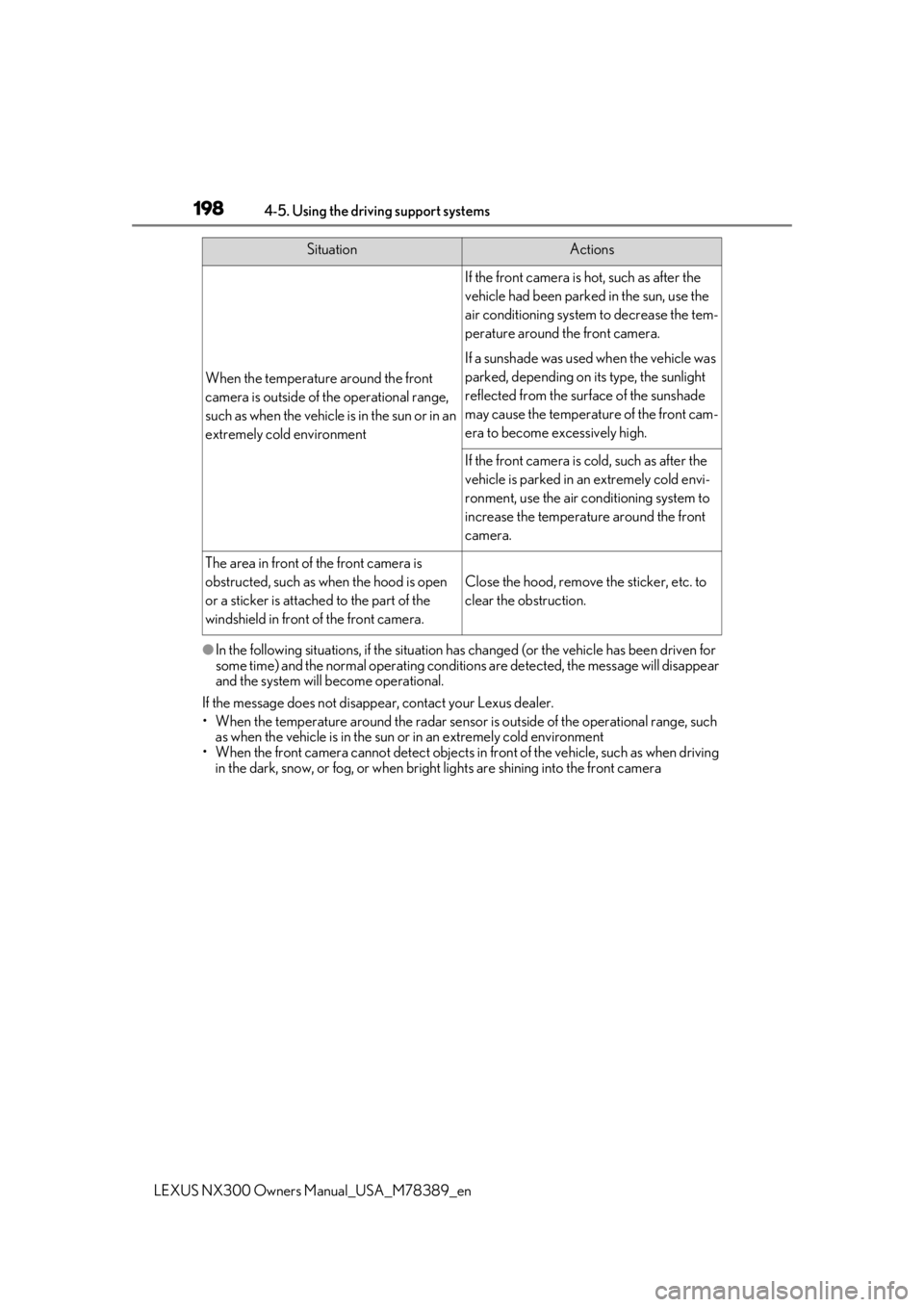
When the temperature around the front
camera is outside of th e operational range,
such as when the vehicle is in the sun or in an
extremely cold environment
If the front camera is hot, such as after the
vehicle had been parked in the sun, use the
air conditioning system to decrease the tem-
perature around the front camera.
If a sunshade was used when the vehicle was
parked, depending on its type, the sunlight
reflected from the surface of the sunshade
may cause the temperature of the front cam-
era to become excessively high.
If the front camera is cold, such as after the
vehicle is parked in an extremely cold envi-
ronment, use the air conditioning system to
increase the temperature around the front
camera.
The area in front of the front camera is
obstructed, such as when the hood is open
or a sticker is attached to the part of the
windshield in front of the front camera.
Close the hood, remove the sticker, etc. to
clear the obstruction.
SituationActions
Page 201 of 468

2014-5. Using the driving support systems
LEXUS NX300 Owners Manual_USA_M78389_en
4
Driving
■Enabling/disabling the pre-colli-
sion system
The pre-collision system can be
enabled/disabled on ( P.86) of
the multi-information display.
The system is automatically enabled each
time the engine switch is turned to IGNI-
TION ON mode.
If the system is disabled, the PCS warn-
ing light will turn on and a message will
be displayed on the multi-information
display.
■Changing the pre-collision warn-
ing timing
The pre-collision warning timing can
be changed on ( P.86) of the
multi-information display.
The warning timing setting is retained
when the engine switch is turned off. How-
ever, if the pre-collisio n system is disabled
and re-enabled, the operation timing will
return to the default setting (middle).
1Early
2
Middle
This is the default setting.
3Late
WARNING
●If the vehicle cannot be driven in a sta-
ble manner, such as when the vehicle
has been in an accident or is malfunc-
tioning
●When the vehicle is driven in a sporty
manner or off-road
●When the tires are not properly
inflated
●When the tires are very worn
●When tires of a size other than speci-
fied are installed
●When tire chains are installed
●When a compact spare tire or an
emergency tire puncture repair kit is
used
●If equipment (snow plow, etc.) that may
obstruct the radar sensor or front cam-
era is temporarily installed to the vehi-
cle
Changing settings of the pre-col-
lision system
Page 205 of 468

2054-5. Using the driving support systems
LEXUS NX300 Owners Manual_USA_M78389_en
4
Driving
ground clearance
• If a vehicle ahead is carrying a load which protrudes past its rear bumper
• If a vehicle ahead is irregularly shaped, such as a tractor or side car
• If a vehicle ahead is a child sized bicycle, a bicycle that is carrying a large load, a
bicycle ridden by more than one person,
or a uniquely shaped bicycle (bicycle with
a child seat, tandem bicycle, etc.)
• If a pedestrian/or the riding height of a
bicyclist ahead is shorter than approxi-
mately 3.2 ft. (1 m) or taller than approxi-
mately 6.5 ft. (2 m)
• If a pedestrian/bicyclist is wearing over- sized clothing (a rain coat, long skirt,
etc.), making their silhouette obscure
• If a pedestrian is bending forward or squatting or bicyclist is bending forward
• If a pedestrian/bicyclist is moving fast
• If a pedestrian is pushing a stroller, wheel-
chair, bicycle or other vehicle
• When driving in incl ement weather such
as heavy rain, fog, snow or a sandstorm
• When driving through steam or smoke
• When the surrounding area is dim, such as at dawn or dusk, or while at night or in
a tunnel, making a detectable object
appear to be nearly the same color as its
surroundings
• When driving in a place where the sur- rounding brightness changes suddenly,
such as at the entrance or exit of a tunnel
• After the engine has started the vehicle has not been driven for a certain amount
of time
• While making a left/right turn and for a few seconds after makin g a left/right turn
• While driving on a curve and for a few
seconds after driving on a curve
• If your vehicle is skidding
• If the front of the vehicle is raised or low- ered • If the wheels are misaligned
• If a wiper blade is blocking the front cam-
era
• The vehicle is being driven at extremely high speeds
• When driving on a hill
• If the radar sensor or front camera is mis-
aligned
●In some situations su ch as the following,
sufficient braking force may not be
obtained, preventing the system from
performing properly:
• If the braking functions cannot operate to their full extent, such as when the brake
parts are extremely cold, extremely hot,
or wet
• If the vehicle is not properly maintained
(brakes or tires are excessively worn,
improper tire inflation pressure, etc.)
• When the vehicle is being driven on a
gravel road or other slippery surface
■If VSC is disabled
●If VSC is disabled ( P.261), the pre-col-
lision brake assist and pre-collision brak-
ing functions are also disabled.
●The PCS warning light will turn on and
“VSC Turned Off Pre-Collision Brake
System Unavailable” will be displayed on
the multi-information display.